How We Cut Cold Email Costs by $2,600/Month
We analyzed our cold email costs and found a $2,600/month inefficiency. Here's the exact infrastructure switch we made, and the playbook that lets us launch immediately while saving 50%+ on domains.
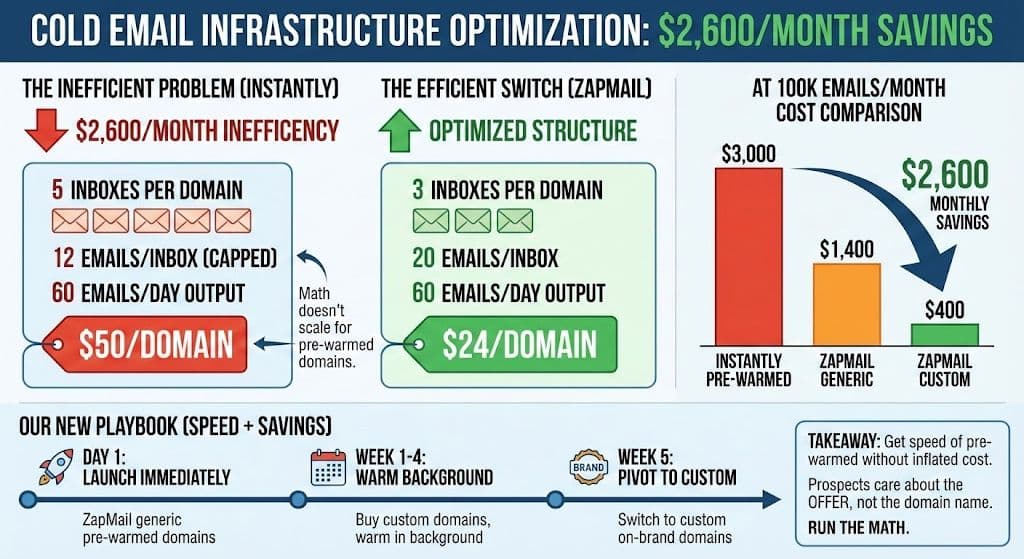
Switching cold email infrastructure from Instantly's pre-warmed domains ($50/domain, 5 inboxes) to ZapMail (3 inboxes, $24/domain) cuts costs by $2,600/month at 100,000 emails sent, while a hybrid rollout (launching on generic pre-warmed domains immediately and pivoting to custom domains after a 30+ day warm-up) preserves instant campaign speed and reduces long-term costs by roughly 85%.
Key takeaways
- Instantly requires 5 inboxes per domain and caps sends at 12 emails per inbox, costing $50 per domain to send 60 emails a day.
- ZapMail uses 3 inboxes per domain sending roughly 20 emails each, matching the same 60 emails/day output for $24 instead of $50 per domain.
- At 100,000 emails per month, Instantly pre-warmed costs $3,000, ZapMail generic pre-warmed costs $1,400, and ZapMail custom domains cost $400, a $2,600 monthly savings.
- Custom domains take 4-6 weeks to warm up, which is why many agencies pay a premium for pre-warmed inboxes to launch immediately.
- Using generic pre-warmed domains, the author's team books 20+ meetings a week, suggesting domain naming has little effect on response rates.
Reviewed and updated September 2, 2026
How We Cut Cold Email Costs by $2,600/Month: The Exact Infrastructure Switch
We recently audited our cold email infrastructure and found a $2,600/month inefficiency.
It wasn't wasted ad spend. It wasn't bad data. It was purely structural.
We were paying a "convenience tax" on our domains.
Here is the exact switch we made to fix it, and the playbook you can use to do the same.
The "Pre-Warmed" Trap
For years, we bought pre-warmed inboxes from Instantly.
Instantly is a fantastic tool. But the math for their pre-warmed domains simply doesn't scale for high-volume agencies or aggressive outbound teams.
Teams evaluating this switch should first confirm their outreach still counts as legitimate cold email, not spam, by reviewing what separates cold email from spam.
Here is the breakdown of the trap.
- Instantly requires 5 inboxes per domain
- you are effectively capped at 12 emails per inbox
- They allow 3 inboxes per domain
- We send roughly 20 emails per inbox
- The output is identical: 60 emails/day per domain
The Instantly Math
Instantly requires 5 inboxes per domain.
To keep deliverability safe (under 60 emails/day per domain), you are effectively capped at 12 emails per inbox.
You pay $50/domain to send just 60 emails a day.
That might seem reasonable for a small pilot. But when you are sending 100k+ emails a month, those numbers compound into a massive overhead.
Scaling outbound volume raises questions about audience burnout, a concern echoed in the reputation cost of investor outreach, where treating a finite market as infinite quietly damages future opportunities.
The ZapMail Switch
We switched our infrastructure provider to ZapMail.
They allow 3 inboxes per domain. We send roughly 20 emails per inbox.
The output is identical: 60 emails/day per domain.
But the cost is $24 instead of $50.
Same daily capacity. Same deliverability. Same inbox placement. Different cost structure.
The Math at Scale

At 100,000 emails per month, the difference isn't just "coffee money." It's an entire salary.
| Provider | Type | Monthly Cost |
|---|---|---|
| Instantly | Pre-warmed | $3,000 |
| ZapMail | Generic pre-warmed | $1,400 |
| ZapMail | Custom domains | $400 |
That is $2,600 in monthly savings.
That's $31,200 a year added directly to your bottom line. Just by changing where you buy your domains.
The Speed vs. Cost Dilemma
So why doesn't everyone just buy custom domains for $12/year and run them for pennies?
Time.
Custom domains take 4-6 weeks to warm up.
If you sign a new client today, you can't tell them, "Great, we'll start sending emails in 6 weeks." They want results now. Pipelines need feeding immediately.
Standing up new sending domains rather than borrowing the main one is part of that speed, since mail the recipient asked for needs its reputation kept clear of cold outreach.
Sender address choices split the same way, and why a cold message never uses no-reply sets the receipt apart from the message that needs an answer.
This is why agencies pay the "convenience tax" for pre-warmed domains. Speed matters more than margin.
But what if you didn't have to choose?
The Hybrid Playbook: Speed and Savings

Here is the exact workflow we use to get the immediate speed of pre-warmed inboxes without the long-term inflated cost.
New inboxes produce their own bounce reports, and what each class of reply code instructs separates an address failure from a policy refusal before anything gets changed.
- Day 1The "Generic" Launch
Client signs. We launch immediately using ZapMail generic pre-warmed domains.
- Week 1-4The Background Build
we buy custom domains and start warming them in the background
- Week 5The Infrastructure Pivot
We swap the campaign from the generic pre-warmed domains to the custom on-brand domains.
Day 1: The "Generic" Launch
Client signs. We launch immediately using ZapMail generic pre-warmed domains.
- Cost: Moderate ($1,400 scale)
- Speed: Instant
- Result: Campaign is live within 24 hours. Lead flow starts immediately.
Week 1-4: The Background Build
While the generic domains are generating leads, we buy custom domains and start warming them in the background.
- Cost: Low ($400 scale)
- Speed: Slow (warming up)
- Action: These domains match the client's brand (e.g.,
try-clientname.com). The warming happens automatically on autopilot.
Week 5: The Infrastructure Pivot
Once the custom domains are fully heated (30+ days), we pivot.
We swap the campaign from the generic pre-warmed domains to the custom on-brand domains.
- Cost: Drops to minimal levels
- Deliverability: Stays consistent
- Brand: Improves to fully branded domains
The Result: You get a Day 1 launch, but you only pay the premium price for the first month. Every month after that, your costs drop by 85%.
Moving sending between providers also rewrites the DNS record behind it, and the ten lookup ceiling on an SPF record is the limit that decides whether it still resolves.
Addressing the "Generic Domain" Fear
I know what you're thinking.
"But Tim, won't sending from a generic domain like outreach-sender-04.com kill my response rates?"
We analyzed the data across our campaigns.
We book 20+ meetings a week using generic pre-warmed domains.
The data is clear: Prospects care about the offer, not the WHOIS data.
Think about your own behavior. When you get a cold email on your phone, what do you check?
- The Subject Line
- The Preview Text
- The Offer
You do not pause to inspect whether the domain is get-revenueflow.com or revenueflow-outreach.net.
If the value proposition hits, they reply. If it doesn't, the best domain in the world won't save you.
The Infrastructure Cost Framework

If you run an agency or a high-volume sales team, use this framework to audit your spend:
- Calculate Cost Per Daily Send: How much are you paying to send one email per day? (Total Cost / Total Daily Volume).
- Map Your Options: Don't assume your current provider is the only game in town. Map out cost-per-domain and inboxes-per-domain for competitors.
- Build a Transition Plan: Don't switch cold. Run parallel infrastructure. Let the new system prove itself before cutting the old one.
- Monitor the Margin: Infrastructure should be a fixed, predictable % of your revenue. If it creeps up, you have an inefficiency.
The Bottom Line
Don't let infrastructure costs eat your margin.
The difference between paying $400/month and $3,000/month doesn't change your open rates. It doesn't change your reply rates.
It only changes your profit margin.
Run the math. Make the switch. Keep the savings.
Related Reading
- Why We Buy 3x More Email Infrastructure Than We Need
- If I Had to Build an Outbound Engine From Scratch Today: The Exact 7-Stage System
- Cold Email Marketing Service: Four Things Sold Under One Name
Need help auditing your outbound stack? See if you qualify for our done-for-you service where we handle the entire technical setup for you.
Frequently asked questions.
Frequently asked questions- How much can switching cold email infrastructure providers actually save per month?
- The article documents a $2,600/month savings at a volume of 100,000 emails sent by switching from Instantly's pre-warmed domains to ZapMail's generic pre-warmed and eventually custom domains. This equates to $31,200 in annual savings, moving from $3,000/month down to as low as $400/month once fully transitioned to custom domains.
- What's the difference between Instantly and ZapMail's domain-to-inbox ratio?
- Instantly requires 5 inboxes per domain and caps sending at 12 emails per inbox to stay under the 60 emails/day deliverability threshold, costing $50 per domain. ZapMail only requires 3 inboxes per domain, sending about 20 emails per inbox, reaching the same 60 emails/day output for $24 per domain.
- Why do agencies pay more for pre-warmed domains instead of just using cheap custom domains?
- Custom domains take 4-6 weeks to warm up before they can be used safely for outbound, and clients who sign on typically expect campaigns to launch immediately rather than wait six weeks. Agencies pay a premium for pre-warmed inboxes to deliver instant speed, even though it costs significantly more per month.
- Does sending cold email from a generic domain hurt response rates?
- According to the article's data, no, the team books 20+ meetings a week using generic pre-warmed domains like 'outreach-sender-04.com.' The claim is that prospects respond based on subject line, preview text, and the offer itself, not the domain's WHOIS information, so a strong value proposition matters more than domain branding.
- What is the hybrid playbook for balancing speed and cost in cold email infrastructure?
- The hybrid approach launches campaigns on Day 1 using ZapMail generic pre-warmed domains for immediate lead flow, while custom on-brand domains are purchased and warmed in the background during weeks 1-4. By week 5, once custom domains are fully warmed (30+ days), the campaign pivots to them, dropping costs by about 85% after the first month while keeping deliverability consistent.
About the author.

Tim Carden is CMO / CTO at RevenueFlow, which builds and operates outbound revenue engines for B2B companies. Studied at McGill University.
Tim Carden · CMO / CTO
Connect on LinkedIn →Explore more.
Ready to scale your outreach?
We build GTM engines that book real meetings. See the receipts.
Related articles.
SMTP Reply Codes: What Each Class Instructs
The digits are a verdict and the text is the reason. Separating an address failure from a policy refusal before reacting is what decides whether the fix works.
SURBL Blacklist: What It Lists and How to Get Removed
SURBL tests the domains inside your message rather than your sending IP. Which of its six lists fired, what the bitmask means, and the fix that works.
Cold Email Frameworks: Which One Fits Your Offer
AIDA, PAS and Before-After-Bridge arrange the same four elements in different orders. What each one assumes about the reader, and what none of them fix.
Cold Email Marketing Service: Four Things, One Name
An agency, an infrastructure provider, a software onboarding tier and a freelancer all use the phrase. What each hands over, and the four questions that tell them apart.
SMTP Relay: What It Is, How It Routes Mail, and Where It Breaks
An SMTP relay passes mail on toward its destination. Buying one means renting somebody else reputation, subject to their rules about what you may send.
BASHO Email: Four Sentences Built on One Insight
A BASHO email is four or five sentences built on one researched insight about a specific person. The format is documented, and it cannot be produced at volume.