ContactOut vs Datagma: Data Enrichment Tool Comparison
Compare ContactOut and Datagma side by side. See pricing, features, and integrations to choose the right data enrichment tool for your needs.

ContactOut and Datagma both offer free plans starting at $0 per month, with paid tiers beginning at $49 per month for each. ContactOut lists 9 features including a LinkedIn browser extension, AI email writer, and a 700M+ profile bulk license on its Team plan, while Datagma lists 8 features including phone and email finders, 10 seats, and API access.
Key takeaways
- ContactOut's Email plan costs $49 per month and includes unlimited emails plus 300 exports per month.
- Datagma's Expert plan costs $249 per month and includes 750 phone lookups and 22,500 emails per month.
- Datagma offers 5 pricing tiers, while ContactOut offers 4 pricing tiers.
- ContactOut lists integrations with 8 tools including Salesforce, HubSpot, Greenhouse, Lever, Bullhorn, Zapier, Gmail, and Outlook, while Datagma lists integrations with 8 tools including Clay, Lemlist, Instantly, Make, Salesforce, BetterContact, FullEnrich, and Zeliq.
- ContactOut was founded in 2015, while Datagma's founding year is not listed in the comparison.
Reviewed and updated September 4, 2026
ContactOut vs Datagma: Data Enrichment Tool Comparison
If you are comparing B2B lead data and contact enrichment tools, ContactOut and Datagma will likely both appear on your radar. They share some surface-level similarities, but the details reveal important differences in pricing, capability, and target audience.
The Quick Answer
By each vendor's own wording, ContactOut lists one user per company limit on free, email and email + phone plans and browser extension for linkedin, while Datagma lists phone finder and email finder. A capability both offer can appear under different names, so read both feature lists below.
Both start at the same price point ($0/mo), so the decision comes down to features and workflow fit.
If your priority is finding accurate contact data for target accounts, both tools target it. The right choice depends on your budget, team size, and the specific capabilities you need most.
Understanding the Core Difference
ContactOut is Email and phone finder with a LinkedIn-focused browser extension, AI-powered email campaigns, and a 700M+ profile bulk license on the Team plan.
Datagma is Real-time B2B data enrichment returning verified emails and direct mobile numbers. Every plan includes 10 seats, API access and a shared credit pool.
The two platforms take different approaches to solving the same core challenge.
Pricing Comparison

ContactOut Pricing (as of September 2026)
| Plan | Price | Contacts | Emails |
|---|---|---|---|
| Free | Free | 5 emails, 5 phones and 5 exports per day | 5 emails / day |
| $49/mo | 300 exports / month | Unlimited emails | |
| Email + Phone | $99/mo | 600 exports / month | Unlimited emails and unlimited phones |
| Team / API | Contact Sales | Bulk license, 700M+ profiles | Contact us |
Source: ContactOut Pricing
Datagma Pricing (as of September 2026)
| Plan | Price | Contacts | Emails |
|---|---|---|---|
| Free | Free | 3 phones/month | 90 to 100 emails/month (vendor surfaces disagree) |
| Regular | $49/mo | 100 phones/month | 3,000 emails/month |
| Popular | $99/mo | 250 phones/month | 7,500 emails/month |
| Expert | $249/mo | 750 phones/month | 22,500 emails/month |
| Enterprise | Contact Sales | Custom limits | - |
Source: Datagma Pricing
Pricing Analysis
Both platforms start at the same $0/mo price point. The decision comes down to which feature set and tier structure works better for your expected usage.
Datagma offers 5 pricing tiers compared to ContactOut's 4, giving you more granularity as you scale.
Both platforms offer free tiers, so you can test each one before spending anything.
Features Breakdown
- One user per company limit on Free, Email and Email + Phone plans
- Browser extension for LinkedIn
- Email campaigns
- AI email writer
- Data enrichment
- List builder
- and 3 more listed below
- Phone Finder
- Email Finder
- 10 seats included
- API access
- WhatsApp integration
- CatchALL emails FREE
- and 2 more listed below
ContactOut Key Features
- One user per company limit on Free, Email and Email + Phone plans
- Browser extension for LinkedIn
- Email campaigns
- AI email writer
- Data enrichment
- List builder
- Search portal
- Bulk license (700M+ profiles on Team)
- CSV export
Datagma Key Features
- Phone Finder
- Email Finder
- 10 seats included
- API access
- WhatsApp integration
- CatchALL emails FREE
- Chrome extension
- Priority support
The two lists below are a diff of each vendor's own feature list by exact wording, so a capability both tools offer can appear on either side under a different name.
Listed only by ContactOut
- One user per company limit on Free, Email and Email + Phone plans
- Browser extension for LinkedIn
- Email campaigns
- AI email writer
- Data enrichment
- List builder
- Search portal
- Bulk license (700M+ profiles on Team)
- CSV export
Listed only by Datagma
- Phone Finder
- Email Finder
- 10 seats included
- API access
- WhatsApp integration
- CatchALL emails FREE
- Chrome extension
- Priority support
Integration Ecosystem

ContactOut Integrations
ContactOut connects with: Salesforce, HubSpot, Greenhouse, Lever, Bullhorn, Zapier, Gmail, Outlook.
Datagma Integrations
Datagma connects with: Clay, Lemlist, Instantly, Make, Salesforce, BetterContact, FullEnrich, Zeliq.
Shared Integrations
Both tools integrate with: Salesforce.
Integrations listed only by ContactOut: HubSpot, Greenhouse, Lever, Bullhorn, Zapier, Gmail, Outlook.
Integrations listed only by Datagma: Clay, Lemlist, Instantly, Make, BetterContact, FullEnrich, Zeliq.
Use Case Recommendations
Best Fit for ContactOut
- Budget-conscious teams looking for an affordable data enrichment tool
- Teams that need a wide feature set (9 capabilities listed)
- Teams that want to start free and scale up as needs grow
- Enterprise buyers who prefer custom pricing and dedicated support
Best Fit for Datagma
- Budget-conscious teams looking for an affordable data enrichment tool
- Teams that want to start free and scale up as needs grow
- Enterprise buyers who prefer custom pricing and dedicated support
Feature Comparison Summary
| Feature | ContactOut | Datagma |
|---|---|---|
| Starting Price | Free | Free |
| Top Tier Price | Contact Sales | Contact Sales |
| Total Features Listed | 9 | 8 |
| Integrations | 8 | 8 |
| Founded | 2015 | N/A |
Getting Started Checklist
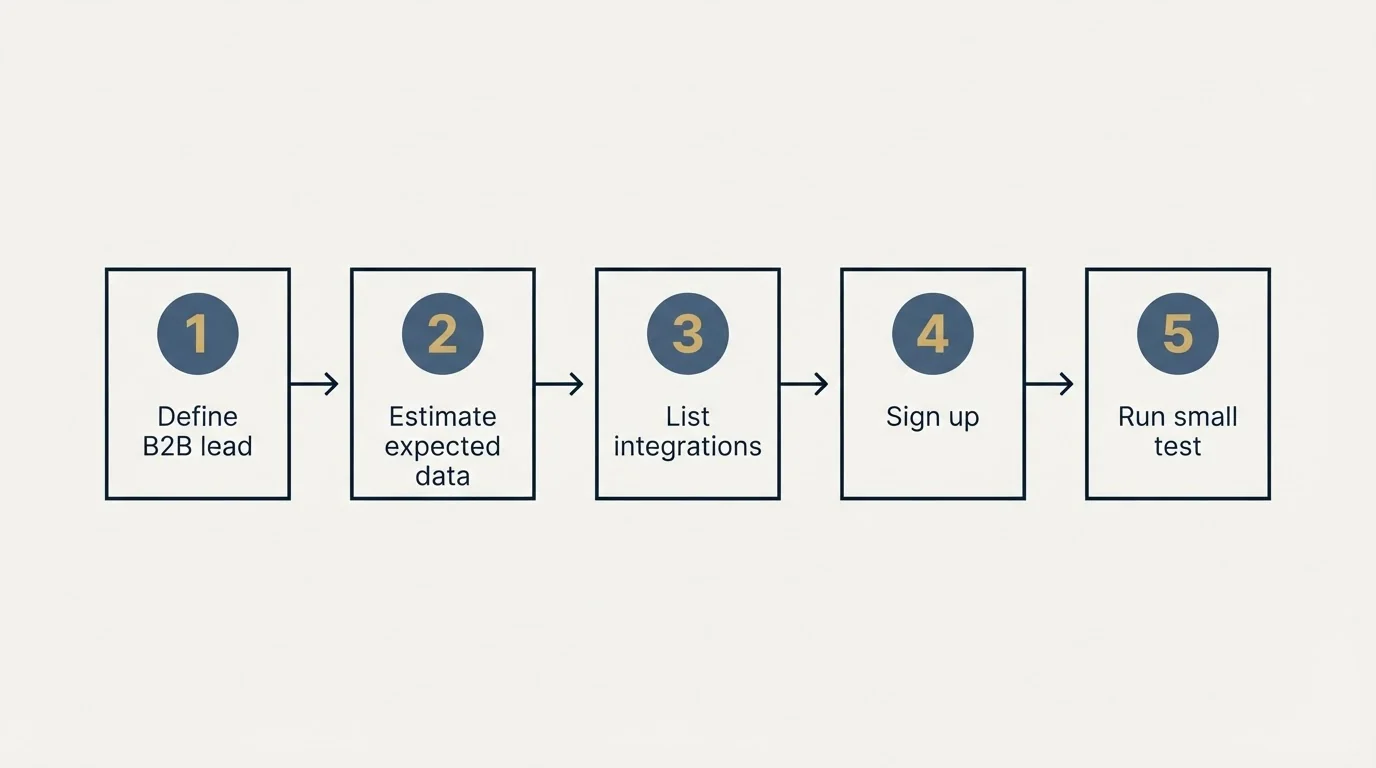
- Define your B2B lead data and contact enrichment requirements and monthly budget
- Estimate your expected data credits or contact lookups to find the right tier
- List the integrations your team currently relies on
- Sign up for free trials or demos of both platforms
- Run a small test with each tool before making a commitment
- Evaluate the onboarding experience and support quality
Final Thoughts
ContactOut and Datagma both serve the B2B lead data and contact enrichment market. ContactOut offers a more accessible entry point, while Datagma starts at $0/mo. Your decision should weigh pricing against the specific features that matter most for your workflow.
Start with a trial of each to see which platform fits your team's daily process. The best tool is the one your team actually uses consistently.
Pricing and features verified as of September 2026. Visit ContactOut and Datagma for current information.
Frequently asked questions.
Frequently asked questions- Is ContactOut or Datagma cheaper?
- Both tools start at the same $0 per month free tier. Their next paid tiers also match at $49 per month each, ContactOut's Email plan and Datagma's Regular plan, so the price difference comes down to which features and contact limits each tier includes rather than the sticker price.
- What integrations does ContactOut support?
- ContactOut connects with Salesforce, HubSpot, Greenhouse, Lever, Bullhorn, Zapier, Gmail, and Outlook. That is 8 listed integrations total, with Salesforce being the one integration it shares in common with Datagma.
- What integrations does Datagma support?
- Datagma connects with Clay, Lemlist, Instantly, Make, Salesforce, BetterContact, FullEnrich, and Zeliq. That totals 8 listed integrations, and Salesforce is the only one that overlaps with ContactOut's integration list.
- Which tool has more features listed?
- ContactOut lists 9 features total, including a LinkedIn browser extension, AI email writer, email campaigns, and a 700M+ profile bulk license on its Team plan. Datagma lists 8 features, including a phone finder, email finder, 10 included seats, API access, and WhatsApp integration.
- Do ContactOut and Datagma share any integrations?
- Yes, both tools integrate with Salesforce. Outside of that shared connection, their integration lists diverge, with ContactOut adding HubSpot, Greenhouse, Lever, Bullhorn, Zapier, Gmail, and Outlook, and Datagma adding Clay, Lemlist, Instantly, Make, BetterContact, FullEnrich, and Zeliq.
About the author.

Tim Carden is CMO / CTO at RevenueFlow, which builds and operates outbound revenue engines for B2B companies. Studied at McGill University.
Tim Carden · CMO / CTO
Connect on LinkedIn →Explore more.
Ready to scale your outreach?
We build GTM engines that book real meetings. See the receipts.
Related articles.
ContactOut vs Luru: Data Enrichment Tool vs Sales Engagement Platform Comparison
Compare ContactOut (data enrichment tool) and Luru (sales engagement platform) side by side. See pricing, features, and integrations to decide which one, or both, your stack needs.
Apollo.io vs Proofy: Data Enrichment Tool Comparison
Compare Apollo.io and Proofy side by side. See pricing, features, and integrations to choose the right data enrichment tool for your needs.
AroundDeal vs Leadspicker: Data Enrichment Tool vs Sales Engagement Platform Comparison
Compare AroundDeal (data enrichment tool) and Leadspicker (sales engagement platform) side by side. See pricing, features, and integrations to decide which one, or both, your stack needs.
AroundDeal vs Salesflare: Data Enrichment Tool vs CRM Platform Comparison
Compare AroundDeal (data enrichment tool) and Salesflare (CRM platform) side by side. See pricing, features, and integrations to decide which one, or both, your stack needs.
Gong vs NeverBounce: Sales Engagement Platform vs Data Enrichment Tool Comparison
Gong vs NeverBounce: what Gong's own pages say about enrichment, what NeverBounce's API returns about an address, and how each vendor prices.
Evaboot vs Microsoft Dynamics 365 Sales: Data Enrichment Tool vs CRM Platform Comparison
Compare Evaboot (data enrichment tool) and Microsoft Dynamics 365 Sales (CRM platform) side by side. See pricing, features, and integrations to decide which one, or both, your stack needs.