The Infinite Lead Glitch: A Custom Lead Database for $5
Stop paying $99/month for limited export credits. Here's how we built a custom scraping engine that generates 4,000+ enriched leads for pennies, without writing a single line of code.
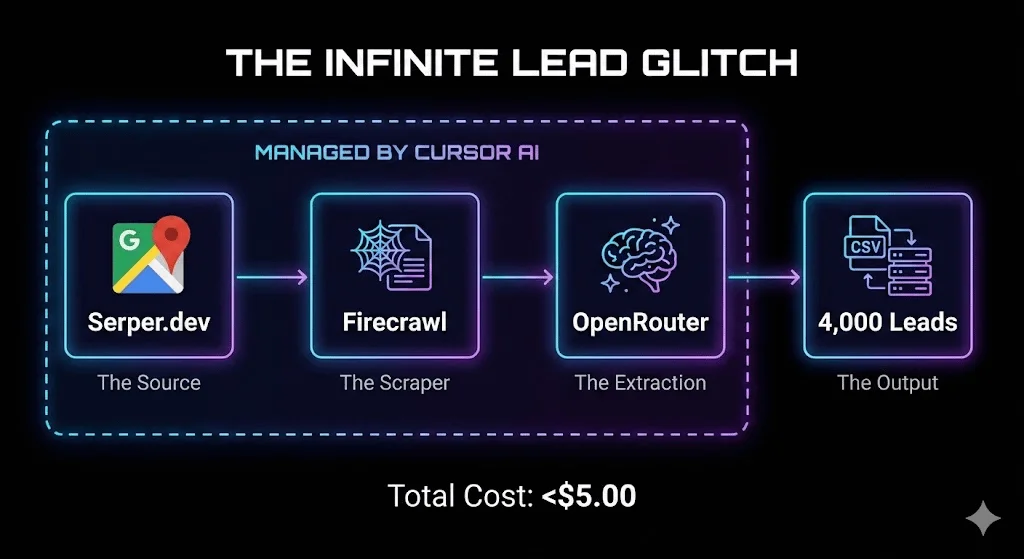
A custom lead database can be built for under $5 by combining four AI-orchestrated tools: Cursor (an AI code editor) writes scraping code from plain English, Serper.dev pulls Google/Google Maps search results, Firecrawl converts websites into clean structured data, and OpenRouter's AI extracts decision-maker names, emails, and company details into a CSV.
Key takeaways
- A 4,000-company lead database was built for approximately $4.60 total, compared to ZoomInfo's $15,000+/year or Apollo's $49-119/user/month billed annually with export limits.
- The stack costs break down to roughly $0.10 for Serper.dev searches, $4.00 for Firecrawl website scraping, and $0.50 for OpenRouter AI extraction across 4,000 leads.
- Example projects included a database of 12,000+ private schools with principal contact data, 8,000+ plumbing companies with owner information, and 3,000+ SaaS companies with leadership details, each costing under $10.
- Serper.dev charges about $0.001 per search and Firecrawl charges about $0.001 per page scraped, making usage-based API pricing central to the low cost.
- The first setup takes 30-45 minutes to configure API keys and preferences, but subsequent projects take only 15-20 minutes.
Reviewed and updated September 10, 2026
The Infinite Lead Glitch: How to Build a Custom Lead Database for Under $5
I built a custom lead database of 4,000 companies for pennies.
Most people are stuck in one of two traps:
- Paying $99/month for limited export credits on data platforms
- Manually copying data from Google Maps like it's 2010
I just built a custom scraping engine in 15 minutes. Without writing a single line of code myself.
Total cost: Less than $5.
Here's the "Infinite Lead Glitch."
The Stack
Four tools, working together, all orchestrated by AI:
- Yes: Cursor, the builder: an AI-powered code editor you instruct in plain English
- Yes: Serper.dev, the source: a Google Search API, including Google Maps
- Yes: Firecrawl, the scraper: visits websites and converts them to clean, structured data
- Yes: OpenRouter, the brain: reads the extracted content and pulls the data points you need
1. Cursor (The Builder)
Cursor is an AI-powered code editor. You tell it what you want in plain English, and it writes the code to make it happen.
This is the command center. Everything else flows through Cursor.
2. Serper.dev (The Source)
Serper.dev is a Google Search API. It lets you programmatically search Google, including Google Maps.
Want every private school in Wyoming? Every dentist in Miami? Every SaaS company in Austin?
Serper.dev queries Google and returns structured data.
Cost: $0.001 per search (1,000 searches = $1)
3. Firecrawl (The Scraper)
Firecrawl visits websites and converts them to clean, structured data.
Once you have a list of websites from Serper.dev, Firecrawl visits each one and extracts the content as clean Markdown that AI can understand.
Cost: ~$0.001 per page
4. OpenRouter (The Brain)
OpenRouter gives you access to multiple AI models at the cheapest possible rates.
Once Firecrawl extracts website content, OpenRouter's AI reads that content and extracts exactly the data points you need:
- Decision-maker names
- Email patterns
- Company details
- Anything else on the page
Cost: Fractions of a penny per extraction
The Complete Workflow
- Step 1Define Your Target
Be specific about what you're looking for. The more precise your criteria, the better your results.
- Step 2Open Cursor and Command
That's the entire instruction. Cursor handles the rest.
- Step 3Watch Cursor Work
If it hits an error? You paste the error back and say "fix this." The AI debugs itself.
- Step 4Collect Your Leads
Ready to import into Clay for further enrichment, or straight into your outreach tool.
Step 1: Define Your Target
Be specific about what you're looking for. The more precise your criteria, the better your results.
Example: "Private schools in Wyoming with websites"
Step 2: Open Cursor and Command
Here's roughly what you'd type into Cursor:
"I want to find private schools in Wyoming using Serper.dev. Then use Firecrawl to visit each school's website. Then use OpenRouter to extract the Principal's name, school phone number, and email if available. Save everything to a CSV."
That's the entire instruction. Cursor handles the rest.
Step 3: Watch Cursor Work
Cursor will:
- Plan the approach (it shows you what it's going to do)
- Write the code to query Serper.dev
- Parse the Google Maps results
- Write the code to send URLs to Firecrawl
- Write the code to process content through OpenRouter
- Handle errors and edge cases
- Export everything to CSV
If it hits an error? You paste the error back and say "fix this." The AI debugs itself.
Step 4: Collect Your Leads
You end up with a CSV containing:
- Company name
- Website URL
- Address
- Phone number
- Decision-maker names (extracted from the website)
- Any other data points you specified
Ready to import into Clay for further enrichment, or straight into your outreach tool.
The Math That Makes This Insane
The reason to build a list without paying for a database subscription is not only the monthly fee: the same subscription is queried by everyone in your category using broadly the same filters, so a segment defined by three common conditions has already been pulled repeatedly by companies selling adjacent products.

Let's break down the actual costs for 4,000 leads:
Serper.dev (Google Maps searches):
- 100 searches to cover geographic variations: $0.10
Firecrawl (website scraping):
- 4,000 websites scraped: ~$4.00
OpenRouter (AI extraction):
- 4,000 extractions with cheap model: ~$0.50
Total: ~$4.60
Compare that to traditional methods:
ZoomInfo: $15,000+/year subscription Apollo: $49-119/user/month billed annually, with export limits Manual research: 20+ hours of your time
The economics don't even make sense. You can build unlimited custom databases for the cost of a coffee.
Real Examples We've Built
Example 1: Private Schools Database
- Serper query: "private schools" across all 50 states
- Firecrawl: Visited each school website
- OpenRouter: Extracted Principal name, Admissions Director, contact info
- Result: 12,000+ schools with decision-maker data
Example 2: Local Service Businesses
- Serper query: "plumbers" in top 100 metro areas
- Firecrawl: Scraped business websites
- OpenRouter: Extracted owner names, service areas, company size indicators
- Result: 8,000+ plumbing companies with owner data
Example 3: SaaS Companies
- Serper query: "[software category] software" searches
- Firecrawl: Scraped company websites
- OpenRouter: Extracted leadership team, company description, tech stack indicators
- Result: 3,000+ targeted SaaS companies
Each of these cost under $10 to build. Each would cost thousands through traditional data providers.
Why This Works Now (And Didn't Before)

Three things changed:
1. AI Code Editors Got Good
Cursor (and similar tools) can now write production-quality code from plain English instructions. The barrier to "programming" is gone.
2. APIs Got Cheap
Serper.dev, Firecrawl, and OpenRouter all operate on usage-based pricing at fractions of a penny per operation. The cost of data extraction collapsed.
3. AI Extraction Got Accurate
Modern language models can reliably extract structured data from unstructured web pages. They understand context, can handle variations, and rarely hallucinate when given clear extraction instructions.
The convergence of these three factors created the "glitch": the ability to build enterprise-grade data infrastructure for pocket change.
Common Questions
"Isn't this complicated to set up?"
The first time takes 30-45 minutes as you get API keys and Cursor figures out your preferences. After that, new projects take 15-20 minutes.
"What about rate limits and blocking?"
Firecrawl handles most anti-bot measures. For particularly protected sites, you might need to slow down your scraping. Cursor can add delays and retry logic automatically.
"Is this legal?"
Scraping publicly available information is generally legal, but always check the specific terms of service for sites you're scraping. Don't scrape data you don't have a legitimate business reason to access.
"What about data quality?"
The data is as good as the websites you're scraping. Some sites have complete leadership pages; others have nothing. Build in validation steps and expect some manual cleanup.
"Can this replace Apollo/ZoomInfo entirely?"
For some use cases, yes. For others, no. This method excels at:
- Niche industries with limited coverage in major databases
- Local businesses
- Specific data points not available elsewhere
Traditional databases still win for:
- Email verification at scale
- Intent data
- Technographic data
Use both. They complement each other.
Getting Started

What You Need
- Cursor - Download at cursor.com (free tier available)
- Serper.dev account - serper.dev (free tier: 2,500 searches)
- Firecrawl account - firecrawl.dev (free tier: 500 pages)
- OpenRouter account - openrouter.ai (pay-as-you-go, usually $5 minimum)
Total startup cost: $5-10 in API credits
Your First Project
Start simple. Pick a narrow niche:
- "Dentists in [your city]"
- "Private schools in [your state]"
- "[Industry] companies in [location]"
Run through the workflow once. See how it feels. Then scale up.
The Bigger Picture
This isn't just about saving money on leads.
It's about the democratization of data infrastructure.
Enterprise companies used to have massive advantages. They could afford data teams, expensive subscriptions, custom tooling.
Now anyone with curiosity and $5 can build the same infrastructure.
The barrier to entry for building a data-driven business just collapsed.
The question isn't whether you can access this data. The question is what you'll do with it.
Related Reading
If you would rather have this run for you, RevenueFlow books qualified meetings on a pay-per-meeting basis and publishes client results.
Got your leads? Learn how to find the right job titles or personalize your outreach at scale to actually convert them.
Frequently asked questions.
Frequently asked questions- What tools do I need to build a custom lead database this way?
- Four tools are required: Cursor, an AI-powered code editor that writes scraping code from plain-English instructions; Serper.dev, a Google Search API for finding companies; Firecrawl, which converts websites into clean structured data; and OpenRouter, which uses AI to extract specific data points like names and emails from that content.
- How much does it actually cost to build a lead database with this method?
- A database of 4,000 enriched leads cost approximately $4.60 total: about $0.10 for Serper.dev searches, $4.00 for Firecrawl scraping 4,000 websites, and $0.50 for OpenRouter AI extraction. This compares to $15,000+/year for ZoomInfo or $49-119/user/month billed annually for Apollo with limited exports.
- Do I need to know how to code to set this up?
- No coding knowledge is required. You describe your goal in plain English to Cursor, the AI code editor, and it plans the approach, writes the code to query Serper.dev, sends URLs to Firecrawl, processes content through OpenRouter, and exports results to a CSV, debugging itself if errors occur.
- How long does it take to set up this scraping workflow?
- The first setup takes 30-45 minutes while you obtain API keys and Cursor learns your preferences. After that initial setup, building a new lead database for a different target audience takes only about 15-20 minutes.
- Is scraping company data this way legal?
- Scraping publicly available information is generally legal, but the article advises checking the specific terms of service for each site being scraped and avoiding data collection when there isn't a legitimate business reason to access it.
About the author.

Tim Carden is CMO / CTO at RevenueFlow, which builds and operates outbound revenue engines for B2B companies. Studied at McGill University.
Tim Carden · CMO / CTO
Connect on LinkedIn →Explore more.
Ready to scale your outreach?
We build GTM engines that book real meetings. See the receipts.
Related articles.
Typeform Alternatives: Read the Response Meter First
Typeform meters responses with a hard ceiling and counts seats inside the plan. What Tally, Fillout, Formbricks and Jotform count instead, from their own pricing pages.
Lead Verification: What Each Check Actually Proves
Lead verification covers two different jobs. One asks whether a mailbox will accept mail, the other asks whether the person behind the row is real and lawful to contact.
Drift Competitors: What Replaced It and What Each Costs
Drift is retired and drift.com now serves a Salesloft page. What the successors publish about price, who owns them now, and which one fits which job.
B2B Database: What to Test Before You Pay
Total record count is the number every vendor leads with and the one that predicts least. The test that replaces it takes a day and settles the purchase.
PartnerStack Pricing: One Published Number
PartnerStack quotes its three platform plans and publishes the whole model for its self-serve product. What each tier gates, and the choice forced at the entry tier.
Foleon Pricing: No Published Price, a 24-Month Term
Foleon publishes no rate on its plans page and publishes the whole commitment behind it. The term, the notice window and what happens to the Docs after.