Abusix Blacklist: Which List Fired and How to Get Delisted
Abusix runs several lists behind one checker row. Read the return code to find which one fired, then follow the operator's delisting steps for that list.
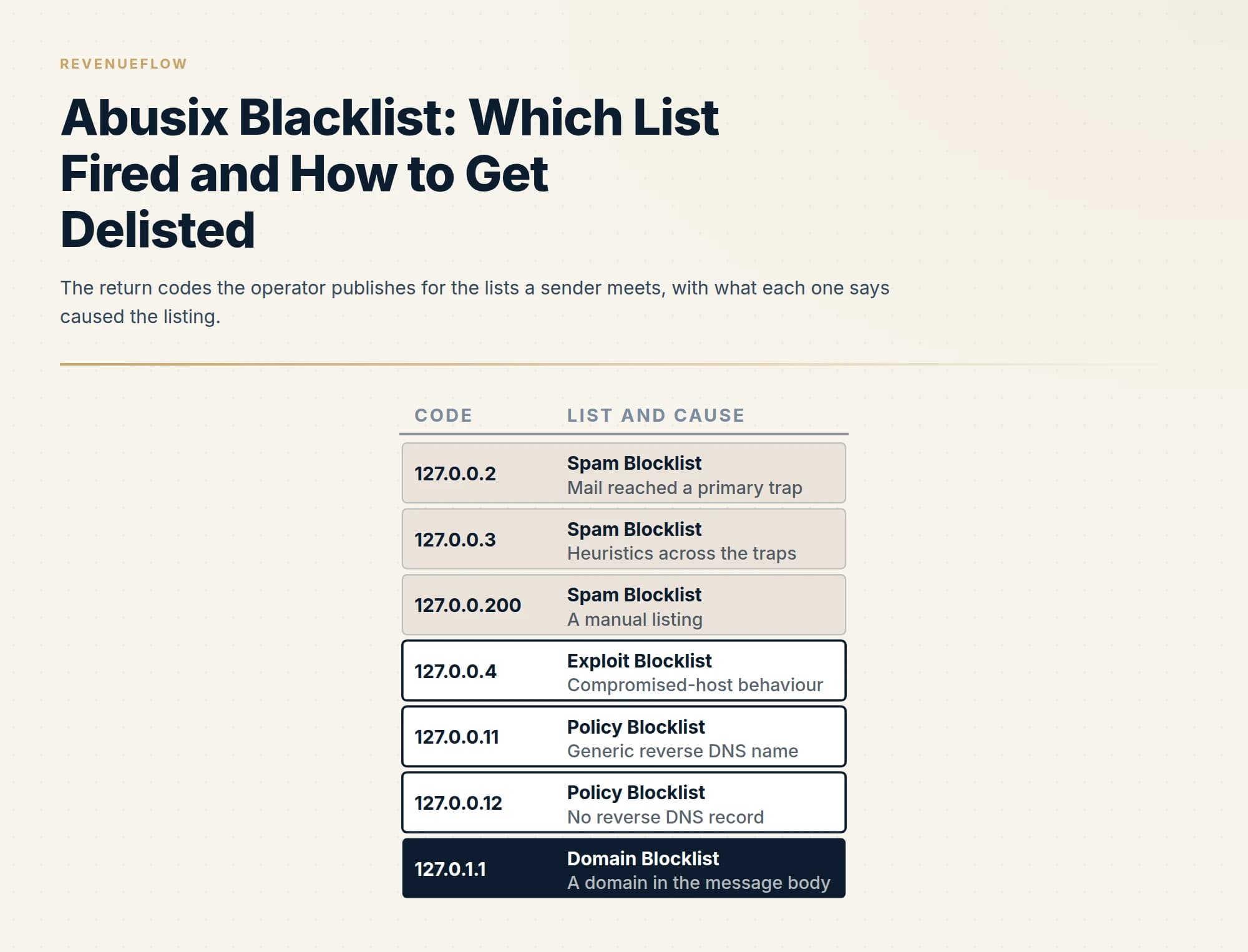
The Abusix blacklist is a suite of DNS lists sold as Guardian Mail. The return code names the list: 127.0.0.2 to 127.0.0.200 the Spam Blocklist, 127.0.0.4 Exploit, 127.0.0.11 and 127.0.0.12 Policy, 127.0.1.1 Domain. Delisting needs a free confirmed account; requests are processed immediately after the cause is fixed.
Key takeaways
- One checker row hides several lists: the Spam, Exploit, Policy and Domain blocklists each key on something different, and the DNS return code tells you which one answered.
- The Spam Blocklist is fed by primary traps, domains that never carried genuine mail or rejected everything for over a year; purchased, appended and long-silent lists are the operator's own named causes.
- Delisting requires a free account with a confirmed email address; the operator processes the request immediately, rebuilds zones every minute and says the lookup clears within about five minutes.
- A Policy Blocklist listing needs no request unless you run the mail server; a proper reverse DNS name clears it automatically, and CIDR ranges are never delisted.
Reviewed and updated September 18, 2026
A checker prints a red row reading Abusix Mail Intelligence, and the bounce that started the search carries a link to lookup.abusix.com with the sending address already filled in. The row is one word. The operator publishes more than ten lists and treats them differently: two are cleared with a fix and a click, one is a policy list most senders should never touch, one is keyed on domains in the copy rather than the address, and every one requires an account before a removal can be filed.
So the first question is which list answered, because the return code names the cause and the cause decides the remedy. This page works through the operator's own documentation in that order: the lists and their codes, what each keys on, who queries them, the removal procedure, and what a sender changes so the address stays off. The same shape for a list keyed only on message-body domains is in the SURBL page; Abusix runs one of those too.
One name, several lists
Abusix now sells the suite as Guardian Mail, and its delisting documentation, last modified on 3 September 2026 according to its own metadata and fetched on 18 September 2026, defines it: "Guardian Mail is a suite of DNS blocklists and welcome lists (these used to be called whitelists)." Checkers and the operator's own FAQ still use the older product name, Abusix Mail Intelligence, and the FAQ states that delisting is the same service whichever name is on the row: "This is a stand-alone service, though it is directly connected to our product Guardian Mail as it uses the same data source."
The production zones page, last modified on 22 August 2025 and fetched on 18 September 2026, lists the zones a receiver can query. The ones a sender meets are:
- The Spam Blocklist, zone name black. "This list contains the IP addresses of hosts that have sent emails to our primary traps. These traps are domains that have never been used for genuine mail or have rejected all mail for over a year."
- The Exploit Blocklist, zone name exploit, built from the behaviour of hosts that connect to the operator's traps and partner mail services, covering compromised hosts, infections, proxies, VPNs and exit nodes. The page's summary: "These behaviors are not expected from a genuine SMTP client."
- The Policy Blocklist, zone name dynamic. "It contains a list of all IP addresses that should not be connecting directly to external SMTP servers."
- The Domain Blocklist, zone name dblack. "This list applies to both inbound and outbound mail and contains domains and IP addresses found in the message body of spam received by our primary traps. We also follow any short URL links found in spam and list any intermediate or destination domains."
- The Combined Blocklist, which the same page describes as the list used for inbound mail that "aggregates all of our recommended IP lists into a single query for convenience and speed." It merges the black, exploit and policy lists, and the FAQ says: "Most of our customers use our combined list, which combines our IP, exploit and policy list."
Beyond those sit hash lists, a welcome list, and newly-observed domain and IP lists, which a sender does not meet in a bounce.
Reading the return code
A DNS blocklist answers with an address in the 127 range, and the operator publishes what each one means. Its return codes page, last modified on 22 August 2025 and fetched on 18 September 2026, maps them: 127.0.0.2 is the Spam Blocklist on a trap hit, 127.0.0.3 is the same list by heuristics, 127.0.0.200 is a manual listing on it, 127.0.0.4 is the Exploit Blocklist, 127.0.0.11 and 127.0.0.12 are the Policy Blocklist, and 127.0.1.1 is the Domain Blocklist for a domain or address found in a message body. The production zones page explains the two policy codes: "127.0.0.11 is returned for hosts with generic rDNS." and "127.0.0.12 is returned for hosts with no rDNS."
That number is the diagnosis. A 127.0.0.2 says a message from this address reached a trap, which points at the list. A 127.0.0.11 says the address has a generic reverse DNS name, which points at whoever operates the machine. A 127.0.1.1 says a domain inside the message is listed, which may not be the sending domain at all. Three remedies, and a checker that prints one word has thrown the distinction away; the operator's lookup gives it back.
What puts an address on the Spam and Exploit lists
The operator states its methods and its causes in its own words. The FAQ, last modified on 31 August 2026 according to its metadata and fetched on 18 September 2026, names the collection: "We use four main methods that can get you listed on one of our blocklists:" and lists spam traps, heuristics, honeypots and policy. The same page answers the question a listed sender actually asks: "The most common causes are:" followed by six items, among them "Broken or missing bounce or engagement management.", "Email lists purchased from a 3rd party or use of any email appending services.", "Sending mail to very old customers or any address with whom you have had no interaction for > 2 years.", "Compromised accounts or services" and "Infected computers or devices." The first item on the list is about failing to confirm opt-in and running no anti-bot check on sign-up forms.
The production zones page repeats the causes for the Spam Blocklist specifically: compromised accounts, infected hosts, botnets, spam gangs, and then "purchased email address lists, poor sign-up processes, open web forms, open proxies, TOR exit nodes, and VPNs."
Read those two lists against a cold outbound programme and the mapping is short. A purchased or appended list, a list nobody has verified in two years, and a bounce process nobody watches are three of the six, and all three are decided before a campaign sends. The traps that produce a 127.0.0.2 are, in the operator's own description, domains that never carried genuine mail or rejected everything for over a year, which is what an old or bought list contains. How a trap gets into such a list is in spam trap.
- Depends: Opt-in is not confirmed and sign-up forms have no anti-bot check
- Depends: Bounce or engagement management is broken or missing
- Depends: A list was purchased from a third party or an appending service was used
- Depends: Mail went to addresses with no interaction for more than two years
- Depends: An account or service is compromised
- Depends: A computer or device on the network is infected
The Policy Blocklist is different
The policy list is the one that frightens people and rarely matters to them. It is built, the production zones page says, by scanning the whole IPv4 range and applying a policy that includes "An IP address MUST have rDNS." and "Contiguous ranges of IP addresses MUST NOT have the same rDNS." together with a rule against templated names that embed the address. It lists addresses that should not be talking to a mail server directly at all. The same page adds: "It is normal for a non-SMTP server IP to be listed in this zone."
The operator's blog, in a post updated on 21 March 2024 and fetched on 18 September 2026, says the same to a worried reader: "If you are only listed on our policy blocklist (PBL), then this should not cause any concern. The listing on the PBL will not affect your ability to send or receive emails." and then: "Therefore, you do not need to request a delist from the policy blocklist unless you are running your own mail server on that address."
Where it does matter, the fix is a DNS record and the removal is automatic: "Anyone can request a delisting from this zone, and a semi-permanent exception will be created automatically." with one limit: "We do not allow delists of CIDR ranges from the Policy list. Only IPs that meet the policy requirements are delisted." A reverse DNS name that says who runs the machine satisfies the policy. Another operator lists on the same signal, and the RATS-Dyna page covers that case.
Who queries the lists
Guardian Mail is sold to mail operators, and the FAQ answers where it can be plugged in. Asked whether a Google Workspace or Microsoft 365 tenant can add it, the FAQ says: "Neither service allows for the addition of 3rd party DNS reputation lists like our Guardian Mail blocklists." with the exception of a gateway placed in front of either. The receivers that consult these lists are self-managed mail servers and gateways, most of them through the combined list, and the operator publishes integration pages for Postfix, Exim, SpamAssassin, Rspamd and the rest.
For an outbound programme that population is real and uneven: a prospect running its own Exchange or a hosted gateway may query it, a prospect on plain Google Workspace does not. Weight the row by whether any rejection string has named it, and work a mixed report in the order email blacklist check and recovery sets out.
The removal procedure, step by step
Every path starts with the bounce, which the FAQ says carries a clickable link of the form lookup.abusix.com/search?q= followed by the address. From there the FAQ lists the steps: "Either click the link in your bounce message or go directly to our Lookup and Delisting page", "Enter the listed IP/domain.", read the information for a listed entry and use its sign-up button to reach the portal, "Either create a new account or log in to your existing account" and "Follow the instructions within the portal to remove your IP/domain from the blocklists."
The account is not optional and the operator says why. The delisting documentation puts it in a warning box: "To delist items from our lists, you will need to register first. Registering and confirming your mail address prevents abuse of our service." The same box states the precondition and the penalty for skipping it: "When you request a delisting, please ensure that you understand the problem and have taken all necessary actions (including deleting any queued mail as necessary) to prevent any further abuse of your systems. Failure to do so often causes a relisting and, thus, a delay in being able to delist again."
Once filed, the FAQ says: "When you request a delisting, we process the delist immediately by removing the offending item from the relevant list(s)." and gives the delay: "Though delists are processed immediately and the DNS zone files are rebuilt every minute, it can take up to 5 minutes before the item is eventually shown as being delisted." There is no fee and nothing to negotiate.
Two things sit outside that path. If the address is not yours, the delisting documentation tells a reader who is not a mail system administrator to contact the IT department or the mail provider, because they run the server; mail leaving through Google Workspace, Microsoft 365 or a sending platform connects from an address the provider owns, and the request is theirs to make. The test for which address a rejection is about is in whose IP a blocklist lookup is checking. And a listing may be gone before anyone files: an entry can stop showing as listed because it expired or somebody else delisted it, and the production zones page gives the Spam Blocklist duration as "Approximately 5.2 days from when traffic was last seen".
The rejection carries a lookup.abusix.com link with the address filled in; the lookup shows which lists hold it and the return code.
A provider-owned address is the provider's request. A policy-only listing needs no request unless you run the mail server.
The operator asks that the problem is understood and queued mail deleted before a request; filing first often causes a relisting.
A free account with a confirmed email address is required; the operator says it prevents abuse of the service.
Processed immediately; zone files rebuild every minute; up to five minutes before the lookup shows it clear.
What to change so it does not recur
The operator's causes and its methods say what the fix is, list by list.
For the Spam Blocklist, the address reached a trap. The change is on the list side: verification before every send, no purchased or appended data, no address that has been silent for years, and bounce handling that removes a failed address the first time. A bounce spike is the earliest visible sign of a list that contains traps, and published bounce rate benchmarks give the level at which a campaign should stop and the source be cleaned.
For the Exploit Blocklist, the address behaved like a compromised host. Scan the machine, check for an open relay or a leaked mailbox password, and if the address is shared at a hosting provider, expect it to list again whatever a single tenant does.
For the Policy Blocklist, the change is a reverse DNS record naming the operator of the server, and only if the address sends mail directly at all.
For the Domain Blocklist, the listed name may be a tracking host, a shortener or a partner site rather than the sending domain, and the remedy is to take the name out of the message before anything is filed.
| List | Keys on | Before you file |
|---|---|---|
| Spam Blocklist (black) | Mail from the address reached a primary trap | Clean the list and the bounce process; listing expires about 5.2 days after the last hit |
| Exploit Blocklist (exploit) | Behaviour of a compromised host, proxy or VPN | Scan the machine, close the relay, clear queued mail |
| Policy Blocklist (dynamic) | Generic or missing reverse DNS on the address | Only if you run the mail server; publish a proper reverse DNS name; no CIDR delists |
| Domain Blocklist (dblack) | A domain or address inside the message body | Remove the listed name from the message; file only for a domain you own |
Our own posture is built around the same causes: dedicated sending domains, every list verified before a campaign sends, one message per campaign and never a second in the same thread, so a non-responding audience is never re-mailed on the same premise, and dedicated tracking domains. Those are policies rather than results.
The short version
Abusix publishes a suite of lists, now sold as Guardian Mail, and the return code says which one answered: 127.0.0.2, 127.0.0.3 and 127.0.0.200 are the Spam Blocklist, 127.0.0.4 is the Exploit Blocklist, 127.0.0.11 and 127.0.0.12 are the Policy Blocklist, and 127.0.1.1 is the Domain Blocklist for a name inside the message.
The Spam and Exploit lists are cleared by fixing the cause, registering a free account with a confirmed email address, and removing the entry in the portal; the operator processes the request immediately and the lookup shows it within about five minutes. The Policy list needs no request unless you run the mail server, and then a proper reverse DNS record clears it automatically. The Domain list is answered by taking the listed name out of the message.
If you would rather run on infrastructure where a verified list, a watched bounce process and a dedicated address are in place before the first send, we plan the first campaign for free.
Zone descriptions, return codes, listing causes, the account requirement, the removal steps and the timings are taken from abusix.com's FAQ (metadata last modified 31 August 2026), its blog post on listings updated 21 March 2024, and the docs.abusix.com Guardian Mail delisting overview (last modified 3 September 2026), production zones and return codes pages (last modified 22 August 2025), all fetched on 18 September 2026. Verify current list behaviour with the operator before relying on it.
Frequently asked questions.
Frequently asked questions- How do I delist an IP from Abusix?
- Open the lookup link in the bounce or go to the operator's Lookup and Delisting page, enter the address, and read which lists hold it. Fix the cause and clear any queued mail, then register a free account and confirm your email address, which the operator requires because anonymous delisting attracted abuse. Remove the entry in the portal; the FAQ says it is processed immediately and shows as delisted within about five minutes.
- What is the Abusix Mail Intelligence blacklist?
- Abusix Mail Intelligence is the older name for the suite Abusix now sells as Guardian Mail: a set of DNS blocklists and welcome lists covering IP addresses, domains, email addresses, short URLs, drive URLs and attachment hashes. Checkers still print the old name. The lists a sender meets are the Spam, Exploit, Policy and Domain blocklists, and the operator's delisting service is the same whichever name appears on the row.
- Why is my IP on the Abusix policy blocklist?
- Because the address has generic or missing reverse DNS, which the operator's policy treats as an address that should not be connecting directly to external mail servers. Its own pages say this is normal for an address that is not a mail server and does not affect sending or receiving. If you do run a mail server on that address, publish a reverse DNS name that identifies its operator and request the exception, which is created automatically.
- How long does an Abusix listing last?
- For the Spam, Exploit and Domain blocklists the operator gives a duration of approximately 5.2 days from when traffic was last seen, so an address that stops hitting traps expires on its own. The Policy Blocklist lists indefinitely until the reverse DNS meets the policy and an exception is requested. A manual delisting is processed immediately and appears in the lookup within about five minutes.
About the author.

Tim Carden is CMO / CTO at RevenueFlow, which builds and operates outbound revenue engines for B2B companies. Studied at McGill University.
Tim Carden · CMO / CTO
Connect on LinkedIn →Explore more.
Ready to scale your outreach?
We build GTM engines that book real meetings. See the receipts.
Related articles.
SpamRATS Blacklist: The Four RATS Lists and How to Delist
SpamRATS is four lists, not one. Which of RATS-Dyna, NoPtr, Spam and Auth fired, what each keys on, the removal path per list and what a sender changes afterwards.
UCEPROTECT Level 3: The Provider Score That Lists Your IP
UCEPROTECT Level 3 lists whole providers by a published score, so a clean address still appears. What the operator says about removal, and what to do instead.
PSBL Blacklist: What It Lists and How to Remove an IP
PSBL lists a connecting IP when it hits a trap, is not filtered as non-spam and is not a known server. Anyone can remove it in minutes; here is why and what to fix first.
ivmURI Blacklist: The Domain List Behind the Links You Send
ivmURI lists domains found inside the clickable links of spam, not sending addresses. Which name in your email it read, who queries it, and what to change.
Sender Score Blocklist: The RPBL and How to Get Delisted
Sender Score is a rating; the Return Path Blocklist is the list a receiver can act on. What the RPBL keys on, the removal form, and what to change so it does not recur.
Email Warmup Pricing in 2026: What 20 Tools Charge, and What 10 Mailboxes Cost
Email warmup tools start at a median of $29 a month, but warming ten mailboxes costs from $7.50 to $1,190 depending on how the vendor prices a mailbox.