SpamRATS Blacklist: The Four RATS Lists and How to Delist
SpamRATS is four lists, not one. Which of RATS-Dyna, NoPtr, Spam and Auth fired, what each keys on, the removal path per list and what a sender changes afterwards.
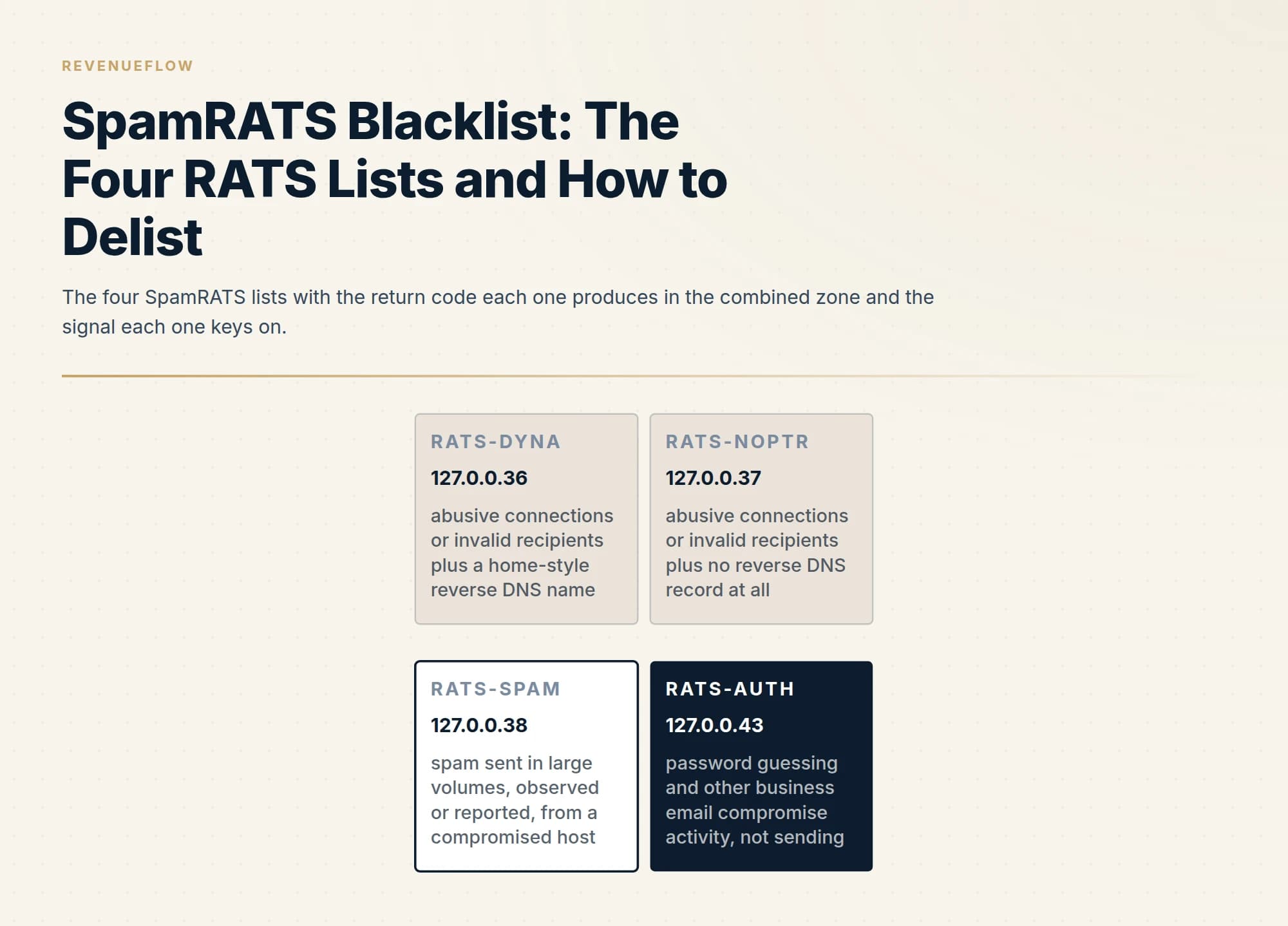
The SpamRATS blacklist is four lists: RATS-Dyna and RATS-NoPtr pair abusive connections with a reverse DNS condition, RATS-Spam lists repeated large-volume spam, and RATS-Auth lists password guessing. The combined zone returns 127.0.0.36, 37, 38 or 43 to say which fired. Dyna and NoPtr clear after the reverse DNS is fixed; Spam is self-service; Auth needs the contact form.
Key takeaways
- One checker row hides four lists with four signals: a home-style reverse DNS name (Dyna), no reverse DNS record (NoPtr), repeated large-volume spam (Spam) and password guessing against mailboxes (Auth).
- The combined all.spamrats.com zone returns 127.0.0.36, 127.0.0.37, 127.0.0.38 or 127.0.0.43, and that code, not the family name a checker prints, says which remedy applies.
- The operator tells a sender who does not run a mail server never to file a removal and to contact the provider instead; provider-owned addresses and their reverse DNS are not yours to change.
- Dyna and NoPtr clear only after the reverse DNS record is corrected and has propagated, Spam clears automatically once the cause is fixed, and Auth requires the contact form with proof of ownership and an explanation.
Reviewed and updated September 18, 2026
A checker prints SpamRATS in red and stops there, as if it were one list with one remedy. It is four. RATS-Dyna, RATS-NoPtr, RATS-Spam and RATS-Auth key on four different signals, three of them have different removal paths, and the operator publishes a combined zone whose return code tells you which one actually fired. Most of the time spent on a SpamRATS row is spent on the wrong list.
This page is about the family: which list answered, what each one keys on, who queries them, the removal procedure for each, and what a sender changes so the address stays off. RATS-Dyna, the list keyed on the shape of a reverse DNS name, has its own treatment in the RATS-Dyna page, which this page points to rather than repeats. The other end of the design spectrum, a list keyed on domains inside the message rather than the connecting address, is in the SURBL page.
Who runs it and what the four lists are
The operator's about page, fetched on 18 September 2026, gives the history in one line: "SpamRATS first became a public RBL in 2007" and every page's footer attributes the mark to mThreat Technology Inc. The same page divides the family by job: "Our RATS-Dyna, RATS-NoPtr, and RATS-Spam reputation lists are specialized for blocking spam. The RATS-Auth reputation list is specialized for protecting your email accounts from suspicious logins."
Each list page carries its own description, all fetched on 18 September 2026:
- RATS-Dyna lists addresses seen flooding connections or trying too many invalid users at ISP and telco mail servers, where the reverse DNS name looks like a home or dynamic connection. The full text, the naming practice it expects and the whole diagnosis are on the RATS-Dyna page linked above.
- RATS-NoPtr is the sibling keyed on an absent record: "RATS-NoPtr is a collection of IP Addresses that have been detected sending an abusive amount of connections, or trying to send to too many invalid users at ISP and Telco's mail servers. A distinguishing characteristic is that the IP lacks a reverse DNS/PTR record. IPs running mail servers should always have a proper reverse DNS record."
- RATS-Spam is the behaviour list: "RATS-Spam is a collection of IP Addresses that have been repeatedly observed or reported as sending spam emails in large volumes." Its page says the population is "from compromised servers, hosts, or relays, and mail servers created for the purpose of spamming." and that "an IP Address is only added when a significant amount of spam-style behavior has been reported or observed."
- RATS-Auth is not about sending at all: "RATS-Auth is a collection of IP Addresses that have been detected as engaged in, or a part of a Business Email Compromise (BEC) attack." with the trigger stated: "IP addresses are added only after detecting abusive activity such as password guessing attacks."
So two of the four lists (Dyna and NoPtr) combine a connection-behaviour condition with a reverse DNS condition, one (Spam) is behaviour alone, and one (Auth) is about login attempts against mailboxes rather than mail sent.
Which list fired: the RATS-All return codes
The usage page, last modified on 30 July 2025 according to its metadata and fetched on 18 September 2026, names four zones a receiver queries separately, dyna, noptr, spam and auth, each under a subscriber's API key, and a fifth that answers for all of them in one lookup. That combined zone returns a code per list: 127.0.0.36 for RATS-Dyna, 127.0.0.37 for RATS-NoPtr, 127.0.0.38 for RATS-Spam and 127.0.0.43 for RATS-Auth. The page adds of the combined query: "However we don't suggest this for most users." which is worth knowing when you read a receiver's rejection: a receiver querying the separate zones names the list in the bounce; one querying all.spamrats.com may only give you the code.
The code is the diagnosis. A 36 or a 37 is answered by a DNS record. A 38 is answered by finding what sent the mail. A 43 has nothing to do with outbound mail and everything to do with a machine trying passwords. Aggregated checkers print the family name and drop the number, which is why the first step below is the operator's own lookup.
Who queries the lists, and where
The usage page states what the lists are for and how they are meant to be applied: "The service should be utilized to verify the IP address of the remote connecting server", that is, the address handing mail to the receiver, never an address found inside the headers. The page lists implementations it does not recommend, including checking transit addresses from headers and validating the A records of domains, and gives one exception: "The ONLY in transit IP you can check is the X-Originating-IP against RATS-AUTH, not against the other RATS discussed here."
Access is keyed. The page tells a receiver that "you should use an API key as part of your DNS requests", registration being free, and states the pricing boundary: "Our RBL's are free to use for most people, unless you are a larger organization with very high query rates, or providing commercial email protection services." It publishes setup pages for Postfix, Dovecot, Exim, Axigen, MailEnable, SmarterMail, Zimbra, cPanel and Plesk, DirectAdmin, Communigate, SpamAssassin, Cisco, IronPort and Trend Micro.
For a sender that describes the population: self-managed mail servers and gateways whose administrators registered a key. Weight the row accordingly: a list no rejection string has ever named has probably never cost a send, and the order to work a mixed report in is in email blacklist check and recovery.
Whether the address is yours at all
The operator asks this before anything else, and the answer is a yes or a no. Its removal page carries the note at the top: "If you are NOT an email administrator and don't own or manage your own email server, you should never have to remove yourself from this list. Instead, contact your ISP." It continues that the problem is either one only the provider can fix or a mail client set up wrongly, and suggests port 587 with SMTP authentication. The lookup page says the same from the other side: "Note: being listed on SpamRATS should only affect you if and only if you are running a mail server."
For most cold email programmes that settles the Dyna and NoPtr rows at once. Mail that leaves through Google Workspace, Microsoft 365 or a sending platform connects from an address the provider owns and whose reverse DNS the provider set. The general test for which address a rejection is about, and why it is the one quoted inside the bounce rather than the one a browser shows, is in whose IP a blocklist lookup is checking.
The removal procedure, list by list
The removal page publishes three steps that apply to every list, headed Check IP address, where you enter the address and the system reports its status, Review Lookup Result, and Submit Removal Request, the last one only where automatic removal is unavailable, in which case the page points at the contact form. What differs is the precondition each list page attaches and the route it offers.
RATS-Dyna and RATS-NoPtr. The record comes first and the request second. The NoPtr page states the rule for who should be filing at all: "You should ONLY need to remove yourself from this list IF you are running your own mail server." and the standard the record has to meet: "Real mail servers should have a reverse DNS/PTR record that reflects the operators of the mail server, according to Best Practices for Email and Network Operators." with mail or mx on the domain that runs the server given as the examples. Removal is available only once the record is corrected, and the page adds: "Please ensure that enough time has passed for DNS propagation." A request filed before the record propagates is refused. The Dyna page carries the same precondition with the extra point that the name must not look residential.
RATS-Spam. Self-service, with a warning about repeats: "You can remove any IP Address from this list automatically. Please ensure that any spam issues are resolved before removing your IP. If your IP continues the abusive behavior, it may be harder to remove it the next time." The form on the list page takes the address and a captcha.
RATS-Auth. No self-service at all. The list page directs removal requests to the contact form and states the conditions: "You must prove that you are the owner/operator of the server, as shown in the rWhois or SWIP for that IP address. Additionally, you must be prepared to explain the activity and the steps that have been made to ensure this type of activity does not occur again in the future." The FAQ gives the hours a reply can be expected: "Our team members are available to respond to inquiries between the hours of 9:00 am to 4:30 pm weekdays exempting Holidays." in the America/Pacific time zone.
- Step 1Check IP address
Enter the address; the system reports its current status.
- Step 2Review Lookup Result
Read which list holds it. If the listing is incorrect, follow the link to the removal request.
- Step 3Submit Removal Request
Only where automatic removal is unavailable: use the contact page with details for review.
| List | Before you file | Route |
|---|---|---|
| RATS-Dyna | You run the mail server; reverse DNS corrected to a name that reflects its operator and left to propagate | Self-service on the list page after the record is fixed |
| RATS-NoPtr | You run the mail server; a reverse DNS record published where none existed, then propagation time | Self-service on the list page after the record is fixed |
| RATS-Spam | The spam issue resolved; a repeat is harder to clear | Automatic removal on the list page |
| RATS-Auth | Proof you own or operate the server via rWhois or SWIP, plus an explanation of the activity and the fix | Contact form, reviewed in business hours |
What to change so it does not recur
The operator's about page names where the abusive connections it lists come from: "IoT Botnets, machines infected and controlled with malicious software", "Bulletproof Hosting Provider networks", compromised servers, and "Email Marketing Companies". The last of those is the category a cold outbound programme can fall into, and the mechanism is the one the Dyna and NoPtr pages describe: too many attempts at recipients who do not exist.
That has one usual cause in outbound, an unverified list producing a wall of invalid recipients in a short window, and it is a list-quality problem before it is a blocklist problem. Verification before every send is the fix, and the level at which a campaign should stop and its source be cleaned is measured against published bounce rate benchmarks rather than guessed.
For a team that runs its own sending host, the reverse DNS record belongs in the same pass as the rest of the sending records. A name that says who operates the server closes both Dyna and NoPtr permanently, and the same record is read by receivers that never query SpamRATS. It sits naturally beside SPF, DKIM and DMARC, which are published once and checked by everyone.
RATS-Spam and RATS-Auth are about the machine. A host on the Spam list is sending mail you did not write, or a great deal more of it than you think, and a host on the Auth list is attacking somebody's mailboxes. Both are security incidents first: scan the machine, close any open relay, reset leaked credentials, and if the address is shared at a hosting provider, expect it to list again whatever a single tenant does.
Our own posture makes the family question small. Outbound runs on provider infrastructure with dedicated sending domains rather than on a self-managed server, which removes the reverse DNS failure mode, lists are verified before a send rather than after a bounce spike, which removes the invalid-recipient failure mode, and each campaign carries one message and never a second in the same thread, so a non-responding audience is never mailed again on the same premise. Those are policies rather than results.
The short version
SpamRATS is four lists, and the combined zone says which one fired: 127.0.0.36 for RATS-Dyna, 127.0.0.37 for RATS-NoPtr, 127.0.0.38 for RATS-Spam and 127.0.0.43 for RATS-Auth. Dyna and NoPtr combine abusive connections or invalid recipients with a reverse DNS condition, Spam is repeated large-volume spam from a compromised host, and Auth is password guessing rather than sending.
The operator says a sender who does not run a mail server should never need to file, and should contact the provider instead. Where the address is yours, Dyna and NoPtr clear after the reverse DNS is corrected and has propagated, Spam clears automatically once the cause is fixed, and Auth needs the contact form with proof of ownership and an explanation.
What keeps an address off is a verified list, a reverse DNS name that says who runs the server, and a machine that sends only what you wrote. If you would rather run outbound on infrastructure where those are in place before the first send, we plan the first campaign for free.
List descriptions, the RATS-All return codes, the query and access rules, the removal steps, each list's precondition and the operator's guidance to senders who do not run a mail server are taken from spamrats.com's list, usage, removal, lookup, about and FAQ pages, fetched on 18 September 2026 (the usage page's metadata dates its last modification to 30 July 2025). Verify current list behaviour with the operator before relying on it.
Frequently asked questions.
Frequently asked questions- How do I remove my IP from the SpamRATS blacklist?
- First confirm you run the mail server that sent the message; the operator says anyone who does not should contact their provider instead. Then look the address up to see which list holds it. For RATS-Dyna and RATS-NoPtr, correct the reverse DNS record to a name that reflects the server's operator, wait for propagation, then use the form on the list page. RATS-Spam clears automatically once the spam issue is resolved. RATS-Auth requires the contact form with proof of ownership.
- What is the difference between RATS-Dyna, RATS-NoPtr and RATS-Spam?
- All three list connecting IP addresses, but on different signals. RATS-Dyna lists an address that flooded connections or tried too many invalid recipients and whose reverse DNS name looks like a home or dynamic connection. RATS-NoPtr lists the same behaviour where the address has no reverse DNS record at all. RATS-Spam lists addresses repeatedly observed or reported sending spam in large volumes, typically compromised servers, hosts or relays.
- What does the all.spamrats.com return code mean?
- The combined zone answers one query for all four lists and encodes the list in the last octet. The operator's usage page gives 127.0.0.36 for RATS-Dyna, 127.0.0.37 for RATS-NoPtr, 127.0.0.38 for RATS-Spam and 127.0.0.43 for RATS-Auth. A receiver querying the separate zones names the list in its rejection; one querying the combined zone may only give you the code, so decode it before choosing a remedy.
- Does a SpamRATS listing affect Google Workspace or Microsoft 365 senders?
- The operator's lookup page says a listing should only affect you if you are running a mail server, and its removal page tells anyone who does not own or manage a mail server to contact their ISP rather than file. Mail sent through a hosted provider or a sending platform connects from an address the provider owns, so a RATS row against it describes the provider's estate and the request, if any, is theirs to make.
About the author.

Tim Carden is CMO / CTO at RevenueFlow, which builds and operates outbound revenue engines for B2B companies. Studied at McGill University.
Tim Carden · CMO / CTO
Connect on LinkedIn →Explore more.
Ready to scale your outreach?
We build GTM engines that book real meetings. See the receipts.
Related articles.
Abusix Blacklist: Which List Fired and How to Get Delisted
Abusix runs several lists behind one checker row. Read the return code to find which one fired, then follow the operator's delisting steps for that list.
UCEPROTECT Level 3: The Provider Score That Lists Your IP
UCEPROTECT Level 3 lists whole providers by a published score, so a clean address still appears. What the operator says about removal, and what to do instead.
PSBL Blacklist: What It Lists and How to Remove an IP
PSBL lists a connecting IP when it hits a trap, is not filtered as non-spam and is not a known server. Anyone can remove it in minutes; here is why and what to fix first.
ivmURI Blacklist: The Domain List Behind the Links You Send
ivmURI lists domains found inside the clickable links of spam, not sending addresses. Which name in your email it read, who queries it, and what to change.
Sender Score Blocklist: The RPBL and How to Get Delisted
Sender Score is a rating; the Return Path Blocklist is the list a receiver can act on. What the RPBL keys on, the removal form, and what to change so it does not recur.
RATS-Dyna: The Listing Your Reverse DNS Caused
RATS-Dyna lists addresses whose reverse DNS looks residential. The operator says a sender who does not run their own mail server should never need to delist.