SPF, DKIM and DMARC for Cold Email: Staying Out of Spam
Copy-paste SPF, DKIM, and DMARC records for Google Workspace and Microsoft 365, what each one verifies, and the alignment failures that break cold email.
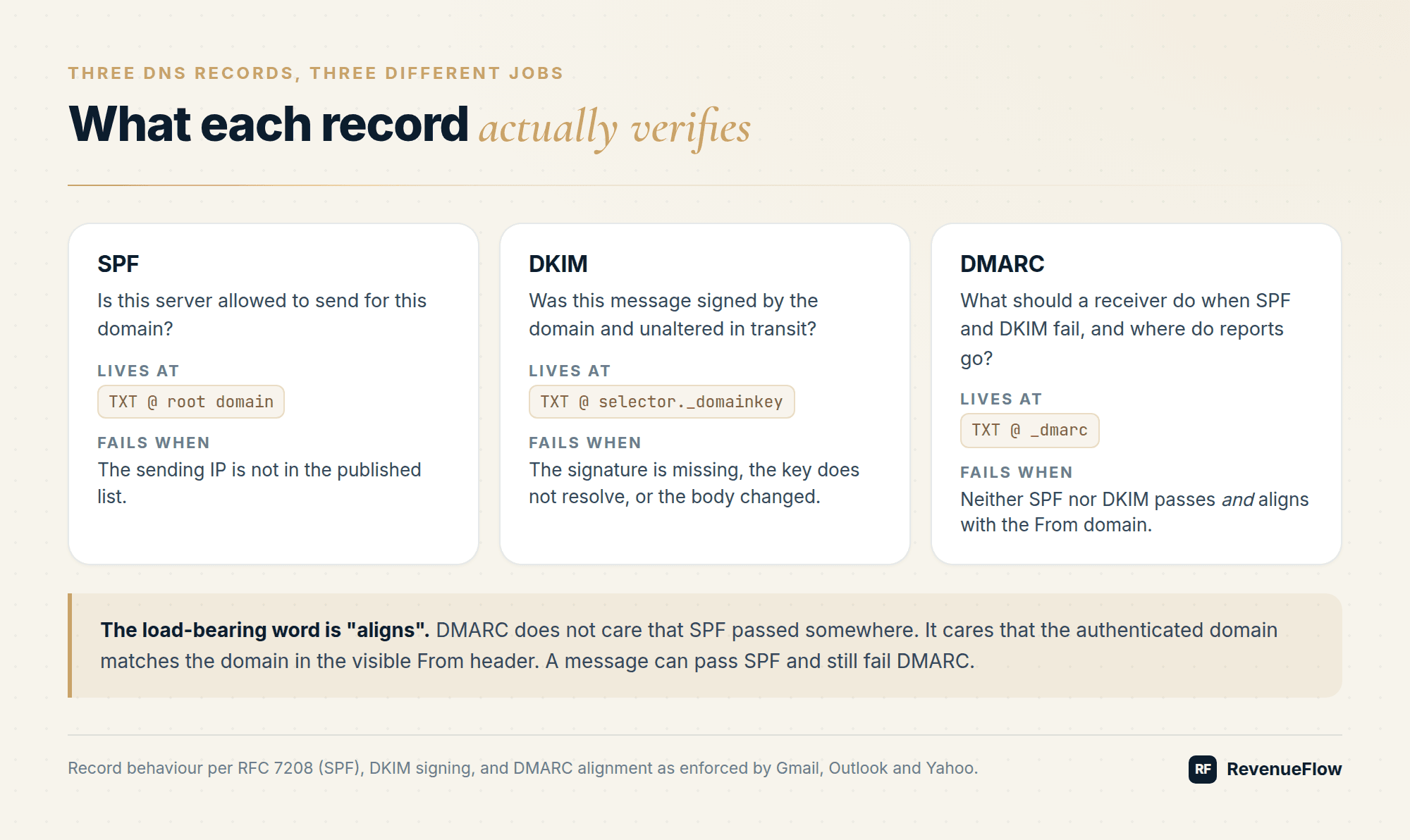
SPF authorises sending servers, DKIM signs messages cryptographically, and DMARC tells receivers what to do when either fails. Gmail and Yahoo require SPF, DKIM, and a DMARC record at or above p=none for senders above 5,000 messages a day, and Microsoft rejects non-compliant bulk mail outright since 5 May 2025.
Key takeaways
- Gmail requires both SPF and DKIM plus a DMARC record for senders above 5,000 messages per day to personal Gmail accounts, and the DMARC policy may be p=none.
- Microsoft began rejecting non-compliant high-volume mail on 5 May 2025 with error 550 5.7.515 for domains sending over 5,000 messages a day to Outlook, Hotmail, and Live addresses.
- SPF allows a maximum of ten DNS-querying mechanisms under RFC 7208; exceeding the limit produces a permerror that most receivers treat as a failure.
- A message can pass SPF and still fail DMARC, because DMARC requires the authenticated domain to align with the visible From domain.
- Google Workspace DKIM uses the selector prefix google and a 2048-bit key by default, while Microsoft 365 publishes DKIM as two CNAME records at selector1 and selector2.
- Publish DMARC at p=none with an rua address first, read several weeks of aggregate reports, then move to quarantine and reject.
Reviewed and updated September 5, 2026
SPF, DKIM, and DMARC for Cold Email: The Setup That Keeps You Out of Spam
Three DNS records decide whether your cold email gets a fair hearing at Gmail, Outlook, and Yahoo. Get them wrong and nothing downstream matters: not the copy, not the list quality, not the warmup schedule. Since 2024 the major mailbox providers stopped treating authentication as a nice-to-have signal and started treating it as an entry requirement.
Here is the setup, the copy-paste records, and the failure modes that quietly cost people their inbox placement.
What each record actually verifies
| Record | Question it answers | Where it lives | Fails when |
|---|---|---|---|
| SPF | Is this server allowed to send for this domain? | TXT at the root domain | The sending IP is not in the published list |
| DKIM | Was this message signed by the domain and unaltered in transit? | TXT at <selector>._domainkey.<domain> | The signature is missing, the key does not resolve, or the body changed |
| DMARC | What should a receiver do when SPF and DKIM fail, and where do reports go? | TXT at _dmarc.<domain> | Neither SPF nor DKIM passes and aligns with the From domain |
The load-bearing word in that last row is aligns. DMARC does not care that SPF passed somewhere. It cares that the domain SPF authenticated matches the domain in the visible From: header, or that the DKIM signing domain does. A message can pass SPF and still fail DMARC. That is the single most common surprise for anyone setting this up for the first time.
The requirements you are actually graded against
Google's sender guidelines require SPF or DKIM for every sender, and both SPF and DKIM plus a published DMARC record for anyone sending 5,000 or more messages a day to personal Gmail accounts. That DMARC policy is allowed to be p=none; Google does not require enforcement. Google also requires the From domain to align with either the SPF domain or the DKIM domain, valid forward and reverse DNS, a TLS connection, RFC 5322 compliant formatting, and one-click unsubscribe using RFC 8058 headers on marketing and subscribed mail. The spam rate ceiling is 0.30 percent as reported in Postmaster Tools, with Google recommending you stay under 0.10 percent.
Yahoo asks for the same shape: SPF or DKIM at minimum for all senders, both plus a DMARC policy of at least p=none for bulk senders, DKIM keys of at least 1024 bits, spam rate below 0.3 percent, a working list-unsubscribe header, and unsubscribes honoured within two days.
Microsoft went further. From 5 May 2025, domains sending more than 5,000 messages a day to outlook.com, hotmail.com, and live.com addresses must have all three records in place. Non-compliant mail is rejected outright with 550 5.7.515 Access denied, sending domain [domain] does not meet the required authentication level.
Cold email operations rarely push 5,000 a day through one domain, and that does not get you out of any of this. Filters treat authentication as a trust signal at every volume, and a fresh cold sending domain has none of the reputation history a mature marketing domain leans on. Authenticate everything.
SPF: copy-paste records
One TXT record at the root of the sending domain. Exactly one. Two SPF records on the same domain is a permanent error under RFC 7208 and both get discarded.
Google Workspace:
v=spf1 include:_spf.google.com ~all
Microsoft 365:
v=spf1 include:spf.protection.outlook.com -all
Google Workspace plus a third-party sending platform:
v=spf1 include:_spf.google.com include:sending-platform.example ~all
Two things to watch.
The ten lookup limit. SPF evaluation allows a maximum of ten DNS-querying mechanisms (include, a, mx, ptr, exists, redirect). Exceed it and the result is permerror, which most receivers treat as a failure. Each include can pull in further lookups of its own, so three or four vendor includes is enough to break a record that looks perfectly short. Count them with an SPF checker before you ship, not after.
~all versus -all. ~all is softfail: accept the message but mark it. -all is hardfail: reject it. Hardfail is stricter and is what Microsoft publishes by default. If you use -all, every legitimate sender for that domain has to be in the record or you break your own mail. Start on ~all while you are still adding infrastructure and tighten to -all once the inventory has stopped moving.
DKIM: generate, publish, verify
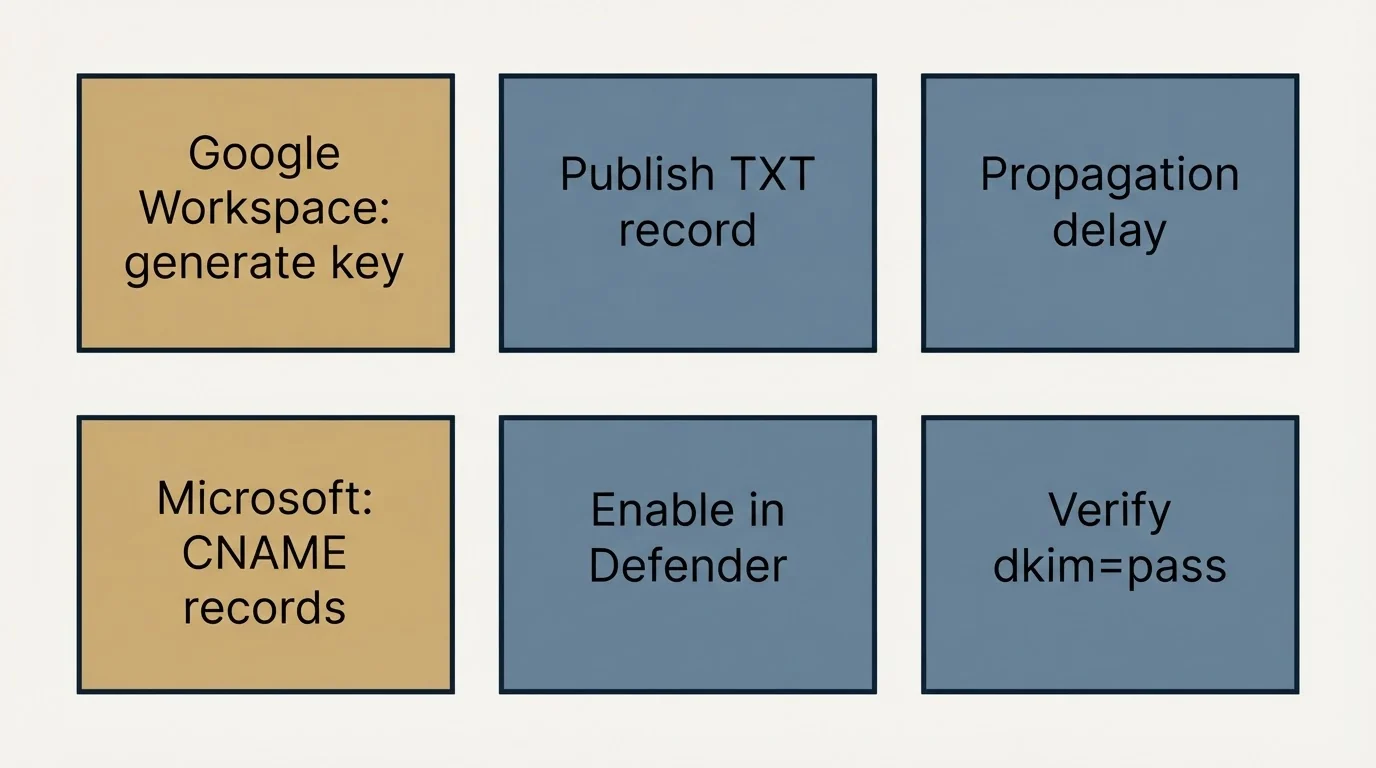
Google Workspace. Admin console, then Apps, Google Workspace, Gmail, Authenticate email. Select the domain, generate a new record, and choose 2048-bit unless your DNS provider cannot handle the record length. Google's default selector prefix is google, so the record you publish looks like this:
google._domainkey.yourdomain.com TXT v=DKIM1; k=rsa; p=<public key>
Return to the admin console and click Start authentication. Google notes that changes can take up to 48 hours to propagate. Send a test message and look for dkim=pass in the recipient's Authentication-Results header.
Microsoft 365. DKIM is published as two CNAME records rather than a TXT record, which lets Microsoft rotate keys without you touching DNS:
selector1._domainkey.yourdomain.com   CNAME   selector1-yourdomain-com._domainkey.<tenant>.onmicrosoft.com
selector2._domainkey.yourdomain.com   CNAME   selector2-yourdomain-com._domainkey.<tenant>.onmicrosoft.com
Then enable signing for the domain in the Defender portal. Copy the exact target values the portal shows you rather than constructing them by hand, because the tenant fragment varies.
DMARC: the policy record, tag by tag
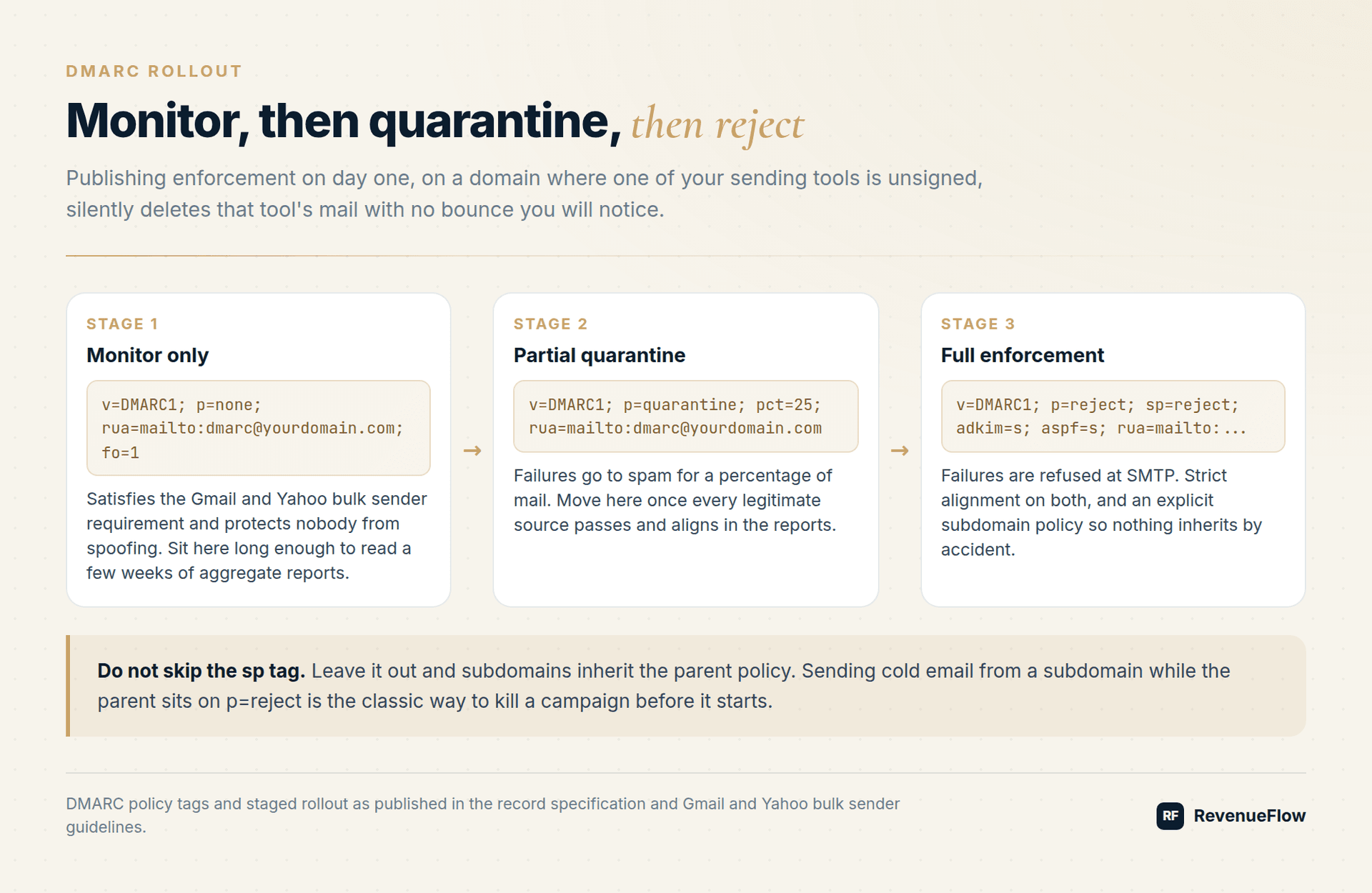
Monitoring only, which is the correct starting point:
_dmarc.yourdomain.com TXT v=DMARC1; p=none; rua=mailto:dmarc@yourdomain.com; fo=1
Quarantine, once the reports are clean:
v=DMARC1; p=quarantine; rua=mailto:dmarc@yourdomain.com
Full enforcement:
v=DMARC1; p=reject; sp=reject; adkim=s; aspf=s; rua=mailto:dmarc@yourdomain.com
What the tags do:
p=is the policy for the domain:nonereports only,quarantinesends failures to spam,rejectrefuses them at SMTP.sp=sets a separate policy for subdomains. Leave it out and subdomains inheritp=. Sending cold email from a subdomain while the parent domain sits onp=rejectis the classic way to kill a campaign before it starts.pct=is historic: RFC 9989, which obsoleted the original DMARC specification in May 2026, deprecates it, and receivers ignore deprecated tags rather than rejecting the record. An existing record withpct=keeps working, but do not build a new rollout plan around percentage stepping - stage by policy level (nonetoquarantinetoreject) instead. What changed in 2026 covers the rest of the update.adkim=andaspf=set alignment strictness:rfor relaxed (the default, allows subdomain matches) orsfor strict (requires an exact domain match).rua=is where aggregate XML reports are delivered. Without it you are enforcing blind.
p=none satisfies the Gmail and Yahoo bulk sender requirement and protects nobody from spoofing. Sit at p=none long enough to read a few weeks of aggregate reports, confirm every legitimate source passes and aligns, then move to quarantine and finally reject.
Common failure modes
- No: Passing SPF, failing DMARC
- No: Two SPF records
- No: Blowing the lookup budget
- No: A subdomain with no policy of its own
- No: Forwarding
- No: Jumping straight to reject
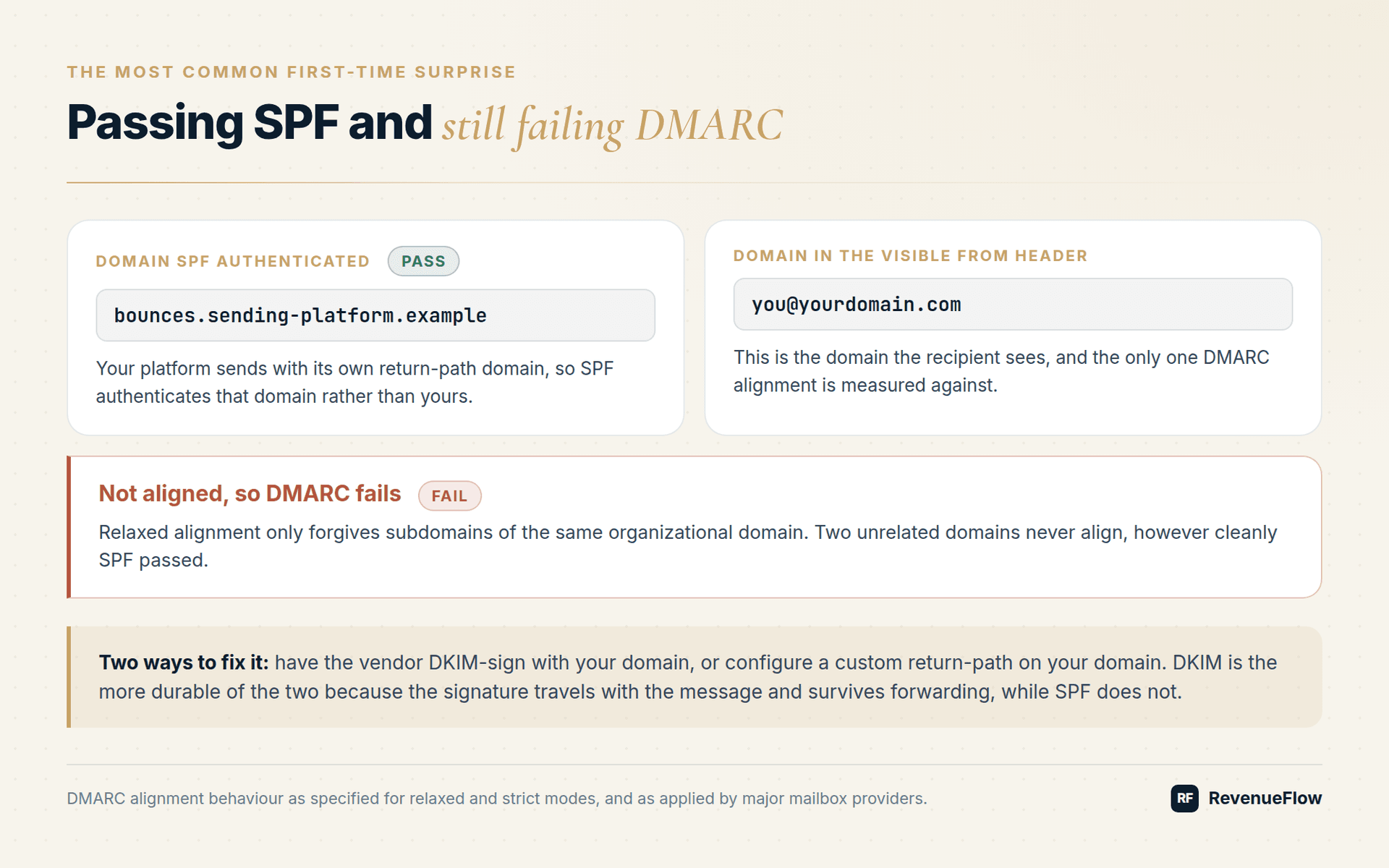
Passing SPF, failing DMARC. Your platform sends with its own return-path domain, SPF authenticates that domain, and it does not match your From domain. Relaxed alignment only forgives subdomains of the same organizational domain. Fix it by having the vendor DKIM-sign with your domain, or by configuring a custom return-path on your domain.
Two SPF records. Someone adds a second record for a new tool instead of adding an include to the existing one, and both get thrown away. Merge them into one.
Blowing the lookup budget. A record with a sending platform, a CRM, a helpdesk, and a transactional provider can quietly cross ten lookups. Flatten it or drop the includes you no longer use.
A subdomain with no policy of its own. Inheritance surprises people in both directions. Publish an explicit sp= on the parent, or a dedicated _dmarc record on the sending subdomain.
Forwarding. SPF breaks on forwarding because the forwarding server is not in your record. DKIM usually survives because the signature travels with the message. That asymmetry is exactly why DKIM is the more durable of the two, and why relying on SPF alone is fragile.
Jumping straight to reject. Publishing p=reject on day one, on a domain where one of your five sending tools is unsigned, silently deletes that tool's mail with no bounce you will notice.
The cold email specific part
An outbound operation runs many sending domains, not one. Each needs its own SPF, DKIM, and DMARC records, and each fails independently. The reason we buy 3x more email infrastructure than we need is the same reason this matters: domains are consumable, and an unauthenticated domain is consumed before it sends a single message.
Build the records into domain provisioning rather than a post-launch checklist, then verify per domain before the first send:
dig TXT yourdomain.comreturns exactly one SPF record.dig TXT google._domainkey.yourdomain.com(or your selector) returns a key.dig TXT _dmarc.yourdomain.comreturns a policy with anruaaddress.- A test send to a Gmail account shows
spf=pass,dkim=pass, anddmarc=pass, with the DKIM domain matching the From domain. - The domain shows a Compliant status in Google Postmaster Tools.
Authentication is table stakes rather than strategy. Once it is clean, the things that move inbox placement are list quality, volume discipline, and recipient behaviour. Start with the cold email deliverability guide and what actually works in 2026, watch your spam rate against benchmarks, and clean lists with real verification so bounces never touch your reputation. If sending is already broken, check whether you are blacklisted before rebuilding anything. And if you are mailing into Canada or the EU, records are only half the compliance picture: here is what the law requires.
Want this built and monitored for you? Get a free campaign plan and we will map the domain, authentication, and sending setup for your ICP.
Frequently asked questions.
Frequently asked questions- Do I need DMARC for cold email if I send less than 5,000 emails a day?
- Technically no, since Gmail only mandates DMARC above 5,000 messages a day to personal Gmail accounts. Practically yes. Cold sending domains have no reputation history, filters treat authentication as a trust signal at any volume, and Postmaster Tools reports your compliance status regardless of volume. Publishing p=none costs one DNS record.
- Why does my email pass SPF but fail DMARC?
- Because DMARC checks alignment, not just authentication. Your sending platform likely uses its own return-path domain, so SPF authenticates that domain rather than the one in your From header. Fix it by having the platform DKIM-sign with your domain, or by configuring a custom return-path on a subdomain of your sending domain.
- Should I use ~all or -all at the end of my SPF record?
- Use ~all while you are still adding sending infrastructure. It softfails, so a missing include marks mail rather than rejecting it. Move to -all once your list of legitimate senders has stopped changing. Microsoft 365 publishes -all by default, which is safe there because the tenant is the only sender.
- How long does it take for SPF, DKIM, and DMARC changes to take effect?
- DNS propagation is usually minutes to a few hours, but Google states changes can take up to 48 hours. Do not judge a new record by a single test send in the first hour. Verify with a dig query first to confirm the record resolves, then send a test and read the Authentication-Results header.
- Do I need separate SPF, DKIM, and DMARC records for every sending domain?
- Yes. Authentication is per domain, and each domain fails independently. An outbound operation running twelve sending domains needs twelve sets of records. Build record creation into your domain provisioning step so a domain can never reach a campaign unauthenticated.
About the author.

Ben Carden is CRO at RevenueFlow, which builds and operates outbound revenue engines for B2B companies. Previously at Gartner Enterprise. Studied at London School of Economics.
Ben Carden · CRO
Connect on LinkedIn →Explore more.
Ready to scale your outreach?
We build GTM engines that book real meetings. See the receipts.
Related articles.
SPF Flattening: The Definition, and What It Trades Away
SPF flattening swaps include statements for the addresses they resolve to, to stay under the ten-lookup ceiling. What it fixes, and what it quietly costs.
SPF Record: What It Publishes, and the Limit That Silently Breaks It
An SPF record names the servers allowed to send for a domain. The ten-lookup ceiling is what breaks it, and the breach produces no error anybody sees.
DMARC Policy: The p Tag, and Why Publishing One Protects Nothing
A DMARC policy tells receivers what to do with mail that fails authentication for your domain. Publishing one and enforcing one are different acts.
DKIM: The Definition, the Mechanics, and the Common Mistake
DKIM signs a message with a private key so receivers can verify the domain that sent it. What the signature proves is narrower than most people assume.
SMTP Reply Codes: What Each Class Instructs
The digits are a verdict and the text is the reason. Separating an address failure from a policy refusal before reacting is what decides whether the fix works.
SURBL Blacklist: What It Lists and How to Get Removed
SURBL tests the domains inside your message rather than your sending IP. Which of its six lists fired, what the bitmask means, and the fix that works.