Cold Email Deliverability: A Guide to Inbox Placement
Cold email that lands in spam makes every other decision irrelevant. The technical foundation, the sending discipline, and the order to work in when placement breaks.
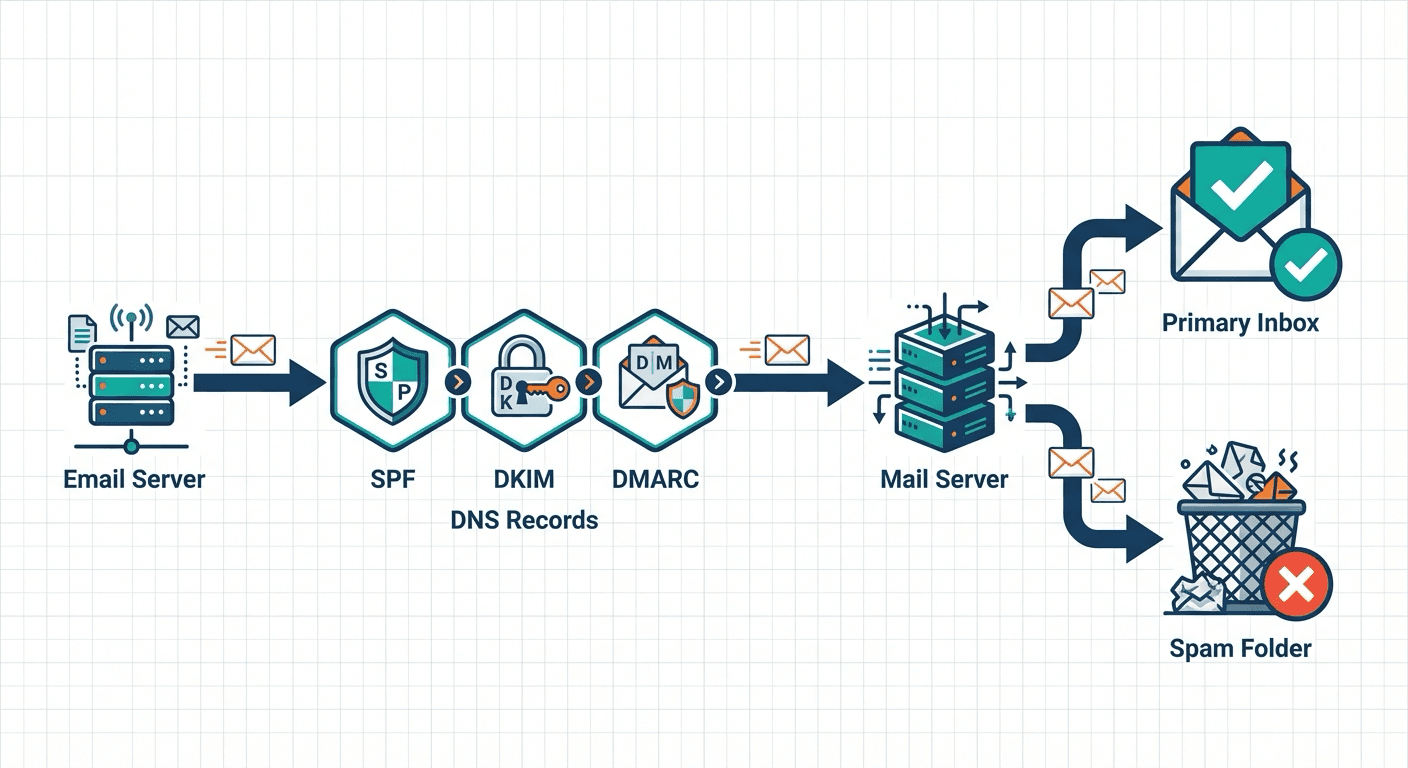
Cold email deliverability depends on authentication that resolves, separate sending domains aged about 30 days, four to six weeks of warming, and volume held far below the provider ceiling at roughly 20 sends per mailbox per day. When placement breaks, work the diagnostic order from authentication down to content rather than rewriting copy first.
Key takeaways
- Cold email runs on separate sending domains, never the primary one, because a flagged domain takes transactional mail and the team's ordinary correspondence down with it.
- Volume per mailbox decides more than the provider ceiling does. At roughly 20 sends per mailbox per day across two mailboxes, a domain sits near 40, so 1,000 sends a day means about 50 mailboxes across 25 domains.
- When placement is already broken, the order is authentication, then blocklists, then list quality, then sending pattern, then complaint rate, with content last, because each step is faster to rule out than the one after it.
- One message per campaign. Adding follow-ups multiplies the volume sent to a given audience roughly fivefold, and every one of those extra sends goes to somebody who has already declined to engage once.
Reviewed and updated October 1, 2026
The Complete Guide to Cold Email Deliverability
A campaign goes out to two thousand people and returns four replies. The copy gets rewritten, the list gets rebuilt, the offer gets sharpened, and the next campaign returns three. Nothing in that loop touches the actual problem, which is that most of those messages were filed as junk before anyone read a word of them.
Placement sits underneath everything else. A subject line only competes against other subject lines once it is in the same folder as them.
This guide covers the technical foundation, the sending discipline that keeps it standing, and the order to work in when placement has already gone wrong.
Most advice on how to avoid spam filters starts with words to remove from the subject line, which is the last thing that decides placement and the first thing people change.
Everything below is the answer to the question usually typed as how to stop emails going to spam, worked in the order that actually changes placement rather than the order that feels productive.
What Deliverability Actually Means
Delivery and deliverability are two different measurements, and mixing them up is why so many senders believe a campaign went fine.
Delivery means the receiving server accepted the message. Deliverability means it landed in the primary inbox rather than the junk folder. A campaign can report 99% delivery and still be almost entirely unread, because a message filed as spam was accepted before it was filed.
When you send a cold email, three things can happen:
- It lands in the primary inbox, where a person may see it.
- It is delivered and filed as spam, which is invisible and looks like success in your reporting.
- It is rejected outright, which at least tells you something is wrong.
The second outcome is the one that costs money, because nothing in your sending platform reports it. Placement is not directly observable from the sending side at all. What you can do is estimate it with seed testing, which inbox placement testing covers, and read the receiver's own view of your sending in Google Postmaster Tools.
We plan cold programmes against a working target of roughly 70% to 85% inbox placement. That is a planning figure rather than a measured guarantee, and any provider quoting you a placement percentage as a promise is quoting something they cannot observe either.
Cold email is harder than transactional or marketing mail for three structural reasons. New domains carry no history. Recipients have no prior relationship, so early engagement is thin. Volume arrives in patterns that look nothing like a person typing. You are asking a filter to trust an unknown sender, and the filter's default answer is no.
The Diagnostic Order
A frequent starting point is that previous lead generation efforts never solved the email delivery problem, and the diagnostic order below is why: a programme that changed the copy or the list while leaving authentication, domains and warming untouched was working on the layer that was not broken.
When placement is broken, the expensive mistake is starting with the copy. Work in this order instead, because each step is cheaper and faster to check than the one after it, and because a problem found at step one makes every later step meaningless.
- Step 1Authentication
SPF, DKIM and DMARC resolving correctly for the exact sending domain. Minutes to check, hours to fix.
- Step 2Blocklists
Check whether the domain or its IP is listed. A listing explains sudden, total failure better than anything else.
- Step 3List quality
Bounce rate is the fastest read on whether the addresses exist and belong to people.
- Step 4Sending pattern
Volume per mailbox, ramp speed, and how long the domain has existed.
- Step 5Complaints
Spam complaint rate against the receiver's published threshold.
- Step 6Content
Last, and usually least. Rewriting copy is the most attempted fix and among the least effective.
The order is not a ranking of how interesting each layer is. It is a ranking of how likely each one is to be the actual cause, weighted by how quickly you can rule it out. Broken authentication and a blocklist listing produce symptoms that look identical to a content problem from the sending side, and both are fixed in hours rather than weeks.
Authentication: SPF, DKIM and DMARC
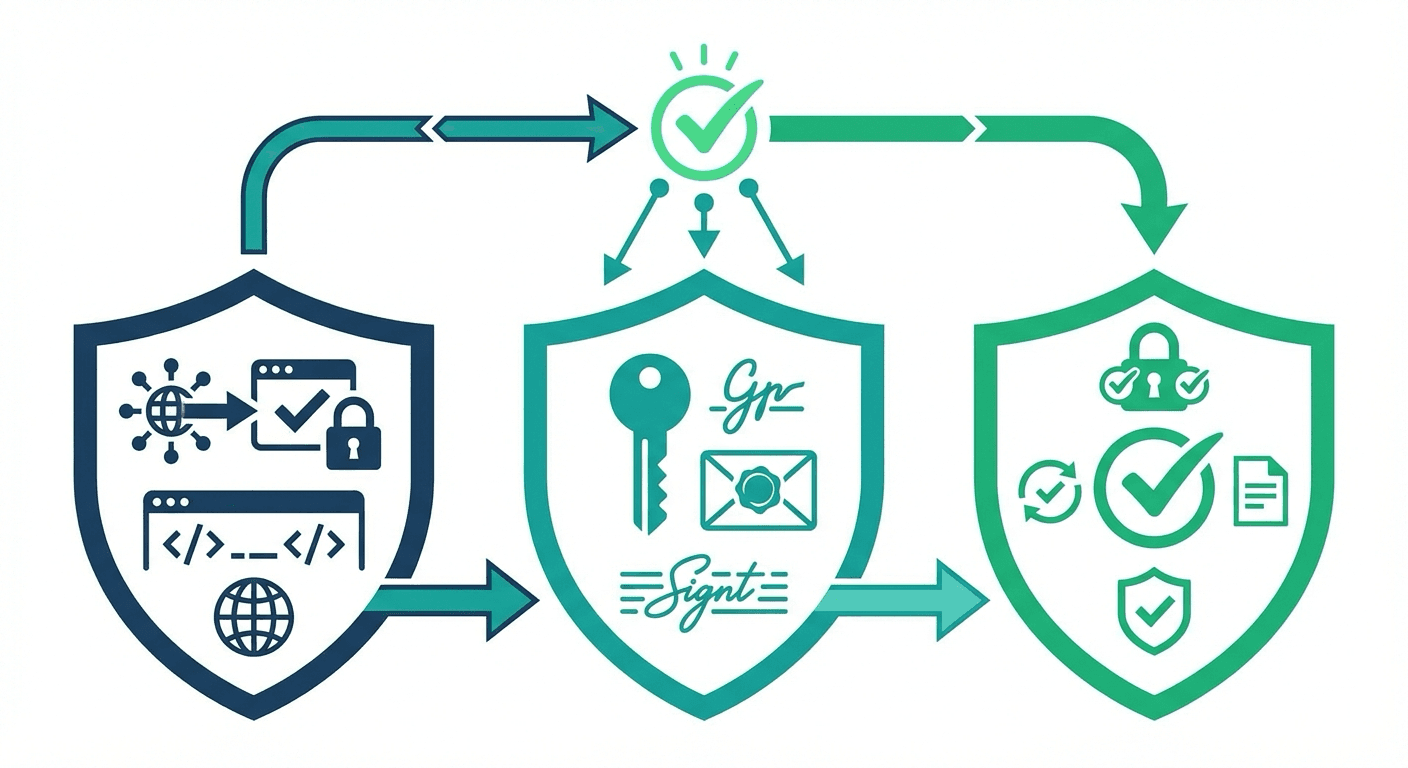
Three DNS records establish that mail claiming to come from your domain actually did. Skip any of them and receiving systems have no basis for trusting the message at all.
SPF publishes which servers are allowed to send for your domain. It is a single TXT record, and the most common failure is having two of them, which invalidates both. One record, checked after every change.
DKIM attaches a cryptographic signature to outbound mail, proving it was not altered in transit and that it came from a server holding your key. The key is generated at your mailbox provider, in the Google Workspace admin console or the Microsoft 365 admin centre, and the public half goes into DNS as a TXT record. This is worth stating plainly because a lot of guidance tells you to generate DKIM keys inside your sending platform. The sending platform relays mail through the mailbox provider; the signing identity belongs to the provider that hosts the mailbox.
DMARC tells receiving systems what to do when SPF or DKIM fail, and asks them to report back. Start at p=none, which monitors without affecting delivery, read the reports until you are confident nothing legitimate is failing, then move to p=quarantine and eventually p=reject.
The record syntax, the per-provider setup steps and the common misconfigurations are covered in full in SPF, DKIM and DMARC for cold email. Two points that belong here rather than there: authentication must resolve for the exact domain in the From header rather than a parent domain, and a custom tracking domain needs its own DNS entries. Shared tracking domains put your click links on a hostname whose reputation is set by every other user of that platform.
Domains and Mailboxes
This is also the answer to the objection that cold email uses mismatched domains which hurts credibility: the sending domain is deliberately not the company domain, and the identity the recipient checks lives in the sender name and the signature, which is why those three have to agree with each other.
Never send cold email from your primary domain. If the domain gets into trouble, the damage is not confined to the campaign. Invoices, password resets and your team's ordinary mail all inherit the same reputation. Cold outreach runs on separate sending domains that are treated as consumable.
That word is the important one. A sending domain is inventory with a working life, not a permanent asset, and the operating posture that follows from it is to replace a domain that develops a problem rather than nurse it back. We maintain considerably more sending capacity than a campaign consumes for exactly this reason.
On the domains themselves, RevenueFlow runs generic sending domains from our own pre-warmed inventory as a matter of policy, and never registers client-branded or lookalike domains for a campaign. The client's identity lives in the sender display name and the signature, which is where a recipient actually reads it. A lookalike domain buys nothing a display name does not already provide, and it puts a brand's name on infrastructure that is designed to be discarded.
Volume per mailbox is the number that matters most, and it is far lower than the provider ceiling. Google Workspace and Microsoft 365 both permit daily volumes in the thousands, and those published limits are the point at which the provider stops you rather than the point at which filters stop trusting you. The per-provider figures are collected in email sending limits by provider.
Our operating policy is roughly 20 sends per mailbox per day, with two mailboxes on a domain, which puts a domain at about 40 sends a day. Working out the inventory from there is arithmetic rather than judgement:
| Daily sends | Mailboxes at 20/day | Domains at 2 mailboxes |
|---|---|---|
| 200 | 10 | 5 |
| 500 | 25 | 13 |
| 1,000 | 50 | 25 |
Those are worked from the policy figures above rather than from any measured result. The shape of the answer is what matters: reaching real volume means many mailboxes each doing very little, distributed by the sending platform, which is what inbox rotation describes. A programme that hits its number through a handful of hard-pushed mailboxes is carrying a risk it has not priced.
Finally, let a new domain exist for about 30 days before it sends anything cold. Registration date is visible to receiving systems and a domain registered this week sending outreach next week is a recognisable pattern.
Warming
You cannot take a new mailbox from zero to full volume. Warming means raising volume gradually while positive engagement accumulates against the domain, and it takes four to six weeks.
- Week 15 to 10 per day
Warmup traffic only. The domain is establishing that it exists and behaves.
- Week 210 to 15 per day
Still warmup traffic. Watch for anything landing in junk at this stage.
- Week 315 to 20 per day
First real sends can begin alongside warmup, in small volumes.
- Weeks 4 to 6About 20 per day
Steady state. The mailbox stays here rather than climbing further.
Automated warmup tools exchange mail between participating accounts and mark it as read, replied to and not spam. They generate engagement signals cheaply, and they are worth running. They also do less than the category implies, because the engagement is synthetic and receiving systems are not obliged to weigh it the same way they weigh a real conversation. What warmup tools actually do works through the gap between the claim and the mechanism.
The one thing warming cannot do is repair a domain that has already been burned. Warming prepares a clean domain for volume, and a burned one needs the recovery path further down this page.
One Message Per Campaign
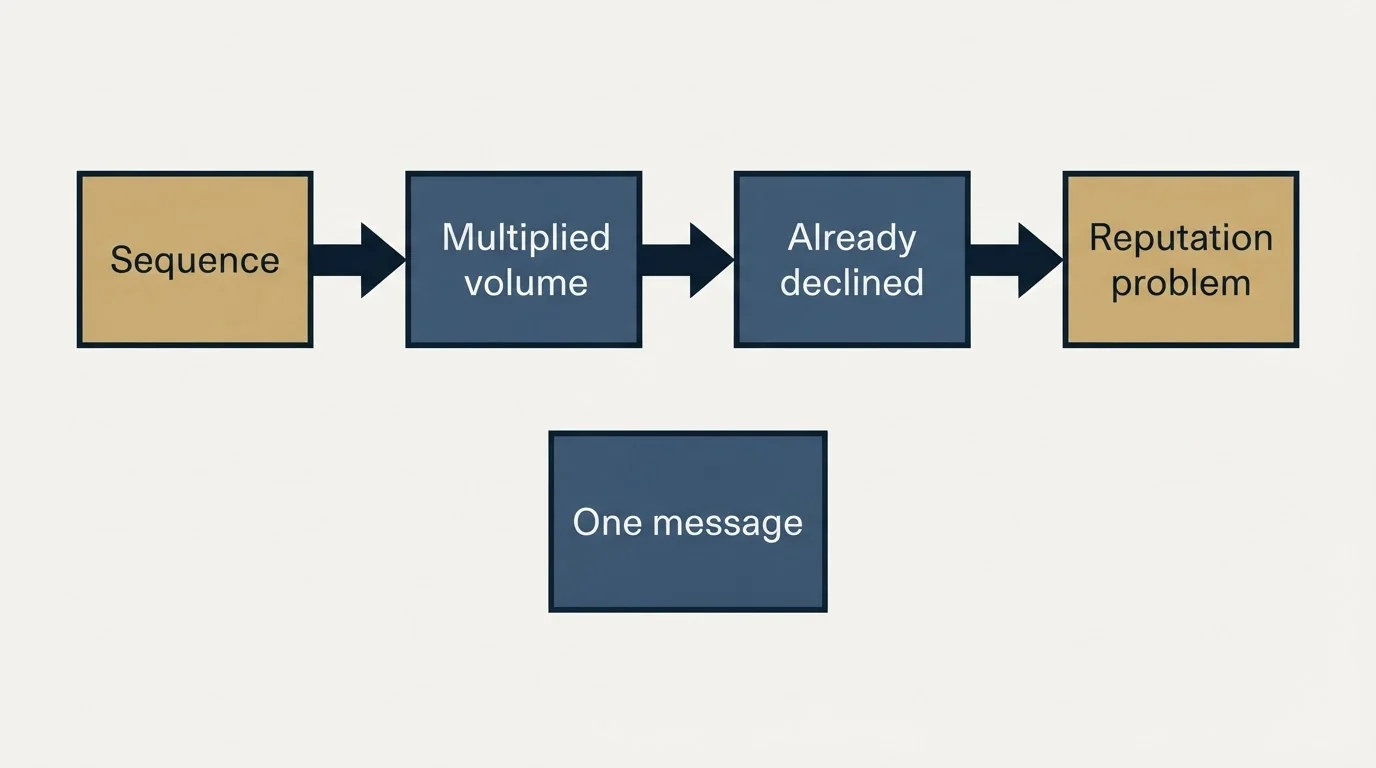
Standard practice across the industry is a sequence: an initial email, then three, five or seven follow-ups to anyone who did not reply.
We do not run follow-up sequences. Every campaign carries exactly one message, never a bump underneath a message the prospect already ignored.
The reasoning is partly about response and partly about deliverability, and both point the same way.
The response side of the argument, and the reasoning that produced the policy, is set out in the case for dropping follow-up sequences entirely.
The deliverability side is arithmetic, and it is unforgiving. A five-touch sequence multiplies the send volume for a given audience by roughly five, and every one of those extra sends goes to somebody who has already declined to engage with you once. Non-engagement is one of the signals filters weigh most heavily, so a sequence concentrates your worst engagement signal into most of your volume. You are spending five times the sending capacity to accumulate a reputation problem.
It also makes capacity planning honest. When a campaign of 2,000 leads means 2,000 sends, the inventory arithmetic above is the whole calculation. Cold email infrastructure works through what that means when you are sizing a programme.
Content, and the Trigger-Word Question
Two rules get bundled together here and only one of them is firm: domains are warmed before they send, and hyperlinks are worth being sparing with in a first message for the way they read rather than because a link is itself a deliverability fault.
Lists of forbidden spam words circulate endlessly, and rewriting copy to avoid them is the most commonly attempted deliverability fix. It is also among the least effective.
Those lists are a relic of rule-based filtering. Modern filters weigh authentication, domain history, sending pattern and recipient behaviour far more heavily than vocabulary, which is why the same message lands in the inbox from one domain and in junk from another. A message can be filed as spam without containing a single word from any of those lists, and a message full of them can land perfectly well from a domain with history behind it. What a spam filter actually weighs and how Gmail's filtering works both go through this in detail.
None of which makes content irrelevant. A few structural things genuinely matter, and they are about shape rather than vocabulary:
- Links. One or two, on a tracking domain you control.
- Attachments. None, in a first cold message.
- Format. Plain text or close to it. Image-heavy HTML in a cold message is a pattern in itself.
- Relevance. The signal that outranks everything on this list. Messages people find relevant get engagement, and engagement is what a filter is trying to predict.
Write like a person writing to one other person, and the vocabulary question stops being interesting.
Monitoring
Four numbers tell you whether the foundation is holding.
Bounce rate should sit under 5%. Above 8% the list is the problem, and no amount of infrastructure work will compensate. Verifying addresses before upload is cheaper than every remedy downstream of a bad list.
Spam complaint rate should sit well under 0.1%. Google publishes 0.3% as the level at which senders should expect consequences, so 0.1% is the number to run against rather than the number to approach.
Reply rate is the closest thing to a direct read on whether recipients want the mail. It is also the input filters care about most, which makes it a deliverability metric as much as a performance one.
Placement, estimated by seed testing, since it cannot be measured directly.
Content-scoring tools return a number for a single message against the older, rule-based layer of filtering. That number is worth reading and is not worth optimising, for the same reason the trigger-word lists are not: it scores the layer that decides the least. Spam score covers what those readings do and do not represent.
If You Are Already Flagged
- Yes: Stop sending from the affected domains immediately
- Yes: Check blocklists for the domain and the sending IP
- Yes: Request delisting through each blocklist's own process
- Yes: Re-verify authentication end to end before resuming anything
- Yes: Re-verify the list that was sending when the problem started
- Yes: Resume at warming volumes, not at previous volumes
- No: Keep sending while you investigate
- No: Rewrite the copy first
The blocklist branch has its own procedure, including which listings matter and which are noise, in blacklist check and recovery.
One judgement call sits at the end of this. A domain that has been genuinely burned can take months to recover, and replacement inventory costs the price of a domain plus a warming cycle. Rebuilding a burned domain is frequently the more expensive option, and treating domains as consumable from the start is what makes that an easy decision rather than a painful one.
The Audit Checklist
Run this before launching and again whenever placement moves:
Authentication. One SPF record, resolving. DKIM signing and verifying at the mailbox provider. DMARC published, at minimum p=none. Custom tracking domain configured.
Domains. At least 30 days old. Not on a blocklist. Separate from your primary domain. Generic rather than brand-lookalike.
Sending. Warming completed. About 20 sends per mailbox per day. Enough mailboxes that no single one is pushed. One message per campaign.
List. Verified before upload. Bounce rate under 5%. Targeting that makes the message plausibly relevant.
Content. One or two links. No attachments. Plain text or close to it.
The checklist version of this, run as a standalone exercise, is the deliverability audit.
The Bottom Line
Deliverability is a small number of unglamorous decisions, made early and then held. Authentication that resolves. Domains that are separate, aged and treated as consumable. Volume per mailbox far below the ceiling. One message per campaign rather than a sequence that multiplies your worst engagement signal. A list of addresses that exist.
Get those right and the content question becomes a writing question, which is a much better problem to have. Get them wrong and the best campaign you will ever write goes into a folder nobody opens.
Deliverability is the infrastructure layer underneath every other cold email decision. It comes first because everything above it depends on it.
Related Reading
- What Warmup Tools Do and What Actually Moves Placement
- Email Deliverability in 2026: What Actually Works
- Cold Email Infrastructure: What You Are Actually Buying
Provider limits and platform behaviour change. Verify current terms with the provider before relying on them.
Want this handled for you? See if you qualify for our done-for-you service, where the infrastructure work above is ours rather than yours.
Frequently asked questions.
Frequently asked questions- What is the difference between email delivery and email deliverability?
- Delivery means the receiving server accepted the message. Deliverability means it landed in the primary inbox rather than the junk folder. A campaign can report 99% delivery and still be almost entirely unread, because a message filed as spam was accepted before it was filed, and nothing in the sending platform reports that outcome.
- How long does it take to warm up a new domain for cold email?
- Four to six weeks, and separately a new domain should exist for about 30 days before it sends anything cold, because registration date is visible to receiving systems. Warming raises volume gradually while engagement accumulates. It prepares a clean domain for sending and cannot repair one that has already been burned.
- How many cold emails should you send per mailbox per day?
- Roughly 20, which is far below what Google Workspace or Microsoft 365 permit. Published provider limits mark the point at which the provider stops you rather than the point at which filters stop trusting you. Volume comes from many mailboxes each doing very little, distributed by the sending platform, rather than from a few pushed hard.
- Do spam trigger words actually matter for cold email?
- Much less than the lists suggest. Those lists are a relic of rule-based filtering, and modern filters weigh authentication, domain history, sending pattern and recipient behaviour far more heavily than vocabulary. A message can be filed as junk containing none of those words, and land cleanly containing several, depending on the domain that sent it.
About the author.

Tim Carden is CMO / CTO at RevenueFlow, which builds and operates outbound revenue engines for B2B companies. Studied at McGill University.
Tim Carden · CMO / CTO
Connect on LinkedIn →Explore more.
Ready to scale your outreach?
We build GTM engines that book real meetings. See the receipts.
Related articles.
SMTP Ports: What 25, 465, 587 and 2525 Are Registered For
Three of the four ports in circulation are registered to mail and one is not. What the IANA registry and the RFCs say, and why none of it moves placement.
Email Deliverability Services: What They Cannot Fix
Deliverability services fix authentication, reputation and infrastructure. They cannot fix a bad list or an offer nobody wants, which is the usual real problem.
Email Warmup Pricing in 2026: What 20 Tools Charge, and What 10 Mailboxes Cost
Email warmup tools start at a median of $29 a month, but warming ten mailboxes costs from $7.50 to $1,190 depending on how the vendor prices a mailbox.
MailReach Pricing: The Headline Rate Is the Second Band
MailReach prices warmup on a slider with four mailbox bands and two billing states. Every band at both states, and why the printed rate is not the entry rate.
Warmup Inbox Pricing: Per Inbox, Annual Loads First
Warmup Inbox prices per inbox and its page opens on the annual switch. Both states for all three plans, the reply ceiling meter, the trial and how a fleet bill is built.
Mailwarm Pricing: The Page Opens on Its Yearly Tab
Mailwarm's pricing tabs open on yearly and the plans meter daily volume rather than mailboxes. Both tabs, the overage rate, the no-trial rule and the per-mailbox cost.