Email Verification Tools: Pricing and Catch-All Handling
MillionVerifier, ZeroBounce, Bouncer, DeBounce and Findymail compared on the pricing their own pages publish, plus an honest explanation of the catch-all problem.
Email verification checks syntax, domain and MX, address type, and finally probes the mail server, which cannot confirm any mailbox on a catch-all domain. On their own pages DeBounce and MillionVerifier reach about 45 cents per thousand at volume, Bouncer runs from $8 to $2 per thousand, and ZeroBounce's ONE plan starts at $99 a month.
Key takeaways
- MillionVerifier sells 1 million verifications for $449, includes catch-all verification at no extra cost and refunds emails it cannot verify.
- DeBounce starts from $0.00045 a check but charges 10 credits for each catch-all validation, so catch-all-heavy lists cost more.
- No verification tool can confirm a mailbox on a catch-all domain; a vendor calling one valid is inferring, not probing.
- Our waterfall runs GetLeads, then Prospeo, then MillionVerifier, cheapest per contact first, and holds unconfirmed catch-all rows.
Reviewed and updated September 21, 2026
Verification is the cheapest deliverability insurance you can buy. Checking a thousand addresses costs from about 45 cents at DeBounce's or MillionVerifier's volume rates to $8 on Bouncer's smallest pack, and skipping it can cost you a sending domain. Yet the category is genuinely confusing, because every vendor publishes an accuracy percentage, none of those percentages come from a shared benchmark, and all of them go quiet on the one case that matters most in B2B: catch-all domains.
The address a campaign sends from deserves the same scrutiny, and what a no-reply sender costs a cold programme explains why the reply is the whole point of a first message.
Here is what these tools actually do, what they cost on their own pages, and how we sequence them.
A free email verifier, meaning the single-address box on a vendor homepage rather than a plan, answers a narrower question than a bulk run: it checks one address on demand, it is usually capped at a handful of lookups a day, and it tells you nothing about what share of a built list is deliverable.
To verify an email address one at a time is a support task; to verify a list before a campaign is an infrastructure decision, and the tools below are priced for the second.
Vendors sell this as an email validation service, an email verification tool or list cleaning depending on the page; the words are interchangeable and the differences that matter are catch-all handling, price per thousand and what the API returns.
The free email validator software people mean is almost always one of these vendors' free tiers rather than a separate product.
A bounce rate checker is the same product under a different name, and what it measures is the list you are about to send rather than the campaign you already sent.
A bulk email verifier is the same product again, run over a file rather than one address at a time, so the comparison below is what decides between them and the catch-all limit applies to a bulk run exactly as it applies to a single lookup.
Asking which is the best email verifier software is the same question, and the comparison below settles it on price per thousand and catch-all policy rather than on any vendor's published accuracy figure.
Bulk email verifier software is this category sold on the list-level job rather than the single-address one, so the questions that separate the products are the ones below: what a thousand costs, what happens on a catch-all domain, and whether unknown results are charged for.
The job people describe as an email bounced check, or asking how to check whether an email will bounce, is this one, run before the send rather than after: confirming an address will accept mail so the bounce never happens.
An email address verification check is the same job under a fourth name, and the useful split is between the single-address box on a vendor homepage and a bulk run over a list you are about to send.
What verification actually checks
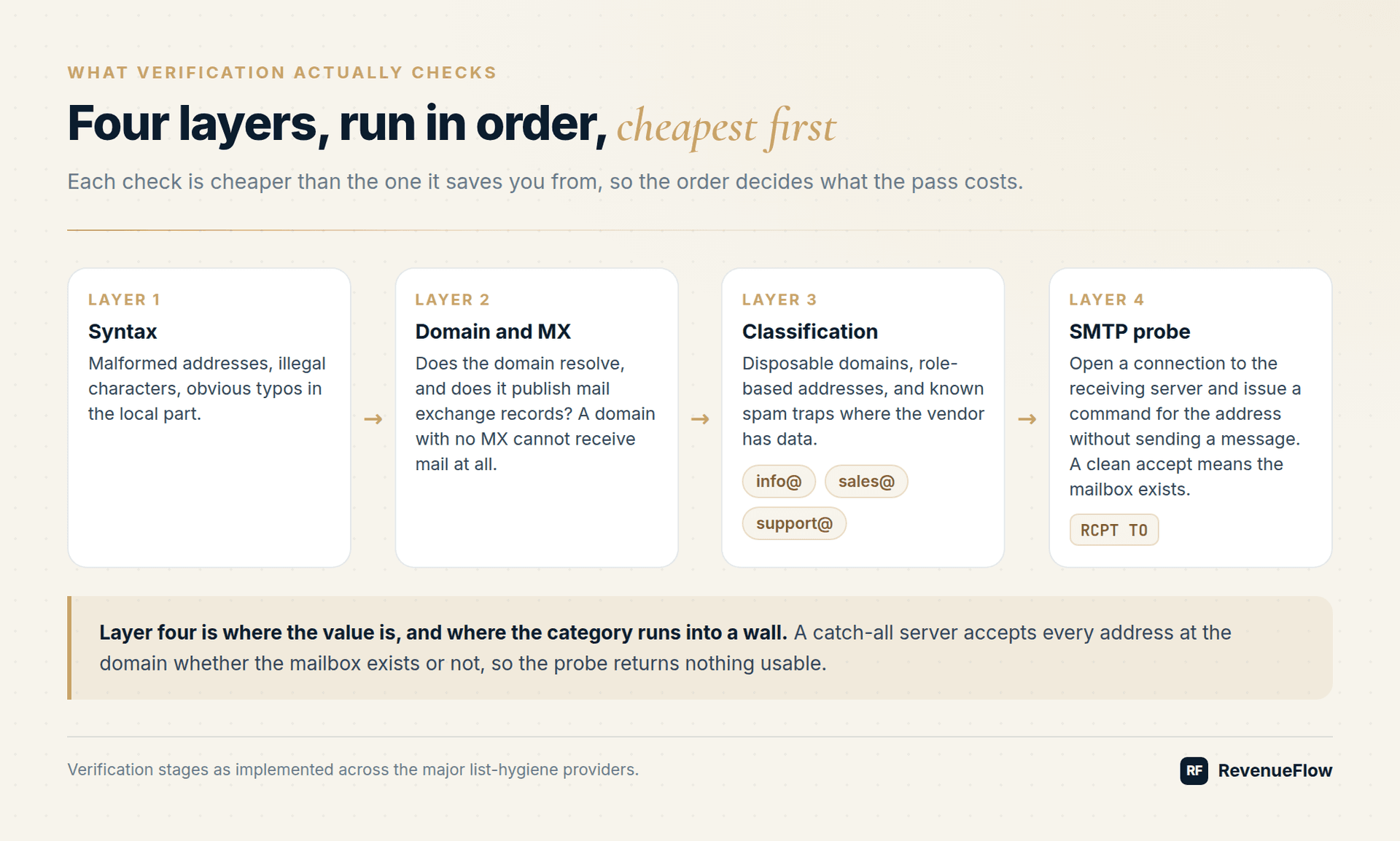
Four layers, run in order, each cheaper than the last one it saves you from:
- Syntax. Malformed addresses, illegal characters, obvious typos in the local part.
- Domain and MX. Does the domain resolve, and does it publish mail exchange records? A domain with no MX cannot receive mail at all.
- Classification. Disposable domains, role-based addresses (info@, sales@, support@), and known spam traps where the vendor has data.
- SMTP probe. Open a connection to the receiving server and issue a
RCPT TOfor the address without sending a message. A clean accept means the mailbox exists. A rejection means it does not.
Step four is where the value is, and it is also where the whole category runs into a wall.
Worth naming what a form's own validation is, because it is layer one and nothing more: the response validation in Google Forms and its equivalents check that an address is shaped like an address, which cannot tell you whether the mailbox exists.
The catch-all problem, stated honestly
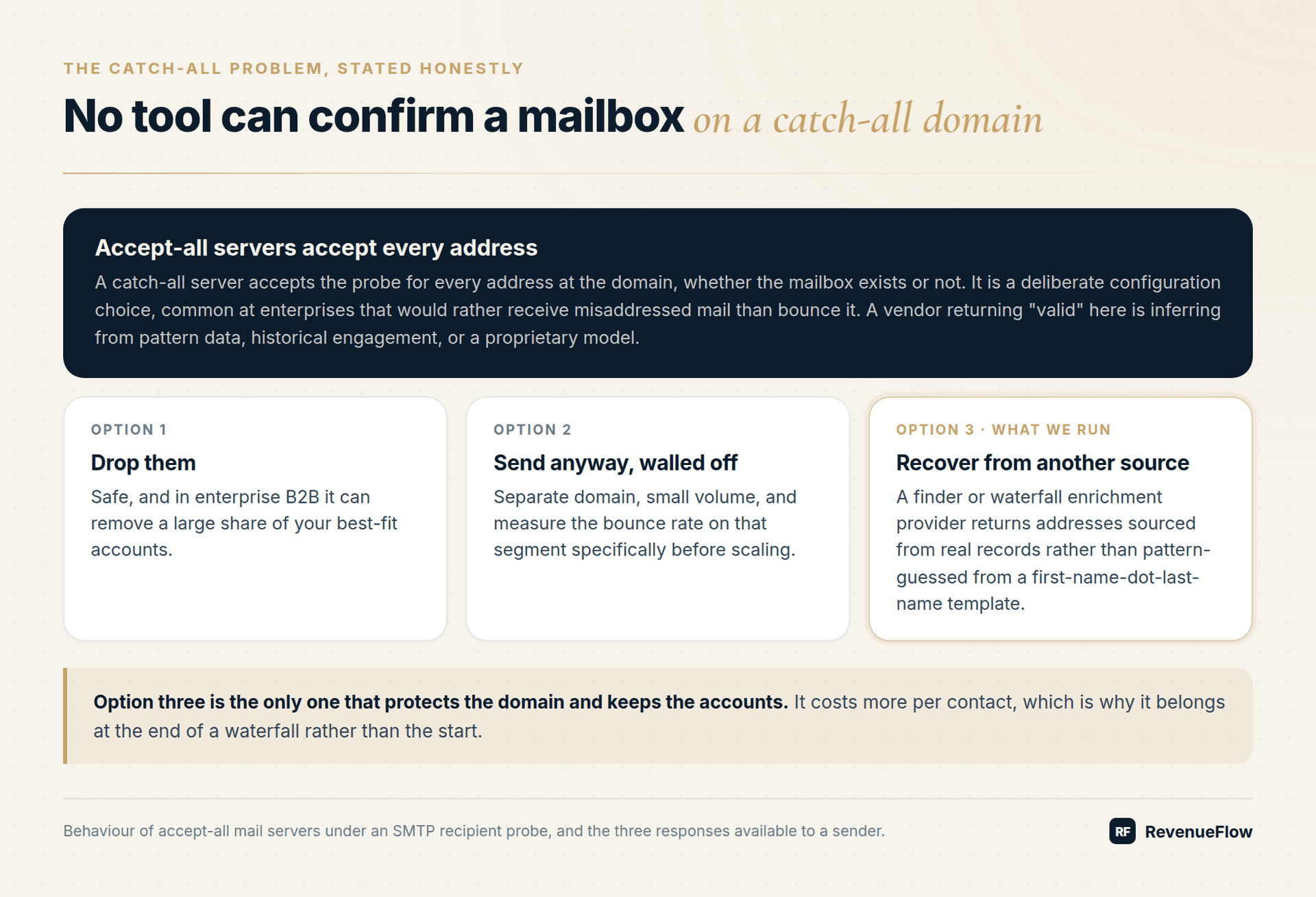
A catch-all (or accept-all) server accepts RCPT TO for every address at the domain, whether the mailbox exists or not. That is a deliberate configuration choice, common at enterprises that would rather receive misaddressed mail than bounce it.
The consequence: no verification tool can confirm a mailbox on a catch-all domain. Not one. A vendor that returns "valid" for a catch-all address is inferring from pattern data, historical engagement, or a proprietary model, and any vendor telling you otherwise about the SMTP layer is describing a guess as a fact.
That leaves three real options:
- Drop them. Safe, and in enterprise B2B it can remove a large share of your best-fit accounts.
- Send anyway, in a walled-off segment. Separate domain, small volume, measure the bounce rate on that segment specifically before scaling.
- Recover them from a different data source. Use a finder or waterfall enrichment provider that returns addresses sourced from real records rather than pattern-guessed from a first-name-dot-last-name template.
Option three is the only one that both protects the domain and keeps the accounts. It costs more per contact, which is why it belongs at the end of a waterfall rather than the start.
What the market charges: DeBounce vs MillionVerifier and the rest
Bulk email address verification is what every price in this table is quoted for: a list uploaded as a file and returned scored, rather than an address checked one at a time in a box on a homepage. Read the per-thousand column rather than the entry price, and read it beside the catch-all policy above, because on an enterprise list the share of addresses a vendor declines to score decides the real cost more than the rate does.
| Tool | Price | Credits and claim |
|---|---|---|
| MillionVerifier | From $39, 100 free credits; 1 million for $449, about 45 cents per 1,000 | Never expire; 99%+ accuracy |
| Bouncer | $8 for 1,000; $2,000 for 1 million, $2 per 1,000 | Never expire; a guarantee, no figure on its pricing page |
| DeBounce | 100 free credits; from $0.00045 a check, 45 cents per 1,000 | Never expire; a 97.5% (or better) deliverability guarantee |
| ZeroBounce | ONE from $99 a month, 10,000-credit minimum; a quote above 1 million | Never expire; 99.6% validation accuracy |
| Findymail | $99 a month: 5,000 finder plus 5,000 verifier credits | Roll over up to 2x; under 5% bounce, or credits refunded |
DeBounce and MillionVerifier land at the same volume rate, about 45 cents per thousand, so the choice between them turns on what each does with the uncertain rows. MillionVerifier includes catch-all verification at no extra cost and refunds any email it cannot verify with certainty; its demonstration sorts results into Good, Risky and Bad. DeBounce charges 10 credits for each catch-all validation and 20 for each successful data enrichment, so its headline per-check rate understates the cost on a catch-all-heavy list.
Not charged
- MillionVerifier: full refund on any email it cannot verify with certainty
- ZeroBounce: unknown results are free
- Findymail: no charge if it cannot find a verified address
- MillionVerifier: catch-all verification at no extra cost
Charged extra
- DeBounce: catch-all validation at 10 credits an address
- DeBounce: data enrichment at 20 credits a detection
ZeroBounce does not charge for unknown results and puts deliverability tools, including inbox placement tests, warm-up and blacklist monitoring, in the same ONE subscription, which matters if you would otherwise buy them separately. Its $99 entry is about $9.90 per thousand validations before those extras.
Findymail is a finder with verification built in rather than a pure verifier. It guarantees a bounce rate under 5 percent with a credit refund if exceeded, and charges only for results it finds.
NeverBounce is left out. Its pricing page did not load for this comparison, and the figures that circulate for it come from third-party trackers rather than its own rate card, which is not a source this page quotes.
Why accuracy percentages are not comparable
Every vendor in that table markets an accuracy figure or a guarantee. None of them run against a shared, published test set. Vendors differ on what counts as a correct result, whether unknowns are excluded from the denominator, and whether catch-all addresses are scored at all. Two tools quoting 99 percent can be measuring different things.
The only test that answers your question is one on your own data. Take 1,000 addresses from a representative list, split it, run each half through a different vendor, send to both, and compare the actual bounce rate against cold email bounce rate benchmarks. Your niche and your data source determine the answer far more than the vendor's marketing does. A list scraped from directories and a list built from a finder API will produce different results through the same tool.
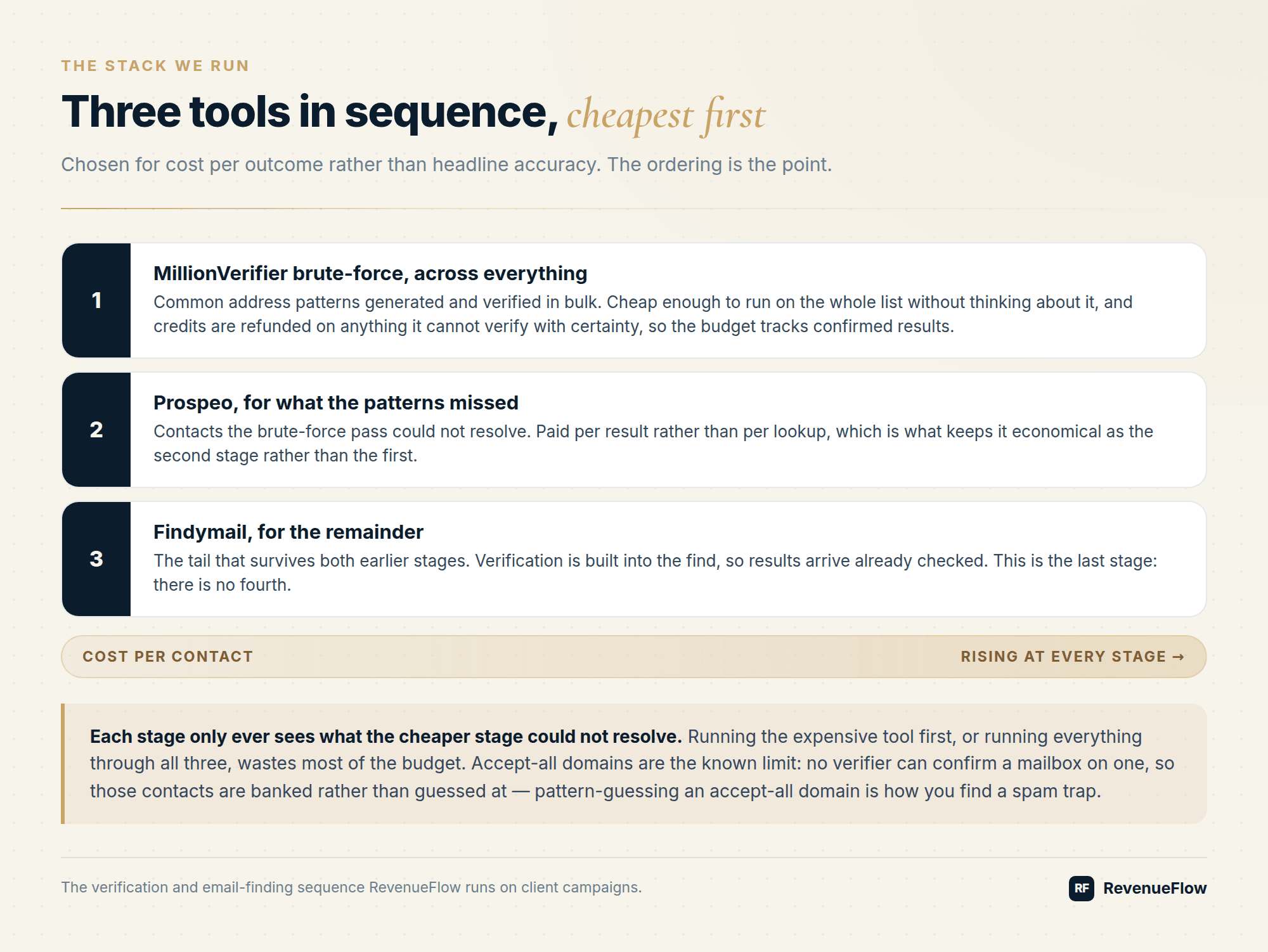
The stack we run
Three stages in sequence, chosen for cost per outcome rather than headline accuracy:
- GetLeads first, across the whole list. Every address it returns is verified before anyone sends to it.
- Prospeo second, for contacts still missing an address. It only returns addresses on the domain we asked about, so a miss cannot come back as a stranger's mailbox at some other company.
- MillionVerifier third, which tests likely address patterns against the receiving server. It is paid per check, which is why it runs last and only sees what the two finders could not resolve.
A finder across the whole list; every address it returns is verified before use.
For contacts still missing an address; it only returns addresses on the domain asked about.
Tests likely address patterns against the receiving server, paid per check.
Catch-all rows with no confirmed mailbox are held, not mailed, by default.
The ordering is the point. Each stage costs more per contact than the one before it, so each only ever sees what the cheaper stage could not resolve. Findymail is not in the default sequence; we switch it on for hard-to-find niches, where its find-and-verify pricing earns its place.
Accept-all domains are the honest limit of this stack: by default, when no stage can evidence a specific mailbox behind a catch-all server, we hold those contacts rather than mail them. We do not send to a mailbox whose existence nobody can evidence. That rule is what keeps bounce rates low enough that domains survive.
Choosing for your situation
| Your situation | Start with |
|---|---|
| Large existing list, one-off clean | MillionVerifier or DeBounce on pay as you go |
| Continuous verification wired into a pipeline | Bouncer or ZeroBounce for the API and integrations |
| You need to find addresses, not just check them | Findymail |
| Enterprise B2B, heavy catch-all exposure | A cheap first pass plus a waterfall enrichment step |
| You also want inbox placement and blacklist monitoring | ZeroBounce, which bundles them |
Verification is necessary and not sufficient
A perfectly verified list still fails if the targeting is wrong, the infrastructure is unauthenticated, or the copy generates complaints. Verification protects one specific thing: your bounce rate, and through it your domain reputation.
Authentication has its own failure mode at the record level, where staying inside the ten-lookup ceiling is what a flattened SPF record buys and what it costs.
Put it alongside correct SPF, DKIM, and DMARC records, monitoring in Google Postmaster Tools, a blacklist check whenever delivery errors spike, and the fundamentals in the cold email deliverability guide. And before you send to anyone in Canada or the EU, confirm your legal footing, because a verified address you are not allowed to email is still a problem.
Want the waterfall built and run for you? Get a free campaign plan and we will show you the verification path for your list.
Frequently asked questions.
Frequently asked questions- DeBounce vs MillionVerifier: which is cheaper?
- At volume they land at about the same rate: DeBounce from $0.00045 a check and MillionVerifier 1 million verifications for $449, both about 45 cents per thousand. The difference is the uncertain rows. MillionVerifier includes catch-all verification at no extra cost and refunds emails it cannot verify; DeBounce charges 10 credits per catch-all validation.
- What is the best email verification service?
- The one that is cheapest per confirmed result on your own list. Accuracy percentages are not measured on a shared test set, so split a representative 1,000 addresses between two vendors, send to both halves and compare real bounce rates. Price per thousand and the catch-all policy then separate the tools better than any published accuracy figure.
- Which email verification tool handles catch-all domains best?
- None can confirm a mailbox on a catch-all domain, because the server accepts every address. What differs is the charge: MillionVerifier includes catch-all verification at no extra cost, DeBounce charges 10 credits per catch-all validation, and ZeroBounce does not charge for unknown results. The safe options are to drop, wall off or re-source those rows.
- Why are some email verifiers so cheap?
- Volume and what they leave out. MillionVerifier's 1 million verifications for $449 and DeBounce's $0.00045 a check are pure verification rates; ZeroBounce's $99 ONE plan bundles inbox placement tests, warm-up and blacklist monitoring, and Findymail's $99 plan includes finding. Compare the cost per usable result, not the entry price.
About the author.

Ben Carden is CRO at RevenueFlow, which builds and operates outbound revenue engines for B2B companies. Previously at Gartner Enterprise. Studied at London School of Economics.
Ben Carden · CRO
Connect on LinkedIn →Explore more.
Ready to scale your outreach?
We build GTM engines that book real meetings. See the receipts.
Related articles.
Email Tracking Software: Six Tools, Priced and Capped
Streak, Mailsuite, Right Inbox, Mixmax, Yesware and HubSpot compared on free-tier caps and published prices, plus what an open event still proves.
Yesware Email Tracking: What the Open Notification Proves
Yesware tracks opens, clicks and attachment views from inside Gmail and Outlook. What each event proves, what every tier costs, and why an open is not a trigger.
No-Reply Email Address: What It Costs a Sender
A no-reply address is defensible on a receipt and indefensible on a cold message, because the reply is the entire product of a first contact.
SMTP Reply Codes: What Each Class Instructs
The digits are a verdict and the text is the reason. Separating an address failure from a policy refusal before reacting is what decides whether the fix works.
Transactional Email: The Class That Needs Its Own Domain
A transactional email is triggered by the recipient's own action and expected by them. The reason it needs separating from marketing and cold mail is reputation.
SURBL Blacklist: What It Lists and How to Get Removed
SURBL tests the domains inside your message rather than your sending IP. Which of its six lists fired, what the bitmask means, and the fix that works.