UCEPROTECT Level 3: The Provider Score That Lists Your IP
UCEPROTECT Level 3 lists whole providers by a published score, so a clean address still appears. What the operator says about removal, and what to do instead.
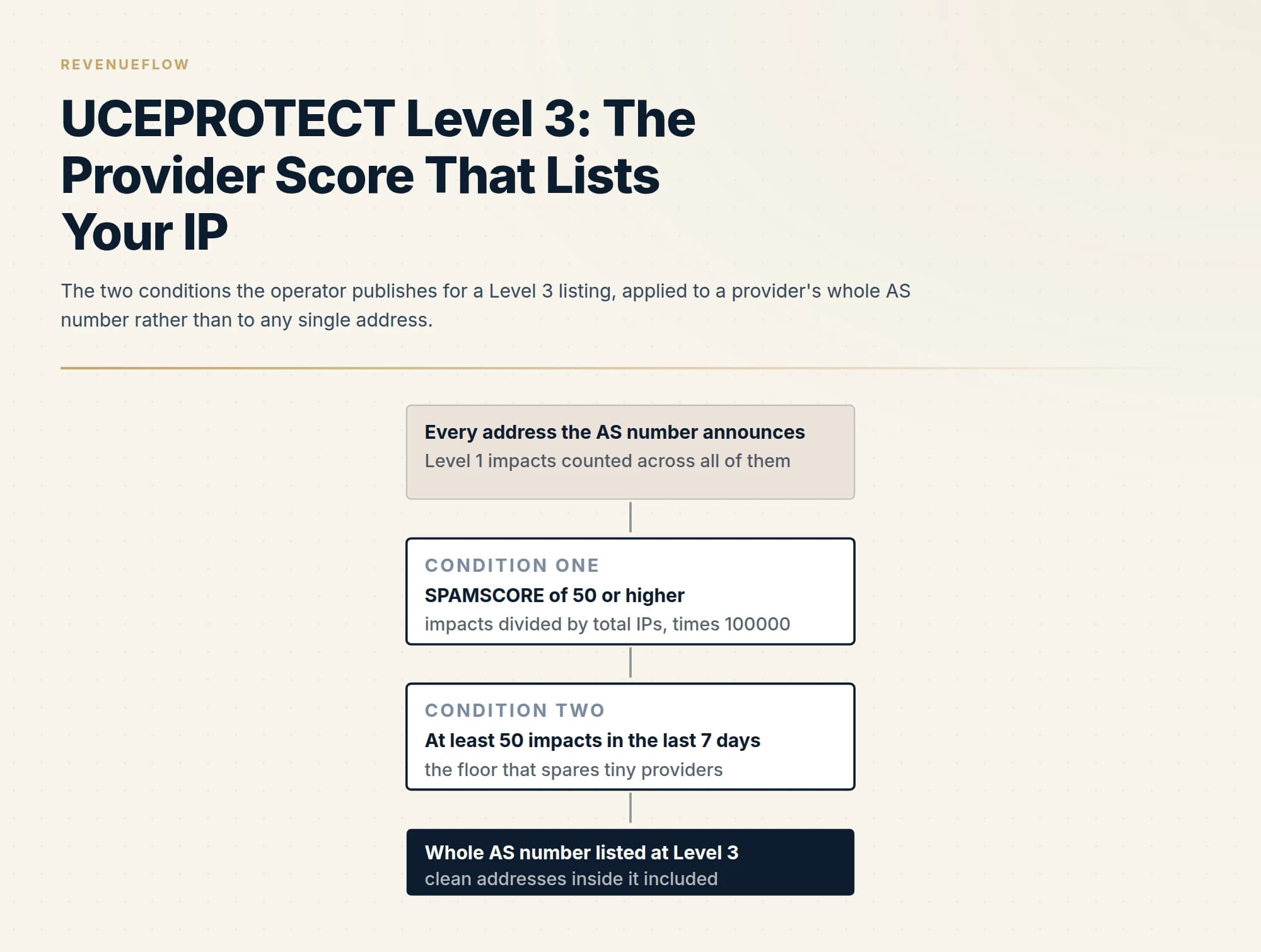
UCEPROTECT Level 3 lists every address an AS number announces once the provider's SPAMSCORE, a ratio of Level 1 impacts to total addresses scaled by 100,000, reaches 50 with at least 50 impacts in 7 days. End-customer removal requests are futile; only the provider can act, and the operator tells receivers to score the list, not block on it.
Key takeaways
- Level 3 keys on the AS number, not the address: the operator computes a SPAMSCORE over the provider's whole address space, and an address that never sent a message inherits the listing.
- Two conditions must both hold, as published on the policy page: a SPAMSCORE of 50 or higher and at least 50 Level 1 impacts inside the last 7 days, the second so that a tiny provider is not listed for one or two spammers.
- The operator's removal page says removal requests from end customers are futile and only the provider can act; the provider drops off automatically once it no longer meets the criteria or can pay for an optional express delisting whose fee is served as an image.
- The operator tells receivers to score a Level 3 match rather than block on it, so the honest test is whether any rejection string has ever named the zone before spending anything on the row.
Reviewed and updated September 19, 2026
A blocklist checker shows a row against UCEPROTECTL3, the sending address has never bounced anything, and the sender goes looking for the removal form. There is one, and the operator's own page says a request from that sender will be ignored. Level 3 does not list addresses. It lists autonomous systems, which is to say whole providers, and the address that appeared on the report is on the list because of arithmetic done over every address the provider announces.
This page follows the operator's own pages through that arithmetic: what the list keys on, the formula and the two thresholds, why a clean address still appears, what the operator says about removal, the one exclusion route it sells, and what a cold outbound programme should do with the row. The allocation-level list one step below it, which escalates a netblock rather than a provider, is worked through in UCEPROTECT Level 2; the two share a mechanism and differ in what they name.
What Level 3 lists and keys on
The Level 3 policy page, fetched on 19 September 2026, states the object in one line: "Level 3 lists IP Space of the worst ASN's." An AS number is the identifier a provider announces its address ranges under, so a Level 3 entry covers every address the provider holds.
The operator is explicit that this is a blunt instrument. The same page says: "This blacklist has been created for HARDLINERS." and then: "It can, and probably will cause collateral damage to innocent users when used to block email." That is the operator's own description of the row on your report.
The operator publishes a live counter of how many of each object are listed. On the morning of 19 September 2026 the banner across every page read "Level 1: 66204 IP's, Level 2: 10417 Allocations, Level 3: 743 ASN's.", timestamped 02:06 CEST that day. Every address inside each listed provider inherits the row.
The formula, and the two thresholds
This is the part the operator publishes and the checker discards. Listings at Level 1 are individual addresses; the Level 1 policy page says they are listed automatically "if they either try to deliver e-mails to spamtraps or if they try to break an SPF Record by forwarding mail that is forbidden by the SPF-Record" or probe the operator's servers, each listing accumulating what the operator calls impacts, and Level 3 is computed from those impacts over the provider's whole address space. The policy page states the rule: "UCEPROTECT level 3 automatically lists all IPs assigned to an AS number as soon as its SPAMSCORE is 50 or higher , and (to avoid mini providers being listed because of 1 or 2 spammers) at least 50 impacts of IPs which are assigned to the AS number have been listed in level 1 in the last 7 days."
The score itself is a ratio scaled up. The page gives it as "(Level 1 impacts from this ASN / total IPs in this ASN) * 100000", rounded to one decimal place. Because the denominator is the provider's total address count, the same impacts mean something different at a small provider and a large one: 55 impacts in 7 days against 1,024 allocated addresses gives a score over five thousand, and 160 impacts against roughly 34 million addresses gives a score of about half a point. The operator's gloss on the second case is that it "means you are a very clean and professional provider ..."
What that means in practice, in the operator's words: "It corresponds to at least 50 Impacts at tiny providers, several hundret Impacts at mid-size providers, and some thousands at big providers." And the benchmark it holds providers to: "Good providers usualy stay safely below a SPAMSCORE of 10." The spelling is the operator's.
Two further mechanisms shape the count. Level 1 records expire when an address stops abusing, so the score is a rolling window; the page argues that a respectable provider cannot reach Level 3 "because Level 1 records expire if there is no abuse for 7 days and we also took care about providers size by generating Level 3." And a provider protection window slows the count on fresh listings, giving the provider time to disconnect an abuser; the Level 2 page above walks through its stages. The operator's reading of the design is one sentence: "To get escalated to Level 3 is almost always an indicator, that providers don't act fast enough on abusers."
Separately from the score, the operator says an AS number can be listed by hand and permanently where it suspects the network exists for spamming: a provider rotating abusers within the ASN, a provider blocking blocklist ranges so its spammers can evade detection, an ASN assigned to a known spammer or botnet operator, or a striking disparity between legitimate mail and spam.
| Level | What it lists | Who can act |
|---|---|---|
| Level 1 | Single IP addresses that hit traps, broke SPF forwarding rules or probed the operator's servers | The holder of the address |
| Level 2 | Allocations, escalated when enough addresses inside the block are listed at Level 1 | The provider that owns the netblock |
| Level 3 | Every address an AS number announces, once the SPAMSCORE and the impact floor are both met | The provider or carrier that holds the AS number |
Why a clean address still appears
Nothing in the formula looks at the address on your report. An address that has never sent a message can be inside a listed AS number, and the operator's removal page tells the sender who arrives there that the whole provider, and not the sender, is what got listed, then adds: "anyway you are also not innocent, because you support spammers by giving your money to such a sewer." The tone is the operator's; the mechanism underneath it is the useful part. The listing is a judgement on where your mail leaves from rather than on what you sent.
Whose address is on the report is a separate question. Mail that leaves through Google Workspace, Microsoft 365 or a sending platform connects from the provider's addresses, so the AS number on the row is theirs. The address to test is the one quoted inside a rejection rather than the one a browser reports, and whose IP a blocklist lookup is checking works through why those are usually different.
The operator's own tool answers the level question directly. Its database query page, fetched on 19 September 2026, tells senders and providers to test different objects: "Users please test your IP adresses. Providers please test your AS number instead." It also warns that "Only manual queries are allowed.", so this is a check to run by hand once, not to script into a monitor. The same page carries a live table of the ten AS numbers with the highest scores, each with its impact count.
Removal, exactly as the operator publishes it
The removal policy page opens with the order to work in: "First it is necessary to know if only your IP address or a complete netblock or your whole provider is blacklisted." It then separates the innocent sender from the provider, and for the sender inside a listed provider it says: "It makes no sense for you to try to fix your service provider" and recommends a complaint to the provider instead.
The Level 3 removal page is blunter. "Removal requests from end customers at LEVEL 3 are futile." Followed by: "Only your service provider can change your situation."
For the provider, two routes exist, and the operator is explicit that one is optional. The default is automatic: "Your provider will be automatically removed from Level 3, as soon as they are no longer matching Listing criterias of Level 3." Because the criteria are a rolling 7-day score, that means the provider has to get its Level 1 listings down, and the page tells providers how to find them: check which Level 1 addresses are driving the listing, then "Just grep the logs (last 7 days) on those Level 1 listed servers for undeliverable outgoing mails at the time displayed." The operator expects a provider to have implemented the four preventive steps on its Help for ISPs page before contacting it: transmission limits on smarthosts, automated detection of accounts sending to many undeliverable addresses, blocking outbound port 25 from dynamic ranges, and securing dedicated customers against open relays and proxies.
The optional route is paid. To a provider that has not implemented those steps, the page says the operator can only offer removal of the ASN, and every address inside it from Level 1, on a payment basis, and that the fee is a discount compared to end users who pay per address. The amount itself is served on the page as an image rather than as text, so it is not reproduced here; the operator's page is the only place to read it. The page labels the offer as optional in capitals, states that a provider "may become re-listed if new abuse becomes known", and publishes the conditions under which the offer is withdrawn: exceeding the listing border by a factor of ten or more, placing in the top five worst spam hosters, or being believed to collaborate with spammers.
The exclusion the operator sells
One route exists at the address level, and it is the only one an end customer can use. The Level 3 removal page says: "For quality reasons, however, individual clean IPs that are registered at ips.whitelisted.org are generally excluded from level 3". whitelisted.org is run by the same network, and its home page, fetched on 19 September 2026, describes the effect: "This means if your Netrange or Provider gets listed in UCEPROTECT Level 2 or 3, then your IP will by excluded and marked as clean, if registered with us." with the condition that the address is not itself listed at Level 1 for abuse.
It is a paid registration for a fixed term; the policy page publishes the periods and prices as read on 19 September 2026: "1 Month (25 CHF), 6 Month (50 CHF), 12 Month (70 CHF), 24 Month (90 CHF)", states that payments are not refundable and cannot be moved to another address, and says a registered address is dropped "immediatley as soon as any kind of abuse is originating from it."
Whether that is worth paying for depends on whether any receiver you send to consults Level 3 at all. MXToolbox's general position on paid delisting, stated on its UCEPROTECTL3 problem page read on 19 September 2026, is that it "does not ever recommend paying for delisting" because it usually removes a listing briefly and resolves nothing. The whitelisting is not a delisting, and the reasoning still applies: money spent on a row nobody is bouncing you for buys nothing.
What a cold outbound programme should do with the row
Weight it by who consults it, and the operator tells you. Its policy page says the recommended use of Level 3 is "incorporating it into a scoring system, to give e.g. 2 points on a" match where five or more points trigger a spam tag, and that blocking on it outright is for hardliners who accept that regular mail will occasionally be rejected. A receiver following the operator's own advice scores a Level 3 match and does not refuse your campaign on it alone. MXToolbox's page files the list as reporting subnets and shared hosts, meaning entire ranges are rejected on the strength of one company's behaviour.
So the honest test is the one every sender-side list gets: has any rejection string ever named the zone. If none has, the row has never cost a send. If one has, the row is telling you which provider's address space your mail leaves from, and that is a purchasing input rather than a delisting task.
- Yes: Confirm the level with the operator's own query, testing the address a rejection quoted
- Yes: Establish whose AS number it is: yours, or the provider the mail leaves through
- Yes: Search your bounce strings for the dnsbl-3 zone before treating the row as urgent
- Yes: Rule out your own causes anyway: a bounce spike, a compromised mailbox, volume that stepped
- No: File a removal request as an end customer, which the operator says is futile
- No: Pay for a whitelisting on a row no receiver has ever bounced you for
The structural answer is the same one that makes every neighbourhood listing a routing decision rather than an incident: outbound leaves on sending domains kept apart from the corporate estate, from address space chosen for the work rather than inherited from whatever pool a provider had free, with enough spare warmed capacity that a bad provider is left rather than argued with. That posture is set out in email domain reputation, and the order to diagnose any listing in, before a single request is filed, is in email blacklist check and recovery. Confirm the level, confirm whose address it is, and rule out the causes that would be yours whatever list reported them: an unverified list producing a bounce spike, a compromised mailbox, or volume that stepped rather than ramped.
The short version
UCEPROTECT Level 3 lists AS numbers, which is to say whole providers, and every address they announce inherits the row. A provider is listed automatically when its SPAMSCORE, the operator's ratio of Level 1 impacts to total addresses scaled by 100,000, reaches 50 and at least 50 impacts have been counted in the last 7 days. The operator describes the list as built for hardliners and expects it to cause collateral damage.
Removal requests from end customers are futile, in the operator's own word. A provider comes off automatically once it no longer meets the criteria, or can pay for an optional express delisting whose fee is published only as an image. An individual clean address can be excluded by a paid registration at ips.whitelisted.org, priced per term in Swiss francs on the day this was read.
For a cold outbound programme the row is a statement about the provider's address space, and the operator itself tells receivers to score it rather than block on it. Search your bounce strings for the zone before spending anything; if nothing has ever named it, nothing has been lost. If you would rather send from address space chosen for the work than from whatever pool a provider had free, we plan the first campaign for free.
The listing object, the SPAMSCORE formula and its two thresholds, the manual listing grounds, the removal position for end customers and providers, the optional paid route and its withdrawal conditions, the whitelisting exclusion and the guidance to receivers are taken from UCEPROTECT's own Level 3 policy, Level 1 policy, removal policy, Level 3 removal, database query and Help for ISPs pages, fetched 19 September 2026; the listing counts are from the operator's own page counter, timestamped 02:06 CEST that morning. The whitelisting terms and prices are from whitelisted.org's home and policy pages, fetched the same day. MXToolbox's classifications and its view on paid delisting are from its UCEPROTECTL3 problem page, read the same day. The express delisting fee is served as an image on the operator's page and is not reproduced here. Verify current list behaviour with the operator before relying on it.
Sources: UCEPROTECT Level 3 policy, UCEPROTECT Level 1 policy, UCEPROTECT removal policy, UCEPROTECT Level 3 removal, UCEPROTECT database query, UCEPROTECT Help for ISPs, whitelisted.org, whitelisted.org policy, MXToolbox on UCEPROTECTL3
Frequently asked questions.
Frequently asked questions- Why is my IP on UCEPROTECT Level 3 when it has never sent spam?
- Because Level 3 does not list addresses. It lists every address an AS number announces once the provider's SPAMSCORE and impact count cross the operator's thresholds, and the score is computed from other addresses inside the same provider. The operator's own removal page says as much: it is your complete provider that got listed, and the address on your report inherited the row from its neighbours.
- How do I get removed from UCEPROTECT Level 3?
- As an end customer you cannot. The operator's Level 3 removal page states that removal requests from end customers are futile and that only the service provider can change the situation. The provider is removed automatically once its AS number no longer meets the two listing conditions, which means bringing its Level 1 listings down, or it can take up the operator's optional paid express delisting, whose fee is published only as an image.
- Does the UCEPROTECTL3 listing block my cold email?
- Only at receivers that consult the zone and choose to block on it, and the operator itself recommends against that use. Its policy page says the recommended use of Level 3 is inside a scoring system, with blocking reserved for hardliners who accept that regular mail will occasionally be rejected. Search your own bounce strings for the dnsbl-3 zone; if nothing has ever named it, the row has not cost a send.
- What is ips.whitelisted.org and does it remove a Level 3 listing?
- It is a paid whitelist zone run by the same network. A registered address is excluded from Level 2 and Level 3 for as long as the registration is valid and the address is not itself listed at Level 1 for abuse. It does not remove the provider's listing; it marks one address as clean inside it. The policy page publishes fixed terms priced in Swiss francs, read on 19 September 2026, and says payments are not refundable or transferable.
About the author.

Tim Carden is CMO / CTO at RevenueFlow, which builds and operates outbound revenue engines for B2B companies. Studied at McGill University.
Tim Carden · CMO / CTO
Connect on LinkedIn →Explore more.
Ready to scale your outreach?
We build GTM engines that book real meetings. See the receipts.
Related articles.
Sender Score Blocklist: The RPBL and How to Get Delisted
Sender Score is a rating; the Return Path Blocklist is the list a receiver can act on. What the RPBL keys on, the removal form, and what to change so it does not recur.
PSBL Blacklist: What It Lists and How to Remove an IP
PSBL lists a connecting IP when it hits a trap, is not filtered as non-spam and is not a known server. Anyone can remove it in minutes; here is why and what to fix first.
SpamRATS Blacklist: The Four RATS Lists and How to Delist
SpamRATS is four lists, not one. Which of RATS-Dyna, NoPtr, Spam and Auth fired, what each keys on, the removal path per list and what a sender changes afterwards.
Abusix Blacklist: Which List Fired and How to Get Delisted
Abusix runs several lists behind one checker row. Read the return code to find which one fired, then follow the operator's delisting steps for that list.
ivmURI Blacklist: The Domain List Behind the Links You Send
ivmURI lists domains found inside the clickable links of spam, not sending addresses. Which name in your email it read, who queries it, and what to change.
UCEPROTECT Level 2: Listed for the Neighbours
Level 2 lists allocations rather than senders. The escalation thresholds, the provider grace windows, and why the free removal is automatic and the paid one optional.