UCEPROTECT Level 2: Listed for the Neighbours
Level 2 lists allocations rather than senders. The escalation thresholds, the provider grace windows, and why the free removal is automatic and the paid one optional.

UCEPROTECTL2, UCEPROTECT's Level 2, lists address allocations rather than individual senders. It escalates when Level 1 listings inside a block accumulate past a threshold set by the size of the netmask, counted over a rolling seven day period. Removal is automatic and free once the block falls back under that threshold.
Key takeaways
- Escalation is keyed on netmask size, from a single impact for an allocation smaller than a slash 27 up to a published formula for wider blocks.
- The operator publishes a provider protection window giving four hours to disconnect an abuser, tightening to one hour after a day and disappearing after two.
- Removal is automatic and free once the block falls back under its threshold, which is a different mechanism from the flat seven day timer most pages describe.
- The operator advises receivers to score this level rather than block on it, warning that blocking on Level 2 will lose some legitimate mail.
Reviewed and updated September 21, 2026
UCEPROTECT Level 2 is the row on a blocklist report most likely to be about somebody you have never met. It does not list senders. It lists allocations, which are the blocks of addresses a hosting provider hands out, and it lists them when enough individual addresses inside the block have been listed at Level 1.
The operator publishes the arithmetic behind that, and reading it is the difference between a productive afternoon and a delisting request nobody will act on.
UCEPROTECTL2 and the three UCEPROTECT levels
UCEPROTECT publishes three lists that its own policy page describes as usable together or separately. Level 1 covers individual addresses. Level 2 covers allocations. Level 3 covers whole autonomous systems, which is to say entire providers.
The operator's removal-policy page opens by saying the first thing to establish is whether only your address, a whole netblock, or your entire provider is listed, and it points at its own database query before anything else. That order matters because the three levels have different causes and only one of them has a remedy you can perform.
Its Level 2 policy page states the reasoning in one line: "Strict Level 2 escalates within allocation". The argument it gives is that repeated spam from various addresses inside a block suggests either several compromised machines or a range belonging to a spam operation, and that a professional provider would not put customer mail servers into the same address space as dynamic connections.
The operator also runs a counter across the top of every page, headed "Spammer listings within the last 7 days". It is live and moves through the day: the reading taken for this refresh showed 10,080 allocations at Level 2, alongside 66,335 addresses at Level 1 and 769 autonomous systems at Level 3.
What actually escalates a block
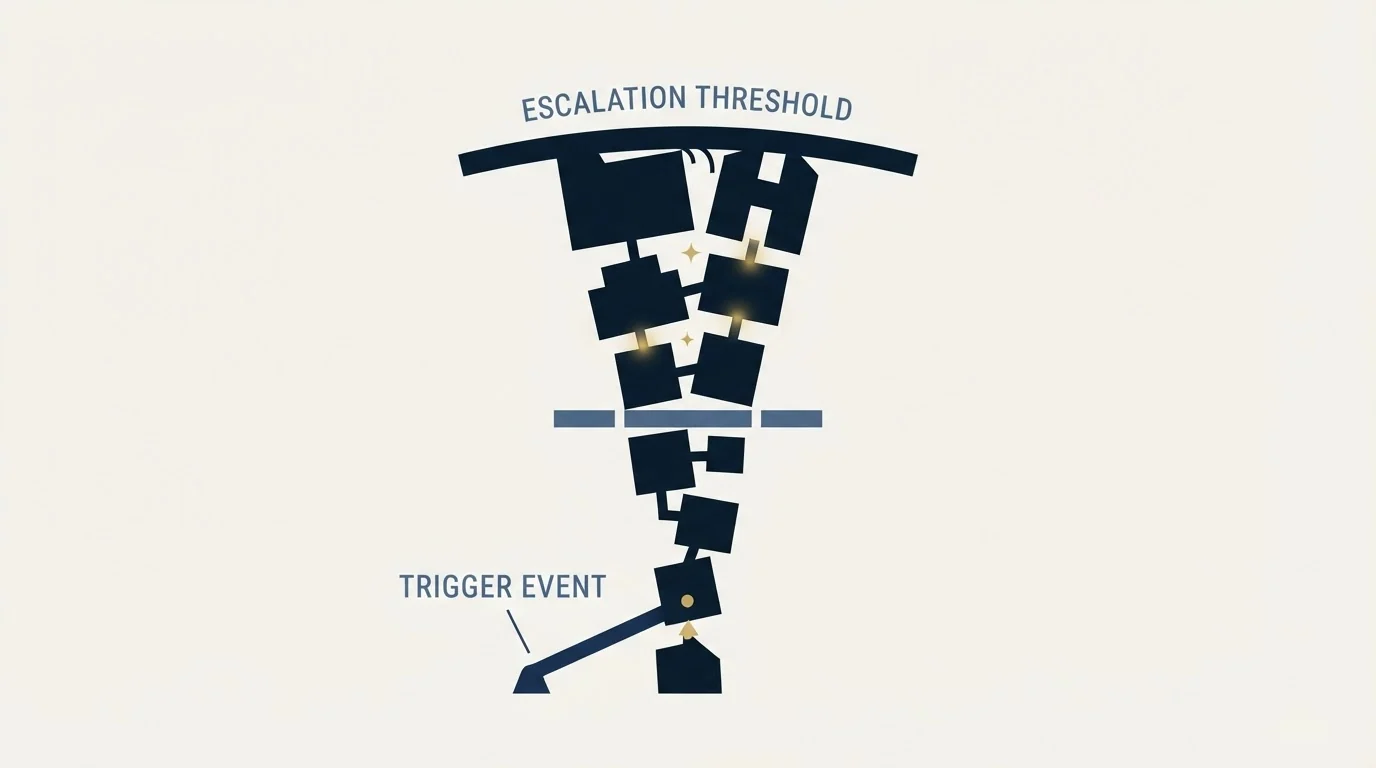
This is where the operator publishes more than any competing page reproduces, and it is worth having because it says exactly how much abuse a block absorbs before it escalates.
Listings at Level 1 accumulate as what the operator calls impacts. Level 2 escalation is then keyed on netmask size. The operator states that allocations smaller than a /27 are listed immediately on a single impact, a /26 needs at least two, and a /25 at least three. From a /24 with four or more impacts, escalation to wider blocks follows a published formula that adds the thresholds of two smaller netmasks together, and the operator says the resulting limits are displayed in its own address and impact check.
| Allocation | Impacts that list it |
|---|---|
| Smaller than /27 | 1, immediately |
| /26 | At least 2 |
| /25 | At least 3 |
| /24 | 4 or more |
| /23 | 6 (the /24 value plus the /26 value) |
There is also a grace mechanism, and it is aimed squarely at providers. The operator describes a provider protection window: on a new Level 1 listing, no further impact from that address is counted for four hours, which it says gives the provider four hours to disconnect the abuser. If abuse is still detected 24 hours after the Level 1 listing, the protection drops to one hour. After 48 hours it stops applying and every impact counts.
Separately from any of that, the operator says a network can be listed at Level 2 manually and permanently where it suspects the range was created for spamming, and it names the grounds: a provider rotating abusers within a network, a range assigned to a known spam operation or malware distributor, a provider blocking blocklist address ranges so its senders can evade detection, and a striking disparity between legitimate mail and spam.
An individual address inside the block reaches the operator's traps.
No further impact is counted from that address for four hours.
Still abusing after a day, the window drops to an hour; after two days every impact counts.
Counted over seven days against a threshold set by the size of the allocation.
Level 2 names the whole block, including every address inside it that did nothing.
Finding out whether it is yours to act on
Run the operator's own database query rather than reading an aggregated row, because the aggregator tells you the service name and the operator tells you the level.
MXToolbox publishes a problem page for the Level 2 list, and its description matches the mechanism: it files the list as reporting subnets, used "to reject email from entire ranges of IP Addresses", and separately as reporting shared hosts, where one company sending unsolicited bulk email can get an entire range reported. The same page carries MXToolbox's own general position on paid delisting, which is that it "does not ever recommend paying for delisting", on the reasoning that it usually removes a listing briefly and resolves nothing.
Then the question that decides everything: whose address is in the rejection. If mail leaves through Google Workspace, Microsoft 365 or a sending platform, the connecting address is the provider's and so is the allocation around it. The rule for finding the right address, which is the one quoted inside the refusal rather than the one a browser reports, is in whose IP a blocklist lookup is checking.
Removal, exactly as the operator publishes it

Two routes exist and the operator is explicit that one of them is optional.
The default route is automatic and free. The operator's Level 2 removal page states that the list "deescalates dynamic and removes the listed allocation if the number of Level 1 listed Impacts went below a predefined trashcount within the last 7 days", and that "Level 2 listings are removed automatically and free of charge as soon as they no longer meet the listing criteria in the policy for level 2". To get a block out, the individual addresses inside it have to come off Level 1, and the operator says normally only the service provider can request that.
That is the mechanism, and it is not the same thing as a seven day timer. Pages describing this list often say a listing clears seven days after the last spam. What the operator publishes is a rolling seven day impact count measured against a threshold for that block size. A block that stays above its threshold does not clear on any schedule.
The optional route is paid. To providers who have not implemented the preventive steps it sets out, the operator says "we can only offer to remove your netblock" and every address inside it from Level 1 on a payment basis, adding that "The fee for this is per allocation." It labels that offer as optional in capitals on the same page. It also publishes conditions under which the offer is withdrawn, including exceeding the listing threshold by a factor of ten and appearing among the worst-ranked spam hosting providers. The terms are quoted here as the operator states them because that is the only honest way to report a commercial policy, and the amount is not reproduced because it belongs to the operator's page rather than to this one.
For an individual sender inside a listed allocation, neither route is yours. The operator's own advice to that reader is to complain to the service provider and to ask for an address in a different netblock. It adds that clean addresses registered at its whitelisting service are excluded from Level 2, which is a route that exists at the address level rather than the block level.
Do
- Establish the level first: 1, 2 and 3 have different causes and owners
- Check the address quoted in a rejection, not the one a browser reports
- Sending through a provider: the allocation is theirs
- Running the infrastructure: ask for a different netblock
Do not
- File a delisting request for an allocation you do not own
- Treat a Level 2 row as urgent when no rejection has named the zone
What it means for a cold outbound programme
Weight it low and read it as an infrastructure signal.
The operator's own guidance to receivers is candid about the cost of using this level. Its policy page warns that a receiver blocking on Level 2 should be prepared to lose some legitimate mail, and it suggests incorporating the list into a scoring system rather than blocking on it outright, giving a match a partial score instead of a refusal. A receiver following that advice does not refuse your campaign on a Level 2 match alone.
What the row is genuinely worth is as evidence about where your mail leaves from. An allocation escalates because enough addresses around yours were listed, which means the block is carrying senders whose behaviour reaches spam traps. That is a purchasing input rather than a delisting task, and it is the same reading the invaluement range list invites for the same reason.
Nothing in the diagnosis order changes. Confirm the level, confirm whose address it is, and rule out the causes that would be yours regardless: an unverified list producing a bounce spike, a compromised mailbox, or volume that stepped rather than ramped. The sequence is in checking and recovering from a blacklisting, and the architecture that makes a range listing a routing decision rather than an incident is in email domain reputation.
The house version is short. Spare warmed capacity exists so that a bad allocation is left rather than argued with. Sending domains stay separate from the corporate estate so a neighbour's behaviour cannot reach the mail that matters. And a row on a list the operator itself recommends scoring rather than blocking gets scored rather than escalated.
The short version

Level 2 lists allocations, not senders. Individual addresses are listed at Level 1, their impacts accumulate over a rolling seven day period, and a block escalates when the count passes a threshold set by the size of the netmask, starting at a single impact for anything smaller than a /27.
The operator publishes a provider protection window that gives a provider four hours to disconnect an abuser before further impacts count, tightening to one hour after a day and disappearing after two.
Removal is automatic and free once the block falls back under its threshold, which is a different mechanism from the flat seven day timer most pages describe. A separate paid express delisting is offered to providers and labelled optional by the operator, with published conditions under which it is withdrawn.
For an individual sender inside a listed allocation there is no request to file. The operator's own advice is to ask the provider for an address in a different netblock, and its guidance to receivers is to score the list rather than block on it.
If you would rather send from address space chosen for outbound rather than inherited from a shared pool, RevenueFlow builds and runs the outbound engine and is paid only for meetings that are actually attended. See if you qualify.
The three-level structure, the escalation thresholds, the provider protection windows, the manual listing grounds, the automatic free removal, the optional paid express delisting and the guidance to receivers are taken from UCEPROTECT's own blacklist policy and removal policy pages. The listing volumes are from the operator's own page counter at the reading taken for this refresh. The subnet and shared-host classifications and the view on paid delisting are taken from MXToolbox's UCEPROTECTL2 problem page. Verify current list behaviour with the operator before relying on it.
Sources: UCEPROTECT Level 2 policy, UCEPROTECT removal policy, UCEPROTECT Level 2 removal, MXToolbox on UCEPROTECTL2
Frequently asked questions.
Frequently asked questions- Why am I on UCEPROTECT Level 2 when I did nothing?
- Because Level 2 lists allocations rather than addresses. Individual addresses in your block are listed at Level 1, their impacts accumulate over a rolling seven day period, and the whole allocation escalates when the count passes a threshold set by the size of the netmask. Every address inside the block is then listed, including yours.
- How do I get removed from UCEPROTECT Level 2?
- For most senders, you cannot, and you do not need to. The operator says Level 2 listings are removed automatically and free of charge as soon as the block no longer meets the listing criteria, which requires the individual addresses inside it to clear Level 1. It also says normally only the service provider can request that.
- Do I have to pay UCEPROTECT to be delisted?
- No. The operator publishes an automatic, free de-escalation as the default route, and labels the paid express delisting as an optional offer in capitals on its own page. It also publishes conditions under which that offer is withdrawn. MXToolbox, separately, states that it does not ever recommend paying for delisting on any list.
- How much does a Level 2 listing affect deliverability?
- Less than the row suggests, on the operator's own guidance. Its policy page warns receivers that blocking on Level 2 will lose some legitimate mail and suggests scoring a match rather than refusing on it. The honest test is whether any rejection string you have received names the zone. Treat it as evidence about your address space instead.
About the author.

Tim Carden is CMO / CTO at RevenueFlow, which builds and operates outbound revenue engines for B2B companies. Studied at McGill University.
Tim Carden · CMO / CTO
Connect on LinkedIn →Explore more.
Ready to scale your outreach?
We build GTM engines that book real meetings. See the receipts.
Related articles.
ivmSIP and ivmSIP/24: Which One Listed Your IP
invaluement publishes two IP lists and the search results merge them. One names your address, the other names the range around it, and only one is yours to fix.
Backscatterer Blacklist: Two Causes, One Four-Week Clock
Backscatterer lists addresses for misdirected bounces and for sender callouts, never for spam. The listing expires after four weeks, so the work is finding the system.
ZapBL: A List of Opinions, and How Yours Clears
ZapBL says it does not block email and is not calling anyone a spammer. What actually gets listed, why three neighbours can catch you, and the four-rung removal ladder.
Suomispam Reputation: Read the Code Before You File
Suomispam publishes four zones and four listing classes, and the response code names which one you have. Two pieces of common delisting advice will not move it.
Woody's SMTP Blacklist: The Delisting Route Refuses
Every page about this list tells you to file a delisting request. Measured on 2 September 2026, the operator's removal endpoint returned HTTP 403.
UCEPROTECT Level 3: The Provider Score That Lists Your IP
UCEPROTECT Level 3 lists whole providers by a published score, so a clean address still appears. What the operator says about removal, and what to do instead.