PSBL Blacklist: What It Lists and How to Remove an IP
PSBL lists a connecting IP when it hits a trap, is not filtered as non-spam and is not a known server. Anyone can remove it in minutes; here is why and what to fix first.
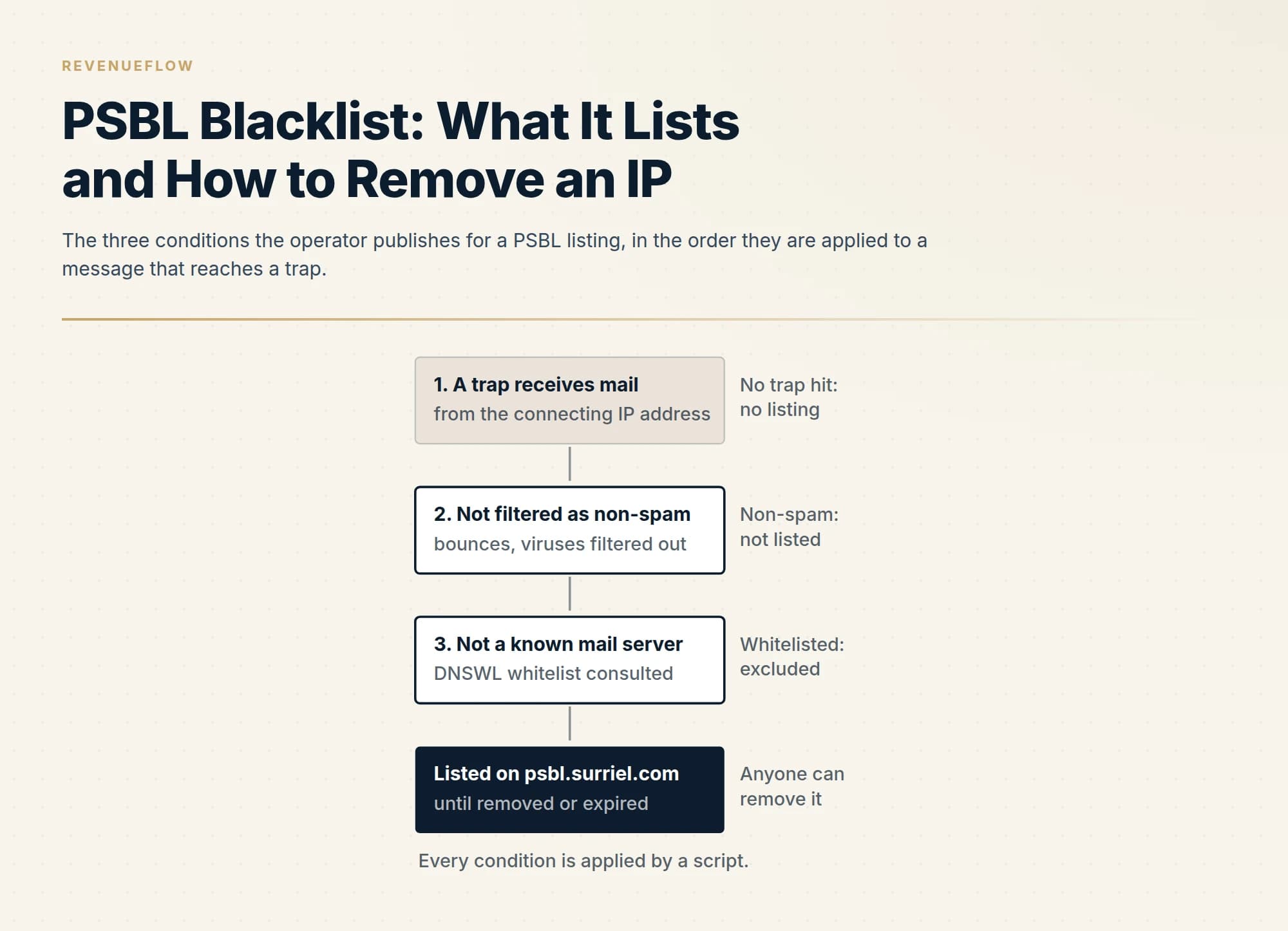
The Passive Spam Block List lists a connecting IP address when a message from it reaches a spamtrap, the filters do not classify it as non-spam, and the address is not a known mail server on the DNSWL whitelist. Anyone can remove an address; the operator calls removal instantaneous, with DNS clearing in about half an hour.
Key takeaways
- PSBL keys on the connecting IP address alone, added by a script when three conditions hold: a trap received mail from it, the mail was not filtered as non-spam, and the address is not on the DNSWL whitelist.
- The list ships as a default rule in SpamAssassin 3.3.0 and later, so receivers score a listed address without ever choosing the list; most exposure is a score contribution, not a hard reject.
- Anyone can remove an address with no account, no fee and no case to argue; the operator calls removal instantaneous and says DNS clears within about half an hour, while automatic expiry after a few weeks is the normal path.
- The lookup shows the times a trap received mail from the address; matched against a send log, they name the campaign and the list that carried the trap, which is the cause to fix before anything else.
Reviewed and updated September 18, 2026
A blocklist report shows a row against psbl.surriel.com, and the natural assumption is that somebody at the list operator has looked at your mail and judged it. Nobody has. The Passive Spam Block List is exactly what its name says: passive. An address is added by a script when a message from it arrives at a trap, and the operator's own pages say that any user can take it off again with no questions asked. Understanding that design is the whole of dealing with a listing, because it tells you both why the row appeared and why the removal takes minutes rather than days.
This page follows the operator's own pages through the list: what PSBL lists and keys on, who queries it, the three conditions that produce a listing, the removal procedure step by step, and what a sender changes so the address does not come back. The list at the other end of the design spectrum, keyed on domains inside the message rather than the connecting address, is worked through in the SURBL page, and the two make a useful pair: one is about where the mail came from, the other about what it linked to.
What PSBL is and what it keys on
The home page, fetched on 18 September 2026 and carrying no publication date, states the design in one sentence: "PSBL is an easy-on, easy-off blacklist that does not rely on testing and should reduce false positives because any user can remove their ISP's mail server from the list." The listing policy follows immediately and has three conditions: an IP address is added "when it sends email to a spamtrap, that email is not identified as non-spam and the IP address is not a known mail server."
Three conditions, all mechanical, and nothing happens until the first one does. A trap receives a message from the address; the operator's filters do not classify that message as a bounce, a virus or otherwise non-spam; and the address is not on the whitelist the operator consults. The FAQ names that whitelist: "PSBL uses the DNSWL whitelist to exclude known good mail servers from being listed." and records a 2009 change limiting the exclusion to the low, medium and high DNSWL classes.
What the list keys on is therefore the connecting address and nothing else. Not the sending domain, not the content, not a reputation score. The FAQ is explicit that the address is the one that made the connection: "PSBL lists the IP address that connected to the PSBL mail server, which means that the spam really came from your IP address." A listing cannot be forged onto you by somebody spoofing your domain in a header, and it cannot be caused by a link in your copy.
Who queries it
PSBL is free to use and the operator publishes how to plug it in. The usage page, fetched on 18 September 2026, tells a mail administrator to "tell it to query the psbl.surriel.com zone, in exactly the same way you would query other DNSBL zones" and adds: "Anybody is free to use PSBL." It then gives the configuration lines for Exim, Sendmail, Postfix and Zmailer, and a plain-text rsync mirror.
The population worth knowing about is described in the SpamAssassin section, because SpamAssassin is a scoring filter rather than a hard reject and it is shipped with the rule already in place: "This rule is included by default in spamassassin-3.3.0+, so you do not need to make any configuration changes to use PSBL with a recent spamassassin." So a receiver running a stock SpamAssassin scores a listed address without its administrator ever having chosen this list, which is why PSBL rows turn up in bounce strings and headers from receivers who could not name the list if asked.
For a sender that changes the weighting. A hard reject from a Postfix server that queries the zone is rare and visible. A score contribution inside a filter that adds it to a dozen other signals is common and invisible, and it is the shape most PSBL exposure takes. The order to work a mixed report in, weighting each row by what it costs, is in email blacklist check and recovery.
Why the address was listed
The FAQ answers the question directly: "Your IP address got listed because it delivered an email to one of the spamtrap addresses that feed PSBL." It then says what the operator believes about the population it lists. Almost all trap mail is spam, and after the filters remove bounces and viruses, the FAQ says: "This means that almost all IP addresses listed in the PSBL are there because they really sent spam." Then the qualification that matters to a legitimate sender: "Keeping this in mind, if your mail server got listed on the PSBL it may well be a false positive."
The FAQ names the routes by which a real programme ends up in a trap. The plainest is list quality: "If you send email to harvested email addresses, or email addresses of other dubious origins, you run the risk of being listed on many DNSBLs, including PSBL." The second is a compromised machine sending through or behind the listed address. The third is inheritance: a dynamic address may have been used by somebody else before you, and the FAQ says so. And the operator's answer to the sender who insists the mail was lawful is short: "while you might have the right to send out certain email, nobody has any obligation to receive it".
For a cold outbound programme the first route is the one to check. A trap address inside a bought, scraped or old list is what turns an otherwise ordinary campaign into a listing, and it is caught before a send rather than after a bounce. How a trap address gets into a list, and what verification does and does not remove, is in spam trap. The operator also gives you evidence: its lookup page says the site "will show you the time(s) a spamtrap received email from said IP address, as well as the time(s) the IP address was removed from the list." Those timestamps, set against the send log, name the campaign and therefore the list that carried the trap.
- Depends: A harvested, purchased or otherwise dubious list carried a trap address
- Depends: A machine behind the address is infected and sending mail you never wrote
- Depends: The address is dynamic and a previous holder was the sender
- Depends: The address is a real mail server that is not yet on the DNSWL whitelist
Whose address it is
Before removing anything, establish whether the listed address is yours to remove. Mail that leaves through Google Workspace, Microsoft 365 or a sending platform connects to receivers from an address the provider owns and shares among its customers. A PSBL row against such an address is a fact about the provider's estate, and while the operator lets anyone clear it, the cause is not yours to fix. The test for which address a rejection is actually about, and why it is the one quoted inside the bounce rather than the one a browser reports, is in whose IP a blocklist lookup is checking.
Where the address is yours, the FAQ raises one more possibility worth a minute: if the listed address is your mail server, the trap mail may have come from an infected machine that the server relays for or sits in front of as a firewall. That is a security incident before it is a deliverability one.
The removal procedure, step by step
The operator's design puts removal in the hands of the listed party and states its reasoning: a legitimate user sharing a server with spammers can clear one or two lists in a minute, while a spammer would have to clear thousands, which is too much work. The steps are on the home page and the FAQ.
-
Query the address. Enter it on the lookup or removal page, which takes an IP address. The home page is emphatic about the input: "Remember, PSBL lists IP addresses, not email addresses, so please put an IP address into the box." The result shows whether the address is or was listed and the times a trap received mail from it.
-
Read the evidence. The times tell you which send produced the hit. The FAQ notes that the archived trap mail is obfuscated so that the trap addresses cannot be washed out of a list, so expect the timestamps rather than the recipient. Match them against your own send log.
-
Remove the address. The FAQ: "Just fill in the IP address in the form below and click your way through the automated removal system. The IP address should be gone from the DNS servers within half an hour." The home page puts the same fact from the operator's side: "Removal from PSBL is instantaneous, but it can take some time for your removal to propagate to nameservers all over the internet." There is no account, no form beyond the address, no fee and nobody to persuade.
-
Find the cause anyway. The FAQ attaches the condition every list operator attaches, in gentler words than most: "You will also want to figure out why the IP address got listed, so you can fix the problem and make sure you do not get listed again in the future." A removal with the cause still in place is followed by the next trap hit and the next listing.
-
Or wait. Manual removal is the minority path. The FAQ says an address that has stopped hitting the traps for a few weeks is expired automatically, and: "This automatic expiry is by far the normal way for IP addresses to get removed from the list." It adds that manual removal accounts for under one in a hundred listed addresses, the rest being machines that never send legitimate mail directly.
Manual removal
- Anyone may do it; no account, no fee, no case to argue
- Enter the IP address, not an email address
- Instantaneous at the operator; gone from DNS within about half an hour
- The rare path: under one listed address in a hundred
Automatic expiry
- Happens when the address stops hitting the traps for a few weeks
- The normal path for the great majority of listed addresses
- Nothing to do, and nothing learned about the cause
- Listed again on the next trap hit
The lookup shows whether it is or was listed and the times a trap received mail from it.
The evidence names when; your send log names which campaign and which list.
Automated, instantaneous at the operator, about half an hour to clear from DNS.
The operator asks you to find out why, so it does not happen again. This is the step that prevents the relisting.
What to change so it does not recur
The three listing conditions say where the fixes are.
On the list side, a trap hit is a list-quality event. Verification before every send, one contact per company, no purchased, appended or scraped data and no address that has been silent for years are the defences, and a bounce spike is the earliest sign that a list contains traps. Published bounce rate benchmarks give the level at which a campaign should stop and its source be cleaned before anything else is sent.
On the machine side, an address that sends mail you did not write is a compromised account, an open relay or an infected device, and the FAQ is right that this is where most listed addresses come from. Check outbound volume against what you can account for before touching the removal form.
On the server side, the operator points at the exclusion it already consults: "If your mail server is not whitelisted yet, please fill out this dnswl.org form." A real mail server that meets the DNSWL criteria fails the third condition permanently and is never listed, whatever a trap receives. That applies to teams that run their own sending host; for mail that leaves through a provider, the provider's addresses are the ones that would need it. How a receiver weighs a connecting address in general, including what a list like this contributes, is in IP reputation.
Our own posture keeps the first condition from firing: outbound runs on dedicated sending domains separate from the corporate domain, every list is verified before a campaign sends, and each campaign carries one message and never a second in the same thread, so a non-responding audience is never mailed again on the same premise. Those are policies rather than results, and they are the policies that keep a trap out of a send.
The short version
PSBL lists a connecting IP address when a message from it reaches a trap, the operator's filters do not classify that message as non-spam, and the address is not a known mail server on the DNSWL whitelist. It keys on nothing else: not the domain, not the content, not a score.
Anyone can remove an address, with no account and no case to argue; the operator says removal is instantaneous and clears from DNS within about half an hour. The evidence page shows when a trap received mail from the address, which names the send and therefore the list that carried the trap. Automatic expiry after a few weeks without a hit is the normal exit for the machines that make up most of the list.
What keeps an address off is a verified list with no purchased or scraped data, a machine that sends only what you wrote, and, for a real mail server, DNSWL whitelisting. If you would rather run on infrastructure where the list is verified and the sending domains are dedicated before the first send, we plan the first campaign for free.
The listing policy, the removal rules, the timings, the SpamAssassin default and the whitelist exclusion are taken from psbl.org's home, FAQ, usage, about and lookup pages, all fetched on 18 September 2026; the pages carry no publication date beyond a January 2009 update note in the FAQ. Verify current list behaviour with the operator before relying on it.
Frequently asked questions.
Frequently asked questions- Why is my IP on the PSBL blacklist?
- Because a message from that address reached one of the spamtrap addresses that feed the list, the operator's filters did not classify it as a bounce, a virus or otherwise non-spam, and the address is not a known mail server on the DNSWL whitelist. The FAQ names the common routes: harvested or dubious lists, an infected machine behind the address, or a dynamic address whose previous holder sent the mail.
- How do I remove my IP from PSBL?
- Enter the IP address, not an email address, on the psbl.org lookup or removal page and click through the automated removal. The operator says removal is instantaneous on its side and that the address should be gone from DNS servers within half an hour. No account, fee or explanation is required. The same page shows when a trap received mail from the address, which is the evidence to use in finding the cause.
- How long does a PSBL listing last?
- Until it is removed or it expires. The operator's FAQ says an address that has stopped sending to the traps for a few weeks is automatically expired from the database, and that this automatic expiry is by far the normal way addresses leave the list. Manual removal accounts for under one listed address in a hundred; the rest are machines that never send legitimate mail directly and are never removed by hand.
- Who uses the PSBL blocklist?
- Any mail server that queries the psbl.surriel.com zone, which the operator says anybody is free to do, with published configuration for Exim, Sendmail, Postfix and Zmailer. One population that never chose the list is SpamAssassin installations, because the operator's page says the rule is included by default from version 3.3.0, so a stock filter scores a listed address without its administrator choosing the list.
About the author.

Tim Carden is CMO / CTO at RevenueFlow, which builds and operates outbound revenue engines for B2B companies. Studied at McGill University.
Tim Carden · CMO / CTO
Connect on LinkedIn →Explore more.
Ready to scale your outreach?
We build GTM engines that book real meetings. See the receipts.
Related articles.
UCEPROTECT Level 3: The Provider Score That Lists Your IP
UCEPROTECT Level 3 lists whole providers by a published score, so a clean address still appears. What the operator says about removal, and what to do instead.
Abusix Blacklist: Which List Fired and How to Get Delisted
Abusix runs several lists behind one checker row. Read the return code to find which one fired, then follow the operator's delisting steps for that list.
SpamRATS Blacklist: The Four RATS Lists and How to Delist
SpamRATS is four lists, not one. Which of RATS-Dyna, NoPtr, Spam and Auth fired, what each keys on, the removal path per list and what a sender changes afterwards.
ivmURI Blacklist: The Domain List Behind the Links You Send
ivmURI lists domains found inside the clickable links of spam, not sending addresses. Which name in your email it read, who queries it, and what to change.
Sender Score Blocklist: The RPBL and How to Get Delisted
Sender Score is a rating; the Return Path Blocklist is the list a receiver can act on. What the RPBL keys on, the removal form, and what to change so it does not recur.
Email Warmup Pricing in 2026: What 20 Tools Charge, and What 10 Mailboxes Cost
Email warmup tools start at a median of $29 a month, but warming ten mailboxes costs from $7.50 to $1,190 depending on how the vendor prices a mailbox.