Best CRM for Google Workspace: What Lives in Gmail
Working with Google Workspace covers four separate integrations, and most of the category ships as a browser extension. What five vendors publish about theirs.
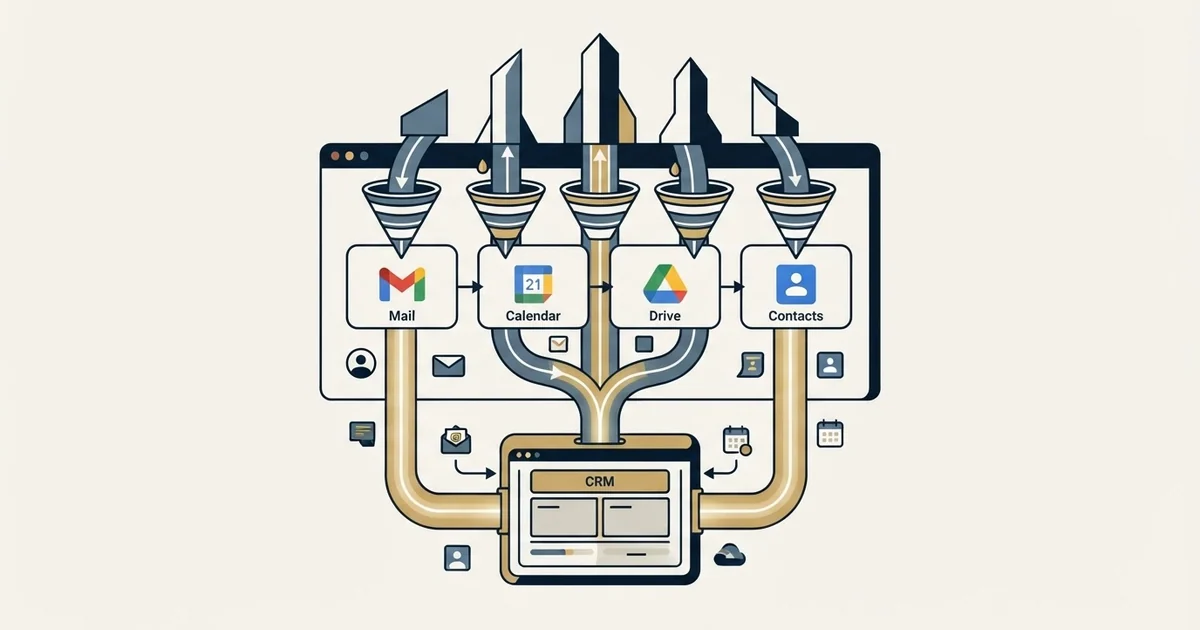
A CRM for Google Workspace connects to four surfaces separately: Gmail, Google Contacts, Calendar, and Drive with Sheets. Most products deliver the Gmail half as a browser extension, so it is scoped per browser and per person. Test each surface and check whether your Workspace administrator controls app installation.
Key takeaways
- The label covers four separate integrations, and a product can serve the Gmail surface fully while doing nothing in Contacts, Calendar or Drive.
- Most of the category ships as a browser extension, so it is scoped to one browser profile; NetHunt and Streak publish a Safari extension alongside the Chrome one.
- Google documents both an organisation-wide Marketplace install and an app allowlist, so in many companies a trial is an administrator's decision.
- Mail merge from a rep's own mailbox is a different product from a cold programme, and Google's bulk rules apply to the mailbox whatever CRM sits on it.
Reviewed and updated October 1, 2026
A five-person team picks a Gmail-native CRM, installs it in an afternoon, and gets a year of clean records out of it. The same product goes into a twenty-person team a year later and the people who work in Firefox cannot see the sidebar at all. Nothing was mis-sold. Copper and NetHunt both describe their Gmail surface as a browser extension on their own pages, and a browser extension is scoped to a browser.
That is the first thing worth knowing about this category, and it is not what the feature grids are organised around. The second is that a claim to work with Google Workspace covers at least four distinct pieces of integration, and a product can do one of them beautifully while doing none of the others.
Four integrations wearing one label
Google Workspace is a suite, and a CRM connects to its parts separately.
The Gmail surface. Contact and deal context rendered beside the open message, plus the ability to create a record without leaving the thread. This is the one everybody means, and it is usually delivered as a browser extension rather than as a Workspace add-on.
Google Contacts. Two-way or one-way synchronisation of people between the CRM and the directory the mailbox itself autocompletes from.
Google Calendar. Meeting context pulled into the event, and event details pulled back into the record.
Drive and Sheets. Documents attached to records automatically, and CRM data exported into a spreadsheet somebody else builds a dashboard on.
A product that only does the first is a Gmail sidebar. A product that does all four is a Workspace CRM in the sense the label implies. The difference is invisible on a feature grid, where every row says yes.
- Record context beside the open message
- Create a contact or deal from the thread
- Scoped to the browser the extension is installed in
- Nothing changes in Calendar, Drive or Contacts
- Contact context in Gmail and in the directory
- Meeting context in Calendar, both directions
- Documents attached to records from Drive
- CRM data exported into Sheets for reporting
What the vendors publish about their own integration

Each entry below is what that company states on its own pages, on the date named, with the pages linked at the foot of this article. No ratings, install counts or customer counts appear here, because a vendor page cannot establish those about itself.
Copper. Its Google Workspace CRM page, read on 2 September 2026, names each of the four surfaces separately: adding contacts from Gmail through a Chrome extension with hover context on any contact, adding and updating leads from email interactions and Google Contacts, looking up event details and customer interactions from inside Google Calendar, automatic syncing of sent documents from Drive to contact records, and export of any report to Google Sheets through its custom report builder, with a Looker Studio connection beyond that. The same page makes a claim about Copper's standing with Google: "The only CRM solution that's a Recommended for Google Workspace app, a Chrome Enterprise Partner and a Google-backed company". That is Copper describing itself, and it is worth reading as one. Its seat and contact meters are covered separately in Copper CRM pricing.
Streak. Its features page, read on 2 September 2026, states that Streak "is built directly into Gmail" and organises the product as a core CRM of pipelines, contacts, tasks and automation plus a set of email tools: email tracking, email sharing, mail merge, snippets and a "Thread Splitter". Two entries on that page matter more than the rest for a sales team. Email sharing is described as a way to "Automatically log email to the right pipeline", which removes the logging step entirely. And the reporting section names "Scheduled exports to Google Sheets", which is a recurring export rather than one produced on request. The full account of where the Gmail-native model stops is in Streak CRM.
NetHunt. Its Gmail CRM page, read on 2 September 2026, states: "We designed NetHunt to make all the CRM features available to your Gmail and Google Workspace." Its page carries both an "Install Chrome extension" and an "Install Safari extension" link for Gmail, which is the browser-scope problem partially solved, and Streak's features page offers a Safari extension beside its Chrome one as well. The same page offers a choice on sending: "Send email campaigns via Gmail, NetHunt SMTP or your own SMTP server", which is a meaningful distinction once volume enters the conversation.
Insightly. Its Google Workspace integration page, read on 2 September 2026, is a breadcrumb and a demo request and describes no Workspace surface at all. What Insightly does publish site-wide is a platform pairing CRM with marketing automation and support ticketing. A team choosing here is usually choosing the platform rather than the Gmail surface, and the Workspace connection is one integration among many rather than the product's organising idea.
Pipedrive. Pipedrive's own Gmail add-on page could not be fetched on 2 September 2026, so nothing from it is quoted here; the boundary between its Gmail panel and actual email sync is worked through in the Pipedrive Gmail add-on. It is the option here whose CRM was not designed around a mailbox, which is a strength for a team that wants a conventional pipeline and a weakness for one that wants the mailbox to be the interface.
The three questions that decide it, and none is a feature
Which browsers does your team actually use? A Chrome extension is installed by a person into a browser profile. It does not follow them to a second machine, it does not exist in Safari or Firefox unless the vendor ships one, and it disappears when somebody switches browser for an unrelated reason. NetHunt and Streak are the two products here whose own pages offer a Safari extension alongside the Chrome one; Copper and Insightly name no browser but Chrome.
Who is allowed to install it? A Workspace administrator can control which third-party apps reach Workspace data and can install Marketplace apps for an organisation rather than leaving it to individuals, and Google documents both controls in its own admin help. In a company where that control is switched on, permission to trial the product is an administrator's decision rather than a rep's. Find that out before the trial rather than during it.
What happens to the pipeline if you leave Google Workspace? For a Gmail-native CRM the coupling runs deeper than an export. The reps' working habits are built on the pipeline being visible beside every thread, so the migration cost is behavioural rather than technical. That is a fine trade to make deliberately and an unpleasant one to discover.
- Yes: Every browser your team works in has an extension, or they agree to standardise
- Yes: Your Workspace administrator has approved the app, or app installation is open
- Yes: A real thread from a real rep logs against the right record with the right owner
- Yes: Calendar, Contacts and Drive are each tested, not assumed from the Gmail panel
- Yes: Somebody owns what happens to the pipeline if the company leaves Workspace
- No: Choosing on a feature grid where every Workspace row says yes
- Depends: Whether the mailbox or a conventional CRM should be the working surface
The boundary these products share, and it is the sending layer

Every Gmail-native CRM eventually gets asked to run outbound, usually because it has a mail merge feature. That is the wrong job for it, and the reason has nothing to do with software quality.
Mail merge sends from the mailbox the rep reads in. A cold programme needs separate sending domains, so that a reputation problem never touches the domain your invoices and support replies come from. It needs several mailboxes in rotation, so no single account carries a volume pattern that looks nothing like a person. It needs warmup, bounce handling and a suppression list enforced at send time rather than remembered. And it runs into limits Google publishes and enforces on its own terms, which are set out in what Google counts as bulk.
One more boundary worth stating rather than implying. Several of these products sell multi-step follow-up sequences, and that is an accurate description of what they do. Our own practice differs and this page does not recommend theirs: one message per campaign, no bumps, no thread replies.
- Step 1List and enrichment
Built and verified outside the CRM, against a segment somebody wrote down before anyone sent anything.
- Step 2Sending stack
Separate domains and mailboxes, rotation and warmup enforced at send time rather than by habit.
- Step 3Reply arrives in Gmail
The human conversation starts in the inbox the rep already lives in, which is the whole argument for this category.
- Step 4Pipeline beside the thread
A deal created next to the message, with no logging step for anyone to forget.
How to choose
Rank the four integrations by which one you would actually miss. A team whose entire record of a relationship is email correspondence should weight the Gmail surface and accept a thinner reporting layer. A team that runs stage-based forecasting should weight the reporting side and accept that the mailbox panel is a convenience rather than the product.
Then test what breaks quietly. Send from a real rep account, reply from a real contact, and check what landed against which record with which owner and timestamp. Test Calendar, Contacts and Drive separately rather than inferring them from a working Gmail panel, because they are separate connections and they fail separately.
And settle what the CRM is the record of before configuring any of it. A mailbox-shaped record answers what was sent and when for free, and answers why a stage took five weeks only if somebody imposed structure the tool cannot enforce. The wider CRM shortlist for a prospecting team, and what the write-back path has to survive, is in the CRM comparison for SDR teams.
The short version

"CRM for Google Workspace" covers four separate integrations, and a product can be excellent at the Gmail surface while doing nothing in Calendar, Contacts or Drive. Test each one rather than reading a grid.
The Gmail surface arrives as a browser extension on the pages of both Copper and NetHunt, which makes it scoped to a browser and installed per person, and NetHunt and Streak each offer a Safari extension alongside the Chrome one. Copper names all four Workspace surfaces on its own page, where it also calls itself "a Recommended for Google Workspace app". Streak is built into Gmail itself and logs mail to the pipeline without a logging step. Pipedrive is the conventional pipeline with a Gmail panel attached rather than a mailbox-shaped CRM.
Before any of that, find out whether your Workspace administrator controls app installation, because in many companies that decides whether a trial is possible at all. And keep the sending layer separate: a mail merge from a rep's own mailbox is a different product from a cold outbound programme, and Google's own bulk rules apply to the mailbox whatever CRM is attached to it.
If the constraint is how many qualified conversations reach that inbox rather than how they get recorded, see what a first campaign produces against your own market.
Product capabilities are quoted from each vendor's own pages on the dates named, from stored snapshots. Verify current terms with the vendor before relying on them.
Sources: Copper for Google Workspace, Streak features, NetHunt Gmail CRM, Insightly Google Workspace integration
Frequently asked questions.
Frequently asked questions- What is the best CRM for Google Workspace?
- It depends which of the four surfaces you would miss. Copper names Gmail, Contacts, Calendar, Drive and Sheets separately on its own page. Streak is built into Gmail itself and logs mail to a pipeline with no logging step. NetHunt and Streak each publish a Safari extension as well as a Chrome one. Pipedrive is a conventional pipeline with a Gmail panel attached.
- Is a Gmail CRM just a browser extension?
- For most of the category the Gmail half is delivered that way, and that has consequences a feature grid hides. An extension is installed by a person into a browser profile, does not follow them to another machine, and does not exist in browsers the vendor has not shipped for. Contacts, Calendar and Drive connect through separate integrations that need testing on their own.
- Can our Workspace administrator block a CRM extension?
- Yes, and in many organisations that decision comes before the trial. Google publishes admin guidance on installing Marketplace apps for an organisation and on managing the Marketplace app allowlist, alongside controls over which third-party apps reach Workspace data. Establish whether those controls are switched on before planning an evaluation.
- Can a Gmail CRM run cold outreach?
- Not as the sending layer. A cold programme needs separate sending domains, several mailboxes in rotation, warmup, bounce handling and suppression enforced at send time. Mail merge sends from the mailbox a rep reads in, which puts reputation risk on the domain your invoices come from and runs into the limits Google publishes for that mailbox.
About the author.

B2B cold email experts helping companies generate qualified leads through done-for-you outreach campaigns.
RevenueFlow Team
Explore more.
Ready to scale your outreach?
We build GTM engines that book real meetings. See the receipts.
Related articles.
Which CRMs and Tools the Outbound Stack Connects To: Integration Data From 342 Sales Tools
HubSpot is named as an integration by 52.3% of 342 verified sales tools, Zapier by 50.3% and Salesforce by 43.3%. Here is the full map by category.
Copper CRM Pricing: Per Seat and Per Contact Limit
Copper charges on two meters and only the seat rate is on the price card. The contact ceiling is what selects the tier for a team that builds its own lists.
Is Clay Free? The Free Plan, the Trial and Where Each Stops
Clay's free plan, its 14-day trial and the no-charge-on-a-miss rule are three different things. What each holds and where it stops, from clay.com on 19 September 2026.
Seamless.AI Email Finder: How It Works, What a Credit Buys
How Seamless.AI's email finder resolves a contact in real time, what one Universal Credit buys, the Total AI score on every address, and what the Chrome extension reads.
Social Selling Tools by Job, and the Account-Risk Line
Fourteen social selling tools sorted into six jobs, split by whether each acts through your LinkedIn account or beside it, from the vendors' own pages.
Video Prospecting Tools by Job: What Each One Is For
Ten video prospecting tools sorted by the job each vendor's own page describes: record and share, personalise at volume, avatars, hosting and interactive demos.