Social Selling Tools by Job, and the Account-Risk Line
Fourteen social selling tools sorted into six jobs, split by whether each acts through your LinkedIn account or beside it, from the vendors' own pages.
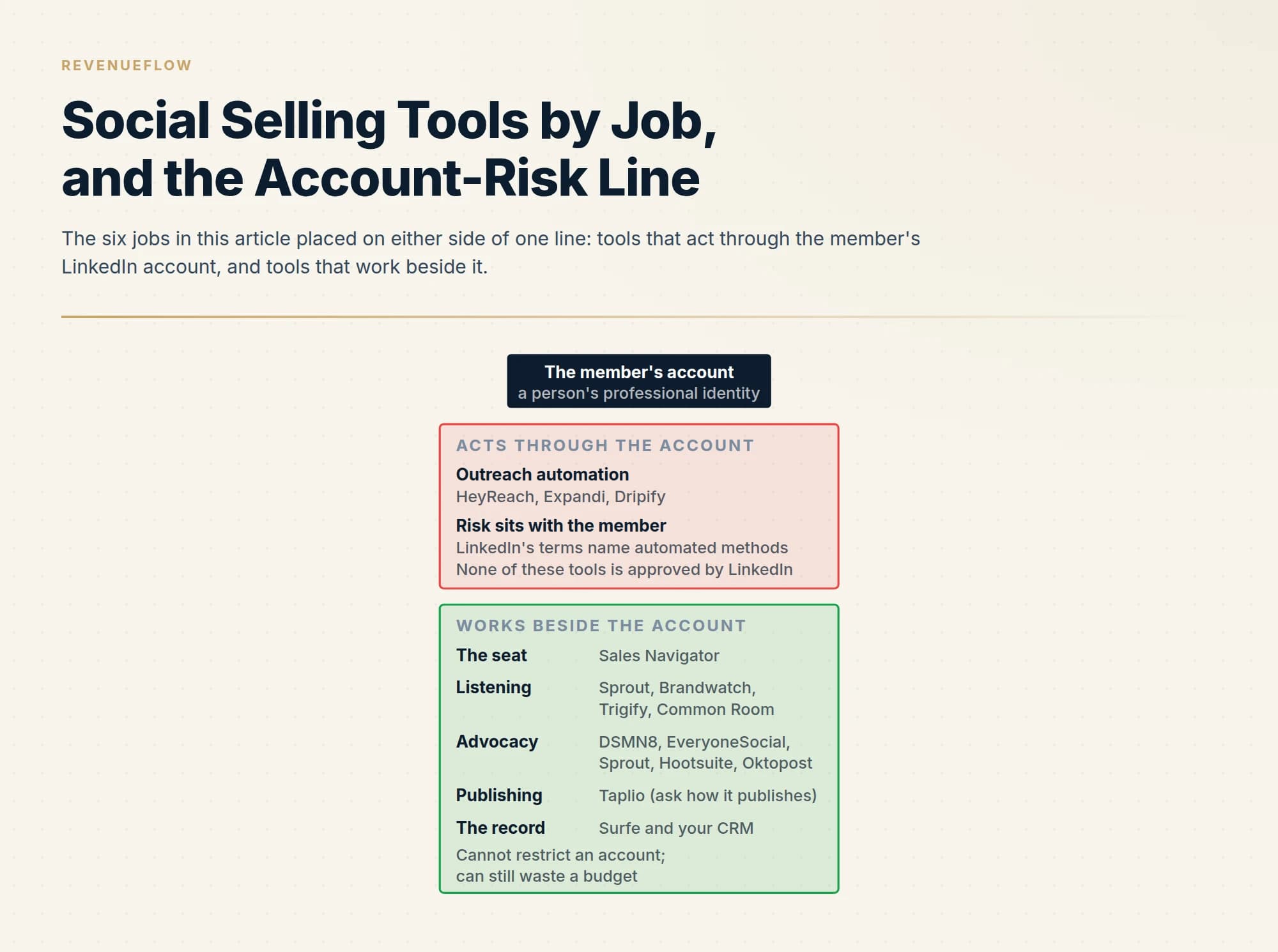
Social selling tools do six jobs: the LinkedIn seat, outreach automation, listening and signals, employee advocacy, publishing, and the CRM record. The line that matters is whether a tool acts through a member's LinkedIn account. Outreach automation does, LinkedIn's User Agreement names automated methods of sending messages, and the stated risk is account restriction. The rest work beside the account.
Key takeaways
- Sort social selling tools by job first, the seat, outreach automation, listening, advocacy, publishing and the CRM record, then by whether the tool acts through a member's LinkedIn account or beside it.
- LinkedIn's User Agreement lists bots and other unauthorized automated methods of sending messages among the things members agree not to do, and its help page says members using prohibited tools risk restriction or shutdown.
- Tools that work beside the account cannot get a seller restricted, and they fail quietly instead, as unread dashboards and unused licences, so name who acts on the output each week.
- Read vendor pages with the date in mind: on 18 September 2026 the page at Hootsuite's Amplify address names the advocacy product Parliament, while reviews quoted on it still say Amplify.
Reviewed and updated September 19, 2026
Search for social selling tools and the first rosters you meet are written by vendors, each of which lists its own product first or second. They sort by popularity. The sort that protects a seller is different: which of these tools act through your LinkedIn account, and which work beside it. A tool in the first group spends your professional identity every time it runs. A tool in the second cannot get you restricted, whatever else it fails to do.
This page sorts fourteen products into six jobs with that line drawn through them. Every description comes from the vendor's own page as read on 18 September 2026, quoted where the wording matters, and LinkedIn's rules are quoted from LinkedIn. No prices appear, because ladders change faster than positioning and we link our dated pricing guides where we have them. The score LinkedIn attaches to all this activity has its own entry, Social Selling Index, which this page does not repeat. It is scoped to B2B sellers; shop features on consumer platforms are a different subject.
The line that matters: through the account, or beside it
LinkedIn's User Agreement, as read on 18 September 2026, lists among the things members agree not to do: "Use bots or other unauthorized automated methods to access the Services, add or download contacts, send or redirect messages, create, comment on, like, share, or re-share posts, or otherwise drive inauthentic engagement". Its help page on prohibited software, marked last updated two years ago on that date, says of members who use such tools that "they risk having their accounts restricted or shut down."
That puts every product in this category on one side of a line. Tools that log in as you and send, connect, comment or collect are acting through the account, and the risk is the member's. Tools that publish through LinkedIn's approved routes, listen to public conversation, or hold records in a CRM work beside the account. The vendors in the first group sell safety features, and none of them is approved by LinkedIn. Our guide to LinkedIn automation tools covers what the risk consists of and what operating discipline reduces it.
Job one: the seat
LinkedIn Sales Navigator is the only product here that LinkedIn sells. Its own page defines it in a sentence: "LinkedIn Sales Navigator is LinkedIn's B2B sales tool tailored for individual sellers and sales teams." The page's feature headings are the jobs a seller uses it for: pinpointing buyers with search filters, real-time alerts, InMail to people outside your network, and adding leads directly to your CRM. What each tier costs and gates is in our Sales Navigator pricing guide.
One dated detail about the score that sits beside it. LinkedIn's page for the index is now titled "From Social Selling Index (SSI) to AI", which tells you where the vendor's own attention has moved. The glossary entry explains why the score was always a habit dashboard and never a performance metric.
Job two: outreach automation, with the caveat attached
These tools send connection requests and messages on a schedule, and they act through the account.
HeyReach headlines its homepage "10x your LinkedIn outbound. Unlimited senders, one fixed cost", which is the multi-sender model: volume from many accounts at a low rate each. We run client LinkedIn outreach through HeyReach, which is a statement of practice and not a results claim. Expandi calls itself the "#1 LinkedIn Automation Tool" in its page title and now leads with "Automate your sales outreach with a single prompt". Dripify promises "LinkedIn Automation Made Ridiculously Simple" and sells LinkedIn and email campaigns together. The generated comparison pages for Expandi alternatives and Dripify alternatives hold the feature grids.
Each of those homepages carries outcome claims, and they are the vendors' own. What none of the three can offer is LinkedIn's approval, for the reason quoted above. Our position on how to use the category is narrower than the tools allow: one message per campaign, and never a second LinkedIn message under one that went unanswered, because it lands in the same thread as a nudge. The routes to a stranger and what each costs are in LinkedIn prospecting.
- Logs in as the member and sends on a schedule
- LinkedIn's terms name automated methods of sending messages
- The stated risk is restriction or shutdown of the account
- Every limit belongs to the account, not to the tool
- Judge it on operating discipline, then on features
- Reads public conversation or publishes approved posts
- People still write the comments and the messages
- No restriction risk from the tool itself
- Fails quietly, as unread dashboards and unused licences
- Judge it on who will act on its output each week
Job three: listening and signals
Listening tools watch public conversation so a seller knows when and where to enter one. They split into marketing suites and newer sales-signal products.
Sprout Social describes its listening product as a way to "Turn social conversations into decision-ready business intelligence", built on queries across brand, audience and competitors. Brandwatch positions itself as "The most intelligent social suite", with consumer intelligence beside social media management; both are bought by marketing teams, and a sales team usually borrows a seat.
The sales-signal products start from the rep. Trigify describes itself as a signal layer: "Every buying signal across 11+ social platforms, ready for your workflows and agents." Common Room sells "Complete buyer intelligence that turns intent into pipeline." and describes identifying real people across CRM, product, marketing and engagement signals.
The test for any of them is the one we apply to every signal product: a signal sold to everyone in your category arrives with the same recommended message attached. Work the free version by hand first, by reading what your twenty best accounts post, and buy a feed only once that produces conversations. A social programme also mixes two motions, building an audience and reaching individuals, and a listening tool serves only the second.
Job four: employee advocacy
Advocacy platforms give employees a queue of approved posts to share from their own profiles.
DSMN8 leads with "Brand-approved, ready-to-share content at your employees' fingertips". EveryoneSocial calls itself "The AI-powered advocacy platform for activating execs and staff." Sprout Social's product "lets employees share brand content within a few clicks and stay compliant with pre-approved copy." Oktopost lists employee advocacy beside social media management and social listening under the banner "B2B social media management that drives revenue".
Hootsuite is the one to read carefully on the date. The page at its Amplify address now names the product Parliament: "Parliament makes it easy for your employees to share your content, massively extending your social reach." The customer reviews quoted further down the same page still call it Amplify. If you are comparing quotes, confirm which name is on the order form.
This whole job is distribution, and its published multipliers are reach figures. Why a reach case should stay out of a revenue forecast, and why enrolling thirty people who will post beats enrolling three hundred, is argued in employee advocacy.
Jobs five and six: publishing, and the record
Taplio is the publishing tool on this list, built around LinkedIn. Its homepage offers to draft posts with a model "trained on 3 million+ posts" and schedule them, and it asks you to connect your LinkedIn account to do so. Ask any scheduler how it publishes: one that uses LinkedIn's official publishing route works beside the account, and one that drives a browser session acts through it. A tool like this helps a person who already has something to say post more consistently. It does not supply the expertise, and readers notice the difference.
The last job is the least glamorous and decides whether any of the above can be measured: getting the person you met on LinkedIn into the CRM without retyping. Sales Navigator's own page describes adding leads directly to your CRM. Surfe sells the same bridge from outside, as a browser extension and enrichment layer: "Find, enrich, and activate accounts and contacts with real-time data and buying signals from multiple providers." If social activity never reaches the record, the programme will be judged on the platform's score, which is the wrong scoreboard.
| Job | Products named here | Check on the vendor's page |
|---|---|---|
| The seat | Sales Navigator | Which tier carries the CRM sync |
| Outreach automation | HeyReach, Expandi, Dripify | How accounts, senders and limits are handled |
| Listening and signals | Sprout Social, Brandwatch, Trigify, Common Room | Whether the signal is sold to everyone |
| Employee advocacy | DSMN8, EveryoneSocial, Sprout Social, Hootsuite, Oktopost | The pricing unit, usually a registered user |
| Publishing | Taplio | Whether it publishes through approved routes |
| The record | Surfe, your CRM | Which CRMs it writes to, and what it writes |
What is not on the list, and why
Two products that other rosters list are missing. Buffer and Nimble both refused our fetch on 18 September 2026, and a description we cannot source from the vendor's own page does not go in. That is a statement about our access on one day and says nothing about either product.
Contact databases are also missing, although two of the vendor rosters in the search results put their own database first or second. Finding a phone number or an email address is a data job, covered in our guides to prospecting tools. It is part of selling and it is no more social than a phone book.
Buying in the right order
- Yes: Name the job: seat, outreach, listening, advocacy, publishing or the record
- Yes: Decide whether the tool acts through a member's account, and whose account carries the risk
- Yes: Confirm social activity reaches the CRM, so it can be judged on conversations
- Yes: Run the listening job by hand on twenty accounts before paying for a feed
- Yes: Name the person who will act on the tool's output every week
- No: Putting the Social Selling Index on a leaderboard to justify the spend
- No: Choosing from a roster whose author sells one of the tools on it
A team needs far fewer of these than the rosters suggest. A seller with a finished profile, a Sales Navigator seat, a CRM that records who they spoke to and a habit of reading what their accounts post has the whole practice. Everything else on this page scales one of those four things, and scaling a habit nobody has yet produces a dashboard.
The short version
Sort social selling tools by job, then by whether they act through a member's LinkedIn account or beside it. Outreach automation acts through the account, LinkedIn's terms name automated methods of sending messages, and the stated risk is restriction or shutdown. The seat, listening, advocacy, publishing and the CRM bridge work beside the account and fail quietly instead, as licences nobody uses. Read each vendor's own page with the date in mind, since one product on this list changed its name under an unchanged address.
If what you want is conversations with chosen accounts and the account risk carried by someone else, that is what we run: see what a first campaign would look like.
Product descriptions come from each vendor's own pages, fetched and read on 18 September 2026: LinkedIn Sales Navigator, LinkedIn User Agreement, LinkedIn Help, Prohibited software and extensions, HeyReach, Expandi, Dripify, Sprout Social, Brandwatch, Trigify, Common Room, DSMN8, EveryoneSocial, Hootsuite, Oktopost, Taplio and Surfe. Verify current features and terms with the vendor before relying on them.
Frequently asked questions.
Frequently asked questions- What are social selling tools?
- Software that supports a seller's use of social networks, mostly LinkedIn, to find buyers, start conversations and stay visible. The category covers six jobs: the LinkedIn Sales Navigator seat, outreach automation, social listening and buying signals, employee advocacy platforms, post drafting and scheduling, and tools that move LinkedIn contacts into a CRM. Most rosters mix these jobs together, which hides the different risks they carry.
- Are LinkedIn automation tools allowed?
- LinkedIn's User Agreement, as read on 18 September 2026, lists using bots or other unauthorized automated methods to send or redirect messages among the things members agree not to do. Its help page on prohibited software says members who use such tools risk having their accounts restricted or shut down. No outreach automation vendor is approved by LinkedIn, so the risk sits with the account holder.
- Do I need Sales Navigator for social selling?
- Not to start. A finished profile, a habit of reading what your target accounts post and a CRM that records conversations cover the practice. Sales Navigator, which LinkedIn describes as its B2B sales tool for individual sellers and sales teams, adds search filters, alerts, InMail and a way to add leads to your CRM. Buy it when search and saved leads are the constraint.
- What is the difference between social selling tools and employee advocacy tools?
- Social selling is an individual seller building relationships in a market they cover. Employee advocacy is a distribution programme in which many employees share approved company posts from their own profiles, usually priced per registered user. Advocacy platforms such as DSMN8, EveryoneSocial and Sprout Social's product extend reach to people who already follow your staff. They do not contact anyone who has not chosen to follow.
About the author.

B2B cold email experts helping companies generate qualified leads through done-for-you outreach campaigns.
RevenueFlow Team
Explore more.
Ready to scale your outreach?
We build GTM engines that book real meetings. See the receipts.
Related articles.
LinkedIn Chrome Extensions, Sorted by the Job They Do
The category holds four unrelated products. Which job each extension does, what six vendors publish about their own, and what none of them change.
Seamless.AI Email Finder: How It Works, What a Credit Buys
How Seamless.AI's email finder resolves a contact in real time, what one Universal Credit buys, the Total AI score on every address, and what the Chrome extension reads.
Video Prospecting Tools by Job: What Each One Is For
Ten video prospecting tools sorted by the job each vendor's own page describes: record and share, personalise at volume, avatars, hosting and interactive demos.
Is Clay Free? The Free Plan, the Trial and Where Each Stops
Clay's free plan, its 14-day trial and the no-charge-on-a-miss rule are three different things. What each holds and where it stops, from clay.com on 19 September 2026.
RingLead vs LeanData: ZoomInfo Operations Compared
RingLead is now ZoomInfo Operations. How it compares with LeanData on matching, routing, deduplication and enrichment, read from each vendor's own pages.
Gong Engage vs Salesloft Cadence: How They Differ
Gong Engage and Salesloft Cadence compared from each vendor's own pages: where each starts, six jobs side by side, and what the pricing pages disclose.