LinkedIn Automation Tools in 2026: What's Safe, What Isn't
LinkedIn approves no automation tool, so the real question is detection risk. Cloud versus extension architecture, observed limits, and the 2026 landscape.
LinkedIn prohibits all automation in its User Agreement, so no tool is approved and safety depends on how you run it. Cloud tools on a stable, country-matched IP with low per-account volume across many senders carry the least restriction risk. Observed ceilings sit near 100 weekly invitations per account.
Key takeaways
- LinkedIn's User Agreement prohibits crawlers, browser plugins and add-ons that automate activity, and accounts using them can be restricted or closed.
- Observed connection request ceilings sit near 100 per week on free and Premium accounts and 150 to 200 on some Sales Navigator accounts, on a rolling seven-day window.
- A safe operating rate is 15 to 25 connection requests and 40 to 60 first-degree messages per sender account per day.
- Ten sender accounts at 15 invitations a day produce more volume at lower risk than two accounts at 60.
- HeyReach starts at $79 per month with an Agency tier at $999 for 25 senders, while Expandi runs around $99 per seat and Dripify $39 to $79 per user.
- Acceptance rates below 20 percent generate 'I don't know this person' reports, the fastest documented route to a restriction.
Reviewed and updated September 5, 2026
LinkedIn Automation Tools in 2026: What's Safe and What Gets You Restricted
Start with the fact every vendor page buries: LinkedIn does not approve any of these tools. The User Agreement prohibits using "software, devices, scripts, robots or any other means or processes (such as crawlers, browser plugins and add-ons)" to scrape data or automate activity, and LinkedIn's help documentation is explicit that prohibited tools can stop working without notice and that accounts using them can be restricted or closed.
So "is this tool LinkedIn-approved?" has one answer, and it is no. The useful question is different: what raises your detection risk, and what keeps a sending account alive for years. That is an operational question, and it has real answers.
Searching for a LinkedIn bot lands on this same category under a blunter name, and the answer does not change with the wording: the platform approves none of them, so what you are choosing between is an architecture and an operating rate.
The architecture split that actually matters
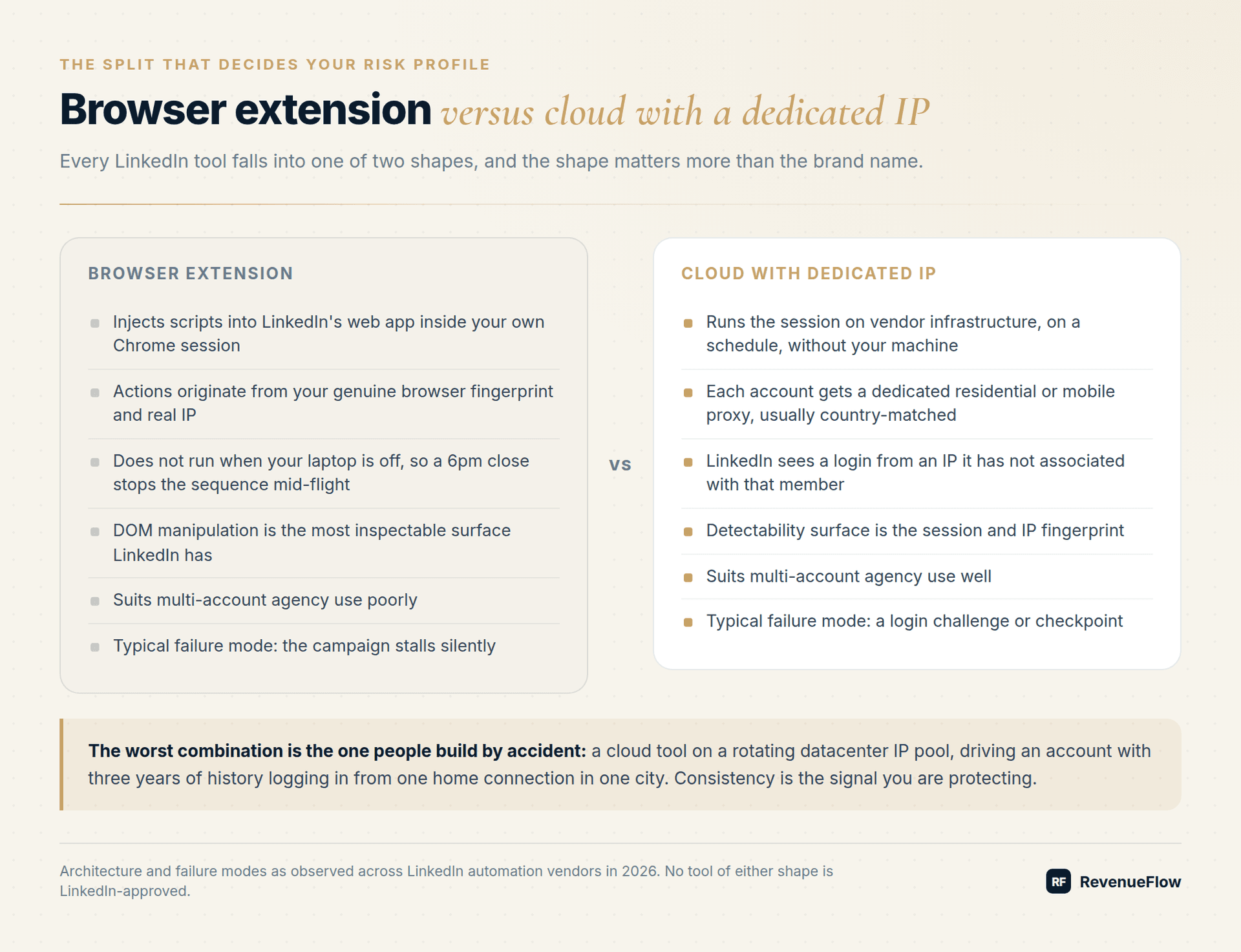
Every LinkedIn tool falls into one of two shapes, and the shape determines your risk profile more than the brand name does.
Browser extension tools inject scripts into LinkedIn's web app inside your own Chrome session. Actions originate from your genuine browser fingerprint and your real IP. The tradeoff: the browser has to be open, so a laptop closing at 6pm stops the campaign mid-sequence, and the extension's DOM manipulation is the most inspectable surface LinkedIn has.
Cloud tools run the session on vendor infrastructure and assign each LinkedIn account a dedicated residential or mobile proxy, usually matched to the account's stated country. Campaigns run on a schedule without your machine involved. The tradeoff: LinkedIn now sees the account logging in from an IP that is not the one it has associated with that member for years, and a shared or previously flagged proxy is worse than no proxy.
| Dimension | Browser extension | Cloud with dedicated IP |
|---|---|---|
| Runs when your laptop is off | No | Yes |
| IP consistency with member history | Native | Requires a stable, country-matched proxy |
| Detectability surface | Injected DOM and extension footprint | Session and IP fingerprint |
| Suits multi-account agency use | Poorly | Well |
| Typical failure mode | Campaign stalls silently | Login challenge or checkpoint |
The worst combination is the one people accidentally build: a cloud tool on a rotating datacenter IP pool, driving a LinkedIn account that has three years of history logging in from one home connection in one city. Consistency is the signal you are protecting.
Activity limits, honestly labelled
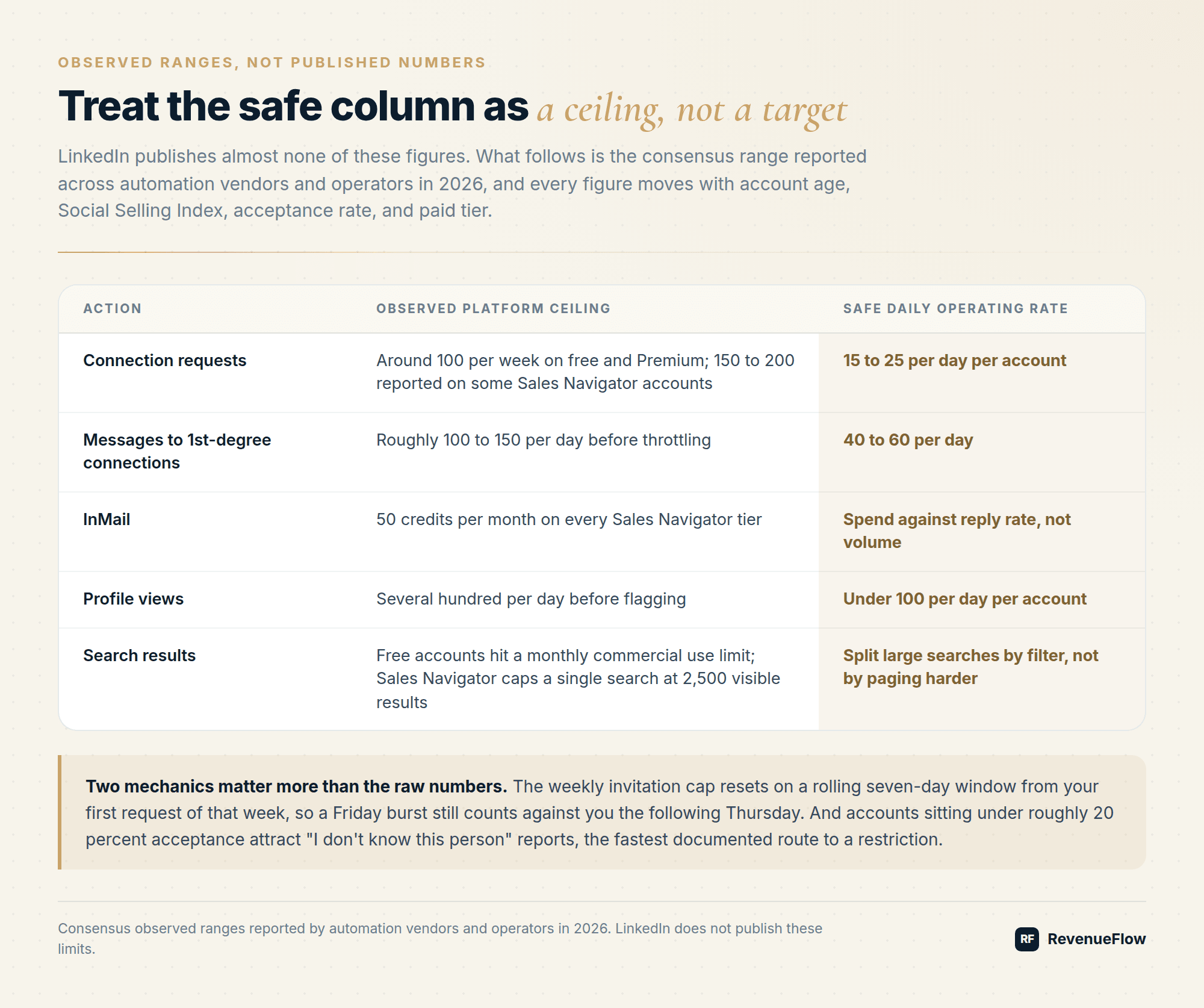
LinkedIn publishes almost none of these numbers. What follows is the consensus observed range reported across automation vendors and operators in 2026, and every figure moves with account age, Social Selling Index, acceptance rate, and whether the account is on a paid tier. Treat the safe column as your operating ceiling, not a target.
| Action | Observed platform ceiling | Safe daily operating rate |
|---|---|---|
| Connection requests | Around 100 per week on free and Premium; 150 to 200 reported on some Sales Navigator accounts | 15 to 25 per day per account |
| Messages to 1st-degree connections | Roughly 100 to 150 per day before throttling | 40 to 60 per day |
| InMail | 50 credits per month on every Sales Navigator tier | Spend against reply rate, not volume |
| Profile views | Several hundred per day before flagging | Keep under 100 per day per account |
| Search results | Free accounts hit a monthly commercial use limit; Sales Navigator caps a single search at 2,500 visible results | Split large searches by filter, not by paging harder |
Two mechanics matter more than the raw numbers. The weekly invitation cap resets on a rolling seven-day window from your first request of that week, not on a calendar Monday, so a Friday burst is still counted against you the following Thursday. And a low acceptance rate compounds: accounts sitting under roughly 20 percent acceptance attract "I don't know this person" reports, which is the fastest documented route to a restriction.
What actually gets accounts restricted
In practice, restrictions cluster around five behaviours:
- Velocity spikes. Going from 0 to 80 invitations in a day on a cold account. Ramp over two to three weeks instead.
- Fresh accounts running automation. An account under about 90 days old with a sparse profile and few connections is the single highest-risk sender you can build.
- Poor acceptance and spam reports. This is a targeting and copy problem masquerading as a tooling problem.
- IP instability. Logging in from a new country, or rotating IPs mid-campaign.
- Bulk scraping. Profile-extraction jobs at volume are a distinct violation from messaging, and they are detected differently.
Notice that three of the five are not about the tool at all. The most common cause of a restricted account is sending mediocre outreach to badly targeted people, quickly.
Two consequences follow for buyers weighing this risk. The claim that LinkedIn will ban an account for automated access is directionally right and imprecise: the documented outcome is a restriction, usually on invitations and usually temporary, and the behaviours above are what trigger it rather than the presence of a tool. And running two tools on one account adds no capacity at all, because every limit here belongs to the account rather than to the software driving it. Two tools on one profile share one budget while doubling the number of systems that can spend it without the other knowing, which is why a client already running an internal tool should keep that account out of any second programme rather than coordinating the two.
The 2026 tool landscape
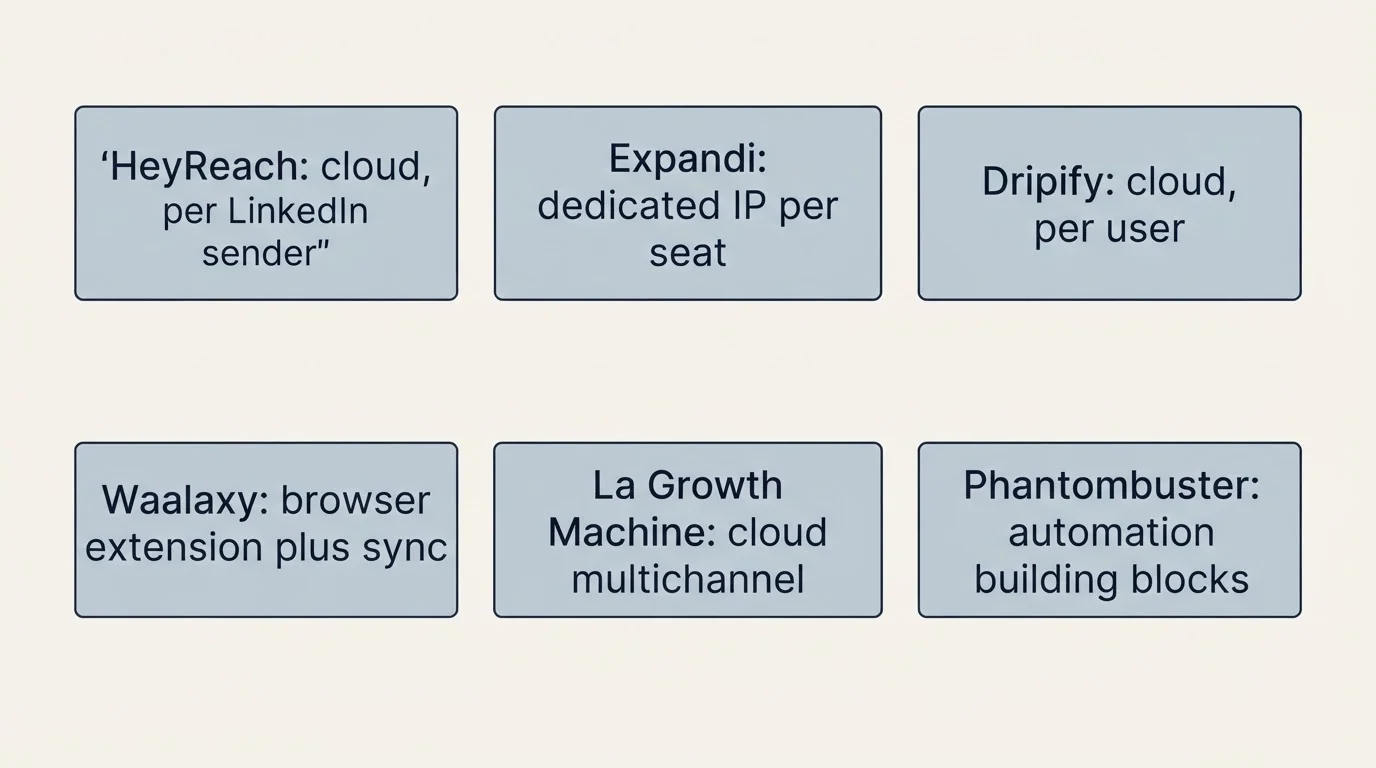
Pricing verified against vendor pricing pages in mid-2026. All of it changes, and several of these vendors reprice quarterly.
La Growth Machine's page, re-read on 4 September 2026, prices per identity rather than per seat and loads in euros with the dollar ladder held in the page's own script, which La Growth Machine pricing sets out for every billing period.
Searches for LinkedIn outreach tools return the same six products under a different word, because the vendors themselves use outreach and automation interchangeably in their own page titles.
| Tool | Architecture | Priced from | Best fit |
|---|---|---|---|
| HeyReach | Cloud, per LinkedIn sender | $79 per month, Agency tier $999 for 25 senders | Agencies and teams rotating many sender accounts in one campaign |
| Expandi | Cloud, dedicated country-matched IP per seat | Around $99 per month per seat | Single-brand outbound where IP hygiene is the priority |
| Dripify | Cloud, per user | Around $39 to $79 per user per month | Small teams wanting simple sequences cheaply |
| Waalaxy | Browser extension plus cloud sync | Free tier up to around $112 per month | Solo sellers and self-serve LinkedIn plus email |
| La Growth Machine | Cloud multichannel | Around $60 per month | Coordinated LinkedIn, email, and X sequences |
| Phantombuster | Cloud automation building blocks | Around $56 per month | Scraping and workflow automation, not a sequencer |
The category has bifurcated. Phantombuster and Waalaxy serve individuals. HeyReach and Expandi serve operators running many accounts, which is a genuinely different product: you need sender rotation, per-client separation, and a unified inbox before you need clever sequence branching. Our own HeyReach review covers the multi-sender model in detail, including where it stops being the right answer.
How we run LinkedIn without burning accounts
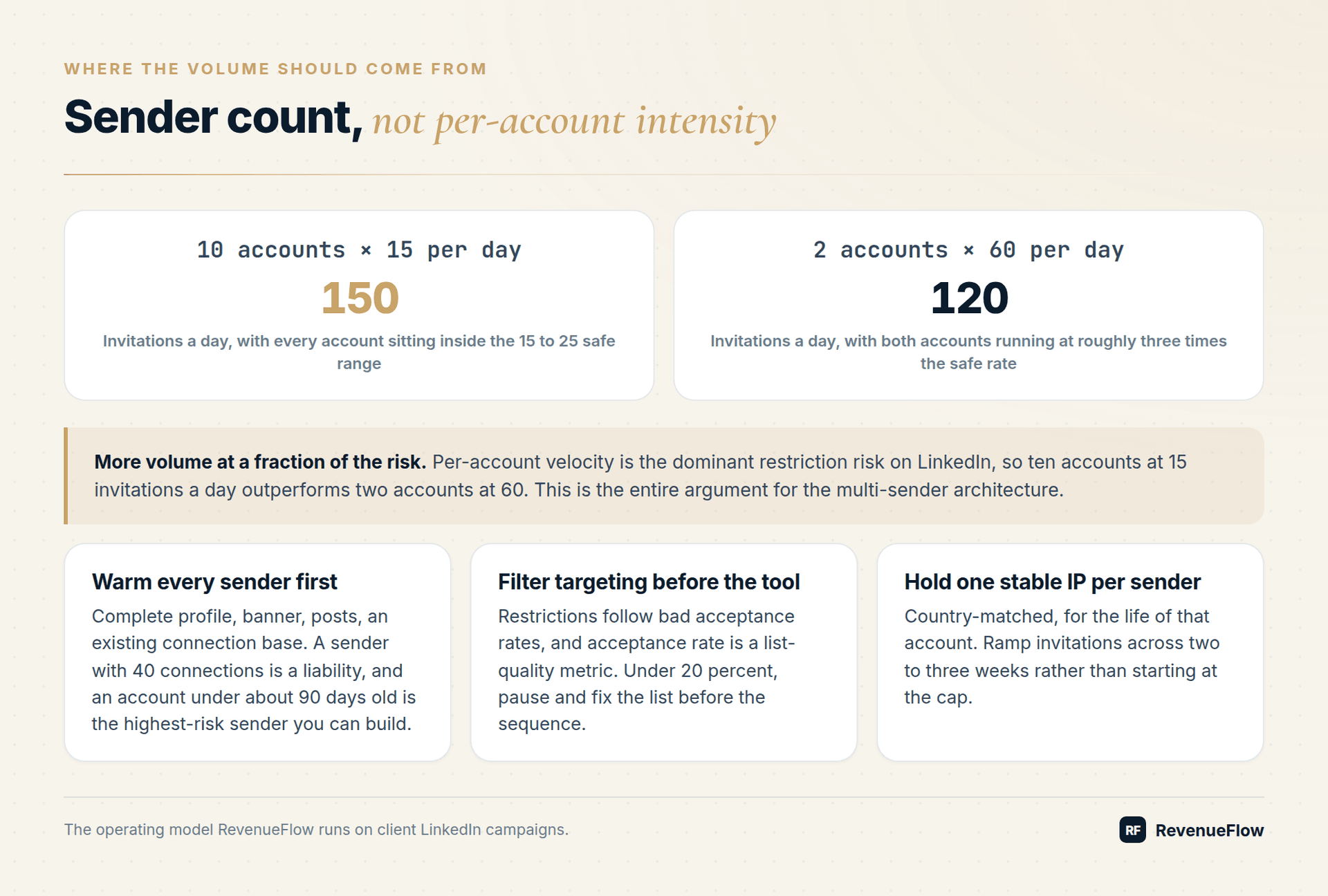
RevenueFlow runs client LinkedIn campaigns daily, and the operating model is deliberately boring:
- Volume comes from sender count, not per-account intensity. Ten accounts at 15 invitations a day outperforms two accounts at 60, with a fraction of the risk. This is the entire argument for the multi-sender architecture.
- Every sender account is warmed as a real profile first. Complete profile, banner, posts, an existing connection base. A sender with 40 connections is a liability.
- Targeting is filtered before it reaches the tool. Restrictions follow bad acceptance rates, and acceptance rate is a list-quality metric.
- Copy is written per campaign, not per tool template. If you want a starting point, our LinkedIn outreach templates are the ones we adapt from.
- LinkedIn is paired with email rather than run alone. The multi-channel outreach templates show the sequencing we use, and the broader outbound sales playbook covers how the two channels split the work.
Safe operating checklist
- Age the account at least 90 days before automating it, and complete the profile properly.
- Ramp invitations across two to three weeks rather than starting at the cap.
- Hold one stable, country-matched IP per sender account for the life of that account.
- Watch acceptance rate weekly. Under 20 percent, pause and fix the list before you fix the sequence.
- Never run bulk profile scraping from an account you also send from.
- Keep withdrawal hygiene: pull unaccepted invitations after two to three weeks so the pending queue does not distort your metrics.
- Assume any account can be restricted and never route your whole pipeline through one profile.
If you are budgeting the channel, Sales Navigator pricing is usually the second line item after the automation tool, and it is the one people over-buy. Pair the channel with B2B intent data only once your baseline sequence is converting, because prioritisation cannot rescue a message nobody wants.
The honest summary
There is no safe LinkedIn automation tool, because safety is not a property of software. There are safer architectures, and there is a safer operating rate. Cloud tools with stable dedicated IPs and low per-account volume across many senders are what survives in 2026. Browser extensions on a single heavily-loaded profile are what gets restricted.
Browser extensions that reveal contact data or capture a profile are a different purchase from a sequencer, and they are sorted by job in LinkedIn Chrome extensions.
Consultants combining LinkedIn outreach with email might instead compare cost-sensitive platforms in the guide to email tools built for consulting workflows.
If you would rather not own the account risk, RevenueFlow runs done-for-you LinkedIn outbound alongside cold email, with the sender infrastructure and the ramp discipline already in place. Get a free campaign plan and we will map the channel to your ICP before anything sends.
Choosing the right complementary channel matters most for regulated industries, and legal teams weighing cold email providers can consult the best email tools for legal services.
Frequently asked questions.
Frequently asked questions- Is LinkedIn automation against the terms of service?
- Yes. LinkedIn's User Agreement prohibits software, scripts, bots, crawlers, browser plugins and add-ons that scrape data or automate activity, and LinkedIn states that accounts using them can be restricted or closed. No tool is LinkedIn-approved. In practice, enforcement targets behaviour: high velocity, new accounts, unstable IPs and low acceptance rates draw attention long before the tool brand does.
- How many connection requests can I send per week without getting restricted?
- LinkedIn does not publish the number. Operators consistently observe around 100 per week on free and Premium accounts, with 150 to 200 reported on some Sales Navigator accounts. The cap resets on a rolling seven-day window from your first request rather than on a calendar week. A safe operating rate is 15 to 25 requests per day per account.
- Are cloud LinkedIn tools safer than browser extensions?
- Usually, provided the cloud tool assigns one stable, country-matched IP per account. Cloud tools run on schedule without your laptop open and are built for multi-account use. The risk is IP inconsistency: a rotating datacenter pool driving an account with years of home-connection history is worse than an extension. Browser extensions send from your genuine session but stop when the browser closes.
- What actually gets a LinkedIn account restricted?
- Five behaviours dominate: sudden velocity spikes on a cold account, automating a profile under roughly 90 days old, acceptance rates below 20 percent that generate spam reports, logging in from unstable or newly changed IPs, and bulk profile scraping. Three of those five are targeting and copy problems rather than tooling problems.
- Which LinkedIn automation tool is best for agencies?
- Agencies need sender rotation, per-client separation and a unified inbox before they need clever sequence branching. HeyReach is built around that model, with per-client workspaces and campaigns that distribute leads across many sender accounts, priced from $79 per month and $999 for a 25-sender Agency tier. Expandi suits single-brand teams prioritising dedicated IP hygiene per seat.
About the author.

B2B cold email experts helping companies generate qualified leads through done-for-you outreach campaigns.
RevenueFlow Team
Explore more.
Ready to scale your outreach?
We build GTM engines that book real meetings. See the receipts.
Related articles.
Social Selling Tools by Job, and the Account-Risk Line
Fourteen social selling tools sorted into six jobs, split by whether each acts through your LinkedIn account or beside it, from the vendors' own pages.
SalesRobot Pricing: Two Tabs, Yearly Opens First
SalesRobot prices LinkedIn per account and email per user on two tabs, with the LinkedIn tab opening on yearly. Both ladders at both states, quotas and credits.
Is Clay Free? The Free Plan, the Trial and Where Each Stops
Clay's free plan, its 14-day trial and the no-charge-on-a-miss rule are three different things. What each holds and where it stops, from clay.com on 19 September 2026.
Video Prospecting Tools by Job: What Each One Is For
Ten video prospecting tools sorted by the job each vendor's own page describes: record and share, personalise at volume, avatars, hosting and interactive demos.
Seamless.AI Email Finder: How It Works, What a Credit Buys
How Seamless.AI's email finder resolves a contact in real time, what one Universal Credit buys, the Total AI score on every address, and what the Chrome extension reads.
Autobound Pricing: One-Time Credit Packs, Not Seats
Autobound's pricing page sells one-time credit packs for a signal data API, not seats. The six packs, the per-endpoint meter, and what a company costs.