LinkedIn Sales Navigator Pricing 2026: The Three Tiers
Sales Navigator Core is $119.99 a month and Advanced $159.99, verified on LinkedIn's compare-plans page. What each tier adds, and when it is not worth buying.
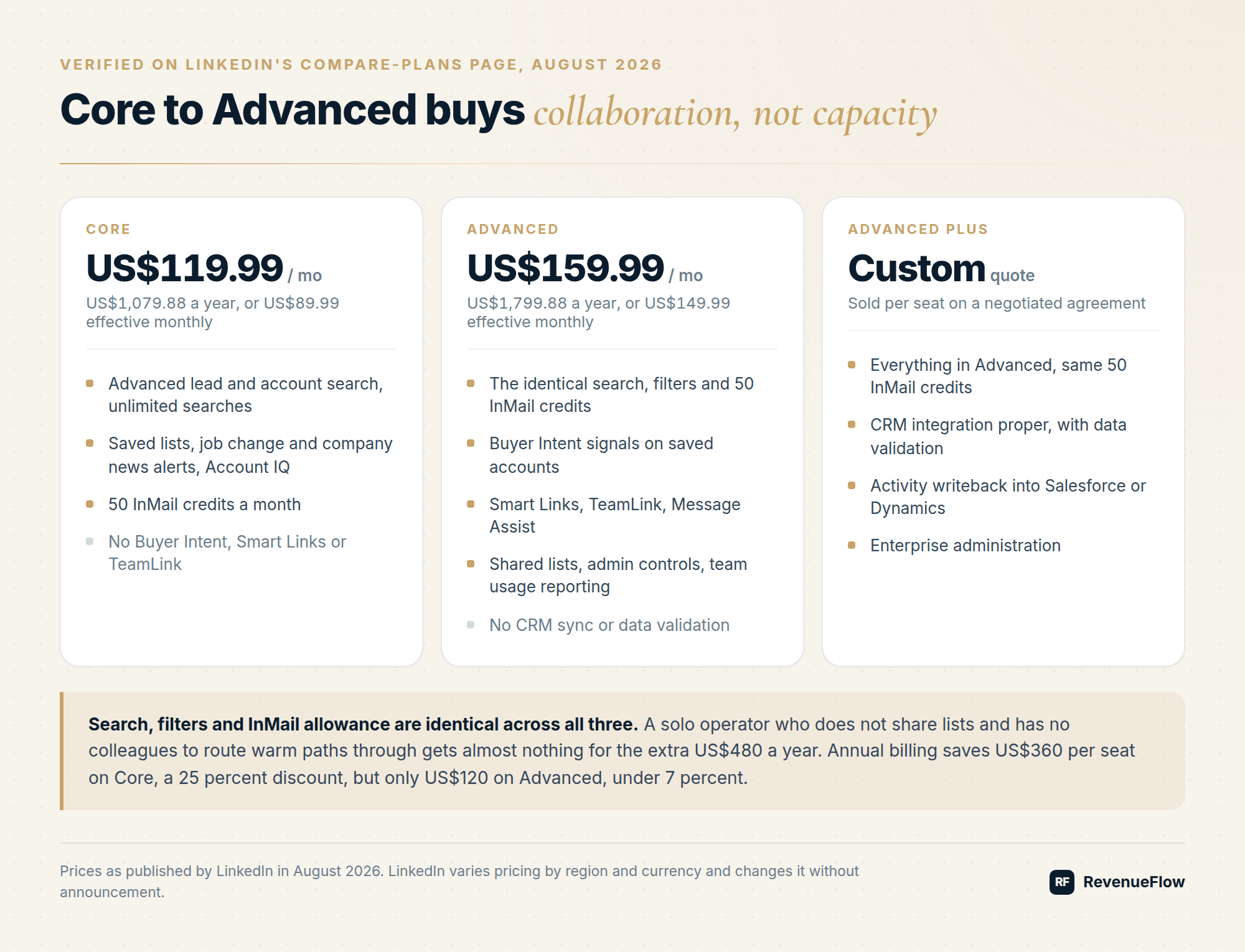
LinkedIn lists Sales Navigator Core at US$119.99 a month and Advanced at US$159.99, with Advanced Plus quoted on request. All three carry 50 InMail credits a month and the same search. The Core to Advanced gap buys Buyer Intent, TeamLink, Smart Links and team reporting rather than extra prospecting capacity.
Key takeaways
- Core is US$119.99 a month or US$1,079.88 a year, and Advanced is US$159.99 a month or US$1,799.88 a year, on LinkedIn's own compare-plans page.
- The annual discount is 25 percent on Core and 6 percent on Advanced, so the two tiers reward committing very differently.
- Search, filters and the 50 monthly InMail credits are identical on Core and Advanced; the price gap buys collaboration and intent signals.
- A single search caps at 2,500 visible results and there is no bulk export, so this is a targeting layer rather than a list source.
Reviewed and updated September 5, 2026
LinkedIn Sales Navigator Pricing 2026: Core vs Advanced vs Advanced Plus
LinkedIn lists Sales Navigator Core at US$119.99 per month and Advanced at US$159.99 per month, with Advanced Plus quoted only on request. Those are the figures on LinkedIn's own compare-plans page as of mid-2026. LinkedIn varies pricing by region and currency and changes it without announcement, so treat everything below as verified-today rather than permanent.
Published ladders are rarer than they look in this market, and PlusVibe publishing its whole pricing ladder is unusual enough in cold email to make comparison possible.
The published prices
| Plan | Monthly | Annual | Effective monthly on annual | InMail credits |
|---|---|---|---|---|
| Core | US$119.99 | US$1,079.88 | US$89.99 | 50 per month |
| Advanced | US$159.99 | US$1,799.88 | US$149.99 | 50 per month |
| Advanced Plus | Custom quote | Custom quote | Custom quote | 50 per month |
LinkedIn also publishes non-US pricing directly: Core at EUR120.99 or GBP94.99 monthly, Advanced at EUR148.21 or GBP130.00 monthly. The euro and sterling figures do not track the dollar ones at any fixed exchange rate, which is the clearest evidence that these are regional list prices rather than a single global number.
Annual billing saves US$360 per seat per year on Core and US$120 per seat per year on Advanced. The Core discount is 25 percent; the Advanced discount is under 7 percent. If you are unsure whether the seat will still be used in six months, monthly Advanced is a cheap option to keep.
So the answer to how much Sales Navigator costs per month depends on which month you mean: the monthly list price, or the annual commitment divided by twelve, and on Core those two differ by thirty dollars a seat while on Advanced they differ by ten.
The annual discount is not one discount
LinkedIn's compare-plans page states the saving on each tier separately, and the two numbers are nothing like each other: a 25 percent saving on Core with annual billing, and a 6 percent saving on Advanced.
That asymmetry is worth a minute of thought before you commit a year. On Core the annual commitment is the cheapest seat LinkedIn sells by a wide margin, and it is close to a straight discount for paying up front. On Advanced the discount barely covers the risk of the seat going unused, so a team that is still deciding whether Advanced earns its place is better off paying monthly and moving to annual once the usage data says yes.
The practical rule: commit annually on Core, prove the case monthly on Advanced.
What each tier actually adds
The tier names suggest a data ladder. They are not one. Search, filters, and InMail allowance are identical across Core and Advanced.
Core gives you the product most people mean when they say Sales Navigator: advanced lead and account search, unlimited searches, saved lead and account lists, alerts on job changes and company news, Account IQ summaries, and 50 InMail credits a month.
Advanced adds team and intelligence features on top of the identical search: Buyer Intent signals on saved accounts, Smart Links for trackable content shares, TeamLink for surfacing colleagues' first-degree paths into a target account, Message Assist drafting, shared lists, admin controls, and team usage reporting.
Advanced Plus is the enterprise contract. Its distinguishing features are CRM integration proper, including data validation and activity writeback into Salesforce or Dynamics, plus enterprise administration. It is sold per seat on a negotiated agreement rather than a list price.
- Advanced lead and account search
- Unlimited searches
- Saved lead and account lists
- Alerts on job changes and company news
- 50 InMail credits a month
- Everything in Core
- Buyer Intent signals on saved accounts
- Smart Links
- TeamLink warm paths
- Shared lists and admin controls
- Team usage reporting
- Everything in Advanced
- CRM sync into Salesforce or Dynamics
- Data validation and activity writeback
- Enterprise administration
| Capability | Core | Advanced | Advanced Plus |
|---|---|---|---|
| Advanced search and filters | Yes | Yes | Yes |
| Unlimited searches | Yes | Yes | Yes |
| InMail credits per month | 50 | 50 | 50 |
| Lead and account lists | Yes | Yes | Yes |
| Buyer Intent signals | No | Yes | Yes |
| Smart Links | No | Yes | Yes |
| TeamLink | No | Yes | Yes |
| Shared lists and team reporting | No | Yes | Yes |
| CRM sync and data validation | No | No | Yes |
Read that table as a decision rule: the price gap between Core and Advanced buys collaboration and intent, not prospecting capacity. A solo operator who does not share lists and does not have colleagues to route warm paths through gets almost nothing for the extra US$480 a year.
The team math nobody runs before signing
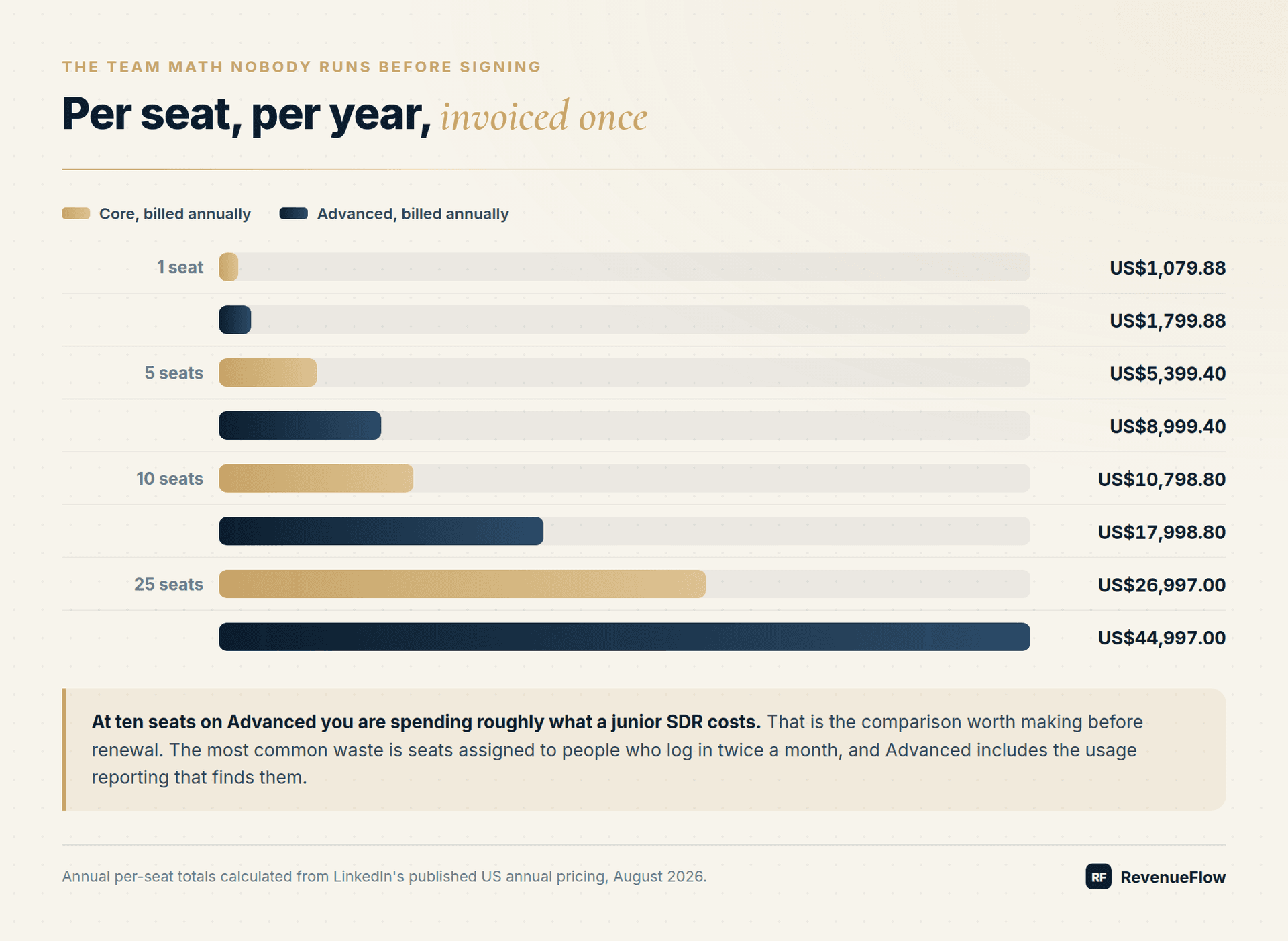
Sales Navigator is priced per seat, and the annual number surprises people because it is invoiced once.
| Team size | Core annual | Advanced annual |
|---|---|---|
| 1 seat | US$1,079.88 | US$1,799.88 |
| 5 seats | US$5,399.40 | US$8,999.40 |
| 10 seats | US$10,798.80 | US$17,998.80 |
| 25 seats | US$26,997.00 | US$44,997.00 |
At ten seats on Advanced you are spending roughly what a junior SDR costs, which is the comparison worth making before renewal. Our breakdown of SDR cost versus an automation stack runs that math in the other direction.
When Sales Navigator is not worth it
Five situations where we advise against buying it, or against buying more seats:
- No: You need a list, not a search tool.
- No: You do not send InMail.
- No: Your ICP is thin on LinkedIn.
- No: You bought Advanced for Buyer Intent alone.
- No: Seats are idle.
You need a list, not a search tool. If the job is "give me 3,000 contacts with verified emails," a data provider does it faster and cheaper. Sales Navigator has no bulk export, exporting via third-party tools violates the User Agreement, and the search caps at 2,500 visible results per query. Compare the options in best ZoomInfo alternatives.
You do not send InMail. The 50 monthly credits are a real part of the value. If your motion is connection request plus message, or email, those credits expire unused every month and you are paying for search you could partly approximate with a Premium account.
Your ICP is thin on LinkedIn. Field service operators, independent restaurants, local trades, and much of the SMB long tail are poorly represented and badly titled on LinkedIn. If your addressable market lives in Google Maps or an industry directory, Sales Navigator search precision buys you nothing. When your total addressable market is genuinely small, cold calling into a small TAM usually beats tooling spend.
You bought Advanced for Buyer Intent alone. LinkedIn's intent signal is directional at best: it tells you an account showed interest, without telling you who or why. Understand what that class of data can and cannot predict in our B2B intent data guide before you upgrade a whole team for it.
Seats are idle. The most common waste is seats assigned to people who log in twice a month. Advanced includes usage reporting; run it before renewal and downgrade the seats that show near-zero search activity.
What to do with it once you have it
Sales Navigator earns its cost as a targeting and timing layer, not as a sending tool. The workflow that pays for itself:
- Build a saved account list against real firmographic filters, not a job title alone.
- Turn on alerts for job changes, funding, and headcount growth on those accounts.
- Let the alert set the timing, and run the actual outreach in a dedicated channel tool.
- Keep the message human. Templates are a starting point, and our LinkedIn outreach templates are the ones we adapt from.
- Pair LinkedIn with email rather than running it alone. The outbound sales playbook sets out how the two channels divide the work.
One warning on execution. Sales Navigator itself is compliant; bolting an automation tool onto it is where account risk enters. Read what is safe and what gets you restricted before you connect anything to the account, and if you are running many sender profiles, the multi-sender approach in our HeyReach review is the shape that survives.
Rolling it out without wasting seats
Sales Navigator is bought once and then quietly wasted for a year, which is a seat-allocation failure rather than a product failure. Three habits prevent most of it.
Buy fewer seats than people who want one. Start with the sellers who can name the accounts they would search for tomorrow. Sales Navigator rewards a specific target list and does nothing for someone still deciding who to sell to, so a seat given to an undecided rep produces logins rather than pipeline.
Set one shared saved-search convention on day one. Teams that let every rep build their own filters end up with searches nobody else can interpret, which means the account list cannot be reviewed and the work cannot be handed over. Agree the firmographic filters once, save them centrally, and let people layer their own on top.
Diary the usage review a month before renewal, not on it. Advanced includes usage reporting for exactly this, and the number that matters is searches run per seat rather than logins. A seat with logins and no searches is someone checking a profile, which a free LinkedIn account does.
Free trial and downgrade path
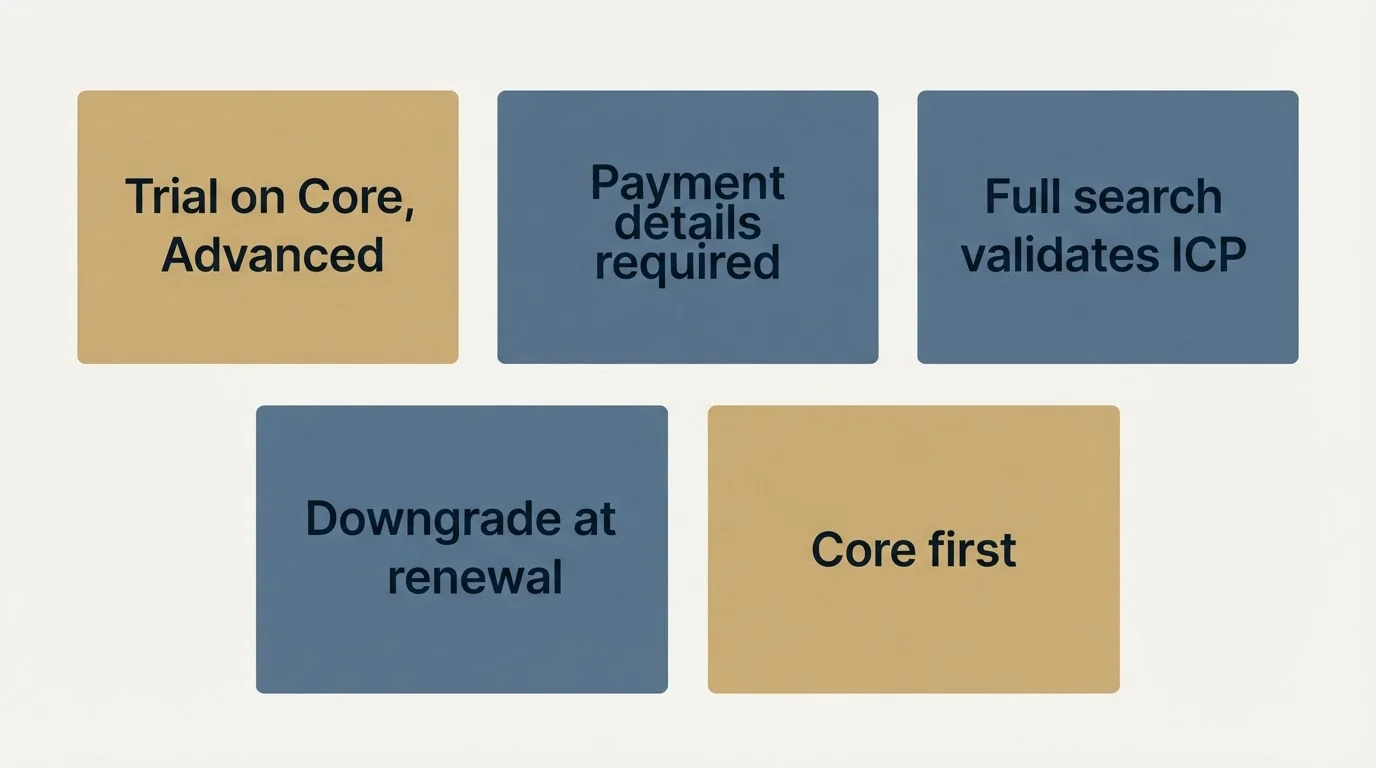
LinkedIn offers a free trial on Core and Advanced, typically one month, and it requires payment details. Two practical notes: the trial gives full search access, which is enough time to validate whether your ICP is actually findable, and downgrading from Advanced to Core mid-term is generally handled at renewal rather than immediately, so pick the cheaper tier first and upgrade if the team features prove necessary.
What the seat does not replace
Two purchases get cancelled on the strength of a Sales Navigator seat and should not be.
It is not a data provider. There is no bulk export, exporting through third-party tools breaches the User Agreement, and a search caps at 2,500 visible results. A seat gives you a way to identify accounts and people; turning that into a list with verified email addresses is a separate job with separate tooling.
It is not a sending tool either. The 50 monthly InMail credits are a real allowance and they are a trickle at outbound volume, so any campaign larger than a named account list still needs a channel that can carry it. Sales Navigator's value in that stack is targeting and timing: it tells you which accounts to approach and which week to approach them in, and the approach itself happens somewhere else.
Treat the seat as the research layer and budget the list and the sending separately, or the second invoice arrives as a surprise.
Bottom line
Buy Core if you are one seller who needs better search and will use the InMail credits. Buy Advanced only if TeamLink, shared lists, or admin reporting solve a problem you can name today. Buy Advanced Plus only when CRM writeback is a procurement requirement. And if the goal is booked meetings rather than better search, the tooling budget is usually in the wrong place: get a free campaign plan and we will show you what the same spend does as an actual outbound motion.
Frequently asked questions.
Frequently asked questions- How much does LinkedIn Sales Navigator cost per month?
- LinkedIn's compare-plans page lists Core at US$119.99 per month and Advanced at US$159.99 per month, with Advanced Plus quoted on request. Annual billing brings Core to US$1,079.88 and Advanced to US$1,799.88 per licence. LinkedIn publishes separate prices for other currencies, so a local figure will differ from a straight conversion.
- Is Advanced worth the extra cost over Core?
- Only if you need the team features. Search, filters and the 50 monthly InMail credits are identical on both tiers. Advanced adds Buyer Intent signals, Smart Links, TeamLink warm paths, shared lists, admin controls and team reporting. A solo seller with no colleagues to route introductions through gets very little for the difference.
- Should I pay annually or monthly?
- It depends on the tier, because the discounts are nothing alike. LinkedIn's page states a 25 percent saving with annual billing on Core and a 6 percent saving on Advanced. Commit annually on Core, where the discount is large enough to absorb some risk, and prove the case monthly on Advanced before locking a year in.
- Can you export leads from Sales Navigator?
- No. There is no bulk export, exporting through third-party tools breaches the LinkedIn User Agreement, and a single search caps at 2,500 visible results. If the goal is a list of contacts with verified email addresses, a dedicated data provider is faster and cheaper. Sales Navigator earns its cost as a targeting and timing layer.
About the author.

B2B cold email experts helping companies generate qualified leads through done-for-you outreach campaigns.
RevenueFlow Team
Explore more.
Ready to scale your outreach?
We build GTM engines that book real meetings. See the receipts.
Related articles.
Social Selling Tools by Job, and the Account-Risk Line
Fourteen social selling tools sorted into six jobs, split by whether each acts through your LinkedIn account or beside it, from the vendors' own pages.
Snitcher Pricing: The $49 Table Is the Annual Rate
Snitcher's visible price table is the annual-billing ladder. The ten bands at both billing states, the unique-company meter, and the rules on a help page.
Twain Pricing: Credits per Lead, Three Research Modes
Twain sells credits, not seats, and a lead costs 1 to 14 of them depending on the research mode. The two ladders, the four expiry clocks and the cap.
Autobound Pricing: One-Time Credit Packs, Not Seats
Autobound's pricing page sells one-time credit packs for a signal data API, not seats. The six packs, the per-endpoint meter, and what a company costs.
TexAu Pricing: Four Tiers, Billed Only on a Match
TexAu charges credits only when a lookup succeeds. The four tiers at both billing states, the rollover cap, and three places the page disagrees with itself.
The Real Cost per 1,000 Emails, Verifications and Data Credits in 2026
Unit prices computed from verified vendor plans: $1.00 per 1,000 emails sent, $2.00 per 1,000 verifications and $19.60 per 1,000 enrichment credits.