Video Prospecting Tools by Job: What Each One Is For
Ten video prospecting tools sorted by the job each vendor's own page describes: record and share, personalise at volume, avatars, hosting and interactive demos.
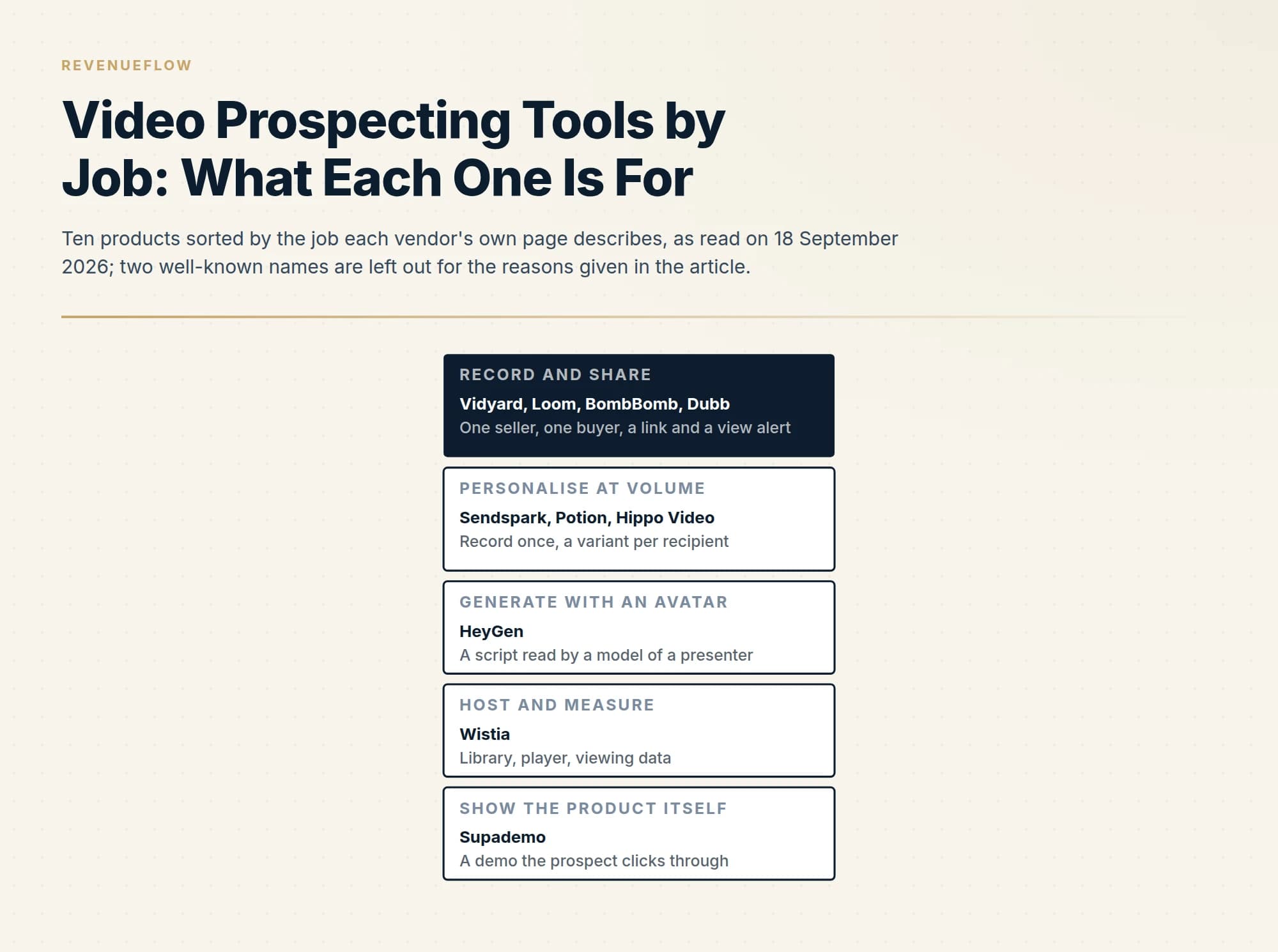
Video prospecting tools do five jobs. Vidyard, Loom, BombBomb and Dubb record and share one-to-one messages; Sendspark, Potion and Hippo Video personalise one recording for many recipients; HeyGen generates avatar video; Wistia hosts and measures; Supademo sends an interactive demo instead. Pick the job first, then read where the CRM integration starts on the vendor's pricing page.
Key takeaways
- Sort video prospecting tools by job before comparing products: record and share, personalise one recording at volume, generate with an avatar, host and measure, or show the product as an interactive demo.
- Personalisation at volume varies the wrapper, a spoken name or the prospect's website behind the speaker; if the script could go to anyone, the video can too.
- No tool here sends a video file by email: a thumbnail and a tracked link go out, a hosted page plays the video, and a view event returns to the seller and the CRM.
- Tavus and Covideo are left off this roster because, as read on 18 September 2026, their own homepages describe conversational AI agents and car dealership messaging.
Reviewed and updated September 19, 2026
The fullest roster of video prospecting tools in the search results is written by a vendor in the category, and the vendor's own product is first on it. The more useful way to sort the category is by job. Recording a one-off message for one buyer, stamping a prospect's name onto one recording a thousand times, generating an avatar that was never filmed, and hosting the result with analytics are four different purchases, and a team that buys the wrong one gets a good product that does not fit its motion.
This page sorts ten products into five jobs. Every description below comes from the vendor's own page as read on 18 September 2026, quoted where the wording matters, and no price appears here: pricing pages change faster than product pages, and where we have read a vendor's ladder in full we link that guide. RevenueFlow runs cold email and LinkedIn outbound and does not send video in its own campaigns, so this is a reading of what the vendors publish and carries no usage claim.
The five jobs
Record and share. A seller records webcam, screen or both, sends a link, and sees who watched. This is the original job, and it is what the phrase video prospecting first described.
Personalise one recording at volume. The seller records once, and software produces a variant per recipient, with the name spoken or the prospect's website placed behind the speaker.
Generate with an avatar. No recording session at all. A model of a presenter reads a script.
Host and measure. A library, a player, and analytics that tie viewing to a contact record.
Show the product itself. An interactive demo a prospect clicks through, sent in the slot a video would have taken.
Record and share
Vidyard. Its video for prospecting page says that "Vidyard lets you record and share personal video messages", by webcam or screen, shared through email or social media by link. The page describes view analytics, and the line that matters to a sales team is the one about the system of record: "Integrate video view data into your CRM to quantify exactly how your videos help close more deals." It also advertises AI-generated outreach videos for sellers with no time to record. Which of that sits on which plan is a pricing question, and our Vidyard pricing guide reads the ladder and shows where the CRM integrations start.
Loom. Loom's sales use case page addresses the same seat by name: "Loom's video messaging helps AEs, BDRs, and SDRs connect with key stakeholders, build relationships, and unlock more revenue." The page lists recording from a browser, desktop or phone, sharing by link, and a viewing alert. On integrations it says "Loom works with Salesforce, Zoom, Slack, Google Workspace, Calendly, and more to keep your workflows running smoothly", and on scale it offers a lighter version of the next job: "Record once and personalize variations of your videos with Variables". Loom is an Atlassian product and a general recording tool first, which is its strength for a team that already uses it internally.
BombBomb. BombBomb's homepage leads with email as the delivery route, describing "embedding personal videos directly in your emails", and its integrations menu names Outreach, Total Expert, Gmail, Outlook and Chrome, with a Gmail plugin and an Outlook plugin among its downloads. The page carries the vendor's own response-rate claim, which we leave on the vendor's page where it belongs.
Dubb. Dubb's homepage, as read on the same date, has been rebuilt around an assistant: "Dubb is a video sales platform and an AI agent, built to work together." The actions it lists include generating leads, recording and emailing videos, booking meetings and building pages, and the industries it names run from sales and software to real estate, insurance and mortgage.
Personalise one recording at volume
Sendspark. Sendspark's homepage headline is the job description: "Record One Video Personalize at Scale with AI". Its AI intros page spells out the mechanism, "Shoot just one video. Then, automatically personalize each video for each viewer with AI.", and names the visual trick this job is known for: "Automatically add the website or LinkedIn profile of your prospect to your video." Contacts come in by CSV, CRM or API, and the output is shared in email or on a landing page with a call to action.
Potion. Potion describes "Personalized AI videos in your own face, voice & gestures". The setup it describes is training a model of the seller, then typing a script or recording a template. The same page says the platform "Integrates with 50+ sales, marketing, support, & CRM tools" and describes the platform as SOC 2 compliant.
Hippo Video. Hippo Video's homepage now leads with what it calls agentic AI, and under that heading keeps both halves of the category. The recording half is the "Screen and Webcam Recorder", described as "Seamlessly record and share demos, walkthroughs, or presentations." The volume half is "Automated Video Campaigns": "Launch hyper-personalized video campaigns at scale, increasing engagement across every touchpoint." It also lists dynamic background videos, interactive videos and custom sales pages.
The honest caution for this job is about what personalisation means. A spoken first name and a screenshot of the prospect's homepage are personalisation of the wrapper. The reason for writing to this person is still whatever the script says, and if the script could go to anyone, the video can too. Our guide to prospecting tools makes the same point about message generators: writing was never the constrained step.
Generate with an avatar
HeyGen. HeyGen's homepage promises "AI videos starring you, made in minutes", with avatars, lip-sync and one-click translation. Nothing on that page, as read on 18 September 2026, addresses sales prospecting specifically. It is a general video generator that sales teams point at outreach, and it should be evaluated as that.
Two names that appear on other rosters are left off this one on the evidence of their own homepages. Tavus now introduces itself as "The human interface for AI" and sells conversational agents and an API; our Tavus pricing guide explains its two separate ladders. Covideo's homepage is titled "Video Message App for Dealerships" and speaks to car dealers throughout. Both may suit a particular team. Neither describes itself today as a B2B prospecting tool, and a roster should follow the vendor's page.
Host and measure, and show the product
Wistia. Wistia calls itself "Your team's video HQ": "One place to host and make videos, run stunning webinars, and see what's driving impact." Its homepage is written for marketers, and it matters to prospecting as the place a recorded library lives and where viewing data joins a marketing platform. Its per-workspace pricing model is read in full in our Wistia pricing guide.
Supademo. Supademo is "The AI demo platform for the full customer journey", and its page lists interactive and sandbox demos beside screen and video recordings. The case for it in prospecting is that some buyers would sooner click through a product for a minute than watch a seller talk about it.
| Job | Check on the vendor's page | The deciding question |
|---|---|---|
| Record and share | Where view data goes, and which plan the CRM integration starts on | Will anyone act on a view alert? |
| Personalise at volume | What is actually varied per recipient, and how contacts are imported | Is the script itself about this reader? |
| Generate with an avatar | Whether the page addresses sales use at all | Would the buyer mind learning it was generated? |
| Host and measure | How viewing data reaches your contact records | Do you have a library worth hosting? |
| Show the product | Whether a demo can be shared by link without a login | Does the product explain itself on screen? |
What actually travels in the message
None of these tools sends a video file through email. By the vendors' own descriptions, what travels is a link, usually behind a thumbnail, and the video plays on a hosted page. Vidyard's page says "Easily share your videos through email or social media with shareable links." Loom's says sellers prospect "using links that let you share Loom videos anywhere". Sendspark's AI intros page says "Share in email or on branded landing pages with your logo & a call-to-action." The page is where the player, the call to action and sometimes a calendar sit, and the view event on that page is what flows back to the CRM.
That has a consequence for cold outreach that no product page dwells on. The first message a stranger receives now contains an image and a tracked link to a third-party domain, and the recipient has to click before anything about the video matters. Whether that helps or hurts placement and replies on your sending setup is something to test on a small segment before rolling out, with the plain-text version of the same message as the control.
Where video earns its place
Video changes what a message can carry and leaves unchanged who receives it. A recording sent to a badly chosen list is a slower way to be ignored, and the seat cost of any tool above is small against the cost of the list it is pointed at. Our Vidyard guide ends on the same position, and our older page of video email templates covers scripts for the recording itself.
The stages where a recorded message has the clearest job are the ones where a relationship already exists: a recap after a demo, a walkthrough of a proposal, an answer to a technical question that would take four paragraphs to type. In cold outreach the recording has to clear a higher bar, because the reader has to click a stranger's link before seeing any of it. In our own campaigns we send one written message per campaign with nothing behind it, so we have no sequence of video touches to recommend, and we would apply the same rule to video that we apply to text: if the first message did not earn a reply, a second recording under it will not.
- Yes: Name the job: record and share, personalise at volume, avatar, hosting or interactive demo
- Yes: Read which plan the CRM integration starts on, on the vendor's own pricing page
- Yes: Check what is varied per recipient, and whether the script is still generic
- Yes: Test a small segment against the plain-text version of the same message
- Yes: Decide who acts on a view alert, and how fast
- No: Choosing from a roster written by one of the vendors on it
The short version
Video prospecting tools do five jobs: record and share, personalise one recording at volume, generate with an avatar, host and measure, and show the product itself. Vidyard, Loom, BombBomb and Dubb describe the first job on their own pages; Sendspark, Potion and Hippo Video the second; HeyGen the third; Wistia the fourth; Supademo the fifth. Tavus and Covideo are left off because their homepages no longer describe B2B prospecting. Pick the job before the product, read the integration gate on the vendor's pricing page, and test any video message against its plain-text twin before rolling it out.
If the constraint is that too few of the right people are being reached at all, the recording tool is not the decision: see what a first campaign produces.
Product descriptions come from each vendor's own pages, fetched and read on 18 September 2026: Vidyard, Loom, BombBomb, Dubb, Sendspark, Potion, Hippo Video, HeyGen, Wistia, Supademo, Tavus and Covideo. Vendors change their positioning and their plans. Verify current features and terms with the vendor before relying on them.
Frequently asked questions.
Frequently asked questions- What is a video prospecting tool?
- Software a seller uses to record a short webcam or screen message, share it by link in an email or a LinkedIn message, and see who watched. Newer products add a second job: recording once and generating a variant per recipient, with the name spoken or the prospect's website shown behind the speaker. Hosting platforms and interactive demo tools sit beside them.
- Which video prospecting tools integrate with a CRM?
- Several vendors describe it on their own pages as read on 18 September 2026. Vidyard's prospecting page talks about integrating video view data into your CRM, Loom's sales page says its video analytics sync directly with your CRM, and Sendspark imports contacts by CSV, CRM or API. Check the vendor's pricing page for the plan where that integration starts before comparing seat rates.
- Is Loom or Vidyard better for sales prospecting?
- They describe the same core job, recording a message, sharing a link and tracking views, from different starting points. Vidyard's pages are written for revenue teams and lead with CRM view data and AI-generated outreach. Loom is a general recording tool that addresses AEs, BDRs and SDRs on a dedicated sales page. The deciding factors are usually the integration gate and what your company already uses.
- Does video work in cold outreach?
- It depends on the list and the message more than on the tool. A video message reaches a stranger as a thumbnail and a tracked link, and the reader has to click before the recording matters. Test a small segment against the plain-text version of the same message. Recorded messages have a clearer job once a conversation exists, such as a recap after a demo.
About the author.

B2B cold email experts helping companies generate qualified leads through done-for-you outreach campaigns.
RevenueFlow Team
Explore more.
Ready to scale your outreach?
We build GTM engines that book real meetings. See the receipts.
Related articles.
LinkedIn Chrome Extensions, Sorted by the Job They Do
The category holds four unrelated products. Which job each extension does, what six vendors publish about their own, and what none of them change.
Seamless.AI Email Finder: How It Works, What a Credit Buys
How Seamless.AI's email finder resolves a contact in real time, what one Universal Credit buys, the Total AI score on every address, and what the Chrome extension reads.
Social Selling Tools by Job, and the Account-Risk Line
Fourteen social selling tools sorted into six jobs, split by whether each acts through your LinkedIn account or beside it, from the vendors' own pages.
Is Clay Free? The Free Plan, the Trial and Where Each Stops
Clay's free plan, its 14-day trial and the no-charge-on-a-miss rule are three different things. What each holds and where it stops, from clay.com on 19 September 2026.
RingLead vs LeanData: ZoomInfo Operations Compared
RingLead is now ZoomInfo Operations. How it compares with LeanData on matching, routing, deduplication and enrichment, read from each vendor's own pages.
Gong Engage vs Salesloft Cadence: How They Differ
Gong Engage and Salesloft Cadence compared from each vendor's own pages: where each starts, six jobs side by side, and what the pricing pages disclose.