Seamless.AI Email Finder: How It Works, What a Credit Buys
How Seamless.AI's email finder resolves a contact in real time, what one Universal Credit buys, the Total AI score on every address, and what the Chrome extension reads.
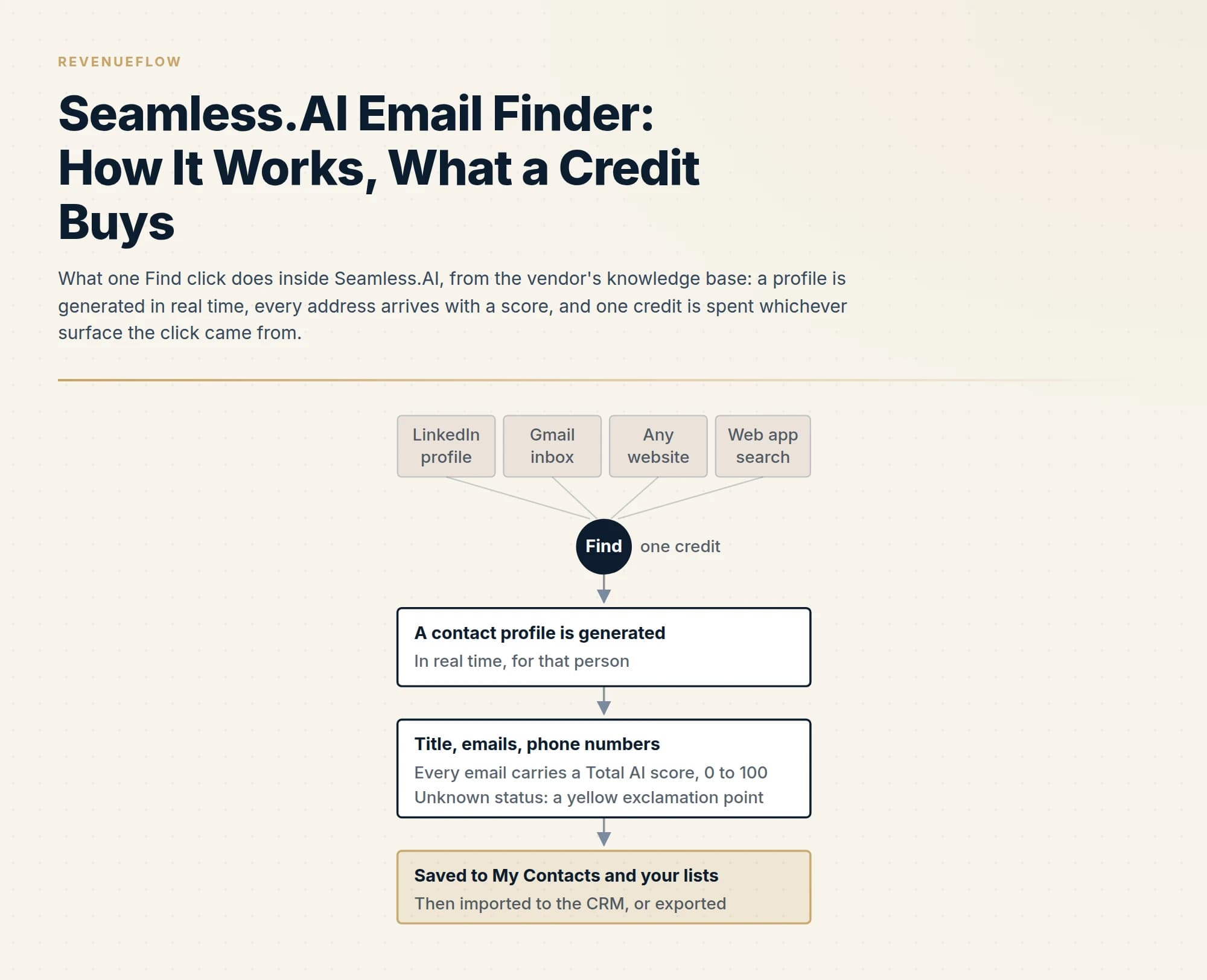
Seamless.AI's email finder is a real-time search reached from the web app or a free Chrome extension on LinkedIn, Gmail, Salesforce and any website. One Find spends one Universal Credit and generates a full profile; every email carries a Total AI score from 0 to 100, vendor threshold 70. The free licence holds 50 credits that never replenish.
Key takeaways
- The finder generates a profile in real time rather than reading a static list, and one Find click costs one Universal Credit whether it comes from the web app, LinkedIn, Gmail, Salesforce or any website through the free Chrome extension.
- Since June 2026 every feature runs on Universal Credits: the free licence holds 50 that never replenish, Basic receives 250 a month, Pro 10,000 a month, and the Pro card states that one credit covers the phone and the email together.
- Every email address carries a Total AI confidence score from 0 to 100, built from deliverability, name and company match, pattern consistency and source reliability; the vendor recommends a threshold of 70 and places accept-all domains in a partial-confidence state.
- The score is a claim, not a verified mailbox: verify every exported address independently, keep catch-all domains in their own tier, and never silence the Unknown-status warning on CRM import.
Reviewed and updated September 19, 2026
Seamless.AI does not hold a list of email addresses waiting to be looked up. Its own knowledge base says so in as many words: a search that returns nothing is not a fault, because the product "works differently from a static database. It is designed for real-time, targeted prospecting". The email finder is the part of that engine that takes a name and a company, builds a contact profile on the spot, attaches a confidence score to every address it finds, and charges one credit for the click that started it. Everything below is what Seamless.AI's own pages say about that mechanism, read on 19 September 2026; nothing is taken from reviews.
The finder lives in four places, costs one Universal Credit per contact wherever it runs, and returns an address with a score rather than a verified mailbox. Those three facts decide how an outbound team should use it. A companion page, Apollo.io email finder, takes another vendor's finder apart the same way, and the mechanics differ enough to read the two together.
Where the finder lives
Seamless.AI's email finder page, fetched on 19 September 2026, describes the finder as a way to "Find email addresses on social platforms, company websites, and anywhere else you prospect with our free Chrome extension." The knowledge-base article on the Chrome extension names the surfaces: "The Seamless Chrome Extension lets you prospect on LinkedIn, Gmail, and Salesforce. With our sidebar, activate the power of Seamless on any website and streamline your prospecting without ever leaving the page." On LinkedIn the same article says the extension "works seamlessly with LinkedIn Basic, LinkedIn Recruiter, and Sales Navigator".
The fourth surface is the web app itself, and the knowledge base treats the extension as the same engine reached from a different page: "Just like in the Seamless platform, you can click Find or Find All to generate contact profiles right in the extension."
The extension is free to install on every plan. The vendor's extension page answers its own FAQ with "Yes, the Seamless.AI Chrome Extension is free." Free to install is not free to use, which is the credit rule below. The Chrome Web Store listing did not render to the fetch behind this page, so the extension is described only from Seamless.AI's own pages, knowledge base and Chrome policy.
What a credit buys, and what each licence holds
The credit rule is the same on every surface. The extension article states it plainly: "Using the Chrome Extension to find contact profile information requires contact and company search credits, just like in Seamless. One contact search credit will be used when you click Find next to a contact, whether in the Seamless platform or the Chrome Extension."
What that credit is has changed this year. The knowledge-base article on credit and licence types, read on 19 September 2026, says the product now runs on one currency: "Seamless uses Universal Credits to power your searches, premium features, and automation workflows." The older Standard Credits, which the article says were only usable on contact and company searching, have been converted, and the cut-over is dated: "As of June 2026, all legacy Standard and premium credits are being transitioned to Universal Credits."
The consumption table in that article is the part to keep. Contact search: "Researching a contact uses 1 credit per contact." The same line says the Find button uses that one credit to generate all information in the contact profile, titles, emails and phone numbers included. Enrichment: one credit per contact or row. Autopilot research: one credit per contact. The AI assistant and AI-generated messages: a fractional 0.2 of a credit per interaction or per message. API calls: dependent on the task.
The pricing page adds the sentence that matters most for an email-only team. The Pro card on seamless.ai/pricing, fetched on 19 September 2026, states "1 Credits = Phone + Email", so one Find returns the whole profile, and there is no cheaper email-only lookup to choose. The pricing page lists three plans: Free, described as "Best individual looking to get started with Seamless" with 1 user and 50 credits; Pro, per user, with unlimited exports and annual credit packages, priced through a sales conversation; and Enterprise, unlimited users on custom packages, also through sales. No paid price is printed on the page.
The licence article fills in the allowances the pricing page leaves out, and they are the numbers to plan around: a Free licence holds 50 Universal Credits; a Basic licence receives 250 a month and a Pro licence 10,000 a month, each refreshing monthly on the contract date; a legacy Standard Credit Pro licence receives 1,000 a day, refreshing daily at midnight UTC, applies only to accounts created before 1 April 2026 and is no longer sold; and a bulk purchase pool is a set amount of credits added to the organisation, used at the organisation's pace, which does not automatically replenish.
| Licence | Universal Credits | Replenish rule |
|---|---|---|
| Free | 50 | They do not replenish |
| Basic | 250 a month | Monthly, on the contract date |
| Pro | 10,000 a month | Monthly, on the contract date |
| Legacy Standard Credit Pro | 1,000 a day | Daily at midnight UTC; accounts created before 1 April 2026 only, no longer sold |
| Bulk purchase pool | A set amount added to the organisation | Used at the organisation's pace; does not automatically replenish |
The pricing page prints no paid price; the allowances above are the knowledge base's, read the same day.
Read the first row twice. The free licence's fifty credits "do not replenish", so a free account is fifty uses of Find in total, not fifty a month, and the Find All button spends them at the speed of a page.
Two rules from the vendor's bulk credits page soften the arithmetic for paid accounts. Bulk Credits describes "Fair refunds and deliverability protection": "Credits automatically return for invalid emails or bad data, supported by validation rules that help maintain your deliverability and data quality." That is the vendor's own statement of a refund on bad data; the page does not define invalid, so test the rule on a sample before a budget depends on it.
The score every address carries
The finder does not return addresses as facts. It returns them with a number. The knowledge-base article on Total AI explains that every email address in Seamless includes a Total AI score from 0 to 100, "which indicates how confident Seamless is that the email is valid, deliverable, and belongs to the right person."
The article lists what feeds the score: deliverability status, including whether the address "falls into a partial-confidence state, such as an accept-all domain"; whether the email matches the contact's name and current employer; how often the pattern has been seen across sources; the reliability of the source; and other validation signals. The bands are published with a recommendation against each: a score of 90 to 100 is the highest confidence and the recommendation is send with confidence; 70 to 89 is high confidence, good for outreach; 50 to 69 is moderate, use with caution; 1 to 49 is low and not recommended. The vendor's own pro tip is a threshold: "A threshold of 70 or above is recommended for most outreach."
Three things follow. The score belongs to the email, so a profile can carry two addresses with different scores, and My Contacts can be filtered on a threshold before an export. An accept-all domain lands in the partial-confidence state by the vendor's own description, the catch-all problem every finder has and no score resolves. And the Unknown status is a separate flag: the knowledge base describes it as a yellow exclamation point that asks for a confirmation click before the contact reaches the CRM, with a checkbox that silences the warning for good, which is the box not to tick.
Accuracy is the vendor's claim, and it stays the vendor's
Seamless.AI's product pages make two kinds of accuracy statement, and both are the vendor describing its own dataset. The email finder page says "We use a 10-step email verification process to find and validate B2B contacts in real-time with our total AI confidence scores so you can avoid high bounce rates and head to the top of the inbox." The Prospector page's FAQ says the platform "uses artificial intelligence to research and validate contact details for high accuracy". The extension page carries the headline counts the whole site repeats, 1.3B+ verified contacts and 414M+ verified mobile numbers, which describe the dataset and not the rate on any particular market.
We have not run a controlled accuracy test of Seamless.AI and do not use it to find addresses. Our own stack finds through a MillionVerifier, Prospeo and Findymail waterfall and sends through Email Bison, so any accuracy figure published here for Seamless.AI would be borrowed or invented, and neither belongs in a decision about money. What can be said from the vendor's own pages is structural: a returned address is a scored claim, the score includes a partial-confidence state for accept-all domains, and the refund on invalid data is a paid-plan rule. Whether a mailbox exists and accepts mail is answered by a verifier run after the finder, and what a healthy bounce rate looks like is the reason that step is never skipped.
The honest test is the same for every finder and takes an afternoon: draw a hundred contacts from the real ICP, run Find on each, record how many returned any address and at what score, verify every address independently, keep catch-all domains in their own column, and divide credits spent by verified deliverable addresses. On the free licence that test costs the whole allowance, a fair use of fifty credits.
What the extension reads, and what the vendor says it does with it
An extension that runs on LinkedIn, Gmail and a CRM reads pages a team may consider sensitive, so the vendor's own policy is part of the finder's mechanics. Seamless.AI publishes a separate Chrome policy for the extension, fetched on 19 September 2026. On collection it says: "If you install it, we collect information from our Google Chrome extension. This information may include information about your contacts, related information, or other content on your browser. We may also collect information about your use of our products or services."
On what it will not do with that data, the policy states: "Seamless.AI does not sell the personal information of its Google Chrome extension users." and lists three prohibited uses, personalised advertising, transfer to advertising platforms, data brokers or resellers, and credit-worthiness or lending decisions. It commits the extension to the Chrome Web Store User Data Policy's Limited Use requirements. And it names the off switch: "At any time, you may uninstall or disable our Google Chrome extension to stop sharing your information with us."
The knowledge base describes what the extension does with the page it sits on. It "auto-detects contacts and companies as you browse", in the vendor's product copy, and on a LinkedIn profile "the Seamless Chrome Extension will display the name of the contact from your LinkedIn research" and generates the profile when Find is clicked. Anything found is written to the account: "Anytime you click Find or Find All in the Seamless side panel, the contact and their profile will automatically be saved to the My Contacts tab on Seamless.AI and your preselected lists."
One line of house doctrine applies here. This page describes what the extension does on LinkedIn from the vendor's own documentation; it is not a tutorial for pulling data out of anyone's platform and does not recommend one. What a team owes LinkedIn's terms is a question for LinkedIn's terms.
How an outbound team should use it, if it uses it
Three rules fall out of the mechanics above.
Decide who you want at each company before clicking Find. A credit buys a whole profile whether you needed all of it or not, and Find All on a page of twenty-five results spends twenty-five credits in one click, half the free allowance. Choosing one person per company before enriching is cheaper per conversation, and it prevents several messages from one sender landing at one domain in a short window, a pattern mail filters are built to notice.
Filter on the score, then verify anyway. The vendor's own threshold of 70 is a reasonable starting filter, and an address at 95 is still a claim. Run the export through a verifier before anything is queued, treat accept-all domains as their own tier, and never switch off the Unknown-status warning on CRM import.
Keep the finder and the sending apart. Seamless.AI now bundles a sending layer, listed on the pricing page as "Connect (Emailing, Phone Calls, and Tasks)" and marked as included on every plan. Our own practice is one message per campaign, sent from infrastructure not tied to the data vendor's account, with nothing scheduled behind it; a source that also sends invites a team to repeat the same unanswered ask because the tool makes it easy. Seamless.AI's own knowledge base recommends focused, smaller-batch, verification-first list building over volume, which is the same instinct.
The alternatives page for this vendor, best Seamless.AI alternatives, compares it with the finders that print a price, and free email finders covers what an unlimited free tier usually means in practice. If the work you want done is the list found, verified and sent rather than the tool evaluated, we can build the first campaign for your market and put the match rate on our side of the line.
The short version
Seamless.AI's email finder is a real-time search engine reached from the web app or a free Chrome extension that runs on LinkedIn, Gmail, Salesforce and any website. One Find click spends one Universal Credit and generates a full profile; every email address carries a Total AI score from 0 to 100 with a vendor-recommended threshold of 70. The free licence holds fifty credits that never replenish, Basic 250 a month, Pro 10,000 a month, and the paid prices are not printed. The score includes a partial-confidence state for accept-all domains, so verification stays a separate job.
Every quotation and figure above is from seamless.ai's product pages, knowledge base and Chrome policy as fetched on 19 September 2026. The Chrome Web Store listing did not render to the fetch behind this page and is not cited. Seamless.AI revises these pages; confirm current terms with the vendor before relying on them.
Frequently asked questions.
Frequently asked questions- How does the Seamless.AI email finder work?
- Seamless.AI's knowledge base says the product works differently from a static database and is designed for real-time, targeted prospecting. Clicking Find next to a contact, in the web app or in the Chrome extension, generates that person's contact profile on the spot, with titles, emails and phone numbers, and saves it to My Contacts and your lists. Each email arrives with a Total AI confidence score from 0 to 100.
- Is the Seamless.AI email finder free?
- The Chrome extension is free to install, and the pricing page lists a Free plan with 1 user and 50 credits. The knowledge base says those 50 Universal Credits do not replenish, so a free account is fifty uses of Find in total. Pro and Enterprise plans are priced through a sales conversation; as read on 19 September 2026 no paid price is printed on the pricing page.
- How many credits does a Seamless.AI email search cost?
- One. The vendor's credit and licence article says researching a contact uses 1 credit per contact and that the Find button spends that credit to generate the whole profile, titles, emails and phone numbers included. The Pro plan card states that one credit equals phone plus email, so there is no cheaper email-only lookup. Enrichment costs one credit per row and AI messages 0.2 of a credit each.
- What is the Total AI score in Seamless.AI?
- A confidence rating from 0 to 100 attached to every email address, indicating how confident Seamless.AI is that the email is valid, deliverable and belongs to the right person. It is built from deliverability status, name and company match, pattern consistency, source reliability and other signals. The vendor recommends a threshold of 70 for most outreach and files accept-all domains under partial confidence.
About the author.

B2B cold email experts helping companies generate qualified leads through done-for-you outreach campaigns.
RevenueFlow Team
Explore more.
Ready to scale your outreach?
We build GTM engines that book real meetings. See the receipts.
Related articles.
Clearout Pricing: Never-Expiring Credits, Three Ways to Buy
Clearout renders its prices in the browser only. The three purchase routes, the three priced cards, the add-on rate card, and what a credit buys on each product.
Enrow Pricing: Three Billing States, Two Currencies
Enrow prices per verified result across monthly, annual and pay-as-you-go tabs in euros and dollars. The ladder, the credit meter and the currency clause.
SalesQL Pricing: Four Plans, Priced Per Credit
SalesQL publishes four plans on a monthly-first pricing page. Here is the dated ladder, the per-profile credit meter, the seat limits, and what the page leaves out.
LeadGibbon Pricing: Three Monthly Plans, No Annual Tab
LeadGibbon publishes three monthly plans and no annual rate. The dated ladder, the verified-emails-only meter, the rollover rule, and what the page does not publish.
Icypeas Pricing: Four Tiers, Plus VAT, No Credit Expiry
Icypeas prices four finder tiers plus VAT, a credit menu on the top tier, and credits that never expire. Every figure at both billing states, and the per-action table.
Is Clay Free? The Free Plan, the Trial and Where Each Stops
Clay's free plan, its 14-day trial and the no-charge-on-a-miss rule are three different things. What each holds and where it stops, from clay.com on 19 September 2026.