LinkedIn Chrome Extensions, Sorted by the Job They Do
The category holds four unrelated products. Which job each extension does, what six vendors publish about their own, and what none of them change.
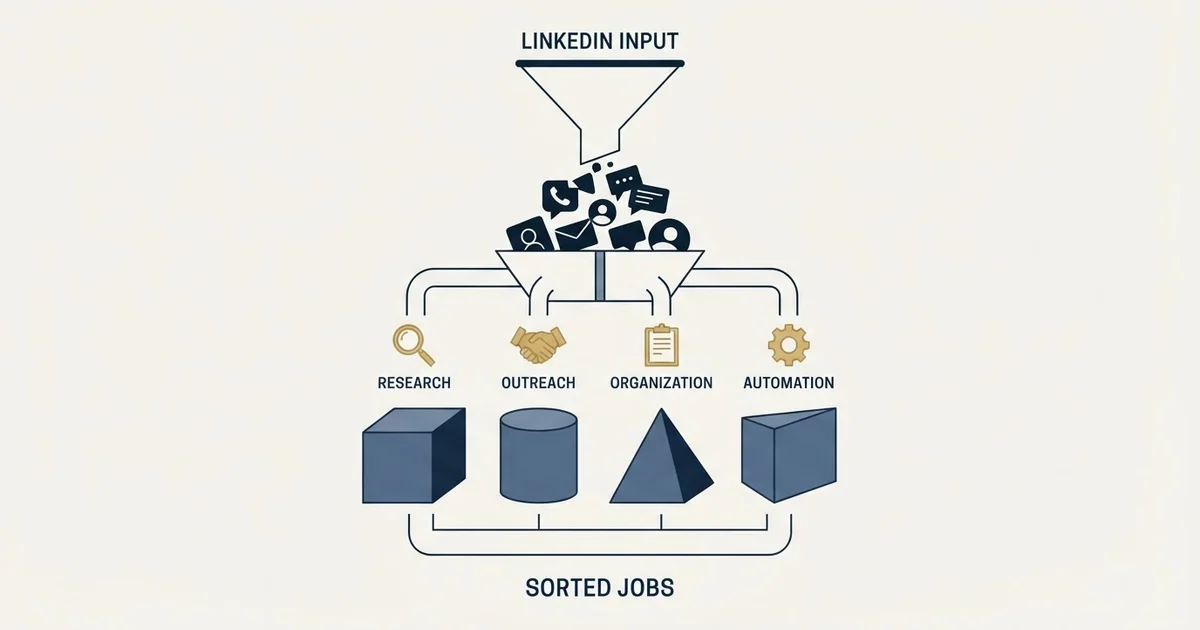
LinkedIn Chrome extensions do four separable jobs. They reveal contact data from a profile, capture the person into a CRM or sequencer, act on your LinkedIn account, or export a Sales Navigator list in bulk. The automation and export jobs carry account restriction risk that belongs to the profile rather than to the software.
Key takeaways
- Four unrelated jobs share one category name, so a purchase made from a feature list usually buys the job the team already had covered.
- In the reveal group every vendor describes the same capability, and coverage on your own market is the only thing that separates them.
- Automation limits belong to the LinkedIn account rather than to the extension, so running two automation products on one profile adds no capacity.
- A vendor safety claim is the vendor's characterisation of its own product, and LinkedIn's User Agreement addresses browser plugins used to automate activity directly.
Reviewed and updated September 2, 2026
The category called LinkedIn Chrome extensions contains at least four unrelated products. One reveals a contact's email while you are looking at their profile. One pushes that profile into a CRM record. One takes actions on your behalf while your browser sits open. One exports a search result to a spreadsheet. They install the same way, they appear in the same round-ups, and choosing between them on a feature list is how teams end up with three that overlap and none that does the job they had.
Sorting them by the job is the whole of the useful work here. This page describes the four jobs, names the extensions we verified first-hand against each vendor's own pages on 2 September 2026, and sets out the account-level constraint that applies to all of them regardless of which one you install.
Every capability statement below comes from the vendor's own published page, fetched directly and dated. No install counts, star ratings or customer numbers appear, because those are published as marketing rather than as product description.
The four jobs
- Resolves an email address or phone number from a profile
- Consumes a credit per reveal
- Does not act on your LinkedIn account
- Value depends entirely on coverage for your market
- Verifiable by testing on a list you already know
- Pushes the profile into a CRM or a sequencer
- Keeps a record of what was already contacted
- Value depends on which systems it writes to
- Removes retyping rather than finding anything
- No account risk beyond what you already run
- Sends invitations, views profiles, sends messages
- Runs against your own LinkedIn account
- Carries the restriction risk in full
- Constrained by account-level limits, not by the tool
- Requires a deliberate operating rate
A fourth job sits slightly apart: bulk export of a search or a Sales Navigator list into a file. It shares the risk profile of automation rather than of reveal, because it involves reading many profiles rather than one, and it is the job most likely to sit on the wrong side of the platform's terms.
Reveal and enrich
This is the job most people mean when they say sales extension. A rep is on a profile, they want a working address, and the extension resolves one without a tab switch.
LeadIQ publishes the reveal and the sync as one motion. Its Chrome extension page states that "LeadIQ helps you easily find contact information, including email, mobile phone numbers, and location" and, separately, that you can "View CRM and sales stack sync status right in the extension." That second capability is the one that separates it from a plain lookup: the extension shows whether the person is already in your systems before you capture them again. This site covers what each capture costs in the LeadIQ Chrome extension.
Surfe publishes the same job with the CRM write as the emphasis. Its Chrome extension page describes reps getting "verified contact details, automatic CRM sync, and outreach tools" inside the feed they are already working in, lists "1-Click Contact Reveal" as its first named capability, and states that it "Works with Salesforce, HubSpot, Pipedrive, and Copper." This site works through what it reveals and where that breaks in the Surfe Chrome extension.
Apollo frames its extension as the platform reaching into whichever tool you are in. Its Chrome extension page says you "Get instant contact and account insights, find emails, add leads to a sequence, and more while working in your favorite tools", which is a reveal job with a sequencer attached to the end of it.
The thing to test in this group is not the feature list, because all three describe the same feature. It is coverage on your own market, which varies enormously by geography, seniority and company size, and which no published claim can tell you. Run the same fifty rows through each and compare. A provider that resolves most of a US software list may resolve very little of a European manufacturing one.
Capture and sync
The second job is quieter and it is the one that decides whether the first job compounds.
An extension that reveals an address and leaves it on the screen has saved a search. An extension that writes the person, the company and the source into a system has saved a search and prevented the same person being revealed again next quarter by somebody else on the team, which is the expensive version of the same mistake.
LeadIQ names the destinations explicitly, stating that you can "Push contact data into your system of choice (e.g., Salesforce, HubSpot, Outreach, Salesloft, and Gong)". Surfe names Salesforce, HubSpot, Pipedrive and Copper on the page quoted above.
The question worth asking before buying anything in this group is which direction the sync runs. Writing into a CRM is common. Reading the CRM to tell you what is already there, before a credit is spent, is less common and is worth more, because the duplicate reveal is the cost nobody notices.
Act on your behalf
The third job is a different product with a different risk attached, and the distinction matters more than any feature comparison in this article.
Dux-Soup describes itself on its own site as running against your existing account rather than through a third party, stating that "Dux-Soup works on your native LinkedIn, Recruiter or Sales Navigator account." Its published description of what a campaign does is specific: "Create intelligent campaigns that send LinkedIn connection invitations, automatically view, follow and endorse profiles, and send InMails and messages." It also publishes the behaviour that matters operationally, that "Once a prospect responds they drop out of your campaign and into your pipeline for you to close." This site covers what runs in your browser in the Dux-Soup Chrome extension.
Dripify publishes the same job with a sequence builder in front of it, describing "smart sequences using a variety of LinkedIn & email actions, delays and conditions" and stating that its "Advanced safety algorithms keep your LinkedIn automation secure and compliant." That second statement is the vendor's own characterisation of its product and it is worth reading as exactly that. LinkedIn approves no automation tool, and its User Agreement addresses software and browser plugins used to automate activity directly, so a safety claim from a vendor is a claim about how the vendor believes its product behaves rather than about the platform's position on it.
Two consequences follow, and neither is about which tool you pick.
The limits belong to the account rather than to the software. Running two automation extensions on one profile adds no capacity at all, and it doubles the number of systems that can spend the same allowance without the other knowing.
The behaviours that produce restrictions are mostly not tooling behaviours. A new account running at volume, a low acceptance rate, and a login pattern that suddenly changes country do more damage than the choice between two products. The architecture argument, and the operating rates that survive it, are worked through in LinkedIn automation tools.
Bulk export

Evaboot publishes the fourth job plainly, describing itself as exporting "clean data and find emails from LinkedIn Sales Navigator in just one click with our Chrome Extension", with the extension working inside Sales Navigator itself.
This job is genuinely useful for a team that has done its filtering inside Sales Navigator and wants the result somewhere it can be worked. It is also the job that reads many profiles rather than one, which is what puts it closest to the boundary. Bulk extraction of profile data is treated differently from messaging by the platform, and this site sets out what these tools actually read and what they infer in LinkedIn email scrapers.
- Step 1Name the job you are missing
Contact data you cannot get, retyping you cannot stop, actions nobody has time for, or a list stuck inside Sales Navigator
- Step 2Test coverage before features
For any reveal product, run the same fifty rows through each candidate. Published coverage claims are computed on somebody else's list
- Step 3Check which direction the sync runs
Writing to a CRM is common. Reading it first, so a duplicate reveal costs nothing, is rarer and worth more
- Step 4Decide whose account carries the risk
Anything in the automation group runs on a real person's profile. That conversation belongs before the purchase
- Step 5Buy one job at a time
Three overlapping extensions is the normal end state of buying from feature lists
What none of them change
Three constraints survive every product in this category, and they are worth stating because the category is sold as though it removes them.
The search allowance is an account property. A free LinkedIn account is subject to a commercial use limit on profile searches and views, and no extension raises it, because the limit is applied to the account rather than to the browser. An extension that helps you view more profiles faster reaches that ceiling sooner.
Reveal coverage is a market property. Every reveal product will resolve a good share of some lists and a poor share of others, and the variable is your market rather than the vendor's quality. This is why the fifty-row test is worth more than any comparison table, including this one.
The message still has to be worth answering. An extension that makes contacting people faster multiplies whatever the message already does. Where the message is not working, the extension increases the volume of a thing that is not working. The three routes to a stranger on LinkedIn, and what each costs, are in LinkedIn prospecting.
- Yes: You can name which of the four jobs is missing today
- Yes: Any reveal product was tested on fifty rows of your own market
- Yes: You know which systems the capture writes into, and whether it reads them first
- Yes: For anything that acts on your behalf, the account owner agreed to the risk
- No: Two products in the same job are running on one profile
- No: The purchase is expected to fix a reply rate
The short version
LinkedIn browser extensions do four separable jobs: reveal contact data from a profile, capture the person into a system, act on your account, and export a list in bulk. Products are chosen well by naming the missing job and badly by comparing feature lists.
In the reveal group, LeadIQ publishes contact discovery alongside CRM sync status shown inside the extension, Surfe publishes a one-click reveal with automatic sync into Salesforce, HubSpot, Pipedrive and Copper, and Apollo publishes contact and account insights with a sequence step attached. All three describe the same capability, and coverage on your own market is the only thing that separates them.
In the automation group, Dux-Soup publishes campaigns that send invitations, view and endorse profiles and send messages from your native account, and Dripify publishes a sequence builder over LinkedIn and email actions. Both carry account risk that belongs to the profile rather than to the software, and a vendor's safety claim is the vendor's characterisation of its own product.
Evaboot publishes the bulk export job, working inside Sales Navigator, which is the job that reads many profiles rather than one.
None of them raises the account search allowance, improves coverage in a market where the data does not exist, or makes an unanswerable message answerable. If the constraint is the message rather than the tooling, see what a campaign against your market looks like before buying another extension.
Sources: LeadIQ Chrome extension, Surfe Chrome extension, Apollo Chrome extension, Dux-Soup, Dripify, Evaboot, LinkedIn commercial use limit, LinkedIn User Agreement
Frequently asked questions.
Frequently asked questions- What do LinkedIn Chrome extensions actually do?
- Four separable things. They reveal an email or phone number from a profile, capture the person into a CRM or sequencer, take actions on your account such as sending invitations and messages, or export a search result in bulk. Most products do one of those well and touch a second, and the third carries an account risk the other two do not.
- Which LinkedIn extension finds the most emails?
- No general answer exists, because coverage depends on your market rather than on the vendor. A provider that resolves most of a US software list may resolve very little of a European manufacturing one. Run the same fifty rows from your own list through each candidate and compare, which is worth more than every published coverage claim combined.
- Are LinkedIn automation extensions safe to use?
- LinkedIn approves none of them, and its User Agreement addresses software and browser plugins used to automate activity. Vendors publish their own safety characterisations, which are claims about how they believe their product behaves. The behaviours that actually produce restrictions are mostly not tooling choices: a new account at volume, poor acceptance rates, and an abruptly changed login pattern.
- Will an extension raise my LinkedIn search limit?
- No. The commercial use limit on profile searches and views is applied to the account rather than to the browser, so no extension lifts it. An extension that lets you view profiles faster reaches the same ceiling sooner. The upgrade path LinkedIn publishes for a larger allowance is its own paid plans.
About the author.

B2B cold email experts helping companies generate qualified leads through done-for-you outreach campaigns.
RevenueFlow Team
Explore more.
Ready to scale your outreach?
We build GTM engines that book real meetings. See the receipts.
Related articles.
Seamless.AI Email Finder: How It Works, What a Credit Buys
How Seamless.AI's email finder resolves a contact in real time, what one Universal Credit buys, the Total AI score on every address, and what the Chrome extension reads.
Social Selling Tools by Job, and the Account-Risk Line
Fourteen social selling tools sorted into six jobs, split by whether each acts through your LinkedIn account or beside it, from the vendors' own pages.
Video Prospecting Tools by Job: What Each One Is For
Ten video prospecting tools sorted by the job each vendor's own page describes: record and share, personalise at volume, avatars, hosting and interactive demos.
Copper CRM Pricing: Per Seat and Per Contact Limit
Copper charges on two meters and only the seat rate is on the price card. The contact ceiling is what selects the tier for a team that builds its own lists.
CloudTalk Pricing: Four Tiers and Three Metered Add-Ons
CloudTalk publishes four seat tiers and prices its dialers separately. The seat rate is the smallest number on the page, and the currency depends on where you read it.
Is Clay Free? The Free Plan, the Trial and Where Each Stops
Clay's free plan, its 14-day trial and the no-charge-on-a-miss rule are three different things. What each holds and where it stops, from clay.com on 19 September 2026.