LinkedIn Prospecting: Three Routes and What Each Costs
Connection requests, InMail and content each reach a prospect differently. How to pick a route, build a list that gets accepted, and stay inside the limits.
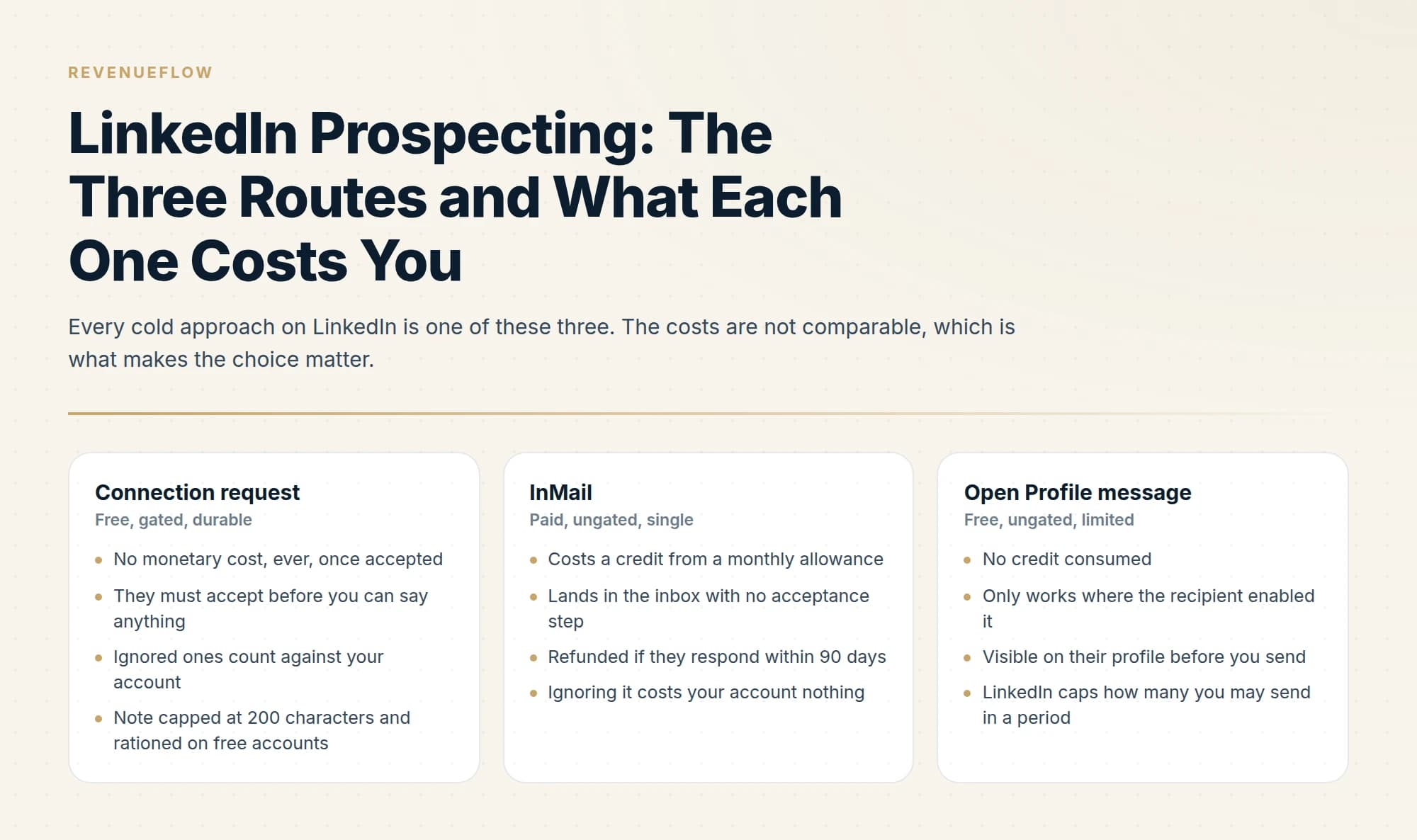
LinkedIn prospecting runs through three routes: a connection request, a paid InMail, or content that makes the prospect approach you. Each carries a different cost and a different risk to the account. Targeting decides which route is viable, because acceptance rate governs both results and account safety.
Key takeaways
- The three routes are not interchangeable: one is free but rationed, one is paid but bypasses connection, and one is slow but carries no account risk at all.
- A narrow list of companies with a real reason to care outperforms a much larger list filtered only on headcount and industry.
- Targeting is a safety mechanism as much as a quality one, since an unaccepted invitation damages the account signal that governs everything else.
- A 200-character invitation note is about thirty words, which enforces the brevity that most outreach advice merely recommends.
Reviewed and updated September 2, 2026
LinkedIn prospecting fails in a predictable order. The list is too broad, so acceptance is low, so the account gets restricted, so the team switches tools and repeats the cycle with different software. Almost none of that is a tooling problem, and the platform's own documentation explains why, if you read the parts about restrictions rather than the parts about features.
The useful way to think about prospecting here is that LinkedIn gives you three routes to a stranger, each with a different cost and a different failure mode, and choosing wrongly is more expensive than executing badly.
That choice is most of what a LinkedIn outreach strategy actually decides: the route per person, the list that makes acceptance plausible, and where persistence goes instead.
LinkedIn and cold email do different jobs in the same programme: LinkedIn carries the single considered touch, and cold email carries the persistence, because a fresh angle by email arrives as a new message while a second LinkedIn message lands underneath the one that was ignored.
The three routes above are how B2B leads actually come off LinkedIn, and the choice between them is a cost decision rather than a volume one.
Sales leads on LinkedIn come out of the same three routes, and the tooling question people ask first is downstream of which route the account can actually sustain.
The three routes, and what each one costs
- No monetary cost, ever, once accepted
- They must accept before you can say anything
- Ignored ones count against your account
- Note capped at 200 characters and rationed on free accounts
- Buys permanent free inbox access
- Costs a credit from a monthly allowance
- Lands in the inbox with no acceptance step
- Refunded if they respond within 90 days
- Ignoring it costs your account nothing
- Buys one message, not a relationship
- No credit consumed
- Only works where the recipient enabled it
- Visible on their profile before you send
- LinkedIn caps how many you may send in a period
- Worth checking before spending anything
Most programmes use only the first, because it is free, and then discover that free is the wrong frame. A connection request costs nothing in money and costs account health when it is ignored, which is the resource that actually constrains a LinkedIn programme.
LinkedIn cold outreach is that same choice under the phrase most guides use, and the route picked for each person decides more about the outcome than the wording of the message does.
An introduction from a mutual contact spends someone else's standing instead, and what each side of an introduction owes decides whether it lands as a favour or a task.
Why targeting is a safety mechanism, not just a quality one
LinkedIn publishes three reasons it restricts an account from sending invitations: too many in a short time, too many ignored or left pending or marked as spam, and excessive volume with a suspected automation tool.
The middle one converts targeting from a performance question into an operational one. Invitations nobody accepts accumulate against you. Two accounts sending identical volume are treated differently depending on who they invited, which is why no fixed weekly send limit exists to design around. The connection limit page covers what LinkedIn publishes and what it deliberately does not.
Some senders try to game that acceptance problem by targeting LinkedIn Open Networkers, and the guide to open networker connections explains why an acceptance from someone who accepts everybody signals nothing about relevance.
The practical consequence reverses the usual instinct. When results are poor, the reflex is to increase volume. On LinkedIn that accelerates the failure, because a bigger list drawn the same way has the same acceptance rate applied to more people, and the pending pile grows faster than the pipeline.
Building the list so acceptance is plausible
The question to answer before sourcing anyone is not who fits your ICP. It is who fits your ICP and has a visible reason to accept a request from you specifically. Those are different sets, and the second is much smaller.
Narrowing to that smaller set usually means writing a search string, and the operators LinkedIn publishes as supported are fewer than most guides suggest, which is the subject of LinkedIn Boolean search.
- Yes: A genuine mutual connection, not a third-degree coincidence
- Yes: Shared group membership, which LinkedIn itself suggests as context
- Yes: They engaged with your content or a post you both commented on
- Yes: Same former employer, alma mater, or a conference you both attended
- Yes: They are actively posting, so they use the platform at all
- No: They match a firmographic filter and nothing else
- Depends: They are senior enough to ignore every stranger request
That last line is the one worth acting on rather than agonising over. Seniority is precisely where the connection request performs worst and the InMail performs best, because the people with the fullest pending lists are the ones whose calendars you want. Spending a credit there is usually cheaper than three ignored invitations, once you count what ignored invitations do.
LinkedIn's own guidance says the same thing in its restrictions documentation: invite people you know and trust, and use InMail and Groups to reach members you do not. Cold programmes invert that, which is the behaviour the restriction system exists to catch.
What the sequence looks like
- Step 1Define the segment narrowly
A list of 400 companies with a real reason to care beats 4,000 filtered on headcount and industry.
- Step 2Check each profile before contacting
Current role, recent activity, and whether Open Profile is on, which would make the message free.
- Step 3Choose the route per person
Invitation where acceptance is plausible, InMail where it is not and the account matters.
- Step 4Send one considered message
Whichever route, the first message carries the campaign, because there is no second one that reads well.
- Step 5Move persistence to email
A fresh angle by email is a genuinely new message. On LinkedIn it lands under the one they ignored.
That last step is our position and it costs us reach, so it is worth being explicit about. We run one message per campaign and do not send LinkedIn follow-ups or a second message to a non-responder, because a LinkedIn thread is permanent and visible and the second message sits directly beneath the first. Most of the market runs multi-step LinkedIn sequences. Both approaches are defensible; ours trades volume for how the market experiences us, and it means the single touch has to be good.
Writing the first message
Whichever route you choose, the constraint is the same: the first message is the campaign, so it has to earn a reply on its own.
Lead with the observation, not the introduction. The recipient can see who you are from your profile, which is the one thing they do not need the message to tell them. What they cannot see is why you contacted them specifically, and that is the only content that distinguishes your message from the others in the same inbox.
Make the reason checkable. Something observable about their company, their role, or a change that happened recently. The test is whether the sentence could be sent unchanged to a hundred other people, and if it could, it will read as a template because functionally it is one.
Ask for something proportionate. A stranger being asked for thirty minutes is being asked for a lot. Asking whether a topic is worth a short conversation is a much smaller commitment, and small asks convert better on a first touch precisely because nobody is blocking calendar time with someone they have never met.
Keep it shorter than the limit allows. An invitation note gives you 200 characters, which is about thirty words and forces the discipline automatically. An InMail gives you far more room and no obligation to use it, and LinkedIn's own guidance is that shorter messages get more responses.
The common thread is that all four rules push in the same direction, toward doing more work per message on fewer people. That is the same conclusion the targeting section reaches from the account-safety side, which is a useful sign that the constraint and the craft agree.
In a licensed trade the craft carries a third constraint, and LinkedIn lead generation for commercial insurance agencies shows what a producer's first message may say under the licensing and advertising rules.
Where phone and email fit
Prospecting on LinkedIn works considerably better when LinkedIn is not the only channel, and the reason is structural rather than tactical.
LinkedIn is excellent at identification and poor at contact detail. It shows you who holds a role, how long they have been there, what they post about, and who they know. It does not hand out verified work email addresses. So the productive division is to identify on LinkedIn and resolve contact details elsewhere, through a dedicated finding and verification waterfall, which also keeps your data supply outside the User Agreement questions covered in what LinkedIn's terms say about scraping.
Calling has the opposite profile: expensive per conversation, bounded by human hours, and unmatched for speed of feedback, because an objection surfaces the same afternoon rather than across three weeks of reply-rate data. For high-value deals where one meeting justifies the time, that learning speed is worth more than the meetings.
A bank's relationship managers work this channel under a further set of rules, from the FFIEC's social media guidance to FINRA's notices for registered persons, and LinkedIn outreach for banks works through them.
Teams weighing LinkedIn research against a live call should see what LinkedIn changes before a cold call, including what it never supplies.
Email is where volume and persistence belong, for the reason given above: a new angle arrives as a genuinely new message rather than as a nudge in a thread someone already declined.
What breaks a LinkedIn programme

Four failure modes, in rough order of how often they occur.
Volume as the response to poor results. Covered above and worth repeating, because it is the most common and the most damaging. The pending pile is the thing that gets accounts restricted, and volume grows it faster than it grows pipeline.
Automation that crosses the line. LinkedIn's prohibited-software page states it does not permit third-party crawlers, bots, plug-ins or extensions that scrape or automate activity, and that members using them risk having accounts restricted or shut down. Repeated suspensions may become permanent. Our LinkedIn automation tools guide covers what stays inside the line.
Running on an account nobody agreed to risk. Programmes frequently run through a founder's or senior seller's personal account, and the restriction conversation happens after the restriction rather than before it. Have it first, and be specific about what could happen.
Treating acceptance as the outcome. A connection accepted and never spoken to is a vanity metric. The point of the invitation is the conversation afterwards, and if nobody has capacity for that conversation, the programme is generating connections rather than pipeline. This is the failure that looks healthiest on a dashboard, because acceptance rate rises while nothing downstream moves, and it usually persists for a quarter before anyone questions it.
The short version
LinkedIn gives you three routes to a stranger: the connection request, which is free in money and costs account health when ignored; the InMail, which costs a refundable credit and lands without a gate; and the Open Profile message, which is free where the recipient enabled it. Targeting is a safety mechanism, because ignored and pending invitations are a published restriction trigger, which makes acceptance rate part of your sending limit. Build the list around who has a visible reason to accept rather than who matches a filter, choose the route per person rather than per campaign, and put your persistence in email, where a fresh angle reads as a new message.
We run LinkedIn alongside email for clients on a pay-per-qualified-meeting basis, which puts the account risk and the targeting work on our side. You can see what a campaign would look like for your market.
LinkedIn restriction triggers, invitation rules and the prohibited-software position are from LinkedIn's own Help Center pages, re-fetched with cache-busting and verified as of mid-2026. LinkedIn publishes no numeric invitation or connection sending limit, and none is stated here.
Frequently asked questions.
Frequently asked questions- What is the best way to prospect on LinkedIn?
- Pick the route that matches your list size and your tolerance for account risk. Connection requests are free and rationed, InMail is paid and reaches people who have not accepted you, and content makes the prospect approach you with no account exposure. Most programmes fail by choosing on cost alone and ignoring which route their targeting can actually support.
- How do you build a LinkedIn prospecting list?
- Define the segment narrowly enough that a reason to connect is obvious from the row itself. A list of a few hundred companies with a genuine trigger will be accepted at a far better rate than several thousand filtered on headcount and industry, and acceptance rate is what governs both your results and whether the account stays healthy.
- How many people can you contact on LinkedIn per week?
- LinkedIn publishes no weekly invitation limit, so any specific number quoted is a third-party estimate rather than a platform rule. What LinkedIn does police is acceptance rate. Plan volume around whether each invitation has a plausible reason to be accepted, because that is the signal the platform actually acts on.
- Should LinkedIn prospecting replace email?
- They solve different problems. LinkedIn gives access to people whose email you do not hold and adds a visible identity to the approach, while email carries volume that LinkedIn's rationing cannot match. Most working programmes use LinkedIn for the accounts where identity matters and email for reach, rather than treating either as a replacement.
About the author.

B2B cold email experts helping companies generate qualified leads through done-for-you outreach campaigns.
RevenueFlow Team
Explore more.
Ready to scale your outreach?
We build GTM engines that book real meetings. See the receipts.
Related articles.
LinkedIn Invitations: The Rules LinkedIn Publishes
What an invitation actually buys, why the note allowance depends on which LinkedIn page you read, and what withdrawing one costs you.
LinkedIn Voice Notes: 60 Seconds, 1st Degree Only
LinkedIn publishes three limits on voice messaging and they decide the play before the script does. What they rule out, and the one slot that survives.
The LinkedIn Green Dot: What Active Status Shows
LinkedIn's green dot and white-centred ring, as LinkedIn's own pages define them, who can see them, and why a cold list shows presence for only some prospects.
Appointment Setting for Business Brokers: The Seller Meeting
What a bought meeting with a business owner has to be for a brokerage: the three-part qualification, the confidentiality rules, the licence line and the owner's reasons.
LinkedIn Connection Limit: The Number It Does Not Publish
LinkedIn publishes no weekly invitation figure. It publishes three restriction triggers, and one of them is how many of your invitations went ignored.
LinkedIn Outreach for Banks: A Regulated Message
How a bank's relationship managers use LinkedIn to reach business owners: what the FFIEC guidance, FINRA's notices and LinkedIn's own rules require, and where to stop.