Circleback: The Automations Are the Product, Not the Notes
Circleback publishes real prices and an unusually wide automation surface. What the notes contain matters less than where they land and who maintains the rules.
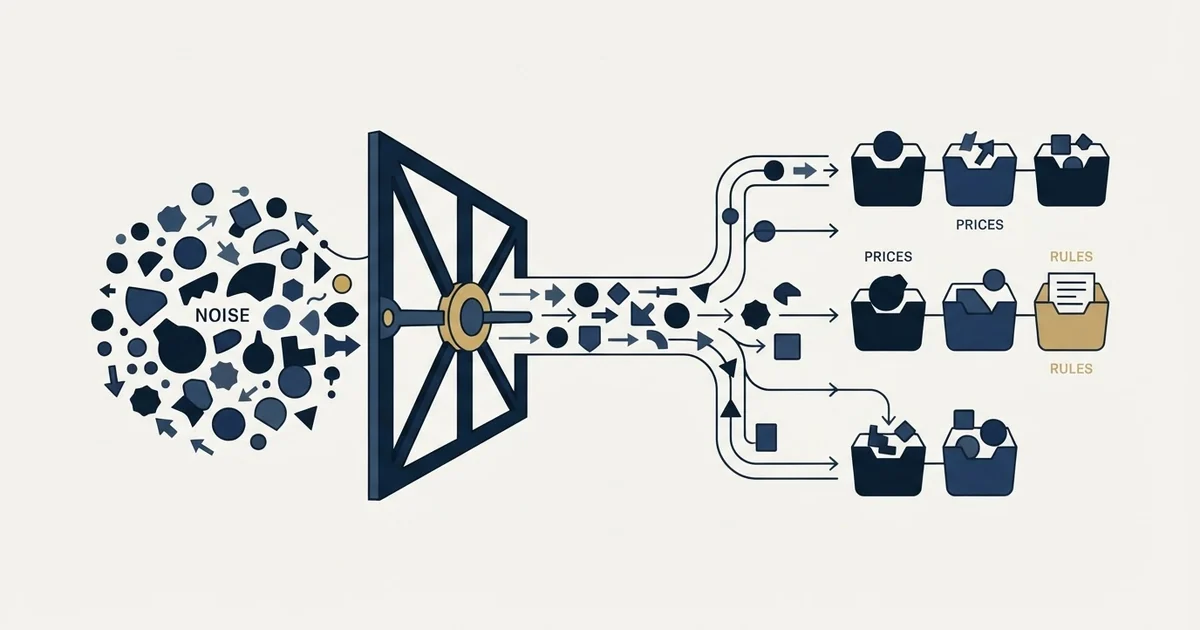
Circleback is an AI meeting notetaker priced flat per seat, at $0 for Free, $15 for Pro, $25 for Business and $35 for Enterprise per user per month as its pricing page read on 2 September 2026. The transcription is not the differentiator. The automation surface into Notion, Linear, HubSpot, Salesforce and Attio is.
Key takeaways
- Circleback's pricing page publishes Free at $0, Pro at $15, Business at $25 and Enterprise at $35 per user per month, with the same figure under its Monthly and Yearly tabs as read on 2 September 2026.
- Free viewer seats arrive on the Business plan rather than at the entry tier, so the seat count to price is the number of people who run calls.
- The automation surface into Notion, Linear, HubSpot, Salesforce and Attio is the actual purchase, and it needs a named owner.
- Two unrelated products share the name, so an alternatives list for the bare brand can return contact managers instead of meeting tools.
Reviewed and updated September 2, 2026
Circleback's pricing page has two billing tabs, Monthly and Yearly. In the HTML that page served to this article's read on 29 August 2026 the Yearly tab was the one marked selected, and the only figures in it were $20.83 per user per month for Individual and $25 for Team. Re-read on 2 September 2026, the page publishes a four-tier ladder, Free at $0, Pro at $15, Business at $25 and Enterprise at $35 per user per month, renders the same figure under both billing tabs, and no longer carries the Individual name or the $20.83 rate. The figures below are the 2 September ones.
That is a small detail and it decides how you read every comparison of this product against its category. Most meeting tools render both billing periods into one page, so a price taken off such a page is ambiguous until somebody checks which of the two was showing. Circleback renders one, and it is the annual one.
The more useful question is what you are actually buying, because the transcription is not it. Transcription works across this whole category now. What separates the products is where the output goes and who has to maintain the thing that puts it there.
What Circleback is
Circleback is an AI meeting recorder and notetaker: it joins calls, transcribes them with speaker identification, writes notes and action items afterwards, and lets you search across everything it has captured. Its own homepage, captured on 29 August 2026, leads with "Unbelievably good meeting notes" and summarises the product as "AI-powered notes, action items, automations, and search." On the same page the notes are promised as "Notes a perfectionist would be proud of. Written for you automatically.", the transcription is headed "State-of-the-art transcription accuracy" with "Over 100 languages supported.", and the company describes itself as "Backed by Y Combinator".
The notes themselves are the part of the product people mean when they search for it, and they behave the way the category behaves. An AI summary is reliable on explicit statements: what was said, what was agreed, what somebody committed to do. It is much weaker on the parts of a sales conversation that were never stated as sentences, which is a general property of the technology rather than a criticism of this vendor. Our write-up of what the recording layer can and cannot tell you works through which dashboard outputs are measurement and which are inference, and every line of it applies here.
Where Circleback diverges from its neighbours is one layer further out.
The automations are the product
The homepage lists the integration surface, and it is unusually wide for a notetaker. Named on that page: Google Calendar, Gmail, Outlook, Slack, Notion, Linear, HubSpot, Salesforce, Attio and Asana, plus an API, MCP access, a CLI and webhooks. The descriptions are specific rather than logo-wall vague. Notion is described as automatically updating pages and databases after meetings. Linear is described as automatically creating issues from meetings. HubSpot and Salesforce are described as updating contacts, deals and opportunities.
Read the feature list on the pricing page and the same emphasis appears inside the plans. Free carries limited automations, Pro carries automations with all integrations, and Business adds default and enforceable settings, which is a different thing: it means automations become an object the team owns rather than something each person configures.
That is the purchase. A notetaker that writes a summary into its own interface produces an archive. A notetaker that writes into Linear, HubSpot and Notion is doing a small amount of operations work automatically, and operations work has an owner whether or not anyone has named one.
- Notes and action items after each call
- Search across your own meetings
- Nothing else in the company changes
- No configuration to maintain
- Records updated in HubSpot, Salesforce or Attio
- Issues created in Linear, pages in Notion
- Team automations shared and enforced
- Somebody maintains the rules when a field is renamed
The second column is where the value is and it is also where the cost that never appears on the invoice sits. Every automation encodes a decision about which field receives what, and those decisions outlive the person who made them. This is the same trap the sales operations software category runs into one layer up, where each new tool creates rules somebody has to maintain forever and the business case usually omits that side.
What it costs, as published

The pricing page, fetched on 29 August 2026, publishes three tiers.
The page publishes Free at $0 per user per month and it is not a stripped tier: it carries AI meeting notes and action items, online and in-person meetings through a bot or the bot-free desktop app, mobile and Apple Watch apps, speaker-labeled transcripts, automatic tagging and sharing, limited automations, a 30-day meeting and recording history, and API, MCP and CLI access. Pro at $15 adds unlimited meeting history, a year of recording storage, automations with all integrations including Notion, HubSpot, Salesforce, Attio and webhooks, custom AI insights and a personalised notetaker participant.
The same page publishes Business at $25 per user per month, and the additions are collaboration and control rather than capability: admin and member roles, unlimited free viewers, custom data retention, default and enforceable settings, two years of recording storage, a usage dashboard and unlimited teams.
Enterprise is priced at $35 per user per month beside a Contact sales button, and lists single sign-on with SAML or OIDC and SCIM provisioning, invoice and purchase-order billing, unlimited recording storage, priority support and HIPAA compliance.
One item inside the Business list matters more than its position suggests: free viewer seats. A manager who reads every transcript and runs no calls does not consume a paid seat on Business. That is worth checking against your own headcount before pricing anything, because it is the difference between paying for a sales organisation and paying for the people in it who run meetings.
It is also a narrower version of the same idea a neighbour sells harder. Avoma prices per recorder seat and makes viewers and collaborators free at every tier, including its entry plan. Circleback attaches free viewers to Business specifically. Same mechanism, different plan boundary, and the boundary is the part that decides a bill.
Pricing and features verified as of August 2026. Verify current terms with the vendor before relying on them.
The name collision, and the three axes that separate these tools
Comparing this product with its neighbours has a trap in it that has nothing to do with the products. There are two things called Circleback. The AI notetaker at circleback.ai is the one this page is about. There is also an older contact and address-book product at circleback.com, and it still appears in search results for the bare brand name, which is why some comparison lists for the name return CRMs and contact managers rather than meeting tools. Check which of the two a given roundup is about before you read its conclusions.
Among actual meeting tools, the comparison that matters is not a feature grid. Every product in this category records, transcribes and summarises. The three real axes are the pricing unit, the recording method, and where the output lands.
On pricing unit, the field splits. Circleback is flat per seat. Avoma charges per recorder seat with free viewers and then sells conversation intelligence and revenue intelligence as separate per-seat add-ons that can rival the plan cost. Others meter by credits or by meetings per month, which turns a predictable line item into a usage forecast.
On recording method, the split is between a bot that joins the call as a visible participant and a capture that runs quietly on the machine, and only one of the two announces itself to the other side. That is a consent decision rather than a preference, and our write-up of a neighbouring recorder works through what each capture method commits you to. Circleback's own plans reach past the video call entirely, listing "Record in-person meetings" on every tier.
On where the output lands, Circleback is at the strong end because of the automation surface above, and that is the honest reason to shortlist it over a tool that is better at the transcript itself.
The wider field, including the products that grew from notetaking into full call analysis, is covered in Gong alternatives.
- Yes: Count the people who actually run calls, not the headcount
- Yes: Name the destination for the notes before enabling a single automation
- Yes: Write the recording and consent policy once, covering every region you sell into
- Yes: Name who maintains the automations when a CRM field is renamed
- Yes: Confirm which billing state a quoted price belongs to
- No: Assume a shared archive will be searched by anyone who is not already looking for something
The consent decision the settings screen makes for you
Recording a sales call is a legal and relationship decision before it is a configuration one. Recording law is jurisdictional and applies to the call rather than to the software, so no vendor assurance settles it. In some jurisdictions every participant has to consent rather than one.
The practical version for a sales team is to settle the policy once and put it in writing: who may switch it on, what is said at the start of a call, where the files live, how long they are kept, and what happens when a prospect asks you to stop. Circleback runs a separate security site, and its pricing page puts custom data retention settings on Business and HIPAA compliance on Enterprise, which tells you where the controls sit but not what your policy should be.
There is a softer cost that no policy covers. Some prospects speak differently once a recorder is in the room, and the least guarded part of a discovery call is often the most useful part. That is a real trade against having the transcript, and it is worth making deliberately. What a rep should be doing while the tool is capturing is a separate question, covered in discovery calls.
Where it fits in an outbound motion
A meeting recorder sits on the far side of the booking. Everything upstream of the meeting is list building, message and qualification, and none of it is touched by anything on this page.
RevenueFlow runs cold email and LinkedIn rather than phone or webinars, and we do not operate Circleback, so everything above comes from the company's own homepage and pricing page as fetched on 29 August 2026, rather than from experience with the product.
The one point that carries across is the coverage blind spot. A recorder makes the conversations you had legible and does nothing about how many you had. A team that installs one and finds its dashboards thin usually has a supply problem being displayed as a coaching problem. What counts as a meeting worth recording is worth settling before launch rather than after, and our note on qualified appointments covers the criteria against which that question gets answered.
The short version

Circleback puts real prices on the page, which is rarer in this category than it should be: as read on 2 September 2026, Free at $0, Pro at $15, Business at $25 and Enterprise at $35 per user per month, with the same figure under both billing tabs. Free viewer seats arrive on Business rather than at the entry tier.
The transcription is not the decision. The automation surface is, because writing into Linear, Notion, HubSpot, Salesforce and Attio is the part that changes how a team works and the part that needs an owner. Buy it as a notetaker and it is a good notetaker. Buy it as an automation layer and name the person who maintains the rules, before the first field gets renamed.
If the constraint is the number of conversations rather than what happens inside them, that is a different purchase entirely. See what a first campaign produces and compare the volume against what any recorder is currently seeing.
Plan names, prices and tier contents above were read from Circleback's pricing page on 29 August 2026 and re-read on 2 September 2026. Verify current terms with the vendor before relying on them.
Sources: Circleback pricing, Circleback home, Avoma pricing
Frequently asked questions.
Frequently asked questions- How much does Circleback cost?
- Its pricing page publishes Free at $0, Pro at $15, Business at $25 and Enterprise at $35 per user per month, as read on 2 September 2026, with the same figure rendered under both the Monthly and Yearly tabs. Confirm which billing state a quote applies to before comparing it with another vendor.
- Do I have to pay for people who only read the notes?
- On the Business plan, no. Unlimited free viewers are listed as a Business feature, so colleagues who read transcripts without running their own recorded meetings do not consume a paid seat. That boundary sits at Business rather than at the entry tier, which is worth checking against your own headcount before choosing a plan.
- What makes Circleback different from other AI notetakers?
- The breadth of what it writes into. Its own site names Notion, Linear, HubSpot, Salesforce, Attio, Asana and Slack alongside an API, MCP access, a CLI and webhooks, with specific behaviours such as creating Linear issues or updating CRM deals after a meeting. Transcription quality is broadly comparable across this category now.
- Is Circleback the same company as CircleBack the contact manager?
- No. The AI meeting notetaker is at circleback.ai. A separate, older address book and contact management product occupies circleback.com and still appears in results for the bare brand name. That is why some alternatives lists for the term compare CRMs rather than meeting tools, so check which product a comparison is discussing.
About the author.

B2B cold email experts helping companies generate qualified leads through done-for-you outreach campaigns.
RevenueFlow Team
Explore more.
Ready to scale your outreach?
We build GTM engines that book real meetings. See the receipts.
Related articles.
Sybill: The Credit Meter Is the Number to Model
Sybill meters by credits per week rather than by seat, and its pricing page carries three different figures for the same two plans. Both facts change the model.
Fathom AI Note Taker: What It Records and Where Notes Land
Fathom records, transcribes and summarises calls, and hides a conversation intelligence product on its upper tier. What it publishes, and the decisions to make first.
Avoma Pricing: Recorder Seats, Free Viewers, and the Add-Ons
Avoma charges only for people whose meetings get recorded and makes viewers free, so the seat count to price is smaller than the team and the add-ons are larger.
Conversation Intelligence: What the Recording Layer Misses
Talk ratio is arithmetic. Sentiment is a guess about words. And the biggest blind spot is the calls that never happened, which no recorder can see.
Sales Automation Software for Small Business: Four Buys
One search returns four unrelated products, and on at least one vendor's published plan list the automation is gated above the tier a small team buys.
Calendly API: What You Can Automate and What You Cannot
Read access runs on any plan, webhooks need a paid one, and programmatic deletion is Enterprise-only. The scope decision that quietly breaks integrations, first.