Sales Operations Software: Which Job You Are Actually Buying
The phrase covers five separate jobs, from the system of record to commission administration. How to tell which layer your problem is in before shortlisting anything.

Sales operations software covers five distinct jobs: the CRM system of record, routing and data hygiene, engagement and activity capture, forecasting and pipeline inspection, and compensation administration. Most teams need three of them, and the expensive mistakes are layer mismatches rather than bad products.
Key takeaways
- Each layer reads from the one below it, so a tool bought above an unreliable layer inherits the unreliability behind a better interface.
- A wrong forecast is usually a stage-definition or close-date problem one layer down, which a forecasting tool renders more attractively without fixing.
- The compensation layer has a clear trigger: when two reasonable people reading the plan get different numbers, the work has stopped being arithmetic.
- Nothing in the category creates demand or agrees definitions, so a perfectly instrumented stack on too few opportunities is a well-measured shortfall.
Reviewed and updated September 2, 2026
Sales Operations Software: Which Job You Are Actually Buying
A sales operations lead is asked to fix forecasting accuracy and comes back with a shortlist of six products. Two are forecasting tools, one is a CRM add-on, one administers commissions, one routes leads, and one is a data provider. Every vendor on the list will say yes when asked whether it helps with forecasting, and every one of them is telling the truth about a different part of the problem.
The phrase covers five separate jobs. Nothing sold under it does all five well, few teams should buy into more than three of them, and the expensive mistakes in this category are worth treating as layer mismatches rather than as bad products.
The five layers
Sorting the category by the job rather than by the vendor makes the shortlist obvious, because each layer has a different owner, a different failure mode and a different trigger for buying it.
A RevOps tech stack is this same set of layers with marketing automation and customer success added at the edges, and one rule decides every purchase in it: fix the layer below before buying the layer above.
The system of record. The CRM. Everything else reads from it and writes to it, and its quality sets the ceiling on every layer above. This is not a layer you buy for sales operations reasons; you already have one, and the sales operations question is whether its data is good enough to build anything on.
Forecasting and pipeline inspection. Tools that sit on top of the CRM and try to say what will close. This is the layer with the most product marketing attached to it and the one where the four layers of the forecasting category itself are worth separating before shortlisting anything.
Engagement and activity. Sequencers, dialers and the systems that capture what representatives actually did. Sales operations should care about this layer chiefly for the activity data it produces, which is the input to the diagnostic questions worth asking.
Compensation administration. Software that calculates commissions and produces statements. This is the layer most often bought late and most often bought in a hurry, because it is invisible until the spreadsheet breaks.
Routing and data hygiene. Assignment rules, deduplication, enrichment, the integration layer that keeps the record clean. The least glamorous layer, the one that decides whether the other four are working with anything real.
Sales operations automation is a question about which of these five layers is being automated, and the answer is usually routing and hygiene or compensation rather than the forecast, because those two are arithmetic against rules while the forecast is a judgement resting on the layers underneath it.
- Step 1System of record
The CRM everything else reads from
- Step 2Routing and hygiene
Whether the records are assigned, deduplicated and current
- Step 3Engagement and activity
What representatives actually did, captured
- Step 4Forecasting
What is going to close, inferred from the three above
- Step 5Compensation
What gets paid, computed from closed business
The question that sorts them
Before shortlisting, answer one question: which of the five is currently producing the number nobody trusts.
If the forecast is wrong, the cause is usually not the forecasting layer. It is that opportunity stages mean different things to different representatives, or that close dates are updated the day before they pass, which are hygiene and process problems that a forecasting tool will render more attractively without fixing. Buying at the forecast layer to solve a data problem one layer down is the single most common expensive mistake here, and it is expensive twice: once for the licence, and again because the improved interface makes the underlying problem harder to see.
If commissions are consuming a week a month, that is a genuine compensation-layer problem and it does have a software answer, because the work is arithmetic against rules and arithmetic against rules is what software is for.
If nobody can say what representatives did last week, that is an activity-capture problem, and the answer is usually configuration of a system you already own rather than a purchase.
- Yes: You can name the specific number that is wrong or missing
- Yes: You have checked whether the layer below it is producing reliable input
- Yes: You know who will own the configuration after the implementation ends
- Yes: You can state what you will stop doing once this is in place
- Depends: The trigger for buying is a number nobody trusts, rather than a plan for next year
- No: You are buying at this layer because the layer below is hard to fix
What every layer leaves untouched
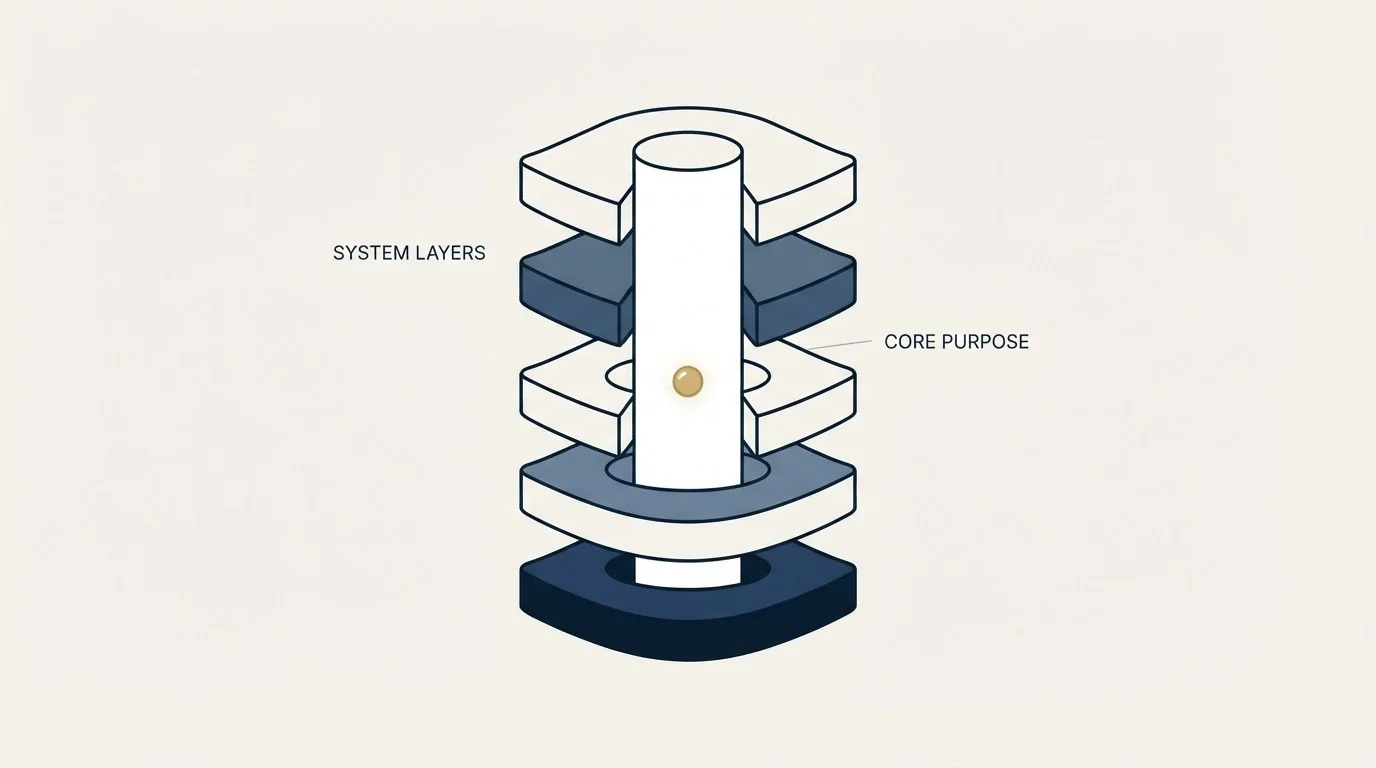
Two things survive every purchase in this category, and knowing that in advance saves a disappointing quarter.
The first is definitions. What counts as a qualified opportunity, what a stage means, when a deal is committed. These are agreements between people, and software makes them enforceable rather than making them. A tool configured against definitions nobody agreed to will produce consistent numbers that consistently mean nothing, and that is a worse position than an obviously broken spreadsheet, because it looks fixed.
The second is the input at the top of the pipeline. No layer here creates demand. A stack that measures, routes, forecasts and pays perfectly on too few opportunities is a well-instrumented shortfall, and the honest diagnosis in that case points somewhere else entirely.
Both of these are why the function itself has to exist before its tooling is worth much. Somebody has to own the definitions and hold them, and that is a person rather than a product.
Reading a vendor's claim in this category
Two habits are worth having, because the category's marketing has recognisable shapes.
Accuracy claims need their basis. A forecasting product that reports an improvement in accuracy is reporting on some population of deals over some period against some baseline, and the interesting question is always which. A vendor that will state the basis has usually done the work; one that will not is quoting a number it inherited from a case study.
Treat a missing price as normal in the enterprise half of the category rather than as evasion, and plan around the one practical consequence. The shortlist you can build by reading is not the shortlist you can build by asking, so budget the calls. Where prices do appear, watch for the shape where the entry tier excludes the thing you are buying the product for.
The buyer bidding on this category is an evaluator with a budget, and that shows in what ranks: the pages that do well are written by vendors adjacent to the layer they are describing. That is worth knowing when reading any comparison, including the ones that sit alongside the ABM platform market, where the same pattern holds.
How many layers a team actually needs

Fewer than the category assumes, and the number tracks headcount more than revenue.
A team of a handful of representatives needs the system of record and nothing else in this list. Its forecasting is a conversation, its commissions fit in a spreadsheet, and its routing is somebody saying who takes what.
A team where the compensation spreadsheet has started producing disputes needs the compensation layer, and that trigger arrives at a predictable size: when the plan has enough components that two reasonable people reading it get different answers, the work has stopped being arithmetic and become adjudication. The plan design underneath that is its own problem and a bigger one, and no administration tool fixes a plan that pays for the wrong behaviour.
A team where nobody can answer why the forecast missed needs the inspection layer, but only after the stage definitions are written down and enforced.
What that layer can know depends on where the evidence actually comes from, because one definition starts at the buyer interaction and the other starts at the CRM record.
A team that has grown past the point where a person can hold the assignment rules in their head needs routing, and this one usually announces itself as leads going unworked rather than as a routing complaint.
- Two people reading the plan get different numbers
- Statements take days and produce disputes
- Check first: is the plan itself the problem
- The forecast misses and nobody can say why
- Stage definitions are written and enforced already
- Check first: are close dates real
- Records are duplicated or unassigned
- Leads sit unworked because ownership is unclear
- Check first: is anybody responsible for the rules
The cost that does not appear on the quote
Every layer here has an implementation cost that lands on the sales operations team rather than on the budget line, and it is the reliable reason these purchases disappoint.
Configuration is the obvious part and the smaller part. The larger part is that each new layer creates a set of rules somebody has to maintain forever: territory definitions that change with every reorganisation, routing rules that break the first time a segment is renamed, commission plan components that need re-entering each time the plan changes. A tool bought to save a week a month reliably costs some hours a month back, and the deal is still usually worth it, but a business case that omits the ongoing side is not a business case.
The second unbilled cost is what happens when the person who configured it leaves. This category is unusually exposed to it, because the configuration encodes decisions that were never written down anywhere else, and the next person inherits rules whose reasons are gone. The cheap defence is to make the definitions a document that exists outside the tool, so that the tool is enforcing a written agreement rather than being the only place the agreement lives.
Neither of these argues against buying. They argue for buying one layer at a time, with an owner named before the contract rather than after it, which is also the shape that lets you tell whether the last purchase worked before you make the next one.
Where outbound sits inside this
Outbound touches this stack at two points and it is worth being precise about them, because conflating them produces a stack that measures the wrong thing.
It writes into the record, which is a hygiene question. Every campaign creates or updates contacts, and a programme that writes inconsistently degrades the layer everything else reads from.
It produces meetings, which enter as opportunities and become the forecasting layer's problem. The instrumentation that matters here is the handoff: whether a meeting that was booked and held is visible as such, and against a definition agreed before the campaign launched rather than after the invoice.
That last point is a process decision and not a tooling one. We agree what counts as a qualified meeting in writing before anything sends, precisely because it is the one definition that cannot be settled afterwards without one side feeling done to.
The short version
Sales operations software is five jobs under one phrase, and the shortlist gets short as soon as you name which number nobody trusts. Fix the layer below before buying the layer above, because a tool that presents unreliable input more attractively is worse than no tool. Nothing in the category creates the definitions or the demand, so a stack that is perfect on both counts and short on pipeline is a different problem, and one worth diagnosing before the next licence. If it is the pipeline half, we can put a campaign in front of your market and you can read what comes back.
Frequently asked questions.
Frequently asked questions- What counts as sales operations software?
- Five layers under one phrase: the CRM as system of record, routing and data hygiene, engagement and activity capture, forecasting and pipeline inspection, and compensation administration. Vendors in any one of them will answer yes when asked whether they help with a given problem, because each is telling the truth about a different part of it.
- Do we need a forecasting tool?
- Only once stage definitions are written down and enforced and close dates are maintained honestly. If the forecast misses and nobody can say why, the cause is usually in the data underneath rather than in the analysis on top, and a tool bought at that point produces consistent numbers that consistently mean nothing, which is harder to spot than an obviously broken spreadsheet.
- When should we buy commission software?
- When the plan has enough moving parts that two reasonable people reading it arrive at different numbers, or when producing statements takes days and generates disputes. That is genuinely arithmetic against rules, which software does well. Check the plan itself first, because administration software will pay the wrong behaviour faster rather than fix it.
- How many of these tools does a small team need?
- Usually one, the CRM. With a handful of representatives, forecasting is a conversation, commissions fit in a spreadsheet and routing is somebody saying who takes what. The layers earn their place at recognisable thresholds, and adding them early costs configuration time and creates rules somebody has to maintain indefinitely.
About the author.

B2B cold email experts helping companies generate qualified leads through done-for-you outreach campaigns.
RevenueFlow Team
Explore more.
Ready to scale your outreach?
We build GTM engines that book real meetings. See the receipts.
Related articles.
Social Selling Tools by Job, and the Account-Risk Line
Fourteen social selling tools sorted into six jobs, split by whether each acts through your LinkedIn account or beside it, from the vendors' own pages.
Seamless.AI Email Finder: How It Works, What a Credit Buys
How Seamless.AI's email finder resolves a contact in real time, what one Universal Credit buys, the Total AI score on every address, and what the Chrome extension reads.
Is Clay Free? The Free Plan, the Trial and Where Each Stops
Clay's free plan, its 14-day trial and the no-charge-on-a-miss rule are three different things. What each holds and where it stops, from clay.com on 19 September 2026.
Video Prospecting Tools by Job: What Each One Is For
Ten video prospecting tools sorted by the job each vendor's own page describes: record and share, personalise at volume, avatars, hosting and interactive demos.
Gong Engage vs Salesloft Cadence: How They Differ
Gong Engage and Salesloft Cadence compared from each vendor's own pages: where each starts, six jobs side by side, and what the pricing pages disclose.
Snitcher Pricing: The $49 Table Is the Annual Rate
Snitcher's visible price table is the annual-billing ladder. The ten bands at both billing states, the unique-company meter, and the rules on a help page.