Cold Email Deliverability Benchmarks: 2026 Performance Data
Complete benchmark data for cold email deliverability metrics including inbox placement, bounce rates, and spam rates. Learn what drives deliverability and how to optimize your sending infrastructure.
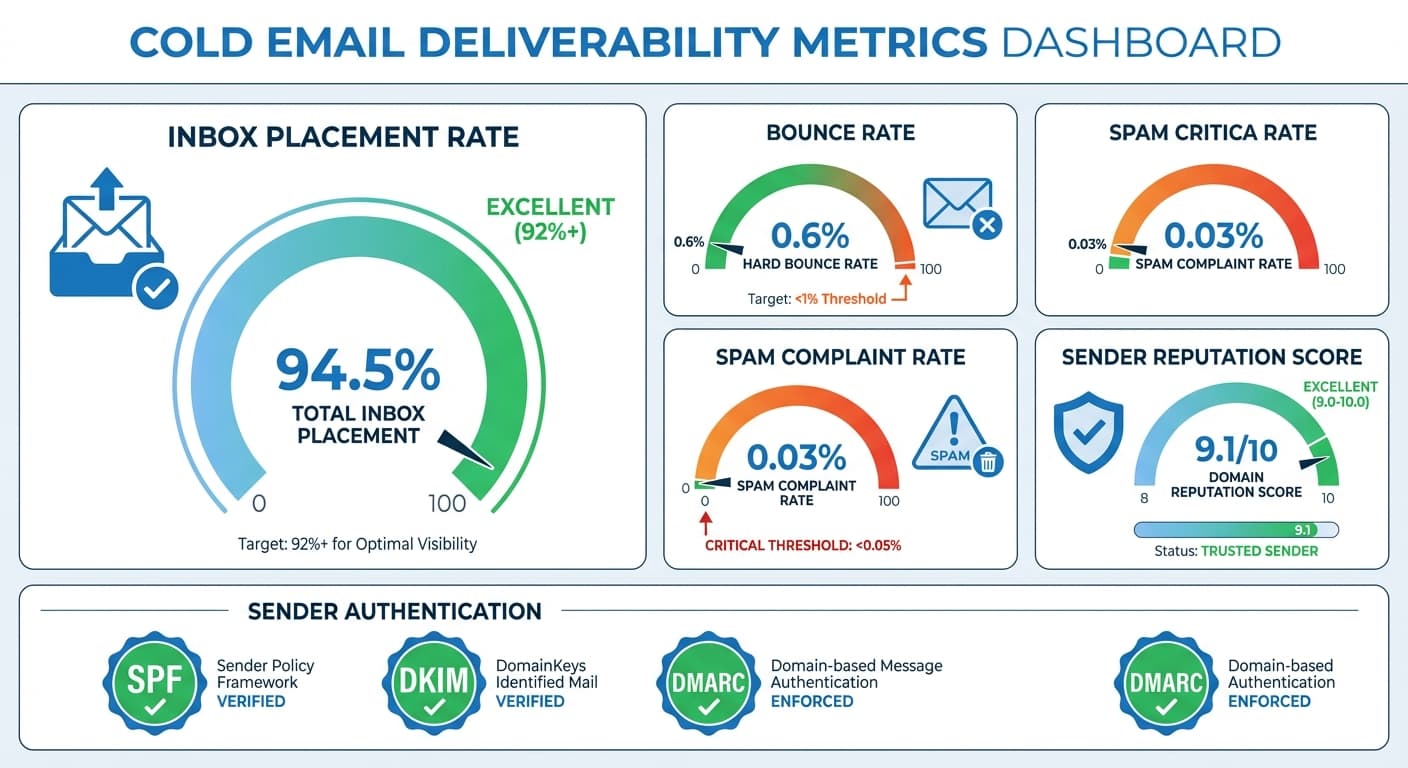
Healthy cold email deliverability requires a delivery rate above 95%, inbox placement above 82%, bounce rate under 3%, and spam complaint rate under 0.1%. These benchmarks assume proper email authentication, verified contact lists, and consistent sending patterns. Google Workspace typically delivers 70-85% inbox placement while Microsoft 365 achieves 75-88%. Maintaining these standards requires regular list verification, domain warming, and reputation monitoring.
Key takeaways
- Excellent cold email programs maintain above 98% delivery rate, 92%+ inbox placement, under 1% bounce rate, and under 0.05% spam complaint rate.
- Google's 0.3% spam complaint threshold triggers reputation damage, while crossing 0.5% requires immediate corrective action.
- Contact data degrades predictably: fresh data (0-3 months) bounces at 1-3%, while data over 12 months old bounces at 12-25%.
- Manually researched contacts show the lowest bounce rates (0.5-2%) while purchased lists typically bounce at 8-25%.
- Google Workspace applies more aggressive spam filtering than Microsoft 365, resulting in lower cold email inbox placement rates (70-85% versus 75-88%).
Reviewed and updated August 28, 2026
Deliverability determines whether your cold emails reach recipient inboxes or get filtered to spam folders. Even the best messaging fails if emails never reach their intended audience. Understanding deliverability benchmarks helps you identify issues and maintain healthy sending infrastructure.
This benchmark report provides comprehensive deliverability data across key metrics including inbox placement, bounce rates, spam complaints, and sender reputation factors.
Methodology and Definitions
Key Deliverability Metrics
Delivery Rate: Percentage of emails accepted by recipient mail servers (not bounced) Inbox Placement Rate: Percentage of delivered emails landing in primary inbox Bounce Rate: Percentage of emails rejected by recipient mail servers Spam Complaint Rate: Percentage of recipients marking emails as spam Spam Trap Hit Rate: Frequency of sending to known spam trap addresses
Data Sources
The benchmarks represent industry-standard performance ranges compiled from email service providers, deliverability monitoring services, and commonly cited B2B outreach metrics.
Overall Deliverability Benchmarks
Healthy cold email programs maintain metrics within these ranges:
| Metric | Concerning | Acceptable | Good | Excellent |
|---|---|---|---|---|
| Delivery Rate | Under 92% | 92-95% | 95-98% | 98%+ |
| Inbox Placement | Under 70% | 70-82% | 82-92% | 92%+ |
| Bounce Rate | Over 5% | 3-5% | 1-3% | Under 1% |
| Spam Complaint Rate | Over 0.3% | 0.1-0.3% | 0.05-0.1% | Under 0.05% |
These ranges assume proper authentication, reasonable list quality, and standard cold email practices.
Bounce Rate Benchmarks
Bounce rates indicate list quality and email validity issues.
Bounce Rate Classification
Hard Bounces: Permanent delivery failures (invalid addresses)
- Target: Under 1%
- Concerning: Over 2%
- Critical: Over 5%
Soft Bounces: Temporary delivery failures (full mailbox, server issues)
- Target: Under 2%
- Concerning: Over 4%
- Critical: Over 8%
Bounce Rate by List Source
Different list building methods show varying bounce rates:
Often unacceptable for cold email
Requires significant verification
Quality varies significantly by provider
Best practice for cold email
Highest quality but least scalable
Purchased or rented lists:
- Typical range: 8-25%
- Often unacceptable for cold email
Scraped or harvested data:
- Typical range: 5-15%
- Requires significant verification
Professional data providers:
- Typical range: 3-8%
- Quality varies significantly by provider
Verified and enriched data:
- Typical range: 1-4%
- Best practice for cold email
Manually researched contacts:
- Typical range: 0.5-2%
- Highest quality but least scalable
Bounce Rate by Data Age
Contact data degrades over time:
Fresh data (0-3 months):
- Expected bounce rate: 1-3%
Moderate age (3-6 months):
- Expected bounce rate: 3-6%
Older data (6-12 months):
- Expected bounce rate: 6-12%
Stale data (12+ months):
- Expected bounce rate: 12-25%
Regular list hygiene and verification is essential for maintaining acceptable bounce rates.
Inbox Placement Benchmarks
Inbox placement measures whether delivered emails reach the primary inbox versus spam or promotional folders.
Overall Inbox Placement Benchmarks
| Performance Level | Inbox Placement Rate |
|---|---|
| Poor | Under 65% |
| Below Average | 65-75% |
| Average | 75-85% |
| Good | 85-92% |
| Excellent | 92%+ |
Inbox Placement by Email Provider
Different email providers have varying spam filtering sophistication:
Google Workspace (Gmail):
- More aggressive filtering
- Typical inbox placement for cold email: 70-85%
- Highly sensitive to engagement signals
Microsoft 365 (Outlook):
- Moderate filtering
- Typical inbox placement for cold email: 75-88%
- Focus on sender reputation
Yahoo and other providers:
- Variable filtering
- Typical inbox placement: 78-90%
Factors Affecting Inbox Placement
Positive factors:
- High engagement rates (opens, replies)
- Clean sending history
- Proper authentication (SPF, DKIM, DMARC)
- Low complaint rates
- Consistent sending volume
Negative factors:
- Spam complaints
- High bounce rates
- Spam trigger content
- Sudden volume spikes
- Poor sender reputation
Spam Complaint Rate Benchmarks
Spam complaints have outsized impact on deliverability.
Spam Complaint Thresholds
| Level | Complaint Rate | Impact |
|---|---|---|
| Excellent | Under 0.05% | No negative impact |
| Good | 0.05-0.1% | Minimal impact |
| Acceptable | 0.1-0.2% | Moderate concern |
| Concerning | 0.2-0.3% | Reputation impact |
| Critical | Over 0.3% | Significant damage |
| Emergency | Over 0.5% | Immediate action required |
Complaint Rate Impact
Google threshold: 0.3% complaint rate triggers reputation damage Microsoft threshold: Varies but generally more lenient
Crossing these thresholds can result in:
- Increased spam folder placement
- Reduced inbox delivery rates
- Potential domain blacklisting
- Long-term reputation damage
Reducing Complaint Rates
Content and targeting:
- Improve targeting precision
- Ensure message relevance
- Use appropriate tone
- Provide clear value
List management:
- Honor opt-out requests immediately
- Remove unengaged contacts
- Verify list sources
- Avoid purchased lists
Technical practices:
- Clear sender identification
- Easy unsubscribe process
- Consistent from name and address
- Professional formatting
Sender Reputation Benchmarks
Sender reputation determines how email providers treat your messages.
Domain Reputation Factors
Positive indicators:
- Clean sending history
- Low bounce and complaint rates
- High engagement (opens, replies)
- Proper authentication
- Consistent sending patterns
Negative indicators:
- High bounce rates
- Spam complaints
- Spam trap hits
- Sudden volume changes
- Authentication failures
IP Reputation Considerations
- Reputation affected by other senders
- Less control over reputation
- Faster initial warming
- Suitable for lower volumes
- Full control over reputation
- Requires proper warming
- Better for consistent, high-volume senders
- Longer reputation building period
Shared IP sending:
- Reputation affected by other senders
- Less control over reputation
- Faster initial warming
- Suitable for lower volumes
Dedicated IP sending:
- Full control over reputation
- Requires proper warming
- Better for consistent, high-volume senders
- Longer reputation building period
Reputation Monitoring
Key metrics to track:
- Google Postmaster Tools data
- Microsoft SNDS reports
- Third-party reputation scores
- Blacklist monitoring
- Engagement trends
Authentication Benchmarks

Proper email authentication is foundational for deliverability.
SPF (Sender Policy Framework)
Implementation benchmarks:
- Required: Pass rate should be 100%
- Concerning: Any significant fail rate
Best practices:
- Include all legitimate sending sources
- Use appropriate mechanisms
- Keep records under 10 DNS lookups
- Regular audits and updates
DKIM (DomainKeys Identified Mail)
Implementation benchmarks:
- Required: Signature on all emails
- Pass rate target: 100%
Best practices:
- Use appropriate key length (2048-bit recommended)
- Rotate keys periodically
- Configure for all sending sources
- Monitor for alignment issues
DMARC (Domain-based Message Authentication)
Policy progression:
- p=none: Monitoring only (starting point)
- p=quarantine: Failing emails to spam (intermediate)
- p=reject: Block failing emails (target state)
Implementation timeline:
- Week 1-4: p=none with monitoring
- Week 5-8: p=quarantine at 10-25%
- Week 9-12: Gradually increase quarantine
- Week 13+: Move toward reject policy
Alignment benchmarks:
- SPF alignment: Target 100%
- DKIM alignment: Target 100%
- Overall DMARC pass: Target 98%+
Domain Warming Benchmarks
New sending domains require gradual volume increases.
Warming Schedule
Conservative approach (recommended for cold email):
| Week | Daily Volume | Notes |
|---|---|---|
| 1 | 20-30 | Focus on highest quality contacts |
| 2 | 40-60 | Monitor engagement carefully |
| 3 | 75-100 | Address any deliverability issues |
| 4 | 125-175 | Continue engagement monitoring |
| 5 | 200-300 | Evaluate readiness for scaling |
| 6+ | 25% weekly increases | Based on performance |
Warming Success Indicators
Positive signs:
- Consistent open rates above 30%
- Reply rates above 2%
- Bounce rates under 2%
- No spam complaints
Teams that want to compare these engagement signals against a specific vertical will find ecommerce sector performance data useful for setting realistic targets.
Warning signs:
- Declining open rates
- Increasing bounce rates
- Spam complaints appearing
- Sudden deliverability drops
Warming Best Practices
Content during warming:
- Use proven, high-performing content
- Maximize personalization
- Target most responsive segments
- Prioritize quality over volume
Monitoring during warming:
- Daily deliverability checks
- Engagement rate tracking
- Bounce and complaint monitoring
- Inbox placement testing
Deliverability by Industry
Different industries face varying deliverability challenges.
Higher Deliverability Industries
Professional services:
- Less aggressive corporate filtering
- Higher engagement rates
- Typical inbox placement: 82-92%
Software and technology:
- Technical recipients less likely to complain
- Good engagement patterns
- Typical inbox placement: 78-88%
More Challenging Industries
Financial services:
- Strict corporate email security
- Regulatory-driven filtering
- Typical inbox placement: 70-82%
Healthcare:
- HIPAA-related security
- Aggressive spam filtering
- Typical inbox placement: 68-80%
Government:
- Strict security policies
- Extensive filtering
- Typical inbox placement: 60-75%
Diagnosing Deliverability Issues
Use these frameworks to identify and resolve problems.
Sudden Deliverability Drops
Check immediately:
- Blacklist status
- Authentication failures
- Recent volume changes
- Bounce and complaint spikes
Common causes:
- Spam trap hit
- Complaint threshold exceeded
- Authentication misconfiguration
- IP or domain reputation damage
Gradual Performance Decline
Monitor for:
- Increasing bounce rates
- Rising complaint rates
- Declining engagement
- List quality degradation
Common causes:
- List aging without refresh
- Targeting drift
- Content fatigue
- Competition for inbox attention
Inconsistent Performance
Investigate:
- Provider-specific issues
- Time-based patterns
- Segment-specific problems
- Content variations
Common causes:
- Provider policy changes
- Sending pattern irregularities
- Segmentation issues
- A/B testing effects
Improving Deliverability
Systematic approach to deliverability improvement.
Immediate Actions
Authentication audit:
- Verify SPF records
- Confirm DKIM configuration
- Implement DMARC monitoring
- Check alignment issues
List hygiene:
- Verify all addresses before sending
- Remove bounced addresses immediately
- Suppress complaint sources
- Update stale data
Short-Term Improvements
Sending practices:
- Implement gradual volume increases
- Maintain consistent sending patterns
- Segment by engagement level
- Remove unengaged contacts
Content optimization:
- Reduce spam trigger language
- Improve engagement through relevance
- Test and iterate on messaging
- Personalize appropriately
Long-Term Infrastructure
Domain strategy:
- Use dedicated cold email domains
- Protect primary brand domain
- Implement proper warming
- Maintain multiple sending domains
Monitoring systems:
- Daily deliverability dashboards
- Automated alerts for issues
- Regular inbox placement testing
- Blacklist monitoring
Tracking and Measurement
Effective deliverability management requires ongoing monitoring.
Essential Metrics to Track
Daily monitoring:
- Bounce rates (hard and soft)
- Delivery rates
- Complaint rates
- Authentication pass rates
Weekly analysis:
- Inbox placement rates
- Engagement trends
- Provider-specific performance
- Blacklist status
Monthly review:
- Overall deliverability trends
- Domain and IP reputation
- Authentication compliance
- Infrastructure health
Tools and Services
Google Postmaster Tools:
- Free reputation monitoring for Gmail
- Spam rate data
- Authentication results
Microsoft SNDS:
- Reputation data for Microsoft
- Spam trap and complaint data
- IP reputation scores
Third-party monitoring:
- Inbox placement testing
- Blacklist monitoring
- Reputation tracking
- Comprehensive dashboards
Next Steps
Maintaining strong deliverability is foundational for cold email success. If your metrics fall outside acceptable ranges, prioritize fixing deliverability before investing in other optimizations.
Applying these deliverability standards within mission driven outreach comes down to sector specific engagement patterns, which nonprofit sending performance data covers in depth.
Systematic attention to authentication, list quality, and sending practices can move deliverability from concerning to excellent over 4-8 weeks of focused effort.
Get your free campaign strategy to assess your current deliverability health and identify specific opportunities for improvement.
Related Reading
Frequently asked questions.
Frequently asked questions- What bounce rate is acceptable for cold email?
- A bounce rate under 3% is acceptable for cold email, with under 1% considered excellent. Hard bounces (permanent failures) should stay under 1%, while soft bounces (temporary failures) should remain under 2%. Bounce rates over 5% are critical and indicate serious list quality issues that will damage sender reputation and deliverability.
- How does Gmail's spam filtering compare to Outlook for cold emails?
- Gmail (Google Workspace) uses more aggressive spam filtering than Outlook (Microsoft 365) for cold emails. Gmail typically achieves 70-85% inbox placement and is highly sensitive to engagement signals like opens and replies. Outlook shows 75-88% inbox placement with more focus on sender reputation. Both require proper authentication and low complaint rates.
- What spam complaint rate will get my domain blacklisted?
- Spam complaint rates over 0.3% trigger reputation damage at Google, while rates over 0.5% require emergency action. Complaint rates between 0.2-0.3% are concerning and cause measurable reputation impact. Excellent programs maintain complaint rates under 0.05%. Crossing these thresholds can result in increased spam folder placement, reduced delivery rates, and potential blacklisting.
- How quickly does contact data become outdated for cold email?
- Contact data degrades steadily over time. Fresh data (0-3 months old) bounces at 1-3%, moderate age data (3-6 months) bounces at 3-6%, older data (6-12 months) bounces at 6-12%, and stale data (over 12 months) bounces at 12-25%. Regular list hygiene and verification are essential to maintain acceptable bounce rates below 3%.
- What inbox placement rate should I expect for B2B cold email?
- Average B2B cold email achieves 75-85% inbox placement, with good programs reaching 85-92% and excellent programs exceeding 92%. Performance below 65% is poor and requires immediate attention. Inbox placement depends on sender reputation, authentication setup, engagement rates, and the specific email provider, with Google Workspace being more restrictive than Microsoft 365.
About the author.

Hosun Chung is COO at RevenueFlow, which builds and operates outbound revenue engines for B2B companies. Previously at Gleacher Shacklock LLP. Studied at London School of Economics.
Hosun Chung · COO
Connect on LinkedIn →Explore more.
Ready to scale your outreach?
We build GTM engines that book real meetings. See the receipts.
Related articles.
Cold Email Conversion Benchmarks: 2026 Performance Data
Complete benchmark data for cold email conversion rates from reply to meeting to opportunity. Learn what drives conversions and how to optimize your full funnel.
Education Cold Email Benchmarks: 2026 Performance Data
Industry benchmark data for education cold email campaigns, including open rates, reply rates, and conversion metrics for companies targeting K-12 schools, higher education, and corporate training organizations.
Automotive Cold Email Benchmarks: 2026 Performance Data
Industry benchmark data for automotive sector cold email campaigns, covering OEMs, suppliers, dealerships, and automotive technology with performance metrics by segment and buyer role.
Real Estate Cold Email Benchmarks: 2026 Performance Data
Comprehensive benchmark data for real estate cold email campaigns, including open rates, reply rates, and conversion metrics for companies targeting brokerages, property managers, developers, and real estate investors.
Fintech Cold Email Benchmarks: 2026 Performance Data
Comprehensive benchmark data for fintech cold email campaigns, including open rates, reply rates, and conversion metrics specific to financial technology companies targeting banks, financial institutions, and businesses.
Media Cold Email Benchmarks: 2026 Performance Data
Comprehensive benchmark data for media and entertainment industry cold email campaigns, covering publishers, streaming platforms, advertising, and content creators.