DKIM on GoDaddy: Step by Step, With the Failure Modes
GoDaddy holds the public key and your sending platform holds the private one. Four things go wrong at that handoff, and none of them reports an error.
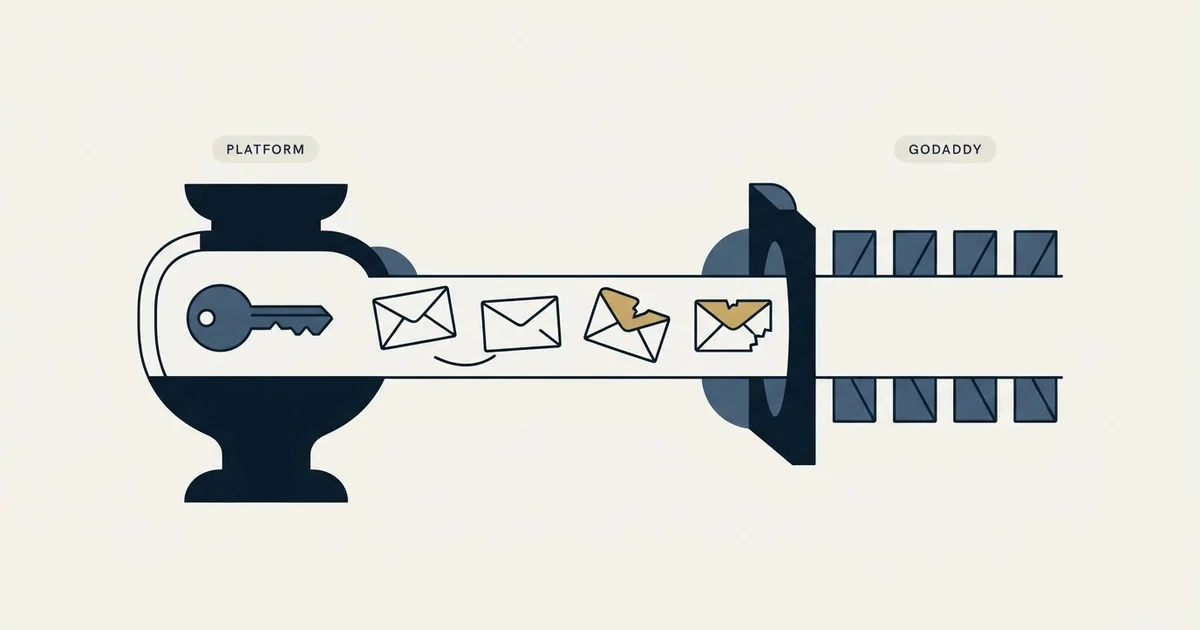
GoDaddy does not generate your DKIM key. Your sending platform does, and GoDaddy holds the public half as a TXT or CNAME record at selector._domainkey.yourdomain.com. Most GoDaddy DKIM failures are one of four things: the domain resolves elsewhere, the host field doubled, the key was truncated, or two senders share one selector.
Key takeaways
- The record name is fixed by RFC 6376 as selector._domainkey.yourdomain.com, and the selector is chosen by the platform that signs, so you cannot invent one.
- A domain registered at GoDaddy but resolved by another nameserver has two DNS panels, and only the live one matters.
- RFC 8301 requires signing keys of at least 1024 bits and recommends 2048, which exceeds the single 256-octet string many DNS panels handle.
- Every sending domain needs its own record and its own verification, because nothing is inherited between domains under one account.
Reviewed and updated August 28, 2026
A team buys thirty domains at GoDaddy for an outbound programme, connects them to Google Workspace, pastes a DKIM key into the DNS panel for each one, and a week later half of them are still failing authentication at Gmail. Nothing in the GoDaddy interface said anything was wrong. The records are there, visible, saved.
The reason is almost always one of four things, and none of them is GoDaddy being broken. GoDaddy is a registrar and a DNS host. It does not sign your mail and it does not generate your DKIM key. It holds the public half of a key that somebody else's mail server is using, and it holds it under a name that has to match exactly what the receiving server will ask for.
What DKIM at GoDaddy actually is
DKIM works on a key pair. Your sending platform holds a private key and signs each outgoing message with it. The receiving server reads the signature header, sees which domain and which selector to ask about, and looks up a DNS record to fetch the matching public key. If the fetched key verifies the signature, DKIM passes.
Everything GoDaddy does in that description is the DNS lookup half. The key comes from whoever sends your mail: Google Workspace, Microsoft 365, GoDaddy's own Professional Email product, or a sending platform. So the first question on any GoDaddy DKIM problem is not "what did I type into GoDaddy", it is "which system generated this key, and is that the system actually sending".
The record name is fixed by the specification. RFC 6376 puts the public key at <selector>._domainkey.<domain>, so a selector called google on acme.com is published at google._domainkey.acme.com. The selector is chosen by the signing platform, which is why you cannot invent one, and why two platforms signing for the same domain need two different selectors rather than one shared record.
- Step 1Platform generates the key
Google Workspace, Microsoft 365 or your sending tool creates the pair and keeps the private half.
- Step 2You publish the public half
A TXT record at selector._domainkey.yourdomain.com in the GoDaddy DNS zone.
- Step 3The platform signs
Every outgoing message carries a DKIM-Signature header naming the domain and the selector.
- Step 4The receiver verifies
Gmail or Outlook queries that exact hostname, fetches the key, and checks the signature.
The four things that actually go wrong

The domain is registered at GoDaddy but resolved somewhere else. This is the one that wastes the most time, because the GoDaddy DNS panel will happily accept and display a record that no resolver on the internet will ever see. If the domain's nameservers point at Cloudflare, Route 53, or a hosting company, the zone GoDaddy shows you is not the live zone. Check the nameservers before you check anything else, and edit the zone that the nameservers point at.
The host field ends up doubled. DNS panels differ on whether they want the full hostname or only the part in front of your domain. Google's own setup documentation flags this as a per-provider difference rather than a rule: "Some domain providers populate your domain name automatically. If not, manually enter your domain." Paste google._domainkey.acme.com into a field that appends acme.com for you and the published record lands at google._domainkey.acme.com.acme.com, which resolves to nothing. After saving, read the record back and confirm the name reads as you intended.
The key is too long for one string. This is a real specification-level constraint rather than a GoDaddy quirk. RFC 8301 records why: "Widely used DNS configuration software places a practical limit on key sizes, because the software only handles a single 256-octet string in a TXT record, and RSA keys significantly longer than 1024 bits don't fit in 256 octets." A 2048-bit key therefore has to be published as multiple quoted strings that the resolver concatenates. Some panels do that splitting for you, some truncate silently, and a truncated key fails verification while looking present in the interface.
That same RFC sets the sizes worth using: "Signers MUST use RSA keys of at least 1024 bits for all keys. Signers SHOULD use RSA keys of at least 2048 bits." If your platform offers both, take the 2048-bit key and deal with the string splitting.
Two senders, one selector. A domain that sends from Google Workspace and from an outbound platform needs both selectors published. Neither replaces the other, and DKIM does not care how many valid signatures exist as long as one verifies. Teams get into trouble by deleting the old record when adding the new one.
Because adding a new selector without removing the old one is safe while duplicating one is not, the rules for multiple DKIM selectors are worth understanding before editing DNS.
A fifth cause is not a mistake at all, and it is worth naming so you do not go hunting for one. DNS changes take time to reach every resolver, and the interval is set by the record's own time-to-live plus whatever caching sits between you and the checking service. Google's setup documentation uses a one hour TTL as its worked example for records of this kind. If a record was wrong and you fixed it, the old answer can still be served for as long as the old TTL said it could, so a check run immediately after an edit tells you very little.
- Yes: The domain's nameservers actually point at GoDaddy, not at Cloudflare or a host
- Yes: The record type matches what the platform gave you, TXT or CNAME, not swapped
- Yes: The saved host reads selector._domainkey and not selector._domainkey.yourdomain.com.yourdomain.com
- Yes: The full key survived the save, with no characters lost at the end
- Yes: Every platform that sends for this domain has its own selector published
- No: You pasted the key into the panel and never looked at the saved value again
TXT or CNAME, and why your platform picked one
Some platforms hand you a TXT record containing the key itself. Others hand you a CNAME pointing at a hostname they control, so the key lives on their side and they can rotate it without asking you to edit DNS again. Both are legitimate and the choice belongs to the sender, not to you.
The practical difference shows up during rotation. With a TXT record you own the key material, so a rotation is a DNS edit on every domain you run. With a CNAME the rotation happens upstream and you do nothing. For an outbound programme running a portfolio of domains, that difference is the one worth caring about, because a key rotation you have to perform thirty times is a project.
The failure mode to watch for is publishing a CNAME's target as a TXT record, or the reverse. GoDaddy will accept either as a valid record of that type, and the lookup will return the wrong kind of answer.
Verifying it, without trusting the panel

A saved record is not a published record and a published record is not a passing signature. Two checks close that gap.
First, query the exact hostname from outside GoDaddy and confirm a key comes back. Any DNS lookup tool does this, and our guide to using MXToolbox for deliverability covers the lookups worth running.
Second, send a message to an account you control at a large provider and read the Authentication-Results header on what arrives. That header states whether DKIM passed and which domain it passed for, which is the only evidence that matters. A key that resolves and still fails usually means the signing platform is using a different selector from the one you published.
Beyond checking a single Authentication-Results header, GlockApps' spam filter testing coverage shows how a message fares across several major inbox filters at once.
Alignment is the step after that. DKIM passing on the signing platform's own domain does not help DMARC unless the signature is on your domain, and that distinction accounts for most DMARC failures we see. The six causes of DMARC failure covers it in order of likelihood, and the SPF, DKIM and DMARC setup for cold email gives the records for both major providers side by side.
The part specific to outbound
Buying domains in bulk at a registrar is normal for outbound work. What is not normal, and what breaks programmes, is treating DKIM as a one-time setup task rather than a per-domain one.
Every sending domain you use needs its own DKIM record, its own selector for each sending platform, and its own verification. There is no inheritance: a key published on acme.com does nothing for try-acme.com, even when the same account owns both and the same platform sends from both. Thirty domains is thirty records and thirty read-backs.
We run outbound as one message per campaign, so a domain that fails authentication does not get a second chance to land with the same person on a later attempt. That raises the value of getting DNS right before the first send rather than diagnosing it afterwards, and it is why our own build process treats a read-back of every record as part of launching rather than as troubleshooting. The same discipline shows up in how much sending infrastructure we buy relative to what we need.
If you would rather not run the DNS layer yourself, we build and operate the whole sending stack as part of running campaigns.
The short version

GoDaddy holds the public key; your sending platform holds the private one and chooses the selector. Publish the record at selector._domainkey.yourdomain.com, confirm the nameservers point at GoDaddy before you edit anything, read the saved record back to catch a doubled host or a truncated key, give every sending platform its own selector, and prove it with an Authentication-Results header rather than with the DNS panel. GoDaddy's own help centre documents the current click path at godaddy.com/help, and the interface changes more often than the specification does.
DNS behaviour and vendor documentation verified as of mid-2026 against RFC 6376, RFC 8301 and Google Workspace's published setup guidance. Verify current interface steps with your provider before relying on them.
Frequently asked questions.
Frequently asked questions- Where exactly does the DKIM record go in GoDaddy?
- As a TXT or CNAME record whose host is your selector followed by _domainkey. The platform that signs your mail tells you both the selector and the record type. Because some panels append your domain to the host field automatically, read the saved record back and confirm the name is not doubled.
- Why does my GoDaddy DKIM record fail even though it saved?
- The three usual causes are that the domain's nameservers point somewhere other than GoDaddy, so the zone you edited is not live, that the host field ended up with your domain twice, or that a long key was truncated on save. A fourth is querying a different selector from the one your platform actually signs with.
- Can one domain have more than one DKIM record?
- Yes, and it usually should. Each sending platform gets its own selector, so a domain sending from a mail provider and an outbound platform carries two records at two different names. Verification only needs one signature to check out, so extra selectors cost nothing and removing one breaks that sender.
- How long does a DKIM change take to work?
- It depends on the record's time-to-live and on caching between you and whoever is checking. Google's setup guidance uses one hour as a worked example for records of this kind. A check run immediately after an edit can still be served the previous answer, so an instant retest tells you very little.
About the author.

Tim Carden is CMO / CTO at RevenueFlow, which builds and operates outbound revenue engines for B2B companies. Studied at McGill University.
Tim Carden · CMO / CTO
Connect on LinkedIn →Explore more.
Ready to scale your outreach?
We build GTM engines that book real meetings. See the receipts.
Related articles.
How Lemwarm Works: The Network, the Ramp and the Score
What lemwarm's pool of real inboxes does, how the ramp is sized in the vendor's own numbers, what the score is made of, and where the tool stops.
Woody's SMTP Blacklist: The Delisting Route Refuses
Every page about this list tells you to file a delisting request. Measured on 2 September 2026, the operator's removal endpoint returned HTTP 403.
SPF Softfail vs Hardfail: Which One to Publish
Google recommends the soft fail qualifier and Microsoft recommends the hard one for the same two characters. What each claims, and what a hard fail hides.
Suomispam Reputation: Read the Code Before You File
Suomispam publishes four zones and four listing classes, and the response code names which one you have. Two pieces of common delisting advice will not move it.
Backscatterer Blacklist: Two Causes, One Four-Week Clock
Backscatterer lists addresses for misdirected bounces and for sender callouts, never for spam. The listing expires after four weeks, so the work is finding the system.
Why Your DMARC Is Failing: The Six Causes
Six causes of DMARC failure, ordered by how often they occur, with the symptom in reports and the fix for each. Alignment accounts for most of them.