How Lemwarm Works: The Network, the Ramp and the Score
What lemwarm's pool of real inboxes does, how the ramp is sized in the vendor's own numbers, what the score is made of, and where the tool stops.
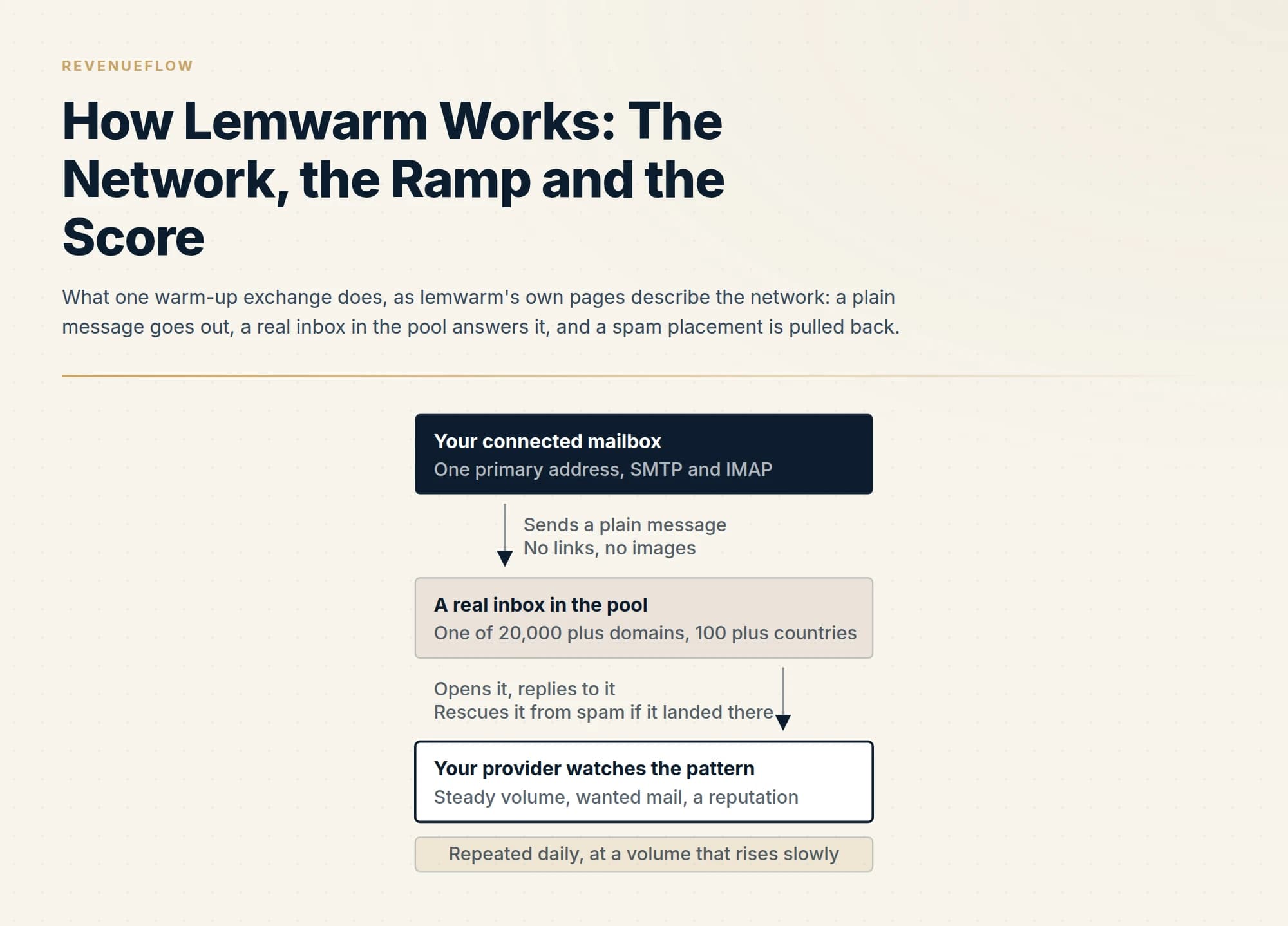
lemwarm connects one primary mailbox over SMTP and IMAP and exchanges plain, linkless messages with a pool of real inboxes so a provider sees steady, wanted mail. lemlist's help centre sizes the ramp to the mailbox's future volume, rising by one a day for about forty days, then fourteen days of stabilisation. The score is a composite, not placement.
Key takeaways
- lemwarm's home page describes warm-up across 20,000 plus real domains in 100 plus countries, a setup check and a daily score; its help centre states it warms email addresses, not IPs, and needs one inbox with both SMTP and IMAP.
- lemlist's setup article sizes a new mailbox at 30 to 40 emails a day, ramps at an increment of 1 for roughly 40 days, then holds 14 days at target with the inbox rate above 90 percent before any campaign, and caps total output at 70 a day per provider.
- Two vendor surfaces describe the score differently: the help centre weights technical setup at 50 percent, spam rate 30, mailbox age 10 and blacklist 10, while the 13 July 2026 blog splits it 70 fixed and 30 inbox rate; both say it is never a placement percentage.
- The tool does not warm aliases without an inbox, SMTP relays or IPs, and it does nothing about an unverified list or spammy copy, which the vendor's own page names as the usual causes of poor placement.
Reviewed and updated September 18, 2026
lemwarm's own home page describes the product in three sentences, read on 18 September 2026: it warms up your inbox by exchanging safe, real emails with a network of 20,000 plus real users, it checks your email setup so Gmail and Outlook trust you as a sender, and it shows you a daily score so you know your emails are safe to send. The same page puts the timeline in one line: about four weeks of warm-up, then two more weeks before you start real campaigns, and after that you leave it running.
That is the whole mechanism in outline. What the marketing page leaves out is the part a sender actually needs, which is how the ramp is sized, what the score is made of, and where the tool stops. lemlist's help centre, which hosts the lemwarm documentation, answers all three in numbers, and it is the source for most of what follows. This is an explainer of a mechanism, not a review of the product and not a pricing page; the lemlist ladder is worked through on lemlist pricing, and the head-to-head with a bracketed rival is lemwarm against Warmbox.
What the network does
A warm-up tool exists because mailbox providers judge a sender by behaviour, and a mailbox with no history has none. lemwarm's answer is a pool. Its home page describes warming up across 20,000 plus healthy domains in 100 plus countries, and adds three words that matter: real inboxes, real replies, no bots. Your connected mailbox sends warm-up messages to other members of the pool, receives theirs, and the pool replies, opens and rescues messages that landed in spam.
The help centre is specific about what the pool is warming. In an article dated 17 April 2026, lemlist states that lemwarm warms up email addresses, not IPs, and that it warms the primary email address connected on the provider side. An alias can be warmed only if it has its own inbox. SMTP relays and transactional sending services are not supported, because the tool requires a connection to a single inbox with both SMTP and IMAP access. Warming inboxes on one domain can improve that domain's reputation, the same article says, but only if the other senders on the domain also follow good practice.
The content of a warm-up message is part of the mechanism too. The setup article states that lemwarm emails contain no links and no images, so there is normally no reason for them to land in spam, which is what makes the traffic useful as a canary later.
The ramp, in the vendor's own numbers
The setup article is unusually prescriptive. The warm-up value, it says, must match your future lemlist volume. For a new mailbox the recommended range is 30 to 40 emails a day. The article warns against a fixed default in both directions: warming a mailbox to 16 a day when it is meant to send 35 trains it for the wrong job, and warming to 40 a mailbox that will only send 20 is the same mistake reversed.
The ramp increment for a new mailbox is 1. At that increment lemwarm adds one email per day until it reaches the target, which the article puts at roughly 40 days, or about 20 days at an increment of 2, which it describes as appropriate only for an older mailbox. A mailbox paused for more than seven days goes back through a short ramp before resuming, and in recovery the increment is 3, on the reasoning that a mailbox rebuilding trust is not a new mailbox.
Then the part most people skip. After the ramp, the article requires 14 days of stabilisation at the target volume with lemlist at zero, and it states that the period is non-negotiable: the inbox rate has to stay above 90 percent for 14 straight days, and if spam appears during that window the clock restarts. Only then do campaigns begin, and the article specifies how: open lemlist at 30 a day rather than the full target, move to 40 once a month of clean sending is behind the mailbox, and drop lemwarm to 10 a day at the same moment. Those 10 emails are no longer warming anything, in the article's words; they report reputation.
The ceiling sits above all of it. Total output, meaning lemlist plus lemwarm plus manual replies, stays under 70 a day per provider, and the article stresses that the ceiling is per provider, not per mailbox: six Google mailboxes share one Google-side reputation.
What the score measures, and the two answers the vendor gives
Every lemwarm surface points at the score as the thing to watch, and two of the vendor's own pages describe its composition differently. Both are reported here, attributed to the page each came from, because a buyer reading one and then the other would reasonably think one was wrong.
The help centre's setup article describes the score as a weighted composite of four components. Technical setup, meaning SPF, DKIM and DMARC present and valid on the sending domain, carries 50 percent in lemlist's weighting and moves as soon as DNS propagates. Spam rate, meaning inbox against spam placement on warm-up traffic, carries 30 percent in lemlist's weighting, is weighted so that one spam placement counts as five inbox placements, and moves in days. Mailbox age carries 10 percent in lemlist's weighting and moves in months, only upward. Blacklist presence carries 10 percent in lemlist's weighting and moves overnight in both directions. The article draws two conclusions: a mailbox with clean DNS sits around 50 before sending anything, and one with broken DNS is capped near 50 however well it sends.
lemwarm's blog post of 13 July 2026 describes the same score as two parts: 70 percent from fixed factors such as domain age and the SPF, DKIM and MX setup, and 30 percent from the inbox rate over the last two weeks. The blog and the help article agree on the split between a fixed part and a behavioural part, and both of lemlist's pages put the behavioural part at 30 percent; they disagree on how the fixed part is composed and whether blacklists sit inside it.
The practical instruction survives either reading, and the help article states it plainly: a score of 80 is not an 80 percent inbox rate, it is a weighted composite and should never be quoted as a placement percentage. A score that falls week to week is almost always the spam-rate component, so inspect content, targeting and volume rather than DNS. And no campaign starts under a score of 90: below 65 the article says to pause and investigate DNS and blacklists, between 65 and 90 to warm only, above 90 with the stabilisation window complete to begin.
Help centre, setup article
- Technical setup: SPF, DKIM, DMARC valid on the domain
- Spam rate on warm-up traffic, one spam weighted as five inbox
- Mailbox age, moving only upward
- Blacklist presence, moving overnight either way
Blog, 13 July 2026
- Fixed factors: domain age, SPF, DKIM and MX setup
- Inbox rate over the last two weeks
What both pages agree on. The score is a weighted composite, never a placement percentage, and a falling score is almost always the behavioural part. Campaigns wait for a high score plus the stabilisation window.
What it monitors after the ramp
The vendor's own framing is that warm-up is maintenance rather than a one-time fix. The get-started page lists what the tool does after the initial phase: it keeps track of your sending volume, monitors your score, checks for blacklists, checks your technical settings, and alerts you to deliverability issues. The home page adds that if you stop, your reputation drops and emails go back to spam.
The dashboard the setup article describes carries four readouts: the score, inbox against spam results, a Cold Email Performance graph and a Reply Performance graph tracking where replies to your emails land.
The 13 July 2026 blog post gives the residual traffic its clearest job. Because warm-up mail carries no links and no images, it is the cleanest mail you send, which makes it a canary: if spam placement spikes in warm-up while campaigns run, the outreach is dragging the reputation down and the sender should pull back. The blog also describes an answer-only mode, which replies inside the pool without starting new threads, recommended for a brand-new mailbox's first week and for a mailbox whose score has dropped. If the score recovers within about four weeks the mailbox is safe; if not, the blog says to retire it and warm a fresh one.
What lemwarm cannot do
The vendor's own boundaries are worth listing, because a warm-up tool is regularly bought to fix a problem it does not reach.
It does not warm an IP, a domain as a whole, an alias without its own inbox, or anything sent through an SMTP relay. Each of those is stated in the help centre article on what lemwarm warms up, and each is a setup that will connect and then quietly not work.
It does not make a list deliverable. The home page names an unverified list, with invalid addresses causing bounces, as one of the five things usually going wrong for a sender with poor open rates, and nothing in the warm-up mechanism checks an address before you write to it. That is a separate verification step, and it belongs immediately before the send whatever tool warmed the mailbox.
It does not make a message wanted. The same list on the home page names spammy copy, risky subject lines and trigger words as a second cause, and the mechanism can only report placement on its own traffic. A campaign that lands in spam because of what it says will show up as a falling score after the fact.
And it does not remove the provider's ceiling. The 70 a day per provider figure is a lemlist recommendation about total output, and it sits on top of the daily limits the mailbox provider applies, covered in email sending limits by provider; the records the score's largest component reads are set up in SPF, DKIM and DMARC for cold email.
| Row | Warmed by lemwarm | Reputation at address level |
|---|---|---|
| Primary mailbox with SMTP and IMAP | Yes | Yes |
| Alias with its own inbox | Yes | Yes |
| Alias that only forwards | No | Partial |
| SMTP relay or transactional service | No | No |
| A dedicated or shared IP | No | No |
| A whole domain at once | Partial | Partial |
Where the price sits, and where the tool sits for us
The mechanism is sold two ways, and only one carries a figure. As published on lemwarm's pricing page on 18 September 2026, the Essential plan is 29 dollars per email address per month on monthly billing and 24 dollars on yearly billing, and the Smart plan is 49 dollars and 40 dollars on the same two states, with a quarterly option at a smaller saving and a custom tier above ten users. Smart adds personalised warm-up on your real templates and a network tailored to your industry. The other route is the one the home page repeats: every lemlist plan includes lemwarm, so a lemlist customer already owns it, and the lemlist review covers what that bundle buys.
Our own practice is worth stating. We send through Email Bison and in-house tooling with our own warm-up, so this is a documentation-grounded read of lemwarm rather than an account of running it. We send one message per campaign, with no bumps and no thread replies, so a first touch that lands in spam is the whole campaign for that person, and the residual-traffic canary the vendor describes is the part of this design we would watch most closely. The wider field is compared in the warm-up tools roundup for cold email teams.
The short version
lemwarm connects one primary mailbox over SMTP and IMAP and exchanges plain, linkless messages with a pool of real inboxes, so a provider sees steady volume and wanted mail. The ramp is sized to the mailbox's future sending volume, rises by one a day for about forty days, holds for fourteen days of stabilisation, and only then hands over to campaigns, with warm-up dropping to a residual that reports reputation and total output capped per provider.
The score is a weighted composite whose largest component is DNS, described two ways on the vendor's own help centre and blog; it is never a placement percentage, and campaigns wait for 90 and the stabilisation window. The tool warms addresses, not IPs or relays, and it does nothing about the list or the copy.
If the warmed mailbox is the easy part and the campaign behind it is the hard one, RevenueFlow builds and sends the first campaign against your market on a pay-per-meeting basis, with the qualification criteria agreed in writing before launch.
Mechanism, ramp figures, score composition and supported setups are per lemwarm's home, get-started and pricing pages, lemwarm's blog post of 13 July 2026, and lemlist's help centre articles on setting up lemwarm and on what lemwarm warms up (dated 17 April 2026), all fetched 18 September 2026. The two score descriptions are reported as each page states them. Verify current behaviour and terms with the vendor before relying on them.
Sources: lemwarm, Get started with lemwarm, lemwarm pricing, How long does it really take to warm up an email, lemwarm blog, How to set up and use lemwarm, lemlist help centre, What lemwarm warms up, lemlist help centre
Frequently asked questions.
Frequently asked questions- How does lemwarm warm up an inbox?
- Per lemwarm's home page on 18 September 2026, it exchanges safe, real emails between your connected mailbox and a network of 20,000 plus real users, checks your SPF, DKIM and DMARC setup, and shows a daily score. lemlist's help centre adds that warm-up messages carry no links or images, that the tool warms the primary address on one inbox over SMTP and IMAP, and that the pool replies to and rescues messages that land in spam.
- How long does lemwarm take before you can send campaigns?
- lemlist's setup article puts the ramp at roughly 40 days for a new mailbox at an increment of one email per day, followed by a non-negotiable 14 days of stabilisation at the target volume with the inbox rate above 90 percent. Campaigns start only when the score is above 90 and that window is complete, opening at 30 a day while lemwarm drops to a residual 10 a day. lemwarm's home page summarises it as about four weeks plus two.
- What is the lemwarm score made of?
- lemlist's help centre describes a weighted composite: technical setup at 50 percent, spam rate on warm-up traffic at 30 percent with one spam placement weighted as five inbox placements, mailbox age at 10 and blacklist presence at 10. lemwarm's blog post of 13 July 2026 describes it as 70 percent fixed factors and 30 percent inbox rate over two weeks. Both pages say a score is not a placement percentage and that campaigns wait for 90.
- What can lemwarm not do?
- Per lemlist's help centre article of 17 April 2026, lemwarm warms email addresses rather than IPs, warms only the primary address on an inbox, cannot warm an alias that merely forwards, and does not support SMTP relays or transactional services. It also does not verify a list or fix the copy; lemwarm's own home page names an unverified list and spammy copy as two of the usual causes of poor placement, and neither is touched by the warm-up mechanism.
About the author.

Tim Carden is CMO / CTO at RevenueFlow, which builds and operates outbound revenue engines for B2B companies. Studied at McGill University.
Tim Carden · CMO / CTO
Connect on LinkedIn →Explore more.
Ready to scale your outreach?
We build GTM engines that book real meetings. See the receipts.
Related articles.
Suomispam Reputation: Read the Code Before You File
Suomispam publishes four zones and four listing classes, and the response code names which one you have. Two pieces of common delisting advice will not move it.
Backscatterer Blacklist: Two Causes, One Four-Week Clock
Backscatterer lists addresses for misdirected bounces and for sender callouts, never for spam. The listing expires after four weeks, so the work is finding the system.
Woody's SMTP Blacklist: The Delisting Route Refuses
Every page about this list tells you to file a delisting request. Measured on 2 September 2026, the operator's removal endpoint returned HTTP 403.
Email Warmup Tools: What Actually Moves Placement
Warmup pools are now free in every major sending tool. What the mechanism actually is, why nobody publishes controlled placement data, and the levers that do work.
Email Warmup Services: What They Do and What They Cost
What warmup actually does, what the market charges, how long vendors say it takes, and why the published evidence for how much it helps is thinner than the marketing.
Mailwarm Pricing: The Page Opens on Its Yearly Tab
Mailwarm's pricing tabs open on yearly and the plans meter daily volume rather than mailboxes. Both tabs, the overage rate, the no-trial rule and the per-mailbox cost.