LinkedIn Account Restricted From Sending Invitations
Nobody is going to tell you what you did. The three published triggers carry very different penalties, and the instinctive fix locks you out for three weeks.
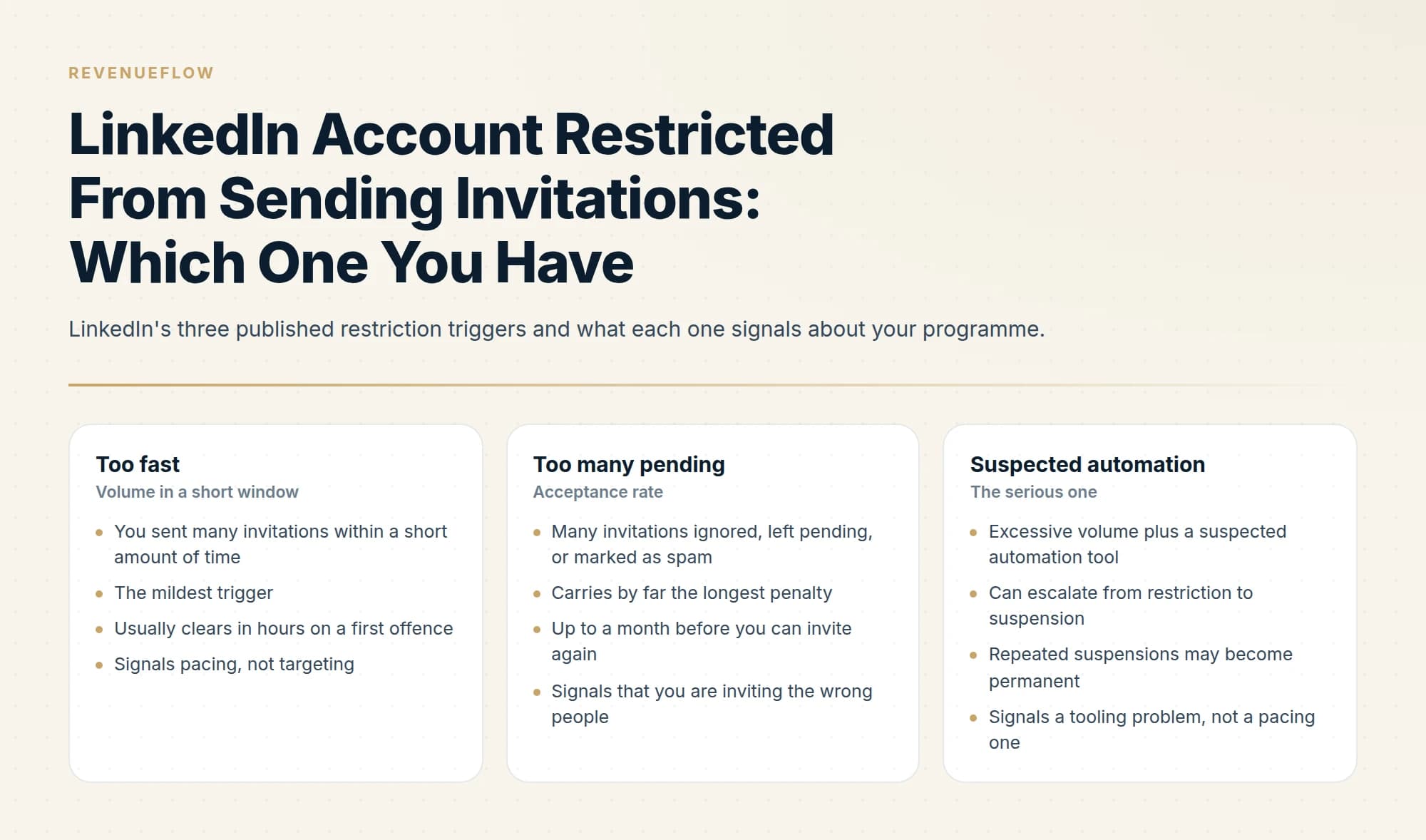
LinkedIn restricts invitation sending for three published reasons: too many invitations too quickly, too many ignored or left pending, and excessive volume with suspected automation. Support will not disclose which, and LinkedIn will not lift a restriction on request. Most clear automatically within a week, so the correct action is usually to stop sending and wait.
Key takeaways
- A first speed restriction clears in hours while a pending-invitation restriction can take a month, so the trigger you hit determines the cost.
- Withdrawing pending invitations blocks you from resending to those people for up to three weeks, which makes the instinctive cleanup the more expensive option.
- The automation trigger escalates through suspension toward permanent restriction, so that is the one where the tooling has to change rather than the pacing.
- An invitation restriction leaves connections, profile and existing conversations intact, so a programme with a warm segment can keep working it.
Reviewed and updated September 1, 2026
The message arrives without warning and without an explanation. LinkedIn tells you your account is restricted from sending invitations, offers no reason, and gives you no way to ask for one. That silence is deliberate: LinkedIn states that for privacy reasons its Support team cannot disclose any additional information about the type or reason for the restriction on your account.
So the first useful thing to know is that nobody is going to tell you what you did. The second is that the restriction is almost certainly temporary, and the length depends entirely on which of three things triggered it.
An invitation block is one kind of LinkedIn account restriction. LinkedIn Account restrictions help page describes others, including restrictions that follow a content review, an identity-verification request, or a compromised account, and those clear on their own paths rather than on the invitation timeline above.
s vendor/ dir: 'If LinkedIn keeps restricting your account rather than restricting it once, the escalation is the thing to read: LinkedIn states that multiple restrictions in a day extend the wait to days, that a pending-invitation restriction can run to a month, and that repeated suspensions for automated activity may result in permanent restriction.
What most people call a LinkedIn ban is one of several different states with different exits, and the word LinkedIn itself uses is restriction, which is why searching the word you experienced returns forum threads while the help pages that would actually resolve it sit under another one.
Work out which restriction you have
LinkedIn publishes three reasons an account gets temporarily restricted from sending invitations, and they carry very different penalties.
- You sent many invitations within a short amount of time
- The mildest trigger
- Usually clears in hours on a first offence
- Signals pacing, not targeting
- Many invitations ignored, left pending, or marked as spam
- Carries by far the longest penalty
- Up to a month before you can invite again
- Signals that you are inviting the wrong people
- Excessive volume plus a suspected automation tool
- Can escalate from restriction to suspension
- Repeated suspensions may become permanent
- Signals a tooling problem, not a pacing one
One further distinction LinkedIn draws that helps with diagnosis: restrictions and limits on standard invitations are separate from the limits placed on personalized invitations to connect. So a restriction on one does not necessarily tell you anything about your standing on the other.
The rules on invitations explain why the personalised note is rationed, withdrawal carries a lockout, and unanswered invitations can trigger a restriction.
You can usually identify yours from behaviour rather than from any notice. If you had a heavy sending day, it is the first. If your pending invitations have been piling up for weeks, it is the second. If you are running a third-party automation tool, assume the third and read the section on it below, because that path does not end where the others do.
How long each one lasts
LinkedIn publishes remedies rather than durations, and they scale with what happened.
- First restrictionWait a few hours
LinkedIn's stated remedy. Then try again, at lower volume.
- Multiple restrictions in one dayWait a few days
Repeating inside a day escalates the response.
- Too many outstanding invitationsWait up to one month
The pending-invitation trigger is roughly thirty times longer than a first speed restriction.
- In generalMost clear within one week
LinkedIn removes most restrictions automatically, and will not remove one on request.
Two things follow from that table. The ratio between the shortest and longest remedy tells you which behaviour LinkedIn considers worse, and it is not speed. And because most restrictions lift automatically inside a week, the correct action in the majority of cases is to stop sending invitations and wait, which is unsatisfying and is genuinely the answer.
There is no appeal. LinkedIn states plainly that it will not remove invitation restrictions on request, so contacting Support to have it lifted is not a route that exists. Nor is there a paid route around it: LinkedIn also states that you cannot buy or acquire more invitations while restricted, or otherwise, and that all members, Basic and Premium alike, are subject to invitation limits. Upgrading mid-restriction changes nothing.
The mistake that makes it worse
The instinct on hitting a pending-invitation restriction is to clean up the pending pile by withdrawing the unanswered invitations. It looks like exactly the right remedy and it carries a cost most people do not know about.
After you withdraw an invitation, you cannot resend one to that person for up to three weeks. Bulk-withdrawing several hundred pending requests therefore removes several hundred people from your addressable pool for the better part of a month, on top of the restriction you are already serving.
If those pending invitations went to people you actually want to reach, withdrawing them is the more expensive of the two options. Waiting costs you time; withdrawing costs you time and the prospects.
When it is a suspension rather than a restriction
The automation trigger behaves differently from the other two and deserves separating out, because it escalates.
LinkedIn's prohibited-software page states that it does not permit third-party software, including crawlers, bots, browser plug-ins or extensions, that scrape, modify the appearance of, or automate activity on the site, and that members using such tools risk having accounts restricted or shut down.
On the invitations page LinkedIn adds the escalation path: an account suspended for automated activity is re-enabled automatically at the time specified in the suspension notice, and repeated suspensions may result in permanent restriction of the account. It also asks members using such extensions to disable them.
So the sequence is restriction, then suspension with a stated end date, then permanent loss. If you are on the second step, the thing to fix is the tooling, because continuing with the same setup walks toward an outcome with no remedy at all. Our LinkedIn automation tools guide covers what can be automated without approaching this, and what LinkedIn's terms say about scraping covers the User Agreement clauses that define the line.
Getting the account healthy again

Assume you will not be told when the restriction lifts and that testing it by sending invitations is how you collect another one. The productive use of the waiting period is fixing the input.
- Yes: Stop sending invitations entirely until the restriction clears
- Yes: Work out why acceptance was low, since pending invitations are the costliest trigger
- Yes: Disable any third-party extension or automation tool touching the account
- Yes: Narrow the target list to people with a visible reason to accept
- Yes: Resume at a fraction of previous volume and ramp
- No: Bulk-withdrawing pending invitations to clean up the ratio
- No: Contacting Support to have the restriction lifted
LinkedIn's own prevention advice, on the same page, is worth repeating because it is more specific than it first sounds: invite only people you know and trust, add a personalised message explaining how you know them or why you want to connect, use InMail and Groups to network with members you do not know, and keep your profile updated with a photo so recipients recognise you.
This breakdown of LinkedIn's message types explains why only the connection request note, unlike InMail or a group message, counts toward an account restriction when ignored.
That third item is the platform telling you which tool it intends for cold outreach, and it is not the invitation. A connection request to a stranger is the thing the restriction system is built to police. An InMail is the paid, sanctioned route to the same person, and our comparison of InMail versus a connection request covers when the credit is the better spend.
What a restriction does not affect
Worth stating, because the notice reads more alarmingly than the reality and people over-correct.
An invitation restriction is scoped to sending invitations. It does not remove your existing connections, delete your profile, or stop you messaging people you are already connected to. Your content, your history and your network are intact, and to anyone looking at your profile nothing has changed.
That matters for two reasons. It means a restriction is not an emergency requiring drastic action, which is what leads people into the bulk-withdrawal mistake above. And it means the channel is not entirely closed while you wait: existing first-degree connections remain reachable, so a programme with a warm segment can keep working it.
What a restriction does affect, beyond the obvious, is your credibility with whoever owns the account. If the account belongs to a founder or a senior salesperson who agreed to let a programme run through it, a restriction is the moment that permission gets reviewed. Handle the internal conversation early and honestly rather than waiting to be asked, because the alternative is losing access to the account permanently for reasons that have nothing to do with LinkedIn.
The prevention that actually works
Restrictions are a lagging indicator of targeting quality, which is why volume discipline alone does not prevent them.
Two accounts sending the same number of invitations get different treatment depending on who they invited, because ignored and pending requests are a named trigger. So the durable protection is a smaller list of people with a plausible reason to accept, rather than a larger list sent more slowly. Pacing helps with the first trigger and does nothing for the second.
It also helps to know that LinkedIn caps the network itself at 30,000 first-degree connections, and recommends keeping only quality connections. An account optimising for raw connection count is working against both the cap and the acceptance signal.
For the underlying limits and why no published weekly number exists, the connection limit page covers what LinkedIn does and does not publish.
If you would rather this risk did not sit on your team's personal accounts, we run LinkedIn alongside email for clients on a pay-per-qualified-meeting basis, which puts the account exposure on our side rather than theirs. You can see what a campaign would look like for your market.
The short version
LinkedIn restricts accounts for three published reasons: too many invitations too quickly, too many ignored or left pending, and excessive volume with suspected automation. You will not be told which, because Support cannot disclose the reason, and you cannot appeal, because LinkedIn does not lift restrictions on request. Most clear automatically within a week. A first speed restriction clears in hours, while a pending-invitation restriction can take a month. Do not bulk-withdraw pending invitations, since that locks you out of re-inviting those people for three weeks. If automation is involved, fix the tooling, because that path escalates through suspension toward permanent restriction. Then resume smaller and better targeted, because acceptance rate is what the system is really measuring.
All rules, triggers, remedies and limits are from LinkedIn's own Help Center pages on types of restrictions for sending invitations and on prohibited software and extensions, both re-fetched with cache-busting and verified as of mid-2026. LinkedIn does not publish numeric invitation limits, and none are stated here. Verify current terms with LinkedIn.
Frequently asked questions.
Frequently asked questions- Why was my LinkedIn account restricted?
- LinkedIn publishes three reasons: you sent many invitations within a short amount of time, many of your invitations were ignored or left pending or marked as spam, or you sent an excessive number and LinkedIn suspects an automation tool. Support will not tell you which one applies, citing privacy, so identify it from your own recent behaviour.
- How long does a LinkedIn restriction last?
- LinkedIn publishes remedies rather than fixed durations. A first restriction calls for waiting a few hours, several in one day for a few days, and a restriction from too many outstanding invitations for up to a month. Most clear within a week automatically. There is no appeal, since LinkedIn states it will not remove invitation restrictions on request.
- Should I withdraw my pending invitations to fix it?
- No. LinkedIn states that after withdrawing an invitation you cannot resend one to that person for up to three weeks, so clearing several hundred pending requests removes those people from your addressable pool for most of a month on top of the restriction. Waiting costs you time, and withdrawing costs you time and the prospects.
- What does a restriction stop me doing?
- It is scoped to sending invitations. Your existing connections, profile, content and history are intact, and you can still message people you are already connected to, so a warm segment stays reachable. Anyone viewing your profile sees no change. That is worth knowing, because treating it as an emergency is what leads people into the bulk-withdrawal mistake.
About the author.

B2B cold email experts helping companies generate qualified leads through done-for-you outreach campaigns.
RevenueFlow Team
Explore more.
Ready to scale your outreach?
We build GTM engines that book real meetings. See the receipts.
Related articles.
LinkedIn Connection Limit: The Number It Does Not Publish
LinkedIn publishes no weekly invitation figure. It publishes three restriction triggers, and one of them is how many of your invitations went ignored.
LinkedIn Voice Notes: 60 Seconds, 1st Degree Only
LinkedIn publishes three limits on voice messaging and they decide the play before the script does. What they rule out, and the one slot that survives.
LinkedIn Message Types: Five Routes and What Silence Costs
Five ways to put a message in front of someone on LinkedIn, priced differently on the way out and priced very differently when nobody replies.
The LinkedIn Green Dot: What Active Status Shows
LinkedIn's green dot and white-centred ring, as LinkedIn's own pages define them, who can see them, and why a cold list shows presence for only some prospects.
LinkedIn Outreach for Banks: A Regulated Message
How a bank's relationship managers use LinkedIn to reach business owners: what the FFIEC guidance, FINRA's notices and LinkedIn's own rules require, and where to stop.
LinkedIn Outreach for Utilities: Selling to the Sector
How a vendor selling to utilities uses LinkedIn next to a published sourcing process: the three ownership models, the registration gate and what a message may ask.