Mailshake vs Pipedrive: A Sender and a CRM, Side by Side
Mailshake sells per-user sending with a two-way Pipedrive sync from its middle tier; Pipedrive is a per-seat CRM with sequences from Growth. Both read 18 September 2026.
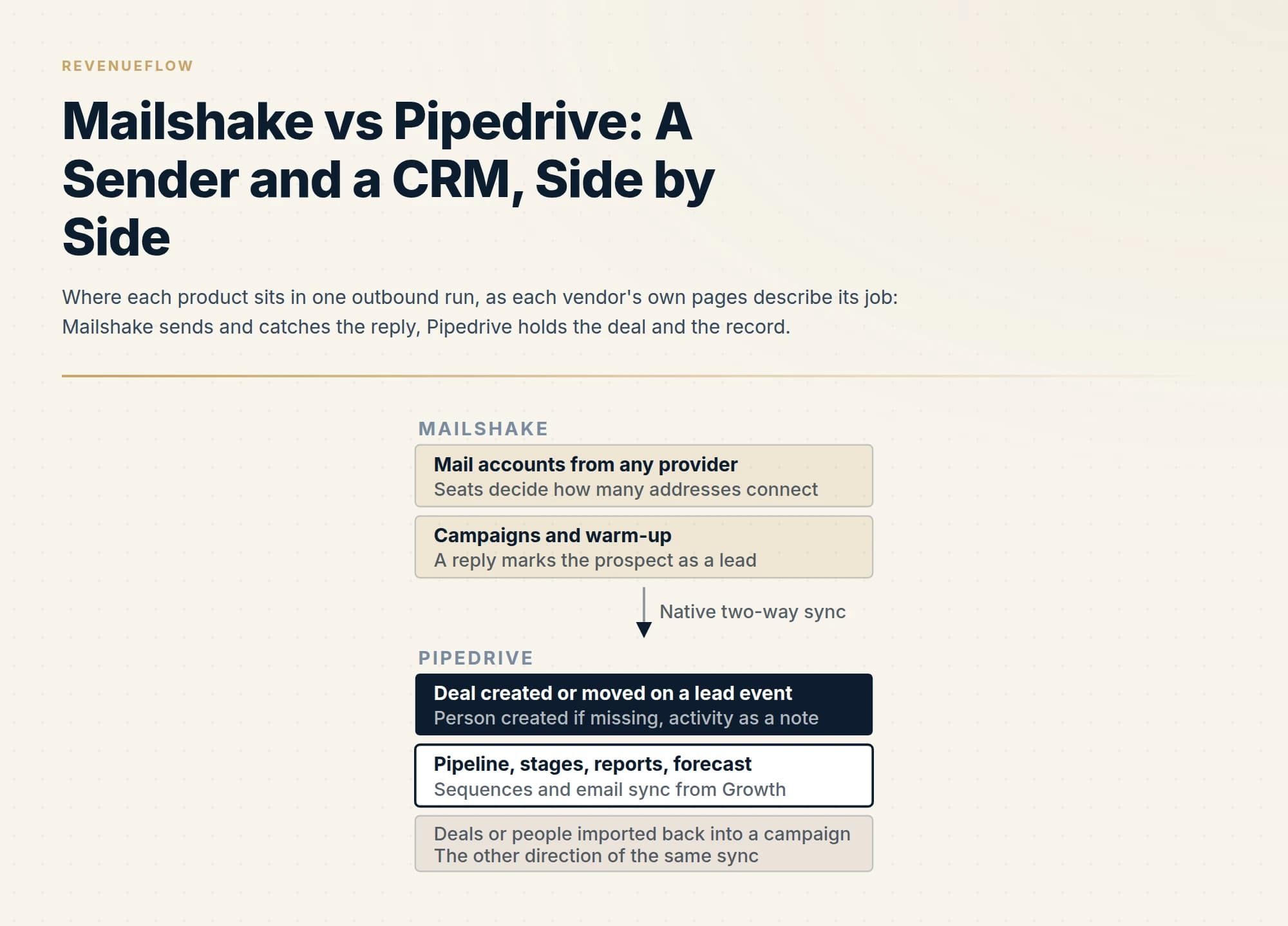
Mailshake, as published on 18 September 2026, is a per-user sales engagement platform in three self-serve tiers with one, two and ten mailbox addresses and a two-way Pipedrive integration from the middle tier. Pipedrive is a per-seat CRM in four plans with sequences from Growth and a rate card this network could not open.
Key takeaways
- Mailshake's pricing page opens on its yearly view and prints both states: Starter, Email Outreach and Sales Engagement at 29, 49 and 99 dollars a month monthly or 25, 45 and 85 yearly, with one, two and ten email addresses per account beside them.
- Pipedrive's pricing page answered 403 on every fetch route on 18 September 2026; its support centre publishes the four plans, the two billing cycles, seat billing whether or not assigned, and puts sequences, email sync and automations on Growth, Premium and Ultimate.
- Mailshake's help article documents the sync: deals and people created on a lead status change, events logged as notes, seven Mailshake actions that can move a deal to a stage, a leads-only scope it calls the most common, and deals or people imported back into campaigns.
- Under a one message per campaign rule the useful sync is leads only, with the CRM record as the suppression list before the next campaign.
Reviewed and updated October 1, 2026
Mailshake's pricing page opens with the yearly term already selected, as it did on 18 September 2026: its own page configuration carries the yearly state as active, so the first figures a visitor sees are the yearly ones. Pipedrive's pricing page answered 403 to every fetch route from this network the same day, plain, headless and forced, on the English path and a regional one, so this page carries no Pipedrive rate at all. What it does carry is the part that decides whether the two products belong together: Mailshake's own documentation of its Pipedrive integration and Pipedrive's own documentation of which plan sequences live on.
The pair is cross-category. Mailshake's pricing page describes a sales engagement platform that sends through mail accounts from any provider, with sequences, warm-up, a data finder and a dialer on the top tier. Pipedrive's products page describes a CRM built around activity-based selling, with pipeline management, email sync and a marketplace of over 500 integrations. A reader typing this pair is rarely choosing one; they are asking how the sender and the record fit together.
The live guides carry each vendor in depth: Mailshake pricing and the Mailshake review on the sending side, Pipedrive pricing, Pipedrive integrations and Pipedrive sequences on the CRM side. This page puts them side by side and reads the integration both vendors document.
What each vendor says it is
Mailshake's pricing page lists three self-serve plans and an agency plan. Starter is for businesses starting an outreach program, with one email address per account and 1,500 email sends a month, unlimited uploaded contacts, warm-up, campaigns and verification, automated sequences, A/B testing and an AI writer. Email Outreach is for teams scaling up, with two email addresses per account, unlimited sends, email rotation, personalisation, advanced scheduling and throttling, a unified inbox, the Salesforce, Pipedrive and HubSpot integrations, more than a thousand integrations via Zapier, a prospects view and a browser extension. Sales Engagement is for multichannel programmes, with ten email addresses per account, five phone numbers, a power dialer, unlimited dialler minutes to North American numbers, phone scripts, lead temperature and an onboarding call. The Agency plan carries unlimited email addresses and a talk-to-sales route.
Pipedrive's support centre, read the same day, publishes the plan structure the pricing page would not serve. Its article on how pricing works, updated 3 September 2026, states four plans, Lite, Growth, Premium and Ultimate, billed monthly or annually with a discount on annual, charged per seat whether or not the seat is assigned, with add-ons and top-ups following the plan's billing cycle. Its plan-features article, updated the same day, puts API access, webhooks and the marketplace with over 500 integrations on every plan, and puts email sync, email templates, open and click tracking, group emailing, automations and sequences on Growth, Premium and Ultimate but not Lite.
That last row is the one that matters for this pair. Pipedrive's own sequencing feature, the thing that overlaps with Mailshake, arrives at Growth.
The integration both vendors document
Mailshake's Pipedrive integration page calls it a native two-way integration and lists four things it does: create new deals in Pipedrive for recipients in Mailshake campaigns, track when emails are sent, opened, clicked and replied to in Pipedrive, customise how deals move through the pipeline, and automatically add prospects from Pipedrive to existing Mailshake campaigns. Its FAQ says most customers set it up so that marking a lead as won in Mailshake adds it to a specific Pipedrive stage, that any field from a Pipedrive deal can be imported into a campaign, and that a recipient can be added to a campaign automatically when a deal status changes in Pipedrive.
Mailshake's help article on connecting Pipedrive, read the same day, is the more precise surface. Mailshake syncs to deals and the associated contact in Pipedrive; if the contact does not exist, it creates the contact and creates a deal when the lead status is updated. Events sync to Pipedrive as notes, and the article recommends connecting the mail account in Pipedrive itself if you want the emails there. Two settings shape what arrives: whether to track events for all prospects or only for Mailshake leads, which the article calls the most commonly used option, and whether to create missing deals and people on a stage change or do nothing. Deals can be moved to stages on seven Mailshake actions: lead won, lost, ignored or opened, prospect unsubscribed, resubscribed or bounced. The integration has to be selected per campaign under Sync to Apps, it cannot sync a campaign retroactively, and a per-person connection has to be repeated for each team member whose Pipedrive login should own the leads.
Pipedrive's marketplace listing for Mailshake, rendered the same day, describes the same shape from the other side: deals created for campaign recipients, activities tracked on the deal, and deals moved through stages when events in Mailshake happen. Its installation instructions send the user to Mailshake's Apps and CRMs screen rather than to a Pipedrive setting, which tells you which vendor built the connector.
Mailshake into Pipedrive
- A deal per campaign recipient, created on a lead status change if missing
- The person created if Pipedrive does not hold one
- Sends, opens, clicks and replies logged as notes
- Deals moved to a chosen stage on seven Mailshake events
- Scoped per campaign, all prospects or leads only
Pipedrive into Mailshake
- Deals, people or leads imported into a new campaign
- Filtered by pipeline and by the stage a deal sits in
- Any deal field mapped into the campaign
- A recipient added when a deal status changes
- One Pipedrive connection per team member who should own leads
Pricing, as published on 18 September 2026
Mailshake's ladder is on the page, in both billing states, and the page's own configuration makes yearly the default view. As published on mailshake.com/pricing on 18 September 2026, Starter is 29 dollars a month on monthly billing and 25 dollars a month on yearly billing, Email Outreach is 49 and 45, Sales Engagement is 99 and 85, and the Agency plan is talk to sales. Two add-ons sit below them: Data Finder at 19 dollars a month monthly or 17 yearly, and Ready to Use Mailboxes at 12 dollars a month monthly or 11 yearly. Starter and Email Outreach each carry 50 free Data Finder credits, Sales Engagement 2,500.
The line that decides the bill is not the price but the mailbox allowance beside it: one email address per account on Starter, two on Email Outreach, ten on Sales Engagement. The live Mailshake review records that the vendor's help centre states those allowances per user rather than per account, so a team buys seats to reach mailboxes; the pricing page still prints them per account, and a buyer sizing a mailbox estate should confirm the total in the checkout.
Pipedrive's rate card could not be read from this network on this day. Its pricing page returned 403 on the English path, on a regional path and on a plain-text twin, under plain, headless and forced-headless fetches; the same behaviour is on record from earlier reads of the host. What Pipedrive does serve is its own billing documentation, which names the four plans, the two billing cycles, the per-seat charge and the add-on and top-up structure, and states that a seat is billed whether or not a user is assigned to it. A figure for Pipedrive that appears on a third-party page is that page's figure and is not repeated here.
| Row | Mailshake | Pipedrive |
|---|---|---|
| A rate card readable from this network | Yes | No |
| Both billing states shown | Yes | Partial |
| Plan names and what each includes | Yes | Yes |
| Charged per seat whether or not assigned | Partial | Yes |
| The other vendor's integration named on a plan | Yes | Partial |
| Add-ons and top-ups documented | Yes | Yes |
The partials follow the vendors' wording. Pipedrive's billing article names monthly and annual cycles without a figure. Mailshake's pricing page prints allowances per account while its help centre prints them per user. Pipedrive's plan-features article names the marketplace on every plan without listing Mailshake by plan, while Mailshake's Email Outreach card names Pipedrive directly.
The overlap: Pipedrive's own sequences
The reason a CRM and a sender can be confused for substitutes is that Pipedrive ships a sequencing feature. Its plan-features article puts Sequences on Growth, Premium and Ultimate, alongside email sync, templates, tracking, group emailing and automations, and its plans article describes Growth as adding sequences for structured, repeatable lead-nurturing workflows using manual emails and follow-up tasks.
That description is the boundary. The live Pipedrive sequences guide reads the vendor's own knowledge base on the feature and records the caps it documents, a step limit and an item limit per sequence, and the consent model around automated sending; the framing there, high-touch processes for a named book of deals, is the vendor's. Mailshake's pricing page sells the opposite shape: unlimited campaigns and unlimited uploaded contacts on every tier, unlimited sends above Starter, and email rotation across connected addresses from Email Outreach up. One is a rep working deals through a mailbox synced to the CRM; the other is a programme spreading volume across addresses bought for outreach.
A team on Growth or above therefore owns a sequencer inside the CRM and is deciding whether to add a second one in front of it. Mailshake's help article draws the line itself: events sync to Pipedrive as notes, and if you want the emails themselves in the CRM, connect the mailbox in Pipedrive.
What we would do with the pair, and what we do instead
Our own stack is Email Bison and in-house tooling for sending and HeyReach for LinkedIn, so this is a documentation-grounded read of two products we do not operate. We do not sell either, resell either or take a fee for connecting them.
Two positions of ours change which lines on these pages matter. We send one message per campaign, with no bumps and no thread replies, so the multi-step sequences both vendors sell are features we would leave switched off. And we keep the sending estate off the corporate mail domain, which is why Mailshake's mailbox allowance is the row we would read first and why a sequence sent through a rep's synced mailbox, the Pipedrive shape, is a motion we keep away from cold volume.
Under those rules the integration's most useful direction is the one Mailshake's help article calls the most common setting: sync leads only, create the deal on the stage change, and let the CRM be the record of who replied. The suppression check before the next campaign runs against that record, and the identity rules that keep it from doubling are the ones in Pipedrive integrations.
Who each one fits
Mailshake fits a small sales team sending from named mailboxes, wanting sequences, tracking and a CRM sync without separate sending infrastructure; Email Outreach is where the Pipedrive integration and rotation arrive. It fits poorly where volume has to come from a mailbox estate rather than headcount, because every additional address is priced through the seat allowance.
Pipedrive fits a team whose constraint is the record: a visual pipeline, seat-based billing, a marketplace on every plan and a sequencing feature on Growth and above for warm, named-account follow-up through a synced mailbox. Its rate card is the thing this page cannot show: read the current price on the vendor's page in your own currency and billing cycle.
A team that needs both is the common case. If the constraint is the number of companies willing to take a meeting rather than where the reply is recorded, RevenueFlow books qualified meetings on a pay-per-meeting basis, against criteria agreed in writing before launch.
The short version
Mailshake, as published on 18 September 2026, is a per-user sales engagement platform with three self-serve tiers at 29, 49 and 99 dollars a month on monthly billing and 25, 45 and 85 on the yearly default view, mailbox allowances of one, two and ten addresses beside them, and a native two-way Pipedrive integration from the middle tier that creates deals on lead events and imports deals back into campaigns. Pipedrive is a per-seat CRM in four plans, Lite, Growth, Premium and Ultimate, with sequences and email sync from Growth, an open marketplace on every plan, and a rate card this network could not open.
They are a sender and a record, and the documented sync is how they fit. Read Mailshake's mailbox allowance before its price, read Pipedrive's rate on its own page, and if you run one message per campaign, sync leads only and let the CRM be the suppression list.
Mailshake plan contents, rates in both billing states, the yearly default, add-ons and mailbox allowances are per mailshake.com/pricing; the integration mechanics per Mailshake's Pipedrive integration page and its help article on connecting Pipedrive. Pipedrive plan names, billing cycles, seat billing, add-ons, top-ups and plan gates are per Pipedrive's knowledge base articles on how pricing works, what is new in the plans and what features the plans have, each updated 3 September 2026; the marketplace listing was rendered in a headless browser; pipedrive.com/en/pricing answered 403 on every route. All fetched 18 September 2026. Verify current terms with both vendors before relying on them.
Sources: Mailshake pricing, Mailshake Pipedrive integration, Connecting and using the Pipedrive integration, Mailshake help, Mailshake app, Pipedrive Marketplace, How does pricing work in Pipedrive, What features do the Pipedrive plans have, What is new in Pipedrive plans, Pipedrive products
Frequently asked questions.
Frequently asked questions- Does Mailshake integrate with Pipedrive?
- Yes, and both vendors document it. Mailshake's integration page calls it a native two-way integration that creates Pipedrive deals for campaign recipients, tracks sends, opens, clicks and replies in Pipedrive, and moves deals through stages. Pipedrive's marketplace listing for Mailshake describes the same shape and sends the user to Mailshake's Apps and CRMs screen to install it. Mailshake's pricing page places the Pipedrive integration on its Email Outreach tier and above as read on 18 September 2026.
- How much do Mailshake and Pipedrive cost?
- Mailshake's pricing page on 18 September 2026 lists Starter at 29 dollars a month monthly or 25 yearly, Email Outreach at 49 or 45, Sales Engagement at 99 or 85, and an Agency plan by sales contact. Pipedrive's pricing page could not be opened from this network on the same day; its support centre names four plans, Lite, Growth, Premium and Ultimate, billed monthly or annually per seat. Read Pipedrive's rate on its own page in your currency.
- Can Pipedrive replace Mailshake for outreach?
- Pipedrive's plan-features article puts sequences, email sync, templates and tracking on Growth, Premium and Ultimate, and its plans article describes sequences as structured lead-nurturing workflows using manual emails and follow-up tasks through a synced mailbox. Mailshake sells unlimited campaigns and contacts on every tier, unlimited sends above Starter, and email rotation across connected addresses from Email Outreach. One is a rep working named deals through a mailbox; the other is a programme spreading volume across addresses bought for outreach.
- What does the Mailshake to Pipedrive sync actually move?
- Per Mailshake's help article on connecting Pipedrive, the sync creates a deal and the associated person when a lead status changes if they do not exist, logs sends, opens, clicks and replies as notes, and can move a deal to a chosen stage on seven Mailshake events: lead won, lost, ignored or opened, and prospect unsubscribed, resubscribed or bounced. It is enabled per campaign, and the other direction imports deals or people into a campaign filtered by pipeline and stage.
About the author.

Tim Carden is CMO / CTO at RevenueFlow, which builds and operates outbound revenue engines for B2B companies. Studied at McGill University.
Tim Carden · CMO / CTO
Connect on LinkedIn →Explore more.
Ready to scale your outreach?
We build GTM engines that book real meetings. See the receipts.
Related articles.
AroundDeal vs Salesflare: Data Enrichment Tool vs CRM Platform Comparison
Compare AroundDeal (data enrichment tool) and Salesflare (CRM platform) side by side. See pricing, features, and integrations to decide which one, or both, your stack needs.
Evaboot vs Microsoft Dynamics 365 Sales: Data Enrichment Tool vs CRM Platform Comparison
Compare Evaboot (data enrichment tool) and Microsoft Dynamics 365 Sales (CRM platform) side by side. See pricing, features, and integrations to decide which one, or both, your stack needs.
Agile CRM vs Copper: CRM Platform Comparison
Compare Agile CRM and Copper side by side. See pricing, features, and integrations to choose the right CRM platform for your needs.
Agile CRM vs LeadIQ: CRM Platform vs Data Enrichment Tool Comparison
Compare Agile CRM (CRM platform) and LeadIQ (data enrichment tool) side by side. See pricing, features, and integrations to decide which one, or both, your stack needs.
Kommo vs Luru: CRM Platform vs Sales Engagement Platform Comparison
Compare Kommo (CRM platform) and Luru (sales engagement platform) side by side. See pricing, features, and integrations to decide which one, or both, your stack needs.
Agile CRM vs Capsule CRM: CRM Platform Comparison
Compare Agile CRM and Capsule CRM side by side. See pricing, features, and integrations to choose the right CRM platform for your needs.