Sales Navigator Core vs Advanced: What Justifies the Upgrade
Advanced adds team management, CRM integration, ROI reporting and Buyer Intent over Core. Who genuinely needs each, and why a solo seller usually should not upgrade.
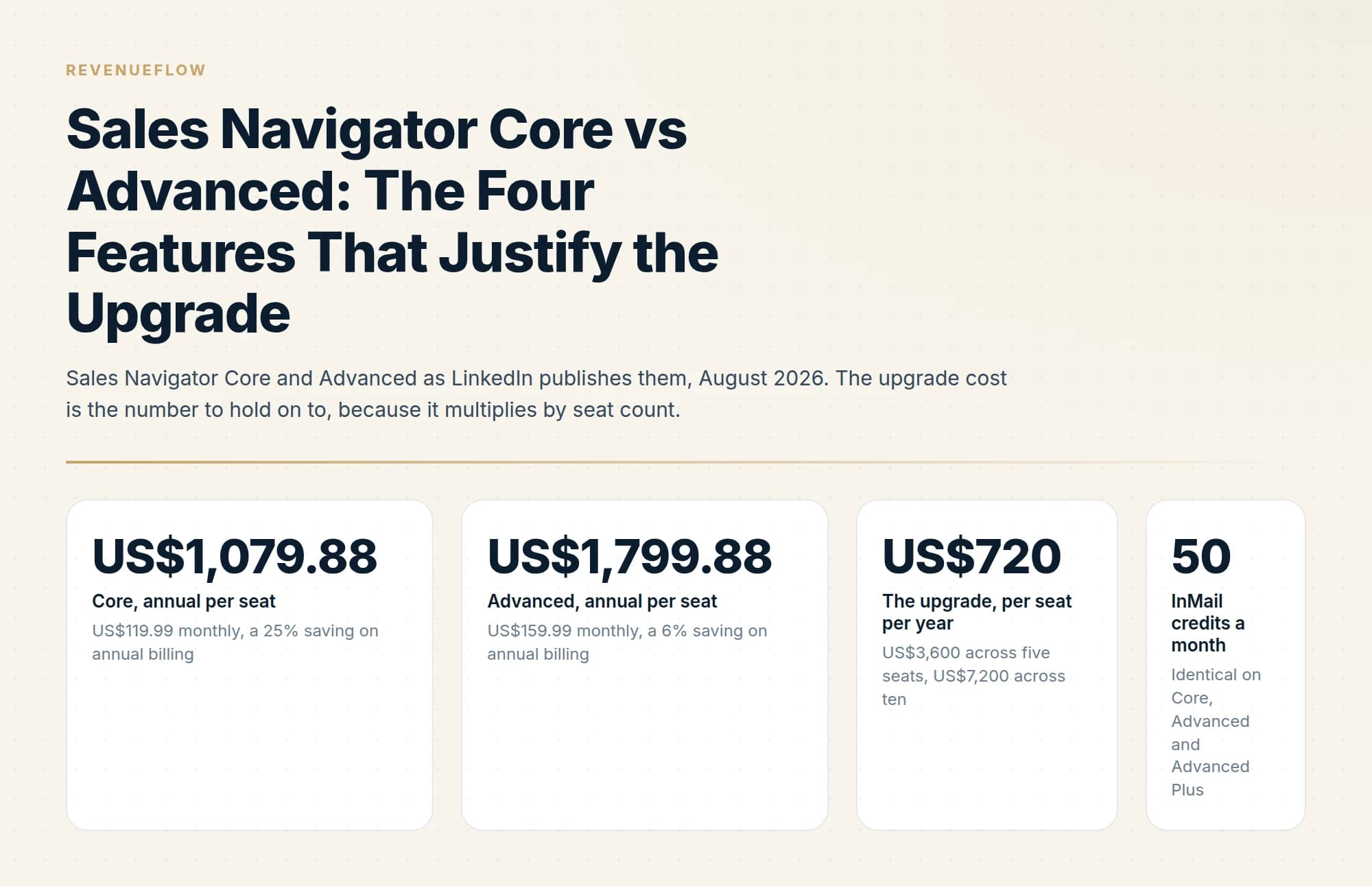
Sales Navigator Advanced adds team seat management, CRM integrations with Salesforce and HubSpot, lead and contact creation into the CRM, custom ROI reporting, and Buyer Intent signals. Every one of those is a team feature, which is why a solo seller is usually right to stay on Core.
Key takeaways
- Core is published at US$119.99 a month and Advanced at US$159.99 a month, with annual billing reducing both.
- Everything Advanced adds is oriented to teams: seat management, CRM writeback, ROI reporting and Buyer Intent.
- A solo seller with no CRM to write into gets very little from the upgrade beyond Buyer Intent.
- Advanced Plus is quoted per customer and is aimed at teams with deeper CRM integration and training needs.
Reviewed and updated September 1, 2026
Sales Navigator Core costs US$119.99 a month and Advanced costs US$159.99, both figures published on LinkedIn's own compare-plans page. Forty dollars a month is small enough that most buyers wave the upgrade through without examining it, and on annual billing the gap gets wider rather than narrower: US$720 per seat per year.
That widening is the first thing worth understanding, because it is the opposite of what people expect from an annual discount. What the extra money buys is a short and specific list, and for one very common type of buyer the honest recommendation is the cheaper tier.
The prices, and why annual billing changes the gap
LinkedIn publishes both tiers directly. Core is US$119.99 per month or US$1,079.88 per year. Advanced is US$159.99 per month or US$1,799.88 per year. Advanced Plus carries no list price and is quoted per team.
The annual discounts are not comparable. LinkedIn states a 25% saving for Core on annual billing and a 6% saving for Advanced. In cash, annual billing takes US$360 a year off Core and US$120 a year off Advanced. So the monthly gap of US$40 becomes an annual gap of US$720 the moment both sides are billed yearly, and the effective monthly cost moves from US$89.99 on Core to US$149.99 on Advanced.
US$119.99 monthly, a 25% saving on annual billing
US$159.99 monthly, a 6% saving on annual billing
US$3,600 across five seats, US$7,200 across ten
Identical on Core, Advanced and Advanced Plus
One more thing about annual billing before the features. LinkedIn's cancellation policy states that cancellation takes effect at the end of the current subscription period: end of the paid year for annual plans, end of the current month for monthly plans. An annual Advanced commitment is therefore a decision you own for twelve months, which is an argument for testing the tier on monthly billing before locking the discount in.
Prices vary by region and currency, and LinkedIn publishes separate euro, sterling, Canadian and Australian list prices that do not track the dollar figures at any fixed exchange rate. The full set of published figures, plus the seat-count arithmetic, is in the Sales Navigator pricing breakdown.
What the upgrade does not buy
Worth clearing this first, because it is where the tier names mislead. Advanced does not add search capability. Advanced Search Filters, unlimited searching, saved lead and account lists, alerts and Account IQ are on Core, and both tiers carry the same 50 InMail credits a month. If your reason for considering Advanced is finding more people or better people, the upgrade does not do that. Prospecting reach is a Core capability, and the extra US$720 buys a different category of thing entirely.
Feature one: team seat management and centralized billing

LinkedIn describes this as scaling and collaborating "with access and billing managed under one account". Concretely, it is the admin layer: one invoice, one place to assign and reclaim licences, and a Full Admin who does that work. LinkedIn's page notes that you can buy up to five Advanced licences online from desktop, after which the account's Full Admin adds, manages and assigns licences through the LinkedIn Admin Center.
Who needs it: anyone running more than two or three seats, and especially anyone whose team changes shape during the year. Reclaiming a licence from a leaver and reassigning it to a new hire is the sort of task that quietly costs a finance team hours when every seat is a separate personal card.
Who does not: one seller. There is nothing to administer, no billing to centralise, and no one to grant access to. For a solo operator this feature has a value of exactly zero, and it is the first of four in a row where that is true.
Feature two: CRM integration and lead creation
Two rows on the plan page, one decision. Advanced CRM Integrations is described as keeping "your CRM current with real-time updates and sync", with the page naming Salesforce, HubSpot, Microsoft Dynamics and Oracle. Lead and Contact Creation lets a seller push leads and accounts into the CRM from inside Sales Navigator without manual re-entry.
Who needs it: teams where the CRM is genuinely the system of record and where manual entry is a measurable tax. If four sellers each spend twenty minutes a day retyping prospect details into Salesforce, that is real time and the integration recovers it. The sync direction that matters most is usually inbound, meaning your CRM's existing accounts and owners being visible inside Sales Navigator so two sellers stop working the same company.
Salesforce Einstein AI for sales breaks down which forecasting and scoring features actually reach the rate card once those synced records land inside that CRM.
Who does not: anyone whose CRM is a spreadsheet, anyone who works lists inside their outreach platform instead, and anyone whose CRM is not on the named list. An integration to a system nobody maintains adds a synchronisation problem rather than removing one.
One caveat specific to this row. LinkedIn sells Advanced Plus to "sales teams using integrated CRM", and the plan page shows deeper CRM capability there, including CRM Embedded Experiences and CRM import for uploading a book of business where Advanced offers CSV upload only. The boundary between the two tiers on CRM has moved before. If CRM integration is the single reason you are upgrading, confirm the exact scope on the plan page and with a LinkedIn representative before committing, because this is the feature most likely to be sold at a tier above the one you were budgeting for.
Feature three: custom ROI reporting
Advanced adds team reporting and custom ROI reporting: usage, activity and adoption across seats, reported in a form you can hand to someone else.
Who needs it: whoever has to defend the renewal. A sales manager with eight seats and a finance business partner asking what the line item produced needs a report, and building one by hand from eight sellers' recollections is worse than paying for it. The other genuine use is finding idle seats before renewal, which is the most common source of waste in per-seat tooling.
Who does not: anyone who can see their own usage by opening the product. And be precise about what the reporting measures. It reports activity inside Sales Navigator, meaning searches run, lists built, InMails sent and profiles viewed. Attribution from a saved search to closed revenue still depends on your CRM and on what your sellers record there. Buying Advanced for ROI reporting and expecting a revenue attribution model produces disappointment at the first review.
Feature four: Buyer Intent

The one people actually upgrade for. LinkedIn describes it as acting "on warm signals at the right time by seeing when buyers show interest in your company", surfaced against accounts you have saved.
Who needs it: teams working a defined account list over a long cycle, where timing is the constraint rather than target selection. If you have 200 named accounts and the problem is knowing which four to call this week, an intent signal on saved accounts is a genuine input.
Who does not: anyone prospecting a wide, undefined market, because the signal attaches to accounts you already saved and does not find new ones. And anyone expecting it to identify a person. The signal is account-level and directional: it indicates that interest was shown somewhere in an organisation, without telling you who or why. Treated as a prompt to look at an account this week, it earns its place. Treated as a qualification, it produces calls that open with the seller knowing less than they think they do.
- Seat management: nothing to administer
- CRM sync: no system of record to sync with
- ROI reporting: visible by opening the product
- Buyer Intent: no maintained account list for it to attach to
- Saves US$720 a year against Advanced
- Keeps the full 25% annual discount, the better of the two
- Seat management: one invoice, licences reassigned as people move
- CRM sync: recovers manual entry time across eight sellers
- ROI reporting: finds idle seats before renewal
- Buyer Intent: prioritises a named account list weekly
- Costs US$5,760 a year more than eight Core seats
- Test on monthly billing before committing to the year
The honest answer for a solo seller
Buy Core.
Every one of the four upgrade features prices something a single seller does not have: colleagues to administer, a shared CRM whose hygiene affects other people, an audience for a report, and a maintained account list for intent signals to land against. Nothing in the upgrade improves search, and search is what a solo seller is buying.
The exception is narrow and real. A solo consultant working a fixed list of 150 target accounts over long cycles, who genuinely maintains that list, might get value from Buyer Intent alone. That is one feature out of four, and the test is whether the account list already exists and is already worked. If the honest answer is that you would build it after upgrading, buy Core and see whether you build it.
- Yes: You run three or more seats and someone has to administer them
- Yes: Your CRM is the real system of record and manual entry costs measurable time
- Yes: Somebody outside the sales team decides whether this line item renews
- Yes: You maintain a named account list you already work weekly
- No: You are one seller, or a team that shares nothing
- No: You want more or better search results
- No: You want Buyer Intent to tell you which person to contact
- Depends: You have a CRM but nobody keeps it current
How to test it rather than guess

The cheapest sequence is to start on the trial, which runs on Core or Advanced and puts the tier question in front of real data. What that period should be spent on is set out in the free trial plan. If the tier is genuinely unclear afterwards, take Advanced monthly for a month or two before taking the annual discount. Paying US$159.99 twice to avoid a US$1,799.88 commitment you cannot exit until the year ends is a sensible trade.
Whichever tier you land on, the product is a targeting and timing layer rather than a source of contact lists. There is no bulk export and third-party extraction violates LinkedIn's User Agreement, which shapes what the tool can be used for; that constraint is worked through in Sales Navigator for lead generation. If the InMail allowance is part of your reasoning, note that it is 50 credits a month on every tier, explained in how InMail credits work. And the question of whether either tier clears your own bar is arithmetic, done in the break-even calculation.
We treat this category as targeting spend rather than pipeline spend, and the meetings come from what gets sent afterwards. If the underlying goal is booked meetings rather than better search, you can see what a campaign would look like for your market.
The short version
LinkedIn publishes Sales Navigator Core at US$119.99 a month or US$1,079.88 a year, and Advanced at US$159.99 a month or US$1,799.88 a year. The monthly gap is US$40, and the annual gap is US$720 per seat, because Core's annual discount is 25% while Advanced's is 6%. Across ten seats the upgrade costs US$7,200 a year.
Advanced adds four things: team seat management with centralized billing, CRM integration with lead and contact creation into Salesforce, HubSpot, Microsoft Dynamics and Oracle, custom ROI reporting, and Buyer Intent. Search, filters and the 50 monthly InMail credits are identical across both tiers, so none of the upgrade improves prospecting reach.
Each of the four prices something a single seller does not have, which makes Core the right answer for solo sellers and Advanced defensible from roughly three seats upward, or wherever a maintained account list makes intent signals actionable. Confirm the CRM scope before upgrading for that reason alone, since LinkedIn sells Advanced Plus specifically around integrated CRM. And because cancellation only takes effect at the end of the paid period, test Advanced on monthly billing before committing to a year of it.
Pricing and features verified against LinkedIn's own compare-plans page as of mid-2026. Verify current terms with the vendor before relying on them.
Sources: LinkedIn Sales Navigator plans and pricing, LinkedIn
Frequently asked questions.
Frequently asked questions- What is the difference between Sales Navigator Core and Advanced?
- Advanced adds team seat management with centralised billing, advanced CRM integrations covering Salesforce, HubSpot, Microsoft Dynamics and Oracle, lead and contact creation directly into the CRM, custom ROI reporting, and Buyer Intent signals. Core covers search, lead lists and InMail without those team capabilities.
- How much do Sales Navigator Core and Advanced cost?
- LinkedIn publishes Core at US$119.99 per month or US$1,079.88 per year, and Advanced at US$159.99 per month or US$1,799.88 per year, with annual billing reducing the monthly equivalent. Advanced Plus is not published and is quoted on team size, CRM integration and onboarding needs.
- Do I need Sales Navigator Advanced as a solo seller?
- Usually not. The upgrade is built around team workflows: shared seat management, writing records into a CRM, and reporting on team ROI. A solo seller without a CRM to integrate captures little of that, and Core covers the search and outreach capability that matters most.
- What is Buyer Intent in Sales Navigator?
- A signal surfaced on Advanced plans indicating accounts showing increased engagement with your company on LinkedIn. It is the one Advanced feature with genuine value to a smaller team, since it prioritises an existing list rather than requiring CRM infrastructure to be useful.
About the author.

B2B cold email experts helping companies generate qualified leads through done-for-you outreach campaigns.
RevenueFlow Team
Explore more.
Ready to scale your outreach?
We build GTM engines that book real meetings. See the receipts.
Related articles.
Is Sales Navigator Worth It? A Break-Even Calculation
The arithmetic: annual cost against your deal value and close rate, how many extra meetings it must produce, and the factors that change the answer.
What Is LinkedIn InMail? Not a Connection Request
LinkedIn InMail explained: how credits work, why replies refund them, the 200 and 1,900 character limits, and when a connection request is the better move.
LinkedIn Sales Navigator Free Trial: Real Value in 30 Days
A plan for a Sales Navigator trial: what to build in the first session, what only a trial can tell you, and what to capture before access ends.
Sales Navigator Lead Generation: Lists That Export Cleanly
Building searches that map to a real ICP, why saved searches are the actual product, and the export constraint that shapes every workflow around the tool.
LinkedIn InMail: A Guide to Credits, Limits and Spending One
The full InMail system in one place: credit allowances by plan, the refund rule, character limits, the rules nobody tells you, and how to decide on a send.
LinkedIn InMail Credits: How They Roll Over and Expire
How the InMail credit system behaves: monthly allocation, rollover ceilings, the 90-day clock, exactly what refunds a credit, and why you cannot buy more.