Is Sales Navigator Worth It? A Break-Even Calculation
The arithmetic: annual cost against your deal value and close rate, how many extra meetings it must produce, and the factors that change the answer.
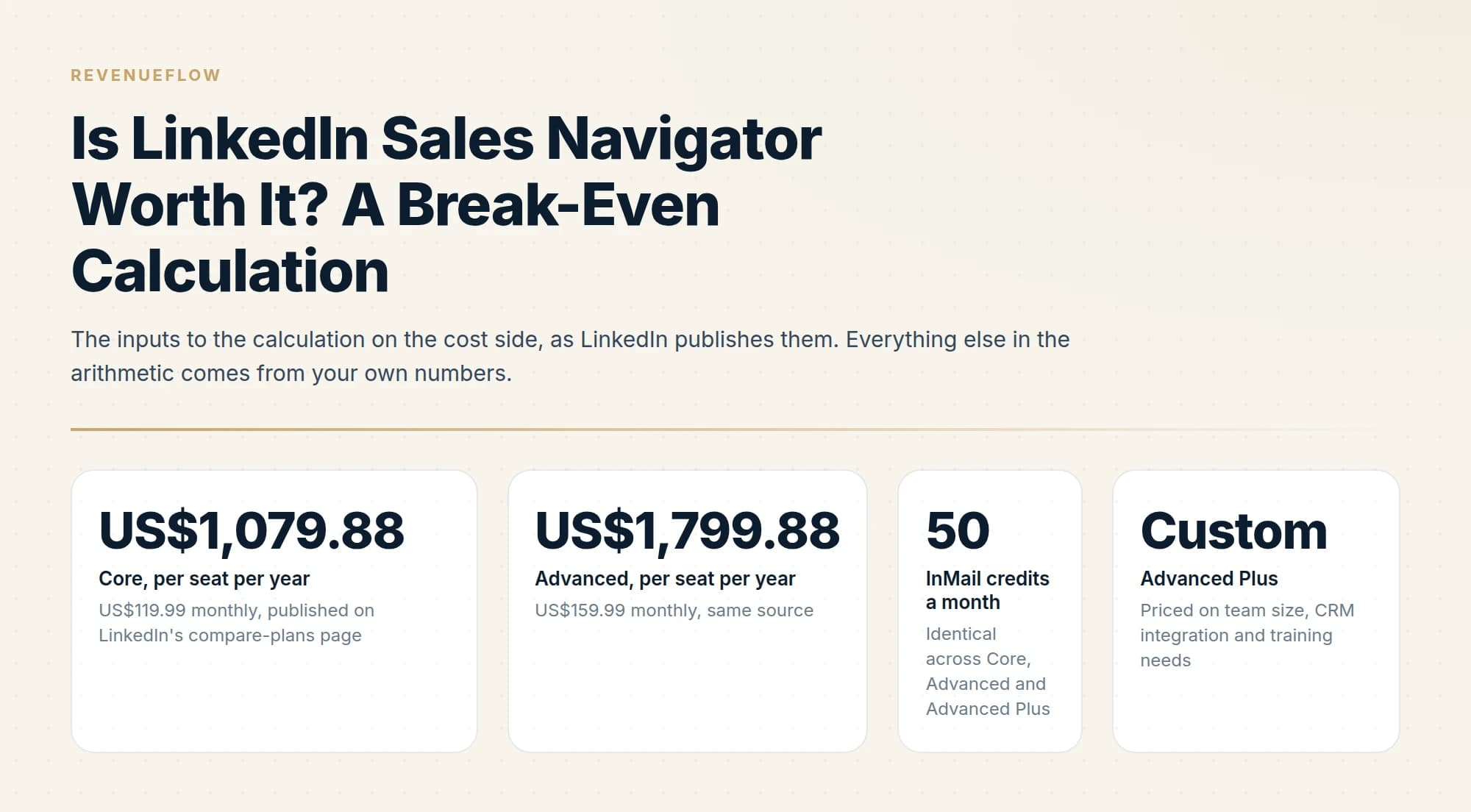
Sales Navigator pays for itself when the additional meetings it produces exceed its annual cost divided by the value of a meeting. With Core published at US$1,079.88 a year, the break-even is usually a small number of meetings, which makes usage rather than price the deciding factor.
Key takeaways
- Break-even is annual cost divided by your average deal value multiplied by your meeting-to-close rate, and it is usually a low single-digit number of deals.
- Because break-even is low, the real question is whether you will use the saved-search and alert workflow rather than whether the price is justified.
- If your buyers are not active on LinkedIn, no amount of tooling fixes that, and the answer is no regardless of the arithmetic.
- Teams that already have good contact data from another source are paying twice for overlapping coverage.
Reviewed and updated September 1, 2026
The question gets answered with opinions almost every time it is asked, and it has an arithmetic answer that takes about four minutes. You need three numbers, and you already have all three: the published licence cost, your average deal value, and the rate at which a first meeting turns into a customer.
What follows is the method rather than a verdict. Run it with your own figures and it will tell you where your bar sits. It will also, for a decent number of readers, come back negative, and the second half of this piece is about the factors that decide which side of the line you land on.
Start with the published cost
LinkedIn publishes both self-serve tiers on its compare-plans page. Sales Navigator Core is US$119.99 per month or US$1,079.88 per year. Advanced is US$159.99 per month or US$1,799.88 per year. Advanced Plus has no list price and is quoted per team, so it sits outside this calculation until you have a quote in hand.
Use the annual figure even if you intend to pay monthly, because the decision you are actually making is whether to run this tool for a year. Multiply by seats. Five Core seats is US$5,399.40 a year and five Advanced seats is US$8,999.40.
Because seat count drives the total just as strongly here, the breakdown of HubSpot's per-seat Sales Hub Enterprise pricing shows a similar arithmetic at work.
US$119.99 monthly, published on LinkedIn's compare-plans page
US$159.99 monthly, same source
Identical across Core, Advanced and Advanced Plus
Priced on team size, CRM integration and training needs
Which tier belongs in your version of the sum is a separate question with its own answer, worked through in Core versus Advanced. The full published price set, including the euro and sterling list prices that do not track the dollar figures, is in the pricing breakdown.
The calculation
Four steps. The only judgment call is the third one.
- Step 1Annual cost
Licence price per seat times seats. Use the annual figure even if you pay monthly, since the decision covers a year.
- Step 2Gross profit per closed deal
Average deal value times your gross margin. Revenue overstates the value of a deal, sometimes by half.
- Step 3Expected value of one meeting
Gross profit per deal times the rate at which a first meeting becomes a customer. This is the number most teams have never written down.
- Step 4Break-even meetings
Annual cost divided by the expected value of one meeting. That is how many additional meetings the tool must produce in a year.
Work an illustrative example through, with figures chosen to be ordinary rather than flattering. Suppose your average deal is US$18,000, your gross margin is 70%, and 15% of first meetings eventually become customers. Gross profit per deal is US$12,600. The expected value of one meeting is 15% of that, or US$1,890.
Divide the Core licence by it: US$1,079.88 divided by US$1,890 is 0.57. One extra meeting every two years covers a Core seat. Advanced at US$1,799.88 needs 0.95, so slightly under one extra meeting a year.
That result is typical, and it is why arguing about the licence fee is usually a waste of the meeting. For most B2B teams with a deal size in four or five figures, the subscription clears its own cost on a rounding error. If your calculation comes back near or above one meeting a month, the cause is a small deal size or a low close rate, and both of those change the answer decisively. A team selling a US$1,200 annual contract at the same 70% margin and a 10% close rate values a meeting at roughly US$84 of gross profit, and needs 13 extra meetings a year to cover Core alone, which is a genuinely different conversation.
The cost that actually decides it
Here is where the naive answer misleads. The licence is the small number in this purchase. The large one is the time a seller spends inside the tool, and it never appears on an invoice.
Same method, second calculation. Estimate the hours a week a seller will spend searching, building lists and reading profiles. Multiply by working weeks. Multiply by their fully loaded hourly cost, which is salary plus employment costs plus benefits, divided by productive hours in the year.
Continuing the illustration: four hours a week across 46 working weeks is 184 hours. A seller costing US$120,000 fully loaded across roughly 1,840 productive hours works out at about US$65 an hour, so those 184 hours cost about US$11,960. That is eleven times the Core licence.
Fold it in. Total annual cost becomes US$13,039.88, and dividing by the US$1,890 expected value of a meeting gives roughly 6.9 meetings a year, a bit more than one every two months. That is a real bar, and it is the number the decision should actually be made against.
Two things follow from it. First, a seat given to someone who will not use it costs almost nothing beyond the licence, which is why idle seats survive so long. Second, a seat given to someone who lives in the tool has to produce meaningfully more, so enthusiasm for the product is not evidence that it is paying.
The word doing the most work is "additional"
Every version of this sum divides by meetings the tool produced that you would not otherwise have had. That word carries the entire result and it is the hardest thing here to measure honestly.
If your sellers already source targets from a data provider, from inbound, from a partner list or from an existing account plan, then a meeting booked with a company you would have contacted anyway is not an additional meeting. It is the same meeting, sourced through a more expensive route. Teams routinely count all of it and conclude the tool is transformative.
Two practical proxies get you close enough. Look at the accounts your sellers contacted last quarter and ask how many of them your existing sources could not have surfaced. And during the trial, run your ICP filters and count what share of the results are companies already in your CRM. A result set that is 80% familiar is telling you the incremental number is small. What that test looks like in practice is set out in the free trial plan, and it is worth doing before the calculation rather than after.
Four factors that change the answer

The arithmetic gives you a threshold. These four decide whether you will clear it.
Whether your buyers are genuinely on LinkedIn, and titled the way you would search. Coverage is uneven and the gaps are systematic. Owner-operated businesses, field trades, regional service companies and much of the smaller end of the market are thinly represented, out of date, or titled in ways no filter anticipates. Precision filtering over a market that is not properly indexed returns confident, wrong answers. This factor can move your incremental meeting count to nearly zero on its own, whatever the arithmetic said.
Whether you already have good data. If you pay a data provider, the overlap is real and the incremental value of a second source is smaller than either vendor's pitch suggests. It cuts the other way too: Sales Navigator has no bulk export and third-party extraction violates LinkedIn's User Agreement, so if what you need is 3,000 contacts with verified email addresses, this is the wrong shape of purchase and a data provider does the job directly. The alternatives worth pricing against are in the ZoomInfo alternatives comparison.
Whether you will use the saved-search and alert workflow. This is the strongest predictor of the whole decision. The product pays when someone maintains account lists and works an alert stream weekly, so a job change or a funding event sets the timing of the outreach. It does not pay when someone opens it occasionally to look a company up, which is a use case that a much cheaper subscription approximates. Ask honestly which of those two describes your team, and treat the trial as the test: if usage tails off after week one during a period when the tool is free, a paid seat will not reverse that.
Whether meetings are actually your constraint. If meetings already happen and do not convert, more of them makes the same problem more expensive. The bottleneck there sits in positioning, qualification or the sales conversation itself, and no targeting tool moves it. Getting explicit about what counts as a meeting worth having is the fix, and the standard we use is set out in what a qualified meeting has to contain.
- Yes: Break-even lands under two meetings a year including the time cost
- Yes: Your ICP is well represented and consistently titled on LinkedIn
- Yes: Somebody will maintain account lists and work the alert stream weekly
- Yes: A trial result set contained companies your existing sources had missed
- No: Your addressable market is small enough that you already know it by name
- No: Your buyers are owner-operators in trades or field services
- No: What you need is a bulk list of contacts with verified emails
- No: Meetings already happen and the problem is conversion
- Depends: You send no InMail, leaving 50 credits a month unused
When the answer is no
Some readers should not buy this, and the arithmetic is not what disqualifies them.
A consultant working a market of 300 accounts they can already name gets nothing from search. The tool solves discovery, and discovery is solved. A team selling to independent restaurants, plumbing contractors or regional logistics operators is buying precision over an index that does not describe those businesses well. Anyone whose plan is to extract lists is buying the wrong product and taking an account risk while doing it. And a team with ten seats where three people log in twice a month is not evaluating a purchase, they are renewing a subscription that four of them use.
The reverse holds just as firmly. A team selling to software companies, financial services firms, agencies or anything else where the buyer maintains a current profile and a searchable title, working a defined account list with alerts turned on, will clear a seven-meeting bar without much difficulty.
We treat this category as targeting and timing spend rather than pipeline spend, which is the reason the calculation above ends at a meeting count rather than a revenue figure. The meeting comes from what you send afterwards. If the constraint you are trying to solve is booked meetings rather than better search, you can see what a campaign would look like for your market.
The short version

Sales Navigator Core is US$1,079.88 a year per seat and Advanced is US$1,799.88, both published by LinkedIn. Break-even is annual cost divided by the expected value of one meeting, where that value is average deal value times gross margin times the rate at which a first meeting becomes a customer. On ordinary mid-market numbers the licence alone breaks even at under one additional meeting a year, which is why the price is rarely the real question.
Add the time cost and the bar moves substantially. Four hours a week of a seller's time is roughly 184 hours a year, and on an illustrative fully loaded rate of US$65 an hour that is about eleven times the licence fee, pushing break-even to around seven additional meetings a year. The load-bearing word throughout is additional, meaning meetings your existing sources would not have produced.
Four factors decide whether you clear that bar: whether your buyers are properly represented and titled on LinkedIn, whether you already pay for data that overlaps, whether anyone will actually maintain lists and work alerts weekly, and whether meetings are your constraint at all. Say no when your market is small enough to know by name, when your buyers are owner-operators in poorly indexed segments, when what you need is a bulk contact list, or when the meetings you already get do not convert.
Pricing verified against LinkedIn's own compare-plans page as of mid-2026. The worked example uses illustrative figures for the deal value, margin, close rate and hourly cost, and is intended to be re-run with your own. Verify current terms with the vendor before relying on them.
Sources: LinkedIn Sales Navigator plans and pricing, LinkedIn
Frequently asked questions.
Frequently asked questions- Is LinkedIn Sales Navigator worth the money?
- It depends on usage rather than price. With Core published at US$1,079.88 a year, break-even is typically a small number of additional closed deals, so the arithmetic clears easily. The failure mode is paying for a subscription used occasionally rather than as a daily prospecting workflow.
- How do I calculate Sales Navigator ROI?
- Take the annual cost, divide by your average deal value multiplied by your meeting-to-close rate, and you have the number of extra meetings it must generate to pay for itself. Then judge honestly whether the saved-search and alert workflow will produce that many.
- When is Sales Navigator not worth it?
- When your buyers are not active on LinkedIn, when you already have equivalent contact data from another provider, or when nobody will use it weekly. The tool surfaces and organises people who are on the platform; it cannot create presence where a market does not have one.
- Is Core or Advanced better value?
- Core for individuals and Advanced for teams that will use the CRM writeback and Buyer Intent. The price gap is modest, but paying for team features nobody uses is the most common way this subscription becomes poor value, so match the tier to how the seat will actually be worked.
About the author.

B2B cold email experts helping companies generate qualified leads through done-for-you outreach campaigns.
RevenueFlow Team
Explore more.
Ready to scale your outreach?
We build GTM engines that book real meetings. See the receipts.
Related articles.
Sales Navigator Core vs Advanced: What Justifies the Upgrade
Advanced adds team management, CRM integration, ROI reporting and Buyer Intent over Core. Who genuinely needs each, and why a solo seller usually should not upgrade.
What Is LinkedIn InMail? Not a Connection Request
LinkedIn InMail explained: how credits work, why replies refund them, the 200 and 1,900 character limits, and when a connection request is the better move.
LinkedIn Sales Navigator Free Trial: Real Value in 30 Days
A plan for a Sales Navigator trial: what to build in the first session, what only a trial can tell you, and what to capture before access ends.
Sales Navigator Lead Generation: Lists That Export Cleanly
Building searches that map to a real ICP, why saved searches are the actual product, and the export constraint that shapes every workflow around the tool.
LinkedIn InMail: A Guide to Credits, Limits and Spending One
The full InMail system in one place: credit allowances by plan, the refund rule, character limits, the rules nobody tells you, and how to decide on a send.
LinkedIn InMail Credits: How They Roll Over and Expire
How the InMail credit system behaves: monthly allocation, rollover ceilings, the 90-day clock, exactly what refunds a credit, and why you cannot buy more.