LinkedIn InMail: A Guide to Credits, Limits and Spending One
The full InMail system in one place: credit allowances by plan, the refund rule, character limits, the rules nobody tells you, and how to decide on a send.
LinkedIn InMail is a paid message to someone you are not connected to. Sales Navigator allocates 50 credits a month, banking to 150, expiring after 90 days, and LinkedIn refunds a credit whenever the recipient responds inside that window. Premium tiers get 5 or 15 and cannot spend them on Sales Navigator.
Key takeaways
- Sales Navigator gives 50 InMail credits per month across Core, Advanced and Advanced Plus, so upgrading tiers adds research features rather than messaging capacity.
- LinkedIn refunds the credit for any InMail that is accepted, declined or answered within 90 days, which means only ignored messages actually cost anything.
- You have 60 minutes to edit or delete a sent InMail, and deleting one that has not been answered forfeits the credit permanently.
- Account-level activity limits sit above the credit system and apply regardless of subscription, so available credits never mean the sending volume is safe.
Reviewed and updated September 2, 2026
Most people meet InMail the same way. They buy Sales Navigator to reach prospects who ignore connection requests, open the settings page, and find 50 credits sitting there. Fifty messages a month looks thin against a cold email list of five thousand, and the natural conclusion is that the channel does not scale.
That conclusion is half right, and the half that is wrong is the half that matters. The credit count is not really the constraint, because LinkedIn gives the credit back when someone responds. The constraint is your response rate, which means the number to manage is targeting quality rather than send volume.
Here is the whole system, verified against LinkedIn's own Help Center, along with the rules that only surface after you have been using it for a month. If you are still deciding whether the channel belongs in your motion at all, start with what InMail is and how it differs from a connection request and come back for the mechanics.
The credit allocation, plan by plan
InMail is a Premium feature. On a Basic account you can only message people you are already connected to, and LinkedIn requires an upgrade before the compose window will let you message a stranger.
What you get depends entirely on which subscription you hold.
| Plan | Credits per month | Maximum you can bank |
|---|---|---|
| Premium Career | 5 | 15 |
| Premium Business | 15 | 45 |
| Sales Navigator Core, Advanced, Advanced Plus | 50 | 150 |
| Recruiter Lite | 30 | 120 |
Two details in that table get missed constantly.
Every Sales Navigator edition gets the same 50. LinkedIn states plainly that all Sales Navigator subscription types provide the same number of credits, so upgrading from Core to Advanced buys you search and research capability, not messaging capacity. If you are considering the upgrade specifically for more InMail, it does not exist at that price. The Sales Navigator pricing guide covers what the tiers actually change.
Premium credits and Sales Navigator credits are separate currencies. LinkedIn is explicit that Premium InMail message credits cannot be used to send InMail on Sales Navigator or on LinkedIn Recruiter. Holding both subscriptions does not pool the balances.
How a credit actually behaves
The lifecycle is where the economics live, and it runs on a 90-day clock in two different places.
- Day 1 of the monthAllocation lands
Sales Navigator credits renew on the first day of every month in UTC, regardless of your billing cycle. Premium credits renew on the first day of your billing cycle instead.
- On sendOne credit is deducted
The compose window shows the remaining balance. You cannot buy more outside the monthly allotment on Premium or Sales Navigator.
- Within 3 daysLinkedIn nudges for you
An automatic reminder is sent to the recipient within three days of the InMail being sent. You do not send it and it is not a second message.
- Any time inside 90 daysA response refunds the credit
Accepted, declined, or answered directly all count, and the credit returns immediately on their response.
- After 90 daysUnused credits expire
Banked credits carry into the following month but must be used within 90 days, capped at your plan's accumulation ceiling.
The refund rule is more generous than people expect. LinkedIn credits back every InMail that is accepted, declined, or responded to directly within 90 days of being sent. A recipient clicking "Not interested" is recorded as declined and still returns your credit. Auto replies count as a response. Quick Replies count as a response.
So the only sends that genuinely cost you anything are the ones nobody reacts to at all. A message that provokes a flat rejection is free. Silence is what has a price.
The rules you find out about later
These are the ones that surprise people in month two.
You cannot send a second InMail until they respond. LinkedIn blocks it outright on Premium: you cannot message a member again until they reply to the first. On Sales Navigator the behaviour is different and worse for your budget, because a second InMail to the same person before a response simply consumes another credit.
That platform behaviour happens to align with how we run LinkedIn anyway, for a reason that has nothing to do with credits. A LinkedIn thread is permanent and visible, so a second message lands directly under the one they already chose not to answer. It reads as a bump whatever the campaign calls it, which is why we do not run no-reply retargets on LinkedIn at all. The first message has to carry the whole campaign.
You have 60 minutes to edit or delete. After that the message is fixed. And deleting matters financially: if you delete an InMail that has not received a response, no credit is returned to you. Deleting a typo costs you the send.
Cancelling zeroes the balance. Any InMail balance becomes zero when a Premium subscription is cancelled, and credits are not transferable when you upgrade or change subscription type. Banking 150 credits before a plan change protects nothing.
In Sales Navigator you have to unlock a lead's profile before you can InMail them. It is a step in the flow rather than a cost, but it is a step.
A recipient can opt out entirely. You cannot message a member who has chosen not to receive InMail in their message preferences, no matter how many credits you hold.
The character limits
LinkedIn's dedicated character-limits page states up to 200 characters in the subject line and up to 1,900 characters in the body, with a live counter in the composer that changes colour as the message grows.
Worth knowing before you plan copy around a number: LinkedIn's InMail FAQ and its send-an-InMail page both state 2,000 characters for the body instead. The pages disagree. Write to 1,900 and you are inside whichever limit your composer is actually enforcing.
Published limits on the platform are inconsistent in other places too, and the commercial use limit LinkedIn never numbers leaves search capacity with no counter at all.
Treating either number as a target is the real mistake. LinkedIn's own guidance in the Help Center is that shorter messages get more responses, and the subject truncates in the inbox list long before 200 characters, so the opening words carry the entire open decision. Write to the length that performs rather than the length the box allows.
Credits are not your real ceiling
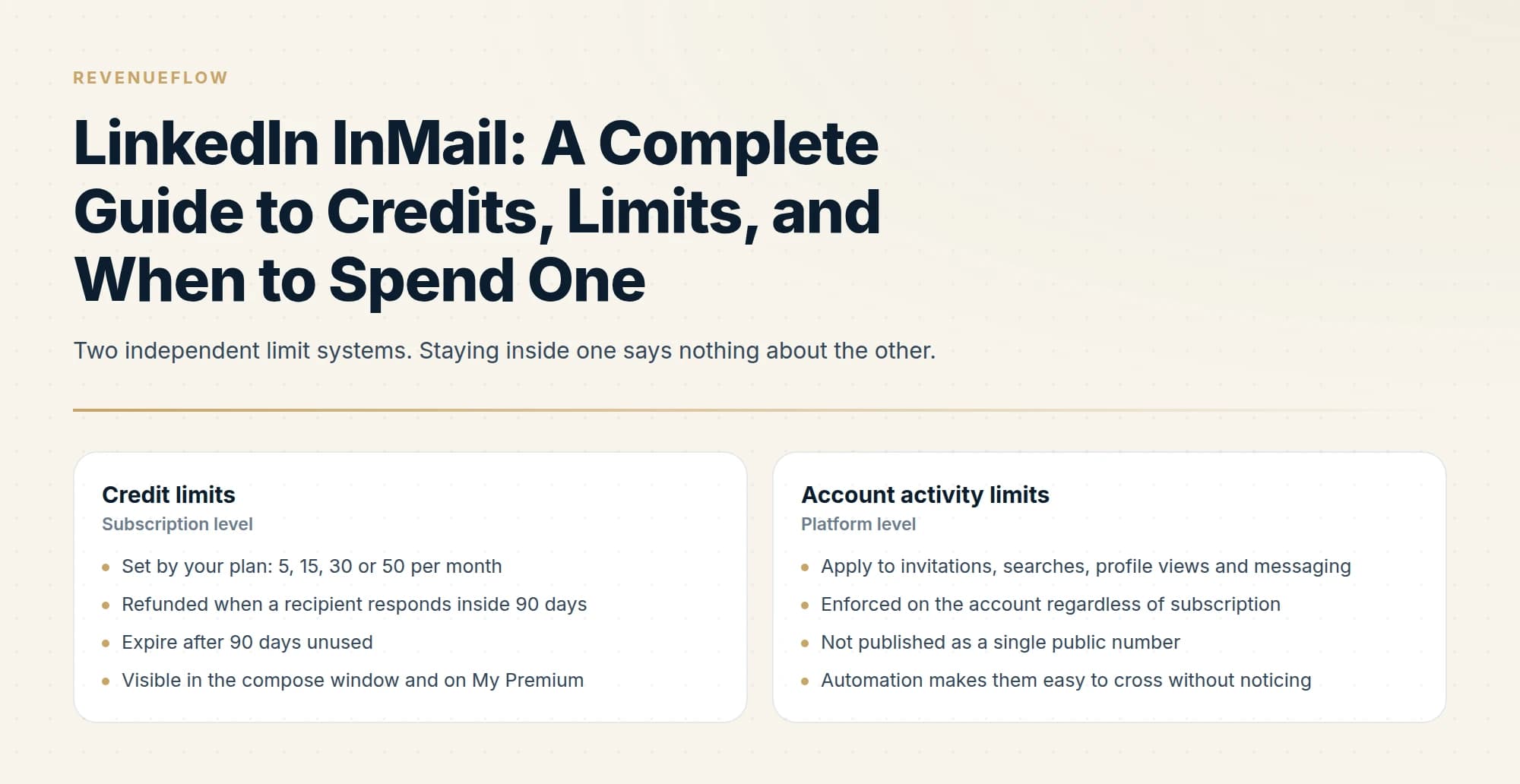
There are two separate limit systems and people conflate them constantly.
- Set by your plan: 5, 15, 30 or 50 per month
- Refunded when a recipient responds inside 90 days
- Expire after 90 days unused
- Visible in the compose window and on My Premium
- Running out costs you reach this month
- Apply to invitations, searches, profile views and messaging
- Enforced on the account regardless of subscription
- Not published as a single public number
- Automation makes them easy to cross without noticing
- Running over these puts the account itself at risk
Having credits available does not mean the activity is safe. A LinkedIn account doing heavy outbound is a LinkedIn account doing heavy outbound, whichever product the messages came from, and the account-level ceiling is what actually bounds a programme. The LinkedIn automation tools guide covers where those thresholds sit and what safe operation looks like when a tool is sending on your behalf.
Deciding whether a send is worth it

Because a reply refunds the credit and silence does not, the pre-send check is worth more than anything you can do to the copy afterwards.
- Yes: Open Profile is off, so this message genuinely requires a credit
- Yes: The profile shows they are still in the role you are writing to
- Yes: You have a specific reason to contact them now rather than next quarter
- Yes: The first line would make no sense sent to anyone else on your list
- No: They are already a first-degree connection
- No: You are sending an identical message to a large undifferentiated list
- Depends: A mutual connection could introduce you instead
The Open Profile line is the one that pays for itself. Some Premium members switch on a setting that lets anyone message them without a credit, and sending a paid InMail to one of them is paying for something already free. The Open Profile question is covered in full here, including why it is not the unlimited-InMail workaround it gets described as.
What to measure
Most teams track credits used, which is close to meaningless because the credit count is an input rather than a result.
Three numbers are worth keeping per seat, per month. Sends, which tells you whether the channel is being used at all. Responses within 90 days, which is the only figure that drives the credit refund and therefore your effective capacity. And meetings booked from those responses, which is the number that decides whether the seat survives the next budget review.
The ratio to watch across months is responses divided by sends. If it falls, effective capacity falls with it, because you stop getting refunds at the same time as your messages stop working. The metric degrades in the same direction as the outcome, which makes it an unusually honest early warning.
What to do about a falling response rate is almost never more volume. Fifty messages a month is a small enough number that every send can be individually justified, and a seat that cannot fill 50 justified sends in a month has a targeting problem rather than a capacity problem.
Where InMail belongs in an outbound programme
InMail is a precision instrument with a per-seat cost, a hard monthly ceiling, and one attempt per prospect. Email is the volume channel. Running them as substitutes wastes both.
That is the substance of InMail against email, and it does not resolve on reply rate. They differ on cost per attempt and on ceiling: an unanswered email costs a send, while an InMail nobody reacts to at all holds a credit for ninety days. Since any reaction returns the credit, the comparison comes down to which prospects are worth a scarce attempt whose only real price is silence.
The pattern that works is using email for coverage and InMail for the accounts where email is not landing or where the buyer is demonstrably more active on LinkedIn than in their inbox. That means InMail volume should be small and deliberate by design, which is the opposite of how most teams try to use it after buying a seat.
If you want the arithmetic rather than the principle, what an InMail actually costs per reply works through the seat cost against realistic response rates, and the credit mechanics in detail covers the refund and rollover rules on their own.
We run LinkedIn alongside email for clients on a pay-per-qualified-meeting basis, which means the targeting discipline above is our cost rather than yours. You can see what a campaign would look like for your market before committing to seats.
The short version
Fifty credits a month on Sales Navigator, 150 bankable, expiring after 90 days, refunded whenever someone responds inside that window. Premium tiers get 5 or 15 and cannot spend them on Sales Navigator. Nobody can buy more outside the monthly allotment. Subject lines cap at 200 characters and bodies at 1,900. Check Open Profile before spending anything, and treat the message as the only one you will send, because the follow-up you are considering lands underneath the message they already ignored.
InMail credit allowances, refund rules and character limits are per the LinkedIn Help Center as of mid-2026. Sales Navigator plan pricing is per LinkedIn's compare-plans page. LinkedIn revises these; verify current terms with LinkedIn before budgeting.
Sources: Understand InMail credits in Sales Navigator, InMail message credits and renewal process, InMail character limits, InMail Messages FAQ
Frequently asked questions.
Frequently asked questions- How many InMail credits do I get with Sales Navigator?
- Fifty per month, on every Sales Navigator edition. LinkedIn states that Core, Advanced and Advanced Plus all provide the same allocation, and each can accumulate up to 150 credits in total. Unused credits carry into the following month but expire after 90 days, and there is no option to purchase additional credits beyond the monthly allotment.
- Do I get an InMail credit back if someone replies?
- Yes. LinkedIn returns a credit for every InMail that is accepted, declined, or responded to directly within 90 days of being sent, and the refund arrives immediately when the recipient responds. Auto replies count as a response, and so does a Not interested quick reply, which LinkedIn records as declined. Only messages nobody reacts to stay spent.
- How long can an InMail message be?
- LinkedIn's character-limits page states up to 200 characters in the subject line and up to 1,900 characters in the body, with a live counter in the composer. Two other LinkedIn Help pages state 2,000 for the body, so writing to 1,900 keeps you inside whichever limit applies. Shorter messages get more responses regardless.
- Can I send a follow-up InMail if they do not reply?
- On Premium, LinkedIn blocks a second InMail until the recipient responds. On Sales Navigator it is permitted and consumes another credit. We do not send them either way, because a LinkedIn thread is permanent and the second message lands directly beneath the one they already chose to ignore, reading as a bump.
About the author.

B2B cold email experts helping companies generate qualified leads through done-for-you outreach campaigns.
RevenueFlow Team
Explore more.
Ready to scale your outreach?
We build GTM engines that book real meetings. See the receipts.
Related articles.
What Is LinkedIn InMail? Not a Connection Request
LinkedIn InMail explained: how credits work, why replies refund them, the 200 and 1,900 character limits, and when a connection request is the better move.
LinkedIn InMail Credits: How They Roll Over and Expire
How the InMail credit system behaves: monthly allocation, rollover ceilings, the 90-day clock, exactly what refunds a credit, and why you cannot buy more.
Is There Unlimited LinkedIn InMail? Open Profile Loophole
No LinkedIn plan offers unlimited InMail. What Open Profile actually does, the three ceilings on it, and the refund rule that gets you closer than any workaround.
How to Send a LinkedIn InMail That Gets Answered
The exact send flow on desktop and mobile, the composer limits, the checks worth running before you spend a credit, and the structure that gets a reply.
LinkedIn Sales Navigator Free Trial: Real Value in 30 Days
A plan for a Sales Navigator trial: what to build in the first session, what only a trial can tell you, and what to capture before access ends.
Sales Navigator Lead Generation: Lists That Export Cleanly
Building searches that map to a real ICP, why saved searches are the actual product, and the export constraint that shapes every workflow around the tool.