What LinkedIn InMail Costs Per Reply
Sales Navigator pricing against the InMail credit refund rule, worked through to a cost per reply, plus the three costs that never appear on the invoice.
A Sales Navigator Core seat is US$119.99 a month with 50 InMail credits, which looks like US$2.40 per send. Because LinkedIn refunds a credit on any response within 90 days, the real figure is cost per reply, and it swings widely with response rate on identical spend.
Key takeaways
- Sales Navigator Core is US$119.99 a month and Advanced US$159.99, both verified on LinkedIn's compare-plans page, and both include the same 50 credits.
- Because responses refund credits, the messages that get ignored are the only ones that consume the allowance.
- On one Core seat, illustrative arithmetic puts cost per reply around US$7.50 at a 25% response rate and around US$60 at 4%, on identical monthly spend.
- The costs that are not on the invoice are targeting hours, the one-shot LinkedIn constraint, and account-level activity risk.
Reviewed and updated August 28, 2026
A Sales Navigator Core seat is US$119.99 a month and comes with 50 InMail credits, which makes the cost per send look like US$2.40. That number is wrong in both directions, and the ways it is wrong are the whole story of whether this channel is worth running.
It is too high because LinkedIn refunds the credit whenever someone responds, so a seat that gets replies buys more than 50 sends. It is too low because a send is not the thing you are buying. Replies are. And the gap between cost per send and cost per reply is set entirely by targeting, which is the variable most teams treat as fixed.
What you are actually paying
Sales Navigator pricing, verified on LinkedIn's own compare-plans page:
| Plan | Monthly | Annual | Credits per month |
|---|---|---|---|
| Sales Navigator Core | US$119.99 | US$1,079.88 | 50 |
| Sales Navigator Advanced | US$159.99 | US$1,799.88 | 50 |
| Sales Navigator Advanced Plus | Custom quote | Custom quote | 50 |
Prices exclude tax and are per licence. The credit column is not a typo: LinkedIn states that all Sales Navigator subscription types provide the same number of credits, so the extra US$40 a month for Advanced buys research and collaboration features rather than messaging capacity. Our Sales Navigator pricing guide covers what that money does buy.
There is no way to purchase additional credits on these plans. LinkedIn is explicit about it, which means the seat cost is the entire InMail budget and volume is capped by subscription count rather than by spend.
The refund rule changes the denominator
LinkedIn credits back every InMail that is accepted, declined, or responded to directly within 90 days of being sent, immediately on the recipient's response. Auto replies count. Quick replies count. A "Not interested" is recorded as declined and still refunds the credit.
So the credits you consume in a month are the messages that were ignored, and the messages that worked were free.
- Step 1Fixed input
One seat, one monthly fee, 50 credits allocated on the first of the month.
- Step 2Sends are variable
Every response refunds a credit, so a higher response rate buys more sends from the same allocation.
- Step 3Replies are what you wanted
The seat cost divided by replies is the number that maps to pipeline.
- Step 4One lever moves both
Better targeting raises replies and lowers consumption at the same time.
The arithmetic, worked
The figures below are illustrative arithmetic on a US$119.99 Core seat, not measured results. Substitute your own response rate and the shape holds.
Take a seat that sends its full allocation each month and treat everything as a single monthly cycle for simplicity.
At a 10% response rate: 50 sends produce 5 responses. Five credits return, so you can send 5 more, which at the same rate produces roughly half a response. Call it 55 sends and 5 replies. The seat cost divided by replies is about US$24 per reply.
At a 25% response rate: 50 sends produce roughly 13 responses. Those refunds fund another 13 sends, which produce another 3. Call it 66 sends and 16 replies, or roughly US$7.50 per reply.
At a 4% response rate: 50 sends produce 2 responses. Effectively 52 sends and 2 replies, at roughly US$60 per reply.
Roughly 66 sends, 16 replies, credits largely self-refunding
Roughly 55 sends, 5 replies
Roughly 52 sends, 2 replies, allowance emptied
A sixfold difference in cost per reply, on identical spend, driven by nothing except who you chose to message. That is unusual. In most paid channels a bad campaign costs the same as a good one and returns less. Here a bad campaign costs more per outcome and consumes more of the fixed resource while doing it.
The costs that are not on the invoice
Three of them, and they are frequently larger than the subscription.
The time to target properly. The arithmetic above says targeting quality is the only variable that matters, and targeting quality is human hours. Someone has to read profiles, verify roles are current, and find the specific reason to write today. On a 50-message allowance that is real work per message, and it is the work people skip when volume feels like the goal.
The one-shot constraint. A LinkedIn thread is permanent and visible, so a second message lands directly beneath the one they ignored, reading as a bump whatever the campaign structure calls it. We do not run no-reply retargets on LinkedIn for that reason. Practically, it means a wasted first touch is a permanently closed door on that channel for that person, which is a cost email simply does not carry.
Account risk. Activity limits on invitations, searches, profile views and messaging apply to the account regardless of subscription, and exceeding them puts the account itself at risk rather than just queuing the work. The LinkedIn automation tools guide covers where those sit, which matters most when a tool is sending on your behalf.
When the honest answer is not to buy the seat

Three situations where the arithmetic says no, and it is worth recognising them before the renewal rather than after.
Your buyers are not active on LinkedIn. Some markets genuinely are not there. Trades, field operations, much of manufacturing and a good deal of local services have thin LinkedIn presence among the actual decision makers, and no amount of credit efficiency fixes an audience that does not read the platform.
Nobody owns the research time. The seat only works if someone spends real minutes per message. A seat bought by a team with no capacity to use it carefully becomes 50 generic messages a month, which is the configuration with the worst cost per reply available.
Teams already stretched thin on research hours face the same staffing question with chat widgets, as explored in ZoomInfo's chat product, where the real cost is having someone available to answer.
You need the volume this quarter. Fifty messages a month does not build a pipeline on a deadline. If the requirement is a step change in meetings within a quarter, the seat is not the instrument, and buying it delays the conversation about what is.
None of those make LinkedIn a bad channel. They make it the wrong first purchase, and the sequence that usually works is a functioning email programme first, with LinkedIn added for the accounts email cannot reach.
How it compares to email
Cold email costs a fraction of a cent per send in infrastructure and does not cap at 50 a month. On raw cost per touch it is not a contest.
That cost advantage assumes inboxes stay deliverable, and consultants sending high volume still need warmup tooling, a comparison covered in email warmup tool options.
Where InMail earns its price is the population that email cannot reach effectively: buyers whose inboxes are saturated, whose addresses are hard to verify, or who are demonstrably more responsive on LinkedIn. For those accounts the relevant comparison is not against the cost of an email but against the cost of not reaching them.
Read as InMail vs email the answer is a sequencing decision rather than a winner: email carries the coverage because it is uncapped and costs a fraction of a cent a send, and the credits get spent on the accounts that coverage is demonstrably failing to reach.
The practical model is email for coverage and InMail for the accounts where coverage is not working, with LinkedIn volume kept deliberately small. If you are benchmarking the email side, our cold email reply rate benchmarks give the comparison figures.
Teams in the insurance sector deciding which platform should carry this email and InMail mix can compare options in sales engagement tools built for insurance.
Running the calculation on your own numbers
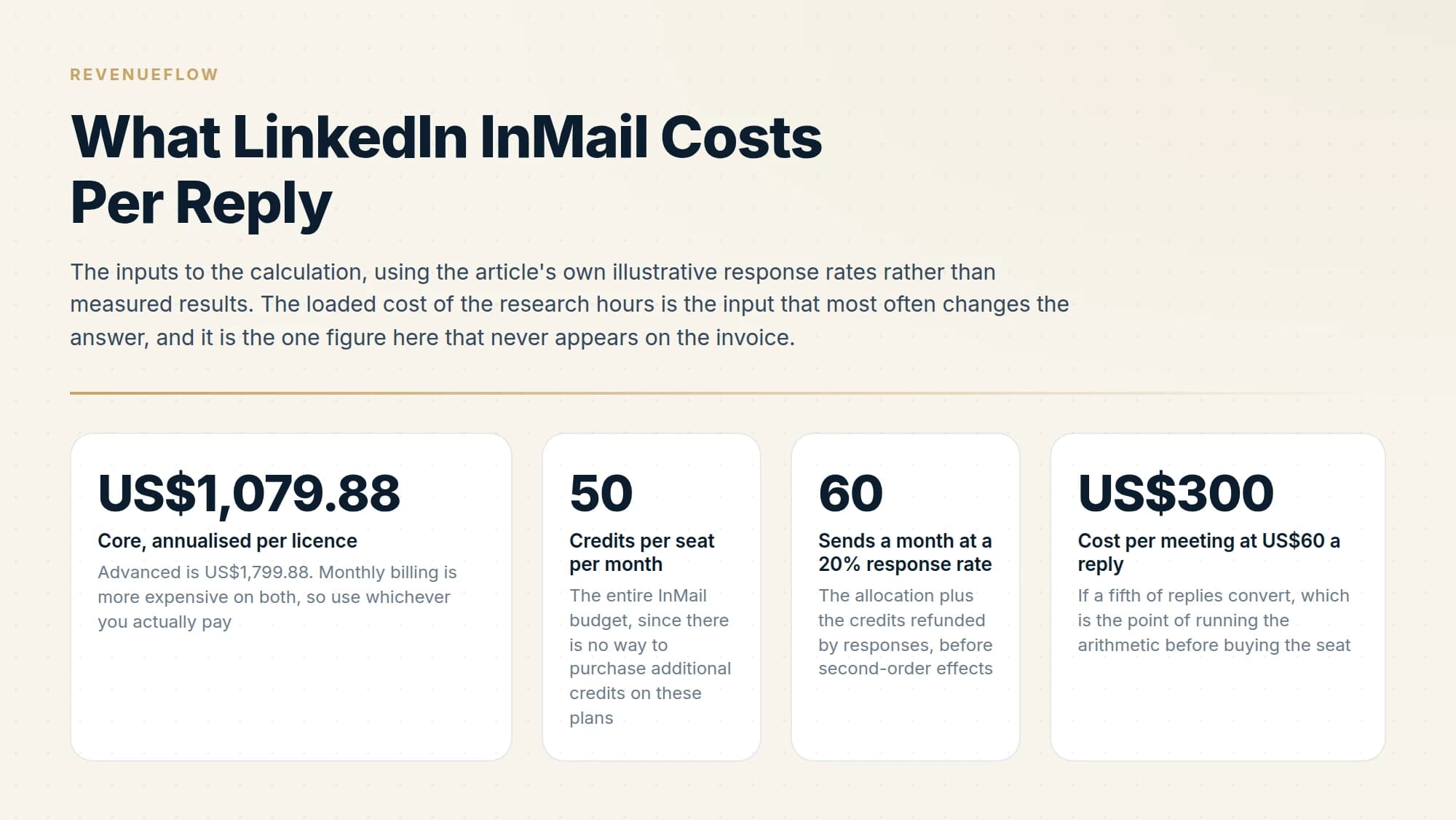
Four inputs, and you can do it on paper in five minutes.
Start with the annualised seat cost. Core at US$1,079.88 a year or Advanced at US$1,799.88, per licence, excluding tax. Monthly billing is more expensive on both, so use whichever you actually pay.
Add the loaded cost of the hours. Whoever researches and writes the messages costs something per hour, and at 50 messages a month even ten minutes each is over eight hours. On many teams this exceeds the subscription, which is the finding that usually changes the decision.
Estimate sends, including refunds. Take your allocation, multiply your response rate by it to get refunded credits, and add those back. A 20% response rate on 50 credits gives roughly 60 sends in a month before second-order effects.
Divide by replies, then by meetings. Total monthly cost divided by replies gives cost per reply. Divided by meetings booked, it gives the number that is actually comparable to your other channels.
The result is usually uncomfortable at low response rates, which is the point of doing it. A channel that costs US$60 a reply and converts a fifth of replies into meetings is a US$300 meeting before anyone has spoken to a prospect.
Advanced is US$1,799.88. Monthly billing is more expensive on both, so use whichever you actually pay
The entire InMail budget, since there is no way to purchase additional credits on these plans
The allocation plus the credits refunded by responses, before second-order effects
If a fifth of replies convert, which is the point of running the arithmetic before buying the seat
What to actually measure
Cost per credit is not a metric. Cost per reply is a decent one. Cost per qualified meeting is the one that decides whether the seat stays.
Track sends, responses inside 90 days, and meetings booked from those responses, per seat and per month. If cost per meeting on LinkedIn is materially worse than on email, the answer is almost never more seats. It is fewer, better-chosen messages, because that is the only input the arithmetic responds to.
For the underlying mechanics, how InMail credits work covers the refund and expiry rules in detail, and what InMail is and how it differs from a connection request covers when a credit is the right thing to spend at all.
We run LinkedIn and email together for clients on a pay-per-qualified-meeting basis, which moves this arithmetic off your invoice entirely: we carry the seat cost and the targeting hours, and you pay for meetings. You can see what a campaign would look like for your market.
Sales Navigator pricing is per LinkedIn's compare-plans page as of mid-2026 and excludes VAT, GST and promotional discounts. Credit allowances and refund rules are per the LinkedIn Help Center. Cost-per-reply figures are illustrative arithmetic, not measured results. Verify current pricing with LinkedIn before budgeting.
Sources: Sales Navigator compare plans, Understand InMail credits in Sales Navigator, InMail message credits and renewal process
Frequently asked questions.
Frequently asked questions- How much does a LinkedIn InMail cost?
- There is no per-message price. You buy a subscription that includes a monthly credit allowance, and LinkedIn does not sell additional credits on Premium or Sales Navigator. A Sales Navigator Core seat at US$119.99 a month with 50 credits works out at roughly US$2.40 per send before the response refunds, which reduce it further.
- Is Sales Navigator worth it for InMail alone?
- Rarely. Fifty messages a month is a small channel, and the seat is easier to justify on search and research capability with InMail as an included feature. If the credits are the only reason you are buying, calculate cost per reply at your realistic response rate first, because at low response rates that number climbs steeply.
- Does a higher Sales Navigator tier give better InMail value?
- No, because every Sales Navigator edition includes the same 50 credits a month. Advanced costs roughly US$40 more per month than Core and adds research, insight and collaboration features. On a pure cost-per-InMail basis Core is strictly better value, so upgrade for the other capabilities or not at all.
- How does InMail cost compare to cold email?
- Cold email is a fraction of a cent per send in infrastructure and has no monthly cap, so on cost per touch it is not close. InMail earns its price on the accounts email struggles to reach, where the comparison is against the cost of not reaching that buyer rather than against the cost of another email.
About the author.

B2B cold email experts helping companies generate qualified leads through done-for-you outreach campaigns.
RevenueFlow Team
Explore more.
Ready to scale your outreach?
We build GTM engines that book real meetings. See the receipts.
Related articles.
Social Selling Tools by Job, and the Account-Risk Line
Fourteen social selling tools sorted into six jobs, split by whether each acts through your LinkedIn account or beside it, from the vendors' own pages.
Is Clay Free? The Free Plan, the Trial and Where Each Stops
Clay's free plan, its 14-day trial and the no-charge-on-a-miss rule are three different things. What each holds and where it stops, from clay.com on 19 September 2026.
Video Prospecting Tools by Job: What Each One Is For
Ten video prospecting tools sorted by the job each vendor's own page describes: record and share, personalise at volume, avatars, hosting and interactive demos.
Seamless.AI Email Finder: How It Works, What a Credit Buys
How Seamless.AI's email finder resolves a contact in real time, what one Universal Credit buys, the Total AI score on every address, and what the Chrome extension reads.
Autobound Pricing: One-Time Credit Packs, Not Seats
Autobound's pricing page sells one-time credit packs for a signal data API, not seats. The six packs, the per-endpoint meter, and what a company costs.
Sales Training Programs: 13 Providers by What They Teach
Thirteen sales training providers and three free sources, grouped by what each one teaches, from their own pages as read on 18 September 2026. No ranking.