CRM Basics: What the System Is a Record Of
The CRM basics: a CRM is the shared record of the companies and people a business sells to and of what has happened with each. It holds four objects, companies, people, opportunities and activities, comes in operational, analytical and collaborative types, and works only when it is configured against goals that can fail.
Key takeaways
- A CRM is a shared system of record built on four objects, the company, the person, the opportunity and the activity, and everything else it ships sits on top of those.
- Operational, analytical and collaborative CRM describe emphasis rather than separate products, and a sales engagement platform is not a CRM at all.
- Write down goals that can fail before configuring anything, because ownership, forecasting, suppression and learning each force a different configuration.
- Everything in a CRM was typed by somebody with an interest in how it reads, so the record holds claims, and the discipline that makes them facts sits outside the tool.
A CRM, short for customer relationship management, is the shared record of the companies and people a business sells to and of what has happened with each of them. The letters name both a practice and the software that holds it, and in ordinary use the phrase "our CRM" means the system: one place where an account, the people at it, the deals in progress and the history of contact all live together.
The definition is that plain, and the difficulties with a CRM start at a second question the definition does not answer. A system of record has to be a record of something specific, and a team that never settles which question the CRM answers ends up with a system that answers a different one badly.
The CRM basics, in order
The basics of a CRM fit in five lines. It holds four kinds of record: companies, people, opportunities and activities. It is sold in three overlapping types: operational, analytical and collaborative. It should be configured against goals that can fail. Everything in it was typed by somebody, so it records claims as well as facts. And it only learns if the other tools in the stack write back to it.
Calling a CRM the system of record means it is the one place the business agrees to treat as true about an account: who owns it, what has been said to it and what is open with it. Every other tool either reads from that record or writes to it, and where two systems disagree, the CRM wins by policy.
What a CRM holds
Four objects carry the weight in every mainstream product, whatever each vendor names them.
The company, sometimes called the account or the organisation, is the unit you sell to. Its identity rule is the single most consequential setup decision in the system, because company names arrive in six spellings and only the domain survives contact with real volume.
Buyers searching for an account CRM are usually asking about this object and the rules built on top of it rather than about a separate class of product.
The person, called the contact or the lead, is attached to a company. A contact with no company attached cannot be routed, cannot be suppressed and cannot be reported on, which is why floating records are the most common quiet defect in a CRM.
The opportunity, called the deal in some products, is one potential purchase attached to a company, carrying a value, a close date, a stage and an owner. Whether one company can hold several concurrent opportunities is a modelling decision that has to be made before any report is built.
The activity is what happened: a call, a message sent, a reply received, a meeting held. This is the object an outbound programme writes to hardest and the one that gets configured last.
Everything else a CRM ships, the fields, the pipelines, the automations, the dashboards, sits on top of those four. The order they have to be settled in, and the required field set that is smaller than most teams expect, is worked through in CRM setup for an outbound team.
The types of CRM, and what the categories are for
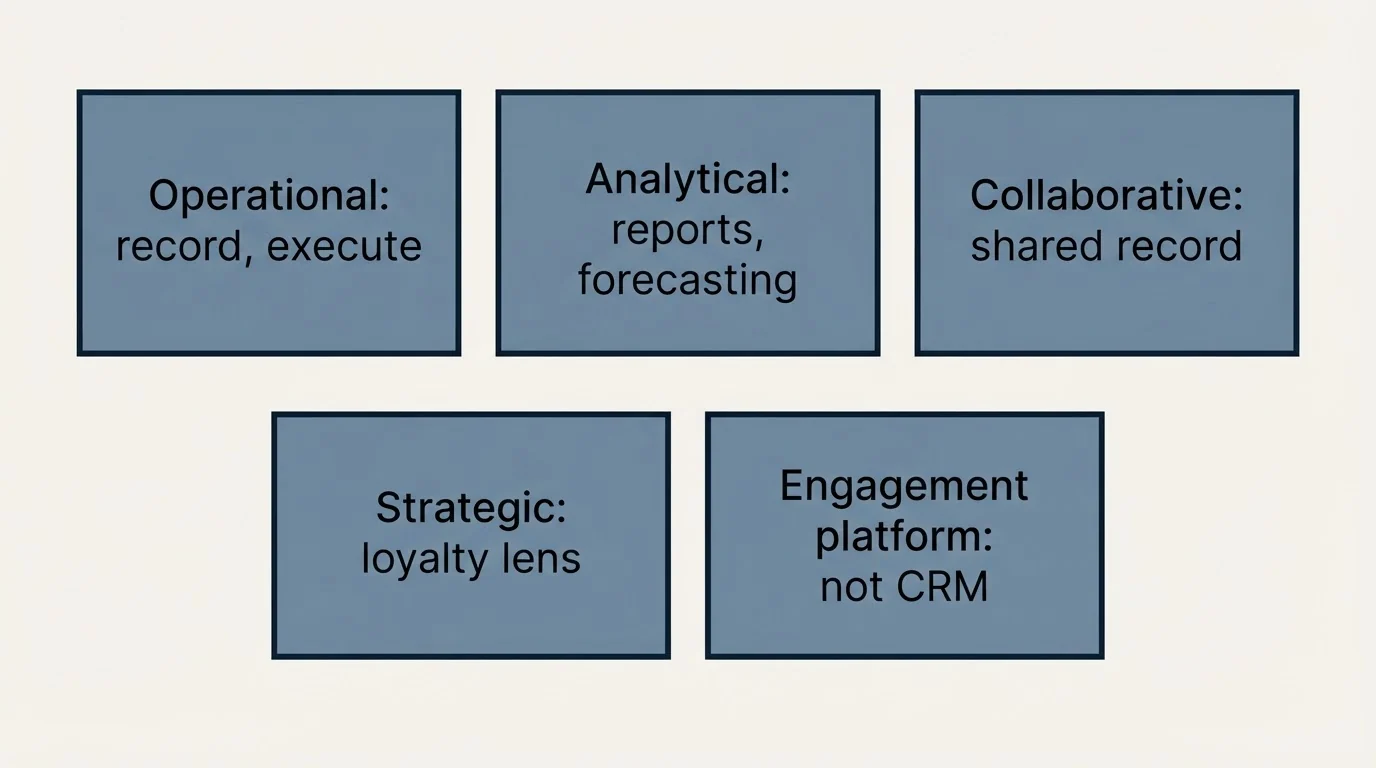
CRM systems are commonly sorted into three types, and the categories are a description of emphasis rather than three different products. Operational CRM is the record-and-execute half: contacts, pipelines, tasks, automation of the routine. Analytical CRM is the reading half: reports, segmentation, forecasting from what the records contain. Collaborative CRM is the sharing half, meaning the same customer record being visible to sales, support and marketing rather than each function keeping its own.
A fourth is sometimes added, strategic CRM, which is the same three read as a long-term loyalty programme rather than as a system. Those three CRM methods are worth knowing because they name what a given product is good at, and worth holding loosely because most current products claim all of them. The useful version of the question is narrower: does this system hold the record well, can it report on the record without an export, and can the other systems in the stack write to it. A product that scores well on the first and badly on the third will produce a clean-looking CRM that disagrees with every other tool you run.
A fourth category gets sold alongside these and is not a type of CRM at all. Sales engagement platforms execute outreach and assume a CRM underneath rather than replacing one, and confusing the two is how a team ends up with two systems each holding part of the same history. Which layer does what is set out in sales process optimization tools.
| Type | The half it names | What it does |
|---|---|---|
| Operational | Record and execute | Contacts, pipelines, tasks, automation of the routine |
| Analytical | Reading | Reports, segmentation, forecasting from what the records contain |
| Collaborative | Sharing | One customer record visible to sales, support and marketing |
| Strategic | The same three, long term | The record read as a loyalty programme rather than as a system |
| Sales engagement platform | Not a CRM | Executes outreach and assumes a CRM underneath |
What a CRM is for, stated as goals that can fail
Asked what the CRM is for, a team will reach for an answer no outcome could contradict, along the lines of managing customer relationships better. That is a description, not a goal, and a CRM without objectives that can fail is an expensive address book.
Four CRM goals are worth writing down before the system is configured, because each one implies a different configuration.
Knowing what is happening with an account, and who is responsible. This is the goal that produces a usable system of record. It implies an owner on every record from the moment it exists, and a next step with a date on every open opportunity.
Making a forecast that means something. This implies stages with exit criteria naming something the buyer did, rather than stage labels naming what the seller sent. A pipeline built on seller activity will report healthy movement in a quarter where nothing is being bought.
Not contacting the same person twice from two directions. This implies suppression as a field on the record rather than a setting inside a sending tool, and it is the goal most often discovered after it has been missed.
Learning which segments and premises work. This implies that outcomes come back from wherever the sending happens, which is a data-flow decision rather than a reporting one.
A goal that names an activity rather than a decision belongs in activity reporting instead. Increasing the number of logged calls is measurable and changes nothing on its own, and a CRM configured to chase it accumulates fields that describe effort.
Goal 1
Know what is happening, and who owns it
Forces an owner on every record from creation, and a dated next step on every open opportunity.
Goal 2
A forecast that means something
Forces stage exit criteria that name something the buyer did, not something the seller sent.
Goal 3
Never contact someone twice from two directions
Forces suppression to live as a field on the record, not as a setting inside a sending tool.
Goal 4
Learn which segments and premises work
Forces outcomes to come back from wherever the sending happens. A data-flow decision.
What is happening with this account?
- Owner on every record, from creation
- Stage criteria naming something the buyer did
- A dated next step on every open opportunity
- Suppression held as data on the company record
- Produces a forecast a manager can audit
What did each rep do?
- Fields that count effort rather than evidence
- Stages that advance on seller activity
- Dashboards that look healthy in a dead quarter
- Adoption enforced by compliance rather than usefulness
- Produces numbers nobody can act on
Where the definition misleads
Two properties of a CRM are invisible in every definition of it, and they are where the trouble starts.
Everything in it was typed in by somebody with an interest in how it reads. A deal's value, its close date and its stage are claims made by the person whose performance the deal describes. The software has no way to tell a confident claim from an observation, so the discipline of making those claims closer to facts sits entirely outside the tool. That discipline is the subject of pipeline management in a CRM.
It is a record of relationships and a queryable database at the same time, and those two jobs pull in opposite directions. As a record, more history is always better. As a database, every field is a tax charged on every record forever, and the fields nobody uses get filled with whatever passes validation. The resolution is to size the field set from the queries you actually run rather than from the reports you might one day want, and to keep the maintenance on a schedule, which is data hygiene.
A third misreading concerns adoption. A CRM that sellers do not use is usually blamed on the sellers, and the more common cause is that the system was built to answer the second question in the panels above. People fill in a record that helps them and route around a record that only reports on them.
How an outbound team uses it
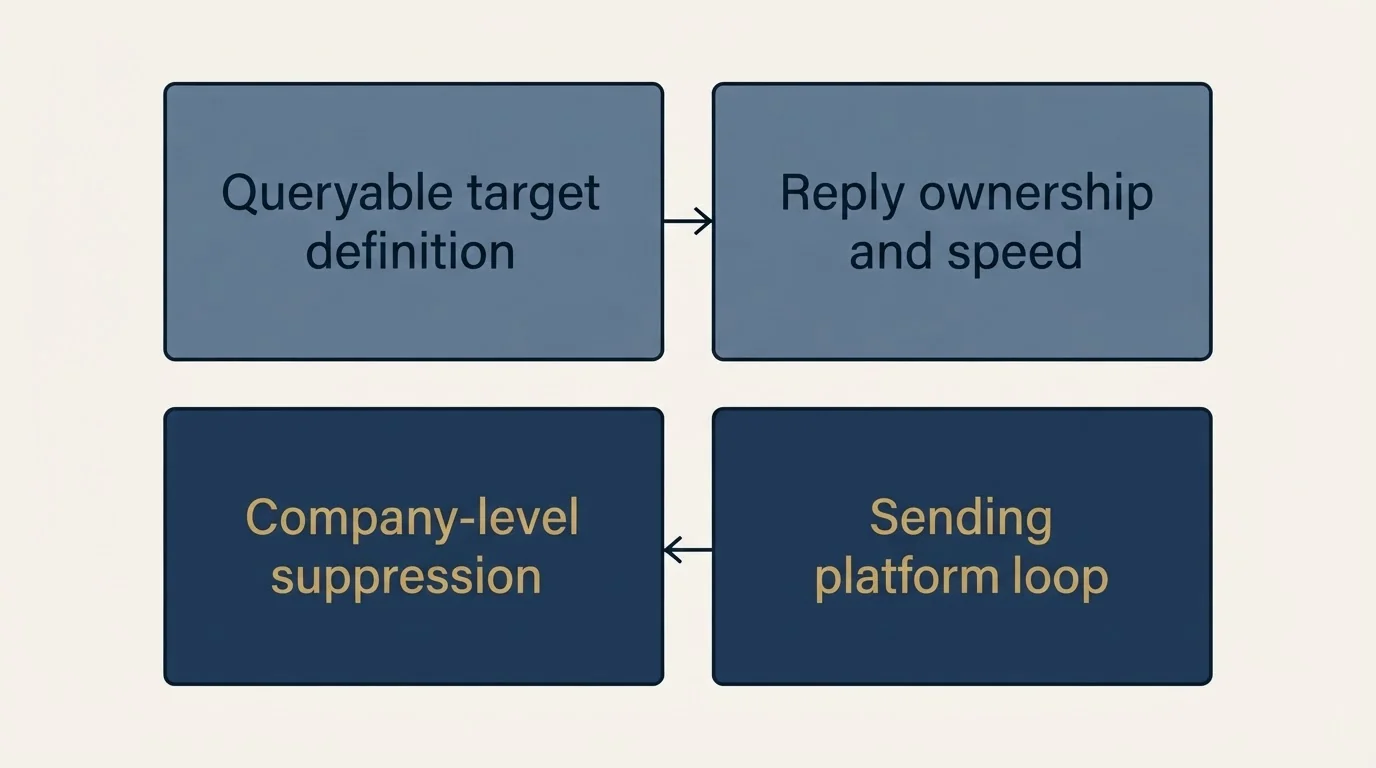
For a team running cold outreach, the CRM does four specific jobs, and only the first is what the vendor demos.
It holds the target definition in a queryable form, so a segment can be built without a research project. The list of fields that matters is short, and filling them is the job covered in CRM enrichment.
It decides who owns a reply and how fast, which is lead routing plus a written response window. A reply that arrives with no owner is something nothing in the system will complain about, and nobody notices until somebody asks why it went unanswered.
It carries suppression, so a person who asked not to be contacted is not contacted again by a different campaign next quarter. That is a company-level fact rather than a campaign setting.
And it closes the loop, which is the part that decides whether the programme learns anything. Sends, replies, bounces, opt-outs and meetings have to arrive from the sending platform against the right record with the right owner and timestamp, and suppression and live opportunities have to travel back the other way. The engineering side of that, meaning the rate limits, the authentication and the field mapping policy that decides which system is allowed to be wrong, is in CRM integration.
One piece of standard CRM advice does not survive contact with our own practice, and it is worth naming rather than leaving implicit. Multi-step follow-up sequences are commonly treated as a core use of the system. We run one message per campaign, with no bumps and no thread replies. What automation should and should not touch in a CRM, and the loop that bites when two systems write to the same field, is in workflow automation in a CRM.
Related terms and guides
CRM enrichment covers filling the fields a segment query needs, data hygiene the maintenance that keeps them worth querying, and record matching the identity question underneath both. Lead routing and lead scoring cover the two rules most often built on top of the record, and sales forecast covers what the pipeline numbers are actually estimating.
On the build side, CRM setup for an outbound team is the vendor-neutral configuration order, CRM integration is the sync layer, and pipeline management in a CRM is what to do with the records once they exist. If the platform question is genuinely open, the CRM comparison for SDR teams covers the shortlist.
A clean CRM with nothing in the top of it is still an empty pipeline, and that is a supply problem rather than a configuration one. See what a first campaign produces against your market.
Frequently asked questions.
Frequently asked questions- What are the basics of a CRM?
- A CRM is the shared record of the companies and people a business sells to and what has happened with each. It rests on four objects: the company, the person attached to it, the opportunity, and the activity. It is sold in operational, analytical and collaborative types, and it works only when configured against goals that can fail.
- What does it mean that a CRM is a system of record?
- It means the CRM is the one place the business agrees to treat as true about an account: who owns it, what has been said to it and what is open with it. Other tools read from that record or write to it. A system of record has to be a record of something specific, so settle which question it answers first.
- What are the types of CRM?
- Three are usually listed. Operational CRM records and executes: contacts, pipelines, tasks and automation. Analytical CRM reads the records: reports, segmentation and forecasting. Collaborative CRM shares one customer record across sales, support and marketing. A fourth, strategic CRM, is the same three read as a long-term loyalty programme. Most current products claim all of them.
- What records does a CRM hold?
- Four kinds. Company records, the unit you sell to, best identified by domain. Person records, which should always be attached to a company. Opportunity records, each one potential purchase with a value, a close date, a stage and an owner. And activity records of what happened: a call, a message sent, a reply received, a meeting held.