Claude Code Is the Best GTM Tool of 2026
Your GTM stack is fine. The problem is that you are the integration layer holding it together. Here is what changes when an agent with API access takes that job instead.
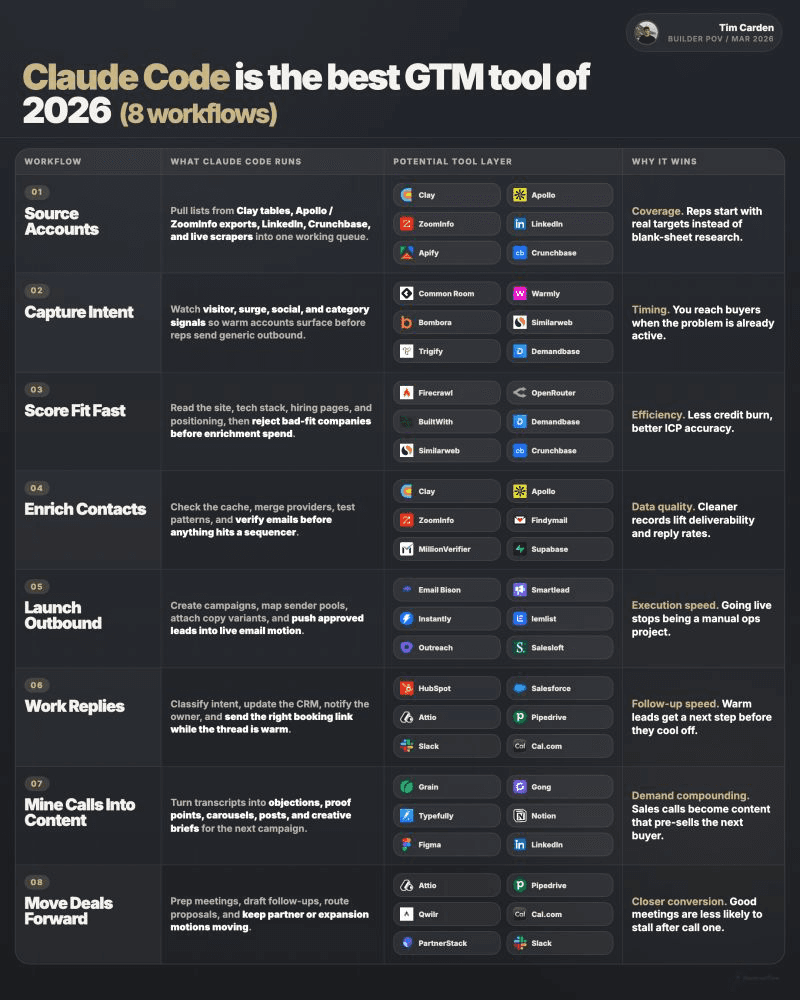
Claude Code functions as operational middleware for your existing GTM stack, using API access to automate the manual integration work that currently falls to RevOps or founders. It connects tools like Clay, Smartlead, HubSpot, and Gong by executing multi-step workflows (list building, signal aggregation, reply routing, post-call documentation) that previously required a human to copy data between systems. The value isn't code generation; it's autonomous execution across your entire stack using the credentials you already have.
Key takeaways
- Modern revenue teams use dozens of specialized tools that require a human to manually transfer data, fix broken automations, and route leads between systems: work that is invisible in headcount planning but consumes significant time.
- An agent with API credentials can execute end-to-end workflows across any tool with published documentation, eliminating the need to shop for native integrations between products.
- Reversing the typical sequence by disqualifying accounts before enrichment cuts data costs on every campaign, since you avoid paying for contact information on companies you will never email.
- Reply handling is where most automated outbound fails: teams automate sending at machine speed but leave a human to manually triage responses when prospects engage.
- The system does not fix weak positioning or replace commercial judgment; it trades tool-wrangling time for setup and review time while introducing a production-grade operational dependency.
Reviewed and updated September 5, 2026
Claude Code Is the Best GTM Tool of 2026
Not because it replaces your stack. Because it operates it.
Look at what a modern revenue team actually owns. Clay for lead data. Smartlead or Instantly for sending. HubSpot for deals. Gong for calls. A dozen more tools sitting between them. Every one of those products is good at its job.
Once you see how many categories a real revenue stack spans, it helps to survey a full breakdown of a production GTM stack to see which tools actually earn their place.
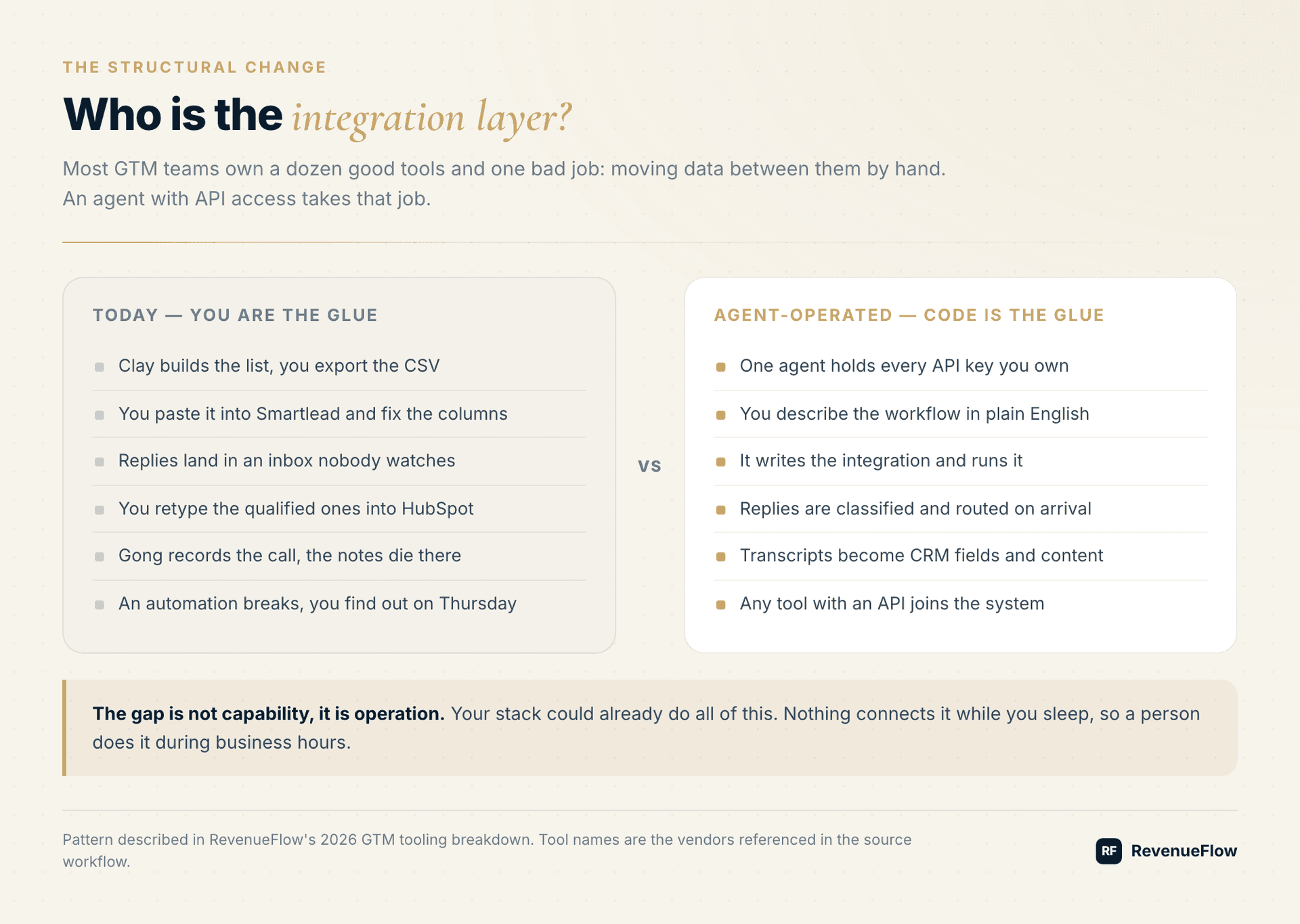
Now look at what connects them. A person, copying data between tabs. Fixing an automation that broke sometime on Tuesday. Routing leads by hand because the rule you wrote does not cover this edge case.
You bought software. You became the middleware.
The Job Nobody Budgeted For
Integration work is invisible in a headcount plan. There is no line item called "moves CSVs between Clay and Smartlead," so nobody staffs it deliberately. It gets absorbed by whoever has the least protected calendar, usually a RevOps hire or the founder.
The work is real, though. It looks like this:
- Export a list from your data tool, clean the columns, import it into your sender
- Notice three days later that a warmup dashboard has been flashing red
- Read replies in a shared inbox and forward the good ones to an AE
- Retype qualified leads into the CRM because the form field names do not match
- Rebuild a Zapier chain after a vendor changes an endpoint
None of it requires judgment. All of it requires a human, because nothing else in the stack knows how to do it end to end.
What Changes With An Agent That Has API Keys
The shift is small to describe and large in practice. You give an agent credentials for the tools you already pay for, then describe the outcome you want in plain English. It writes the code, calls each API, and runs the workflow.
That last part matters more than the code generation. Plenty of tools can draft a Python script. The difference here is that the same system executes it, reads the result, handles the error, and runs again tomorrow.
The practical consequence: any tool with an API becomes part of the system. You stop shopping for native integrations. If a vendor publishes docs, it is connectable.
The Five Workflows That Cover Most Of Outbound
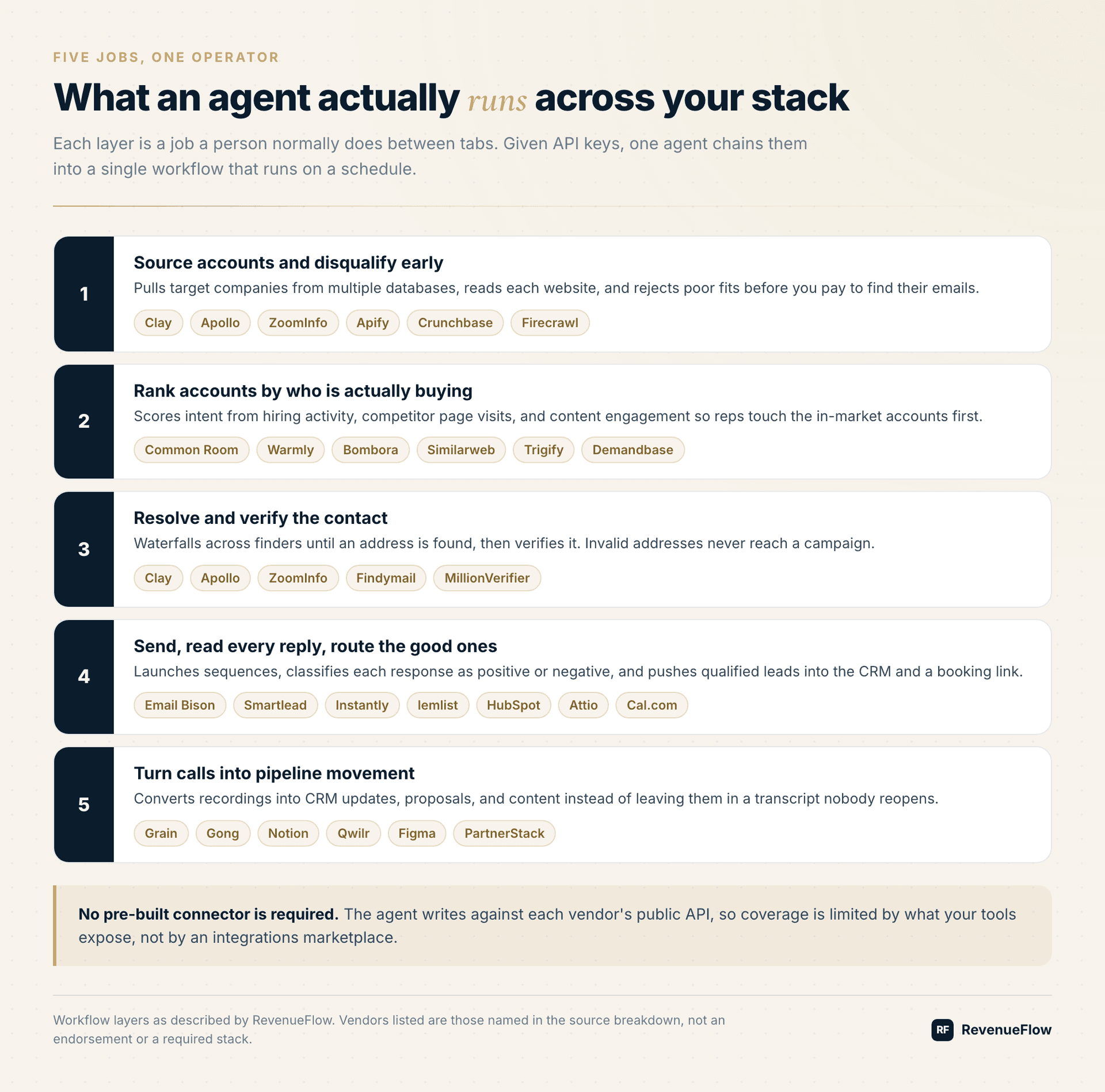
1. Source accounts and disqualify before you spend
Pull target companies from Clay, Apollo, ZoomInfo, LinkedIn, Apify, and Crunchbase in one pass. Then read each company's website with a crawler like Firecrawl and drop the ones that do not fit.
The sequencing is the point. Most teams enrich first and qualify second, which means paying for contact data on accounts they were never going to email. Reversing that order cuts enrichment spend on every campaign.
2. Rank by who is actually in market
Buying signals live in different products: Common Room, Warmly, Bombora, Similarweb, Trigify, Demandbase. Each one sees a slice. Hiring surges. Competitor page visits. Content engagement.
An agent can query all of them and produce one ranked list. That ranking is the thing your reps actually need, and it is exactly the thing no single vendor will hand you, because no vendor owns all the signals.
3. Find the email, then prove it works
Check Clay, Apollo, ZoomInfo, and Findymail in sequence until an address comes back. Run every result through a verifier such as MillionVerifier before it enters a campaign.
Deliverability problems are usually data problems wearing a costume. Bounces train mailbox providers to distrust your domain, and the damage outlasts the campaign that caused it.
4. Send, classify every reply, route the good ones
Launch sequences in Email Bison, Smartlead, Instantly, lemlist, Outreach, or Salesloft. Then read every reply, sort positive from negative from out-of-office, and push the qualified ones into HubSpot, Salesforce, Attio, or Pipedrive with a Slack ping and a Cal.com link.
Reply handling is where most automated outbound quietly fails. Teams automate the sending and leave a human to triage responses, so the system runs at machine speed until the moment a prospect says yes.
5. Turn calls into pipeline movement
Grain and Gong recordings become CRM field updates, Notion docs, proposal drafts in Qwilr, and content briefs. The recording already exists. The question is whether anything happens to it.
What This Does Not Solve
Worth saying plainly, because the category is full of overclaiming.
An agent operating your stack does not fix a weak offer. If your positioning is unclear, faster outbound reaches more people with an unclear message. It does not replace judgment on which accounts matter, and it does not remove the need for someone who understands the commercial context to review what gets sent.
It also introduces a real operational dependency. Giving one system credentials to your CRM, your sender, and your data tools means scoping those keys carefully and knowing what runs on a schedule. Treat it like production infrastructure, because it is.
And it is not free. You are trading tool-wrangling time for a smaller amount of setup and review time. The trade is usually worth it. It is still a trade.
How To Start Without Betting The Quarter
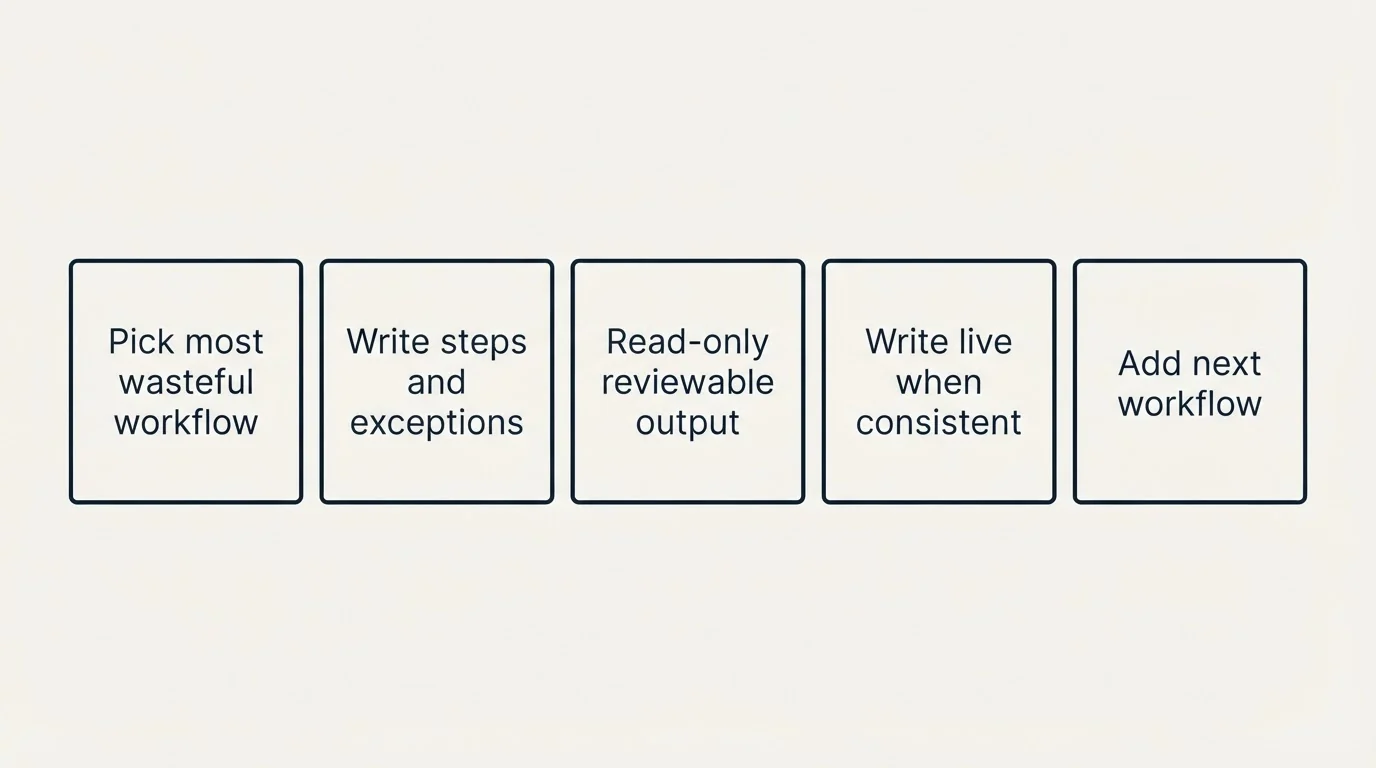
- Step 1Pick the workflow that wastes the most of someone's week
For most teams that is either list building or reply triage.
- Step 2Write down the steps as you do them manually, including the exceptions.
- Step 3Give the agent read-only access first
have it produce the output as a file you review
- Step 4Only after the output is consistently right should it write to a live system.
- Step 5Then add the next workflow.
The stack compounds because each one reuses the same credentials and the same context about your ICP.
Pick the workflow that wastes the most of someone's week. For most teams that is either list building or reply triage.
Write down the steps as you do them manually, including the exceptions. Give the agent read-only access first and have it produce the output as a file you review. Only after the output is consistently right should it write to a live system.
Once you have documented a process this way, it helps to see how those written procedures become reusable Claude Code skills for GTM work across an entire revenue team.
Then add the next workflow. The stack compounds because each one reuses the same credentials and the same context about your ICP.
The Actual Argument
Every tool on your list is software you still have to staff, configure, and run. The vendor captured the value of building it. The operating burden stayed with you.
What is different in 2026 is that the operating burden is now automatable, not just the individual tasks inside it. That is why the interesting GTM question stopped being "which tool" and became "who runs the tools."
At RevenueFlow we run this across sourcing, contact data, sending, reply handling, transcripts, and proposals. It is the first setup that has felt like a GTM operator rather than another AI feature bolted onto a dashboard.
What Changes By Layer
| Layer | Before | After |
|---|---|---|
| Sourcing | Export CSV, clean columns, import | Pulled on demand against live filters |
| Qualification | After enrichment, if at all | Before enrichment, from the website |
| Contact data | One provider, accept the gaps | Waterfall until verified, then verify again |
| Sending | Manual campaign assembly | Built from an ICP definition |
| Reply handling | Shared inbox, checked twice a day | Classified and routed in minutes |
| Post-call | Transcript nobody reopens | CRM fields, proposal drafts, content briefs |
| Failure mode | Someone notices eventually | Alert fires when a step returns nothing |
Frequently Asked Questions
Do I need to be able to code?
No, but you need to be comfortable reading what was written and saying when it looks wrong. The barrier is not syntax, it is being specific about what you want. People who write clear process documentation tend to do well with this. People who expect it to infer the process do not.
What happens when a vendor changes their API?
The workflow breaks, and you find out either from an alert you built or from a quiet gap in your pipeline. Build the alert. The repair itself is usually fast, because the agent can read the new documentation and rewrite the call.
Is this safer or riskier than Zapier?
Different risk, similar magnitude. Zapier's logic is opaque once it grows past a few dozen steps and nobody remembers who built what. Code is inspectable and versioned, which is better. Against that, an agent with write access to your CRM can do more damage faster than a Zap can. Scope the credentials to what each workflow actually needs.
How long before it pays for itself?
The first workflow is slower than doing the task manually. The second is faster, because it reuses the credentials and the context. Most teams cross over somewhere in the second or third workflow, which is typically two to three weeks in.
Does this replace Clay, Smartlead, or HubSpot?
No. It operates them. Every tool in the stack keeps doing its job. What changes is that a person is no longer the thing carrying data between them.
Related Reading
- 5 RevOps Workflows You Can Run Entirely From the Terminal
- The Gap Between a Chat App and an Engineer: 5 B2B Marketing Workflows
- 5 Marketing Workflows You Can Run Entirely From the Terminal
We build AI-native pipeline systems and you pay per qualified meeting, not a retainer. No paying for activity. You only pay when we book you a qualified sales meeting. See if you qualify.
Frequently asked questions.
Frequently asked questions- What does Claude Code actually do for go-to-market teams?
- Claude Code acts as executable middleware between your existing GTM tools. It uses API credentials to run multi-step workflows that previously required manual work: pulling account lists from data providers, checking buying signals across platforms, verifying email addresses, routing qualified replies into your CRM, and turning call recordings into pipeline documentation. The core capability is autonomous execution across your stack, not just generating code.
- How does using an agent change the way outbound workflows run?
- An agent eliminates the manual data transfer and monitoring work that connects specialized tools. Instead of exporting CSVs from Clay, cleaning columns, importing to Smartlead, then manually routing replies to AEs, you describe the desired outcome and the agent writes code to call each API in sequence. It handles errors, runs on schedule, and works with any tool that publishes API documentation, removing the constraint of native integrations.
- Should I replace my current GTM stack with Claude Code?
- No. Claude Code operates your existing stack rather than replacing it. You keep using Clay for data, Smartlead for sending, HubSpot for deals, and Gong for calls. The agent simply automates the integration layer: the invisible work of moving data between those tools, fixing broken automations, and routing information based on rules. Your tools remain; the human middleware role disappears.
- What are the risks of giving an agent API access to my revenue tools?
- You create a real operational dependency by granting one system credentials to your CRM, email sender, and data tools. This requires careful key scoping, understanding what runs on schedule, and treating the setup as production infrastructure. Start with read-only access, review outputs as files before allowing writes to live systems, and recognize that faster execution of a weak offer just reaches more people with an unclear message.
About the author.

Tim Carden is CMO / CTO at RevenueFlow, which builds and operates outbound revenue engines for B2B companies. Studied at McGill University.
Tim Carden · CMO / CTO
Connect on LinkedIn →Explore more.
Ready to scale your outreach?
We build GTM engines that book real meetings. See the receipts.
Related articles.
Claude Code for RevOps: 5 Workflows to Run From the Terminal
Five recurring RevOps jobs run from the terminal with Claude Code: pipeline hygiene, forecasting, deal intelligence, lead routing and attribution, and the team setup.
AI Sales Agents: 6 Jobs They Do Well and 4 They Fail At
Agents plan and act, copilots suggest, workflows follow a fixed path. Here are the six sales jobs agents handle today, the four they fail, and the buying test.
AI SDR: What It Replaces, What It Doesn't and What It Costs
AI SDRs handle research, list building, sending and reply triage well. Discovery, objections and relationships do not transfer. Capability matrix and real pricing.
Outbound Teams Hold Their Stack With 3 Ops People or 22 APIs
Five categories of tooling, all API-addressable, run from one terminal. Here is the full stack, what MCP actually changes, and the honest version of what replaces the ops headcount.
AI Appointment Setters vs Human Setters: Cost per Meeting
2026 pricing for voice AI setters, AI SDR platforms, human setters and agencies, with a cost-per-meeting table that adds back oversight and no-shows.
Chat App or Engineer: 5 B2B Marketing Workflows
Competitor teardowns, campaign reports, a versioned brand voice file, SEO refresh, and ABM briefs. Five workflows that read real files, run real scripts, and write finished artifacts to disk.