Claude Code for RevOps: 5 Workflows to Run From the Terminal
Five recurring RevOps jobs run from the terminal with Claude Code: pipeline hygiene, forecasting, deal intelligence, lead routing and attribution, and the team setup.
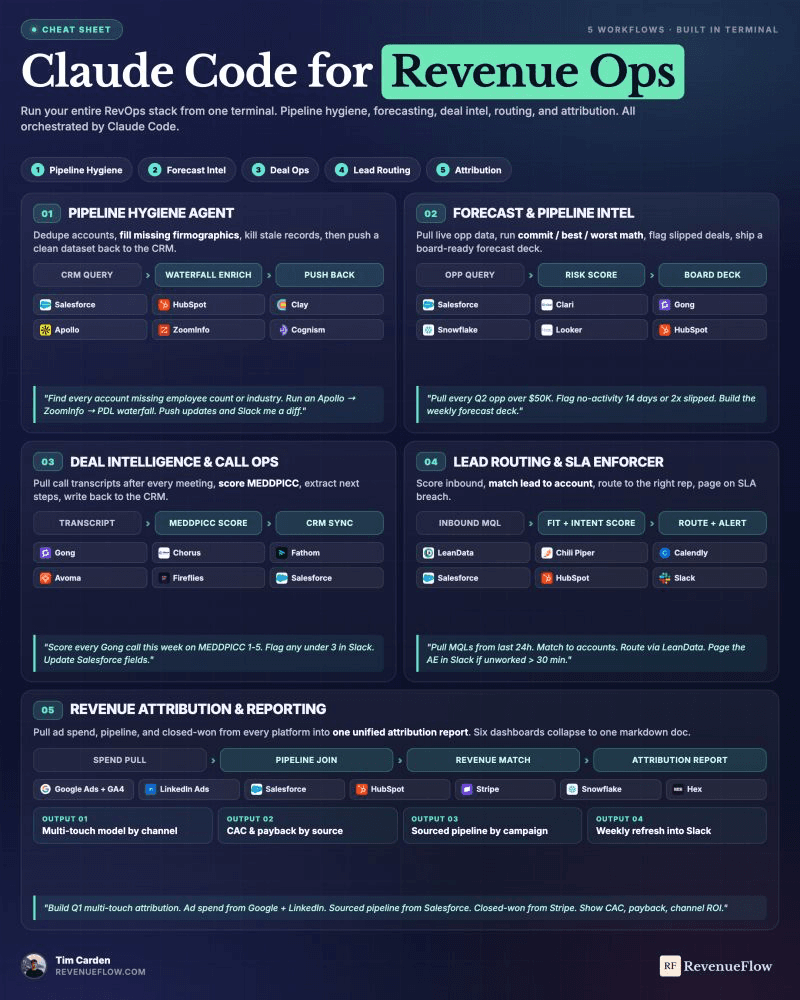
Claude Code runs RevOps workflows from the terminal through four pieces: MCP servers that connect it to the CRM, warehouse and Slack; a project CLAUDE.md holding the rules; permission rules deciding what runs without asking; and claude -p for scheduled runs. Start with pipeline hygiene in read-only mode.
Key takeaways
- The top Claude Code tools for RevOps are pieces of Claude Code itself: MCP servers, a project CLAUDE.md, permission rules, and non-interactive claude -p runs.
- Set it up as one repository so the whole team shares the same MCP configuration, CLAUDE.md and permission rules, with keys read from environment variables.
- Pipeline hygiene comes first because routing, scoring, forecasting and attribution all inherit whatever errors sit in the account data underneath them.
- Start every workflow in read-only mode, producing a diff for a human, and let it write only once the diffs are consistently correct.
Reviewed and updated September 21, 2026
Claude Code is an agentic coding tool that reads your codebase, edits files and runs commands, and it runs in the terminal. That is what makes it useful to RevOps teams that want to automate pipeline and enrichment workflows rather than click through them. The top tools for the job are not new products: they are four pieces of Claude Code itself, pointed at the systems you already pay for.
Revenue operations is mostly the same five jobs, repeated on a schedule, across systems that do not talk to each other.
That is also the honest scope of AI for RevOps: five recurring jobs that each already expose an API, rather than a transformation programme.
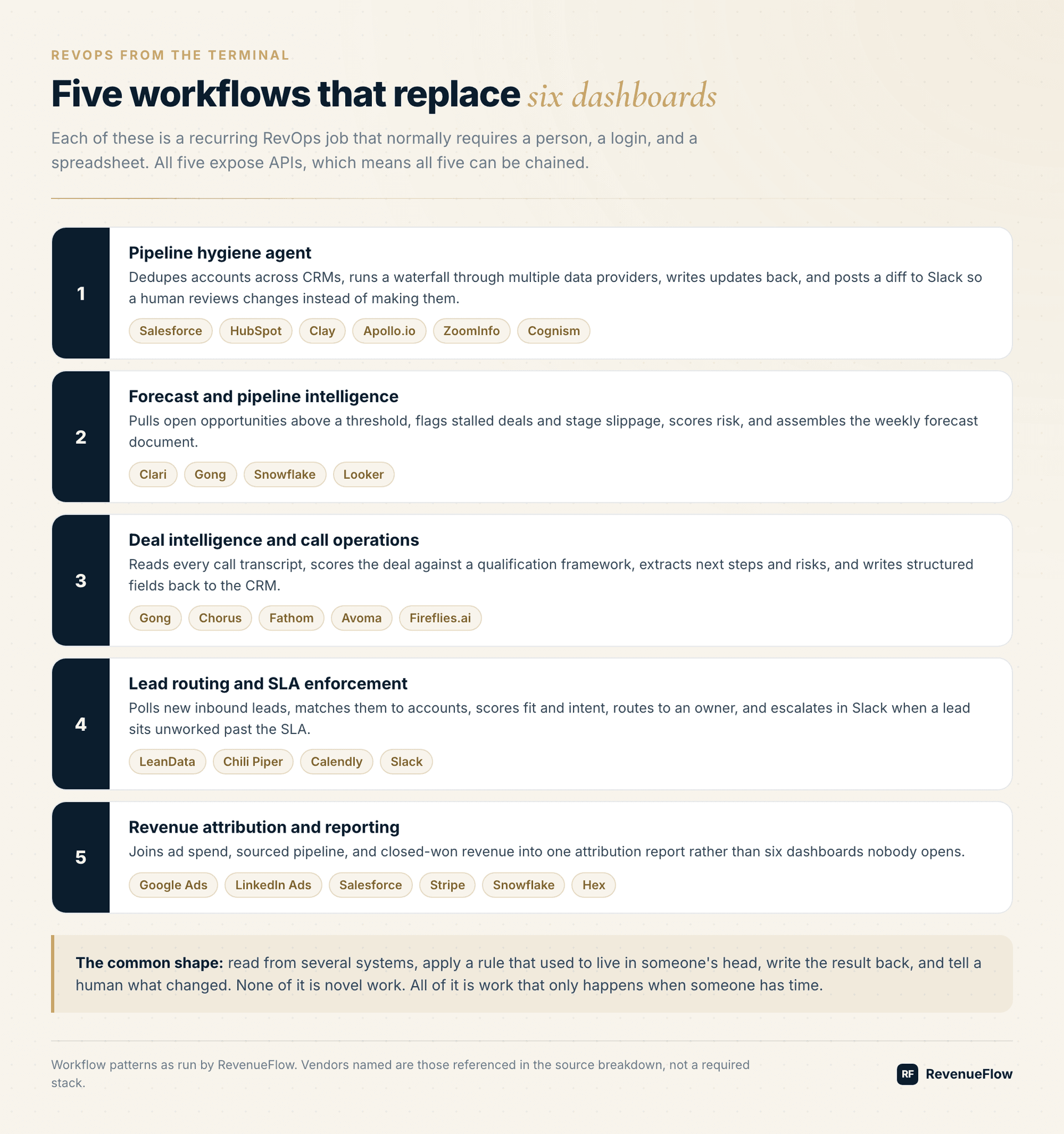
Every one of those systems has an API. That is the part worth sitting with, because it means the jobs are chainable. What follows is how each one looks when an agent runs it instead of a person clicking between tabs.
Claude Code tools for RevOps teams: automate pipeline and enrichment workflows from the terminal
Four pieces do the work. MCP servers connect Claude Code to the CRM, the warehouse and Slack; Anthropic's documentation describes MCP as an open source standard for AI-tool integrations, and says MCP servers give Claude Code access to your tools, databases, and APIs. A project CLAUDE.md holds the rules a RevOps person would otherwise repeat every time, and Claude reads it at the start of every session. Permission rules decide what may run without asking. And the -p flag runs any prompt non-interactively, which is what turns a conversation into a scheduled job.
| Piece | What it does | Where it lives |
|---|---|---|
| MCP servers | Connect Claude Code to your tools, databases and APIs | .mcp.json at the project root, shared with the team |
| CLAUDE.md | Persistent instructions, read at the start of every session | The project folder, next to the scripts |
| Permission rules | Allow, ask and deny rules for what may run without asking | .claude/settings.json, committed for the team |
| claude -p | Runs a prompt non-interactively, for scripts and schedules | Your scheduler: cron, CI or a job runner |
None of the four is specific to revenue work, which is the point. The RevOps knowledge lives in the CLAUDE.md and in the workflows below; the tooling is the same one an engineering team uses, which means it is maintained, documented and already inside most companies.
How to set up Claude Code for RevOps automation
The setup that lets a whole team run the same enrichment and pipeline workflows is a repository, not a person's laptop. Put the workflows, the CLAUDE.md, the MCP configuration and the permission rules in one repository, and everyone who runs a job runs the same rules.
One install per operator, on the machine or server that will run the jobs.
Field names, matching rules, and the records that must never be written.
The CRM, the warehouse and Slack, with keys read from environment variables.
Allow reads, deny writes until the diffs are right, deny the secrets files.
Branch on the exit code and alert when a run fails or returns an odd volume.
Three details decide whether this is safe to leave running. Project-scoped MCP servers are stored in a .mcp.json file at the project's root, so the team shares one set of connections, and the file supports environment variable expansion, so keys stay out of it. The shared .claude/settings.json is committed so teammates get the same permission rules, and a deny rule on the secrets file is the first one to write. And a scheduled run needs to fail loudly: Claude Code exits with code 0 on success and a non-zero code when the run fails, and the documentation says to pass --permission-prompts none when nobody is available to answer permission prompts, for example in a scheduled job.
One warning from the same documentation is worth copying into the CLAUDE.md verbatim: "Verify you trust each server before connecting it. Servers that fetch external content can expose you to prompt injection risk." An agent with write access to a CRM should only be connected to servers you would give the same access.
1. Pipeline Hygiene
The job: keep account and contact records accurate enough that everything built on top of them works.
The workflow reads accounts from Salesforce and HubSpot, identifies duplicates, runs a waterfall enrichment through Apollo.io, ZoomInfo, and People Data Labs via Clay, then writes updates back and posts a diff to Slack.
The diff matters more than the update. You want a human to see what changed before it becomes canonical, especially in the first few weeks when the matching logic is still wrong in ways you have not discovered yet.
Gartner puts the cost of poor data quality at at least $12.9 million a year for the average organisation, a figure from its 2020 research. Whatever the exact figure is for your business, the cost is real and it compounds through every layer above it.
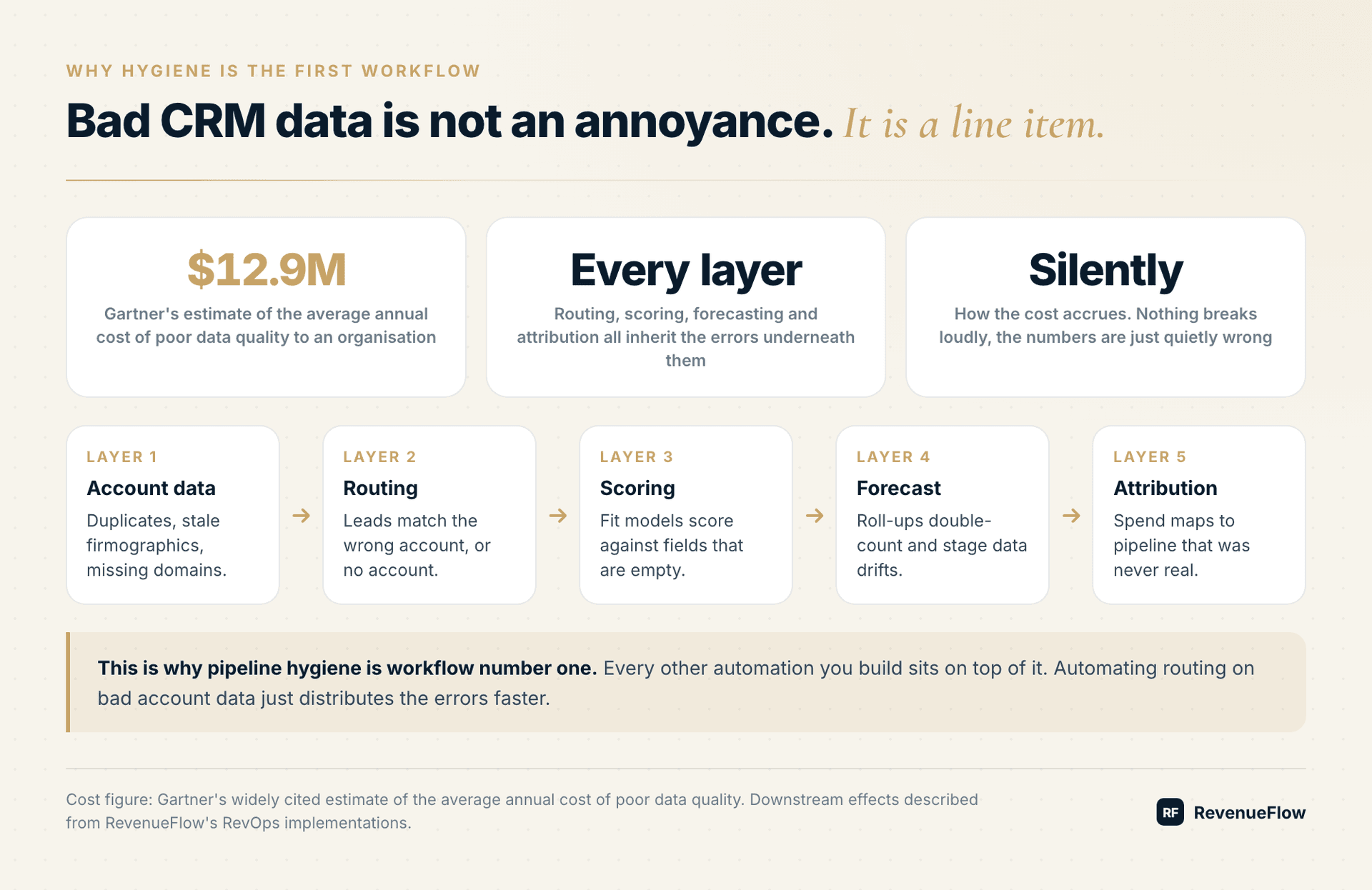
This is why hygiene is workflow one rather than workflow five. Automating lead routing on top of bad account data just distributes the errors faster.
2. Forecast And Pipeline Intelligence
The job: produce a defensible weekly view of what is going to close.
Pull every open opportunity above a threshold. Flag anything with no activity in 14 days. Flag stage slippage against the previous snapshot. Score risk. Assemble the result into a document a revenue leader can actually take into a board meeting.
Clari, Gong, Snowflake and Looker each hold part of that picture. The forecast deck that currently takes an analyst most of a Monday becomes a query across them plus a template, wherever each one gives you an API or an export.
Those products sit in different rows of the same stack, and nine RevOps products sorted by job separate forecasting from routing, data supply and wiring.
The honest caveat: the model that scores risk is only as good as the historical data you feed it. Early on, treat the score as a prompt for a conversation rather than a verdict.
3. Deal Intelligence And Call Operations
The job: get what was said on a call into the CRM.
After every call, pull the transcript from Gong, Chorus, Fathom, Avoma, or Fireflies. Score the deal against your qualification framework. Extract next steps, risks, and stated timelines. Write structured fields back to Salesforce.
This is the workflow with the clearest before and after, because "the rep did not update the CRM" is a problem every sales org has and no amount of process has ever solved. Reps do not skip CRM updates out of laziness. They skip them because the update happens after the call, when the next call has already started.
Moving the work to a system that was listening anyway removes the conflict entirely.
4. Lead Routing And SLA Enforcement
The job: get inbound leads to the right person fast enough to matter.
Poll for new MQLs every ten minutes. Match each lead to an existing account. Score fit and intent. Route through LeanData, Chili Piper, or Calendly. Page the owner in Slack if a lead sits unworked past 30 minutes.
Automating that routing assumes somebody already owns the lead definition, and who owns which revenue decision is the question scope language never answers.
The interesting change here is not the speed. It is that the routing logic becomes plain English rather than a flowchart in a tool nobody wants to open. Rules like "if the account already has an open opportunity, route to that owner regardless of territory" are one sentence, not fifteen clicks.
That makes the logic reviewable by the person who actually owns the policy, which is usually the reason routing rules go stale in the first place.
5. Revenue Attribution
The job: connect spend to pipeline to revenue without three weeks of reconciliation.
Pull ad spend from Google and LinkedIn. Sourced pipeline from Salesforce. Closed-won from Stripe. Join in Snowflake. Render in Hex.
Six dashboards collapse into one report. Not because the dashboards were bad, but because nobody was ever going to open all six and hold the joins in their head.
Attribution stays genuinely hard. Multi-touch models involve judgment calls that automation does not resolve. What automation removes is the data assembly, which is the part that made the report monthly instead of weekly.
What This Is Not
It is not a replacement for a RevOps person. Every workflow above needs someone who understands the commercial context to define the rules, review the output, and notice when a result is wrong in a way the system cannot detect.
It is also production infrastructure. An agent with write access to your CRM, your data warehouse, and your billing system needs scoped credentials, a log of what ran, and a clear answer to what happens when a job fails halfway through. Treat it accordingly.
And it takes real setup time. The first workflow is slower than doing the task by hand. The second is faster, because it reuses the credentials and the context. That crossover is the whole economic case.
Where To Start
A report of proposed changes, nothing written to a live record.
Learn how bad the data is and where the matching logic breaks.
Only once the diffs are consistently correct.
It reuses the credentials, the CLAUDE.md and the permission rules.
Start with pipeline hygiene, in read-only mode, producing a report rather than writing changes.
You will learn two things quickly: how bad your data actually is, and where your matching logic breaks. Both of those need to be understood before anything writes to a live system.
Once the diffs are consistently correct, let it write. Then add the next workflow.
At RevenueFlow we run hygiene, deal intelligence, and attribution this way. The shift is not that the work got faster. It is that the work now happens on a schedule instead of when someone finds an afternoon.
Build Order And Risk
| Workflow | Build effort | Risk if wrong | Start in read-only? |
|---|---|---|---|
| Pipeline hygiene | Medium | High, it writes to core records | Yes, always |
| Forecast intelligence | Low | Low, output is a document | Not required |
| Deal intelligence | Medium | Medium, writes CRM fields | Yes |
| Lead routing | High | High, affects live SLAs | Yes, shadow mode first |
| Attribution | Medium | Low, reporting only | Not required |
Frequently Asked Questions
Does this replace a RevOps hire?
No. Every workflow above needs someone who understands the commercial context to define the rules, review the output, and notice when a result is wrong in a way the system cannot detect. What it replaces is the portion of that person's week spent assembling data rather than interpreting it.
What is the most common failure?
Silent failure. An enrichment step starts returning nulls, the job keeps running, and nothing looks broken until the month closes short. Build the alert that fires when a step returns an unexpected volume before you build the next workflow.
Which workflow should I build first?
Pipeline hygiene, in read-only mode, producing a report rather than writing changes. You will learn how bad your data actually is and where your matching logic breaks, and both need to be understood before anything writes to a live system.
How do I handle permissions safely?
Scope credentials per workflow rather than issuing one key with full access. A forecasting job needs read access to opportunities and nothing else. Treat it like production infrastructure, because a system with write access to your CRM is exactly that.
Can this work with a non-standard CRM setup?
Usually better than an off-the-shelf integration can, because the logic is written against your actual field names and quirks rather than against a vendor's assumption of how you configured things. Heavy customisation is where pre-built connectors tend to fail and where this approach has the advantage.
Related Reading
- 5 Marketing Workflows You Can Run Entirely From the Terminal
- Claude Code Is the Best GTM Tool of 2026 (Because It Operates the Whole Stack)
- The Gap Between a Chat App and an Engineer: 5 B2B Marketing Workflows
We build AI-native pipeline systems and you pay per qualified meeting, not a retainer. No paying for activity. You only pay when we book you a qualified sales meeting. See if you qualify.
Frequently asked questions.
Frequently asked questions- What are the top Claude Code tools for RevOps teams?
- Four pieces of Claude Code do the work: MCP servers that connect it to your CRM, warehouse and Slack; a project CLAUDE.md that holds your field names and matching rules; permission rules that decide what runs without asking; and the -p flag, which runs a prompt non-interactively so a workflow can be scheduled rather than typed.
- How do I set up Claude Code for RevOps automation for a team?
- Keep everything in one repository. Commit a project CLAUDE.md with the rules, add MCP servers at project scope so they live in a shared .mcp.json with keys read from environment variables, commit permission rules in .claude/settings.json, and schedule claude -p runs that alert on a non-zero exit code.
- Which workflow should I build first?
- Pipeline hygiene, in read-only mode, producing a report rather than writing changes. You will learn how bad your data actually is and where your matching logic breaks, and both need to be understood before anything writes to a live system. Every other workflow sits on top of the account data it cleans.
- Does this replace a RevOps hire?
- No. Every workflow needs someone who understands the commercial context to define the rules, review the output, and notice when a result is wrong in a way the system cannot detect. What it replaces is the portion of that person's week spent assembling data rather than interpreting it.
About the author.

Tim Carden is CMO / CTO at RevenueFlow, which builds and operates outbound revenue engines for B2B companies. Studied at McGill University.
Tim Carden · CMO / CTO
Connect on LinkedIn →Explore more.
Ready to scale your outreach?
We build GTM engines that book real meetings. See the receipts.
Related articles.
Claude Code Is the Best GTM Tool of 2026
Your GTM stack is fine. The problem is that you are the integration layer holding it together. Here is what changes when an agent with API access takes that job instead.
AI Sales Agents: 6 Jobs They Do Well and 4 They Fail At
Agents plan and act, copilots suggest, workflows follow a fixed path. Here are the six sales jobs agents handle today, the four they fail, and the buying test.
AI SDR: What It Replaces, What It Doesn't and What It Costs
AI SDRs handle research, list building, sending and reply triage well. Discovery, objections and relationships do not transfer. Capability matrix and real pricing.
Chat App or Engineer: 5 B2B Marketing Workflows
Competitor teardowns, campaign reports, a versioned brand voice file, SEO refresh, and ABM briefs. Five workflows that read real files, run real scripts, and write finished artifacts to disk.
5 Marketing Workflows You Can Run Entirely From the Terminal
Personalised outbound, content repurposing, competitive intelligence, SEO gap analysis, and creative testing. Five jobs that span four tools each, run by one agent instead of a person switching tabs.
Outbound Teams Hold Their Stack With 3 Ops People or 22 APIs
Five categories of tooling, all API-addressable, run from one terminal. Here is the full stack, what MCP actually changes, and the honest version of what replaces the ops headcount.