8 Workflows That Turn Claude Code Into a Cold Email Machine
Domain provisioning, warmup monitoring, waterfall enrichment, ICP scoring, personalisation, campaign builds, reply routing, and signal-driven micro-campaigns. All from one terminal.
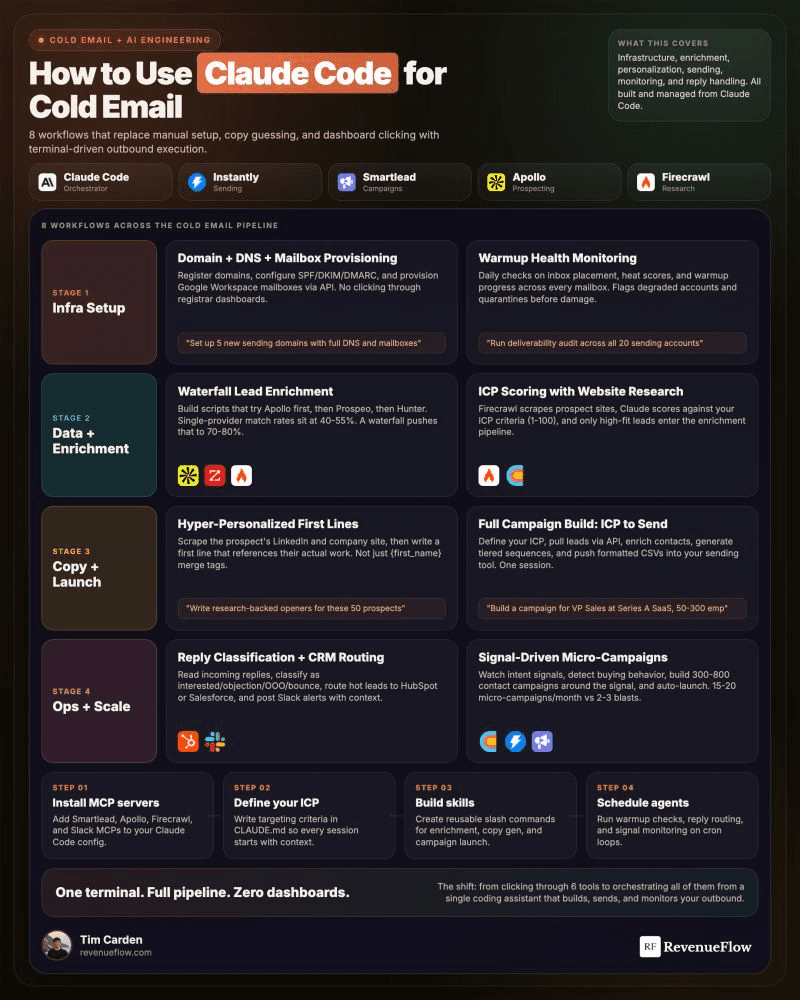
Eight API-driven workflows automate cold email from domain provisioning through reply routing to signal-triggered campaigns, all orchestrated through Claude Code. The core advantage is economic: when campaign setup costs near zero, teams can run 15-20 tightly targeted micro-campaigns monthly instead of 2-3 generic blasts, dramatically improving reply rates by matching message specificity to list precision.
Key takeaways
- Teams can scale from 2-3 large generic campaigns to 15-20 tightly targeted micro-campaigns per month when automation removes setup friction.
- Reply handling should be built first because it carries zero deliverability risk and fixes the highest-cost failure: qualified prospects cooling while responses sit unread.
- Waterfall enrichment stops querying after the first verified result across Apollo, Hunter.io and Prospeo, preventing redundant API costs.
- ICP scoring with website crawling via Firecrawl is the cheapest pipeline stage to disqualify accounts before purchasing contact data.
- Signal-driven micro-campaigns rank last in build order because they carry high deliverability risk if volume limits are not enforced.
Reviewed and updated September 5, 2026
8 Workflows That Turn Claude Code Into a Cold Email Machine
Most teams are still doing this manually.
Buying domains by hand. Setting up DNS by hand. Writing sequences by hand. Checking warmup dashboards by hand. Routing replies by hand.
That is six tools, twelve tabs, and a full day gone. Every time you launch a campaign.
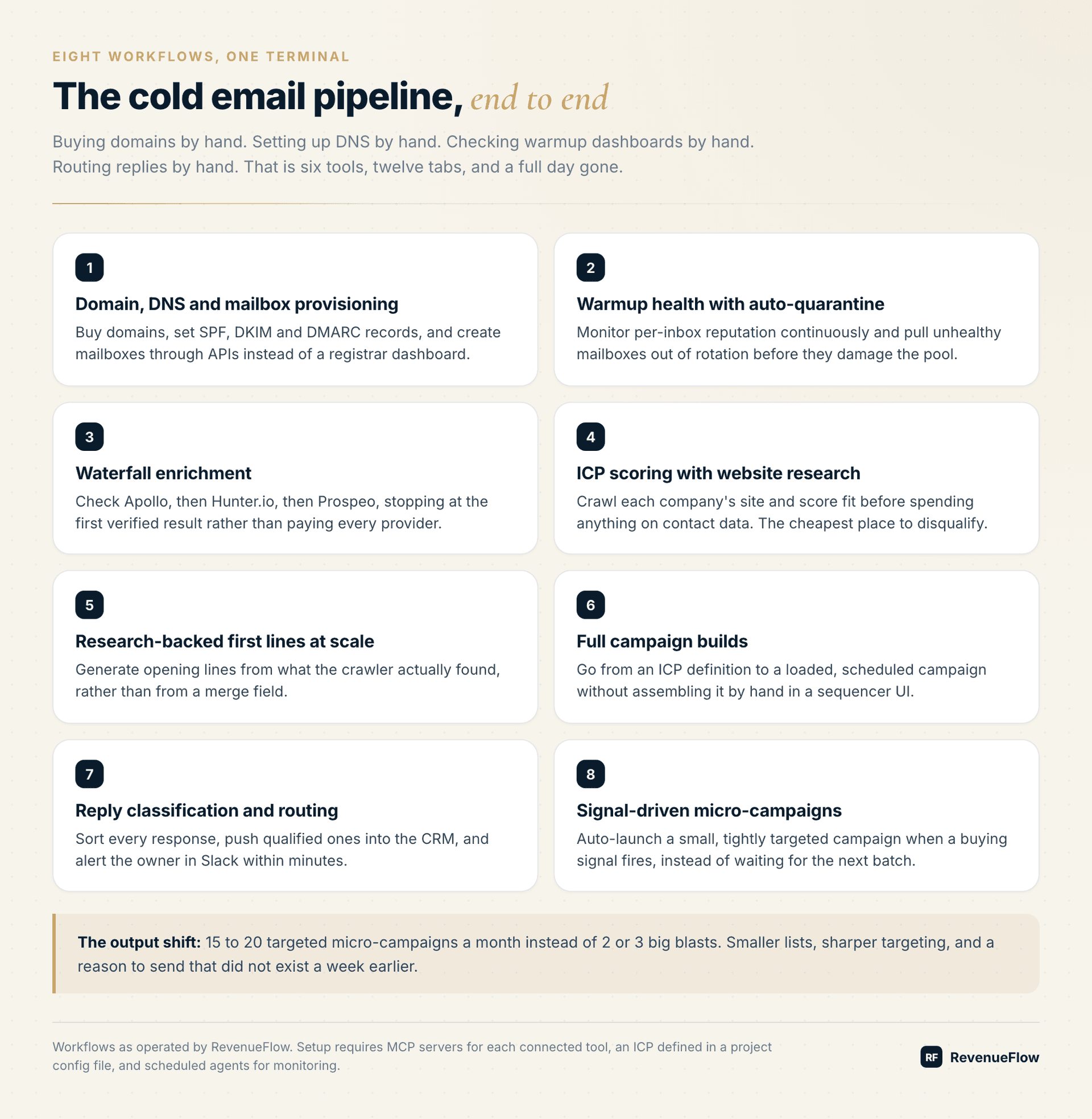
The Eight Workflows
1. Domain, DNS and mailbox provisioning via API. Buy domains, set SPF, DKIM and DMARC records, create mailboxes. All of it is API-addressable, and none of it needs a registrar dashboard.
2. Warmup health monitoring with auto-quarantine. Watch per-inbox reputation continuously and pull unhealthy mailboxes out of rotation automatically. Without this, one degraded domain quietly drags down the whole pool and you notice weeks later.
3. Waterfall enrichment across Apollo, Hunter.io and Prospeo. Stop at the first verified result rather than querying every provider for every contact.
4. ICP scoring with Firecrawl website research. Crawl the company site and score fit before spending on contact data. This is the cheapest place in the entire pipeline to disqualify an account.
5. Research-backed personalised first lines at scale. Generate openers from what the crawler found rather than from a merge field.
6. Full campaign builds from ICP definition to send. Go from a definition to a loaded, scheduled campaign without assembling it in a sequencer interface.
7. Reply classification with CRM routing and Slack alerts. Sort every response and get qualified ones in front of a human in minutes.
8. Signal-driven micro-campaigns that auto-launch. When a buying signal fires, a small tightly targeted campaign goes out immediately instead of waiting for the next batch.
The Setup
Four things, in order:
- Install MCP servers for the tools you use (Smartlead, Apollo, Firecrawl, Slack)
- Define your ICP in a project config file so every workflow shares the same definition
- Build reusable skills for each workflow rather than re-prompting each time
- Schedule agents for the monitoring jobs that need to run without you
The ICP definition being centralised matters more than it sounds. When scoring, personalisation, and campaign building all read from one file, changing your targeting is a single edit rather than a hunt through eight prompts.
The Result That Actually Matters
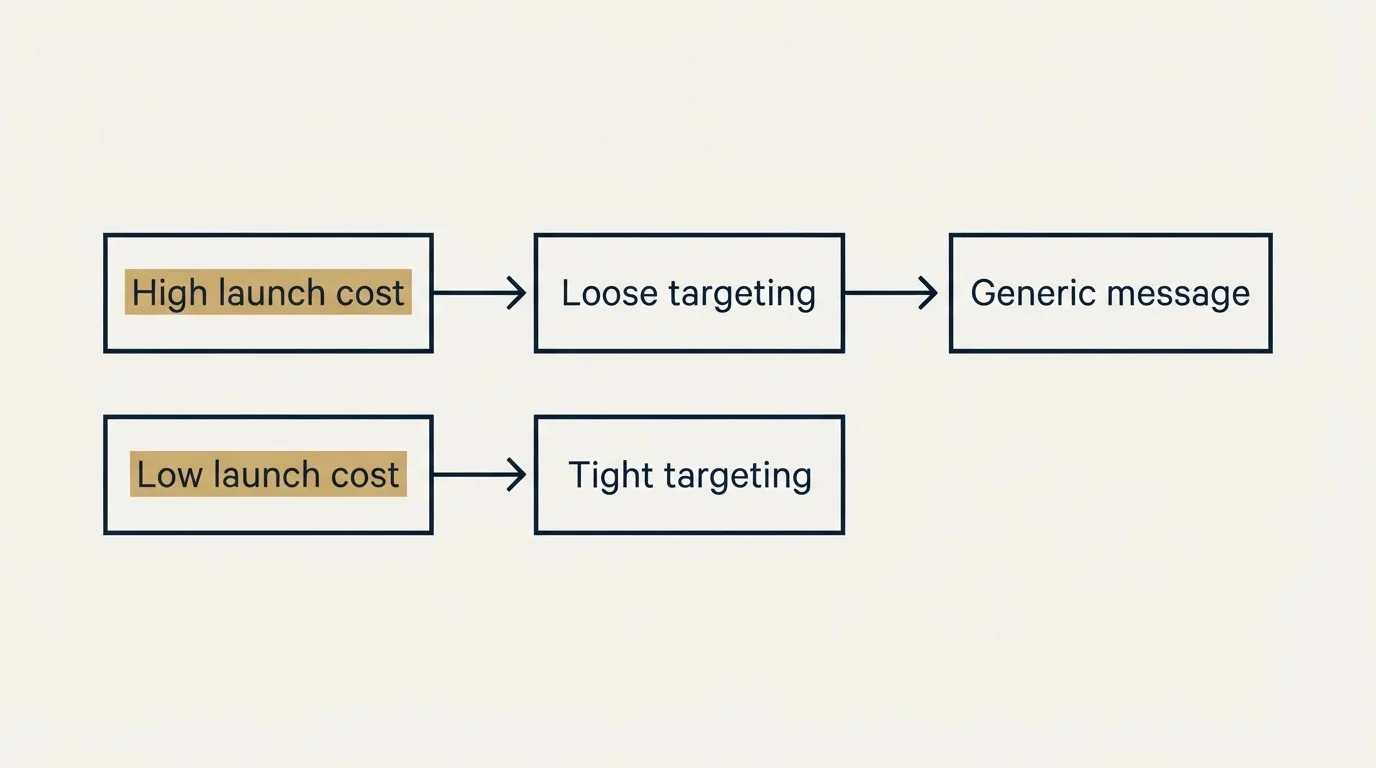
15 to 20 targeted micro-campaigns per month instead of 2 or 3 big blasts.
That is the real change, and it is worth being precise about why it helps.
Big blasts force a compromise. To justify the setup effort, the list has to be large, which means the targeting has to be loose, which means the message has to be generic. Every step follows from the cost of launching.
When launching costs almost nothing, you can run a campaign to 200 companies that all did the same specific thing last week. The list is small, the targeting is tight, and the message can reference something real. That combination is what produces reply rates that look nothing like the benchmark.
- the list has to be large, which means the targeting has to be loose, which means the message has to be generic
- Every step follows from the cost of launching.
- The list is small, the targeting is tight, and the message can reference something real.
- That combination is what produces reply rates that look nothing like the benchmark.
What Gets Harder
Two things, and they are worth planning for.
Monitoring becomes your job. A person running campaigns manually notices when something looks wrong. An automated pipeline running twenty micro-campaigns does not volunteer that enrichment has been returning nulls since Tuesday. Build the health checks before you build the volume.
Deliverability risk scales with automation. The system will happily send at a volume that damages your domains if you let it. Auto-quarantine, gradual ramping, and hard volume ceilings are not optional features here, they are what makes the rest safe to run.
Since Smartlead exposes campaign and deliverability data through its own MCP server, it helps to understand exactly what an AI agent can reach inside your sending account before automating around it.
Where To Start
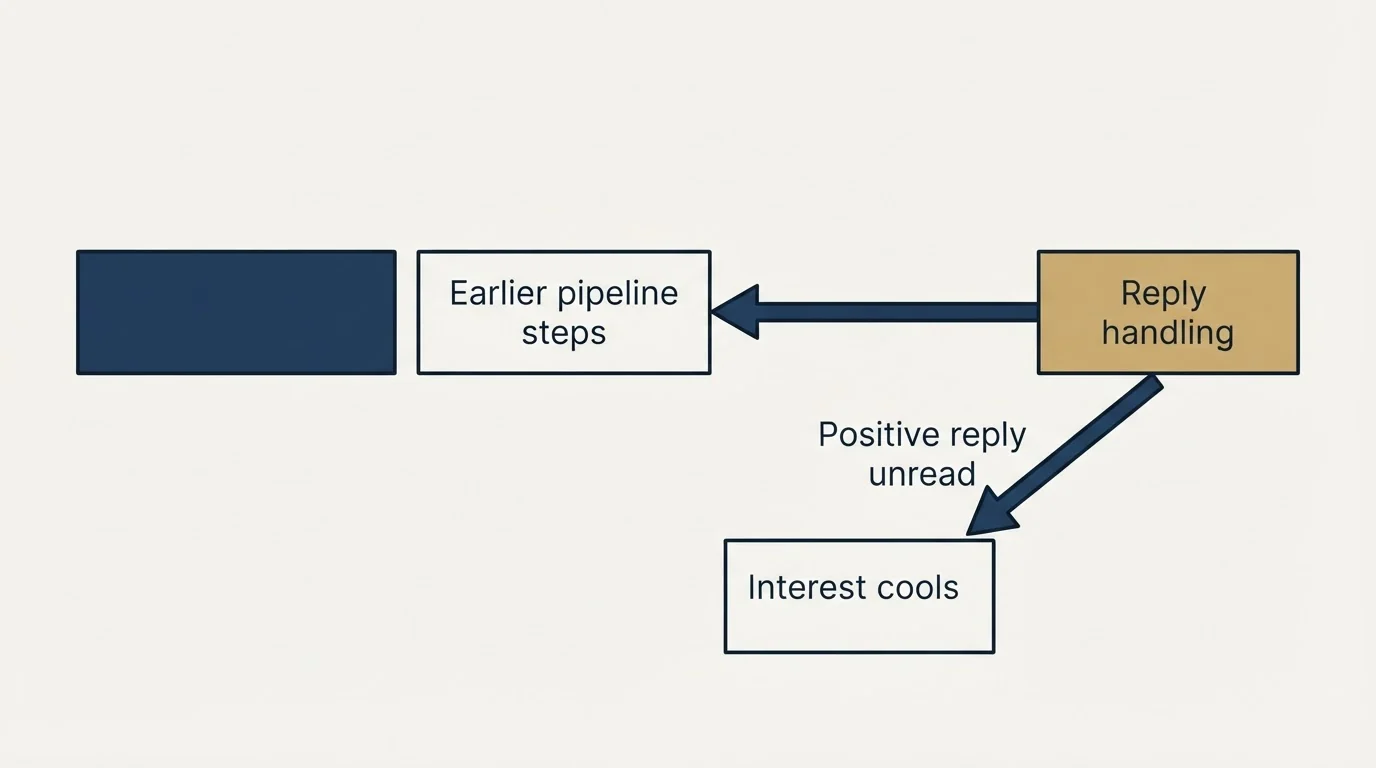
Workflow 7, reply handling, before anything else.
It is the highest-value automation in the list, it touches nothing that can damage your sending reputation, and it fixes the failure that costs teams the most: a positive reply sitting unread while the prospect's interest cools.
Then build backwards up the pipeline.
One terminal. Full pipeline. No dashboards.
The Eight Workflows, Ranked By Where To Start
| # | Workflow | Risk to sending reputation | Build order |
|---|---|---|---|
| 7 | Reply classification and routing | None | First |
| 4 | ICP scoring with website research | None | Second |
| 3 | Waterfall enrichment | Low | Third |
| 2 | Warmup monitoring with auto-quarantine | Protects it | Fourth |
| 1 | Domain, DNS and mailbox provisioning | Medium | Fifth |
| 5 | Personalised first lines at scale | Low | Sixth |
| 6 | Full campaign builds | Medium | Seventh |
| 8 | Signal-driven micro-campaigns | High if unbounded | Last |
Frequently Asked Questions
Why start with reply handling rather than sending?
It is the highest-value automation on the list, it touches nothing that can damage your domains, and it fixes the failure that costs teams the most: a positive reply sitting unread while the prospect's interest cools. Build backwards up the pipeline from there.
Why are micro-campaigns better than large batches?
Big blasts force a compromise. To justify the setup effort, the list has to be large, so the targeting has to be loose, so the message has to be generic. When launching costs almost nothing, you can email 200 companies that all did the same specific thing last week.
What is the biggest risk of automating cold email?
The system will happily send at a volume that damages your domains. Auto-quarantine, gradual ramping, and hard volume ceilings are not optional features here, they are what makes the rest safe to run at all.
Do I need MCP servers for this?
They help substantially where they exist, because they remove the integration you would otherwise write and maintain. Where a vendor has no MCP server, the agent writes against the raw API instead, which works but puts maintenance back on you.
The mechanics of letting an agent create, start and pause campaigns directly are worked through in lemlist's MCP server integration.
What does the ICP file actually do?
It centralises your targeting definition so scoring, personalisation, and campaign building all read from one place. Changing your targeting becomes a single edit rather than a hunt through eight separate prompts, which is what keeps the workflows consistent as they multiply.
Related Reading
- 5 Marketing Workflows You Can Run Entirely From the Terminal
- Claude Code Is the Best GTM Tool of 2026 (Because It Operates the Whole Stack)
- The Gap Between a Chat App and an Engineer: 5 B2B Marketing Workflows
We build AI-native pipeline systems and you pay per qualified meeting, not a retainer. No paying for activity. You only pay when we book you a qualified sales meeting. See if you qualify.
Frequently asked questions.
Frequently asked questions- Why should I start with reply handling instead of building sending workflows first?
- Reply classification is the highest-value automation with zero deliverability risk. It solves the most expensive failure in cold email: qualified prospects losing interest while positive replies sit unread. Building backwards from reply handling toward sending lets you capture value immediately while learning the system before touching anything that can damage your domains.
- How do micro-campaigns produce better results than large batch sends?
- Large batches force a compromise chain: high setup cost demands large lists, large lists require loose targeting, loose targeting necessitates generic messaging. When automation drops launch costs to near zero, you can send to 200 companies that all exhibited the same specific behavior last week, allowing tight targeting and contextual messaging that drives reply rates far above benchmarks.
- What is the biggest risk when automating cold email workflows?
- The system will send at volumes that damage your domains if you allow it. Automated pipelines running twenty simultaneous micro-campaigns lack the manual operator's natural error detection. Auto-quarantine for unhealthy mailboxes, gradual volume ramping, and hard sending ceilings are not optional features but essential safeguards that make high-volume automation safe to operate.
- What does waterfall enrichment mean in cold email?
- Waterfall enrichment queries data providers sequentially and stops at the first verified result instead of checking every service for every contact. The workflow cascades through Apollo, Hunter.io, and Prospeo in order, preventing redundant API calls and unnecessary costs when an earlier provider returns valid contact data.
About the author.

Tim Carden is CMO / CTO at RevenueFlow, which builds and operates outbound revenue engines for B2B companies. Studied at McGill University.
Tim Carden · CMO / CTO
Connect on LinkedIn →Explore more.
Ready to scale your outreach?
We build GTM engines that book real meetings. See the receipts.
Related articles.
The Smartlead MCP Server: What an AI Agent Can Reach
Smartlead's MCP server puts campaign status, lead data and deliverability behind a chat interface. The transport limit, the client limit, and where the key travels.
The lemlist MCP Server: When the Agent Can Launch Campaigns
lemlist's MCP server can create, start and pause campaigns, not just read them. The OAuth path, the credit meter, and the three database figures its pages disagree on.
Cold Email Sender Name: Whose Name Goes On It
The from field is read before the subject line and is the only part of a cold email a recipient can independently verify. What has to agree, and what breaks it.
The Cold Email Signature Is an Identity Claim
A recipient who is mildly interested and mildly suspicious checks that you exist before replying. The signature is where that check either resolves or does not.
What a Cold Email Is, and What Separates It From Spam
A cold email is a first business email to somebody with no prior relationship with you. What that one condition rules in, rules out, and demands technically.
GMass Mail Merge: Sending Inside Gmail, and What It Costs
GMass runs the merge inside Gmail, which removes every setup step and hands your sending ceiling and your reputation to Google in the same move.