Instantly.ai Review: What the Plans Include and Who It Suits
Instantly gives unlimited inboxes on every paid plan and meters contacts and send volume instead. What that changes, where each tier runs out, and who it fits.
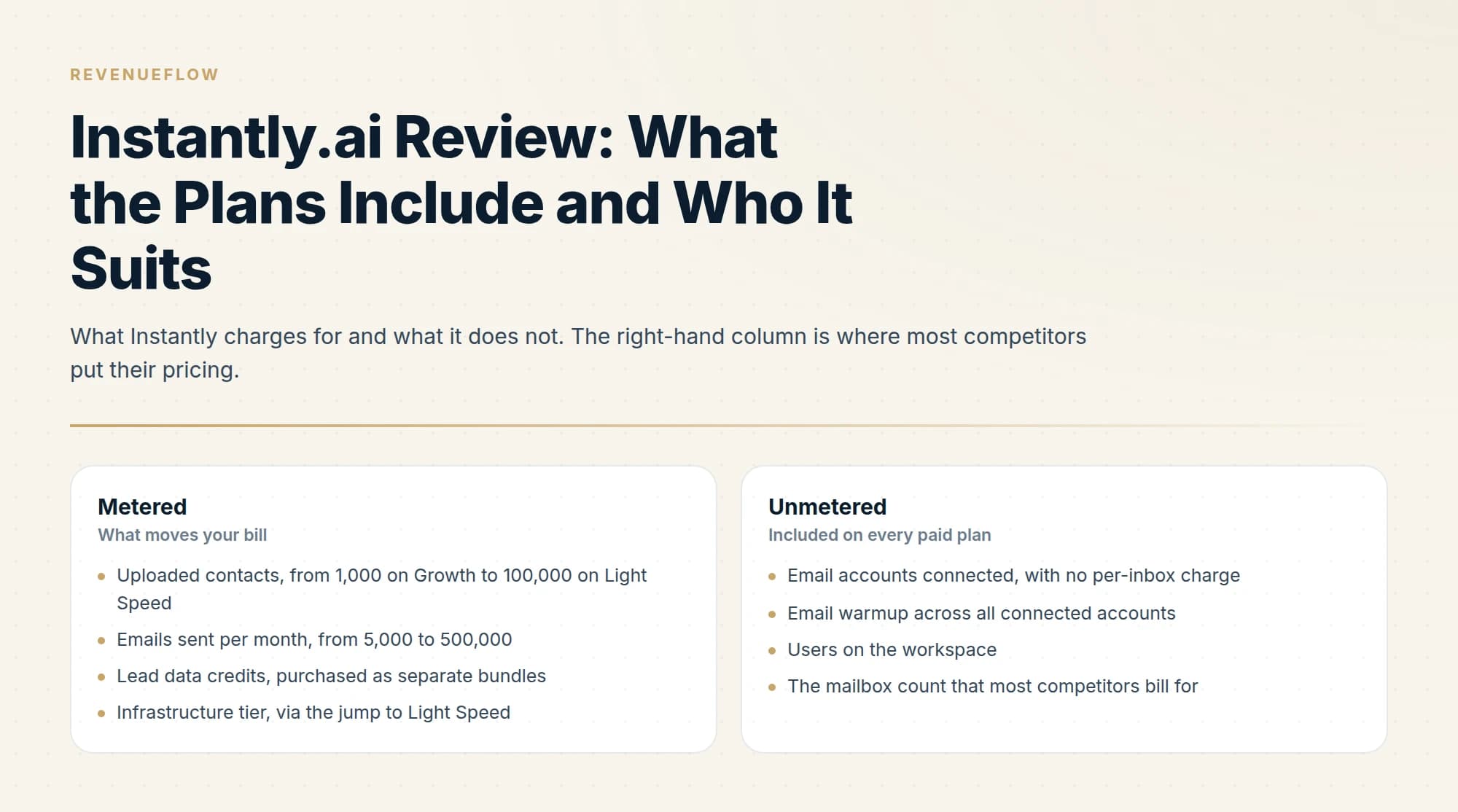
Instantly plans are separate subscriptions: Email Outreach for sending at US$47, US$97 or US$358 a month, each with unlimited email accounts and warmup, and Instantly Credits for lead data from US$9. Outreach upgrades are prorated, credits upgrades charge in full, and exceeding a plan's volume means upgrading, with no overage charge.
Key takeaways
- Every Email Outreach plan carries unlimited email accounts and warmup, so Instantly meters uploaded contacts and monthly emails: 1,000 and 5,000 on Growth, 25,000 and 125,000 on Hypergrowth.
- The uploaded contact limit is fixed across all campaigns rather than monthly, and every tier allows five emails per contact, so a one-email-per-contact motion hits the contact ceiling first.
- Billing differs by subscription: Email Outreach upgrades are prorated and keep the renewal date, while an Instantly Credits upgrade charges the full new price and starts a new cycle.
- Instantly sells domains at US$15 a year and mailboxes at US$4 to US$10 a month, and says it keeps ownership of pre-warmed domains and cannot transfer them.
Reviewed and updated September 18, 2026
Instantly plans put unlimited email accounts and unlimited warmup on every Email Outreach tier, including the US$47 one. That single decision shapes the whole product, because the thing most cold email tools charge for is the thing Instantly gives away, and the meter has to sit somewhere else instead. It sits on uploaded contacts and monthly send volume, and on a second subscription for lead data.
Understanding where the meter actually is turns out to be most of what you need to evaluate the tool. This is a documentation-grounded review rather than a hands-on one: we run Email Bison for sending and HeyReach for LinkedIn, so we do not operate Instantly and will not claim results from it. Everything below is checked against Instantly's own pricing page, its help centre and its developer documentation.
Cold email sending is only one stage of a revenue workflow, and how Instantly compares to Gong explains where deal intelligence and coaching fit alongside outreach execution.
Instantly plans and how billing works
Instantly plans are separate subscriptions, each billed on its own: Email Outreach for sending (Growth at US$47, Hypergrowth at US$97 and Light Speed at US$358 a month), Instantly Credits for lead data and the AI agents, plus CRM, Inbox Placement and done-for-you mailboxes. There is no overage charge: Instantly's pricing file says that once a plan's included volume is exceeded, you upgrade tiers.
The Email Outreach tiers, at monthly billing:
| Plan | Monthly | Uploaded contacts | Emails per month |
|---|---|---|---|
| Growth | US$47 | 1,000 | 5,000 |
| Hypergrowth | US$97 | 25,000 | 125,000 |
| Light Speed | US$358 | 100,000 | 500,000 |
| Enterprise | Custom | 100,000+ | 500,000+ |
Annual billing brings those to US$37.60, US$77.60 and US$286.30 a month respectively. One inconsistency is worth knowing: the monthly Hypergrowth card, the help centre and the pricing file say 125,000 emails a month, while the yearly card and the on-page feature table say 100,000.
Every one of those tiers carries unlimited email accounts and unlimited email warmup. Growth adds chat support, Hypergrowth adds premium live support, Light Speed adds the SISR system, and Enterprise adds a private deliverability network and a dedicated account manager, with a shared Slack channel on its yearly card. An Email Outreach add-on at US$87 a month adds 25,000 uploaded contacts and 125,000 emails on Hypergrowth and Light Speed.
What the Instantly Growth plan includes, and what it leaves out
The Instantly Growth plan is US$47 a month for 1,000 uploaded contacts and 5,000 emails. Instantly's pricing file lists basic A/Z testing and a preview-only Unibox on Growth, with full 26-variant testing, full in-app Unibox replies and native webhooks starting at Hypergrowth. API access is on every plan. The help centre adds the detail that matters most: the uploaded contact limit is a fixed limit across all campaigns, not a monthly allowance.
How Instantly billing works
Lead data sits on its own Instantly Credits subscription. The help centre lists Nano at US$9 a month for 150 credits, Growth credits from US$47 for 1,500, Supersonic from US$97 and Hyper Credits from US$197. Credits expire 2 months after purchase on monthly plans and 1 year after purchase on annual plans, and each workspace needs its own subscription.
The billing rules differ by subscription, which is where surprises come from. An Email Outreach upgrade takes effect immediately and is prorated, keeping your renewal date; a downgrade is also immediate, with the unused time added to your account balance as credit. A credits upgrade charges the full price of the new plan at once and starts a new billing cycle, while a credits downgrade waits for the end of the cycle. Cancelling Email Outreach ends it with the billing cycle, after which accounts, warmup and campaigns pause, and the help centre says Instantly does not offer the option to pause subscriptions.
Email Outreach
- Upgrade: immediate and prorated, renewal date kept
- Downgrade: immediate, unused time added to your balance as credit
- Cancel: ends with the billing cycle, then accounts, warmup and campaigns pause
Instantly Credits
- Upgrade: full price at once and a new billing cycle
- Downgrade: waits for the end of the cycle
- Expiry: 2 months after purchase, or 1 year on annual plans
Domains and mailboxes
- Renewal: email accounts on the 15th of each month, billed apart
- Price: US$15 a year per domain, US$4 to US$10 a month per account
- Cancel: immediate, account by account
No pause option on any subscription, and each workspace needs its own subscription.
Instantly domains and mailboxes
Instantly also sells the mailboxes. Its help centre lists domains at US$15 a year, pre-warmed Google accounts at US$10 a month, done-for-you Google accounts at US$5 and Airmail accounts at US$4. Email accounts renew on the 15th of each month, billed apart from the main plan, and cancelling one takes effect immediately. Pre-warmed accounts come in batches of 5, and the help centre says Instantly retains domain ownership and administrator access and cannot transfer them, so those domains stay with Instantly if you leave.
Where the meter actually sits
The jump from Growth to Hypergrowth is the one worth studying, because it is 25 times the contacts and 25 times the sending volume for roughly twice the price (20 times the volume on the yearly card's figure). Past Hypergrowth, the add-on keeps the same shape: Hypergrowth plus one add-on is US$97 + US$87 = US$184 a month for 50,000 uploaded contacts and 250,000 emails. Growth at 5,000 emails a month is about 170 a day, which is two or three mailboxes running conservatively. Anyone operating a real outbound programme is on Hypergrowth or above, and Growth is best understood as an entry point rather than a working tier.
The SISR system

Light Speed introduces something Instantly calls SISR, for Server and IP Sharding and Rotation. Instantly's description of what it does: it automatically assigns dedicated and private server and IP blocks, so you do not need to purchase private servers or proxies separately; dedicated IP pools reduce the risk of reputation issues in one place affecting other campaigns; and flagged IPs are swapped out immediately.
That is a meaningful feature and it is worth reading precisely. It is infrastructure isolation, which reduces the blast radius when something goes wrong. It is not a guarantee about inbox placement, and Instantly does not present it as one.
What unlimited inboxes actually changes
Because inboxes are free, the correct move is many mailboxes each sending conservatively rather than a few mailboxes each sending hard. Twenty mailboxes at 25 emails a day is a very different reputational profile from five mailboxes at 100 a day, even though both produce 500 sends. Mailbox providers respond to per-mailbox volume and per-mailbox behaviour, so spreading the load is genuinely protective.
The catch is that unlimited inboxes in the tool does not mean free inboxes in reality. Every mailbox is a real Google or Microsoft seat, or an Airmail account, on a real domain that you buy, from Instantly's own store or elsewhere, and then warm and maintain. The sending platform is often the cheapest line in the infrastructure budget, and a plan advertising unlimited accounts can quietly encourage you to acquire more mailbox infrastructure than your list justifies.
The second catch is the send cap. Unlimited inboxes under a 5,000-emails-a-month ceiling means unlimited connections to a metered pipe. Size the plan on the volume, not on the mailbox count.
Teams weighing whether Instantly fits alongside a broader sales engagement stack can see how the two categories differ in Groove by Clari compared with Instantly.
The API is a real part of the product
Instantly publishes exact API rate limits, which is rarer in this category than it should be and materially useful if you intend to automate anything.
The figures are 100 requests a second and 6,000 a minute, applied to the entire workspace, shared between API v1 and v2, and shared across every API key you issue. That last clause closes the obvious workaround: minting a second key buys no additional throughput.
Keys are scoped by resource and action, in shapes like accounts:read and accounts:all, with wildcards for broader access. That granularity is worth using. A reporting integration does not need permission to pause mailboxes, and scoping keys narrowly turns the blast radius of a leaked credential into a decision rather than an accident.
The automation surface covers the operational work: bulk-pausing up to 100 accounts in a single call, enabling and disabling warmup as pollable background jobs, per-account daily send analytics, and an OAuth flow for connecting Google and Microsoft accounts programmatically. That last one is what makes provisioning a large mailbox estate scriptable rather than a week of clicking.
The comparison point worth knowing: Smartlead's API rate limits guide counts per API key, 60 requests a minute on its Standard tier and 120 on Pro, where Instantly counts the whole workspace. If you are choosing between the two and intend to build, that difference shows up on day one.
What a review cannot tell you
Nobody can tell you what your inbox placement will be. Placement is decided by recipient-side reputation systems that respond to your domains, your sending history, your list quality and your content. A platform can help or hinder at the margins through infrastructure and pacing controls. It cannot deliver placement, and any tool review implying otherwise is selling something. What actually governs it is published by the mailbox providers themselves: Google requires SPF or DKIM for all senders, valid forward and reverse DNS, TLS, and spam rates in Postmaster Tools below 0.30%, with SPF, DKIM and DMARC all required above 5,000 messages a day to Gmail.
We have not run Instantly at volume, so there are no reply rates, deliverability figures or uptime observations from us in this article. Our stack is Email Bison and HeyReach with a MillionVerifier, Prospeo and Findymail waterfall for finding addresses. Reviews that quote hands-on numbers are more useful than this one on those specific points, and worth reading alongside it.
How to evaluate it in two weeks

The plans are month-to-month if you skip annual billing, and Instantly's pricing file lists a 14-day free trial, no card required, with 250 uploaded contacts and 1,000 emails. That is enough to judge the interface and not enough for a real segment, so the trial and one paid month together make the real evaluation.
Take Growth for one month after the trial and use it on a genuinely small campaign rather than a test list. Five thousand sends is enough to run a real segment, and the questions it answers are the ones that matter: does the interface fit how your team works, does the reply handling surface conversations somewhere useful, and does the sending behave predictably against your own domains.
What one month will not tell you is anything durable about deliverability, because placement depends on domain history that a new setup has not accumulated yet. Judging a platform on placement in week two mostly measures the age of your domains.
The decision that should come out of the trial is whether the metering shape fits your motion; the tier ceilings and how they map to your volume are what you will live with. If you cancel, do it before the renewal date: the help centre says an Email Outreach cancellation takes effect at the end of the billing cycle.
Who it suits
The unlimited-inbox model pays off in some motions and bites in others:
- Good fit: you run many mailboxes at low per-mailbox volume, and your monthly send volume fits inside a tier, since exceeding it means an upgrade rather than an overage.
- Good fit: you want infrastructure isolation and will pay Light Speed pricing for the SISR system.
- Good fit: you want lead data and sending from one vendor and accept two subscriptions, Email Outreach and Instantly Credits.
- Poor fit: you have a large contact list touched once each, because the uploaded contact limit binds before the send limit.
- Poor fit: you need webhooks on the entry tier, since the pricing file gates them to Hypergrowth and above.
For the API in depth, the Instantly API guide covers what that enables and where it constrains. For the tier-by-tier cost detail, the Instantly AI pricing breakdown works through what caps you at each level, and the Smartlead comparison covers the closest competitor on the unlimited-mailbox model.
If you are weighing alternatives more broadly, we maintain a list of Instantly alternatives. And whichever platform you choose, the deliverability guide covers the layer that actually determines results.
We run outbound for clients on a pay-per-qualified-meeting basis, which means tool selection, infrastructure and deliverability sit on our side rather than yours. You can see what a campaign would look like for your market.
Pricing and features are taken from the vendors' own pages. Verify current terms with the vendor before relying on them.
Sources: Instantly pricing, Instantly plans overview, Instantly upgrade and downgrade rules, Instantly cancellation, Instantly API rate limits, Smartlead rate limits guide, Google email sender guidelines
Frequently asked questions.
Frequently asked questions- What plans does Instantly offer?
- Instantly sells separate subscriptions. Email Outreach covers sending: Growth at US$47 a month, Hypergrowth at US$97, Light Speed at US$358 and a custom Enterprise tier. Instantly Credits covers lead data and the AI agents, from Nano at US$9. CRM, Inbox Placement and done-for-you domains and mailboxes are billed on top, each on its own.
- What does the Instantly Growth plan include?
- Growth is US$47 a month, or US$37.60 billed annually, for 1,000 uploaded contacts and 5,000 emails a month with unlimited email accounts, unlimited warmup and chat support. Instantly's pricing file lists basic A/Z testing and a preview-only Unibox on Growth; webhooks and full Unibox replies start at Hypergrowth.
- How does Instantly billing work when you upgrade or cancel?
- An Email Outreach upgrade is immediate and prorated, and your renewal date stays the same. A credits upgrade charges the full price at once and starts a new cycle. Cancelling Email Outreach ends it with the billing cycle, after which accounts, warmup and campaigns pause. Instantly's help centre says it offers no option to pause a subscription.
- Can you buy domains from Instantly?
- Yes. Instantly's help centre lists domains at US$15 a year, pre-warmed Google accounts at US$10 a month, done-for-you Google accounts at US$5 and Airmail accounts at US$4. Pre-warmed accounts come in batches of 5, and Instantly says it retains domain ownership and administrator access and cannot transfer those domains to you.
About the author.

Tim Carden is CMO / CTO at RevenueFlow, which builds and operates outbound revenue engines for B2B companies. Studied at McGill University.
Tim Carden · CMO / CTO
Connect on LinkedIn →Explore more.
Ready to scale your outreach?
We build GTM engines that book real meetings. See the receipts.
Related articles.
Instantly.ai Pricing: What Each Tier Costs and What Caps You
Adding inboxes to Instantly costs nothing on any plan. What you pay for is contacts and monthly send volume, and here is where each tier actually runs out.
Smartlead Review: Unlimited Mailboxes and What the Plans Cap
Smartlead includes unlimited mailboxes on every plan and bundles verification on the upper tiers. What rotation does, what it cannot do, and where the ceilings bite.
Graymail vs Spam: What the Difference Costs a Sender
Graymail is a claim about a sending pattern. Spam is a claim about intent. They respond to different repairs, and confusing them sends teams to rewrite copy.
ZeroBounce Pricing: The Three Things Buyers Miss
What the ZeroBounce pricing page actually publishes, which billing state it shows by default, and the credit rules that decide what a buyer really pays.
BriteVerify: What It Verifies and the Price to Ask For
BriteVerify checks email, phone and postal address under Validity, and publishes no rate card on any surface that returns a page. What that means for buyers.
Choosing a NeverBounce Alternative: Name Your Reason
Three reasons teams leave NeverBounce, each pointing at a different replacement, plus how to run a two-vendor split test on your own list that actually settles it.