Graymail vs Spam: What the Difference Costs a Sender
Graymail is a claim about a sending pattern. Spam is a claim about intent. They respond to different repairs, and confusing them sends teams to rewrite copy.
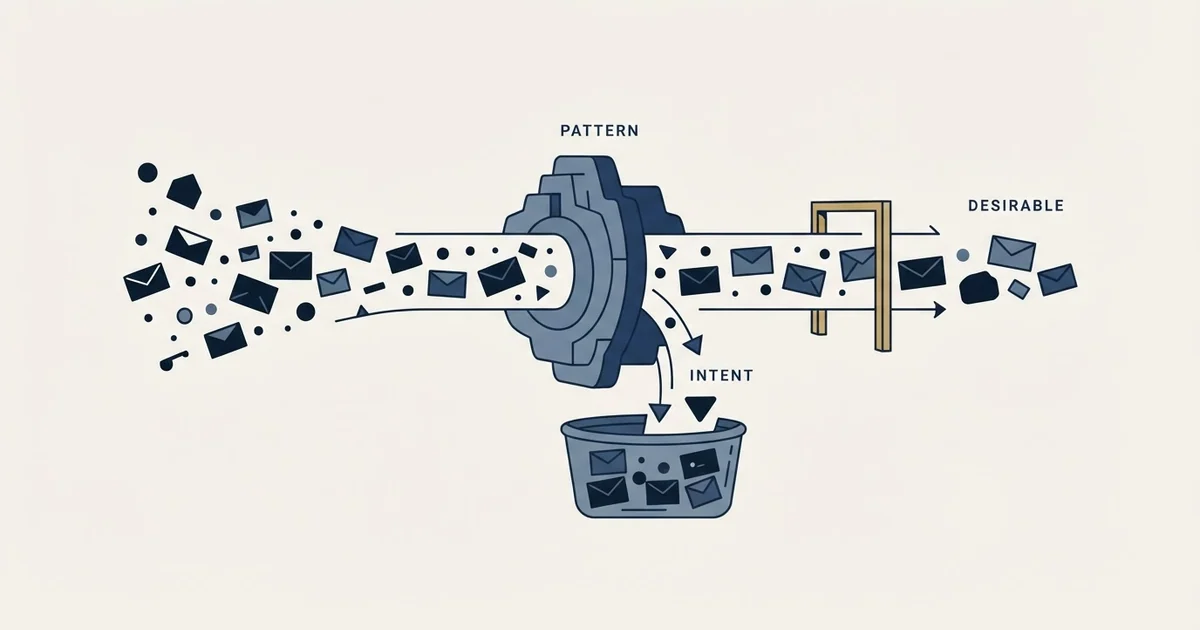
Graymail vs spam comes down to consent and intent. Graymail is bulk email the recipient once asked for from a legitimate sender and no longer values, so filters score it as bulk and file it. Spam is unsolicited and often deceptive, so filters block or junk it. Microsoft publishes the graymail score as a bulk complaint level, 0 to 9.
Key takeaways
- Graymail is solicited bulk mail from a legitimate source whose value varies by recipient; spam is unsolicited, often deceptive and sometimes malicious.
- Microsoft scores graymail as a bulk complaint level from 0 to 9, with default thresholds of 7, 6 on the Standard preset and 5 on the Strict preset, chosen by the recipient's administrator.
- At or above the threshold Microsoft delivers bulk mail to the Junk Email folder, or quarantines it under the Strict preset, so identical mail lands differently at different companies.
- A bulk score is built from complaint history, so the repairs are the segment, authentication, list hygiene and an easy opt-out; subject-line changes and seed-inbox tests do not move it.
Reviewed and updated September 18, 2026
A sender checks the seed inbox, finds the message in Promotions rather than Primary, and starts rewriting subject lines. Nothing in the copy caused it. The filter did not decide the message was abusive. It decided the message was bulk, and bulk has its own bucket with its own rules.
What is graymail?
Graymail is bulk email that a recipient technically asked for and no longer values: newsletters, announcements and promotions from a legitimate sender, worth something to some recipients and nothing to others. Filters treat it as its own category, separate from spam. Proofpoint defines it as solicited mail from a legitimate source, and Microsoft scores it on a published scale from 0 to 9.
Graymail is the name for that bucket. Understanding the difference between graymail and spam matters to a cold sender for one reason: the two verdicts are produced by different mechanisms, respond to different repairs, and confusing them sends teams to rewrite copy when the actual signal was engagement.
What each word means to the people who filter mail
The definitions worth using are the ones the filtering vendors publish, because those are the definitions their products implement.
Proofpoint's own threat reference page on graymail defines it as "bulk email that does not fit the definition of spam because it is solicited, comes from a legitimate source, and has varying value to different recipients". Its examples are newsletters, announcements and targeted advertisements, and it notes that recipients previously opted in, knowingly or unknowingly, while the value of the mailing may have decreased over time.
Microsoft uses the same concept under a different name and makes the mechanism explicit. Its Defender for Office 365 documentation on bulk complaint level states that "Messages from a bulk sender are known as bulk mail or gray mail", and describes a numeric score attached to inbound messages in an X-header. The published scale runs from 0, where "The message isn't from a bulk sender", through 1 to 3 for "a bulk sender that generates few complaints", 4 to 7 for a mixed number of complaints, and 8 to 9 for "a bulk sender that generates a high number of complaints".
Spam is the other category, and its defining property is not volume. It is that the message is unsolicited, frequently deceptive, and sometimes malicious. A filter reaching a spam verdict is making a claim about intent. A filter reaching a graymail verdict is making a claim about a sending pattern and a complaint history, and it is explicitly declining to make the intent claim.
Graymail vs spam: the difference
The difference between graymail and spam is consent and intent. Spam is mail the recipient never asked for, which Proofpoint calls its main quality. Graymail is solicited mail from a legitimate sender that the recipient has stopped valuing. Filters act on that difference: spam is blocked or junked as abuse, while graymail is scored as bulk and filed.
Graymail, or bulk
A claim about a sending pattern
- Solicited, from a legitimate source, of varying value
- Scored on complaint history and sending pattern
- Filed: Junk Email, Promotions, or quarantine under a strict policy
- Threshold chosen by the recipient's administrator
- Repaired by changing who is on the list
Spam
A claim about intent
- Unsolicited, often deceptive, sometimes malicious
- Scored on content, authentication, reputation and known signatures
- Blocked, quarantined or filed as junk
- Thresholds far less discretionary
- Repaired by fixing authentication, list quality and complaint rate
The verdict is a scale, not a switch
This is the part that changes how a cold sender should read a placement problem.
Microsoft's documentation publishes the thresholds directly. The default bulk complaint level threshold used in anti-spam policies is 7. The Standard preset security policy uses 6, and the Strict preset security policy uses 5. Messages meeting or exceeding the configured threshold have the policy's bulk action taken on them. Microsoft publishes that too: under the default policy and the Standard preset the message is delivered to the recipient's Junk Email folder, and under the Strict preset it is quarantined.
Three things follow from that, and none of them is about your copy.
The threshold is set by the recipient's administrator, not by you. The same message, from the same domain, on the same day, can land in the inbox at one company and in junk at another because one of them selected a stricter preset. A seed test in your own mailbox measures your own configuration.
The score is driven by complaint history rather than by content. A bulk sender generating few complaints scores low. The lever is who you send to and whether they mind, which is a list decision made before anything was written.
And there is a middle band that behaves like neither inbox nor spam. A message scored as bulk is not accused of anything. Under the default policy and the Standard preset it is filed in Junk Email, and it is quarantined only where an administrator chose the Strict preset. On the consumer side the same middle band is what the Promotions tab does, and the corpus covers what that means for placement diagnosis in the spam folder, which sets out the three destinations rather than the usual two.
Where cold outreach actually sits
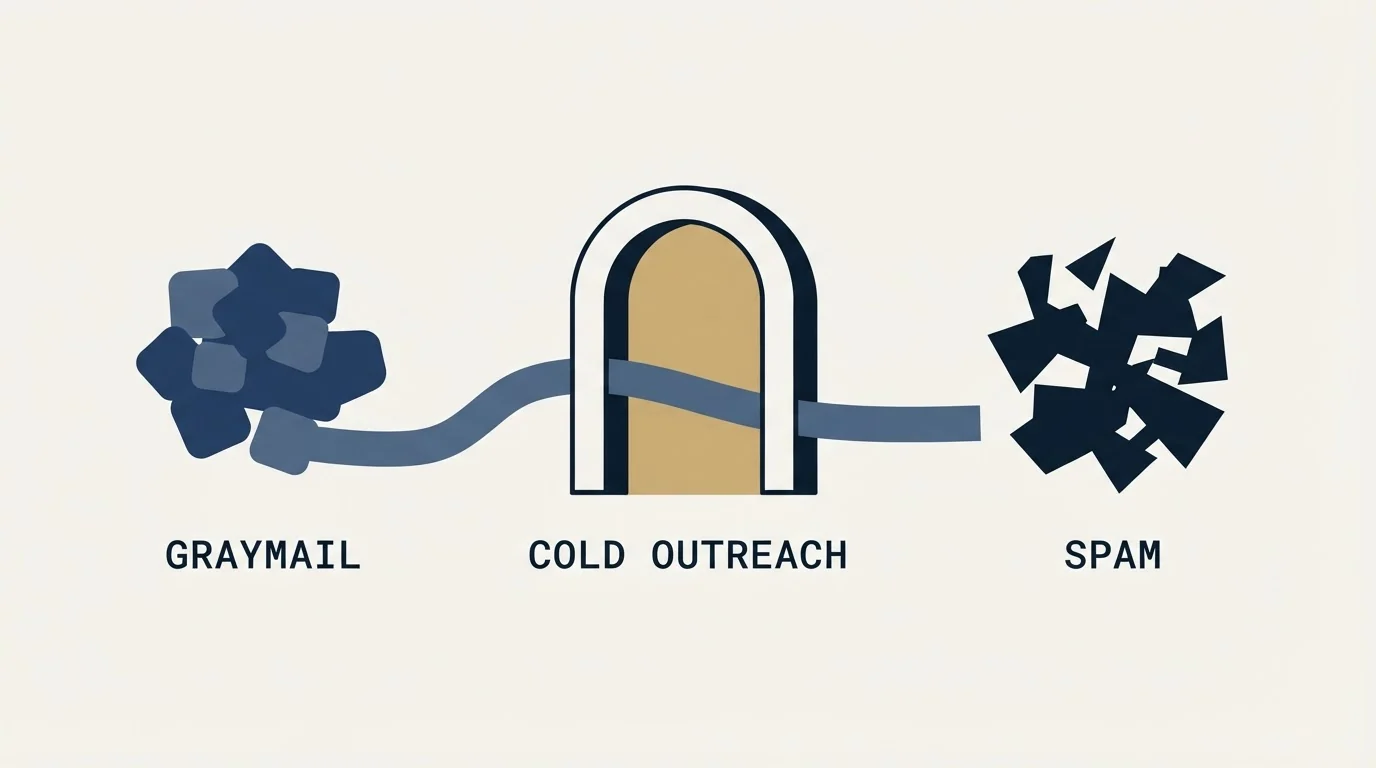
Worth accepting rather than arguing with: B2B cold outreach lives in the graymail neighbourhood by construction. It is bulk by any reasonable definition, it comes from a real sender, and its value genuinely varies by recipient. That is the honest description, and the corpus makes the same point when reading a gateway's own material in the Mimecast spam filter.
The one place cold outreach differs from the newsletter case Proofpoint describes is consent. A newsletter recipient opted in at some point and later stopped caring. A cold recipient never opted in at all. That gap is what makes complaint rate the binding constraint on the whole motion, because complaint rate is what a bulk score is built from and it is the one number a cold programme can move.
Google publishes its side of this as a hard requirement rather than as guidance. Its sender guidelines page tells all senders to "Keep spam rates reported in Postmaster Tools below 0.3%", and applies a further set of requirements including DMARC to anyone who sends more than 5,000 messages per day to Gmail accounts. What that threshold means for a cold sender's actual tier, and what the number is really measuring, is worked through in the Google spam filter.
Telling them apart from the outside
A sender cannot read the recipient's headers, so the diagnosis has to be made from the shape of the failure rather than from the verdict itself. Three patterns separate reasonably well.
Placement that varies by recipient organisation while the message is identical points at a bulk verdict, because the threshold is a per-organisation setting and the content is a constant. Two companies on the same list, same day, same copy, opposite outcomes is the signature.
Placement that collapses across every recipient at once, shortly after a change to sending domains, mailboxes or authentication, points at the spam side. That verdict travels with the sending identity rather than with the audience, so it does not respect organisational boundaries.
Placement that degrades gradually over several campaigns from the same domain, with nothing changed in the copy or the configuration, points at an accumulating complaint history. That is a bulk score moving up its scale, and it is the slowest to notice and the slowest to reverse, because the input it responds to is the previous few weeks of recipient behaviour rather than today's message.
The fourth pattern is the one that misleads. A message landing in a promotions or bulk folder for a recipient who never opens anything from anyone in that folder is not evidence about your sender reputation at all. It is evidence about that mailbox. Reading a single seed inbox as a measurement of the campaign is the most common diagnostic error in this whole area, and it is expensive because it always produces a copy change.
The repairs, sorted by which verdict they address

The practical value of separating the two verdicts is that it stops a team from applying the wrong repair for six weeks.
Moves a bulk score
- Narrow the segment, the only direct input to a complaint rate
- Fix authentication and alignment, because an unauthenticated bulk sender is scored as both at once
- Remove dead and unverified addresses, since bounces are read as list acquisition
- Make the opt-out obvious and instant, so a person leaves rather than complaining
Does not
- Rewriting subject lines to avoid trigger words, which addresses a content model that is not the one filing you
- Sending more volume to compensate, which raises the pattern signal the score is built on
- Generalising from your own seed inbox, when the threshold is set per recipient organisation
The unsubscribe row deserves a sentence of its own, because it is counter-intuitive to senders who read the opt-out as lost pipeline. A complaint and an unsubscribe are two ways a recipient can express the same thing, and only one of them feeds the score that files your mail. Making the exit easy converts complaints into departures, which is a strictly better trade on the numbers that decide placement. The definitional groundwork on what that rate measures and where it breaks is in spam complaint rate.
Why the graymail verdict is the one worth aiming at
There is a version of this article that treats a bulk verdict as a failure. It is not, and pretending otherwise leads to worse decisions.
A sender scored as bulk with few complaints is in a stable, sustainable place. Microsoft's own scale reserves its bottom band for exactly that sender: bulk, and generating few complaints. The bands above it are earned by complaints rather than by volume. A cold programme cannot stop being bulk, and it can absolutely control which end of that scale it sits at.
That reframes the objective. The goal is not to look unlike a bulk sender, which is not achievable and produces a lot of superstitious copy editing. The goal is to be a bulk sender that nobody complains about, which is a list problem, a relevance problem and an opt-out problem, in that order.
Our own practice makes one of those levers structural rather than optional. We send one message per campaign, with no bumps and no thread replies, so a person who does not answer does not hear from us again inside that campaign. That is documented policy rather than a claim about anybody's numbers, and its relevance here is mechanical: a follow-up is delivered to the population that has already declined once, which is the population most likely to complain, and the complaint feeds the score that decides where every other campaign on the domain lands.
The short version

Graymail and spam are two different verdicts. Graymail is a claim about a sending pattern and a complaint history, and vendors publish it as a numeric score with a threshold the recipient's administrator sets. Spam is a claim about intent, and it is repaired by different things.
Cold outreach is bulk mail by construction, so the achievable goal is the low end of that scale rather than an exit from it. Complaint rate is the input, and the levers that move it are the segment, the authentication, the list hygiene and how easy the exit is. Subject-line superstition, more volume and seed-inbox testing address none of it.
If you would rather see a segment narrow enough that the complaint rate takes care of itself, see what a first campaign looks like.
Frequently asked questions.
Frequently asked questions- What is graymail?
- Graymail is bulk email that does not fit the definition of spam because the recipient opted in at some point and the sender is legitimate. Proofpoint's examples are newsletters, announcements and targeted advertisements whose value to the recipient may have decreased over time. Microsoft calls the same thing bulk mail or gray mail.
- What is the difference between graymail and spam?
- Consent and intent. Proofpoint describes the main quality of spam as the user never having asked to be emailed, while graymail is solicited mail from a real sender that the recipient has stopped valuing. Filters respond differently: spam is blocked or junked as abuse, and graymail is scored as bulk and filed.
- Is cold email graymail or spam?
- B2B cold outreach sits in the graymail neighbourhood by construction: it is bulk, it comes from a real sender, and its value varies by recipient. It differs from a newsletter in that the recipient never opted in, which makes complaint rate the binding constraint, because complaint history is what a bulk score is built from.
- How do I stop my emails being filtered as graymail?
- A bulk sender cannot stop being bulk, so aim for the low end of the scale. Narrow the segment so fewer recipients have no reason to care, fix authentication and alignment, remove dead addresses, and make the opt-out obvious and instant. Rewriting subject lines and sending more volume do not move a bulk score.
About the author.

Tim Carden is CMO / CTO at RevenueFlow, which builds and operates outbound revenue engines for B2B companies. Studied at McGill University.
Tim Carden · CMO / CTO
Connect on LinkedIn →Explore more.
Ready to scale your outreach?
We build GTM engines that book real meetings. See the receipts.
Related articles.
Email Warmup Tools: What Actually Moves Placement
Warmup pools are now free in every major sending tool. What the mechanism actually is, why nobody publishes controlled placement data, and the levers that do work.
Instantly.ai Review: What the Plans Include and Who It Suits
Instantly gives unlimited inboxes on every paid plan and meters contacts and send volume instead. What that changes, where each tier runs out, and who it fits.
Migrating Cold Email Tools Without Losing Domain Reputation
Domain reputation survives a platform switch. Warmup schedules, sending caps and suppression lists do not. How to sequence a migration so mailboxes come through intact.
Smartlead Review: Unlimited Mailboxes and What the Plans Cap
Smartlead includes unlimited mailboxes on every plan and bundles verification on the upper tiers. What rotation does, what it cannot do, and where the ceilings bite.
Blacklist IP Search: Whose IP the Lookup Is Checking
The address your browser reports is almost never the one a receiving server refused. What a blocklist lookup queries, and which IP to run it against.
Email Address Capitalization: What It Changes for Senders
Capitalization in an email address does not decide delivery. It decides whether two rows are one person, and that is where a suppression list quietly fails.