The Instantly.ai API: Rate Limits, Scopes and Automation
Instantly publishes exact rate limits and scopes its API keys. What the workspace-level limit means for your design, and the asynchronous pattern to get right.
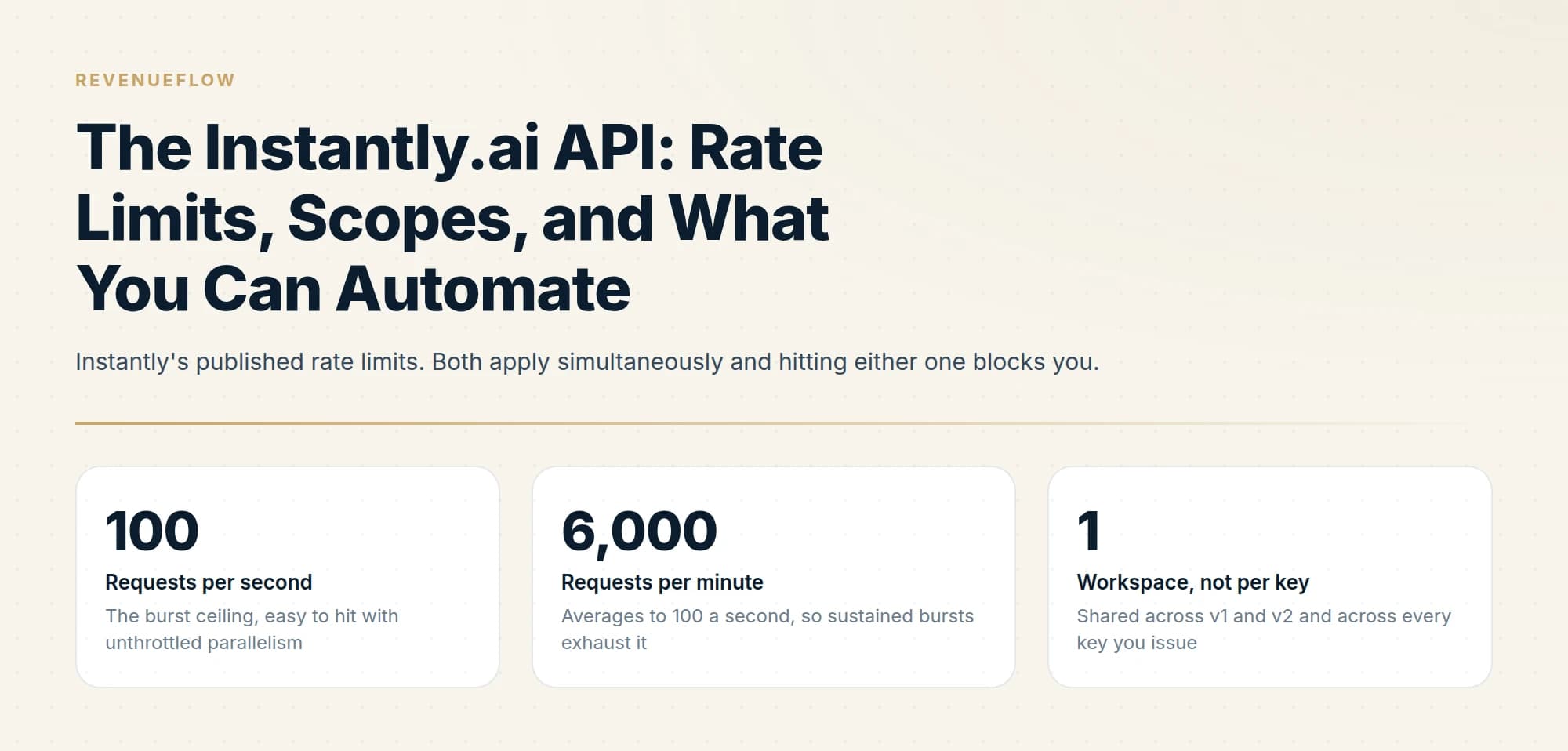
Instantly's API v1 was deprecated on January 19, 2026, and its docs send new integrations to API v2. Listing emails and replies moves from GET /unibox/emails/list to GET /api/v2/emails, filtered to email_type=received for replies and limited to 20 requests a minute, inside a workspace budget of 100 a second and 6,000 a minute.
Key takeaways
- Instantly's migration guide records API v1 as deprecated on January 19, 2026, says to use API v2 for new integrations, and says v1 integrations such as Zapier and Make keep working.
- GET /api/v2/emails replaces the v1 Unibox list; replies are emails of type received, pages hold up to 100, and the endpoint allows 20 requests a minute.
- The workspace limit is 100 requests a second and 6,000 a minute, shared by API v1, API v2 and every key, so a second key adds no throughput.
- Warmup enable and disable return background jobs to poll at GET /api/v2/background-jobs/:id, and the reply_received webhook event pushes replies without spending list calls.
Reviewed and updated September 21, 2026
Instantly publishes its rate limits, which sounds like a small thing until you try to capacity-plan against a competitor that does not. The numbers are 100 requests per second and 6,000 per minute, and the important detail is what they apply to: the entire workspace, shared between API v1 and v2, regardless of how many API keys you have issued.
That last clause defeats the obvious workaround. Minting a second key to double your throughput does nothing, because the limit is not per key. Here is what the API can do, including how to list emails and replies now that API v1 is deprecated, where it constrains you, and the parts worth designing around, all from Instantly's own developer documentation.
Instantly.ai API v1: Listing Emails and Replies
API v1 is deprecated. Instantly's migration guide says it was deprecated on January 19, 2026 and that new integrations should use API v2, though v1 integrations such as Zapier and Make keep working. The v1 call GET /unibox/emails/list maps to GET /api/v2/emails, replies are that list filtered to email_type=received, and POST /unibox/reply becomes POST /api/v2/emails/reply.
GET /unibox/emails/list becomes GET /api/v2/emails, a list with filtering.GET /unibox/emails/unread/count becomes GET /api/v2/emails/unread/count.POST /unibox/reply becomes POST /api/v2/emails/reply, with reply_to_uuid in the body.The v2 list endpoint is where the detail lives, and one line at the top of its reference changes how you build on it: it has a rate limit of 20 requests a minute, unlike other API endpoints. Everything visible in the Unibox comes back from it, campaign emails, replies and manually sent emails alike, so the filters do the work. email_type takes received, sent or manual; campaign_id, lead, eaccount and is_unread narrow the set; min_timestamp_created and max_timestamp_created bound it in time; latest_of_thread returns only the newest email in each thread; and a search of thread: followed by a thread ID pulls one conversation. Marking a thread read moves from POST /unibox/threads/mark-read to POST /api/v2/emails/threads/{thread_id}/mark-as-read. Pages hold up to 100 emails, and starting_after takes the next_starting_after value from the previous response. The key needs emails:read, emails:all, all:read or all:all.
Answering a reply is its own call. POST /api/v2/emails/reply sends only as a reply to an existing email, and it requires reply_to_uuid, the id of the email being answered, plus eaccount, subject and body, with an emails:create or wider scope.
At 20 list requests a minute, polling for replies is the expensive way to watch an inbox. Instantly's webhook events include reply_received and auto_reply_received, which push the event to you instead, and that is the better fit for anything that has to react quickly.
Poll the list
GET /api/v2/emailswithemail_type=received- 20 requests a minute on this endpoint
- Up to 100 emails a page, paged with
starting_after - Narrow with
campaign_id,is_unreadormin_timestamp_created
Subscribe to events
reply_received: a reply was received from a leadauto_reply_received: an auto-reply was received- Pushed to your endpoint, so no list calls are spent waiting
Authentication and scopes
Authentication is a bearer token. Add an authorization header with the value Bearer followed by your API key, and send API v2 requests to https://api.instantly.ai/api/v2.
The more interesting part is that v2 keys are scoped. Endpoints declare the scopes they require, in the shape accounts:read, accounts:create, accounts:update, accounts:delete or accounts:all, with wildcard equivalents like all:read and all:all covering everything.
The documentation's own advice is to select only the scopes your integration requires, and that granularity is worth using rather than defaulting to all:all. A key that only reads analytics cannot pause your mailboxes if it leaks, and a reporting integration has no business holding delete permissions. Issue one key per integration, scoped to what that integration genuinely does, and the blast radius of a compromised key becomes a design decision rather than an accident.
The rate limits, precisely
Exceeding either returns 429.
Note how the two interact. Six thousand a minute averages exactly to 100 a second, so the per-minute limit adds no headroom above the per-second one: a job that runs at the per-second ceiling has no slack left in the minute, and one burst of retries tips it over. Design for a sustained rate comfortably below both. Some endpoints also carry a tighter limit of their own: List email allows 20 requests a minute, and Send a test email 10 a minute per workspace.
Instantly's own documented mitigations are sensible and worth following. Run automations two to four times a day rather than once, so a single run is not trying to push a day's worth of requests at once. And batch: its documentation gives the worked example of updating 10,000 leads by batching 100 at a time with a 2-second wait between batches.
The workspace-level scope has an organisational consequence too. If several integrations share a workspace, they share the limit, and one badly behaved job starves the others. On a shared workspace, self-throttling is not politeness, it is the only thing preventing your reporting job from being blocked by somebody else's bulk update.
What you can automate

The v2 surface is broad. The parts that matter most for outbound operations:
Email account management. List, create, get, patch and delete accounts. Pause a single account, or pause up to 100 accounts in one call, with the response separating paused_emails from failed_emails so you can see exactly which ones did not take.
Warmup control. Enable and disable warmup for accounts programmatically, and pull warmup analytics. Both enable and disable are asynchronous: they start a background job and return the job object, and you poll GET /api/v2/background-jobs/:id to watch it complete.
The InboxAlly vs Instantly comparison explains why warmup and outreach execution are treated as separate workflow stages rather than as competing platforms.
The Gong vs Instantly comparison explains why deal intelligence platforms and cold email execution tools occupy separate stages of the revenue workflow rather than competing directly.
Analytics. Daily account analytics showing emails sent per day per account, which is the endpoint to build volume monitoring on.
Campaign and lead operations, plus account-to-campaign mapping so you can ask which campaigns a given mailbox is attached to.
OAuth connection flow for programmatically connecting Google and Microsoft accounts to a workspace, which is the piece that makes provisioning a mailbox estate scriptable rather than manual.
Deciding where a connected account actually stores its data matters well beyond Instantly, and Pipedrive's document storage setup shows how tying documents to Drive or SharePoint changes sharing and versioning.
Workspace groups, for managing multiple sub-workspaces from a single admin workspace. That is the agency feature.
The asynchronous pattern is the one to get right
Several operations do not complete inside the request. Warmup enable and disable are the documented examples: you receive a background job object and poll for its progress.
That fourth step is the one worth insisting on. A completed background job tells you the job finished, which is not the same claim as every account now being in the state you asked for. Re-reading the accounts costs one call and converts an assumption into a fact, and it is the same discipline the bulk-pause endpoint enforces on you by returning failed_emails separately.
Monitoring worth building alongside it

The daily account analytics endpoint returns emails sent per day per account, and it is the most useful monitoring primitive in the API.
Two alerts are worth building on it. A mailbox sending materially more than its intended daily cap means a configuration has drifted or a campaign is distributing unevenly, and per-mailbox volume spikes are exactly what reputation systems respond to. A mailbox sending zero when it should be sending is the quieter failure: an account can disconnect, hit an authentication error or be paused without anything announcing it, and an estate of 50 mailboxes can lose several without the aggregate numbers moving enough to notice.
That second case is the one that justifies the endpoint. Aggregate send volume looks healthy while individual mailboxes fall out of rotation, because the remaining mailboxes absorb the load and quietly send more than they should. One failure produces two problems, and only per-account data shows either of them.
What the API will not do for you
Worth stating plainly, because API capability gets confused with operational safety.
It will not protect your domains. You can script the provisioning of 200 mailboxes, enable warmup on all of them and launch tomorrow, and every one of those calls will succeed. Whether that is survivable depends on domain authentication, list quality and pacing, none of which the API evaluates. Google's published requirements are the actual bar: SPF or DKIM for all senders, valid forward and reverse DNS, TLS, spam rates in Postmaster Tools below 0.30%, and SPF, DKIM and DMARC together above 5,000 messages a day to Gmail.
It will not tell you a job stalled. A rate-limited worker retrying with backoff and a worker with nothing left to do look identical from outside. Report sustained 429s explicitly rather than letting backoff swallow them.
It will not make sequencing safe. The API can add steps to a campaign as easily as one. We run one message per campaign and do not send thread follow-ups, which is a house position rather than a platform constraint: a follow-up increases volume against the same list without improving targeting, and volume against unimproved targeting is what moves complaint rates.
Designing around a shared workspace budget

The workspace-level limit has an organisational consequence that catches teams as they grow, and it is worth designing for before it bites.
Every integration touching the workspace draws from the same 100-per-second and 6,000-per-minute allowance. A reporting job, a CRM sync, a lead-loading pipeline and an ad-hoc script all compete, and none of them can see the others' consumption. The failure is asymmetric: a bulk job running flat out does not fail, it simply starves everything else, and the thing that breaks is the small, latency-sensitive integration that only needed a handful of calls.
Three habits keep it workable. Give every integration its own self-imposed ceiling, well below the workspace limit, so no single job can consume the whole budget even when it has a large queue. Run bulk work on a schedule rather than on demand, at hours when the interactive integrations are idle. And make each integration log its own request volume, because when the workspace starts returning 429s you need to know which job is responsible, and the platform will not tell you.
The same reasoning applies to the v1 and v2 sharing. Two versions drawing from one budget means a partial migration doubles your request count against an unchanged allowance, at exactly the moment when both paths are active.
Migrating from v1
Instantly publishes a v1-to-v2 migration guide with endpoint mapping, which is the document to read first if you have an existing integration. It records v1 as deprecated, says to use v2 for all new integrations, and says integrations using v1, like Zapier and Make, keep working. The rate limit is shared between the two versions, so a partial migration running both concurrently draws from one budget rather than two, and a migration window is exactly when request volume is highest.
For the product around the API, the Instantly review covers the plans and inclusions, and the pricing breakdown covers what caps you at each tier. For the comparison on automation surfaces specifically, the Smartlead API guide covers the same questions for Smartlead's API, and migrating between tools covers moving an estate without losing reputation.
We build and operate this kind of integration for clients on a pay-per-qualified-meeting basis. You can see what a campaign would look like for your market.
Pricing and features are taken from the vendors' own pages. Verify current terms with the vendor before relying on them.
Sources: Instantly API rate limits, Instantly API authorization, API v1 to v2 migration, List email, Webhook events, Google email sender guidelines
Frequently asked questions.
Frequently asked questions- How do I list emails and replies with the Instantly.ai API v1?
- API v1 is deprecated, so the docs point you to v2. Instantly's migration guide maps GET /unibox/emails/list to GET /api/v2/emails, and replies are that list filtered with email_type=received. The v2 endpoint pages up to 100 emails with starting_after, filters by campaign, lead, sending account or unread status, and allows 20 requests a minute.
- Is the Instantly API v1 still available?
- Instantly's migration guide says API v1 was deprecated on January 19, 2026 and tells you to use API v2 for all new integrations. It also says integrations already using v1, like Zapier and Make, will keep working without disruption. The rate limit is shared between the two versions, so a partial migration draws from one budget.
- What are the Instantly API rate limits?
- The docs set no more than 100 requests a second and 6,000 a minute, applied to the whole workspace, shared between API v1 and v2 and across every key. Hitting either returns a 429. Some endpoints are tighter: List email allows 20 requests a minute and Send a test email 10 a minute per workspace.
- How do I reply to an email through the Instantly API?
- Call POST /api/v2/emails/reply, which replaces the v1 POST /unibox/reply. It sends only as a reply to an existing email and requires reply_to_uuid, the id of the email you are answering, plus eaccount, subject and body. The key needs emails:create, emails:all, all:create or all:all.
About the author.

B2B cold email experts helping companies generate qualified leads through done-for-you outreach campaigns.
RevenueFlow Team
Explore more.
Ready to scale your outreach?
We build GTM engines that book real meetings. See the receipts.
Related articles.
Calendly API: What You Can Automate and What You Cannot
Read access runs on any plan, webhooks need a paid one, and programmatic deletion is Enterprise-only. The scope decision that quietly breaks integrations, first.
Salesloft API: Rate Limits, Auth and What to Cache
The Salesloft rate limit is a shared team budget of 600 cost per minute, and deep pages cost thirty times an ordinary call. What that changes about caching.
Apollo and Clay Integration: What Connects, Who Meters What
Clay's docs list one Apollo source and eleven actions. How the account connects, which way each action moves data, and which vendor bills each step.
Salesforce API Integration: Pick the Interface, Then Code
Salesforce sells programmatic access as a line item and publishes four interfaces. Which one each job belongs on, and what breaks in production but never in a sandbox.
The Attio API: Two Rate Limits, Only One Behaves
Attio caps its API at 100 reads and 25 writes per second, then prices list queries by complexity score. That second limit grows as your workspace does.
The Pipedrive API: A Daily Token Budget
Pipedrive prices API calls rather than counting them. The published token budget, the cost of each endpoint type, and the two ceilings a sync has to respect.