Apollo and Clay Integration: What Connects, Who Meters What
Clay's docs list one Apollo source and eleven actions. How the account connects, which way each action moves data, and which vendor bills each step.
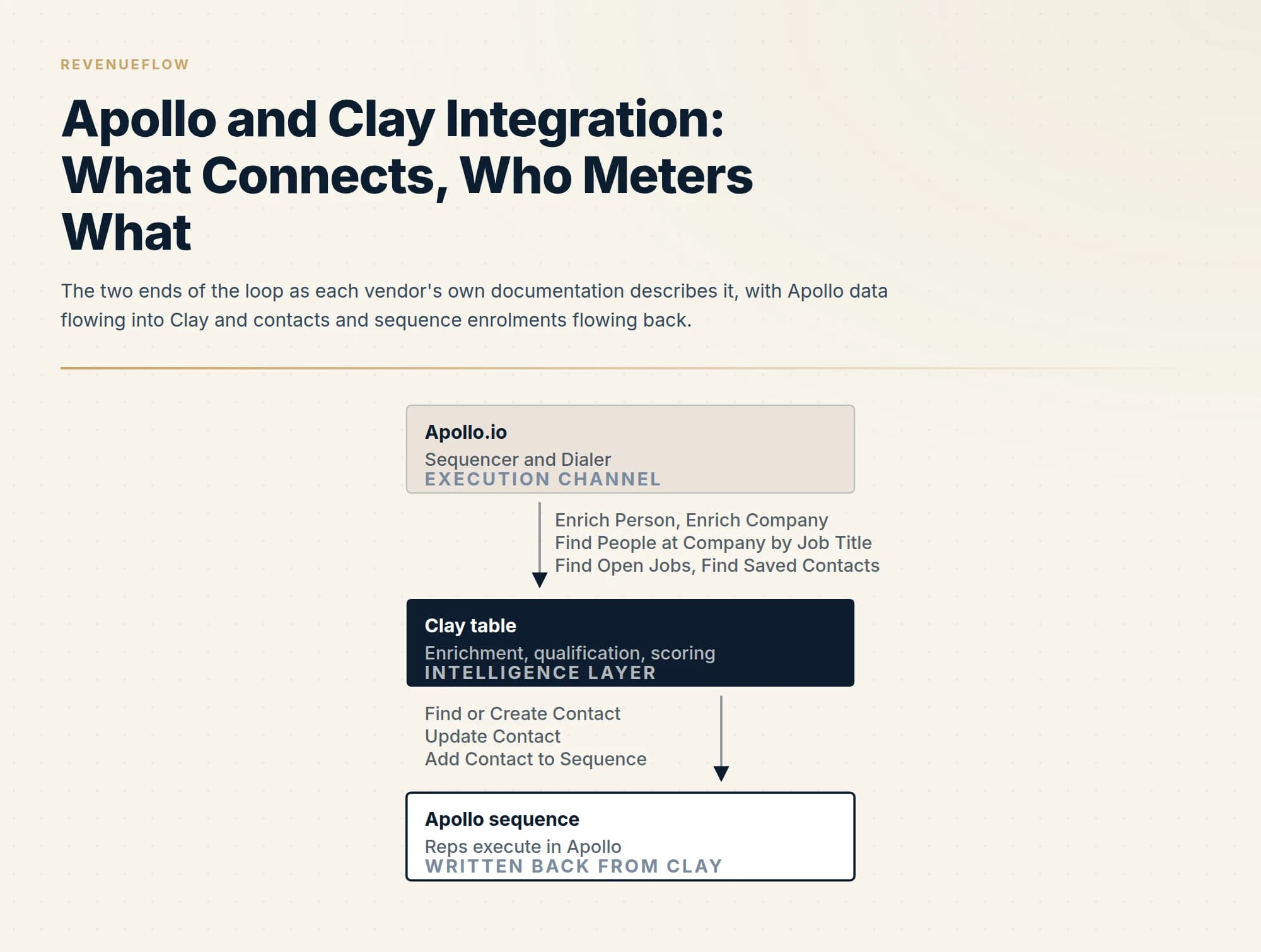
Clay's documentation lists one Apollo source and eleven actions: seven pull people, companies, jobs and saved contacts into a table, four write contacts and sequence enrolments back. The connection is an Apollo account authenticated inside Clay behind a scoped API key whose access depends on the Apollo plan. Apollo bills credits and requests; Clay bills actions.
Key takeaways
- Clay's docs, read on 18 September 2026, describe one Apollo source, Find People from Apollo, and eleven actions including Enrich Person, Find or Create Contact and Add Contact to Sequence.
- Apollo's developer docs state that API access depends on the Apollo plan, that keys are scoped per endpoint by default, and that rate limits are per team, per endpoint and enforced per minute, hour and day at once.
- Enrichment endpoints consume Apollo credits, and Apollo's pricing FAQ names Person API enrichment synced outside Apollo as a use of export credits; Clay meters the same column in actions, with bring-your-own-key listed on every Clay plan.
- Both vendors' April 2026 posts describe rate limits for paid customers improved by at least five times and a live Apollo Sequencer API, while keeping the split: Clay is the intelligence layer, Apollo an execution channel.
Reviewed and updated September 18, 2026
Clay's own documentation lists the Apollo.io integration as one source and eleven actions, read from its docs page on 18 September 2026. The source is called Find People from Apollo. The actions run from Enrich Person and Enrich Company through Find or Create Contact, Update Contact, Add Contact to Sequence and Update Contact Status in Sequence. That list is the integration. Everything else written about the pair is either a comparison of the two products or a description of what happens after the records leave Clay.
Apollo's side of the story is shorter and clearer about the division of labour. Its integration directory entry for Clay, rendered on the same day, states that Clay handles the strategic intelligence layer of data enrichment, qualification, scoring and workflow orchestration, while Apollo serves as one execution channel among many. The same entry names the two Apollo products that execution means: the Sequencer and the Dialer.
So the honest shape of the integration is a loop with two ends: Apollo data flows into Clay tables, and Clay writes contacts and sequence enrolments back. Which side meters which step decides the bill, and that is where this page spends its words.
If you want the two products compared as products, Apollo against Clay does that job. This page is only about the wiring.
What the connection is made of
Clay's docs describe the setup in three moves. In a workbook you add a source and search for Apollo.io, or in a table you click Add enrichment and pick an Apollo.io option under Integrations. Either way a modal asks you to select an Apollo.io account, and if none is connected you click Add account and authenticate.
On Apollo's side the credential is an API key, and Apollo's developer documentation, read on 18 September 2026, is precise about how one is made. You create a key under Settings, then Integrations, then API Keys, and choose the endpoints it can call. A scoped key, the default, works only for the endpoints you selected and returns a 403 on anything else. A master key reaches every endpoint, and a few endpoints, the example given is getting a list of users, work only with a master key. The same page carries a plan gate in one sentence: access to the Apollo API depends on your Apollo plan, and if you need access you upgrade the plan or talk to Apollo's sales team.
Two other Apollo statements matter before the first column runs. Apollo's pricing page FAQ says the vendor offers API access on its Custom plans for more advanced integrations, while its rate-limit documentation publishes a plan table headed Free, Basic, Professional and Organization, noting that legacy plans may differ. The safe reading is the documentation's own instruction: check your plan details in Apollo, or call the view API usage stats endpoint, before assuming a key will work.
What flows from Apollo into Clay
The pull side is the larger half of the action list, and Clay's docs name the inputs and outputs of each action, which is what a builder needs before deciding a column order.
Find People from Apollo is the source. It takes job titles as a required input, company domains as an optional filter, and a limit of one to one thousand people. Find People at Company By Job Title is the per-row version: comma-separated titles, comma-separated domains, optional locations, and a limit the docs cap at ten, with an option to include contacts from your linked CRM and prioritise them within the results.
Enrich Person takes any identifying detail you hold, first name, last name, full name, email, company name, company domain or an Apollo ID, and returns contact information, job title and employment history, company details, LinkedIn and social URLs, department, seniority and location. Enrich Company takes a domain and returns industry and description, employee count and departmental headcount, revenue, technologies used, headquarters and office locations, social profiles, founded year and company type.
Three lookup actions round it out. Find Open Jobs returns a company's job postings with title, URL, location and dates. Find Account by ID and Find Contact by ID return the full record for a known Apollo identifier. Find Saved Contacts searches your own Apollo contacts by keyword, and the docs recommend the email address as the keyword, with a limit of one to ten.
Every one of those is a column that runs per row, and the Clay enrichment guide explains why column order and a run condition on each column keep the bill sane: run the Apollo column only on rows a cheaper column left empty.
| Row | Pulls from Apollo into Clay | Writes from Clay into Apollo |
|---|---|---|
| Find People from Apollo (source) | Yes | No |
| Enrich Person | Yes | No |
| Enrich Company | Yes | No |
| Find People at Company By Job Title | Yes | No |
| Find Open Jobs | Yes | No |
| Find Account by ID | Yes | No |
| Find Contact by ID | Yes | No |
| Find Saved Contacts | Yes | No |
| Find or Create Contact | No | Yes |
| Update Contact | No | Yes |
| Add Contact to Sequence | No | Yes |
| Update Contact Status in Sequence | No | Yes |
What flows from Clay back into Apollo
The write side is four actions, and two details in Clay's docs decide whether it creates duplicates or sequences the wrong people.
Find or Create Contact carries a Run Dedupe input that defaults to true. With it on, the docs state, Apollo dedupes contacts by email address, LinkedIn URL, or name and organisation name, and returns the existing contact instead of creating a second one. The output carries a flag named was_existing that says which happened, and it deserves its own column so you can read it before the sequence step runs.
Add Contact to Sequence requires the contact to exist in Apollo already, and takes a sequence ID, a contact ID and the sending email account's ID. It then exposes five override flags, all defaulting to false: add without an email, add with an unverified email, add with a job change, add if active in other campaigns, add if finished in other campaigns. The docs describe these as a way to bypass common sequence enrolment restrictions. Read that the other way round: with every flag at its default, Apollo's own restrictions stand, and a contact with no verified address or an active enrolment elsewhere is skipped, with the reason returned.
Update Contact Status in Sequence takes one of three modes, remove, pause or mark as finished. Under our own house rule that is the action worth wiring first: we run one message per campaign, with no bumps and no thread replies, so a reply arriving anywhere should remove the contact from whatever cadence a team does run, and this is the call that does it. The dedup rules at the CRM end of a similar loop are worked through in Apollo and HubSpot deduplication.
Who meters what
Two companies, two meters each, and the integration touches all four.
Apollo meters credits. Its rate-limit documentation, read on 18 September 2026, states that enrichment endpoints consume credits and that their higher per-minute limit is not a licence to send unlimited requests, because the credit balance still governs how much data you can enrich. Its pricing FAQ describes a second unit, export credits, consumed whenever you export a contact outside of Apollo, and names Person API enrichment synced to an outside system as one of the cases. A Clay column calling Enrich Person is that case.
Apollo also meters requests. The documented limits are per team, not per key or per user, so every Clay column and every rep's key in one workspace draws from the same pool. They are per endpoint, and they are enforced in three windows at once, per minute, per hour and per day. Enrichment endpoints on paid plans are published with no hourly or daily limit and a higher per-minute figure; the free plan carries all three windows.
Clay meters two things of its own. Its pricing page, as served the same day, separates them in one line: actions measure platform usage, enrichment and GTM execution, while data credits buy data and AI from vendors in Clay's marketplace. The Apollo integration described here runs on your own connected Apollo account, and Clay's pricing page lists bring your own API key as included on the Free, Launch, Growth and Enterprise plans alike. The consequence, which Clay pricing works through with the unit costs, is that an Apollo lookup through your own key is action-priced on the Clay side and credit-priced on the Apollo side.
Billed by Apollo
- Credits. Enrichment endpoints consume them; the balance governs how much data you can enrich.
- Export credits. Consumed when a contact leaves Apollo, including Person API enrichment synced outside.
- Requests. Per team, per endpoint, in three windows at once.
Billed by Clay
- Actions. Platform usage: running the column at all.
- Data credits. Marketplace data and AI, which a bring-your-own-key Apollo column does not draw on.
- Bring your own API key. Listed as included on every Clay plan.
The April 2026 change, and what it moved
Both vendors published the same announcement in their own words. Clay's blog post dated 15 April 2026, and an Apollo magazine post with the same body, describe two improvements for joint customers. The rate-limit experience for data enrichment for paid customers improved by at least five times, which the posts describe as a seamless data flow from Apollo into Clay at scale. And the Apollo Sequencer API integration went live, so that ops teams can orchestrate Apollo sequences directly through Clay's API and set them up for reps to execute in Apollo.
The rate-limit table in Apollo's current documentation is consistent with that: the enrichment endpoints carry a per-minute allowance a multiple of the general one on paid plans. The sequence actions in Clay's docs are the second half.
What the announcement did not change is the split each vendor draws: Clay's blog still describes Apollo as the execution end, and Apollo's directory entry still calls itself one execution channel among many.
What the integration does not do
Three gaps are visible from the docs, and none of them is a defect.
It does not verify addresses. Enrich Person returns contact information and the saved-contact actions return an email verification status field, but nothing in the action list checks a mailbox. We verify every address immediately before it enters a campaign, whatever resolved it.
It does not deduplicate across sources. Run Dedupe protects Apollo against duplicates created by Clay; it does nothing about two rows in the Clay table for the same person, and a table with duplicates runs every Apollo column twice.
It does not make the execution end a good idea. Our own stack sends through Email Bison and in-house tooling rather than Apollo's Sequencer, so this is a documentation-grounded read of the wiring rather than an account of a loop we operate, and the sequence actions are described as the vendors describe them. Multi-step cadences are a motion we have chosen not to run, for reasons set out under why one message per campaign.
Setting it up in an order that costs little
The docs give you the pieces; the order is ours.
Create a scoped Apollo key with only the endpoints the Clay actions call, and confirm the plan gate before building anything, by checking plan details in Apollo or calling the usage stats endpoint the docs point to. Connect that account in Clay once, in the workspace the tables will live in.
Build against a small sample table with run conditions set before the first Apollo column is enabled, because Apollo's requests and credits fire on a test run exactly as they do in production. Put the was_existing flag in its own column and read it on the sample before enabling any sequence action. Then decide, in writing, which system owns each field when the two disagree, because Update Contact overwrites what you send it.
The short version
Clay's docs list one source and eleven actions for Apollo: seven that pull people, companies, jobs and saved contacts into a table, four that write contacts and sequence enrolments back. The connection is an Apollo account authenticated inside Clay, backed by an Apollo API key whose reach you scope endpoint by endpoint and whose access depends on your Apollo plan.
Apollo bills the loop in credits, export credits and per-team request limits enforced in three windows. Clay bills it in actions, and because bring-your-own-key is listed on every Clay plan, an Apollo column through your own key draws no Clay data credits. The April 2026 update raised the enrichment rate limits for paid customers and added the Sequencer API, and it left the division of labour where both vendors draw it: Clay decides, Apollo executes.
If the list is the part you would rather have built and verified than metered, RevenueFlow builds and sends the first campaign against your market on a pay-per-meeting basis, with the qualification criteria agreed in writing before launch.
Integration actions, inputs and outputs are per Clay's documentation and Clay's pricing page; API key scopes, the plan gate, rate limits and credit behaviour are per Apollo's developer documentation and pricing page; the April 2026 changes are per Clay's blog post of 15 April 2026 and Apollo's magazine post. All fetched 18 September 2026. Verify current behaviour with both vendors before relying on it.
Sources: Apollo.io integration, Clay Docs, Apollo.io x Clay integration, Clay and Apollo Integration, Clay blog, Clay pricing, Clay integration, Apollo directory, How Clay and Apollo help you move from data to deals faster, Apollo magazine, Create an API Key, Apollo docs, Rate Limits, Apollo docs, Apollo.io pricing
Frequently asked questions.
Frequently asked questions- How do you connect Apollo to Clay?
- Per Clay's documentation as read on 18 September 2026, you add Apollo.io as a source in a workbook or as an enrichment in a table, then select an Apollo.io account in the modal; if none is connected you click Add account and authenticate. On Apollo's side you create an API key under Settings, Integrations, API Keys, choosing the endpoints it may call. Apollo's docs state that API access depends on your Apollo plan.
- What does the Apollo integration in Clay actually do?
- Clay's docs list a Find People from Apollo source and eleven actions. Seven pull data into a table: Enrich Person, Enrich Company, Find People at Company By Job Title, Find Open Jobs, Find Account by ID, Find Contact by ID and Find Saved Contacts. Four write back to Apollo: Find or Create Contact, Update Contact, Add Contact to Sequence and Update Contact Status in Sequence, the last with remove, pause and mark-as-finished modes.
- Does using Apollo inside Clay cost Apollo credits or Clay credits?
- Both vendors' pages say the meters sit on each side. Apollo's rate-limit docs state that enrichment endpoints consume credits and its pricing FAQ says export credits are consumed when a contact leaves Apollo, naming Person API enrichment synced outside as a case. Clay's pricing page separates actions from data credits and lists bring your own API key as included on every plan, so an Apollo column through your own key is action-priced on Clay's side.
- What changed in the Apollo and Clay integration in 2026?
- Clay's blog post of 15 April 2026 and an Apollo magazine post with the same body announce two improvements for joint customers: the rate-limit experience for data enrichment for paid customers improved by at least five times, and the Apollo Sequencer API integration went live so that sequences can be orchestrated from Clay and executed by reps in Apollo. Apollo's current rate-limit table shows the higher per-minute enrichment allowance on paid plans.
About the author.

B2B cold email experts helping companies generate qualified leads through done-for-you outreach campaigns.
RevenueFlow Team
Explore more.
Ready to scale your outreach?
We build GTM engines that book real meetings. See the receipts.
Related articles.
ABM Platforms: Demandbase, 6sense, DemandScience vs Clay
Terminus now redirects to DemandScience, none of the enterprise vendors publish a price, and the build-or-buy line has moved. What each platform actually sells.
Calendly API: What You Can Automate and What You Cannot
Read access runs on any plan, webhooks need a paid one, and programmatic deletion is Enterprise-only. The scope decision that quietly breaks integrations, first.
HubSpot and Zapier: The Search Step That Decides Duplicates
Zapier's HubSpot app has one action that matches on email address and a search family that does the rest. Which you pick decides your duplicate rate.
Pipedrive Calling: Native Surfaces, Marketplace Dialers
Pipedrive's knowledge base says it has no built-in calling integration. What ships natively is a set of shortcuts to your phone, and the dialer is a second subscription.
Pipedrive and PandaDoc: The Two Plan Gates
PandaDoc places its Pipedrive integration on Business and Enterprise plans and requires each user to install it individually. Both facts precede any configuration.
Salesloft API: Rate Limits, Auth and What to Cache
The Salesloft rate limit is a shared team budget of 600 cost per minute, and deep pages cost thirty times an ordinary call. What that changes about caching.