Clay Pricing: What Credits Really Cost Per Enriched Row
Clay bills in two currencies and the headline price is both added together. The per-unit cost of actions and data credits, and what a row really costs.
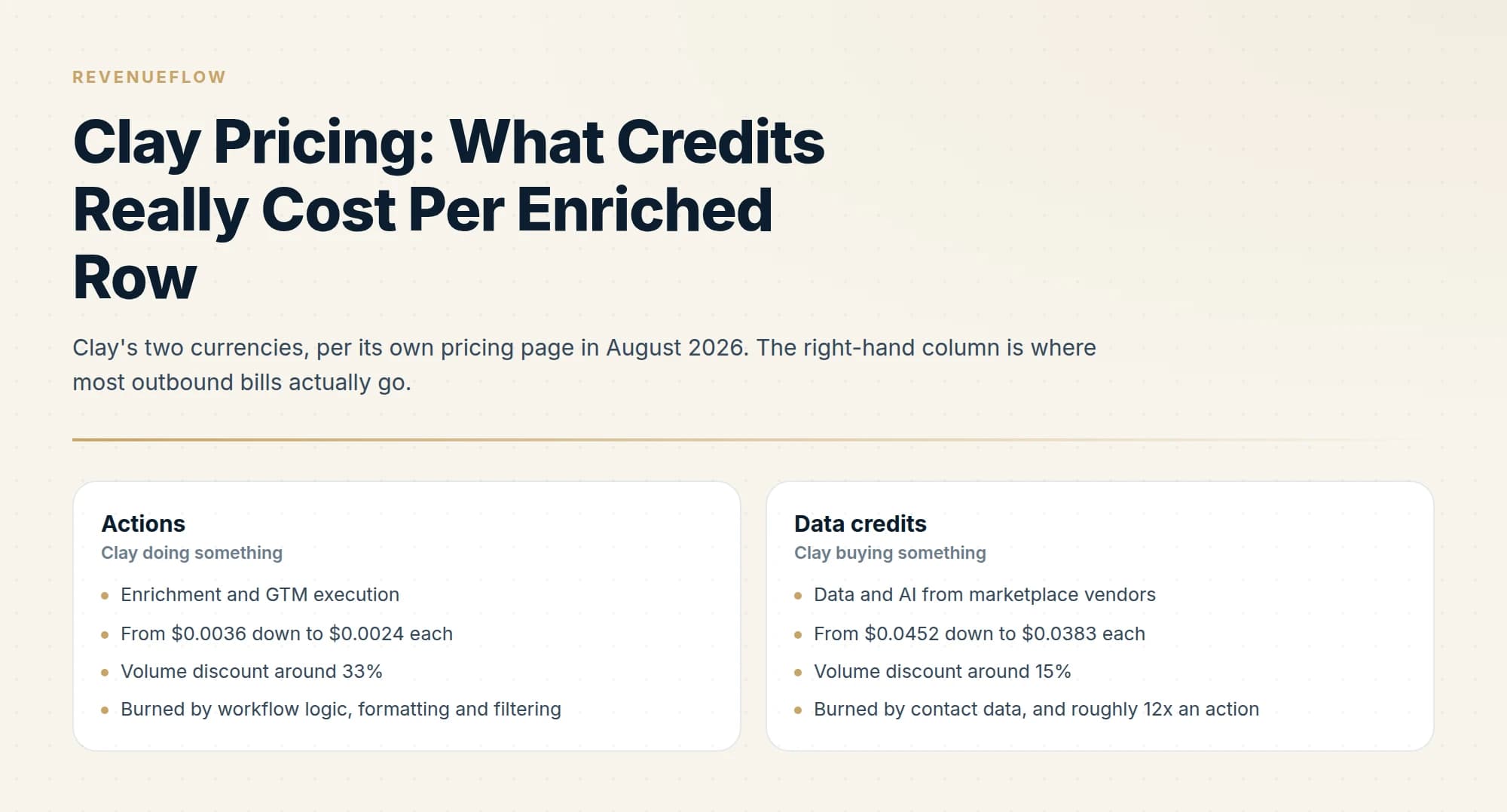
Clay charges in two currencies: actions, which measure platform usage, and data credits, which buy data from marketplace vendors. The headline plan price is both added together. Data credits cost roughly twelve times what actions cost, and your true cost per enriched row is total credits divided by successfully resolved rows.
Key takeaways
- Clay's $167 Launch headline is 180,000 actions a year at $54 a month plus 30,000 data credits at $113 a month, added together.
- A data credit costs about $0.0452 at the entry tier against $0.0036 for an action, so credits dominate almost every outbound bill.
- Volume discounts are much weaker on credits, falling about 15% across a twentyfold increase, against about 33% for actions.
- The free plan is capped at 200 rows per table, which makes it an evaluation tier rather than a working one.
Reviewed and updated September 5, 2026
Clay's Launch plan shows a headline of $167 a month, and that number is two purchases added together. The plan page's own dropdowns break it out: 180,000 actions a year at $54 a month, plus 30,000 data credits a year at $113 a month. Add them and you get the headline.
Once you see that, the pricing model stops being confusing. Clay bills in two separate currencies, they scale at different rates, and the one most people watch is not the one that dominates their bill.
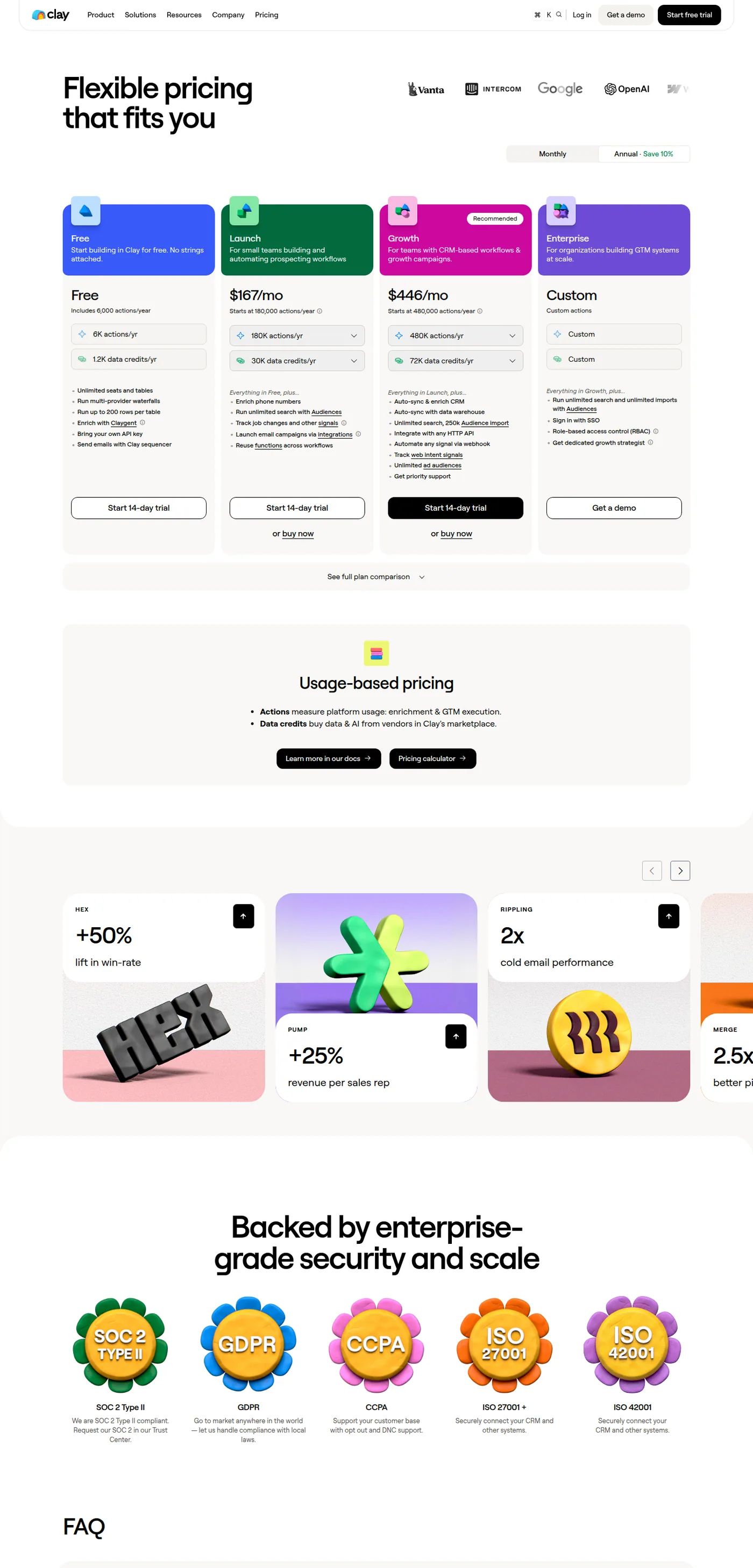
Clay's public pricing page, captured mid-2026.
The two currencies
Clay states the distinction on the pricing page itself:
Actions measure platform usage: enrichment & GTM execution. Data credits buy data & AI from vendors in Clay's marketplace.
An action is Clay doing something. A data credit is Clay buying something on your behalf from a provider in its marketplace. Running a column costs actions. Getting an email address back from a data vendor costs credits.
That split is why two teams on the same plan can have very different bills. A team doing heavy filtering, formatting and workflow logic burns actions. A team enriching contact data across many providers burns credits. Most outbound teams are the second kind, and credits are roughly ten times more expensive per unit.
What each unit actually costs
Both currencies are sold on a ladder, and Clay publishes every rung. Dividing the annual price by the annual allowance gives the real unit cost.
| Actions per year | Price per month | Cost per action |
|---|---|---|
| 180,000 | $54 | $0.0036 |
| 480,000 | $135 | $0.0034 |
| 720,000 | $180 | $0.0030 |
| 1,200,000 | $261 | $0.0026 |
| 2,400,000 | $486 | $0.0024 |
| Data credits per year | Price per month | Cost per credit |
|---|---|---|
| 30,000 | $113 | $0.0452 |
| 72,000 | $261 | $0.0435 |
| 120,000 | $414 | $0.0414 |
| 240,000 | $792 | $0.0396 |
| 600,000 | $1,913 | $0.0383 |
Two things fall out of those tables that the plan cards do not tell you.
A data credit costs roughly twelve times what an action costs. At the entry rung it is $0.0452 against $0.0036. If your bill is growing and you are not sure why, it is almost certainly credits.
The volume discount is much better on actions than on credits. Actions fall about 33% per unit from the smallest rung to the largest, a thirteen-fold increase in volume. Data credits fall about 15% across a twenty-fold increase. Buying in bulk barely helps on the currency that costs the most, which is worth knowing before you commit to a bigger annual tier to "get the discount".
Those figures are the annual toggle, which Clay lists as saving 10% against monthly. Monthly data credits start at $125 for 2,500 a month, which works out at $0.05 a credit.
- Enrichment and GTM execution
- From $0.0036 down to $0.0024 each
- Volume discount around 33%
- Burned by workflow logic, formatting and filtering
- Data and AI from marketplace vendors
- From $0.0452 down to $0.0383 each
- Volume discount around 15%
- Burned by contact data, and roughly 12x an action
Why a row is not a credit
The question people actually want answered is what one enriched row costs, and the honest answer is that it depends on how many providers the row touches.
A waterfall exists precisely because no single provider covers everyone. If your first provider hits, the row cost one lookup. If it misses and the second is tried, the row cost two. A row that fails every provider still consumed credits at each attempt, and it produced nothing.
That last case is the one that quietly dominates a bill on a hard list. Your cost per enriched row is not the cost of a lookup, it is the cost of all lookups divided by the ones that succeeded. On a list with a 50% overall hit rate and three providers attempted per miss, the arithmetic gets away from you quickly.
The practical consequences are ordering and stopping, which we cover in detail in building a Clay waterfall that does not waste credits and in the general waterfall enrichment guide.
The free tier and where it stops
The free plan is more usable than most, and it has one limit that decides whether it works for you.
You get 6,000 actions and 1,200 data credits a year, which is 500 actions and 100 credits a month, plus unlimited seats and tables. You can run multi-provider waterfalls, enrich with Claygent, bring your own API keys and send through Clay's sequencer.
The constraint is 200 rows per table. That is a genuine cap on evaluation rather than a soft nudge, and it means the free tier is for learning the tool rather than for running a real list. The bring-your-own-key option is the interesting part of the free plan: if you already hold provider contracts, you can drive them through Clay's workflow layer and pay Clay only in actions.
Estimating your own bill before you buy
Four numbers give you a defensible estimate, and you can get all of them from a sample.
- Step 1Take a real sample
200 rows of the list you actually intend to work, not a clean test list.
- Step 2Run the waterfall you intend to run
Count credits consumed and rows successfully enriched, separately.
- Step 3Divide by successes, not attempts
Total credits divided by usable rows is your true cost per enriched row.
- Step 4Multiply by monthly volume, then add actions
Actions are the smaller number but they are not zero, especially with heavy workflow logic.
The sample has to be representative. Enrichment hit rates vary enormously by seniority, company size and geography, so a sample drawn from easy rows produces an estimate that will not survive contact with your real list.
- Yes: You know your credits-per-enriched-row on a representative sample
- Yes: Your waterfall stops after the first hit rather than running every provider
- Yes: Duplicate rows are removed before enrichment, not after
- No: You are buying a larger tier mainly for the data-credit discount
- Depends: You hold direct provider contracts worth driving with your own API keys
Choosing between Launch and Growth
The jump from Launch to Growth is $167 to $446 a month, and the allowances behind it go from 180,000 actions and 30,000 credits a year to 480,000 actions and 72,000 credits. Roughly 2.7 times the price for 2.7 times the actions and 2.4 times the credits, so the tier jump is close to linear and is not itself a discount.
What you are actually buying at Growth is the feature line rather than the volume. Auto-sync and enrich to CRM, syncing with a data warehouse, integrating with any HTTP API, automating any signal via webhook, web intent signals, unlimited ad audiences and priority support. Launch covers phone enrichment, signal tracking on job changes, email campaigns via integrations and reusable functions.
The Clay and HubSpot workflow comparison explains why teams pair enrichment with pipeline tracking rather than picking one tool.
That makes the decision cleaner than a volume calculation. If your workflow ends when a CSV or a sequencer push is produced, Launch does the job and you scale the allowances underneath it. If Clay needs to write back into a CRM or warehouse continuously, that capability sits at Growth and you are paying for the integration rather than for the credits.
Teams weighing whether Clay's write-back capability replaces a full CRM should see how it stacks up against a dedicated pipeline tracking tool.
The trap is upgrading for volume. Because the tiers scale nearly linearly and each tier's allowances are individually expandable, buying a higher tier to get more credits usually gains you nothing that expanding the allowance on your current tier would not.
What to do before an annual commitment
Annual billing saves 10% and locks the shape of your usage for a year, which is the part worth thinking about.
Outbound volume is lumpy. A campaign build consumes credits in bursts, then a month passes with almost nothing while sends run and replies get worked. Annual allowances are quoted per year, which suits that pattern better than monthly allowances that expire, so the annual toggle is usually right on the credits line even beyond the discount.
Two questions to settle first. Do you have direct contracts with any providers, in which case bringing your own key moves that volume from credits to actions and shrinks the credits allowance you need. And is your hit rate stable enough to forecast, because a list that gets harder mid-year consumes credits faster per usable row and the allowance you sized against last quarter's list will not hold.
Where Clay is genuinely cheap and where it is not
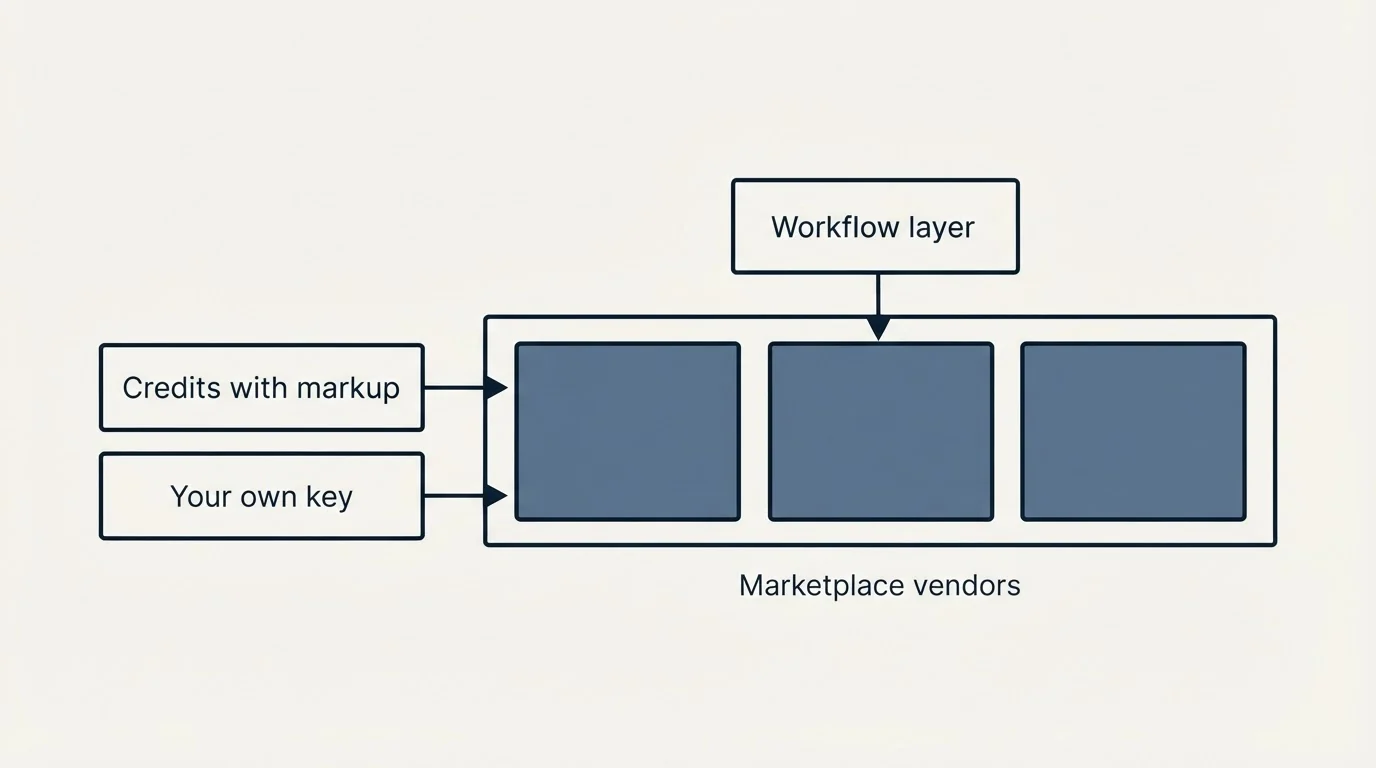
Clay is cheap as a workflow layer. Actions cost fractions of a cent, the free tier is real, and the ability to sequence providers conditionally is what stops you paying every vendor for every row.
Clay is not cheap as a data source, because it is not a data source. It is reselling marketplace vendors, and a marginal markup on someone else's data is the business model. If you have volume and a direct contract with a provider, bringing your own key and paying Clay in actions is materially cheaper than buying the same data as credits.
Since vendors who resell or mark up third-party data rarely publish a straight rate card, it is worth seeing how that opacity plays out in Crayon's pricing structure.
The decision is therefore not really Clay against another tool. It is whether you want one workflow layer orchestrating many providers, which is worth paying for, or whether you have one provider and a simple need, in which case the workflow layer is overhead. Our end-to-end Clay lead generation workflow shows what the first shape looks like with the costs attached, and best Clay alternatives covers the second.
The short version
Clay charges in actions and data credits, the headline price is the two added together, and data credits cost roughly twelve times what actions cost while discounting far less at volume. Your cost per enriched row is total credits divided by successful rows, which is a different and larger number than the price of one lookup. Estimate it from 200 representative rows before you commit to an annual tier.
If you would rather have the enriched list and the campaign delivered than build and meter the stack yourself, you can see what a campaign would look like for your market.
Clay pricing verified against clay.com/pricing as of mid-2026, with per-unit costs calculated from Clay's own published allowances. Verify current terms with the vendor before relying on them.
Sources: Clay pricing
Frequently asked questions.
Frequently asked questions- How much does Clay actually cost per month?
- Clay publishes a free tier, Launch from $167 a month and Growth from $446 a month on the annual toggle, with Enterprise quoted. Both paid headlines are a bundle of an actions allowance and a data credits allowance, and both scale up from there, so the plan name matters less than the two allowances you pick underneath it.
- What is the difference between actions and data credits in Clay?
- Clay defines actions as measuring platform usage, meaning enrichment and GTM execution, and data credits as buying data and AI from vendors in its marketplace. In practice an action is Clay doing something and a credit is Clay buying something for you. Credits cost roughly twelve times more per unit than actions.
- How do I work out my cost per enriched row?
- Divide total credits consumed by the number of rows that came back usable, not by rows attempted. A waterfall spends credits on failures too, so on a list with a low hit rate your cost per usable row can be several times the price of a single lookup. Measure it on a 200-row representative sample first.
- Is Clay's free plan enough to run a real campaign?
- No. It includes 500 actions and 100 data credits a month with unlimited seats and tables, which is enough to learn the product, but it caps tables at 200 rows. It is genuinely useful for evaluating a workflow, and the bring-your-own-API-key option makes it viable if you already hold provider contracts.
About the author.

B2B cold email experts helping companies generate qualified leads through done-for-you outreach campaigns.
RevenueFlow Team
Explore more.
Ready to scale your outreach?
We build GTM engines that book real meetings. See the receipts.
Related articles.
Apollo and Clay Integration: What Connects, Who Meters What
Clay's docs list one Apollo source and eleven actions. How the account connects, which way each action moves data, and which vendor bills each step.
Alta Pricing: No Rate Card, a Quote in Hours
Alta publishes no price. What its plans page, FAQ and blog disclose about how the platform is priced, the inputs that set a quote, and the numbers to ignore.
Gojiberry AI Pricing: One Plan, Then a Quote
Gojiberry AI publishes one plan and quotes the rest. The dated price, the meters it names, the billing terms, and the look-alike domain that is not the vendor.
Sales Automation Software for Small Business: Four Buys
One search returns four unrelated products, and on at least one vendor's published plan list the automation is gated above the tier a small team buys.
ABM Platforms: Demandbase, 6sense, DemandScience vs Clay
Terminus now redirects to DemandScience, none of the enterprise vendors publish a price, and the build-or-buy line has moved. What each platform actually sells.
Avoma Pricing: Recorder Seats, Free Viewers, and the Add-Ons
Avoma charges only for people whose meetings get recorded and makes viewers free, so the seat count to price is smaller than the team and the add-ons are larger.