Apollo vs Clay: Data Enrichment Tools Compared
Apollo is a contact database with sequences and a dialer, priced per seat. Clay is an enrichment workbench that calls 150+ data providers, priced per workspace.
Clay vs Apollo is a choice between a workbench and a database. Apollo owns 240M+ contacts and adds sequences and a dialer, from $49 per seat per month billed annually. Clay calls 150+ data providers from one table, from $185 a month with unlimited seats. Apollo is cheaper up to three seats, and Clay's flat price wins from four.
Key takeaways
- Apollo's pricing page lists Basic at $49, Professional at $79 and Organization at $119 per seat per month, billed annually, with 30,000 to 72,000 credits a seat a year.
- Clay's Launch plan starts at $185 a month, or $167 on annual billing, with unlimited seats on every plan and two meters: actions and data credits.
- Illustratively, Apollo Basic costs $147 for three seats and $196 for four, so Clay's flat $167 becomes the lower bill at four seats, though it buys one shared pool.
- Apollo charges 1 credit for an email and 8 for a phone number, while Clay's data credits are spent at rates set by whichever provider the waterfall calls.
Reviewed and updated September 18, 2026
Clay vs Apollo gets searched as though the two were rival databases, and only one of them is a database. Apollo's homepage counts 240M+ contacts in a database it owns, with sequences and a dialer attached. Clay's pricing page counts 150+ data providers it can call, and sells a table to run them in. One sells records per seat. The other sells the workbench per workspace and bills the records separately.
Clay vs Apollo: The Quick Answer
Pick Apollo if you want one tool that finds contacts and emails them: its pricing page lists Basic at $49 per seat per month, billed annually, with 30,000 credits a seat a year. Pick Clay if coverage is the problem and somebody will build: Launch starts at $185 a month, or $167 billed annually, with unlimited seats. From four seats up, Clay's flat price is the lower one.
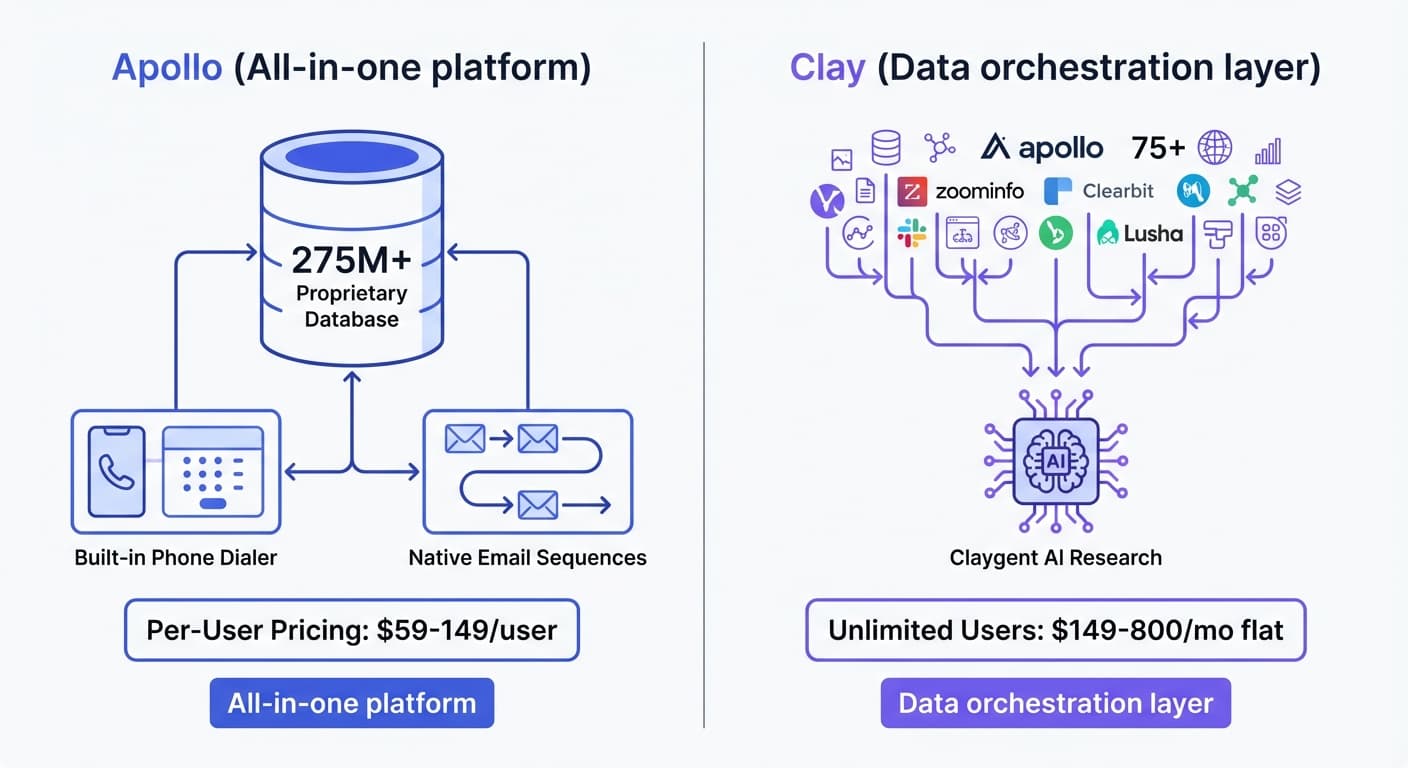
If you want a single platform with a large contact database, built-in email sequences, and straightforward pricing, Apollo delivers a comprehensive all-in-one solution. The platform works well for teams that prefer having everything in one place.
Beyond enrichment, teams often pair Apollo with a dedicated CRM, and Apollo's fit alongside HubSpot explains how outreach and deal tracking complement each other.
If you need maximum data coverage by pulling from multiple sources, custom enrichment workflows, and AI-powered research automation, Clay offers superior flexibility. The platform excels when you want to combine data from various providers and build sophisticated workflows.
Understanding the Core Difference
The architectural difference between these platforms shapes every other comparison.
Apollo.io operates as an all-in-one sales intelligence platform. The company maintains its own database of 240M+ contacts and 30M+ companies. Users access this single database through Apollo's interface, which also includes email sequences, a phone dialer, and engagement tracking. Apollo owns and maintains the data you access.
Apollo's database strength pairs naturally with CRM pipeline tracking, a relationship explored in Apollo paired with a CRM platform.
Clay operates as a data orchestration platform. Rather than maintaining its own database, Clay connects to 150+ data providers, the count its pricing page gives, including Apollo, ZoomInfo, Clearbit, Lusha, and dozens more. Users build workflows that query multiple sources, often in "waterfall" sequences where if one provider returns no data, Clay automatically tries the next. Clay aggregates and orchestrates other people's data.
This distinction matters because:
- Apollo is simpler to use. One database, one interface, one pricing structure.
- Clay offers more flexibility. Multiple sources, custom workflows, higher potential match rates.
The line between them has moved in one place. Clay's pricing page now lists sending email through its own sequencer or an integration from the Launch plan up, so Clay is no longer only the step before a sending tool. The database is still the dividing fact: Apollo owns one and Clay calls other people's.
Pricing Comparison
Apollo.io Pricing
| Plan | Price | Credits | Seats |
|---|---|---|---|
| Free | Free | 900 credits per seat/year, granted monthly | 1 or more |
| Basic | $49/mo | 30,000 credits per seat/year, granted upfront | 1 or more |
| Professional | $79/mo | 48,000 credits per seat/year, granted upfront | 1 or more |
| Organization | $119/mo | 72,000 credits per seat/year, granted upfront | 3 minimum |
Every paid price above is the per seat per month rate billed annually, and the Organization tier carries a three seat minimum. Apollo's credit table charges 1 credit for an email and 8 for a phone number, so Basic's 30,000 credits a year is 30,000 emails or 3,750 phone numbers for each seat.
Source: Apollo.io Pricing
Clay Pricing
| Plan | Monthly billing | Annual billing | Actions | Data credits |
|---|---|---|---|---|
| Free | Free | Free | 500 a month | 100 a month |
| Launch | From $185/mo | From $167/mo | From 15,000 a month | From 2,500 a month |
| Growth | From $495/mo | From $446/mo | From 40,000 a month | From 6,000 a month |
| Enterprise | Custom | Annual commitment | Custom | Custom |
Clay prices the workspace rather than the person. Its pricing page lists unlimited seats on every plan, Free included, and meters two things: actions, which measure platform usage, and data credits, which buy data from the providers in its marketplace. Each paid price is the two added together. On monthly billing the pricing page makes Launch up of $60 of actions plus $125 of data credits. Claygent, its AI research agent, is listed on the Free plan, and phone number enrichment starts on Launch.
Source: clay.com/pricing
What one, three and ten seats cost
The arithmetic below is illustrative. It multiplies the published annual-billing rates by a seat count and says nothing about how many records each bill buys.
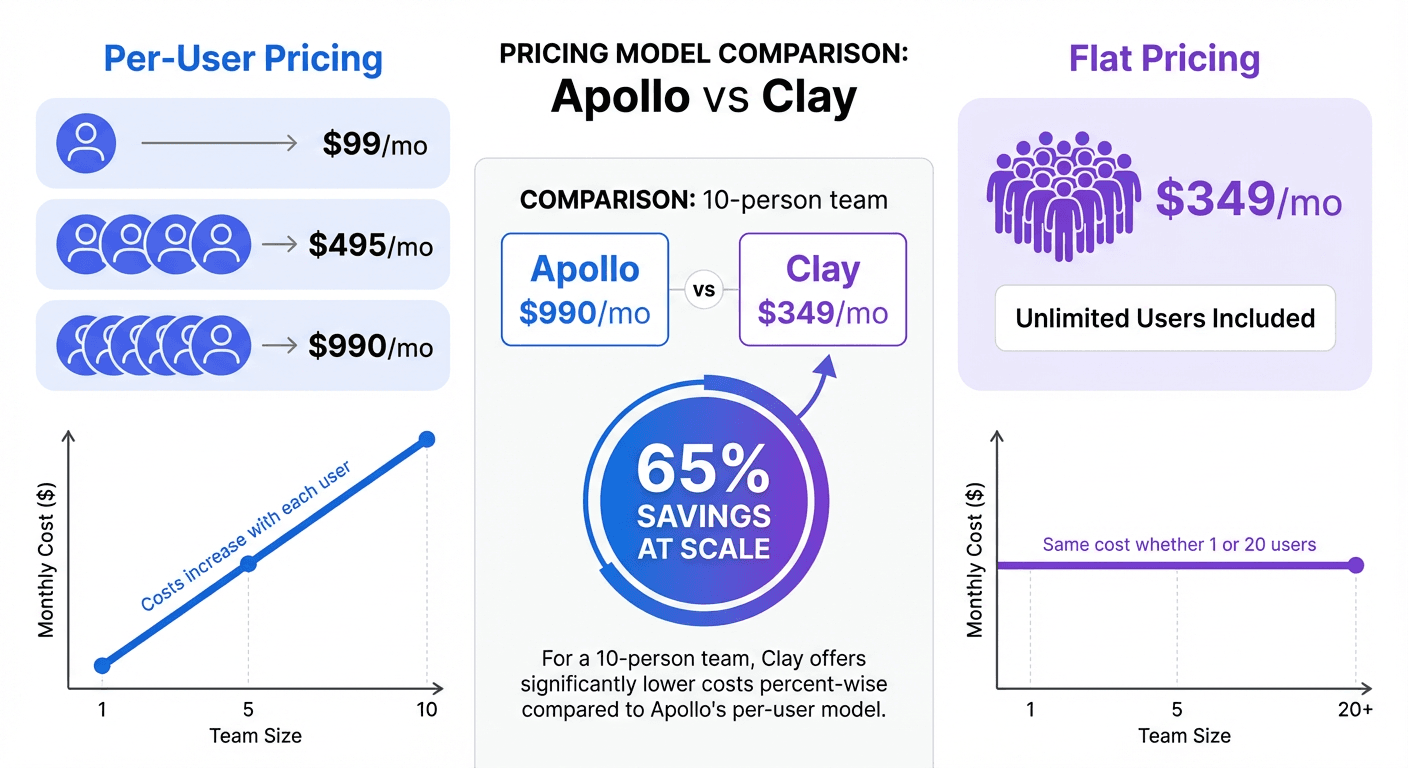
Apollo Basic at $49 a seat is $49 for one person, $147 for three and $490 for ten. Professional at $79 is $79, $237 and $790. Clay's Launch is $167 a month on annual billing whether one person logs in or ten do. So Clay becomes the lower bill at four seats against Basic, where Apollo reaches $196, and at three seats against Professional.
The catch is volume. Every Apollo seat brings its own 30,000 credits a year, so ten seats on Basic hold 300,000 between them. Clay's Launch price buys one shared pool of 15,000 actions and 2,500 data credits a month however many people use it. A large team doing light enrichment is cheaper on Clay. A large team in which everyone pulls lists all day will outgrow Launch long before it outgrows Apollo.
| What is metered | Apollo | Clay |
|---|---|---|
| The unit | Credits, granted per seat | Actions and data credits, per workspace |
| An email | 1 credit | Data credits, set by the provider called |
| A phone number | 8 credits | Not included on the Free plan |
| Seats | Priced per seat, 3 minimum on Organization | Unlimited on every plan |
| Entry paid grant | 30,000 credits a seat a year on Basic | 15,000 actions and 2,500 data credits a month on Launch |
Clay's data credits are spent at rates that depend on the provider called, so a waterfall that tries several sources for one row spends more than a single lookup. Estimating a Clay bill means knowing how long your workflow is, which is a question Apollo never asks.
Database and Data Coverage
Apollo.io Database
Apollo maintains a proprietary database with:
- 240M+ contact records
- 30M+ company records
- Email addresses with verification
- Direct dial phone numbers
- Intent data signals
- Job change alerts
- LinkedIn profile matching
Apollo's data comes from multiple collection methods including public web data, user contributions, and partnerships. The database receives regular updates, though data decay affects all B2B databases.
Clay Data Sources
Clay aggregates 150+ data providers including:
Contact Data: Apollo, ZoomInfo, Clearbit, Lusha, People Data Labs, Cognism, LeadIQ, RocketReach, Hunter.io
Company Data: Crunchbase, BuiltWith, Owler, PitchBook, LinkedIn
Email Verification: ZeroBounce, NeverBounce, Bouncer, Kickbox
Technographics: BuiltWith, Wappalyzer, HG Insights
Social Profiles: LinkedIn, Twitter/X
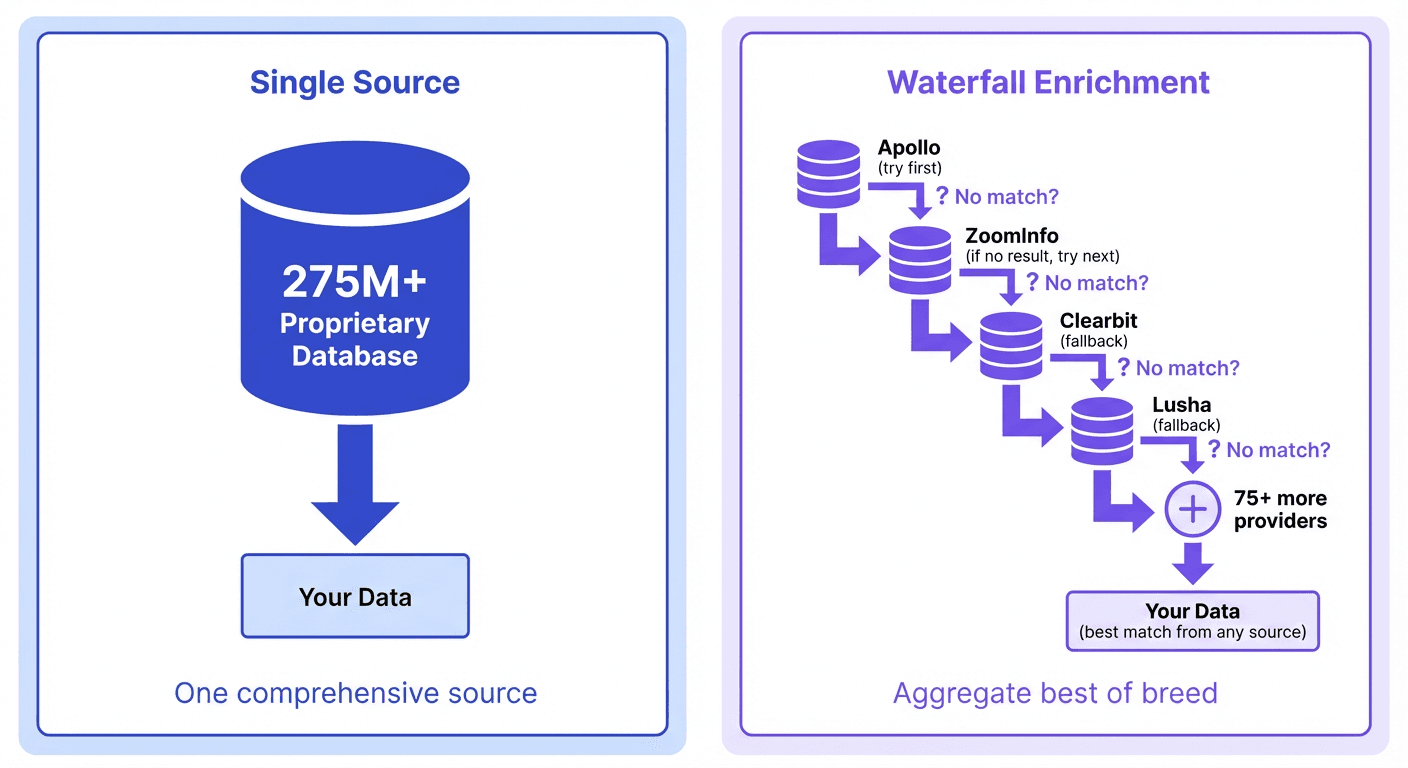
The "waterfall enrichment" feature allows building fallback chains. For example: try Apollo first, then ZoomInfo, then Lusha. This approach maximizes match rates because gaps in one database may be covered by another.
Data Coverage Comparison
Single source simplicity: Apollo users access one database through one interface. This simplifies workflows and makes credit consumption predictable.
Multi-source coverage: Clay users can achieve higher match rates by combining sources. This is particularly valuable when:
- Targeting niche industries where no single database has complete coverage
- Prospecting international contacts where regional providers excel
- Validating data by cross-referencing multiple sources
Practical example: A prospect in a small European tech company might not appear in Apollo's database. In Clay, you could configure a waterfall that tries Apollo, then Clearbit, then a European-focused provider like Cognism, significantly improving your chances of finding contact data.
Key Features
Apollo.io Features
Built-in Contact Database: Direct access to 240M+ contacts without additional data provider costs.
Email Sequences: Native sequences with A/Z testing and an email deliverability suite, both listed on its pricing page.
Phone Dialer: Built-in calling with call recording, transcription, and logging (available on higher tiers).
LinkedIn Extension: Chrome extension for prospecting directly on LinkedIn profiles and Sales Navigator.
Intent Data: Signals indicating when companies are researching topics relevant to your solution.
Job Change Alerts: Notifications when target contacts change roles or companies.
CRM Sync: Bidirectional sync with Salesforce and HubSpot.
API Access: Programmatic access to search, enrich, and sync data.
Clay Features
150+ Data Provider Integrations: Access to Apollo, ZoomInfo, Clearbit, and dozens more through a single interface.
Waterfall Enrichment: Chain multiple providers with automatic fallback logic to maximize match rates.
Claygent (AI Research Agent): AI that can perform custom research tasks like finding company news, summarizing LinkedIn activity, or answering specific questions about prospects.
No-Code Workflow Builder: Visual interface for building multi-step enrichment and automation workflows.
CRM Integrations: Connections to Salesforce, HubSpot, Pipedrive, Close, and other CRMs.
Email Tool Integrations: Direct export to Instantly, Smartlead, Lemlist, and other cold email platforms.
API and Webhooks: Trigger workflows from external systems and integrate with any tool.
Native Sequencer: From the Launch plan, email can be sent through Clay's own sequencer or an integration.
Unlimited Users: Every plan, Free included, lists unlimited seats.
Integration Ecosystem
Apollo.io Integrations
- CRMs: Salesforce, HubSpot
- Email platforms: Gmail, Outlook
- Engagement tools: Outreach, SalesLoft
- Marketing automation: Marketo
- Communication: Slack
- LinkedIn: Chrome extension for direct prospecting
- API: REST API for custom integrations
Clay Integrations
- CRMs: Salesforce, HubSpot, Pipedrive, Close
- Cold email tools: Instantly, Smartlead, Lemlist
- Data providers: 150+ sources accessible within the platform
- Productivity: Google Sheets, Airtable, Notion
- AI: OpenAI integration for custom prompts and formatting
- API and Webhooks: Connect to any tool through HTTP
Integration Comparison
Apollo's list centres on CRM sync and the standard engagement platforms. Clay's is broader, reaching cold email tools such as Instantly, Smartlead and Lemlist and no-code tools such as Airtable and Notion.
Another angle worth weighing is how narrower, LinkedIn-focused tools stack up, a contrast explored in the comparison of LinkedIn sourcing versus intent-driven prospecting.
Apollo vs Clay: Who Should Pick Which
Best Fit for Apollo.io
- Teams wanting an all-in-one platform: Database, sequences, and dialer in one tool reduces tech stack complexity
- Smaller teams (1-3 users): Per-user pricing can be economical at smaller scales
- Teams preferring simplicity: One database, straightforward credit system, familiar interface
- Phone-heavy outreach: Built-in dialer with recording and transcription
- LinkedIn-centric prospecting: Chrome extension for seamless LinkedIn workflows
- Budget-conscious teams: Free tier and lower entry price than Clay
Best Fit for Clay
- Teams prioritizing data coverage: Waterfall enrichment maximizes match rates across multiple sources
- Larger teams (5+ users): Flat-rate pricing with unlimited users becomes very economical
- Complex enrichment needs: Custom workflows combining multiple data types and sources
- AI-powered research: Claygent automates manual research tasks
- Outbound-focused teams: Direct integrations with Instantly, Smartlead, Lemlist
- Agencies and consultants: Flexibility to work across different client tech stacks
- Teams wanting validation: Cross-reference multiple sources to verify data accuracy
Feature Comparison Summary
| Feature | Apollo.io | Clay |
|---|---|---|
| Database | 240M+ contacts (proprietary) | 150+ data providers (aggregated) |
| Pricing model | Per-user | Per-workspace (unlimited users) |
| Entry price | $49/user/month, billed annually | $185/month per workspace, or $167 billed annually |
| Email sequences | Built-in | Native sequencer from Launch, or integrations |
| Phone dialer | Built-in | No |
| Data waterfall | No | Yes |
| AI research agent | Limited | Yes (Claygent) |
| LinkedIn extension | Yes | Via data sources |
| Intent data | Yes | Via data sources |
| Cold email integrations | Limited | Instantly, Smartlead, Lemlist |
| Workflow builder | Basic | Advanced no-code |
Where Each One Sits In A One-Message Campaign
Apollo can source the list and send the email from the same screen. Clay sources and enriches, and from the Launch plan can send through its own sequencer or hand the list to a sending tool.
House practice is one message per campaign, with no bumps and no thread replies, so each address gets a single attempt. That changes what the sourcing step is worth. There is no second email to recover from a wrong address, which is the practical argument for a waterfall and a verification pass before anything goes out. It is also the reason a campaign builder, in either tool, matters less here than the quality of the row.
A Clay workflow with Apollo inside it
- Import company list from Google Sheets (domain or company name only)
- Enrich with company data from Clearbit
- Find decision makers using Apollo
- If Apollo returns no contacts, waterfall to ZoomInfo, then Lusha
- Verify emails through ZeroBounce
- Use Claygent to research recent company news for personalization
- Export enriched list to Instantly for outreach
Data Quality Considerations
Both platforms face B2B data decay: people change jobs, companies get acquired and addresses go stale. Apollo maintains one database and corrects it at volume, and Clay lets you cross-reference several sources at the cost of more credits. Whichever you choose, verify emails before sending, because a bounce costs sending reputation across every campaign on the domain.
Final Thoughts
Apollo.io and Clay solve the same fundamental problem, finding and enriching B2B prospect data, but they take distinctly different approaches.
Choose Apollo.io for: An all-in-one platform with built-in database, email sequences, and phone dialer. Best for teams wanting simplicity, smaller teams watching per-user costs, and those who value having everything in one place.
Choose Clay for: Maximum data coverage through multi-source aggregation, sophisticated workflow automation, and AI-powered research. Best for larger teams (unlimited seats on every plan), outbound-focused teams with complex enrichment needs, and those who want flexibility across their tech stack.
Many teams find value in using both platforms. Apollo can serve as one of Clay's data sources, combining Apollo's database access with Clay's orchestration capabilities. This hybrid approach offers the benefits of both architectures, though it does increase complexity and cost.
How that pairing is wired, the one source and eleven actions Clay documents and the API key and plan gate Apollo requires, is in the Apollo and Clay integration guide.
Teams weighing additional enrichment stacks beyond Apollo and Clay can see how a LinkedIn-focused profile finder stacks up against a technographic specialist in technographic data versus profile enrichment.
Related Reading
- Clay vs Clearbit: Which B2B Data Enrichment Tool Fits Your Stack?
- Clay vs Lusha: Which B2B Data Enrichment Tool Should You Use?
If you would rather have this run for you, RevenueFlow books qualified meetings on a pay-per-meeting basis and publishes client results.
Pricing and features are taken from the vendors' own pages. Verify current terms with the vendor before relying on them.
Sources:
Frequently asked questions.
Frequently asked questions- Clay vs Apollo: which is better for a small team?
- Apollo, in most cases. Its pricing page lists a free plan and Basic at $49 per seat per month billed annually, so one to three people pay $49 to $147. Clay's Launch starts at $185 a month, or $167 billed annually. Clay only becomes the lower bill at four seats, and it needs somebody willing to build workflows.
- Can I use Apollo and Clay together?
- Yes, and many teams do. Clay calls other vendors' data from a table, and Apollo can be one of the providers in that waterfall. A common build finds decision makers through Apollo first, then tries other providers when Apollo returns nothing. The cost is complexity: you pay for both tools and have to watch two meters.
- Does Clay have its own contact database?
- No. Clay orchestrates other providers' data and owns none itself. Its pricing page describes finding and enriching data from 150+ providers and running multi-provider waterfalls, where the next source is tried when one returns nothing. Apollo is the opposite design: its homepage counts 240M+ contacts in a database it maintains, with sequences and a dialer attached.
- How does Apollo pricing compare with Clay pricing?
- They meter different things. Apollo prices each seat and grants credits per seat, charging 1 credit for an email and 8 for a phone number. Clay prices the workspace with unlimited seats and meters actions and data credits. Apollo's bill follows headcount and Clay's follows workflow length, so compare them at your real team size and volume.
About the author.

Tim Carden is CMO / CTO at RevenueFlow, which builds and operates outbound revenue engines for B2B companies. Studied at McGill University.
Tim Carden · CMO / CTO
Connect on LinkedIn →Explore more.
Ready to scale your outreach?
We build GTM engines that book real meetings. See the receipts.
Related articles.
Cognism vs Upcell: A Data Provider Against a Data Layer
Cognism sells compliance-first contact data by quote and credit; Upcell sells a layer that runs your providers, Cognism included, through one record. Read 18 Sep 2026.
PromptLoop vs ZoomInfo: Web Research Against a Database
PromptLoop builds a dataset from the live web in credits it publishes; ZoomInfo sells access to a maintained database by quote. Both pages read 18 September 2026.
Zoom Revenue Accelerator vs Gong: An Add-On vs a Platform
Zoom's support centre documents Revenue Accelerator as a licence on a Zoom account in two classes; Gong sells a platform per user plus a platform fee. Neither has a rate.
Metadata vs 6sense: Paid Media Execution vs Intent
Metadata runs paid B2B campaigns through seven AI agents; 6sense ranks accounts on intent and sells contact data by credit. Neither publishes a rate. Read 18 Sep 2026.
Chili Piper vs LeanData: Form-First Against CRM-First
Chili Piper publishes a seat floor and bundles scheduling and chat; LeanData prices by Salesforce object and sells scheduling separately. Both read 18 September 2026.
Mailshake vs Pipedrive: A Sender and a CRM, Side by Side
Mailshake sells per-user sending with a two-way Pipedrive sync from its middle tier; Pipedrive is a per-seat CRM with sequences from Growth. Both read 18 September 2026.