LinkedIn CRM: What Sales Navigator Integrates With
LinkedIn sells no CRM. It sells integrations into the one you already run, and the tier built for that work is the only one it will not price.
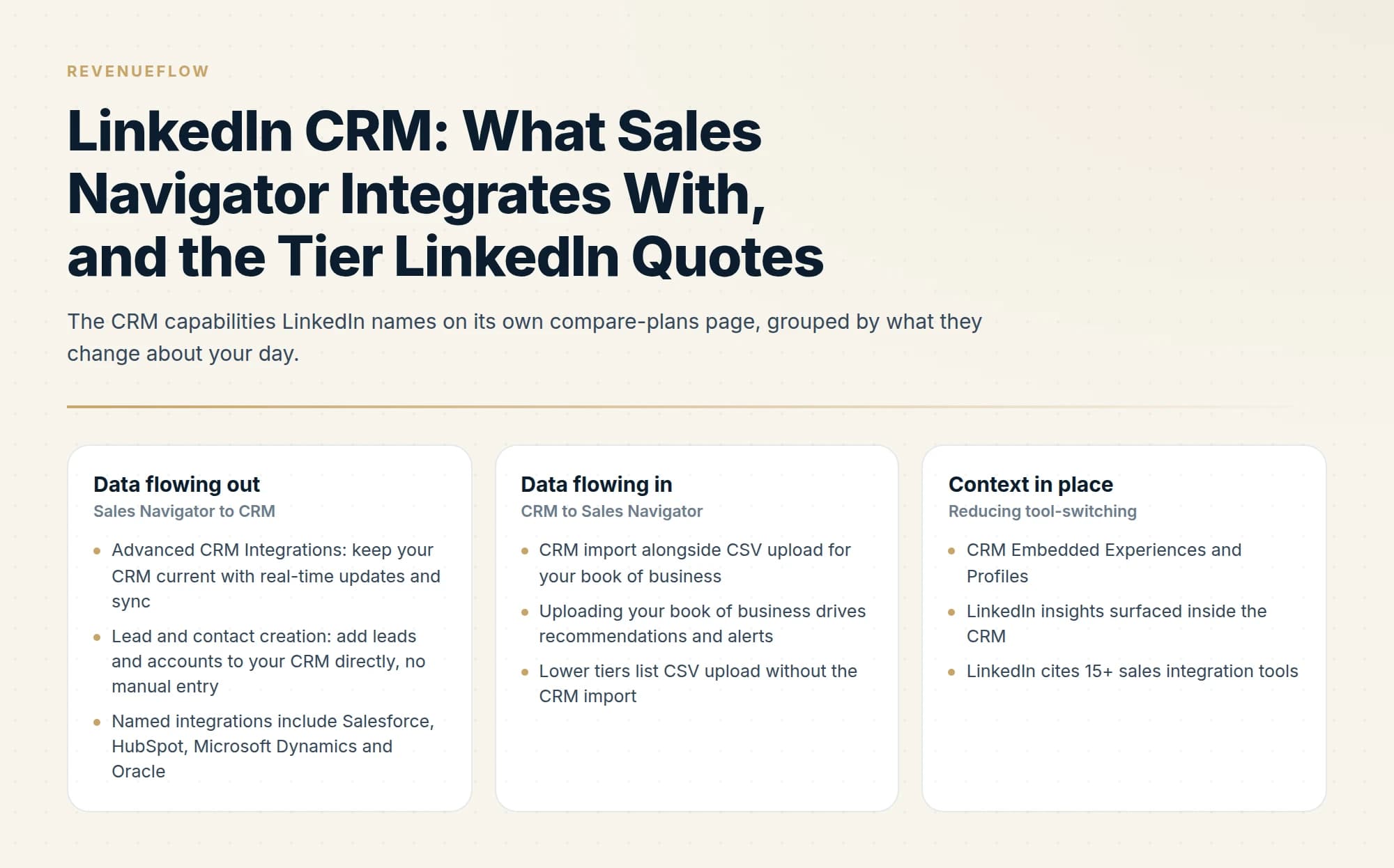
LinkedIn does not sell a CRM. Sales Navigator integrates with the one you already run, and LinkedIn describes Advanced Plus as the tier for sales teams using integrated CRM, priced custom on team size, CRM integration and onboarding. Core is US$119.99 and Advanced US$159.99 per licence per month.
Key takeaways
- LinkedIn's compare-plans page describes Advanced Plus as the tier for sales teams using integrated CRM, and it is the one tier whose price LinkedIn does not publish.
- All three tiers carry the same 50 InMail credits a month, so upgrading for CRM integration buys integration and not messaging capacity.
- LinkedIn does not supply verified work email addresses, and most CRMs deduplicate contacts on exactly that field, so a synced record arrives without its matching key.
- Per-tier feature availability is published as a visual matrix, so read the tier attribution off LinkedIn's page before buying on the strength of one capability.
Reviewed and updated September 2, 2026
LinkedIn does not sell a CRM. That answer disappoints people searching for one, and it is the useful starting point, because what LinkedIn actually sells is a set of integrations that push LinkedIn data into the CRM you already run, and the tier that does that properly is the one whose price LinkedIn will not show you.
Everything below is from LinkedIn's own Sales Navigator compare-plans page, read today.
What LinkedIn actually offers
Sales Navigator comes in three tiers, and LinkedIn's own "best for" row describes them plainly: Core is for individual sellers, Advanced is for sales teams, and Advanced Plus is for "sales teams using integrated CRM".
That last phrase is the whole answer to the CRM question. CRM integration is not a feature sprinkled across the range, it is the thing that defines the top tier.
| Tier | Published price | LinkedIn's stated fit |
|---|---|---|
| Core | US$119.99 per month per licence | Individual sellers |
| Advanced | US$159.99 per month per licence | Sales teams |
| Advanced Plus | Custom, request a demo | Sales teams using integrated CRM |
Advanced Plus pricing is described as customised based on your sales team's size, your CRM integration, and onboarding and training needs. So the tier built for CRM work is priced partly on the CRM work, and you cannot see the number without a sales conversation.
Worth noting from the same matrix: InMail is 50 a month on all three tiers. Upgrading for CRM integration does not buy additional messaging capacity, which is a common assumption. Our Sales Navigator pricing guide covers the full tier comparison.
What the integrations actually do
LinkedIn describes several distinct CRM capabilities on that page, and they solve different problems.
- Advanced CRM Integrations: keep your CRM current with real-time updates and sync
- Lead and contact creation: add leads and accounts to your CRM directly, no manual entry
- Named integrations include Salesforce, HubSpot, Microsoft Dynamics and Oracle
- CRM import alongside CSV upload for your book of business
- Uploading your book of business drives recommendations and alerts
- Lower tiers list CSV upload without the CRM import
- CRM Embedded Experiences and Profiles
- LinkedIn insights surfaced inside the CRM
- LinkedIn cites 15+ sales integration tools
One honest caveat on that table. LinkedIn presents the per-tier availability as a visual matrix of checkmarks, and a text extraction of the page does not reliably preserve which column each row belongs to. The capability descriptions above are quoted from LinkedIn; which tier each one sits in should be read off the matrix on LinkedIn's page directly before you buy on the strength of any single feature. The one tier attribution LinkedIn states in words rather than checkmarks is the "best for" row, and that puts integrated CRM at Advanced Plus.
The question nobody asks before connecting it
Sync makes CRM records appear. It does not make them correct, and the failure is quiet.
LinkedIn is excellent at identifying who holds a role and poor at contact detail. It does not hand out verified work email addresses. So records that originate from LinkedIn arrive with strong firmographic and role data and frequently without the one field that most CRMs use to recognise a person.
Presence data has the same shape, since active status appears only for existing connections and a cold prospect is not one.
That matters more than it sounds, because deduplication runs on exactly that field. HubSpot, for instance, publishes that it automatically deduplicates contacts by email address and companies by domain name. A record arriving without an email has nothing to match on, so it is created fresh rather than merged, and you have a second copy of someone you already had. Our Apollo and HubSpot deduplication guide covers those matching rules in full, and they apply to any tool pushing records in, LinkedIn included.
- Step 1LinkedIn identifies the person
Role, company, seniority and tenure, which is the part LinkedIn is genuinely best at.
- Step 2No verified email comes with them
LinkedIn does not supply work email addresses, so the record arrives missing the CRM's matching key.
- Step 3The CRM cannot match it
Deduplication runs on email for contacts and domain for companies. Nothing to match means a new record.
- Step 4Resolve the address before the push
Run a finding and verification waterfall first, so the record arrives with the key its destination needs.
The intervention point is the last step and it is cheap. Resolving and verifying the email before pushing to the CRM converts a duplicate-generating sync into a normal one, and it produces a record you can actually send to.
The same applies on the company side, where the matching key is the domain rather than the email. A company pushed with a name and no domain has nothing to match against, so it lands as a second record, and every contact attached to the wrong copy is mis-attributed in reporting from then on. That failure is harder to spot than a duplicate person, because both company records look complete when you open either one.
Whether to buy the integration at all
Three questions decide it, and the price you cannot see is only the third.
- Yes: Your reps genuinely live in the CRM rather than in Sales Navigator
- Yes: You are on one of the named platforms: Salesforce, HubSpot, Dynamics, Oracle
- Yes: Somebody owns CRM data hygiene and will own it after the sync too
- Yes: You have decided how LinkedIn-sourced records get emails before they land
- No: Buying it to reduce manual copying by one or two people
- No: Expecting the integration to improve data quality by itself
- Depends: Whether a smaller team is better served by Advanced plus manual discipline
The third line is the one that decides whether this is worth it a year later. A sync multiplies whatever hygiene practice you already have. A team with clean ownership gets a CRM that stays current, and a team without one gets its existing mess propagated faster and from a second direction.
The first "no" is worth stating plainly because it is the most common reason people buy. If the pain is two reps copying fields by hand, the arithmetic on a custom-priced enterprise tier rarely works. Manual entry is cheap at small scale and the integration is not.
What "real-time sync" does not mean
The phrase appears in LinkedIn's own description of Advanced CRM Integrations, and it is worth reading precisely, because sync is a word that hides a design decision.
Sync tells you that changes propagate. It does not tell you which system wins when both have a value and they disagree, and that rule is the single most consequential setting in any CRM integration. A job title held in your CRM from a conversation last quarter and a job title held on a LinkedIn profile are both plausible, and one of them is about to overwrite the other.
Decide the direction of authority per field rather than accepting a default. LinkedIn profile data is usually more current on role, employer and seniority, because the person maintains it themselves and has an incentive to. Your CRM is usually more accurate on anything a human learned in a conversation: budget, timing, the fact that they moved teams internally, the reason the last deal stalled. A sync that lets profile data overwrite conversation data will quietly erase the more valuable of the two.
The second thing sync does not mean is deletion. Records generally flow in and update; they rarely disappear when the underlying profile changes or the person leaves. So a synced CRM accumulates, and the growth is invisible until someone runs a count.
Using LinkedIn as a CRM, which people try
Some teams attempt to run pipeline inside LinkedIn itself, using saved leads, lists, notes and tags in Sales Navigator as a lightweight substitute.
Teams relying on Sales Navigator for outreach should also weigh the mechanics of the connection request itself, since how LinkedIn's invitation rules actually work shapes whether that inbox access ever gets granted.
It works for a single seller managing a modest book, and it breaks in three predictable ways. There is no shared pipeline view, so nothing is visible to a manager or a colleague. The data lives with the seat, so it leaves when the person does. And it captures the LinkedIn-shaped part of the relationship only, which excludes email threads, calls, and everything that happens after the deal becomes real.
Streak's Gmail-native pipeline shows a lighter alternative for small teams who want deals to live beside their email threads rather than sync into a separate CRM.
The honest framing is that Sales Navigator is a prospecting and research surface, not a system of record, and LinkedIn's own tier structure says the same thing by making the CRM integration the premium feature. How to work Sales Navigator for lead generation covers what it is genuinely good at.
Where we sit
We run LinkedIn through HeyReach alongside email, and we are paid on attended qualified meetings, so what reaches a client's CRM matters to us commercially rather than administratively. Two practices follow from that and both are relevant here.
We resolve email addresses through a dedicated verification waterfall rather than expecting them from LinkedIn, which means records arrive with the key a CRM can match on. And we do not scrape LinkedIn to populate anything, because the User Agreement prohibits it and the account risk lands on the client, as covered in what LinkedIn's terms say about scraping.
If you would rather not build any of this yourself, you can see what a campaign would look like for your market.
The short version
There is no LinkedIn CRM. Sales Navigator integrates with the CRM you already run, and LinkedIn describes Advanced Plus as the tier for teams using integrated CRM, priced custom and quoted on team size, CRM integration and onboarding rather than published. Core is US$119.99 and Advanced US$159.99 per licence per month, and all three tiers carry the same 50 InMail credits, so upgrading for CRM buys integration and not messaging. Named platforms include Salesforce, HubSpot, Microsoft Dynamics and Oracle. Before connecting anything, decide how LinkedIn-sourced records will get a verified email address, because that field is what your CRM deduplicates on and LinkedIn does not supply it.
Sales Navigator tier descriptions, pricing, CRM capability names and named integration platforms are from LinkedIn's own compare-plans page at https://business.linkedin.com/sales-solutions/compare-plans, re-fetched with cache-busting and verified as of mid-2026. Per-tier feature availability is presented there as a visual matrix; read it directly rather than relying on any secondary summary, including this one. HubSpot deduplication behaviour is per HubSpot's own documentation. Prices exclude tax and LinkedIn revises them.
Frequently asked questions.
Frequently asked questions- Does LinkedIn have a CRM?
- No. LinkedIn sells Sales Navigator, which integrates with the CRM you already run rather than replacing it. Its compare-plans page describes Advanced Plus as the tier for sales teams using integrated CRM, and names Salesforce, HubSpot, Microsoft Dynamics and Oracle among the platforms. Saved leads, lists and notes inside Sales Navigator suit one seller and offer no shared pipeline view.
- How much does Sales Navigator CRM integration cost?
- LinkedIn publishes US$119.99 per licence per month for Core and US$159.99 for Advanced, and shows no price for Advanced Plus, the tier it describes as being for teams using integrated CRM. That tier is quoted on request and priced on your team size, your CRM integration and your onboarding and training needs, so the number arrives through a sales conversation.
- Why do LinkedIn-sourced CRM records duplicate?
- They arrive without the field the CRM matches on. HubSpot documents that it deduplicates contacts by email address and companies by domain name, and LinkedIn does not supply verified work email addresses. A record with no email has nothing to match against, so it is created fresh instead of merged. Resolve and verify the address before the push.
- Can you run your pipeline inside Sales Navigator?
- One seller with a modest book can manage, using saved leads, lists, notes and tags. It breaks in three ways once anyone else needs visibility: no shared pipeline view for a manager or a colleague, data that sits with the seat and leaves when the person does, and a record covering only the LinkedIn part of the relationship.
- How do I export contacts from LinkedIn to Excel?
- Your own first-degree connections can be exported through LinkedIn's data-download tool, which returns a CSV that opens in Excel, and email addresses appear only where the member has allowed it. Sales Navigator is a separate matter. LinkedIn states it does not offer CSV or XLS export of leads and accounts, so data leaves that tool through a CRM integration or by hand.
About the author.

B2B cold email experts helping companies generate qualified leads through done-for-you outreach campaigns.
RevenueFlow Team
Explore more.
Ready to scale your outreach?
We build GTM engines that book real meetings. See the receipts.
Related articles.
LinkedIn Web Scraping: What Section 8.2 Prohibits
Section 8.2 reaches past running a scraper yourself. It also covers data obtained through aggregators and brokers, which catches buyers as well as builders.
Does Sales Navigator Provide Email Addresses? No
Sales Navigator identifies the person and stops there. No tier supplies a work email address, and the CRM export carries the record with that field empty.
LinkedIn Voice Notes: 60 Seconds, 1st Degree Only
LinkedIn publishes three limits on voice messaging and they decide the play before the script does. What they rule out, and the one slot that survives.
The LinkedIn Green Dot: What Active Status Shows
LinkedIn's green dot and white-centred ring, as LinkedIn's own pages define them, who can see them, and why a cold list shows presence for only some prospects.
Sales Enablement Charters: What the Published Ones Ask For
Six publishers set out what a sales enablement charter should contain. Five describe a document nobody can check, and one writes a definition with inspection in it.
LinkedIn Message Types: Five Routes and What Silence Costs
Five ways to put a message in front of someone on LinkedIn, priced differently on the way out and priced very differently when nobody replies.