Personalize 500 Prospects in 30 Seconds Each Using Clay
Most cold email experts waste 30 minutes per prospect. We do the opposite. Here's how we personalize at scale.
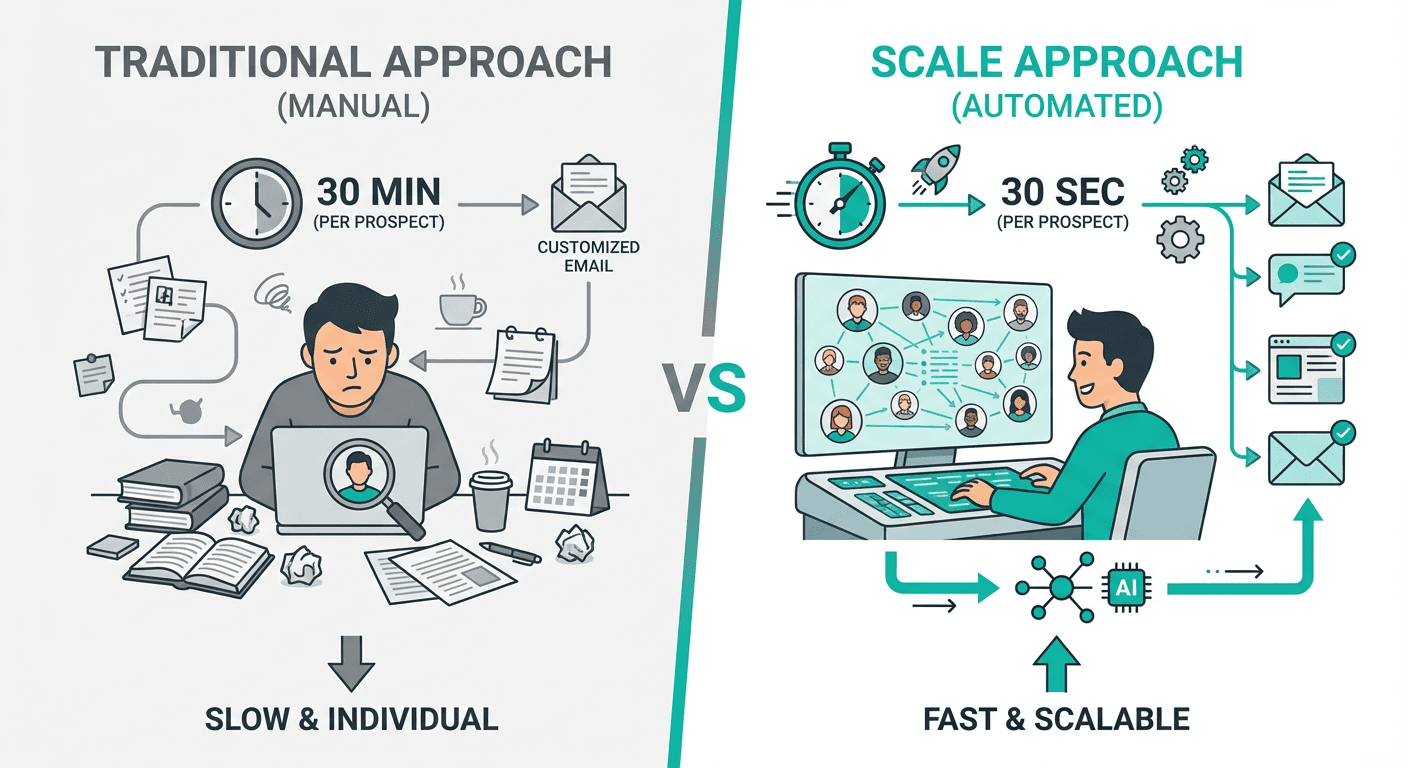
Use Clay's two-column automation system to personalize 500 prospects in 30 seconds each. Column one checks recent activity (podcasts, LinkedIn posts, articles), column two checks company signals (funding, launches, press). This approach finds personalization for 80-90% of prospects automatically, delivering 15 replies per week versus 5 with traditional 30-minute manual research per prospect.
Key takeaways
- The two-column Clay system finds personalization for 80 to 90 percent of prospects automatically while spending only 30 seconds per contact.
- Reverse engineering (building a list of 500 qualified prospects first, then applying automated personalization) flips the usual effort equation: volume first, with personalization applied mechanically afterward.
- Scaling from 50 prospects per week with 30-minute manual research to 500 prospects with 30-second automation increases replies from 5 to 15 despite lower reply rates (3% versus 10%).
- Two separate AI columns rather than one or four is the optimal balance, allowing each prompt to focus on specific signals without burning excessive API credits.
- Personalization does not need to be relevant to your offer; recent signals like podcast mentions or funding announcements simply prove the email was not mass-blasted.
Reviewed and updated September 5, 2026
How to Personalize 500 Prospects in 30 Seconds Each Using Clay
Most cold email experts are wasting 30 minutes per prospect.
They find the perfect signal first. Then build a list of 50 people.
We do the opposite.
How we personalize 500 prospects in 30 seconds each using Clay:
The Reverse Engineering Approach
Traditional approach:
- Find perfect signal
- Build small list of 50 people
- Send highly personalized emails
- Run out of prospects in days
Our approach:
- Build your list first using Clay People Finder
- Get 500 qualified prospects from your ICP
- Run automated personalization at scale
Clay People Finder handles enrichment, and once prospects are built, teams often pair it with an outreach platform, a pairing explored in Clay and Groove side by side.
The Two-Column System
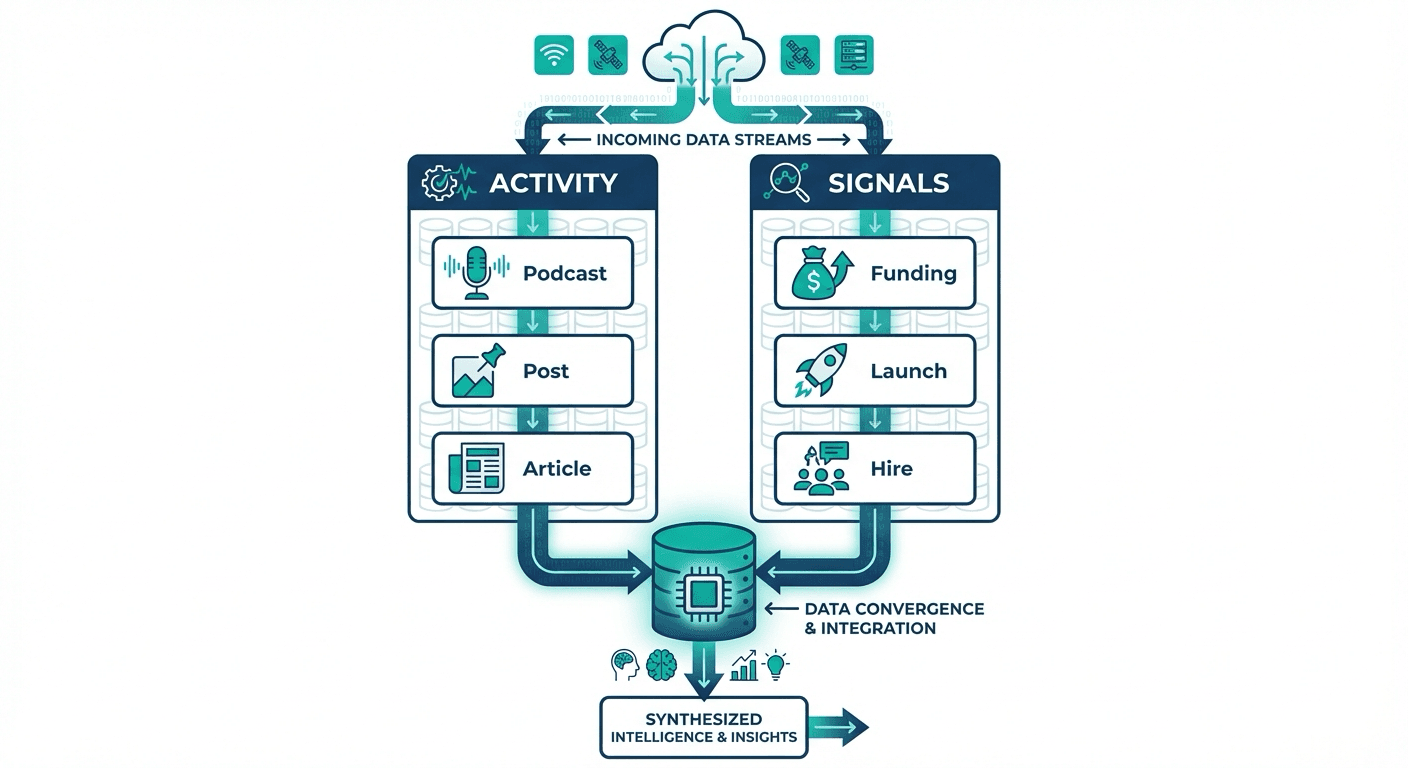
Run two automated personalization columns:
Column 1: Recent Activity
Checks for:
- Recent podcast appearances
- LinkedIn posts (last 30 days)
- Speaking engagements
- Published articles
Column 2: Company Signals
Checks for:
- Funding rounds
- Product launches
- Company features in press
- Major hiring announcements
Why Split Into Two Columns?
Why we split it into two separate columns instead of one:
Each AI prompt can allocate more intelligence to finding its specific signals.
In an ideal world you'd have four columns, one for each signal. But you'd burn way too many API credits.
Clay's enrichment data still needs somewhere to live once prospects reply, and this tool comparison for sales pipelines explains how Clay and Monday CRM handle different stages of the workflow.
Once enriched prospects are ready for outreach, this comparison of Clay and Outreach explains why revenue teams often pair the two tools rather than choosing one.
Two columns is the sweet spot. The AI is focused enough to find quality signals without wasting credits.
The Controversial Part
If both columns come back empty? We go straight to the offer.
The personalization doesn't need to be relevant to what you sell.
You just need something recent to break the ice and prove you didn't blast 10,000 people.
Examples of What We Use
- "Your podcast with Steven Bartlett was awesome."
- "Congrats on the Series B."
- "Your LinkedIn post on leadership was interesting."
That's it. Then you go into your offer.
The Results
We find personalization for 80 to 90 percent of our list this way.
The other 10 to 20 percent? We send the email anyway without personalization.
Your offer is strong enough to stand on its own.
Why This Works Better
Most people do it backwards. They spend 30 minutes finding the perfect relevant signal. Then they have 50 people to email instead of 500.
Or they scrape LinkedIn engagers and filter for intent. Burn API credits on junk data. Waste a week for 100 mediocre leads.
Deciding whether Clay replaces a sales engagement tool or complements one matters, and the Clay and Salesloft comparison clarifies how the two fit together in a workflow.
The Math
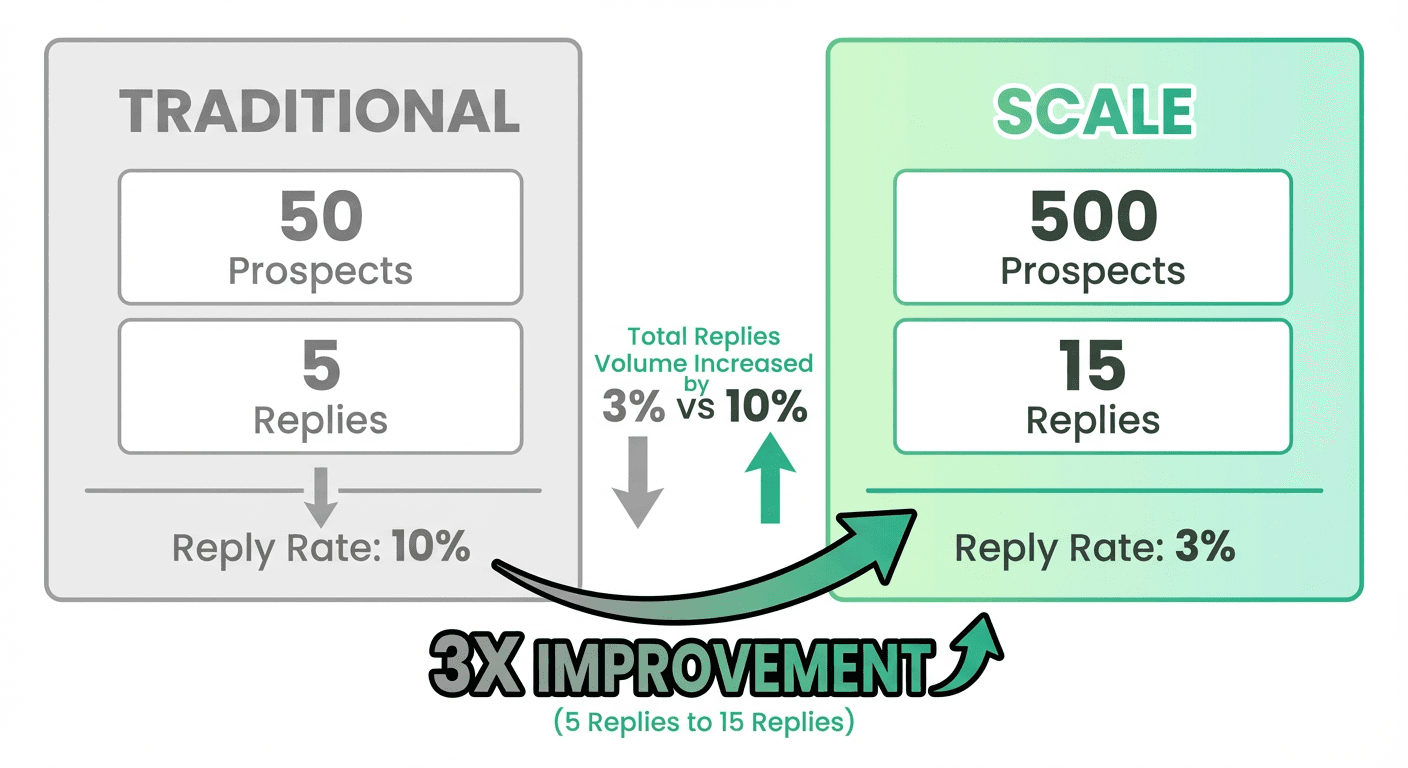
Traditional approach:
- 30 minutes per prospect
- 50 prospects per week
- 10% reply rate = 5 replies
Our approach:
- 30 seconds per prospect
- 500 prospects per week
- 3% reply rate = 15 replies
You just 3x'd your pipeline while spending less time.
How to Implement This
- Step 1Build Your List First
Use Clay People Finder to get 500+ qualified prospects matching your ICP criteria.
- Step 2Set Up Your Personalization Columns
Create two separate Clay enrichment columns.
- Step 3Create Your Email Template
- Step 4Send at Scale
Export to your email sending tool and launch your campaign.
Step 1: Build Your List First
Use Clay People Finder to get 500+ qualified prospects matching your ICP criteria:
- Job titles
- Company size
- Industry
- Geography
- Other relevant filters
Step 2: Set Up Your Personalization Columns
Create two separate Clay enrichment columns:
- Recent activity checker
- Company signals checker
Step 3: Create Your Email Template
Structure:
[Personalization if found]
[Your offer]
[Clear CTA]
[Signature]
Step 4: Send at Scale
Export to your email sending tool and launch your campaign.
The Key Insight
Build the list first. Personalize at scale second. Your offer does the heavy lifting anyway.
If you have a strong offer and proper deliverability, light personalization or no personalization will still generate pipeline.
(Understanding the hierarchy? Infrastructure and offer matter more than personalization.)
Stop spending hours on personalization that doesn't move the needle. Start building bigger lists with better offers.
The Bottom Line
- Quality > Hyper-relevance for personalization
- List size > Perfect targeting
- Offer strength > Personalization depth
Most experts are optimizing for the wrong variables. They'd rather spend 30 hours perfecting personalization than 3 hours improving their offer.
Don't be most experts.
Build your list, add light personalization at scale, and let your offer do the work.
Related Reading
- Why Spintax Is Killing Your Deliverability (And What to Use Instead)
- How to Automate Hyper-Specific Email Personalization at Scale Using Clay AI
If you would rather have this run for you, RevenueFlow books qualified meetings on a pay-per-meeting basis and publishes client results.
Frequently asked questions.
Frequently asked questions- How long does it take to personalize each prospect using Clay's two-column system?
- It takes 30 seconds per prospect using the automated two-column system in Clay. This contrasts with traditional manual research methods that take 30 minutes per prospect. The system automatically checks recent activity in one column and company signals in another, finding relevant personalization for 80-90% of prospects without manual effort.
- What signals should I include in each Clay personalization column?
- Column one should check recent activity signals including podcast appearances, LinkedIn posts from the last 30 days, speaking engagements, and published articles. Column two should check company signals including funding rounds, product launches, press features, and major hiring announcements. Splitting into two focused columns allows each AI prompt to allocate more intelligence to finding specific signals without wasting API credits.
- Should I still send emails if Clay finds no personalization for a prospect?
- Yes, send the email anyway without personalization. The authors send to 10-20% of their list with no personalization and still generate pipeline. The approach prioritizes offer strength over personalization depth: if you have a strong offer and proper deliverability, the email will still perform. Light or no personalization can generate results when the fundamentals are solid.
- Why does building the list first work better than finding perfect signals first?
- Building the list first delivers 15 replies per week versus 5 with signal-first approaches. Starting with 500 qualified prospects from Clay People Finder and applying automated personalization at scale produces more total responses even with lower reply rates (3% versus 10%). The traditional method of finding perfect signals first limits you to 50 prospects per week, constraining pipeline despite higher engagement rates.
About the author.

Tim Carden is CMO / CTO at RevenueFlow, which builds and operates outbound revenue engines for B2B companies. Studied at McGill University.
Tim Carden · CMO / CTO
Connect on LinkedIn →Explore more.
Ready to scale your outreach?
We build GTM engines that book real meetings. See the receipts.
Related articles.
Why Spintax Is Killing Your Deliverability
Spintax makes your emails look robotic and triggers spam filters. Here's a better system using Clay that creates 125 unique email combinations while maintaining quality control.
Sales Enablement Statistics, Traced to Their Sources
The sales enablement figures in circulation, followed to their publishers: which state a population, which are gated, and which are quietly seven years old.
B2B Lead Lists for Travel Agencies: Registers and Gaps
The travel trade is written down in state consumer protection registers, not industry directories, and an exemption inside one decides who is missing from your file.
Sales Prospecting for Health Systems: The Public Record
Where health systems are written down in public: the Medicare cost report, the facility list a non-profit system files, and the two gates that follow qualification.
B2B Lead Lists for Aviation Companies: Build or Buy
Aviation is one of the few industries whose accounts are published by its regulator, which changes what is worth buying and what is worth downloading yourself.
Cold Calling for Chemical Companies: Who Picks Up
A chemical cold call rarely arrives first. It reaches a formulator who has already been comparing suppliers on a screen, for one of three published reasons.