An Email Deliverability Expert's First 30 Days
Week by week through a deliverability engagement, from a read-only assessment to fixes and measurement, and why changing DNS on day one is a warning sign.
A deliverability expert spends the first week reading rather than changing: auditing authentication, baselining Postmaster Tools, checking blacklists and reviewing list hygiene. Fixes follow in week two, measurement in weeks three and four, and reputation monitoring continues permanently after the engagement ends.
Key takeaways
- Week one should be assessment only. Someone changing DNS records before establishing a baseline cannot prove anything they do afterwards worked.
- Authentication fixes are fast and reputation recovery is slow, so the visible results of week two usually appear in week four or later.
- The engagement produces a permanent maintenance obligation, not a finished state, because reputation responds to every campaign you send.
- Ask for the baseline measurements in writing at the end of week one, since without them the final report has nothing to compare against.
Reviewed and updated September 1, 2026
The contract is signed, the deliverability specialist starts on Monday, and by Friday your DNS records look exactly the same as they did the week before. Nothing has been changed, and the only deliverable is a document. That is the correct shape for a first week, and it is one of the earliest signals that you hired the right person.
Deliverability work is a diagnostic job wearing the clothes of a configuration job. The configuration part takes an afternoon. Working out which record is genuinely broken, which is merely unusual, and which is fine and being blamed for a problem it did not cause is what takes a week. Here is what a competent first thirty days actually contains, in order, and what should exist at the end of it.
If you are still choosing who to bring in, the vetting questions are a separate subject and are covered in what to ask an email deliverability consultant. This piece starts after the contract is signed.
- Week 1Assessment only
Authentication audit, Postmaster Tools baseline, blacklist sweep, list hygiene review, placement snapshot. No DNS changes.
- Week 2Fixes
SPF, DKIM and DMARC alignment, dead record cleanup, and separation of outbound sending from the primary domain.
- Week 3Measure the change
Re-test placement against the week 1 snapshot. Watch the spam rate move. Attribute each change to a specific fix.
- Week 4Remediate and hand over
Delisting where needed, a written ramp plan, and the list of things that now need watching permanently.
Why week one changes nothing
Every mail domain has three or four settings that look wrong to a stranger and are load-bearing for somebody. A stray include: in the SPF record belongs to the payroll provider. The odd DKIM selector is the invoicing tool nobody has migrated yet. The subdomain with its own MX is the support desk.
An engineer who edits DNS on day one has removed the evidence before reading it. Worse, DNS changes propagate on their own schedule, so a change made on Monday and a placement problem noticed on Wednesday cannot be cleanly attributed to each other. The whole value of the first month comes from the fact that a baseline was taken before anything moved.
So treat day-one DNS edits as a warning sign. There are two honest exceptions. An open relay and an active listing on a major blacklist are both live incidents, and neither improves by being studied for a week. Everything else waits for the audit.
A blacklist listing itself can point to more than the sending IP, since receiving servers also test the domains in your headers and links, a distinction explained in domain blacklist checks explained.
Two related tells are worth watching for in the same first few days. A specialist who has not asked for read access to your sending platform and your DNS is planning to work from a scanner report, and a scanner report describes what is published rather than what is happening. And a specialist who gives you a verdict on the first call, before seeing either, is pattern matching against their last client. The findings that matter on your domain are the ones that could not have been guessed.
Week 1: what is actually being read

Five separate reads, each producing a written finding rather than an action.
Authentication as published. What SPF, DKIM and DMARC currently say, evaluated as a receiving server would evaluate them, not as they were intended. The specific thing being counted here is DNS lookups. RFC 7208 requires SPF implementations to limit the terms that trigger DNS queries to ten during evaluation, and include, a, mx, ptr and exists all count against it, along with the redirect modifier. Exceeding it returns a permerror, which is a failure rather than a soft warning. Domains that have collected vendors for a decade cross this line quietly, and nothing tells you.
A Postmaster Tools baseline. Google publishes your spam rate, and its bulk sender guidance sets the threshold at below 0.30%. Postmaster Tools only reports on domains you have verified, so a domain nobody ever verified has no history to read at all. Getting that verification in place during week one is what makes weeks three and four measurable. The mechanics are in our Google Postmaster Tools guide.
Blacklist status across every sending IP and domain. Not one check on the primary domain. Every domain currently sending, plus the IPs behind them. Listings on obscure lists are common and often harmless, and a listing on a widely consumed list is a different situation entirely, so the finding has to name which list.
List hygiene. Where the addresses came from, when they were last verified, and what the bounce pattern looks like. This is the most common root cause of a reputation problem and the least likely to be diagnosed as one, because the symptom shows up in the infrastructure and the cause is in the data.
Once list hygiene surfaces a bounce pattern worth investigating, sorting bounce refusals by ownership shows whether the recipient, your DNS, or your sending behaviour is to blame.
Current placement. A seed list test gives you which folder you are landing in at each major provider today. Without that snapshot, every improvement claimed in week four is an opinion.
- Yes: A written map of every domain and IP currently sending on your behalf
- Yes: SPF lookup count per sending domain, with the ten-term limit checked
- Yes: DKIM selectors found, and which of them align with the visible From domain
- Yes: DMARC record status per domain, including the sending domains
- Yes: Postmaster Tools verified, with the current spam rate recorded
- Yes: Blacklist findings, named list by named list
- Yes: A placement snapshot across the providers you actually send to
- No: DNS records already edited this week
Week 2: the fixes
Now the work is mechanical, and it goes in a fixed order because the later fixes depend on the earlier ones.
Alignment comes first. DMARC passes when either SPF or DKIM passes and aligns with the domain in the From header, and it does not need both. That single sentence resolves most confusion about why a domain that "has SPF" still fails. A third-party platform sending from its own infrastructure passes SPF for its own domain, which aligns with nothing you own, and DKIM signing with your domain is the fix. Publishing the records each platform hands you is unglamorous and it is most of week two. The setup detail is in our SPF, DKIM and DMARC guide for cold email.
Record cleanup comes second. Every include: for a vendor you stopped using in 2023 is consuming one of ten lookups and buying nothing. Removing them is the cheapest way back under the limit, and it should be done by deletion rather than by flattening the record into raw IP addresses, which trades a lookup problem for a maintenance problem.
DMARC comes third, and for most domains the right week-two move is publishing a record with a reporting address rather than jumping to enforcement. Enforcing before you know who sends as your domain is how a payroll notification gets silently quarantined three weeks later. The reasoning is set out in DMARC policy not enabled.
Infrastructure separation is the fourth piece, and it is the one clients push back on most. Cold outbound belongs on domains separate from the domain your contracts and invoices come from. Reputation attaches to the sending domain, and separation means a problem in one place cannot reach the other. A specialist who leaves outbound on your primary domain has accepted a risk on your behalf without telling you.
Weeks 3 and 4: measurement and remediation

Week three exists to prove the week-two work did something. Re-run the placement test against the same seed list, watch the Postmaster Tools spam rate against the 0.30% line, and attribute each movement to a specific change. Some changes will show nothing, which is a genuine result and worth recording.
The attribution discipline is what separates a measurement week from a waiting week. Authentication fixes and reputation recovery move on different clocks: a corrected DKIM alignment shows up in DMARC reporting within a day or two, while a spam rate that has been elevated for a quarter responds to a change in sending behaviour over weeks. Reading a flat spam rate in week three as evidence that week two failed is the most common misreading of this stage, and it leads to a second round of changes stacked on top of the first, which makes the next measurement uninterpretable as well.
Week four handles what did not resolve. Delisting requests where a listing survived the fixes. A decision on any domain whose reputation is bad enough that repair costs more than replacement. And a written ramp plan, because volume is the variable most likely to undo the month's work.
That plan is where warmup belongs. MailReach, whose pricing page publishes the number, states that the initial warmup phase should last fourteen days minimum and that no campaigns should be sent during it, and advises keeping warming running for as long as you send campaigns and between them. Whatever tool you use, that shape is the useful part: a floor measured in weeks before real sending, and warming that continues afterwards rather than switching off at launch.
What finished looks like, and what never finishes
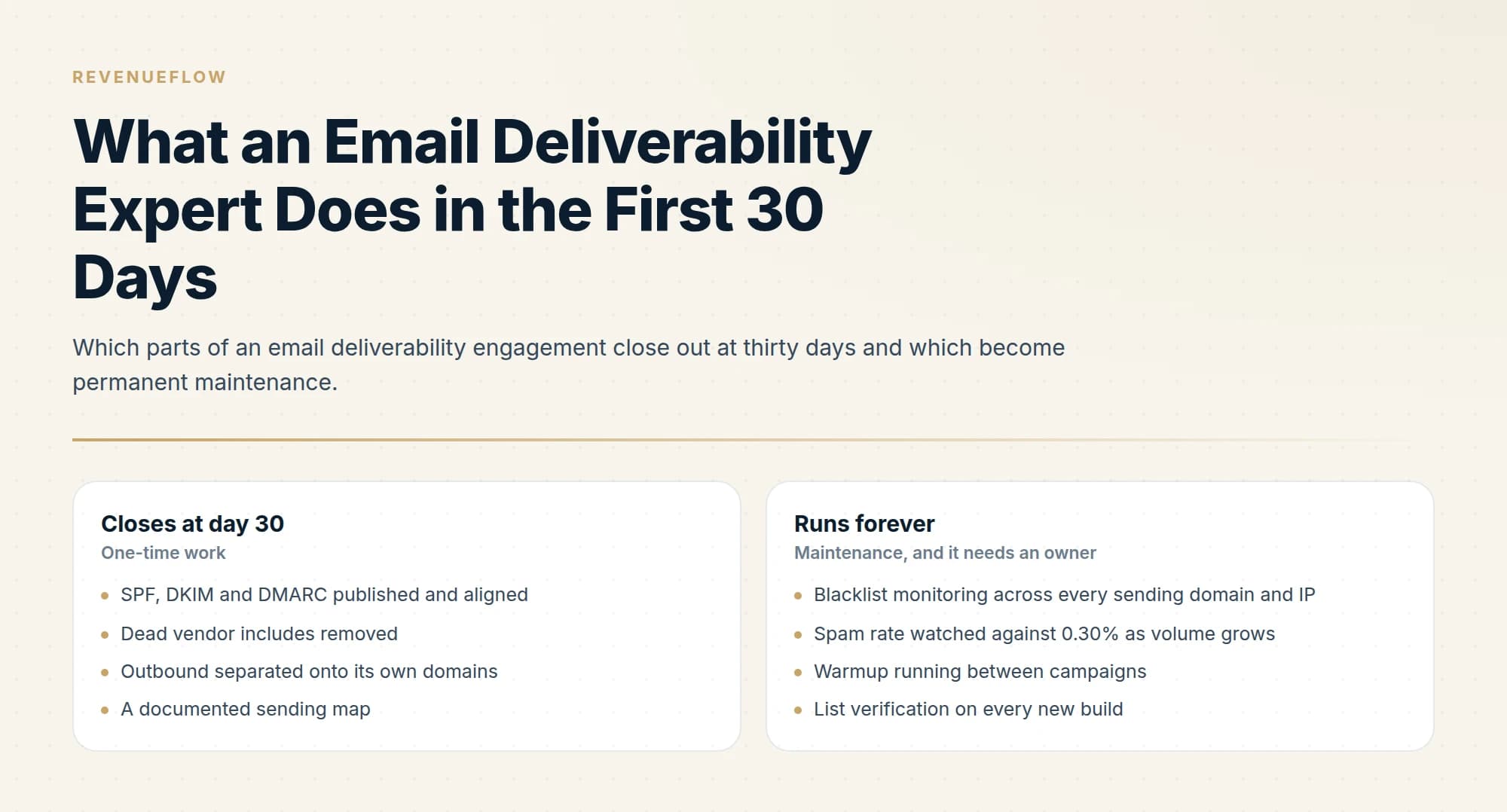
- SPF, DKIM and DMARC published and aligned
- Dead vendor includes removed
- Outbound separated onto its own domains
- A documented sending map
- A measured placement baseline
- Delisting requests filed and resolved
- Blacklist monitoring across every sending domain and IP
- Spam rate watched against 0.30% as volume grows
- Warmup running between campaigns
- List verification on every new build
- DMARC reports read after each new vendor is added
- DNS reviewed whenever a tool is adopted or dropped
The distinction matters commercially. A thirty-day engagement priced as a project should deliver the left column completely, and should hand you the right column as an explicit list with an owner named. An engagement that quietly converts into a retainer without that list ever being written down is selling you attention rather than a result.
Ask for the right column in writing at day thirty. It is the cheapest test of whether the work was done properly, because a specialist who genuinely audited your setup can produce it in an hour and one who did not cannot produce it at all.
We run sending infrastructure as part of our outbound engagements rather than as a standalone audit, and you can see what a campaign would look like for your market.
The short version

A first month of deliverability work is one week of reading and three weeks of acting on it. Week one produces findings and no DNS changes: an authentication audit against the ten-lookup SPF limit, a verified Postmaster Tools baseline, a blacklist sweep across every sending domain and IP, a list hygiene review, and a placement snapshot. Week two fixes alignment first, then removes dead records, then publishes DMARC with reporting, then separates outbound from the primary domain. Weeks three and four measure the difference against the week-one baseline and remediate what survived. An engineer editing DNS on day one, with the exception of an open relay or an active major listing, has destroyed the evidence before reading it.
SPF term limits are per RFC 7208 section 4.6.4. Google bulk sender requirements and the 0.30% spam rate threshold are per Google's published sender guidelines as of mid-2026. MailReach warmup guidance is quoted from its own pricing page, verified mid-2026. Confirm current requirements with the official sources before making DNS changes.
Sources: RFC 7208 section 4.6.4, Google email sender guidelines, MailReach pricing
Frequently asked questions.
Frequently asked questions- What happens in the first week of a deliverability engagement?
- Assessment rather than changes: auditing SPF, DKIM and DMARC records and their alignment, establishing a baseline in Google Postmaster Tools, checking blacklist status, reviewing list hygiene and bounce history, and testing current inbox placement. The baseline is what makes later improvement measurable.
- How long does it take to fix email deliverability?
- Authentication problems can be fixed in hours once diagnosed, but reputation recovers slowly because providers weigh recent sending history. Expect technical fixes inside the first fortnight and measurable placement change over the following weeks, assuming sending volume and list quality also change where needed.
- Why should an expert not change DNS on day one?
- Because without a baseline nobody can tell whether a later improvement came from the change or from something else. Immediate DNS edits also risk breaking legitimate senders that have not yet been identified, which is exactly what the assessment week exists to enumerate.
- What continues after the 30 days?
- Monitoring and maintenance. Blacklist status, Postmaster Tools spam rates, bounce rates and authentication validity all need continuous attention, and new sending domains need warming before use. The engagement should end with a documented maintenance routine and an owner, not just a report.
About the author.

Tim Carden is CMO / CTO at RevenueFlow, which builds and operates outbound revenue engines for B2B companies. Studied at McGill University.
Tim Carden · CMO / CTO
Connect on LinkedIn →Explore more.
Ready to scale your outreach?
We build GTM engines that book real meetings. See the receipts.
Related articles.
Email Deliverability Services: What They Cannot Fix
Deliverability services fix authentication, reputation and infrastructure. They cannot fix a bad list or an offer nobody wants, which is the usual real problem.
How to Run Your Own Email Deliverability Audit
Fourteen checks you can run today, what each one looks at, what a pass looks like, and what to do when one fails. No tools beyond free diagnostics required.
Email Warmup Pricing in 2026: What 20 Tools Charge, and What 10 Mailboxes Cost
Email warmup tools start at a median of $29 a month, but warming ten mailboxes costs from $7.50 to $1,190 depending on how the vendor prices a mailbox.
Warmup Inbox Pricing: Per Inbox, Annual Loads First
Warmup Inbox prices per inbox and its page opens on the annual switch. Both states for all three plans, the reply ceiling meter, the trial and how a fleet bill is built.
MailReach Pricing: The Headline Rate Is the Second Band
MailReach prices warmup on a slider with four mailbox bands and two billing states. Every band at both states, and why the printed rate is not the entry rate.
Mailwarm Pricing: The Page Opens on Its Yearly Tab
Mailwarm's pricing tabs open on yearly and the plans meter daily volume rather than mailboxes. Both tabs, the overage rate, the no-trial rule and the per-mailbox cost.