Copper HubSpot Integration: Two Paths, Neither Native
Copper documents a Zapier bridge to HubSpot Marketing Hub on all four plans; HubSpot documents its own two-way Data Sync app for Copper. Both read 18 September 2026.
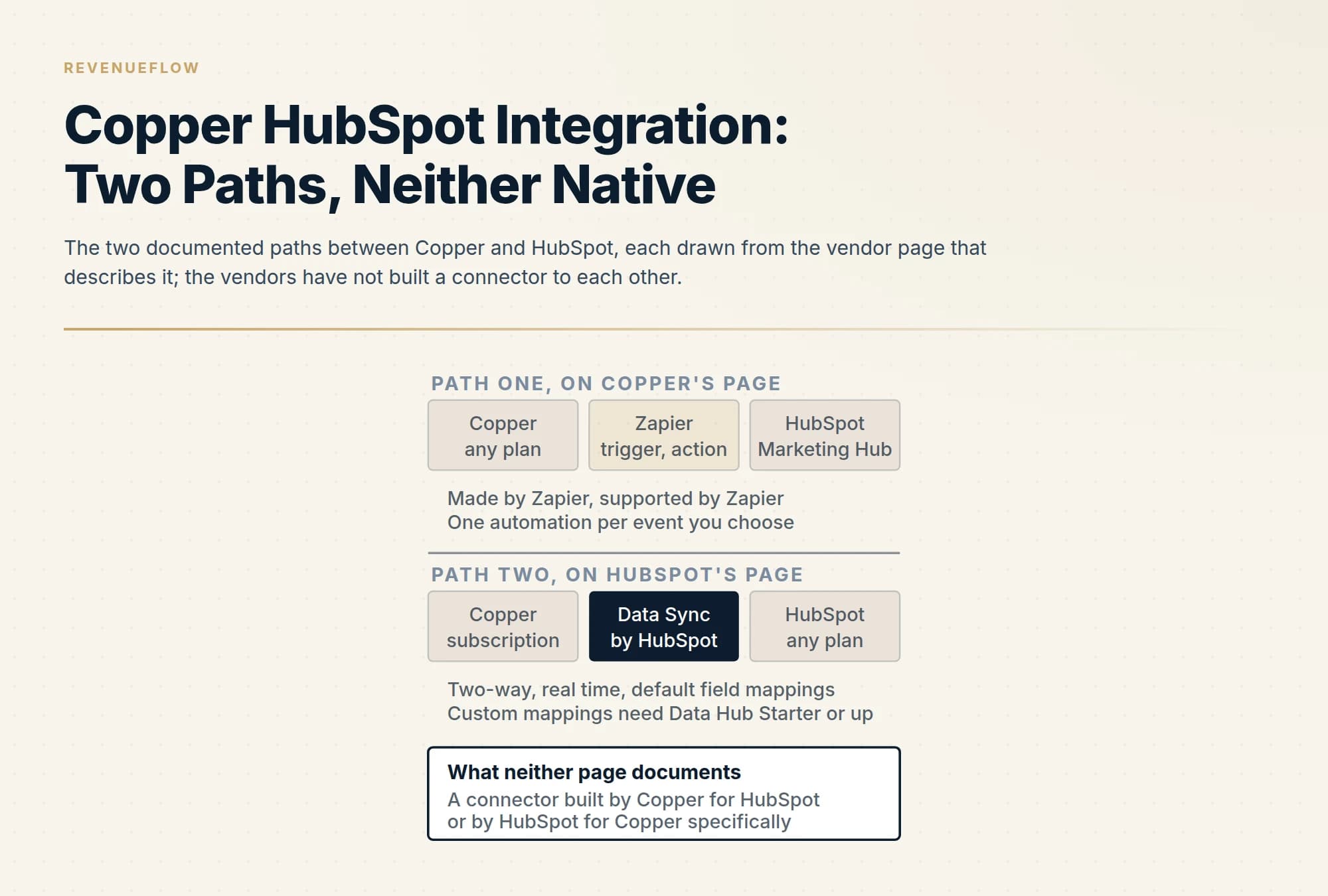
Neither Copper nor HubSpot has built a connector to the other. Copper's directory documents a HubSpot path made and supported by Zapier on all four Copper plans. HubSpot's marketplace documents its own Data Sync app, two-way and real time, moving people, leads, companies, opportunities, tasks, notes, calls and meetings, with custom mappings on Data Hub Starter or up.
Key takeaways
- Copper's HubSpot listing is headed HubSpot Integration by Zapier, is supported by Zapier, connects Copper with HubSpot Marketing Hub, and names all four Copper plans as eligible.
- HubSpot's Copper listing is Data Sync by HubSpot, a HubSpot Certified App: two-way real-time sync with default mappings and historical syncing, free as an integration, requiring a Copper subscription, with custom field mappings on Data Hub Starter or up.
- HubSpot's data sync article, updated 15 July 2026, documents the engine: an initial sync then incremental syncs, matching on email for contacts and name or domain for companies, normalised name matching, and a first-record-wins duplicate rule.
- Test either path on twenty awkward records before a historical sync, and read the Copper contact ceiling on the lower tiers before letting HubSpot contacts create Copper people.
Reviewed and updated September 18, 2026
Copper's own integrations directory, read on 18 September 2026, has one listing for HubSpot, and its heading names who built it: HubSpot Integration by Zapier. HubSpot's own app marketplace, rendered the same day, has one listing for Copper, and its heading names a different builder: Data Sync by HubSpot, a HubSpot Certified App built by HubSpot. Neither vendor has built a connector to the other. Both document a path, and the two paths are different products with different rules.
That is the whole answer to the question, and it is a more useful answer than a tutorial, because the two paths move different objects, on different plan gates, in different directions. This page sets out what each vendor's page says and nothing the pages do not say. If you are choosing between the two CRMs rather than connecting them, Copper against HubSpot CRM is that comparison, and Copper CRM pricing reads the seat and contact meters in depth.
The path Copper documents
Copper's listing describes the integration as aligning your sales and marketing efforts by connecting Copper with HubSpot's Marketing Automation, and its plan-availability line says it is available on Starter, Basic, Professional and Business. The category is email marketing, the support line is Zapier support, and the description is Zapier's own framing: Zapier lets you connect HubSpot Marketing Hub with Copper so you can automate your work with no code required, with a pointer to a certified Zapier partner for custom workflows.
Two lines on the same page qualify that. Copper's integrations FAQ states that its Gmail, Google Calendar, Google Contacts and Google Drive integrations are included with all plans, that most of its CRM integrations are included on Professional plans and above, and that select integrations are available on Business plans only, with the instruction to check the plan-availability section of each listing. The HubSpot listing's own availability line names all four plans, so the Zapier path is not gated by Copper tier; what Zapier itself charges for tasks is a Zapier question and not on Copper's page.
Copper's main integrations directory carries no other HubSpot entry, and Copper's help centre, read the same day, carries an article titled how to migrate from HubSpot to Copper, which is a one-time import rather than a sync. So the vendor's documented answer is a bridge: a Zapier connection triggered by events in one product and acting in the other, built one automation at a time.
The path HubSpot documents
HubSpot's marketplace listing for Copper is a Data Sync app, and the listing states what it does in four lines: two-way sync, with data shared between Copper and HubSpot in real time; default field mappings, so setup is quick with out-of-the-box mappings already created; historical syncing, so existing data syncs right away and updates sync as they happen; and a note to review the shared-data section to see which objects sync.
That section is the useful part, and it is a table. Copper phone call activities sync to HubSpot calls, companies to companies, people to contacts, leads to contacts, meeting activities to meetings, notes to notes, opportunities to deals, and tasks to tasks. The listing states that custom field mappings are available with Data Hub Starter or up, that the app requires a Copper subscription, that no HubSpot account permissions are required to install it, and that the integration itself is free, with a note that free refers to the cost of the integration and not the app subscriptions.
HubSpot's knowledge base article on data sync, updated 15 July 2026, describes the engine underneath every Data Sync app, Copper's included. On activation it builds an internal index of all records in an object, then compares and monitors changes so it can recover a dropped or errored API call. Every sync has two phases: an initial sync that passes all existing records in both apps through the engine, and an incremental sync that scans indexed records for updates. Matching uses identifiers, by default email for contacts and name or domain for companies, and the article states that when records are matched on non-unique name fields, capitalisation, special characters and punctuation are ignored. It also states a rule worth knowing before the first run: the first record returned by the app's API is syncable and the next one is considered a duplicate, and initial syncs on large databases may take days, with an email when they complete.
| Row | Data Sync by HubSpot | Zapier path, per Copper |
|---|---|---|
| Copper people to HubSpot contacts | Yes | Partial |
| Copper leads to HubSpot contacts | Yes | Partial |
| Copper companies to HubSpot companies | Yes | Partial |
| Copper opportunities to HubSpot deals | Yes | Partial |
| Copper tasks to HubSpot tasks | Yes | Partial |
| Copper notes to HubSpot notes | Yes | Partial |
| Copper phone call activities to HubSpot calls | Yes | Partial |
| Copper meeting activities to HubSpot meetings | Yes | Partial |
| Copper projects or custom objects | No | Partial |
The no on the last row is an absence from the listing's shared-data table as rendered, not a statement about what a custom configuration could reach; HubSpot's knowledge base has a separate article on syncing custom objects with data sync apps, and whether Copper is among them is a question for that article rather than this listing.
What the two paths decide differently
Read side by side, the two vendor pages answer the questions an integration buyer actually has, and they answer them differently.
Direction. HubSpot's app is two-way by design and the listing says so; the knowledge base adds that a sync can be configured one-way or two-way. Zapier automations are one-way per automation, a trigger in one product and an action in the other, and a two-way effect is two automations.
Objects. HubSpot's listing names eight object pairs and syncs them as records. Copper's Zapier listing describes connecting Copper with HubSpot Marketing Hub for email engagement and web-visit signals, which is the marketing side of HubSpot rather than its CRM objects; what a given automation moves depends on which trigger and action are chosen.
Plan gates. Copper's listing names all four Copper plans for the Zapier path. HubSpot's listing requires a Copper subscription and no HubSpot permissions to install, puts custom field mappings behind Data Hub Starter or up, and notes that the integration is free while the subscriptions are not. Neither page mentions the other vendor's tier.
Matching. HubSpot's knowledge base documents the keys, email for contacts and name or domain for companies, the normalisation on name matches and the first-record-wins duplicate rule. Copper's Zapier listing documents no matching behaviour, because matching in a Zapier automation is whatever the chosen action does with the fields it is given.
Both paths share one property a buyer should not miss. Copper's data lives in Gmail and Google Workspace by design, and the Copper CRM pricing guide records a contact ceiling on the lower two Copper tiers. A two-way sync that creates a Copper person for every HubSpot contact is the fastest way to reach that ceiling, and nothing on either vendor's page warns about it.
| Question | Zapier path, per Copper's listing | Data Sync path, per HubSpot's listing |
|---|---|---|
| Who built and supports it | Made by Zapier, Zapier support | Built by HubSpot, HubSpot Certified App |
| Direction | One way per automation | Two-way, real time, one-way configurable |
| What moves | Whatever the trigger and action pair moves, framed as Marketing Hub engagement | People, leads, companies, opportunities, tasks, notes, calls, meetings |
| Plan gate stated | All four Copper plans | Copper subscription; custom mappings on Data Hub Starter or up |
| Matching documented | Not on the page | Email, name or domain, normalised, first record wins |
Running either path on twenty records first
The rules the CRM end applies decide whether a sync helps or doubles a database, and the rules HubSpot publishes are the same ones the Apollo and HubSpot deduplication guide works through for a different source: contacts match on email, companies on domain, and a record arriving without the matching field is created fresh.
So pick twenty Copper records spanning the awkward cases before either path goes live. One person who already exists in HubSpot under the same email, one under a different email, one company held under a different domain, one person with no email at all, and one company with no domain on file. Run the sync or the automation, then read the twenty on both sides rather than trusting a count, and open the resulting HubSpot companies to see which contacts attached where. Whatever happens to those five awkward cases is what happens at volume, and the knowledge base's own line that initial syncs on large databases may take days is the reason to find out on twenty.
One more check belongs on the Copper side. Count the Copper contacts the sync would create, and read that number against the contact ceiling of the Copper tier you are on before turning on a historical sync.
Where this sits for an outbound team
We run Email Bison and in-house tooling for sending and HeyReach for LinkedIn, and we do not sell, resell or connect either CRM for a fee, so this is a documentation-grounded read of two vendor pages rather than a walkthrough of a sync we operate. The CRM's job in our motion is narrow: it is where the suppression check happens before anyone is contacted, and a sync that doubles a record doubles the chance a colleague is written to twice under a one message per campaign rule.
If the record is clean and the top of the pipeline is empty, that is a supply problem rather than an integration one, and RevenueFlow books qualified meetings on a pay-per-meeting basis, against criteria agreed in writing before launch.
The short version
Neither Copper nor HubSpot has built a connector to the other. Copper's integrations directory documents a HubSpot path made and supported by Zapier, available on all four Copper plans, framed around HubSpot Marketing Hub engagement. HubSpot's marketplace documents a Data Sync app it built itself, two-way and real time, moving people, leads, companies, opportunities, tasks, notes, calls and meetings, requiring a Copper subscription, free as an integration, with custom field mappings on Data Hub Starter or up and matching on email, name or domain per HubSpot's knowledge base.
Pick the path by direction and objects, test it on twenty awkward records, and read the Copper contact ceiling before a historical sync runs.
Copper's HubSpot listing, plan availability and integrations FAQ are per copper.com's integrations pages; HubSpot's listing contents, shared-data table and requirements are per the Copper app page on HubSpot's marketplace, rendered in a headless browser; the sync engine, matching rules and phases are per HubSpot's knowledge base article on data sync, updated 15 July 2026. All fetched 18 September 2026. Verify current behaviour with both vendors before relying on it.
Sources: HubSpot integration with Copper CRM, Copper integrations, Copper, HubSpot App Marketplace, Connect and use HubSpot data sync
Frequently asked questions.
Frequently asked questions- Is there a native Copper HubSpot integration?
- Not one built by either vendor for the other, as their pages read on 18 September 2026. Copper's integrations directory lists a HubSpot integration made by Zapier and supported by Zapier. HubSpot's app marketplace lists Copper as a Data Sync app built by HubSpot, which is HubSpot's generic sync engine configured for Copper's objects. Both are documented paths; neither is a connector Copper built for HubSpot or HubSpot built specifically for Copper.
- What does HubSpot's Data Sync app move between Copper and HubSpot?
- Per the Copper listing on HubSpot's marketplace, Copper phone call activities sync to HubSpot calls, companies to companies, people to contacts, leads to contacts, meeting activities to meetings, notes to notes, opportunities to deals, and tasks to tasks. The listing states the sync is two-way and real time, that default field mappings are provided, that historical data syncs on activation, and that custom field mappings are available with Data Hub Starter or up.
- Which Copper plan do you need to connect HubSpot?
- Copper's own HubSpot listing names Starter, Basic, Professional and Business as the plans on which the Zapier integration is available, while Copper's integrations FAQ notes that most CRM integrations sit on Professional and above and some on Business only, with the instruction to check each listing. HubSpot's Data Sync listing requires a Copper subscription without naming a tier, and no HubSpot account permissions to install, with custom mappings gated on HubSpot's Data Hub Starter or up.
- How does HubSpot match Copper records to avoid duplicates?
- HubSpot's data sync article, updated 15 July 2026, states that records are matched on identifiers, by default email for contacts and name or domain for companies, and that when records are matched on non-unique name fields, capitalisation, special characters and punctuation are ignored. It also states that the first record returned by the app's API is syncable and the next one is considered a duplicate, and that initial syncs on large databases may take days.
About the author.

B2B cold email experts helping companies generate qualified leads through done-for-you outreach campaigns.
RevenueFlow Team
Explore more.
Ready to scale your outreach?
We build GTM engines that book real meetings. See the receipts.
Related articles.
HubSpot and Zapier: The Search Step That Decides Duplicates
Zapier's HubSpot app has one action that matches on email address and a search family that does the rest. Which you pick decides your duplicate rate.
Reply.io Salesforce Integration: The Sixteen Sync Steps
Reply's support article lists sixteen sync steps, two profiles, required field mappings and a two-hour cadence. What the native Salesforce integration moves.
Salesforce API Integration: Pick the Interface, Then Code
Salesforce sells programmatic access as a line item and publishes four interfaces. Which one each job belongs on, and what breaks in production but never in a sandbox.
The Pipedrive API: A Daily Token Budget
Pipedrive prices API calls rather than counting them. The published token budget, the cost of each endpoint type, and the two ceilings a sync has to respect.
HubSpot Power Dialers: Pooled Minutes Are the Real Cap
HubSpot's calling minutes are pooled across the whole account rather than granted per seat. That changes the arithmetic of a calling programme more than the dialer does.
Calendly and Salesforce: The Package, Flow and Plan Gates
The Calendly Salesforce integration installs a package into your org and runs a Flow. Which plan buys the write path, which buys routing, and what the default does.