How to Improve Domain Reputation, Step by Step
Google's own advice when a rating drops is to stop sending, then resume at a slower rate. The diagnosis that makes the pause worth taking.
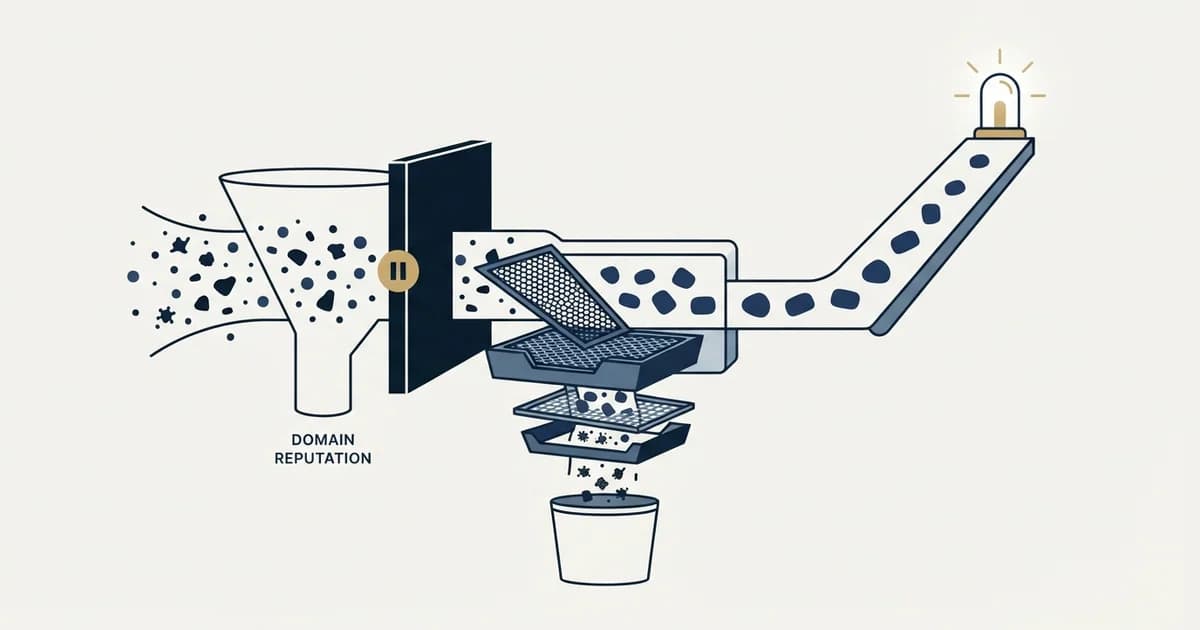
Google's own guidance for a fallen reputation is to stop sending for a short period, then resume at a slower rate. Use the pause to find the cause among four candidates: an unverified list, a mismatched audience, incomplete authentication, or a volume jump. Fix that input, then restart at a fraction of previous volume.
Key takeaways
- Stop sending on the affected domain only, since reputation is scoped per domain and sibling domains sending clean mail are unaffected.
- Diagnose before changing anything: bounce rate points at the list, complaint rate points at the audience, and both are visible in data you already hold.
- Classify bounce notifications rather than reading a counter, because in 1,413,405 measured sends 12.59% of what the counter called bounces were delay notices.
- No provider publishes a recovery time, and the figures quoted around the web are not sourced, so judge the fix on your own bounce and complaint trends instead.
Reviewed and updated August 14, 2026
A domain rating drops from High to Low and two instincts arrive immediately. Send more, to prove the domain is legitimate. Or buy a new domain and move everything onto it. Both make the situation worse, and the second one makes it worse in a way that takes months to unwind, because the list that damaged the first domain is still the list.
Google publishes its own advice for a sender whose reputation has fallen, and it is the opposite of both instincts: completely stop sending for a short period of time, then resume sending at a slower rate. That is the shape of the whole recovery. Here is how to work through it without wasting the pause.
Step 1: stop sending from the affected domain
The pause is not symbolic. Reputation is computed from recent behaviour, so every message sent while the underlying problem is unfixed adds to the evidence against you. Continuing to send during diagnosis is the most common way a recoverable rating becomes a retired domain.
Stop the campaigns on that domain specifically rather than pausing everything. Reputation is scored per domain, and Google's documentation notes the dashboard only displays messages sent from the exact domain used for DKIM and SPF authentication, so a sibling domain sending clean mail is unaffected and there is no reason to idle it.
Step 2: find the cause before changing anything
There are four realistic causes and they are distinguishable from data you already have.
An unverified or stale list. Look at hard bounces on that domain. A rate meaningfully above the norm points here. Worth classifying rather than reading off a counter: in our own cold email benchmark report, across 1,413,405 sends, the platform bounce counter read 3.04% while the true hard bounce rate after classifying all 42,953 notifications was 1.27%. Delay notices were 12.59% of what the counter called bounces, so a panic driven by the dashboard number is a real risk. The measured norms are in our bounce rate benchmarks.
A poorly matched audience. Look at complaints. Google's guidelines advise keeping spam rates below 0.10% and never reaching 0.30%, and at cold email volumes a single complaint in a day can breach that on a small domain. If bounces are normal and complaints are not, the list was deliverable and the wrong people were on it.
Incomplete authentication. Check SPF, DKIM and DMARC on that specific domain, not on the main one. A domain added to the pool later than the others is the usual offender, because the mailboxes get created and the DNS work is assumed to have happened. SPF, DKIM and DMARC for cold email covers what each record has to say.
A volume jump. Check whether sending from that domain climbed sharply before the drop. A domain with a short history sending like an established one is the signature receivers are built to catch.
Then check blocklists across every sending domain, not just the affected one, using the process in email blacklist checks and recovery. A listing is the one cause with a documented external fix, and it is worth ruling in or out first because it is the cheapest to check.
- Step 1Stop
Halt sending on the affected domain only, leaving siblings running
- Step 2Diagnose
Bounces, complaints, authentication, volume shape, blocklists
- Step 3Fix the input
Verify the list, cut the segment, complete the DNS, request delisting
- Step 4Resume slower
Restart at a fraction of previous volume to a well matched audience
- Step 5Watch the trend
Weekly, per domain, rather than daily and blended
Step 3: fix the input rather than the symptom

Verify the list. Every address, through a verification service, before it goes near the domain again. This removes the bounce input entirely and it is the cheapest step in the whole recovery.
Cut the segment that complained. If complaints concentrate in an industry, a company size or a job title, remove that segment rather than softening the copy. Complaints come from people who should not have received the message, and rewriting a message to the wrong person does not fix the mismatch.
Complete the authentication. Publish what is missing, then confirm it by sending a message to an address you control and reading the raw headers. The authentication results line states what the receiver concluded, and it is the only confirmation worth trusting.
Request delisting where a listing exists, after fixing the cause. Delisting before the cause is fixed produces a second listing and a worse standing with that blocklist.
Suppress everything you should not be sending to. Prior complainers, unsubscribes, role addresses, anything already bouncing. A suppression list is a reputation control before it is a compliance one.
Step 4: resume at lower volume, to a better list
Google's own recommendation is to resume at a slower rate, and the reason is that the rating recovers from evidence of good behaviour rather than from the passage of time alone. A domain sitting idle is not accruing anything positive. It needs to send clean mail to people who engage with it.
That makes the restart audience the most important choice in the recovery. The best available list, the tightest segment, the highest expected reply rate. Recovery volume should be a fraction of what the domain was sending before, increased gradually while the trend holds, and the increase should stop the moment complaints reappear.
Two things not to do during the restart. Do not move the pause to a fresh domain and call it a fix, because a new domain has no history and no history is its own penalty. And do not add messages to people who did not answer, which is a decision we have made permanently: we run one message per campaign, and on a recovering domain every extra message to an unresponsive recipient is a fresh opportunity to collect the complaint that put you here.
- Yes: The cause has been identified, not guessed
- Yes: Every address on the restart list is verified
- Yes: The segment that generated complaints is excluded
- Yes: SPF, DKIM and DMARC confirmed by reading raw headers
- Yes: Blocklist status clear, or delisting requested after the fix
- Yes: Restart volume is a fraction of the previous level
- Yes: Somebody is reading the trend weekly and can stop it again
How long it takes, honestly
Nobody publishes a recovery time, including Google, and the numbers quoted confidently around the web are not sourced to any provider. What Google does say is that it can take time for improvements in spam rate to reflect positively on spam classification, which is a statement about direction rather than duration.
The honest position is that recovery is a function of volume of good behaviour rather than of elapsed days, so a domain sending a small amount of clean mail recovers more slowly in wall clock time than one sending more. The rating is retrospective in the same way, which means the dashboard will still show yesterday's problem for a while after you have fixed it.
A working expectation: judge the fix on the trend in your own bounce and complaint rates, which move immediately, rather than on the provider's rating, which lags. If those trends are clean and the rating has not moved after several weeks of consistent sending, the cause was probably not the one you fixed.
The advice that circulates and does not work
Four remedies come up constantly in forum threads and vendor blogs, and none of them addresses an input a receiver actually scores.
Rewriting the copy. Spam words and subject line tuning affect how an individual message is scored at the filter. Reputation is built from behaviour across many messages, so a domain with a complaint problem sends better-written mail to the same wrong people and collects the same complaints.
Running a warmup tool on the damaged domain. Warmup pools exchange mail between accounts to generate engagement signals. Whatever value that has on a fresh domain, it does not remove the complaints or the bounces already on the record, and it adds volume during the period when Google's own advice is to send less. What warmup tools do and what the evidence for them looks like is in what email warmup tools actually do.
Switching sending platforms. The platform is not what receivers score. Moving the same list and the same domain to a different tool changes the interface and nothing the filter can see.
Adding a dedicated IP. For a sender on provider mailboxes this is not available, and where it is available a new dedicated IP starts with no history, which is a fresh disadvantage rather than a repair.
The common thread is that each one changes something you control quickly, and reputation is built from the two things that take real work to change: who is on the list and how they respond.
When to retire the domain instead

Some domains are not worth recovering. A domain rated Bad, meaning Google's own definition of a history of sending a high volume of spam regularly, carries a record that a modest recovery programme will take a long time to outweigh. A domain listed on multiple blocklists with repeat listings has a pattern rather than an incident.
Retiring is a legitimate answer, with one condition: retire the domain and keep the diagnosis. A team that retires domains without finding the cause simply pays for new domains at a regular interval. The full picture of what builds and destroys the rating is in email domain reputation, and the surfaces that let you watch it are in domain reputation checks.
If you would rather have the list, the segmentation and the sending built so this does not recur, we will build the first campaign with you.
Provider documentation verified as of mid-2026. Verify current terms with the provider before relying on them.
Frequently asked questions.
Frequently asked questions- How long does it take to recover domain reputation?
- Nobody publishes a figure, including Google, and the confident numbers circulating are not sourced to any provider. Google says only that improvements in spam rate take time to reflect in classification. Recovery responds to the volume of good behaviour rather than to elapsed days, and the rating lags your actual fix.
- Should I just buy a new domain instead of fixing this one?
- Only after you have found the cause. A fresh domain has no sending history, which receivers treat as suspicious, and moving the list that caused the damage onto it reproduces the problem on a schedule. Retiring a domain is legitimate when a rating is Bad or listings repeat, but keep the diagnosis.
- Does an email warmup tool fix a damaged domain?
- It does not remove the complaints or bounces already on the record, and it adds sending volume during the period when Google's own advice is to send less. Warmup pools generate engagement signals between accounts. Whatever value that has on a fresh domain, it is not a repair mechanism for a damaged one.
- What is the first thing to check when delivery drops suddenly?
- Blocklist status across every sending domain, because it is the cheapest check and the only cause with a documented external remedy. Then authentication on the specific domain affected, since a domain added to the pool later than the others is the usual source of a missing DKIM or SPF record.
About the author.

Tim Carden is CMO / CTO at RevenueFlow, which builds and operates outbound revenue engines for B2B companies. Studied at McGill University.
Tim Carden · CMO / CTO
Connect on LinkedIn →Explore more.
Ready to scale your outreach?
We build GTM engines that book real meetings. See the receipts.
Related articles.
ivmURI Blacklist: The Domain List Behind the Links You Send
ivmURI lists domains found inside the clickable links of spam, not sending addresses. Which name in your email it read, who queries it, and what to change.
Sending Cold Email From the CRM You Already Pay For
A CRM sequence tool sends from your primary domain and your own mailbox, and vendor terms usually require documented consent. What a separate cold stack buys.
Mass Email From Outlook: The Limits Microsoft Publishes
Microsoft publishes the ceiling on one mailbox and, a few paragraphs later, recommends that bulk commercial mail go to a specialist provider instead.
IMAP or SMTP: One Sends, One Reads, and the Ports
A mail setup pane asks for two servers because the two protocols run in opposite directions. The RFCs define both jobs, and the ports are where providers disagree.
SMTP for Yahoo: The Settings and the Sender Requirements
Yahoo publishes its outgoing settings in six lines. It also publishes sender requirements enforced since February 2024, and refuses to name the volume that triggers them.
GMass Inbox Tester: The Public Seed List Cuts Both Ways
GMass publishes the fifteen seed addresses behind its free placement tester. That makes the test repeatable, and it also makes the absolute result pessimistic.