Apollo Integrations: What Connects, and on Which Plan
Apollo's integrations marketplace sorted by job: what its own pages say each CRM sync moves, which plan ticks which integration, and what a sync costs.
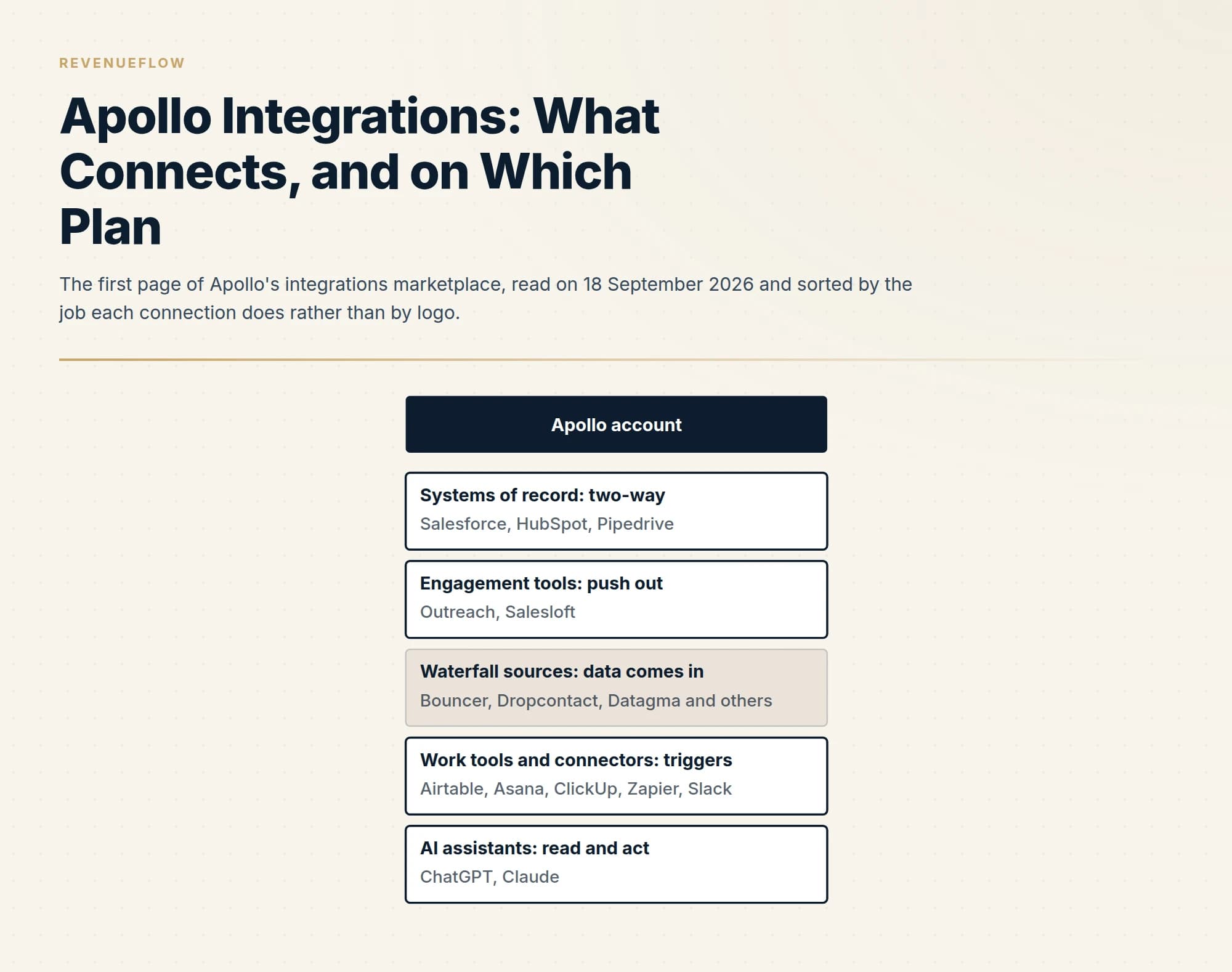
Apollo's integrations marketplace lists native two-way syncs for Salesforce, HubSpot and Pipedrive, one-way pushes into Outreach and Salesloft, waterfall enrichment sources, workflow connectors such as Zapier, and AI assistants. As read on 18 September 2026, the pricing table ticks CRM integrations on every plan, the engagement pushes from Basic, and exports through any of them consume credits.
Key takeaways
- Apollo's marketplace files listings under twelve categories and two collections, Built by Apollo and Built by Partner, which decides who supports a broken sync.
- Apollo's own pages list opportunities, meetings and calendar events for the Salesforce sync and do not list them for HubSpot, as read on 18 September 2026.
- The pricing table ticks CRM integrations on all four plans, the Outreach and Salesloft push from Basic, and SendGrid and Mailgun from Professional.
- The pricing FAQ states that exporting a contact outside Apollo, including to a CRM, consumes export credits, so automatic pushes draw on the balance.
Reviewed and updated September 18, 2026
Open Apollo's integrations marketplace and the first card is ChatGPT. Salesforce and HubSpot sit second and third, a Chrome extension fourth, Claude fifth, and Slack carries a "Recently Launched" label. Underneath, an alphabetical grid begins with Adobe Marketo, Airtable and Albato and ends its first page at Enrichley, with a button to load more.
That ordering says the directory is more than a list of CRM connectors. As read on 18 September 2026, the page headed "Connect your favorite go-to-market tools to Apollo" files every listing under one of twelve categories and one of two collections, and the labels matter more than the logos. A card marked Integration, a card marked Workflows and a card marked Waterfall Enrichment are three different kinds of connection that move different things in different directions.
This guide sorts the directory by the job each connection does, reads what Apollo's own detail pages say each one syncs, and then reads the plan table on Apollo's pricing page to see which plan exposes which. Everything below comes from apollo.io pages fetched that day. Apollo's knowledge base, where the setup steps live, sits behind a browser challenge that blocks automated reading, so this page describes what connects and what moves, and leaves the click path to Apollo.
The directory, sorted by job
The marketplace offers two filters. Collections has two values, Built by Apollo and Built by Partner. Categories has twelve: Apollo Waterfall Enrichment, Connectors, CRM, Email, Data and Analytics, Video and Web Conferencing, Dialer, Recruiting, Sales Engagement and Intelligence, Marketing Automation, AI, and Workflows. Each card also carries a type label above its name, and on the first page those labels are Integration, Workflows, Waterfall Enrichment and, on Slack, Recently Launched.
Read as jobs rather than as categories, the listings on that first page fall into five groups.
Systems of record. Salesforce, HubSpot and Pipedrive, all filed under CRM and all in the Built by Apollo collection. These are the two-way connections, and they are the ones most people mean when they search for Apollo integrations.
Places you send people to be contacted. Outreach and Salesloft, filed under Sales Engagement and Intelligence and also built by Apollo. These are one-way handoffs with a field sync attached.
Data sources that feed Apollo. The Waterfall Enrichment cards, which on the first page include Bouncer, Bytemine, ClearoutPhone, ContactOut, Datagma, Dropcontact and Enrichley. These run in the opposite direction from everything else: they are third-party providers Apollo can query when filling in a contact, which is the pattern explained in our piece on waterfall enrichment.
Work tools that receive a trigger. The Workflows cards, among them Airtable, Amplitude, Asana, ClickUp and Coda, plus the Connectors category where Zapier and Slack are filed.
Assistants that read Apollo. ChatGPT and Claude lead the page, and the docs homepage now opens with a Build with AI panel offering to connect Claude, ChatGPT or Perplexity before it mentions an API key.
The page is paginated and this guide read its first page and nine detail pages, so treat the named examples as examples rather than as a census.
The CRM integrations: what moves in each direction
Apollo describes all three CRM connections the same way at the top of their pages. The Salesforce page reads "Connect Apollo to your Salesforce CRM with our bi-directional integration to reduce admin work and keep your data synchronized, fresh, and accurate between the two platforms", and the HubSpot page repeats the sentence with the name swapped. The difference is in the use-case lists lower down, where each page states exactly which objects travel.
For Salesforce, the pull list reads "Pull contacts/leads, accounts, opportunities, emails, calls, and tasks from Salesforce to Apollo." The push list reads "Push contacts/leads, accounts, email activity, notes, calls, tasks, meetings, and calendar events from Apollo to Salesforce."
For HubSpot, the pull list reads "Pull contacts, accounts, emails, calls, and tasks from HubSpot to Apollo." The push list reads "Push contacts, accounts, email activity, calls, tasks, and notes from Apollo to HubSpot."
Put the two side by side and three objects appear only on the Salesforce page: opportunities on the way in, and meetings and calendar events on the way out. Nothing on the HubSpot page says those objects sync. That is a statement about what two marketing pages list, read on one day, and it is worth confirming in a trial before a forecast or a meetings report depends on it.
Pipedrive is described more loosely. Its page promises "Bi-directional sync of contact and account data, including both default and custom fields", with the option to push records automatically when they reach a stage or to select them by hand, and it frames the return path as pushing Pipedrive contacts into Apollo to engage them.
All three pages also list enrichment as a separate use case. The Salesforce wording is "Update and fill in missing contact and account fields in Salesforce with information from Apollo's database", offered as manual or automatic.
Salesforce
Pulled into Apollo: contacts and leads, accounts, emails, calls, tasks
Salesforce page only opportunities
Pushed from Apollo: contacts and leads, accounts, email activity, notes, calls, tasks
Salesforce page only meetings and calendar events
HubSpot
Pulled into Apollo: contacts, accounts, emails, calls, tasks
Pushed from Apollo: contacts, accounts, email activity, calls, tasks, notes
No opportunities, meetings or calendar events are listed on this page.
A two-way sync is also where duplicates come from. If Apollo pushes a person the CRM already holds under a different email, you now own two records and a merge project. The matching rules that prevent that on the HubSpot side are the whole subject of our guide to the Apollo and HubSpot integration, and the same questions apply to the other two CRMs: which field decides a match, which system wins a conflict, and who is allowed to create an account.
The engagement handoffs are one-way
The Outreach and Salesloft pages are shorter because the job is smaller. The Outreach page offers two use cases: "Push new or saved leads from Apollo into an existing Outreach sequence" and "Automatically sync contact fields between Apollo and Outreach." The Salesloft page mirrors it, with "Push new or saved leads from Apollo into Salesloft or an existing cadence."
Nothing on either page describes activity coming back. Replies, bounces and opt-outs recorded in the engagement tool are not listed as returning to Apollo, so a team running this handoff should assume suppression lives in the engagement tool and in the CRM rather than in Apollo, and check it rather than trust it.
Sequence and cadence are those vendors' nouns for multi-step follow-up schedules. Our own documented practice is one message per campaign, with no bumps and no thread replies, so a handoff into a five-step schedule is a description of how those products work rather than a recommendation from us. RevenueFlow does not run Apollo, Outreach or Salesloft in its own sending.
Built by Apollo, built by a partner
The collection filter decides who you call when a sync breaks. Salesforce, HubSpot, Pipedrive, Outreach, Salesloft, Zapier and Slack are all in the Built by Apollo collection. Clay is in Built by Partner, and its page says so plainly: "Developed by: Clay Labs Inc", with a Clay support address. Its listed use cases, Enrich Person, Enrich Company and Find People at Company By Job Title, run inside Clay and call Apollo for data, which is the reverse of a CRM sync.
Two listings are thinner than their logos suggest. The Zapier page, filed under Connectors, carries no use-case text at all, only a link to an overview in the knowledge base. The Slack page describes an assistant rather than a notification feed.
Which plan exposes which
Apollo's pricing page answers this in a comparison table under a heading that reads Operations and Integrations. As published on Apollo's pricing page on 18 September 2026, in its default state of annual billing, the four plans are Free at $0, Basic at $49, Professional at $79 and Organization at $119 per seat per month, with Organization requiring at least three seats. The Apollo pricing guide covers the credit side of those plans; the rows below are the integration side.
The table's tick marks, read from the rendered page that day, run as follows. The row labelled CRM Integrations (Salesforce, HubSpot, Pipedrive) is ticked on all four plans including Free. Outreach & SalesLoft Integration is ticked from Basic upward. SendGrid & Mailgun Integration is ticked on Professional and Organization only. LLM Integrations (MCP) is ticked on all four. Workflow Integrations is ticked from Basic upward. The email row is text rather than ticks: Gmail and Microsoft on Free, all email providers on the paid plans.
| Row | Free | Basic | Professional | Organization |
|---|---|---|---|---|
| CRM Integrations (Salesforce, HubSpot, Pipedrive) | Yes | Yes | Yes | Yes |
| Outreach & SalesLoft Integration | No | Yes | Yes | Yes |
| SendGrid & Mailgun Integration | No | No | Yes | Yes |
| LLM Integrations (MCP) | Yes | Yes | Yes | Yes |
| Workflow Integrations | No | Yes | Yes | Yes |
Two caveats belong beside that grid.
The first is that a tick is not a quantity. The Free plan card on the same page lists "CRM Enrichment (Limit 100 per month)", while the Basic card lists Automated CRM Enrichment and two automated workflows. A free account can connect Salesforce. It cannot keep a CRM of any size enriched.
The second is that the page disagrees with itself about the API. The Free plan card lists API Access, and the table's API rows are ticked across all four plans. The FAQ further down the same page says "We also offer API Access on our Custom plans for more advanced integrations." Both statements were on the page on the same day. The likeliest reading is that a basic key is available everywhere and the fuller endpoint set is negotiated, but the page does not say that, so ask before you build on it.
What a sync costs
Connecting a CRM is ticked on every plan. Moving data through the connection is metered. The pricing FAQ puts it this way: "You consume export credits whenever you export a contact outside of Apollo." Its examples are CSV, CRM, or Person API enrichment, and it names Outreach and Salesloft as systems that count as outside.
That single sentence changes how an integration should be switched on. An automatic rule that pushes every saved contact to the CRM, or a scheduled enrichment across an existing database, is a standing order against the credit balance. Decide which records deserve to cross before turning on anything automatic, and read the credit allowance on your plan first.
When nothing in the directory fits
The last route is the API. Apollo's developer docs open with two panels, Build with AI and Build with API, and the second is a two-step start: get an API key, send a request. Our Apollo API guide covers the rate limits and the credit rules that apply once you do.
The order to try things in follows from everything above.
Start with the native CRM sync if your CRM is one of the three. Use the engagement push if the destination is Outreach or Salesloft and you are on Basic or above. For anything else, look it up in the directory and note which collection it sits in, because a partner-built listing is the partner's to fix. Zapier is the fallback for tools with no listing, and the API is the fallback for Zapier, with the plan question above settled in writing first.
One boundary applies to every route. Apollo's plans are licensed for internal use: the pricing page says the listed plans "are permitted for internal business use only" and that powering an external product or sharing data with customers needs a separate agreement. This guide describes Apollo's documented connections and is not a method for moving Apollo data anywhere its terms do not allow.
What to settle before you connect anything
Three decisions are yours rather than Apollo's. Which system owns a field when the two disagree, because a bi-directional sync will overwrite the better value with the worse one. Which records may cross automatically, because every export draws on credits. And who supports the connection, which the collection label answers.
The Apollo review covers whether the product belongs in your stack at all. And if the constraint is conversations rather than connectors, you can see what a first campaign produces against your own market before wiring anything together.
The short version
Apollo's marketplace files every listing under twelve categories and two collections, and the useful sort is by job: two-way CRM syncs, one-way engagement pushes, waterfall data sources, workflow triggers and AI assistants. Apollo's own pages list opportunities, meetings and calendar events for Salesforce and not for HubSpot. The pricing table ticks CRM integrations on every plan, the Outreach and Salesloft push from Basic, and SendGrid and Mailgun from Professional, while the same page gives two different answers about API access. Exports through any of them consume credits.
Integration descriptions, plan rows and prices above were read from Apollo's own marketplace, integration detail pages, pricing page and developer docs on 18 September 2026; the pricing table was read in a rendered browser session that day, in its default annual billing state. Verify current terms with the vendor before relying on them.
Sources: Apollo integrations marketplace, Apollo and Salesforce, Apollo and HubSpot, Apollo and Pipedrive, Apollo and Outreach, Apollo and Salesloft, Apollo and Clay, Apollo pricing, Apollo developer docs
Frequently asked questions.
Frequently asked questions- What does Apollo integrate with?
- As read on 18 September 2026, Apollo's marketplace lists native CRM syncs for Salesforce, HubSpot and Pipedrive, pushes into Outreach and Salesloft, waterfall enrichment providers such as Bouncer and Dropcontact, workflow tools such as Airtable and Asana, connectors including Zapier and Slack, and AI assistants including ChatGPT and Claude. The directory is paginated, so that list is its first page rather than a full census.
- Is the Apollo Salesforce integration two-way?
- Apollo's own page calls it bi-directional. It lists contacts and leads, accounts, opportunities, emails, calls and tasks as pulled from Salesforce, and contacts and leads, accounts, email activity, notes, calls, tasks, meetings and calendar events as pushed to it. Enrichment of existing Salesforce fields is listed separately, as manual or automatic, and draws on credits.
- Can I connect a CRM on Apollo's free plan?
- The plan table on Apollo's pricing page, as rendered on 18 September 2026, ticks CRM integrations for Salesforce, HubSpot and Pipedrive on all four plans including Free. The Free plan card also limits CRM enrichment to 100 a month, so a free account can connect a CRM and cannot keep a large one enriched.
- Does syncing Apollo contacts to a CRM use credits?
- Yes, according to the FAQ on Apollo's pricing page, which says you consume export credits whenever you export a contact outside Apollo and gives CSV, CRM and API enrichment as examples, naming Outreach and Salesloft as outside systems. Decide which records should cross before switching on any automatic push or scheduled enrichment.
About the author.

B2B cold email experts helping companies generate qualified leads through done-for-you outreach campaigns.
RevenueFlow Team
Explore more.
Ready to scale your outreach?
We build GTM engines that book real meetings. See the receipts.
Related articles.
Is Clay Free? The Free Plan, the Trial and Where Each Stops
Clay's free plan, its 14-day trial and the no-charge-on-a-miss rule are three different things. What each holds and where it stops, from clay.com on 19 September 2026.
Seamless.AI Email Finder: How It Works, What a Credit Buys
How Seamless.AI's email finder resolves a contact in real time, what one Universal Credit buys, the Total AI score on every address, and what the Chrome extension reads.
Snitcher Pricing: The $49 Table Is the Annual Rate
Snitcher's visible price table is the annual-billing ladder. The ten bands at both billing states, the unique-company meter, and the rules on a help page.
LeadIQ Salesforce Integration: What Syncs, What Blocks It
How LeadIQ's Salesforce integration works, from LeadIQ's own help centre: per-user OAuth, Lead or Contact, domain matching, duplicates, API calls and plan gates.
Firmographic Data Providers: What Six of Them Publish
Six firmographic data providers read from their own pages: the fields each sells, the coverage each states, how the data is delivered, and who prints a price.
Airscale Pricing: Three Plans, One Credit, Four Rates
Airscale prints a different credit cost on every plan, and its advertised per-email price belongs to the custom one. The dated ladder and the rollover rules.