Dialer Modes, the Two-Second Rule and What a Seat Costs
Preview, power and parallel dialing sit on a line from safest to fastest. The trade is always the same: more talk time per hour, less control over hello.
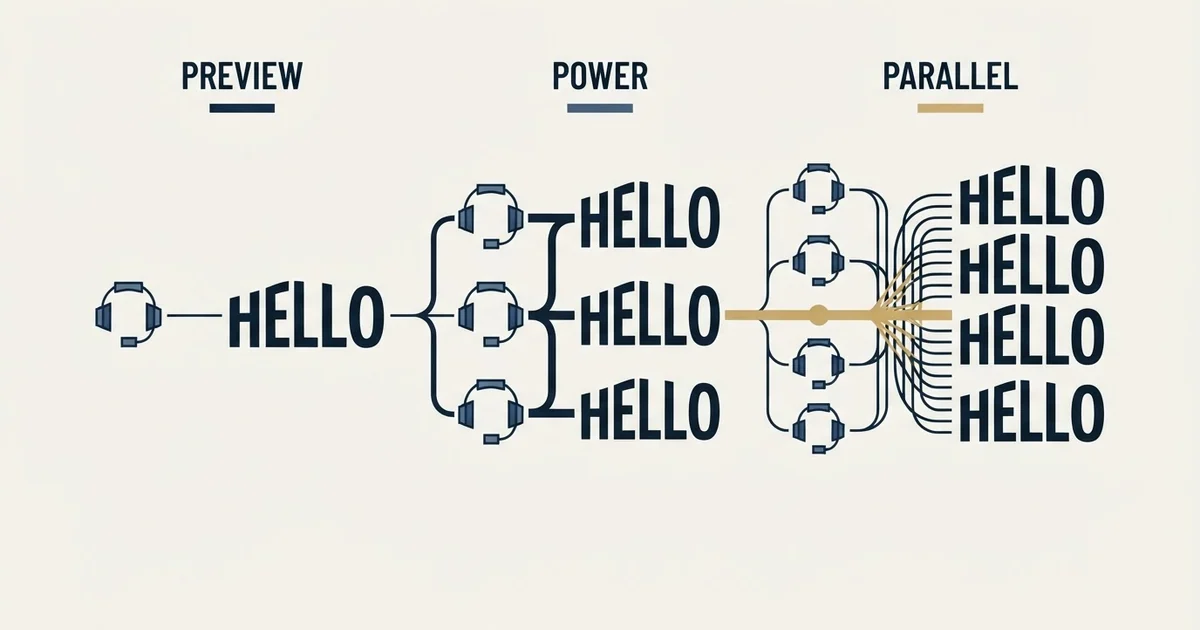
A cold calling dialer automates the placing of calls. Preview mode shows the rep each record first, power mode dials one line per rep automatically, and parallel mode dials several. Published seats run from $29 to $215 per user per month depending on vendor and billing state, and number reputation is the cost nobody budgets.
Key takeaways
- The FTC guide defines an abandoned call as one not connected to a representative within two seconds of the person's completed greeting.
- The safe harbour allows no more than three percent abandonment per campaign, with a 15 second or four ring minimum before disconnecting.
- Most business-to-business calls are exempt from that rule, so for B2B teams parallel dialing is a reputation risk rather than a compliance one.
- PhoneBurner's tiers run $140 to $183 per user monthly billed annually, and JustCall's run $29 to $89, with both pages showing two billing states.
Reviewed and updated August 28, 2026
A rep dialling by hand spends most of the hour listening to a phone ring. Dialers exist to delete that dead time, and every meaningful difference between them comes down to how much dead time they delete and what they risk in exchange.
There are four dialing modes in common use, they sit on a straight line from safest to fastest, and the trade at every step is the same: more talk time per hour, less control over the moment the prospect says hello. Getting the mode wrong is expensive in a way that does not show up on the invoice.
Every dialer in this comparison is cloud based, meaning the switching runs on the vendor's infrastructure and a seat needs a browser and a headset rather than an on-premise phone system, so the deployment word in a product name changes the procurement conversation rather than the dialing arithmetic. Local presence dialing is the product name for this: the dialer holds a pool of numbers across area codes and picks one matching the prospect's location at call time, which is why the pool size and the rotation rate are the two settings that decide how fast the reputation cost arrives.
Outbound dialer software is the category name these modes are sold under, and most of the category is built for a contact centre working a queue rather than for a seller working a named account list, which is the distinction to hold before comparing two products on mode alone. A search for a named vendor's sales dialer, JustCall's among them, returns that vendor's own product and help pages rather than independent comparison, so the seat pricing and dialing modes set out above are the part of that question somebody other than the vendor can answer.
The four modes, in order of aggression
Manual or click to call places one number at a time from a screen. The rep sees the record, decides to call, and the system saves the keystrokes. Nothing is automated except the dialing itself.
Preview dialing queues the list and shows the rep the next record before connecting. The rep gets a few seconds of context, then triggers the call. This is the mode for complex sales where opening with the wrong assumption ends the conversation.
Power or progressive dialing places the next call automatically as soon as the previous one ends, one line per rep. The rep hears the ringing and answers into a live connection. Dead time drops sharply and nothing is dialled that a rep is not already waiting for.
Parallel or predictive dialing places several calls at once per rep, on the expectation that most will not answer, and connects the rep to whichever human picks up first. This is where the productivity claims come from and where the problems start.
- One line, rep triggers each call
- Highest context per conversation
- Lowest calls per hour
- Right for complex or senior buyers
- One line per rep
- Rep hears the ring
- No abandoned calls by construction
- The default for most B2B teams
- Highest talk time per hour
- Someone answers to a pause or to nobody
- Abandonment rules bite here
- Number reputation degrades fastest
The two-second rule, and who it actually binds

Parallel dialing produces a specific artefact: a person answers and there is no rep available, so they hear silence or a recording. Regulators named that artefact and wrote rules about it.
The Federal Trade Commission's Telemarketing Sales Rule guide defines the term precisely. A call is abandoned "if a person answers it and the telemarketer does not connect the call to a sales representative within two seconds of the person's completed greeting." Two seconds, from the end of their hello.
The safe harbour that follows sets four conditions. Abandonment of "no more than three percent of all calls answered by a live person," measured over a single campaign or over each successive 30-day period. Letting the phone ring "for 15 seconds or four rings" before disconnecting an unanswered call. Playing a recorded message naming the seller and its phone number whenever no representative is available within two seconds. And keeping records that document all of it. The guide is explicit that a telemarketer running several campaigns cannot average across them, so a clean campaign does not offset a dirty one.
Here is the part that changes the decision for B2B teams. The same FTC guide states that "most phone calls between a telemarketer and a business are exempt from the TSR," and that the National Do Not Call Registry prohibition "does not apply to business-to-business calls." For a genuine business-to-business programme, the three percent ceiling is generally not the binding constraint.
That does not make parallel dialing free of consequence. It moves the constraint from the regulator to the carrier and the recipient, which is a harder audience to appeal to. The full picture of which rules apply to which calls is worth having straight before choosing a mode, because the answer determines whether you are managing a compliance risk or a reputation risk.
Number reputation is the cost nobody budgets for
Carriers and handset makers now label suspected spam calls before the recipient decides whether to answer. The labelling systems watch call volume per number, answer rate, average duration and complaint reports. A number that dials heavily and gets short calls acquires a label, and a labelled number stops connecting.
Two habits follow. Spread volume across a pool of numbers rather than burning one, and register the numbers you use through the carrier verification programmes rather than leaving them anonymous. Vendors sell the first habit as a product line: JustCall's pricing page, for example, lists packs of local numbers as a separate monthly charge alongside the per-seat price, which tells you that number inventory is a recurring cost rather than a one-off.
Local presence, which shows the recipient a number in their own area code, sits inside the same trade. It lifts answer rates and it raises the annoyance when the person calls back and reaches a company two time zones away. Rotating heavily through local numbers is also the fastest way to acquire labels, so the tactic partially destroys its own advantage.
Solopreneurs juggling cold calls and cold email face the same reputation problem on the inbox side, where tools that build sender trust before sending keep new addresses out of spam folders.
The arithmetic that decides the mode
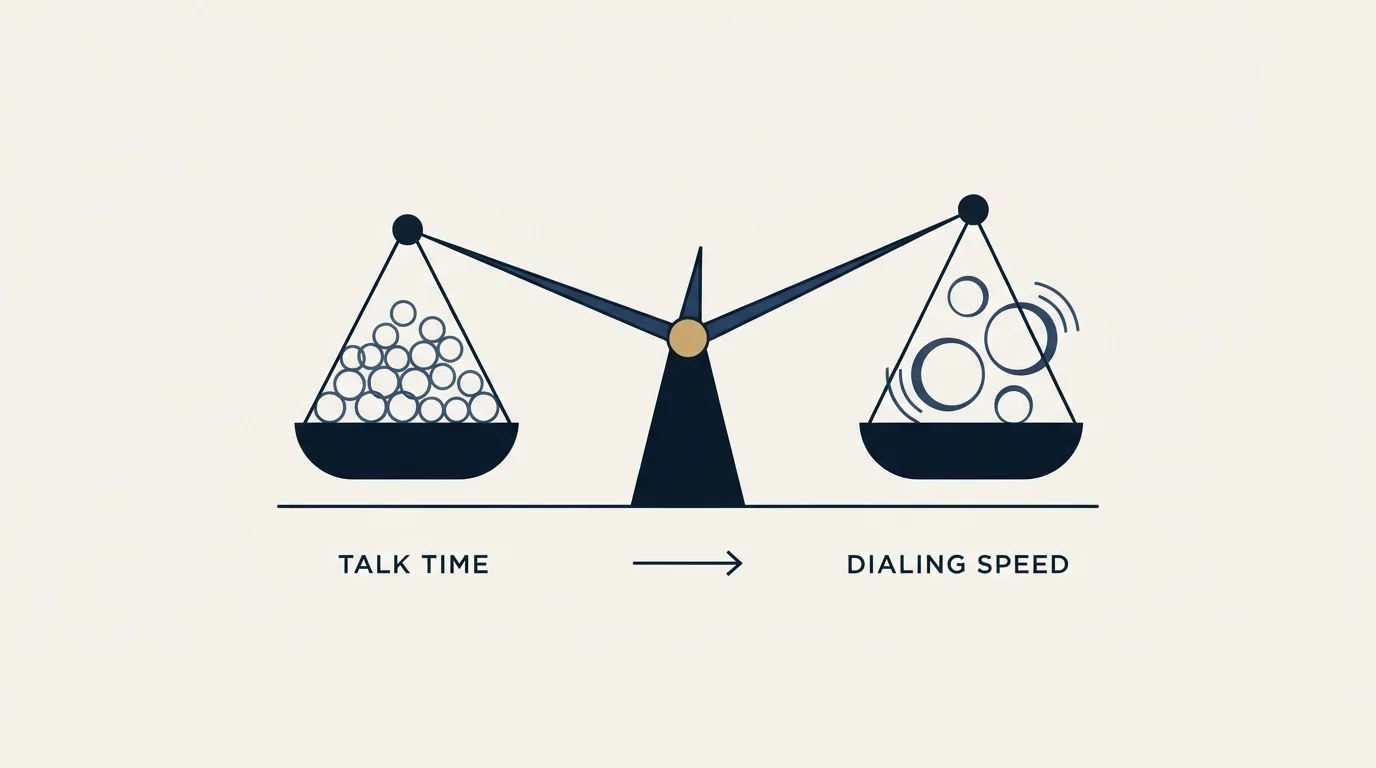
Work the numbers on your own list rather than on a vendor's example, because the answer flips depending on one input: what fraction of dials reach a human.
Start with the hour. A rep dialing manually places somewhere between twenty and forty calls in a working hour depending on how much they type between them, and every ring, voicemail and misdial is paid for in their salary. Power dialing removes the gaps between calls without changing the odds of any single call, so it raises volume by removing waste rather than by taking a risk.
Parallel dialing changes the odds deliberately. Three lines per rep means three chances of a connect per cycle, and on a list where one dial in twenty reaches a person, that is a meaningful lift. On a list where one dial in four reaches a person, the same setting produces regular collisions where two people answer at once, and one of them gets silence.
That inversion is the point. The higher your connect rate, the less parallel dialing helps and the more it costs you in abandoned calls and labelled numbers. Teams calling a well-researched list of direct mobiles are usually the worst candidates for the most aggressive mode, which is the opposite of how it gets sold.
A power dialer free trial is offered by essentially every vendor in the category and separates none of them, because the two questions that decide the purchase both need weeks and volume: what your own connect rate is on your own list, and how fast your numbers acquire labels once real volume runs through them.
What a seat actually costs
Published per-seat pricing in this category clusters in two bands.
PhoneBurner's pricing page lists three tiers with both billing states printed next to each other: Standard at $140 per user per month billed annually or $165 billed monthly, Professional at $165 annually or $195 monthly, and Premium at $183 annually or $215 monthly. The same page notes that outbound SMS beyond the plan limit is charged at $15 per 1,000 messages.
JustCall's pricing page sits at the other end: Team at $29 per user per month billed annually, Pro at $49, and Pro Plus at $89, with a minimum of two licences. The page pairs those seats with usage-priced AI features, so the seat price is the floor rather than the bill.
Both pages carry monthly and annual figures in the same document, which is the standard trap when comparing this category. A raw reading of either page can surface a price the visitor is never shown, so confirm which billing state the page displays by default and quote the state you will actually buy. On PhoneBurner's three tiers the annual figure sits about fifteen percent below the monthly figure in every case, which is a wider gap than most of the feature differences being compared.
Convoso publishes no price at all on its own pricing page, and its FAQ gives the reason and the axes: pricing is tailored to the number of seats, features and integrations, plans are primarily annual, and standard carrier rates apply on top of the subscription and vary by usage and destination.
Worth separating before comparing seat prices: JustCall's power dialer and its AI dialer are different products at different line counts, the first described on its own product page as calling the next person when a call ends and the second titled as dialing ten lines, so a buyer arriving on a power dialer query can be sold either mode.
- Yes: Mode matches the sale: preview for complex, power for most B2B, parallel only with a reason
- Yes: The seat price you compared is the same billing state across all vendors
- Yes: Number inventory and its monthly cost are quoted, not assumed
- Yes: Numbers are registered with the carrier verification programmes
- Yes: Recording behaviour is configurable per jurisdiction
- Yes: Call outcomes write back to the CRM without a rep retyping them
- Depends: You have measured what proportion of your numbers reach the right person
The thing a dialer cannot do
A dialer multiplies dials. It does not improve them. If a third of the mobile numbers on the list belong to somebody who left the company two years ago, a faster dialer reaches the wrong person faster and burns number reputation doing it.
Teams weighing cheap contact sources should see how the free ZoomInfo tier's hidden cost is paid in mailbox data rather than money before adding numbers to any dial list.
Measure phone-number accuracy on a sample of your own list before buying anything, and measure it against your own market rather than against a provider's published coverage claim. The method for running that test on contact data generally is in our comparison of how to test data accuracy on your own market, and it transfers directly to phone fields.
The other thing a dialer cannot supply is a reason for the call. The opening has to name something specific about this company today, and that specificity comes from the research behind the list rather than from the tool that places the call. Our piece on the first ten seconds and the list behind them is the practical version of that argument.
A dialer is also only one purchase of several. Data, recording and conversation analysis, and CRM logging are separate line items that most teams discover after the dialer is signed, and we have laid out that full stack in the four purchases behind a calling programme.
RevenueFlow does not sell calling or dialers. We run cold email and LinkedIn outbound, where the equivalent infrastructure question is deliverability rather than number reputation, and where our campaigns send one message per prospect with nothing scheduled behind it. If you want the written half built and measured alongside whatever calling stack you land on, we will build the first campaign.
Unlike phone number reputation, email deliverability hinges on warmup tools, and recruiters can compare current options in warmup tools built for recruiters.
Vendor pricing verified against PhoneBurner's and JustCall's own pricing pages as of mid-2026, with dated snapshots retained. Regulatory statements come from the FTC's published compliance guide and are not legal advice. Verify current terms before relying on them.
Frequently asked questions.
Frequently asked questions- What is the difference between a power dialer and a parallel dialer?
- A power dialer places one call per rep automatically as soon as the previous ends, so the rep hears the ring and nothing is dialled without someone waiting for it. A parallel dialer places several calls at once per rep and connects whoever answers first, which raises talk time and creates calls that answer to nobody.
- How much does a cold calling dialer cost?
- Published per-seat pricing spans a wide range. JustCall's pricing page lists $29, $49 and $89 per user per month billed annually with a two-licence minimum. PhoneBurner's lists $140, $165 and $183 per user per month billed annually, or $165, $195 and $215 billed monthly. Number inventory is charged separately.
- Do the abandoned-call rules apply to B2B calling?
- Largely not. The FTC's guide states that most phone calls between a telemarketer and a business are exempt from the Telemarketing Sales Rule, which is where the two-second definition and the three percent safe harbour live. The constraint that does apply to B2B parallel dialing is carrier spam labelling and recipient irritation.
- Does local presence dialing still work?
- It lifts answer rates and carries two costs. The recipient who calls back reaches a company in another time zone, and heavy rotation through local numbers is the fastest way to acquire a spam label, which then suppresses connects. Spread volume across a registered pool rather than burning a small set of numbers.
About the author.

B2B cold email experts helping companies generate qualified leads through done-for-you outreach campaigns.
RevenueFlow Team
Explore more.
Ready to scale your outreach?
We build GTM engines that book real meetings. See the receipts.
Related articles.
RevOps Tools: Nine Products and the Job Each Does
Nine revenue operations products sorted by the six jobs the category covers, with every product fact and price read off the vendor's own pages and dated.
Video Prospecting Tools by Job: What Each One Is For
Ten video prospecting tools sorted by the job each vendor's own page describes: record and share, personalise at volume, avatars, hosting and interactive demos.
Which CRMs and Tools the Outbound Stack Connects To: Integration Data From 342 Sales Tools
HubSpot is named as an integration by 52.3% of 342 verified sales tools, Zapier by 50.3% and Salesforce by 43.3%. Here is the full map by category.
Sales Engagement Platform Pricing in 2026: What 61 Tools Charge and Which Hide It
Sales engagement platforms start at a median of $75 a month, 70.5% carry a quote-only tier, and AI SDR platforms start at $204.50. Data from 61 verified tools.
Best CRM for Google Workspace: What Lives in Gmail
Working with Google Workspace covers four separate integrations, and most of the category ships as a browser extension. What five vendors publish about theirs.
Is Clay Free? The Free Plan, the Trial and Where Each Stops
Clay's free plan, its 14-day trial and the no-charge-on-a-miss rule are three different things. What each holds and where it stops, from clay.com on 19 September 2026.