8 Meeting Reschedule Email Templates and When to Send Each
Eight meeting reschedule email templates for moving a booked sales meeting before it happens, from either side, each with the reasoning line by line.
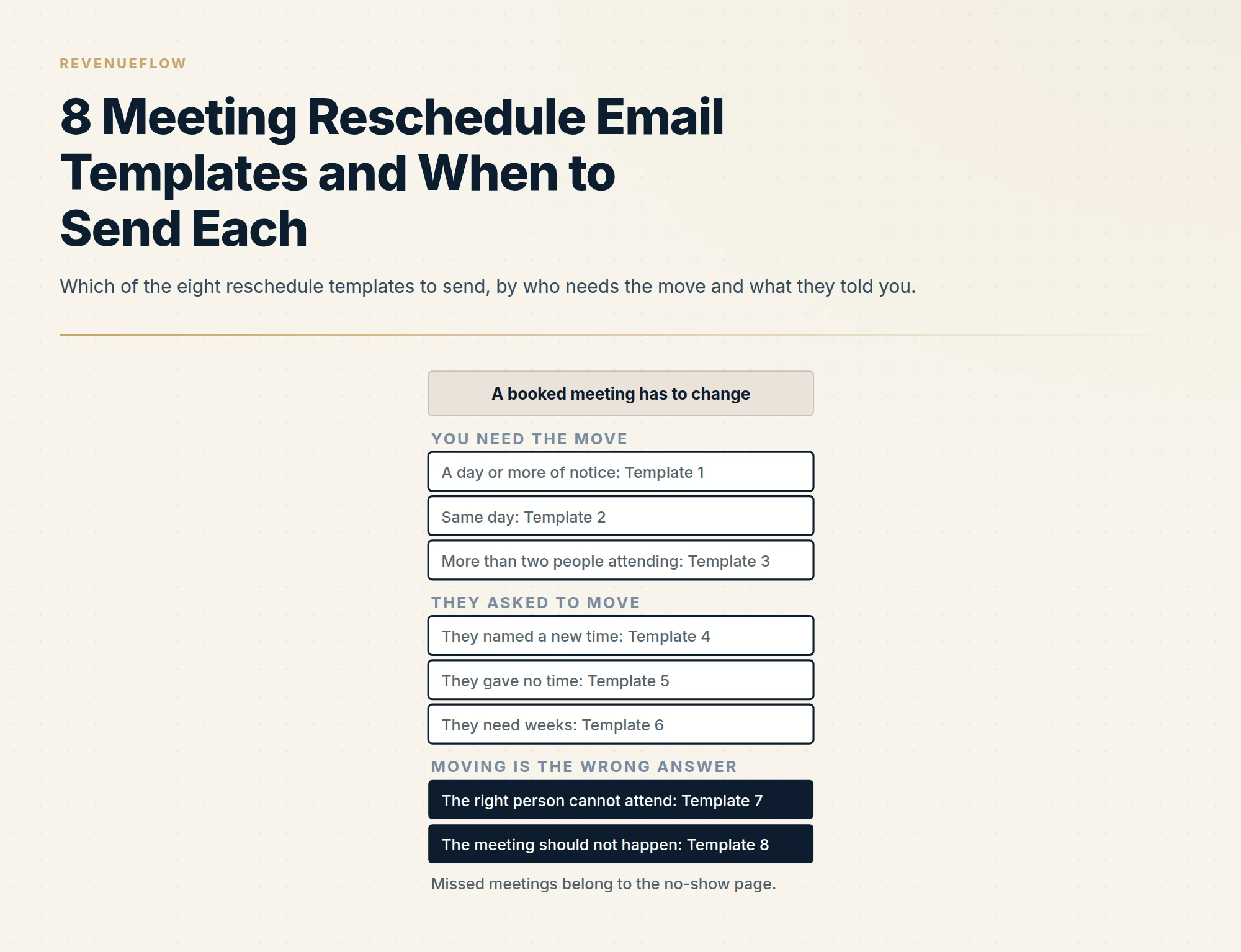
A meeting reschedule email is one message that puts the new time in the subject, gives one clause of reason, offers two or three specific times and a link, and restates the topic so the reader knows only the time changed. Apologise once, and only for same-day moves. When the prospect asks to move, do the scheduling work for them.
Key takeaways
- Rescheduling a booked meeting is correspondence inside an agreement the prospect already made, so a second message is appropriate in a way it never is to somebody who did not reply.
- Pick the template by who needs the move and how much notice there is: you with notice, you on the same day, a group meeting, they named a time, they gave no time, or they need weeks.
- Put the new time in the subject line and offer two or three specific times plus a link, because a move to sometime next week hands the scheduling work to the person you inconvenienced.
- When the meeting should not happen, cancel it honestly with the reason in their words, since a reschedule that hides a cancellation teaches a prospect that your invitations are provisional.
Reviewed and updated September 18, 2026
A prospect agreed to Thursday at two. On Wednesday afternoon your own calendar falls apart, and the meeting you spent three weeks earning has to move. The email you send next is the first time this person sees how you behave when something goes wrong, and the published advice puts the apology first.
Moving a booked meeting is correspondence. The person said yes, the agreement exists, and everything sent to protect it is administration of that agreement. That is the test meeting reminder emails sets out: a message that would still make sense if the answer is already yes is correspondence, and it lists the rescheduling link alongside the reminder and the confirmation. That page carries one reschedule message, the confirmation you send after the prospect moved the meeting themselves. This page is the rest of the situation: eight templates for moving a meeting before it happens, from either side, each a different case with its reasoning. Every template below is invented for illustration and none carries a results claim.
Two neighbouring cases are already covered and are not repeated here. If the meeting was missed, the messages are in the no-show email template. If the missed meeting was a demo, the graceful reschedule is Template 7 in demo follow-up templates.
Which template to send
The situation forks on two questions: who needs the move, and how much notice there is. The published advice concentrates on one branch, the one where you are the person moving it. Koalendar's guide, last modified on 25 August 2026 and fetched on 18 September 2026, starts that branch from the right premise: "Rescheduling happens even in well-run teams." Smartlead's guide, last modified on 20 December 2025 and fetched the same day, gives the mechanical rule: "Suggest two or three specific alternatives to original date." Both rules hold across the templates below. What the guides leave thin is the other branch, where the prospect asks to move, and the cases where moving is the wrong answer.
The merge fields, explained once
{{first_name}} is the recipient. {{old_time}} and {{new_time_1}} to {{new_time_3}} are full times written as day, date, time and the recipient's time zone, for example Thursday 14 May, 14:00 BST. {{topic}} is the one thing the meeting is about, in the words used when it was booked. {{reschedule_link}} is your booking page. {{your_name}} closes every template. Where a template needs anything else, the line explains it.
Section 1: You need to move it
Template 1: You have a conflict, with a day or more of notice
Subject: Moving our call: {{new_time_1}} instead of {{old_time}}?

Hi {{first_name}},

We need to move our call on {{old_time}}. A commitment we cannot shift has landed on the same slot.

Could you do either of these instead?
- {{new_time_1}}
- {{new_time_2}}

If neither works, any open slot here is yours: {{reschedule_link}}

Same agenda: {{topic}}. We will update the invite as soon as you pick.

{{your_name}}
Why each line is there. The subject carries the proposed new time, so the decision can be made from the inbox. The reason is one clause and no more, because a longer explanation asks the reader to evaluate your excuse. Two named times serve the person who replies with one word, and the link serves the person who would rather pick. Restating the topic tells them that only the time has changed. There is no apology in it, and that is deliberate: the fix is the courtesy.
Template 2: You have to move it the same day
Subject: Today's {{old_time}} call: we need to move it, sorry

Hi {{first_name}},

Short notice, and we are sorry for it: we cannot make our {{old_time}} call today.

We can do {{new_time_1}} or {{new_time_2}}, and we will take whichever suits you over anything else in our diary. The link has every open slot: {{reschedule_link}}

If you had set time aside to prepare, none of it is wasted. The agenda stands: {{topic}}.

{{your_name}}
Why each line is there. Same-day is the one case where an apology belongs, once, in the subject and the first line, because the cost to them is real. The subject leads with the word today so it is seen before the slot. The second paragraph gives them priority in your diary, which is the only compensation you can offer. The last paragraph protects the preparation they may have done. There is still no story about why.
Template 3: Moving a meeting with more than two people
Subject: {{topic}} on {{old_time}}: proposing {{new_time_1}}

Hi {{first_name}},

We need to move {{old_time}}, and since {{their_colleague}} and {{your_colleague}} are both on the invite we want to make it one change and not three.

Proposed: {{new_time_1}}. Fallback: {{new_time_2}}.

Could you confirm for your side? We have checked both slots with {{your_colleague}}. Once you reply we will update the single invite, so nobody is working from an old one.

Agenda unchanged: {{topic}}.

{{your_name}}
Why each line is there. {{their_colleague}} and {{your_colleague}} are the other attendees. A multi-person move fails through partial updates, where one attendee has the new time and another has the old. So the email goes to one person on their side, says your side is already checked, offers one proposal and one fallback, and promises a single updated invite. A booking link is left out on purpose, since a link lets one attendee pick a slot the others cannot make.
Section 2: They asked to move it
Template 4: They named a new time
Subject: Moved to {{new_time_1}}, invite updated

Hi {{first_name}},

No problem at all. {{new_time_1}} works, and we have updated the invite, so the old slot is gone from your calendar.

Same link as before, and the same agenda: {{topic}}.

{{your_name}}
Why each line is there. Speed is the whole craft here: accept, confirm in writing, update the invite, stop. The subject states the new time as settled. Say that the old slot is gone, because a lingering duplicate is how people join the wrong one. Ask nothing about why they moved. If they moved it through your booking tool instead of asking, the message to send is the reschedule confirmation on the reminder page linked above.
Template 5: They asked to move it and gave no time
Subject: Re: {{their_subject}}

Hi {{first_name}},

Of course. Here are three that work on our side:
- {{new_time_1}}
- {{new_time_2}}
- {{new_time_3}}

Reply with a number, or pick anything here: {{reschedule_link}}

We will hold the original slot until you choose, in case it frees up again.

{{your_name}}
Why each line is there. {{their_subject}} is the subject of their message, because this is a reply on their thread. They handed you the scheduling work, so do it: three specific times across different days, and a link as the fallback. Reply with a number is the lowest-effort answer available. Holding the original slot costs nothing and occasionally saves the meeting. Avoid asking when would suit them, which hands the work back.
Template 6: They need weeks, so park it with a date
Subject: Re: {{their_subject}}

Hi {{first_name}},

Understood, and thanks for saying so instead of letting it slide.

We have cancelled {{old_time}} so it is off your calendar. You mentioned things settle after {{their_milestone}}, so we will write to you in the week of {{reopen_week}} with a couple of times. If it is still the wrong moment then, one line back is enough and we will leave it with you.

{{your_name}}
Why each line is there. {{their_milestone}} is the event they named, such as a quarter end or a launch, and {{reopen_week}} is the week you will write again. When somebody says the next month is impossible, offering next week's slots ignores what they told you. This template removes the meeting, names the date you will return, and ties that date to their reason. Writing in that week is correspondence, because they agreed to it. It is one message on the date you named, and the last sentence tells them how to end it.
Section 3: When moving it is the wrong answer
Template 7: Move it so the right person can attend
Subject: {{old_time}}: worth moving so {{their_colleague}} can join?

Hi {{first_name}},

You mentioned that {{their_colleague}} owns {{topic}} day to day and cannot make {{old_time}}.

We would sooner move the call than have you relay it afterwards. Could the two of you do {{new_time_1}} or {{new_time_2}}? If it is easier, forward this and {{their_colleague}} can pick directly: {{reschedule_link}}

If you would prefer to keep {{old_time}} as it is, that works too, and we can bring {{their_colleague}} in afterwards.

{{your_name}}
Why each line is there. This is the reschedule you propose for their benefit. The first line quotes their own statement back, so the suggestion is theirs in origin. The reason given is about their time, the relay they would otherwise have to do. The last paragraph keeps the original slot alive, so the message cannot be read as you backing out.
Template 8: Cancel honestly, do not reschedule
Subject: Cancelling {{old_time}}, and why

Hi {{first_name}},

We are cancelling our call on {{old_time}} and we are not proposing a new time, because we do not think it would be a good use of yours.

Since it went in the diary you told us {{what_changed}}. Given that, we are not the right fit at the moment, and a meeting would not change it.

If that changes, our line is open: {{reschedule_link}}

{{your_name}}
Why each line is there. {{what_changed}} is the fact that ended the fit, in their words. The anti-pattern this replaces is the reschedule that hides a cancellation, where a meeting is pushed twice and then quietly dropped. The subject says cancelling. The body gives the real reason, grounded in something they said, and leaves one door open without proposing a slot. It is rare.
| Sub-case | Must carry | Leave out |
|---|---|---|
| You move it, with notice | New time in the subject, two times, a link, the topic | The story of why |
| You move it, same day | One apology, priority in your diary | A second apology |
| More than two people | One proposal, one fallback, one updated invite | A booking link |
| They named a time | Acceptance, the invite updated, the old slot gone | Any question about why |
| They gave no time | Three times on different days, reply with a number | Asking when would suit them |
| They need weeks | The meeting removed, the week you will write again | Next week's slots |
Subject lines
A reschedule subject has one job: the new time, or the fact of the change, readable from the inbox. The lines group by what they assume.
You are proposing a move (they have not agreed yet). The rule: name the old slot and the proposed one, and end with a question mark.
- Moving our call: Thursday 14:00 instead of Tuesday 10:00?
- Tuesday 10:00: could we do Thursday instead?
- Our call on the 14th: proposing the 16th
- Today's 15:00 call: we need to move it, sorry
The move is settled (you are confirming). The rule: state the new time as a fact, and no question mark.
- Moved to Thursday 14:00, invite updated
- New time confirmed: Thursday 14 May, 14:00 BST
- Thursday 14:00 it is
You are replying on their thread. The rule: keep their subject. The thread is the record of the agreement, and a new subject breaks it.
- Re: their original subject, unchanged
Several people are attending. The rule: lead with the topic, because attendees search for the meeting by what it is about.
- Pricing review on the 14th: proposing the 16th
- Pricing review: moved to Thursday 16 May, single invite updated
You are cancelling. The rule: say cancelling. A subject that says rescheduling on an email that cancels is the start of the anti-pattern.
- Cancelling Thursday 14:00, and why
The cadence after a reschedule
One message, and then the calendar does the rest. Salesforge's template guide, published on 22 May 2026 and fetched on 18 September 2026, leans harder on regret than this page does, saying "Now, the key to rescheduling is offering a sincere apology.", and it also states the goal the message serves: "Offer alternative dates so that the meeting can still happen without too much delay." Once a time is agreed, update the invite and confirm once in writing. The reminder before the new time is the ordinary reminder, and automated notes on a reschedule trigger are covered in Calendly workflows.
If a proposed move gets no reply, one further short note on the same thread is reasonable, because the agreement to meet still stands and the old slot is approaching. After that, keep the original slot if you can attend it, or cancel it in writing so nobody turns up to an empty room. None of this is a chase for attention. It is housekeeping around a yes that already exists, which is the line our sales cadence page draws around scheduled commitments.
- At onceThe reschedule email
One message: the new time or the proposal, in the subject.
- When they pickThe invite updated
A single invite, and the old slot gone.
- Same dayConfirm once in writing
The reschedule confirmation on the reminder page.
- The day before the new timeThe ordinary reminder
With a link to move it again.
- If the new time is missedThe no-show note
Covered on the no-show page.
What not to send
The apology paragraph. Three sentences of regret before the new time appears. It makes the reader do emotional work and hides the one thing they need. One apology, in the same-day case only.
Sometime next week. A move with no specific time is a cancellation with better manners. It hands the scheduling work to the person you inconvenienced, and it is how a moved meeting quietly becomes no meeting.
A reschedule with no link and no times. The reader has to reply, wait and reply again. Two times and a link close it in one step.
Moving it twice. The first move is forgiven. A second one reads as a verdict on how much the meeting matters to you. If a second conflict appears, send a colleague or shorten the call before moving it again.
The reschedule that hides a cancellation. If the meeting should not happen, say so with Template 8. A meeting pushed twice and then dropped teaches the prospect that your calendar invitations are provisional.
The apology paragraph
We are so sorry to do this, and we hate rescheduling. Something has come up and we feel terrible about the inconvenience. Would sometime next week work?
Three apologies, no time, and the scheduling work handed back.
The new time first
We need to move our call on Tuesday. Could you do Thursday at 14:00 or Friday at 10:00? Same agenda, and we will update the invite as soon as you pick.
One clause of reason, two times, the topic unchanged.
The short version
Decide who needs the move and how much notice there is, then send one message with the new time in the subject, two or three specific times, a link and the topic restated. Apologise once, and only when the notice is short. When they ask to move, do the scheduling work for them. When they need weeks, remove the meeting and name the week you will write. When the meeting should not happen, cancel it honestly. Then let the invite, the confirmation and the ordinary reminder do the rest.
Meetings that hold start with how they are booked. Get a free campaign plan and we will show you how meetings are qualified against criteria agreed in writing before anything is sent.
Publisher guidance quoted from the Koalendar, Smartlead and Salesforge pages as fetched on 18 September 2026. Publishers revise these pages; confirm the current text before relying on it.
Frequently asked questions.
Frequently asked questions- How do you politely reschedule a meeting by email?
- Send one short message with the proposed new time in the subject line. Say you need to move the meeting, give the reason in a single clause, offer two specific times in the recipient's time zone and a booking link as the fallback, and restate what the meeting is about so they know only the time has changed. Then update the invite as soon as they pick.
- Should you apologise when rescheduling a meeting?
- Once, and only when the notice is short. For a same-day move, the apology belongs in the subject and the first line, because the cost to the other person is real. With a day or more of notice, the courtesy is the fix itself: specific times, a link and an updated invite. A paragraph of regret makes the reader do emotional work and hides the one thing they need.
- What do you say when a prospect asks to reschedule?
- If they named a time, accept it, confirm it in writing, update the invite and say the old slot is gone. If they gave no time, reply on their thread with three specific times on different days, let them answer with a number, and add a booking link. Ask nothing about why they moved it. If they need weeks, remove the meeting and name the week you will write again.
- How many times is it acceptable to reschedule a sales meeting?
- Once from your side. A first move is forgiven, and a second one reads as a verdict on how much the meeting matters to you. If a second conflict appears, send a colleague or shorten the call before moving it again. If the real issue is that the meeting should not happen, cancel it honestly and give the reason instead of pushing it twice and letting it lapse.
About the author.

B2B cold email experts helping companies generate qualified leads through done-for-you outreach campaigns.
RevenueFlow Team
Explore more.
Ready to scale your outreach?
We build GTM engines that book real meetings. See the receipts.
Related articles.
9 Bump Email Templates and When to Send Each
Nine bump email templates for threads where the other side owes you something, the three checks that make a bump correspondence, and what never to send.
Roundtable Invitation Email Templates: Eight Invitations
Eight roundtable invitation templates by seat: the cold first invite, the invite via a member, the seat confirmation, the waitlist reply and the guest expert.
Multi-Threading Email Templates: Ten Second-Person Emails
Ten multi-threading email templates for the second and third people in a live deal: the user, the blocker, the economic buyer, the sceptic and more.
Inbound Lead Reply Email Templates: Eleven First Replies
Eleven first-reply templates for an inbound lead, one per trigger: demo, pricing, form, download, trial, referral, event, chat, non-fit, out of hours, handover.
Customer Check-In Email Templates: Nine Check-Ins by Moment
Nine customer check-in templates for the account owner, one per moment: a closed escalation, a usage drop, a new leader, a release, pre-renewal, news and bad news.
Sample Cold Emails: Six Written to Be the Only One You Send
Most sample cold emails are step one of five, so they underperform alone. Six complete messages, what to change in each, and why the middle is the part to cut.