9 Bump Email Templates and When to Send Each
Nine bump email templates for threads where the other side owes you something, the three checks that make a bump correspondence, and what never to send.
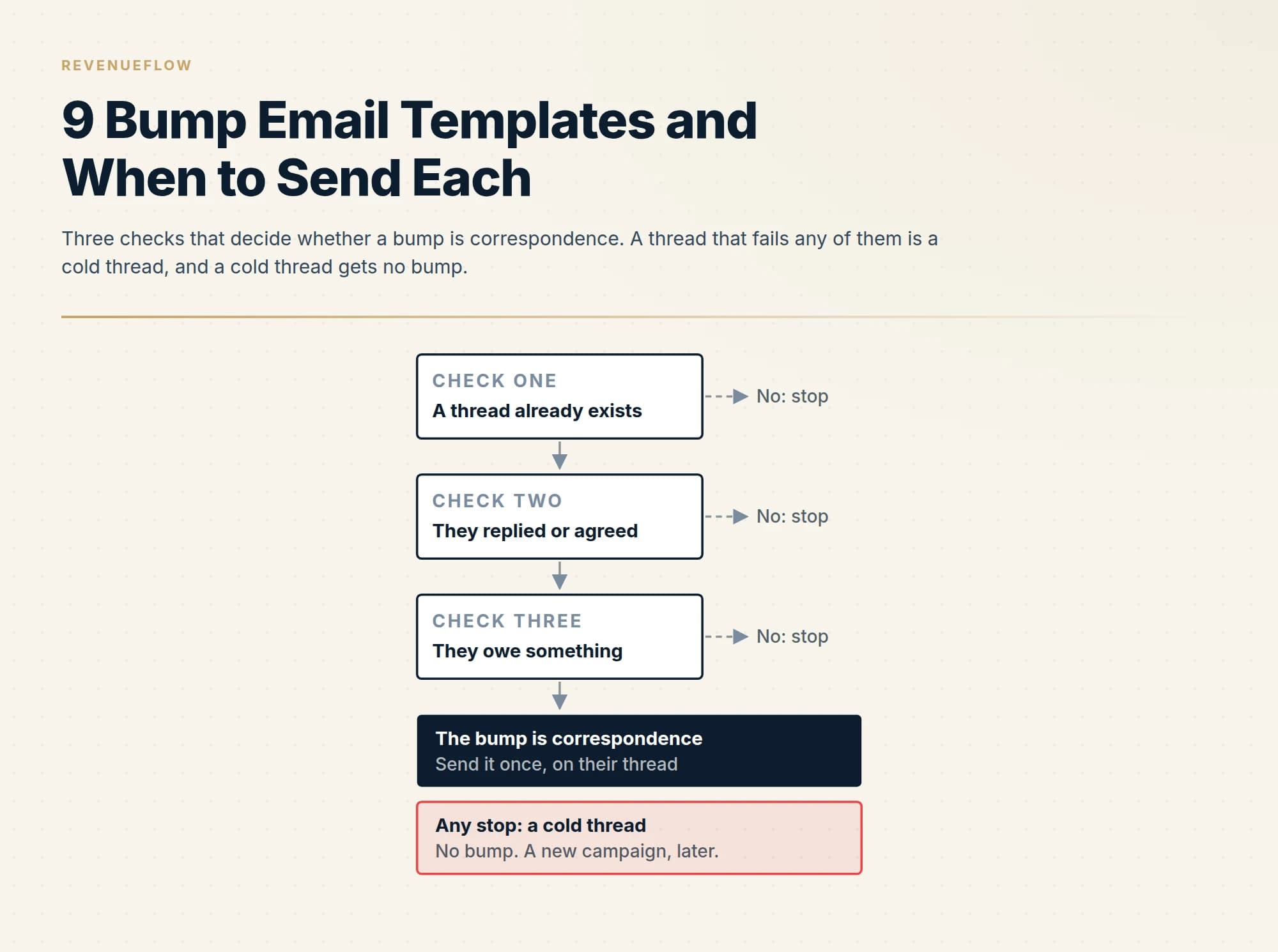
A bump email is a one or two line reply on an existing thread that brings an unanswered message back up. Send one only where a thread exists, the person replied or agreed to something, and they owe something specific. Name what is owed, add one new thing, send it once, and never bump a cold prospect.
Key takeaways
- Three checks decide whether a bump is correspondence: a thread already exists, the person replied or agreed to something, and they owe something specific; a thread that fails any of them gets no bump.
- We do not send the cold bump, because our campaigns carry one message with no thread replies to people who did not answer.
- Every bump carries one new thing, such as a pointer to the part that matters, a dependency, a real date or a forced-choice question, because a bump with nothing new is only impatience.
- A bump inherits its thread's subject and is sent once; if it draws nothing, the next message changes job to a real deadline or a close-the-loop note, and then you stop.
Reviewed and updated September 18, 2026
A bump is the shortest email in business: one or two lines, sent on an existing thread, to bring an unanswered message back to the top of an inbox. Whether it reads as diligence or as nagging depends on one thing the wording cannot fix, which is whether the other person owes you anything.
This page carries nine bump templates, and all nine are for threads where the other side does owe something: a reply they promised, a decision with a date, a deliverable, an answer to something they asked for. It carries none for the case most bump advice is written about, the cold prospect who never replied, and the first section says why. Every template below is invented for illustration, and none carries a reply rate or a results claim.
Where we differ from standard practice
The market teaches the bump as a step in a cold sequence. Mailchimp's guide to the email bump, as fetched on 18 September 2026, defines it broadly, "An email bump is a short follow-up message sent to prompt a reply to an unanswered email.", and describes a convention for repeating it: "Many professionals rely on the Rule of 3: a simple, effective structure for sending up to 3 bump emails, each slightly different in tone and content." That is industry practice, and it is reported here as such.
We do not send the cold bump. Our campaigns carry one message, with no bumps and no thread replies to people who did not answer. The argument and our own published figures are in why we stopped using follow-ups, and the market's numbers are read against their cost in cold email follow-up benchmarks. The working test is in meeting reminder emails, which names bumps as the messages we do not send: if a message would still make sense when the answer is already yes, it is correspondence, and if it only makes sense as another attempt to get a yes, it is a bump in the bad sense. Our guide to cold emailing product managers adds the reader's view, which is that a pure bump reads as evidence the sender has nothing else to say.
Omnisend's guide, published on 11 May 2026 and fetched on 18 September 2026, defines the bump more narrowly than Mailchimp does, and its definition contains the condition that matters: "A bump email is a short message you can send on an already existing thread to remind the recipient about the conversation you had and bring the thread back to the top of their inbox." A conversation you had. Flodesk's five bump templates, last modified on 3 August 2026 and fetched the same day, include an overdue invoice and a job application, which are both cases where a relationship already exists. Read that way, the bump is a tool for live threads. Everything below keeps it there.
The merge fields, explained once
{{first_name}} is the recipient. {{thing}} is what is owed or was sent, named the way they named it. {{date}} is a real date: when it was sent, when it is due, or when you will act. {{your_name}} closes every template. A bump has no greeting line beyond the name and no sign-off beyond yours, and every template is sent as a reply on the existing thread unless its subject says otherwise.
Section 1: They asked, you delivered, they went quiet
Template 1: They asked you to send something
Subject: Re: {{their_subject}}

{{first_name}}, the {{thing}} you asked for went over on {{date}}. The part that answers your question about {{their_question}} is on page two.

Is it what you needed, or should we cut it differently?

{{your_name}}
Why each line is there. {{their_subject}} is the subject of their request and {{their_question}} is the question they asked. The first sentence restates that they asked, which is what makes this correspondence. It then adds the one new thing, a pointer to the part that matters, so the bump is worth opening even if the first message was read. The closing question offers two answers, and both are easy.
Template 2: A proposal they requested
Subject: Re: {{their_subject}}

{{first_name}}, on the proposal you asked for: is it the scope or the timing that needs another look? One word back and we will rework that part by {{date}}.

{{your_name}}
Why each line is there. The fuller follow-ups after a proposal are Templates 3 and 4 in our proposal email templates page. This is the bump version: no recap, no added material. It asks a forced-choice question, because a stalled proposal may be stalled on one thing, and naming two candidates is easier to answer than an open question. The promise with a date shows what their one word buys.
Section 2: After a meeting, with actions on their side
Template 3: Actions they own
Subject: Re: {{meeting_subject}}

{{first_name}}, after our call you were going to {{their_action}}. We have held {{your_action}} until it arrives, so nothing moves on our side until then.

Still on for this week?

{{your_name}}
Why each line is there. {{meeting_subject}} is the subject of the meeting thread, {{their_action}} is what they said they would do, in their words, and {{your_action}} is what you are holding. The bump names their commitment without blame and states the dependency, which is the new information: your work is waiting on theirs. The question asks about a time, which is kinder than asking whether they did it.
Template 4: The date they named has come
Subject: Re: {{their_subject}}

{{first_name}}, you asked us to come back in {{their_month}}, so here we are. Is this still worth a conversation, or has it moved?

{{your_name}}
Why each line is there. {{their_month}} is the month they named. They set this date. The bump quotes their request back, claims nothing about their situation and offers an exit in the same breath. If it draws nothing, the next and last message closes the loop, and the wording for that is in the cadence section.
Section 3: Inside your own company
Template 5: The internal bump to a colleague or the closer
Subject: Re: {{internal_subject}}

{{first_name}}, we need {{thing}} from you to reply to {{customer}} by {{date}}. If you cannot get to it, tell us who can and we will ask them.

{{your_name}}
Why each line is there. {{internal_subject}} is the subject of the internal thread and {{customer}} is the account that is waiting. The internal bump fails when it says only any update. This one states what is needed, for whom, by when, and gives the colleague a way out that still moves the work. It never copies their manager. An escalation is a different message, and a bump disguised as one poisons the next request.
Template 6: Forwarding the thread to a new stakeholder
Subject: Fwd: {{their_subject}} (context for {{new_name}})

{{new_name}}, {{first_name}} suggested we bring you in. The short version of the thread below: {{one_line_summary}}.

The open question is {{open_question}}. Are you the right person for it?

{{your_name}}
Why each line is there. {{new_name}} is the new stakeholder, {{one_line_summary}} is the thread in one sentence and {{open_question}} is the one thing still undecided. This is the only template here that changes the subject, because the reader is new and must not have to read the whole thread to see why they are on it. It names who suggested them, which is the licence to write. The emails for working several stakeholders inside one deal are a larger subject, and this page carries only this one.
Section 4: Customers, partners and vendors
Template 7: A customer who owes a renewal decision
Subject: Re: {{renewal_subject}}

{{first_name}}, your term ends on {{date}}, and we need your decision by {{decision_date}} to keep the current terms in place. Renew as is, change something, or stop?

{{your_name}}
Why each line is there. {{renewal_subject}} is the subject of the renewal thread and {{decision_date}} is the last day you can act on their answer. There is a contract, so there is an expectation of contact. The bump states the two dates and lists the three possible answers, including stop, because offering stop in one word makes renew just as easy to say.
Template 8: A partner on a deliverable
Subject: Re: {{project_subject}}

{{first_name}}, the {{thing}} was due from your side on {{date}}, and our launch date depends on it. What is a realistic date now? We would sooner move the plan once than guess.

{{your_name}}
Why each line is there. {{project_subject}} is the subject of the project thread. Partners slip for ordinary reasons, and a bump that asks where is it invites an excuse. Asking for a realistic date invites a plan. The last sentence says what you will do with their answer.
Template 9: A vendor you are buying from
Subject: Re: {{quote_subject}}

{{first_name}}, we asked for {{thing}} on {{date}} and need it to take this to our approver on {{decision_date}}. Can you get it to us before then?

{{your_name}}
Why each line is there. {{quote_subject}} is the subject of your request. Buyers bump too, and a seller should know what a good one looks like from the other side. It names the ask, the internal date it serves and nothing else.
Re: their original subject, unchanged
Dana, the rollout plan you asked for went over on the 9th. 1
The part that answers your question about weekend cover is on page two. 2
Is it what you needed, or should we cut it differently? 3
- 1What they asked for and when it was sent. This is the line that makes it correspondence.
- 2The one new thing: a pointer to the part that matters, so the bump is worth opening.
- 3A question with two easy answers.
| Sub-case | They owe | The bump carries |
|---|---|---|
| They asked you to send something | A reaction | A pointer to the part that matters |
| A proposal they requested | A decision | A forced-choice question |
| Actions they own after a meeting | The action | What you are holding until it arrives |
| The date they named has come | A yes or a no | Their own request, and an exit |
| A renewal decision | A decision by a date | The two dates and the three answers |
| A partner deliverable | The deliverable | A request for a realistic date |
Subject lines: inherit the thread, and when to change it
A bump inherits its subject. The thread's subject is the record of what was asked, and replying under it keeps that record attached. So this section is mostly about the exceptions.
Keep the subject unchanged (the default). The rule: if they wrote or replied on this thread, its subject is theirs, and yours rides it.
- Re: Rollout plan for the Leeds depot
- Re: Proposal for the March start
- Re: Notes and actions from Tuesday
- Re: Renewal, term ending 30 June
Change it when the reader is new. The rule: say whose thread it is and why they are on it.
- Fwd: Rollout plan (context for {{new_name}})
- Fwd: Security review, one open question for you
Change it when the thread subject has become wrong. The rule: keep their words and append the current question, so the history still matches.
- Re: Rollout plan, now the weekend cover question
- Re: Proposal for the March start, April dates attached
Internal threads. The rule: lead with the customer and the date, because colleagues triage by who is waiting.
- Re: {{customer}} reply due Thursday
- Re: Quote for {{customer}}, need pricing sign-off by the 12th
Never. Re: on a message that is not a reply. It is the fake thread, and the reader finds out in one click.
The cadence: once, then what
A bump is sent once. If it draws nothing, a second bump is the same message with less dignity, so the next message changes job. It either carries a real deadline, as in the renewal template, or it closes the loop: say you will stop asking, say what happens on your side as a result, and leave one door open. The close-the-loop note in the no-show email template is a model for the tone. After that, stop. If the account matters and something new becomes true of it later, that is a new message on a new premise.
Timing follows the thing that is owed. Bump when the date in the agreement arrives, or when your own work is actually blocked. No interval is given here, because no data exists on bump timing in live threads.
- When the date in the agreement arrivesThe bump
Once, on their thread, carrying one new thing.
- If it draws nothingA message with a different job
A real deadline, or the close-the-loop note.
- After thatStop
Later, something new is a new message on a new premise.
What not to send
Any bump on a cold thread. If they never replied, there is no thread, only your messages. The three checks above all fail, and the pages linked in the first section explain the cost.
The fake Re:. A subject dressed as a reply to a conversation that never happened. It gets the open and loses the reader in the same second.
Bumping this to the top of your inbox, to a stranger. The phrase announces that the only new information is your impatience. Inside a live thread it is merely empty. To a stranger it is the definition of the thing we do not send.
The guilt bump. A line such as we have tried you a few times, or any count of your own attempts. It puts the reader in the wrong, and people who feel caught stay quiet.
The bump with nothing new. Any thoughts, or just checking in. Every template above carries one new thing: a pointer, a dependency, a date or a forced choice. If you have nothing new, you have no bump yet.
The short version
Bump only where a thread exists, the person replied or agreed to something, and they owe something specific. Send it once, as a reply under their subject, in two or three lines that name what is owed and add one new thing. If it draws nothing, send one message with a different job, a real deadline or a close-the-loop, and then stop. To people who never replied, send nothing. Where a cadence is the right tool at all, such as warm inbound and existing customers, is set out in our page on the sales cadence.
If you want a pipeline that does not depend on chasing strangers, get a free campaign plan and we will show you how a one-message campaign is built for your market.
Publisher pages quoted as fetched on 18 September 2026: Mailchimp, Omnisend (published 11 May 2026) and Flodesk (last modified 3 August 2026). Publishers revise these pages; confirm the current text before relying on it.
Frequently asked questions.
Frequently asked questions- What is a bump email?
- A bump email is a short reply, usually one or two lines, sent on an existing thread to bring an unanswered message back to the top of the recipient's inbox. Omnisend's guide defines it as a message on an already existing thread that reminds the recipient about a conversation you had. It works as correspondence when the other person owes something, such as a decision or a deliverable.
- How do you politely bump an email?
- Reply under the original subject, use the person's name, and in two or three lines say what is owed and add one new thing: a pointer to the part of your document that answers their question, the work you are holding until their action arrives, or a real date. End with a question that has an easy answer. Leave out apologies, counts of earlier attempts and the phrase just checking in.
- Should you bump a cold email that got no reply?
- We do not. Our campaigns send one message, with no bumps and no thread replies to people who did not answer, because each later touch goes only to people who saw a message and chose not to respond.
- How many times should you bump an email?
- Once. Published guides describe sending up to three bumps, each slightly different in tone, but inside a live thread a second bump is the same message with less dignity. If the first draws nothing, change the job of the next message: give a real deadline, or close the loop by saying you will stop asking and what happens on your side as a result. Then stop.
About the author.

B2B cold email experts helping companies generate qualified leads through done-for-you outreach campaigns.
RevenueFlow Team
Explore more.
Ready to scale your outreach?
We build GTM engines that book real meetings. See the receipts.
Related articles.
Customer Check-In Email Templates: Nine Check-Ins by Moment
Nine customer check-in templates for the account owner, one per moment: a closed escalation, a usage drop, a new leader, a release, pre-renewal, news and bad news.
Roundtable Invitation Email Templates: Eight Invitations
Eight roundtable invitation templates by seat: the cold first invite, the invite via a member, the seat confirmation, the waitlist reply and the guest expert.
Multi-Threading Email Templates: Ten Second-Person Emails
Ten multi-threading email templates for the second and third people in a live deal: the user, the blocker, the economic buyer, the sceptic and more.
8 Meeting Reschedule Email Templates and When to Send Each
Eight meeting reschedule email templates for moving a booked sales meeting before it happens, from either side, each with the reasoning line by line.
Inbound Lead Reply Email Templates: Eleven First Replies
Eleven first-reply templates for an inbound lead, one per trigger: demo, pricing, form, download, trial, referral, event, chat, non-fit, out of hours, handover.
Sales Email Subject Lines: The Metric That Stopped Working
A subject line has one job, which is to get the first line read. The metric everyone optimises it on is now a mixture of human readers and machine fetches.