Pay per Lead Ads: The Economics From Both Sides
How in-platform lead forms actually bill, what prefill puts into the record you receive, and how to instrument quality instead of counting submissions.
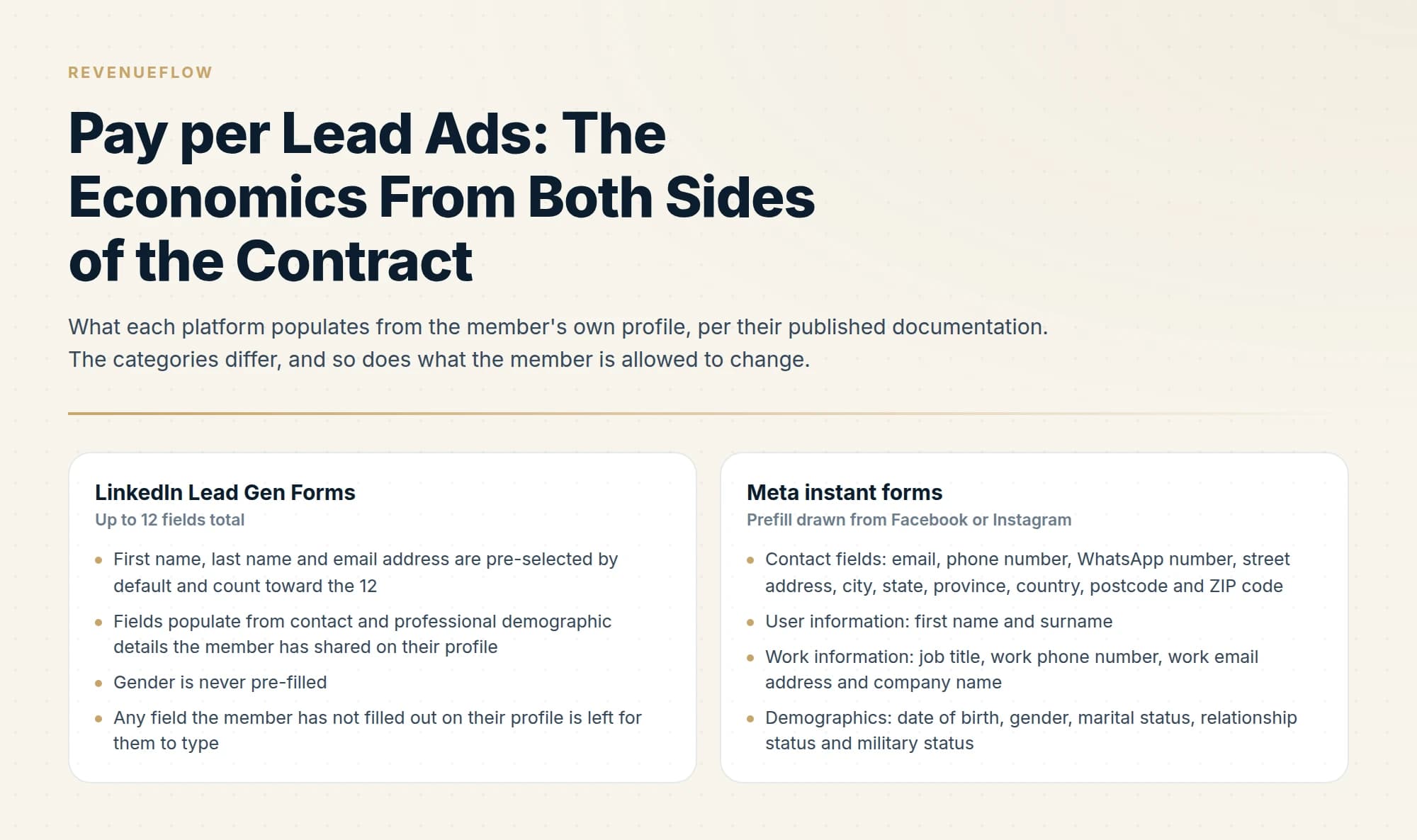
Pay per lead ads are in-platform lead forms managed against a cost per lead, while the auction underneath still charges for impressions, clicks or message sends. LinkedIn and Meta prefill the form from the member's own profile, which raises submission rates and lowers the effort behind each submission. Quality has to be instrumented downstream of the form.
Key takeaways
- LinkedIn documents lead generation campaigns as charged by impressions, clicks or message sends, and lists the click that opens the Lead Gen Form as chargeable.
- LinkedIn Lead Gen Forms allow up to 12 fields, pre-select first name, last name and email, and never pre-fill gender.
- Meta ships More volume as the default instant form type and sells Higher intent as the option that adds a review screen to reduce marginally interested submissions.
- Meta makes leads data downloadable for 90 days from submission, and LinkedIn stores collected member profile data for one year, so the record has to leave the platform early.
Reviewed and updated September 1, 2026
LinkedIn's help centre publishes a table of what a lead generation campaign is charged for. The three entries in it are impressions, clicks and message sends. A submitted lead does not appear anywhere in that table.
That is worth sitting with, because pay per lead ads and pay per lead advertising are the phrases everyone uses for this motion, and cost per lead is the number on the dashboard. The number is real. It is arrived at by division after the fact, and the auction underneath it is still charging you for reach and attention. Understanding where the billing unit sits and where the lead definition sits is most of what separates advertisers who are happy with this channel from advertisers who quietly stop funding it.
What the platforms actually charge for
LinkedIn documents the charging model per objective. For lead generation campaigns using Sponsored Content formats, maximum delivery bidding is charged by impressions on both the Leads and the Qualified leads optimisation goals, manual bidding on the enhanced setting is charged by clicks, and Sponsored Messaging formats are charged by sends. LinkedIn also states that there is no additional cost for Lead Gen Forms beyond the cost of the associated ad set, so the form itself is free and the traffic to it is what you buy.
The chargeable-click definition is the detail that matters commercially. LinkedIn lists a click on the call-to-action button that opens the Lead Gen Form as a chargeable click. The form opening is the billable event. What the member does inside the form after that point is a matter between you and them.
Meta's lead ads work through instant forms attached to a leads objective, and the same structural point holds: you are buying delivery into a feed and measuring the submissions that come out the other end. Check Meta's own Ads Manager documentation for how your specific objective and performance goal are charged, because the combination of format, optimisation goal and bidding strategy is what decides it on both platforms.
What prefill actually fills in
Both platforms populate the form from the profile the person already maintains, which is the entire reason submission is fast.
- First name, last name and email address are pre-selected by default and count toward the 12
- Fields populate from contact and professional demographic details the member has shared on their profile
- Gender is never pre-filled
- Any field the member has not filled out on their profile is left for them to type
- Up to three custom questions, each capped at 100 characters, all required to submit
- Up to five disclosure checkboxes, 500 characters each, outside the 12-field limit
- Contact fields: email, phone number, WhatsApp number, street address, city, state, province, country, postcode and ZIP code
- User information: first name and surname
- Work information: job title, work phone number, work email address and company name
- Demographics: date of birth, gender, marital status, relationship status and military status
- National ID number in named countries, one per form, delivery restricted to that country
- People can edit any prefilled information except their date of birth
Two things follow from that table. The contact email and the work email address are separate questions on Meta, so a form that asks for the first one collects whatever address the person attached to a social account, which is frequently a personal one. And LinkedIn offers a Validate work email option that blocks the most commonly used free email domains, giving Hotmail, Yahoo and Gmail as its examples, while stating plainly that it does not block every possible domain and that submission rates might decrease when a member is unwilling to disclose a work address or tries to submit a personal one.
That trade is the whole channel in miniature. Every control that improves what you receive costs you some of what you receive.
The platform ships a friction dial, and defaults it to low

Meta documents three instant form types. More volume is the default and is described as making it easy for people to quickly submit the form on a mobile device, designed to generate a larger number of leads. Higher intent adds inline context under the contact fields indicating that your business may follow up, plus an additional review screen giving people a chance to confirm their information. Meta's own wording for what those two features do is that they help you receive more intentional submissions and prevent receiving submissions from people who are only marginally interested in your product or service. Rich creative is the third option and focuses on branding and context inside the form.
There is a delivery constraint attached: Meta states that a higher intent instant form will only be delivered on Facebook Feed and Instagram feed on mobile devices and will not appear on desktop computers.
So the platform itself acknowledges that the low-friction default produces submissions from people who are marginally interested, and sells you a higher-friction alternative to reduce that. Anyone reading a cost-per-lead figure from a default-configured form is reading the output of a setting chosen for volume.
What a lead is in this context
The record you receive is a copy of profile data, taken at the moment someone tapped a button in a feed. Nothing in that flow tests whether the person wanted a conversation with a salesperson.
The title field is the clearest case. It prefills from a profile the member wrote and updates at their own pace, and neither platform verifies it against anything. A job title describes what someone does. It carries no statement about whether they own the problem you sell into, whether they were the right person to ask, or whether the address on the form is one they read at work. Treating a title string as a qualification signal is the step where a lead count starts to diverge from a pipeline count. The MQL and SQL distinction exists to keep those two things apart, and a prefilled form sits firmly on the lower rung of it.
There is also a structural point about role addresses. When the contact email is the one attached to a personal social account, the record you have is a route to a human being rather than a route into a company. When it is a shared or departmental address collected by a generic contact field, the record is a route into an inbox that may have no single owner. Neither is worthless. Both need a different follow-up motion from the one your CRM defaults to, and a lead-count dashboard cannot see the difference.
The clock, and the two retention windows

Both platforms document hard limits on how long the data stays with them, and both limits are shorter than a lot of B2B buying cycles.
- SubmissionThe row is created
LinkedIn records the lead against the form. Meta records it against the instant form and the ad account.
- Immediately afterMeta's own guidance is to capture at once
Meta recommends an integrated CRM or Leads Centre, states that minimising follow-up time can improve lead quality, and notes that manual downloads take longer.
- Within 90 daysMeta's download window
Meta makes leads data available for download for up to 90 days from submission, and cites security and storage as the reason for the limit.
- After 90 daysThe Meta export gap opens
Lifetime results still show the lead count, while only the last 90 days are downloadable. Meta recommends downloading often or using a CRM.
- Within 12 monthsLinkedIn's storage limit
LinkedIn states collected member profile data can only be stored for one year under its member privacy policy. Analytics and performance metrics remain in Campaign Manager beyond that.
Meta's published best practice for advertisers running this motion is to schedule lead ad campaigns for times when the organisation is prepared to connect, and to run them during business hours so a conversation can start quickly after someone shares their information. Meta also suggests using custom questions or the appointment request question to establish when and how the person prefers to be reached. That is Meta's guidance to its advertisers, and it is a fair description of how the channel is conventionally worked.
One more delivery detail catches people out. LinkedIn requires a landing page URL on every form and states explicitly that it does not automatically send any assets to members. If your ad promised a report, the report is your problem to deliver, and the confirmation screen is the only thing the platform puts in front of the person.
Instrumenting quality instead of counting submissions
The submission count is the one number the platform makes effortless to read, and it is the one number that tells you least. Everything below is a documented platform control that moves you toward measuring something else.
- Yes: Hidden fields carry your own source, campaign and agency metadata into the lead export. LinkedIn allows up to 20 and states they collect no additional personal data
- Yes: A downstream event you actually care about is defined before launch, and the identifier that joins a submission to it is being written
- Yes: Required custom questions are asking something a casual tapper would decline to answer
- Depends: Work-email validation is enabled where a personal address would make the record unusable
- Depends: Meta's SMS one-time password verification is enabled, which Meta says filters out fake leads such as spam bots and bad actors
- Depends: The higher intent form type has been tested against the default, accepting that it does not deliver on desktop
- No: Cost per submission is the headline metric anyone in the business is judged on
Meta's phone verification is worth understanding precisely, because it is the strongest quality gate either platform publishes. After filling in the instant form, the person is prompted for a one-time password sent by mobile, and they must enter it correctly to submit at all. Meta notes that someone entering a landline cannot verify and therefore cannot submit, and that a failed submission is not counted as a lead or tracked in your leads data. Once verified, the same number is not re-prompted for 90 days.
That control does two useful things at once. It removes a class of fabricated records, and it removes real people who declined to prove a phone number, which is itself a signal you can price. What it cannot do is tell you whether the person wanted a meeting.
Where the lead definition belongs

The reason lead-form economics get contested is that the two sides of the contract are counting different objects. The buyer is counting outcomes. The seller, whether that is a platform, an agency or an internal team, is counting the thing the system can observe. A form submission is observable. A qualified conversation is a judgement, and a judgement has to be written down before anyone spends money against it.
A broader limitation sits behind this counting problem, explored in a companion piece on how performance-based pricing shifts delivery risk, where the higher unit price buys a bounded downside rather than a cheaper unit.
We run the qualified-meeting version of that discipline on our own engagements. Our MSA Qualified Meeting standard has five points, all of which must hold: the company is in the pre-approved audience, the participant has reasonable responsibility for or influence over the relevant business area, the prospect agrees to a relevant business conversation, the prospect attends and participates, and the prospect was not disclosed as an existing customer or suppressed account before outreach. Budget, timing, decision authority and immediate intent are explicitly not billing conditions. A held meeting counts unless the client flags it within three business days with a reason that maps to that written definition.
Whatever channel you are buying, the useful move is the same: agree the countable object in writing before the spend starts. That work is the same whether you are buying appointment setting, comparing appointment setting against lead generation, or briefing an agency and trying to make sense of what the pricing covers. It is also why a tight ideal customer profile does more for lead quality than any form setting, since the audience you buy determines the pool the prefill draws from.
The practical read
Lead forms are a legitimate, well-documented channel with a clearly published set of controls. The mistake is treating the submission count as the deliverable. The platforms bill on attention, prefill from profiles, default to volume, and hand you a CSV with a shelf life. Everything past that point is your instrumentation.
If you would rather buy the outcome than the input, that is the model we operate: campaigns priced against attended, qualified meetings with the definition agreed in writing before launch. You can see what a campaign would look like for your market.
Pricing and features verified as of mid-2026. Verify current terms with the vendor before relying on them.
Sources: Lead Gen Form fields, LinkedIn, Lead Gen Form specifications, LinkedIn, Chargeable clicks for lead generation campaigns, LinkedIn, About instant form types, Meta, About prefill questions, Meta, About expired leads, Meta
Frequently asked questions.
Frequently asked questions- Do lead form ads actually charge you per lead?
- On LinkedIn, no. Its documentation lists lead generation campaigns as charged by impressions, clicks or message sends depending on the format, optimisation goal and bidding strategy. Cost per lead is computed after the fact by dividing spend by submissions. Check Meta's own Ads Manager documentation for how your specific objective and performance goal are billed.
- What information gets prefilled into a lead form?
- LinkedIn populates contact and professional demographic details from what the member has shared on their profile, with gender excluded. Meta prefills from a Facebook or Instagram profile across contact fields, name, work information such as job title and company, and demographics. People can edit anything Meta prefills except their date of birth.
- Why do prefilled lead forms produce lower intent?
- Submitting takes one tap because the answers are already there, so the form filters almost nobody. Meta documents this directly: its default form type is built for volume, and its Higher intent type adds a review screen specifically to prevent submissions from people who are only marginally interested. The friction that would have qualified someone has been removed on purpose.
- How do you improve lead quality on these forms?
- Use the documented controls. LinkedIn offers work-email validation that blocks common free domains, up to three required custom questions, and up to 20 hidden fields for your own tracking metadata. Meta offers SMS one-time password verification, which it says filters out fake leads. Then measure a downstream event rather than the submission count.
About the author.

B2B cold email experts helping companies generate qualified leads through done-for-you outreach campaigns.
RevenueFlow Team
Explore more.
Ready to scale your outreach?
We build GTM engines that book real meetings. See the receipts.
Related articles.
Cold Calling for PPC Agencies: What You Can See First
A paid media prospect is partly readable before the call and has already been told by the platform what to do when a stranger rings about its ads.
Win Rate Benchmarks: Which Figures State a Population
A catalogue of the published average sales win rates, sorted by whether the page names the population behind its own number. Most do not.
Sales Kickoff Agendas: Five Published, Session by Session
Five publishers print a sales kickoff agenda. They agree on four blocks and disagree on session length, rehearsal and where the agenda comes from.
Sales Enablement Charters: What the Published Ones Ask For
Six publishers set out what a sales enablement charter should contain. Five describe a document nobody can check, and one writes a definition with inspection in it.
Sales Cycle Length Benchmarks: What Each Figure Counts
The published B2B sales cycle benchmarks, sorted by what each page says it counted. The same number means two different things in two of them.
Sales Comp Plan Design: What the Publishers Prescribe
Four publishers set out how to design a sales compensation plan. Here are their procedures, their components, and which of their ratios carry a population.